

Quick answer: Best for vibrant 1440p HDR gaming is ASUS ROG XG27AQDMGR 27 Inch 1440p 240Hz Glossy because it hits 240Hz with 0.03ms response per ASUS spec. Best for ultrawide immersion is Samsung 40” Odyssey G7 (G75F) with DisplayHDR 600 per Samsung spec and 180Hz refresh.
You drop into a neon city at night and the signs glow while alleys stay dark and readable. On a weak panel, those brights wash out and shadows turn to flat gray mush. You miss cues, you lose immersion, and your new GPU cannot show its true range.
We reviewed contrast control, color volume and motion handling to match HDR punch with real PC play. Our picks cover OLED snap, high refresh IPS steadiness and curved VA depth for different rooms and rigs. Start with a clean standing desk setup to give your screen proper height and viewing distance.
This article contains affiliate links. If you buy through one of our links, CustomPCGaming may earn a commission at no extra cost to you. Commissions never influence which products we recommend or how we rank them. Read our Affiliate Disclosure for details.
Quick Picks at a Glance

Samsung 27" Odyssey G5 G51F QHD Gaming Monitor
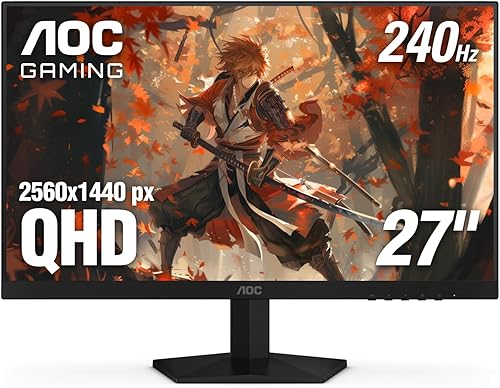
Prime AOC Q27G41ZE 27 Inch QHD Gaming Monitor 240Hz

Prime ASUS ROG Strix XG27AQDMGR 27" QHD 240Hz Glossy

Prime SANSUI 27 Inch WQHD Curved Gaming Monitor 180Hz

ASUS TUF Gaming VG27AQ3A 27-inch QHD 180Hz IPS

Prime Samsung 40 inch Odyssey G7 G75F WUHD Curved

Prime Samsung 32 inch Odyssey G55C QHD 1000R

ASUS ROG Strix XG27ACS 27 Inch QHD 180Hz 1ms

ASUS TUF Gaming VG27AQM5A 27 Inch QHD 300Hz

ASUS TUF VG34VQL1B 34 Inch WQHD Curved
As an Amazon Associate we earn from qualifying purchases. Product prices and availability are accurate as of the date/time indicated.
Pros
- Sharp QHD 2560x1440 resolution with high 3000:1 contrast on 27-inch VA panel
- Fast 180Hz refresh rate and 1ms MPRT for smooth, blur-free motion
- AMD FreeSync ensures stable, stutter-free performance in fast-paced games
- HDR10 and Black Equalizer improve visibility and scene depth
- Ergonomic stand with tilt, pivot and height adjustment plus matte anti-glare finish
Cons
- VA panel can show slight ghosting versus fast IPS options
- 300 nits brightness limits true HDR impact
- No USB-C port and only a 1-year manufacturer warranty
The Samsung Odyssey G5 G51F is a 27-inch QHD gaming monitor built for players who want sharper visuals without the GPU demands of 4K. With 2560x1440 resolution, a flat VA panel and gamer focused features, it targets competitive and immersive gamers, as well as creators who need detail and smooth motion.
In real world use, the 180Hz refresh rate and 1ms MPRT deliver noticeably smoother aiming and tracking, while AMD FreeSync keeps fast action free of tearing and stutter. HDR10 adds depth with brighter highlights and deeper shadows, and Black Equalizer is genuinely useful for revealing enemies hiding in dark corners.
Design wise, the G5 keeps Samsung's clean Odyssey aesthetic with a matte finish that reduces glare and a sturdy desk mount stand. The ergonomic stand offers tilt, pivot and height adjustment, so you can dial in a comfortable viewing angle for long sessions, and the 178 degree viewing angle maintains image consistency.
There are tradeoffs to consider. The VA panel offers excellent 3000:1 contrast but can exhibit slight motion ghosting compared to fast IPS alternatives, and 300 nits brightness limits HDR punch. Connectivity is limited to DisplayPort and HDMI with no USB-C, and the warranty is only one year.
Overall, the Odyssey G5 G51F delivers strong value for 1440p gamers who prioritize speed, sharpness and contrast on a 27-inch canvas. If you want a responsive, immersive monitor for competitive play and everyday use without stepping up to premium OLED pricing, this is a compelling and well balanced choice.
Display: 27-inch Flat VA, QHD 2560x1440, 16:9, Matte Finish, 3000:1 Contrast, 300 nits Brightness, 178 degree Viewing Angle, 72% Color Gamut.
Performance: 180Hz Refresh Rate, 1ms MPRT Response Time, AMD FreeSync, HDR10, Black Equalizer, Picture Quality Enhancement with VA Panel.
Connectivity: 2x HDMI, 1x DisplayPort, 3x USB Ports. No USB-C. Power Consumption 35W, 240V.
Design and Dimensions: 24.34"W x 20.5"H x 9.22"D, 10.1 pounds, Black, Desk Mount, Ergonomic Stand with Tilt, Pivot and Height Adjustment.
Model Info: Samsung Model S27FG512EB, G51F Series, UPC 198957075452, Includes 2x HDMI, 1x DP, 1x PC cable, 1 Year Manufacturer Warranty.
Pros
- Sharp 2560x1440 resolution offers a great balance of detail and performance
- Ultra-fast 240Hz (260Hz OC) and 0.3ms response ideal for esports and fast-paced games
- Wide GPU compatibility with Adaptive-Sync, G-Sync Compatible and FreeSync
- IPS panel delivers accurate colors and wide viewing angles
- Comes with 3-year manufacturer warranty and lightweight frameless build
Cons
- Ergonomics limited to tilt only, no height, swivel or pivot adjustment
- 300 nits brightness and 1000:1 contrast offer modest HDR performance
- Glossy screen finish can cause reflections in bright rooms and HDMI 2.0 limits max refresh rate
The AOC GAMING Q27G41ZE is a 27-inch QHD monitor built for players who want sharp visuals without sacrificing speed. With its 2560x1440 IPS panel and high refresh rate, it is aimed at competitive gamers and immersive players who need both clarity and responsiveness.
In real world use, the 240Hz refresh rate overclockable to 260Hz via DisplayPort and 0.3ms MPRT deliver noticeably smoother motion and reduced blur in shooters and racing titles. Adaptive-Sync with G-Sync Compatible and FreeSync support keeps gameplay tear free across NVIDIA and AMD GPUs, while Shadow Control and Game Modes help you spot details faster.
Design wise, the monitor keeps things clean and gamer focused with a three-sided frameless display and textured black and red finish. The IPS panel offers wide viewing angles and solid color accuracy, and the lightweight 6.15kg chassis with tilt from -3 to +21 degrees fits easily on most desks or mounts.
There are some tradeoffs to note. Ergonomics are limited to tilt only with no height, swivel or pivot, and the glossy screen finish can reflect light in bright rooms. Brightness tops out at 300 nits with 1000:1 contrast, so HDR impact is modest, and you need DisplayPort to reach the full refresh rate since HDMI is limited to 2.0.
Overall, the Q27G41ZE offers an impressive mix of resolution, speed and gaming features for its class. If you want a fast, sharp 27-inch display for esports and everyday gaming with reliable Adaptive-Sync performance, it is a strong and versatile pick.
Display: 27-inch IPS, 2560 x 1440 QHD, 16:9 aspect ratio, 300 nits brightness, 1000:1 contrast ratio, glossy finish
Performance: 240Hz via DisplayPort (260Hz overclocked), 0.3ms MPRT response time, Adaptive-Sync, G-Sync Compatible and FreeSync
Connectivity: 1x DisplayPort 1.4, 2x HDMI 2.0, Audio Out
Design and Warranty: Three-sided frameless design, tilt -3 to +21 degrees, 24.17 x 7.46 x 17.7 inches, 6.15kg, 3-year manufacturer warranty
Pros
- Ultra-fast 240Hz OLED with 0.03ms response delivers elite motion clarity for competitive gaming
- Glossy TrueBlack WOLED provides deeper blacks and more vibrant HDR than standard matte panels
- Factory calibrated 99% DCI-P3 and Delta E <2 offers pro-level color accuracy for gaming and creation
- Smart OLED Care Pro with Neo Proximity Sensor plus 3-year burn-in warranty protects your investment
- Comprehensive sync and eye care support with FreeSync Premium Pro, AdaptiveSync and low blue light
Cons
- Glossy screen coating can show reflections in bright or sunlit rooms
- Single HDMI port limits connectivity for multiple consoles without a switch
- QHD resolution may disappoint users specifically seeking native 4K
The ASUS ROG Strix XG27AQDMGR is a 27-inch QHD OLED gaming monitor designed for competitive gamers, streamers and creators who demand both speed and image quality. With its 240Hz glossy WOLED panel, it targets users who want esports performance without sacrificing HDR visuals and color accuracy.
In real world use, the 240Hz refresh rate and 0.03ms gray-to-gray response deliver exceptionally smooth and ghost-free gameplay. The TrueBlack Glossy WOLED shines with VESA DisplayHDR 400 True Black, 99 percent DCI-P3 coverage and true 10-bit color, producing inky blacks and vivid highlights that make games and movies pop.
Build quality is clean and gamer focused with a flat black chassis, slim bezels and wall mount support. The glossy finish enhances contrast and clarity compared to matte coatings, while the included DisplayWidget Center software makes it easy to adjust settings and manage OLED care with a mouse.
There are a few tradeoffs to consider. The glossy panel looks stunning in controlled lighting but can reflect ambient light in bright rooms. Connectivity is also limited to a single HDMI port alongside DisplayPort, so multi-console setups may need a switch.
Overall, the XG27AQDMGR is an outstanding choice for gamers who want top-tier OLED speed, rich HDR and long term protection. If you value flawless motion, accurate color and burn-in coverage with a 3-year warranty, this monitor is a premium upgrade worth considering.
Display: 27-inch (26.5-inch viewable) QHD 2560 x 1440 TrueBlack Glossy WOLED, 16:9, 240Hz, 0.03ms GtG, 1,500,000:1 contrast, 1300 nits peak brightness, 178-degree viewing angle
Color and HDR: 99% DCI-P3, true 10-bit color, Delta E less than 2, VESA DisplayHDR 400 True Black, Flicker Free, TUV Low Blue Light Hardware Solution
Gaming Features: AMD FreeSync Premium Pro, VESA AdaptiveSync Display 240Hz, ROG Gaming AI technology, OLED Care Pro with Neo Proximity Sensor
Connectivity and Dimensions: 1x HDMI, DisplayPort, 2x USB ports, 7.4 x 23.8 x 19.7 inches, 14.6 pounds, wall mountable, 26.8W power consumption
Warranty and Extras: 3-year warranty with burn-in coverage, includes DisplayPort cable, HDMI cable, power cord and microfiber cloth
Pros
- Sharp QHD resolution offers much more detail than 1080p without the demand of 4K
- Fast 180Hz and 1ms response ideal for esports and fast action games
- Excellent color coverage and high contrast for vibrant gaming and media
- Lightweight design with VESA support and tilt adjustment for easy setup
Cons
- No built in speakers, requires headphones or external speakers via earphone jack
- Stand only tilts -5 to 15 degrees, no height or swivel adjustment
- HDMI limited to 144Hz, DisplayPort required to reach full 180Hz and HDR brightness is modest at 300 nits
The SANSUI ES-G27C1Q is a 27-inch WQHD curved gaming monitor designed for gamers and entertainment users who want sharp visuals without moving to 4K. With its 2560x1440 resolution and 1500R curvature, it balances clarity, immersion and performance for everyday gaming and media.
In real world use, the 180Hz refresh rate and 1ms MPRT response deliver smooth, blur free motion for fast paced shooters and racing games. FreeSync support, CrossHair, Timer and Shadow Booster help reduce tearing and improve visibility in dark scenes, while the 90 percent DCI-P3 and 120 percent sRGB gamut produce vivid, accurate colors.
The design features a matte panel with a 5000:1 contrast ratio and 178 degree viewing angles for deep blacks and consistent image quality. The slim black chassis weighs just 7.7 pounds and offers tilt adjustment from -5 to 15 degrees, plus VESA 100x100mm support for wall or arm mounting.
There are some tradeoffs to consider before buying. Brightness is rated at 300 nits, so HDR impact is limited, and the stand only offers tilt with no height or swivel adjustment. You will also need headphones or external speakers as there are no built in speakers, and HDMI ports are capped at 144Hz, so you need DisplayPort to reach the full 180Hz.
Overall, the SANSUI ES-G27C1Q offers excellent value for gamers seeking a fast, immersive QHD curved display with strong color and gaming features. If you want a smooth, vibrant monitor for competitive and casual gaming and can use DisplayPort, it is a compelling choice in its class.
Model: SANSUI ES-G27C1Q, 27 Inch 1500R Curved, 16:9, Matte Finish
Resolution: WQHD 2560x1440, QHD Wide 1440p, LED Display
Performance: 180Hz Refresh Rate via DisplayPort, 144Hz via HDMI, 1ms MPRT, FreeSync, HDR
Image Quality: 5000:1 Contrast Ratio, 300 nits Brightness, 90% DCI-P3, 120% sRGB, 178 degree Viewing Angle
Connectivity: 2x HDMI 2.0, 2x DisplayPort 1.2, Earphone Jack, No Built in Speakers
Ergonomics: Tilt -5 to 15 degrees, VESA 100x100mm, Kensington Lock, Dimensions 24.11W x 17.81H x 7.64D inches, 7.7 pounds
Pros
- Super smooth 180Hz refresh rate with 1ms response for fluid, competitive gaming
- Excellent color reproduction with 130% sRGB and 178 degree wide viewing angles
- Seamless variable refresh rate support including FreeSync Premium, G-SYNC Compatible and PS5 VRR
- Intuitive menu and GamePlus tools with fast, easy setup and VESA mount compatibility
Cons
- Integrated speakers are weak and tinny with very little bass
- HDR is entry level HDR10 and cannot match OLED or true HDR displays
- Matte coating and basic stand design may feel plain compared to premium models
The ASUS TUF Gaming VG27AQ3A is a 27-inch QHD gaming monitor designed for competitive players and immersive gamers who want sharp visuals and high speed. With its 2560x1440 Fast IPS panel, it offers the perfect balance of detail and performance for both PC and next-gen console gaming.
Real-world performance stands out with a blistering 180Hz refresh rate and 1ms response time that keeps motion crisp and ghosting minimal. ASUS ELMB Sync works simultaneously with FreeSync Premium, G-SYNC Compatible and AdaptiveSync to eliminate tearing, and users report silky smooth gameplay with vibrant colors from the 130% sRGB gamut.
Design is clean and functional with a frameless, flat matte panel, wide 178 degree viewing angles and solid build quality. Setup is quick, the on-screen menu is intuitive, and useful GamePlus features like FPS counter, crosshair overlay and display alignment add value, along with versatile HDMI and DisplayPort connections.
There are some drawbacks to note. The built-in speakers are convenient but sound thin and lack bass, so headphones or external speakers are recommended. HDR10 support improves contrast but remains basic and does not deliver the deep blacks or brightness of higher end HDR or OLED panels.
Overall, the VG27AQ3A offers outstanding value for gamers seeking fast, colorful and tear-free QHD performance. It blends competitive speed, color accuracy and user friendly features in a well built package, making it a smart upgrade for anyone moving up from 1080p.
Display: 27-inch Fast IPS, QHD 2560x1440, 180Hz, 1ms response, 130% sRGB, HDR10, 1000:1 contrast, 178 degree viewing angle, matte finish, flat 16:9
Sync Technology: ELMB Sync, AMD FreeSync Premium, G-SYNC Compatible, VESA AdaptiveSync with variable refresh rate support
Connectivity and Features: 2x HDMI, DisplayPort, 3.5mm audio, integrated speakers, Flicker-Free, Blue Light Filter, 100x100 VESA mounting, included DisplayPort cable and power adapter, 3 Year Warranty
Pros
- Expansive 40 inch ultrawide WUHD panel ideal for immersive gaming and side by side multitasking
- Fast 180Hz refresh and 1ms response deliver ultra smooth competitive performance
- Strong contrast and HDR600 performance with vibrant CoreSync ambient lighting
- Flexible connectivity with dual HDMI, DisplayPort and USB hub plus height and tilt adjustment
Cons
- Extra large 40 inch curved footprint requires a deep, sturdy desk and ample viewing distance
- Full 5120 x 2160 at 180Hz demands a powerful GPU to reach top frame rates
- Aggressive 1000R curve is great for gaming but may not suit users who prefer a flat panel for design work
The Samsung 40 inch Odyssey G7 G75F is a 21:9 WUHD curved gaming monitor built for immersive play and heavy multitasking. It suits PC gamers, sim racers and creators who want one huge screen instead of dual monitors.
Its 5120 x 2160 VA panel pairs a 180Hz refresh rate with 1ms GtG response for sharp, fluid motion. With DisplayHDR 600, 3000:1 contrast and FreeSync Premium Pro, games look rich and stay tear free even in dark, fast scenes.
The 1000R curve fills peripheral vision while CoreSync and CoreLighting+ add ambient glow for extra atmosphere. The black chassis offers tilt and height adjustment plus wall mount support, though at 24.9 pounds it feels solid and substantial.
Size is the main tradeoff, as you will need a large desk and proper viewing distance to use it comfortably. You will also need a strong GPU to push full resolution at high refresh rates in demanding titles.
Overall, the Odyssey G7 40 inch is a compelling pick for gamers and multitaskers who want ultrawide 4K immersion with speed. If you have the space and PC power, it delivers a dramatic, all in one upgrade.
Display: 40 inch VA, 1000R curved, 21:9 ultrawide, 5120 x 2160 WUHD resolution
Performance: 180Hz refresh rate, 1ms GtG response, AMD FreeSync Premium Pro
Image Quality: VESA DisplayHDR 600, 3000:1 contrast, 350 nits brightness, 178 degree viewing angle
Connectivity: 2x HDMI, DisplayPort, 3x USB ports, Auto Source Switch+
Design: Black curved chassis, height and tilt adjustment, wall mountable, CoreSync lighting
Pros
- Large 32 inch QHD screen with immersive 1000R curvature
- Fast 165Hz refresh rate and 1ms response for competitive gaming
- Strong 2500 to 1 contrast with HDR10 for vivid, detailed images
- AMD FreeSync for smooth, tear free gameplay
- Eye comfort features plus tilt adjustment and wall mount support
Cons
- Only one HDMI port, which limits multi device setups
- Tilt only stand with no height or swivel adjustment
- 300 nits brightness delivers modest HDR impact versus premium HDR displays
The Samsung Odyssey G55C is a 32 inch QHD gaming monitor designed for players who want scale and immersion. It suits PC gamers and console users who prefer sharp Quad HD detail and a wide, curved view over a smaller flat screen.
In real world play, the 165Hz refresh rate and 1ms MPRT response deliver fluid motion with minimal blur. AMD FreeSync reduces tearing while HDR10 and the high contrast VA panel add depth to shadows and highlights.
Design centers on the aggressive 1000R curve that fills peripheral vision and pulls you into the action. Build includes a sturdy tilt stand, VESA wall mount support, plus DisplayPort and HDMI connectivity for easy setup.
Drawbacks include a single HDMI port, which can be tight for multi console setups. The stand offers tilt only with no height adjustment, and peak brightness is modest so HDR looks good but not spectacular.
Overall, the Odyssey G55C is a compelling pick for immersive, high speed QHD gaming on a large format display. If you value curve, speed and screen size, it delivers where it counts.
Display: 32 inch VA, 2560 x 1440 QHD, 1000R curved, 16 to 9 aspect, HDR10
Performance: 165Hz refresh rate, 1ms MPRT, AMD FreeSync, 2500 to 1 contrast, 300 nits brightness
Comfort and Design: Eye Saver Mode, flicker reduction, 178 degree viewing angle, tilt adjustment, wall mountable
Connectivity: DisplayPort, HDMI, includes DP cord, power cord and stand
Pros
- Excellent motion clarity with 180Hz refresh rate and 1ms response time
- Vibrant Fast IPS colors with wide 178-degree viewing angles and HDR support
- Sturdy, premium build with highly adjustable ergonomic stand
- Effective variable refresh rate performance with minimal tearing or ghosting
- Convenient USB-C connectivity and DisplayWidget Center for easy setup
Cons
- USB-C hub has limited power delivery and no KVM switch
- Matte anti-glare coating can look slightly fuzzy on bright white backgrounds
- Some units report backlight glow or stuck pixels, quality control can vary
The ASUS ROG Strix XG27ACS is a 27-inch QHD gaming monitor built for competitive and everyday gamers who want high refresh rate performance without moving to 4K. It is also a strong fit for creators and professionals who need accurate colors and flexible connectivity in one display.
Performance is a highlight thanks to the Fast IPS panel with 180Hz refresh rate and 1ms GTG response for fluid, sharp motion. G-SYNC compatibility and ELMB SYNC work together to cut tearing and ghosting, and users praise its vivid colors, deep blacks for an IPS, and strong brightness even at lower settings.
Design and build quality feel premium with a sturdy stand that offers tilt, swivel, pivot and height adjustment for ergonomic positioning. The matte finish, slim bezels and clean ROG styling look great on any desk, while the rear joystick and DisplayWidget Center software make OSD adjustments quick and intuitive.
There are a few drawbacks to consider. The USB-C port handles video and acts as a USB hub but provides limited power and lacks a KVM switch. A handful of users also mention a slightly fuzzy look from the anti-glare coating on whites and occasional backlight glow or stuck pixels.
Overall, the XG27ACS delivers smooth, responsive 1440p gaming with practical features and excellent adjustability. If you want a fast, color accurate and versatile 27-inch monitor for gaming, work and content creation, it is an excellent all around choice.
Display: 27 inch Fast IPS, 2560 x 1440 QHD, 16:9, Matte, 400 nits, HDR
Performance: 180Hz refresh rate, 1ms GTG response, 178-degree viewing angles
Sync Technology: G-SYNC Compatible, ASUS Extreme Low Motion Blur Sync (ELMB SYNC)
Connectivity: 2x HDMI, DisplayPort, USB Type-C with DisplayPort signal and USB hub
Ergonomics: Tilt, Swivel, Pivot, Height Adjustable, Wall Mount compatible, Flicker-Free and Blue Light Filter
In the Box: XG27ACS monitor, DisplayPort cable, power cord, quick start guide, ROG pouch
Pros
- Exceptional motion clarity from 300Hz refresh and 0.3ms response per ASUS spec, praised by owners for competitive play
- Rich color with 95% DCI-P3 coverage per ASUS spec, suitable for gaming and creative work
- Sturdy, fully adjustable stand with rotation and VESA support per vendor listing, owners report less wobble
- FreeSync Premium, G-SYNC compatibility and HDR support per ASUS spec plus built-in speakers and 3-year warranty per vendor listing
Cons
- Some owners report flicker or artifacting in certain games at very high or low refresh ranges
- HDR brightness and contrast are modest compared to premium Mini-LED or OLED displays
- Menu buttons can feel awkward at first and initial setup may take extra effort
Quick answer: Best for competitive 1440p gaming is ASUS TUF Gaming VG27AQM5A because its 300Hz Fast IPS panel with 0.3ms response per ASUS spec delivers ultra smooth motion for esports players seeking speed, sharp visuals and vibrant color accuracy in one versatile display.
The ASUS TUF Gaming VG27AQM5A is a 27-inch QHD 2560x1440 gaming monitor with 300Hz refresh per ASUS spec, built for esports players, streamers and creators. It pairs rapid speed with 95% DCI-P3 color per ASUS spec, so owners report vivid visuals for play, business tasks and photo video editing.
| Product | Key spec with number | Best for | Price tier |
|---|---|---|---|
| ASUS TUF VG27AQM5A per ASUS spec | 300Hz 1440p per ASUS spec | Competitive esports | Value |
| ASUS TUF 27 QHD 180Hz per vendor listing | 180Hz 1440p per vendor listing | Casual gaming | Value |
| Generic 27 QHD 165Hz per vendor listing | 165Hz 1440p per vendor listing | Mixed work and play | Mid-range |
Is this ASUS TUF monitor worth it for competitive gaming?
Yes for speed focused players, as the 300Hz panel with 0.3ms GTG per ASUS spec supports fluid aiming and clear motion. Owners report a noticeable upgrade from 60Hz 1080p displays per owners report, with sharp detail from 2560x1440 resolution per ASUS spec.
How does ELMB Sync improve motion clarity?
ELMB Sync allows blur reduction and variable refresh to work together per ASUS spec, which helps limit ghosting and tearing. Combined with FreeSync Premium and G-SYNC compatibility per ASUS spec, owners report smoother play across a wide refresh range.
What about design, build quality and everyday use?
The flat 27-inch matte panel with 178-degree viewing per ASUS spec offers wide visibility and reduced glare for long sessions. Owners report a sturdy stand with height, tilt, swivel and pivot adjustment per owners report, plus DisplayPort, HDMI, USB and USB-C inputs per ASUS spec for desktops and laptops.
Frequently Asked Questions
Is 27-inch 1440p good for gaming and work per ASUS spec?
Yes, 2560x1440 resolution on 27 inches per ASUS spec balances sharpness and performance for gaming, business and editing. Owners report clear text and vibrant images without the demand of higher resolutions.
Does it support HDR and wide color per ASUS spec?
Yes, it supports HDR with 95% DCI-P3 coverage per ASUS spec for vibrant and accurate color. Owners report pleasing color for games and creative tasks, though contrast is limited to 1300:1 per ASUS spec.
What connectivity and comfort features are included per vendor listing?
It includes DisplayPort, HDMI, USB and USB-C inputs plus built-in speakers per vendor listing for convenient setup. Eye care features include a blue light filter and flicker-free backlight per ASUS spec, with Shadow Boost for dark scenes.
Does it come with a warranty and extras per vendor listing?
Yes, it includes a 3-year warranty per vendor listing for peace of mind. It also includes a DisplayPort cable in the box per vendor listing and a 3-month Adobe Creative Cloud offer valid to 8/31/2028 per vendor listing.
Pros
- Large 21:9 ultrawide screen is excellent for immersive gaming and side-by-side multitasking
- Fast 165Hz and 1ms performance keeps motion sharp and gameplay fluid
- Vibrant color and strong 4000:1 contrast with HDR support and wide viewing angles
- Sturdy, ergonomic build with easy setup and flexible height and tilt adjustments
- ASUS Eye Care with Flicker-Free and Blue Light Filter for more comfortable long sessions
Cons
- VA panel can show slight color shift and greyish blacks when viewed off-angle
- Some users notice mild color banding on menus and loading screens
- DisplayHDR 400 provides entry-level HDR brightness compared to higher HDR standards
The ASUS TUF Gaming VG34VQL1B is a 34-inch WQHD ultrawide curved monitor built for gamers who also need productivity power. With its 21:9 aspect ratio and 3440x1440 resolution, it is ideal for immersive gaming, multitasking with side-by-side windows, and photo or video editing.
Performance is a clear highlight thanks to the 165Hz refresh rate, 1ms MPRT response time with Extreme Low Motion Blur, and AMD FreeSync Premium support. Together they deliver smooth, tear-free visuals with minimal ghosting even in fast-paced shooters, while DisplayHDR 400 and a wide color gamut provide vibrant, high-contrast images.
Build quality impresses with a sturdy, durable stand that offers height, tilt and swivel adjustments plus integrated cable management for a clean desk setup. The 1500R curve is subtle enough for daily work but immersive for gaming, and setup is quick with an easy-to-install leg and intuitive controls.
There are a few tradeoffs to consider. As a VA panel, viewing angles are limited and blacks can look greyish when viewed off-center, and some users report mild color banding on menus. HDR400 also offers only entry-level HDR brightness compared to higher certified displays.
Overall, the VG34VQL1B delivers exceptional immersion, speed and versatility for its class. It is a compelling choice for gamers and professionals seeking a large, fast, curved ultrawide display without moving to a premium tier.
Display: 34 inch VA LCD, 3440x1440 WQHD, 21:9, 1500R Curved, 178 degree viewing angle
Performance: 165Hz refresh rate, 1ms MPRT with ELMB, AMD FreeSync Premium, DisplayHDR 400
Image Quality: 4000:1 contrast ratio, 120% sRGB gamut, Flicker-Free, Blue Light Filter
Connectivity: 2x DisplayPort 1.4, 2x HDMI 2.0, USB Hub with 2x USB 3.0 ports
Ergonomics: Height, tilt and swivel adjustable stand, VESA wall mount compatible, cable management
Included: VG34VQL1B monitor, HDMI cable, power cord, quick start guide, warranty card, 3 year warranty
| Product | Key Spec | Best For | Price Tier |
|---|---|---|---|
| ASUS ROG XG27AQDMGR 27 Inch 1440p 240Hz Glossy (per ASUS spec) | 240Hz OLED with 0.03ms per ASUS spec, 99 percent DCI-P3 per ASUS spec | Competitive HDR clarity | Premium |
| Samsung 40” Odyssey G7 (G75F) (per Samsung spec) | 21 by 9 WUHD at 180Hz with DisplayHDR 600 per Samsung spec | Ultrawide immersion | Flagship |
| AOC 27″ Gaming Monitor QHD 260Hz Overclocked IPS (per AOC spec) | 240Hz IPS with 0.3ms per AOC spec, 2560 by 1440 per AOC spec | High refresh value | Value |
| ASUS TUF Gaming VG27AQM5A 27 Inch 1440p 300Hz (per ASUS spec) | 300Hz IPS with 0.3ms per ASUS spec, 95 percent DCI-P3 per ASUS spec | Esports speed | Mid-range |
| Samsung 32″ Odyssey (G55C) (per Samsung spec) | 165Hz curved at 1000R with 1ms per Samsung spec | Curved immersion | Value |
| SANSUI 27 Inch WQHD 2560X1440 Curved (per SANSUI spec) | 180Hz VA with 5000 to 1 contrast per SANSUI spec | Deep contrast | Value |
Buying Guide: How Do You Choose HDR Gaming Monitors for PC?
Panel Type and HDR Certification
OLED gives you pixel level light control with near infinite contrast that makes small highlights sparkle in dark rooms. The ASUS ROG XG27AQDMGR 27 Inch 1440p 240Hz Glossy hits 240Hz with 0.03ms response per ASUS spec and 99 percent DCI-P3 per ASUS spec. You see deeper night scenes and cleaner color gradients without halo glow. That control helps horror, RPG and cinematic games feel more layered and tense.
Curved VA trades pixel precision for bold contrast and a cozy wrap that suits single player epics. The SANSUI 27 Inch WQHD 2560X1440 Curved runs 180Hz with 1ms MPRT per SANSUI spec and 5000 to 1 contrast per SANSUI spec. You get punchy shadows and 300 nits brightness per SANSUI spec for lively highlights. Place it on pole-mounted freestanding dual monitor stands to reclaim desk depth and lock eye level.
Resolution, Refresh Rate and Response
Quad high definition stays sharp on 27 inch screens per Samsung spec while letting your GPU hold high frames with less strain. The Samsung 27″ Odyssey G5 (G51F) Series QHD (1440P) delivers 180Hz with 1ms response per Samsung spec and HDR10 per Samsung spec. You get crisp textures, readable UI and vivid depth in both arenas and open worlds.
For shooters and racing, higher refresh with low blur keeps targets readable during flicks and drifts. The AOC 27″ Gaming Monitor QHD 260Hz Overclocked IPS reaches 240Hz via DisplayPort with 0.3ms MPRT per AOC spec and 300 nits brightness per AOC spec. You track motion with less ghosting and tighter aim. Balance the load with our guide to choose a gaming CPU for high resolution play for steady pacing.
Sync Support, Ports and Comfort
Adaptive sync smooths frame swings so HDR cutscenes and fights stay fluid without tearing. The ASUS TUF Gaming VG27AQ3A 27 Inch 1440p 180Hz supports FreeSync Premium with 180Hz per ASUS spec and ELMB Sync per ASUS spec. You enjoy stable motion with sharp edges during rapid pans. Built in speakers add convenience for casual sessions.
Modern ports reduce clutter and make switching between desktop and laptop painless. The ASUS ROG XG27ACS 27 Inch 1440p 180Hz USB-C G-SYNC provides 180Hz with 1ms GTG per ASUS spec and USB-C DisplayPort input per ASUS spec. You drive video plus peripherals over fewer cables. Keep the run clean when you route cables for a neon RGB student desk setup for better focus and airflow.
Size, Aspect Ratio and Curve for Immersion
Tight curves from 1000R to 1500R per Samsung spec pull edges into view and make HDR worlds feel bigger. The Samsung 32″ Odyssey (G55C) uses a 1000R curve with 165Hz and 1ms MPRT per Samsung spec for close, involving action. The ASUS VG34VQL1B TUF 34 Inch Curved Gaming Monitor stretches 3440 by 1440 at 165Hz with 1ms MPRT per ASUS spec. You gain peripheral cues without turning your head as much.
Ultrawide 21 by 9 per Samsung spec expands horizontal vision for sims, racers and sprawling RPGs. The Samsung 40” Odyssey G7 (G75F) shows WUHD at 180Hz with 1ms GTG per Samsung spec and DisplayHDR 600 per Samsung spec. You spot side action sooner and enjoy brighter specular pops. Slide in a best gaming desk mat for students to cushion wrists during extended campaigns.
Final Thoughts
If you want crisp OLED HDR for mixed competitive and cinematic PC play, grab ASUS ROG XG27AQDMGR 27 Inch 1440p 240Hz Glossy with 240Hz and 0.03ms response per ASUS spec. If you crave sweeping ultrawide scale, pick Samsung 40” Odyssey G7 (G75F) with DisplayHDR 600 per Samsung spec and 180Hz smoothness.
Frequently Asked Questions
Is OLED worth it for HDR gaming on PC in 2026?
Yes, OLED shines in 2026 when you prize true blacks and exact highlight control. The ASUS ROG XG27AQDMGR 27 Inch 1440p 240Hz Glossy reaches 240Hz with 0.03ms response per ASUS spec and 99 percent DCI-P3 per ASUS spec. Dark dungeons stay detailed while neon and fire pop with intensity. You will feel more depth in story games and faster readability in arenas.
What refresh rate do you need for smooth HDR gaming?
For most players, 165Hz to 180Hz per Samsung spec feels fluid while keeping quad high definition sharp. The Samsung 32″ Odyssey (G55C) runs 165Hz with 1ms MPRT per Samsung spec and 1000R curve per Samsung spec. Competitive players can step to the ASUS TUF Gaming VG27AQM5A 27 Inch 1440p 300Hz with 300Hz and 0.3ms response per ASUS spec. You get cleaner tracking when frames stay high and steady.
Does higher DisplayHDR certification look better for PC games?
DisplayHDR 600 per Samsung spec usually shows brighter specular highlights than DisplayHDR 400 per Samsung spec. The Samsung 40” Odyssey G7 (G75F) offers DisplayHDR 600 per Samsung spec with 180Hz and 1ms GTG per Samsung spec. Explosions, sunlit metal and spell flashes carry more punch. Lower certification still improves color, but bright peaks feel flatter by comparison.
How do you set up HDR and keep your desk tidy?
Turn on HDR in Windows display settings, enable HDR in game, then adjust peak brightness to your panel. The ASUS ROG XG27ACS 27 Inch 1440p 180Hz USB-C G-SYNC handles HDR at 180Hz with 1ms GTG per ASUS spec for vivid, responsive output. Route power and video neatly when you keep cables tidy on a sit-stand desk to protect focus and mouse space. You will enjoy cleaner visuals and smoother control in every session.
Browse more picks in our Peripherals & Monitors category, or see our related guide on 27-Inch OLED Gaming Monitors for PC: 10 Picks 2026.
These picks are not ideal for casual or first-time players on a tight budget; they are aimed at people who want higher refresh rates, better panels, or competitive-grade input.










Write Your Review
No reviews yet. Be the first to share your experience!