

Quick answer: Best for balanced QHD gaming is Samsung 32” Odyssey G5 (G50F) because it delivers 180Hz refresh with 1ms response per Samsung spec, giving you fluid motion plus sharp IPS detail for shooters and story games while adaptive sync keeps tearing low for smoother aim.
If your current display feels cramped in sprawling RPGs yet sluggish in shooters, a 32-inch panel per manufacturer spec hits a sweet spot for immersion without overwhelming your desk. We assessed sharpness, motion handling and eye comfort across nine current designs to match different GPUs and play styles, and if you care about contrast you should also browse our picks for HDR gaming monitors to understand brightness tradeoffs before you decide.
This article contains affiliate links. If you buy through one of our links, CustomPCGaming may earn a commission at no extra cost to you. Commissions never influence which products we recommend or how we rank them. Read our Affiliate Disclosure for details.
Quick Picks at a Glance

ASUS TUF Gaming VG32VQM5AZ 32 Inch Curved Monitor

Prime ASUS TUF Gaming VG32VQ1B 31.5" Curved WQHD
SANSUI 32 Inch 1500R Curved Gaming Monitor 240Hz

Prime Samsung 32 inch Odyssey G55C QHD 1000R

Prime Samsung 32" Odyssey G5 QHD Gaming Monitor – 180Hz

Prime AOC CQ32G4VE 32 Inch Curved QHD Gaming Monitor

Prime LG UltraGear 32GS60QC-B 32-inch QHD Curved

LG UltraGear 32GX870A 32-inch 4K OLED

Sceptre 32-inch QHD Gaming Monitor 210Hz 1ms
As an Amazon Associate we earn from qualifying purchases. Product prices and availability are accurate as of the date/time indicated.
Pros
- Blazing fast 240Hz and 0.5ms performance praised for noticeably smoother gameplay
- Immersive 1500R curve enhances gaming immersion on a large 32 inch screen
- Excellent brightness and vibrant color with 120% sRGB coverage
- Sturdy build with reliable, tear free gaming via FreeSync Premium and ELMB Sync
- Useful extras including built in speakers, Game Crosshair feature and DisplayWidget software
Cons
- Full HD on a 32 inch panel offers lower pixel density than 1440p, so text and fine details are less sharp
- Limited ergonomics with tilt only adjustment, no height or swivel
- No USB hub and basic built in speakers are not a replacement for dedicated audio
The ASUS TUF Gaming VG32VQM5AZ is a 31.5 inch Full HD 1500R curved monitor designed for competitive and immersive gamers who value speed over ultra high resolution. Its large curved screen creates an enveloping field of view that is ideal for shooters, racing and fast action titles.
In real world use, the overclockable 240Hz refresh rate and 0.5ms response time deliver exceptionally fluid motion with minimal blur. Combined ELMB Sync and FreeSync Premium effectively remove tearing and ghosting, and users report noticeably smoother gameplay while the 120 percent sRGB gamut keeps colors vivid and engaging.
Build quality is solid for the TUF Gaming line, with a sturdy stand, matte anti glare coating and clean black styling that fits any setup. Connectivity is simple with DisplayPort and dual HDMI plus an earphone jack and built in speakers, and DisplayWidget Center makes tuning settings much easier than using onboard buttons.
The main trade off is pixel density, as Full HD stretched across 32 inches is not as sharp as 1440p for text, creative work or detailed strategy games. Ergonomics are also limited to tilt adjustment, so you may want a VESA arm for height control, and the integrated speakers are convenient but not a substitute for headphones.
Overall, this monitor is a strong pick for gamers who want a large, immersive curved display with top tier speed and proven reliability. If you prioritize high frame rates and smooth competitive performance without pushing your GPU to 1440p or 4K, it offers excellent everyday value.
Display: 31.5 inch, 1920 x 1080 Full HD, 1500R Curved, VA LCD, Matte Anti Glare, 178 degree viewing angle
Performance: Overclockable 240Hz, 0.5ms GTG minimum, FreeSync Premium, VESA AdaptiveSync Display 240Hz, ELMB Sync, 120 percent sRGB
Eye Care and Features: TUV Flicker Free, TUV Low Blue Light, DisplayWidget Center, Built In Speakers, Game Crosshair, Extreme Low Motion Blur
Connectivity: DisplayPort, 2x HDMI, Earphone Jack, VESA Mount 100 x 100
Dimensions and Warranty: 27.89 x 19.9 x 8.4 inches, 14.9 lbs, 28.6W power consumption, 3 Year Manufacturer Warranty, Includes DisplayPort cable and L shaped screwdriver
Pros
- Large 31.5-inch 1440p curved panel offers excellent immersion and screen space for gaming and multitasking
- Fast 165Hz refresh and ELMB 1ms response provide crisp, tear free performance with FreeSync Premium
- High 3000:1 contrast and Shadow Boost improve visibility in dark game scenes
- Flexible setup with HDMI, DisplayPort, built-in speakers, VESA mount support and 3-year warranty
Cons
- 250 nits brightness is modest, so HDR effect is subtle compared to higher brightness displays
- No USB hub, USB-C or advanced ergonomic adjustments, which limits premium setup flexibility
- Built-in speakers are basic and serious gamers will still want a headset or external speakers
The ASUS TUF Gaming VG32VQ1B is a 31.5-inch curved WQHD monitor built for competitive and immersive gamers. With 2560 x 1440 resolution and a 1500R curve, it is a strong fit for PC gamers, console players and creators who want extra screen space.
In real world play, the 165Hz refresh rate and 1ms MPRT with ELMB keep fast motion sharp and clear. FreeSync Premium over DisplayPort and HDMI removes tearing and stutter, while Shadow Boost helps you see details in dark scenes without overexposing bright areas.
The matte panel delivers deep 3000:1 contrast, wide 178 degree viewing angles and HDR10 color enhancement. The curved black chassis feels sturdy for daily use, and built-in speakers plus VESA mount support make setup simple for desk or wall mounting.
It is not perfect, as 250 nits brightness limits HDR punch in bright rooms. Connectivity is also basic with only HDMI and DisplayPort, so there is no USB-C or USB hub for streamlined accessory connections.
Overall, the VG32VQ1B is an excellent value pick for gamers who want large curved 1440p immersion with fast, smooth performance. If you prioritize speed, contrast and comfort for long sessions, it is easy to recommend.
Display: 31.5-inch curved LCD with 2560 x 1440 WQHD resolution, 1500R curvature, matte finish and 178 degree viewing angles.
Performance: 165Hz refresh rate, 1ms MPRT with ELMB, FreeSync Premium and Adaptive-Sync, 3000:1 contrast, 250 nits brightness and HDR10 support.
Connectivity and Design: DisplayPort 1.2, HDMI v2.0, built-in speakers, VESA wall mount compatible, wired setup for PC, laptop and console use.
Pros
- Excellent 240Hz smoothness in the 32 inch curved class for fast action gaming
- High contrast VA panel with vivid 125% sRGB color, 300 nits brightness and HDR
- Comfort features include matte finish, flicker free, low blue light and wide 178 degree viewing
- Simple setup with included DP cable and VESA compatibility for arms and wall mounts
Cons
- 1080p resolution on 32 inches looks less sharp up close than 1440p alternatives
- No built in speakers, requires external speakers or headset via earphone jack
- Tilt only stand with no height or swivel adjustment
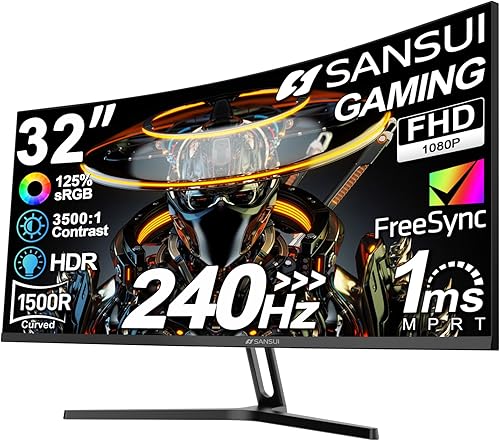
The SANSUI ES-G32C1F is a 32 inch 1500R curved gaming monitor built for speed focused players who want a large, immersive screen. It is best suited for FPS, racing and console gamers who prioritize high refresh rates and smooth motion.
In real world use, the 240Hz refresh rate and 1ms MPRT response deliver noticeably fluid gameplay, especially when paired with FreeSync over DisplayPort or HDMI. The VA panel offers a strong 3500:1 contrast ratio, 300 nits brightness and 125 percent sRGB coverage with HDR support for punchy color and deep blacks.
Design is clean and gamer ready with a frameless matte screen, slim profile and wide 178 degree viewing angles for comfortable long sessions. The stand offers tilt adjustment from minus 5 to 15 degrees, and the 100 by 100mm VESA pattern allows easy wall or arm mounting.
The main tradeoff is pixel density, since Full HD spread over 32 inches looks softer up close than smaller or higher resolution displays. It also lacks built in speakers and height or swivel adjustment, so plan for a headset and ideal viewing at about 1.2 meters back.
Overall, this SANSUI delivers standout motion clarity, immersion and comfort features for competitive gaming. If you want a big curved 240Hz screen for fast action and can accept 1080p sharpness, it is an easy recommendation.
Display: 32 inch 1500R curved LCD, Full HD 1920 x 1080, 16:9, matte finish, 178 degree viewing angle
Performance: 240Hz refresh rate, 1ms MPRT, FreeSync, HDR, 125 percent sRGB, 16.7M colors, 300 nits, 3500:1 contrast
Connectivity: 1 x HDMI, 1 x DisplayPort 1.4, 3.5mm earphone jack, DP cable included, no built in speakers
Design and Warranty: Tilt minus 5 to 15 degrees, VESA 100 x 100mm, desk or wall mount, 1 year manufacturer warranty with lifetime support
Pros
- Large 32 inch QHD screen with immersive 1000R curvature
- Fast 165Hz refresh rate and 1ms response for competitive gaming
- Strong 2500 to 1 contrast with HDR10 for vivid, detailed images
- AMD FreeSync for smooth, tear free gameplay
- Eye comfort features plus tilt adjustment and wall mount support
Cons
- Only one HDMI port, which limits multi device setups
- Tilt only stand with no height or swivel adjustment
- 300 nits brightness delivers modest HDR impact versus premium HDR displays
The Samsung Odyssey G55C is a 32 inch QHD gaming monitor designed for players who want scale and immersion. It suits PC gamers and console users who prefer sharp Quad HD detail and a wide, curved view over a smaller flat screen.
In real world play, the 165Hz refresh rate and 1ms MPRT response deliver fluid motion with minimal blur. AMD FreeSync reduces tearing while HDR10 and the high contrast VA panel add depth to shadows and highlights.
Design centers on the aggressive 1000R curve that fills peripheral vision and pulls you into the action. Build includes a sturdy tilt stand, VESA wall mount support, plus DisplayPort and HDMI connectivity for easy setup.
Drawbacks include a single HDMI port, which can be tight for multi console setups. The stand offers tilt only with no height adjustment, and peak brightness is modest so HDR looks good but not spectacular.
Overall, the Odyssey G55C is a compelling pick for immersive, high speed QHD gaming on a large format display. If you value curve, speed and screen size, it delivers where it counts.
Display: 32 inch VA, 2560 x 1440 QHD, 1000R curved, 16 to 9 aspect, HDR10
Performance: 165Hz refresh rate, 1ms MPRT, AMD FreeSync, 2500 to 1 contrast, 300 nits brightness
Comfort and Design: Eye Saver Mode, flicker reduction, 178 degree viewing angle, tilt adjustment, wall mountable
Connectivity: DisplayPort, HDMI, includes DP cord, power cord and stand
Pros
- Buttery smooth 180Hz and 1ms performance ideal for fast-paced shooters and esports
- Sharp QHD resolution on a large 32-inch IPS panel with wide viewing angles
- Tear-free gaming with both G-Sync Compatible and FreeSync Adaptive Sync
- Fully adjustable ergonomic stand for personalized comfort during long sessions
- Helpful gaming features including HDR10, Black Equalizer and Virtual Aim Point
Cons
- 300 nits brightness and 1000:1 contrast limit true HDR impact versus premium HDR displays
- Only one HDMI port may restrict multi-console or multi-device setups
- IPS LCD cannot match the deep blacks and contrast of VA or OLED panels
The Samsung Odyssey G5 G50F is a 32-inch QHD gaming monitor designed for players who want a large, sharp canvas without stepping up to 4K. It is well suited for competitive gamers, casual enthusiasts and creators who need smooth performance and accurate color on a flat IPS display.
In real world use, the 2560x1440 resolution delivers noticeably crisper detail than 1080p, while the 180Hz refresh rate and 1ms GtG response keep motion ultra smooth. G-Sync Compatible and FreeSync support work together to eliminate screen tearing, and HDR10 adds brighter highlights and more nuanced shadows for richer game scenes.
Design wise, the monitor features a clean matte black finish and a sturdy ergonomic stand that offers height adjustment, tilt, swivel and pivot. The matte coating reduces glare, the 178 degree IPS viewing angle keeps colors consistent, and Auto Source Switch+ makes switching between PC and console inputs seamless.
There are some tradeoffs to consider. Peak brightness of 300 nits and a 1000:1 contrast ratio mean HDR is more subtle than on premium HDR displays, and the single HDMI port may feel limiting if you connect multiple consoles. As an IPS LCD, it also cannot match the infinite contrast of OLED panels.
Overall, the Odyssey G5 G50F delivers excellent value for gamers seeking speed, sharpness and comfort in a large format. If you want fluid 180Hz gameplay, versatile ergonomics and reliable Samsung build quality for desktop gaming and everyday use, this is a compelling choice.
Display: 32-inch Flat IPS, QHD 2560x1440, 180Hz, 1ms GtG, 16:9 Aspect Ratio, Matte Finish, 178 degree Viewing Angle
Picture Quality: HDR10, 300 nits Brightness, 1000:1 Contrast Ratio, 99% Color Gamut, 0.27 Pixel Pitch
Adaptive Sync: G-Sync Compatible and FreeSync for tear-free, low-lag gaming
Connectivity: DisplayPort, 1x HDMI, Auto Source Switch+ for instant input detection
Ergonomics: Height Adjustable Stand with Tilt, Swivel and Pivot, Desk Mount, Black Design
Model Info: Samsung S32FG502EN (FBASAMLS32FG502ENXZA), LCD Display Technology, 1 Year Manufacturer Warranty
Pros
- Large 32-inch 1500R curved QHD screen for immersive viewing
- Fast 180Hz refresh rate and 0.5ms response with Adaptive Sync for smooth competitive play
- Wide 120 percent sRGB color gamut with high contrast and HDR for vibrant visuals
- Four video inputs plus audio out for easy multi-device setup
- LowBlue and Flicker Free eye care backed by 3-year warranty with advance replacement
Cons
- VA panel has narrower viewing angles and slower pixel transitions than IPS or OLED alternatives
- Glossy screen finish can reflect glare in bright rooms
- 1440p resolution on 32 inches offers lower pixel density than smaller QHD monitors, so text is less sharp
The AOC CQ32G4VE is a 32-inch curved gaming monitor built around a QHD VA panel, aimed at PC and console gamers who want big screen immersion without moving to 4K. It pairs 2560 x 1440 resolution with a 1500R curve that suits racing, RPG and cinematic single player games.
Performance is the highlight, with a 180Hz refresh rate, 0.5ms MPRT mode and Adaptive Sync including G-Sync compatibility for smooth, tear free motion. In real world play, fast shooters and sports feel fluid and responsive, while 120 percent sRGB coverage and HDR add rich color and strong contrast.
Design is practical and gamer focused with a frameless curved front, desk mount support and a simple black finish that fits most setups. Connectivity is generous with two DisplayPort 1.4 ports, two HDMI 2.0 ports and audio line out, so you can keep a PC and consoles connected.
There are tradeoffs to consider, as the VA panel and glossy finish mean viewing angles are tighter and reflections can show in bright rooms. Pixel density is also lower than a 27-inch QHD display, so competitive esports players or text heavy business users may prefer a smaller, sharper screen.
Overall, the CQ32G4VE is a strong pick for gamers seeking an immersive large format QHD display with high refresh speed and console friendly features. If you prioritize smooth performance, vibrant contrast and versatile connectivity for mixed PC and console use, it delivers excellent value in its class.
Screen: 32-inch curved VA, 2560 x 1440 QHD, 1500R curvature, 16:9, glossy finish
Performance: 180Hz refresh rate, 0.5ms MPRT, Adaptive Sync with G-Sync compatibility, HDR support
Color and Contrast: 120 percent sRGB color gamut, 80,000,000 to 1 SmartContrast ratio
Connectivity: 2 x DisplayPort 1.4, 2 x HDMI 2.0, audio line out
Features: LowBlue Mode, Flicker Free, frameless design, desk mountable, included HDMI cable and power cord
Pros
- Large 32-inch QHD screen balances sharp detail with high frame rates
- Fast 180Hz and 1ms performance ideal for FPS, racing and action titles
- High 3000:1 contrast VA panel with HDR10 for deep blacks and vivid color
- Steep 1000R curve and borderless design create strong gaming immersion
Cons
- Tilt only stand with no height or swivel adjustment limits ergonomics
- 300 nits brightness is modest for true HDR impact in bright rooms
- VA panel offers great contrast but can show more smearing than fast IPS or OLED
The LG 32GS60QC-B UltraGear is a 32-inch QHD curved gaming monitor built for players who want big screen immersion without giving up speed. It is best suited for FPS, RTS and action gamers who play on PC or console and want smooth performance on a large canvas.
At its core you get 2560 x 1440 resolution paired with up to 180Hz refresh rate and 1ms GtG response for fast, fluid motion. AMD FreeSync plus Dynamic Action Sync helps reduce tearing and input lag, so aiming and fast turns feel responsive and connected.
The steep 1000R VA panel wraps into your peripheral vision for a cockpit like feel, while 3000:1 contrast, HDR10 and 99 percent sRGB deliver deep blacks and punchy color. Gamer tools like Black Stabilizer, crosshair overlay, FPS counter and dedicated Gamer, FPS and RTS modes add practical in game advantages.
Design is clean and battlestation friendly with a three-side virtually borderless screen, matte finish and tilt adjustable stand. Connectivity is straightforward with two HDMI ports and DisplayPort, plus VESA wall mount support if you prefer an arm or wall setup.
Overall, this UltraGear is an excellent value focused choice for immersive high refresh QHD gaming. If you want a large curved display that stays fast for competitive play and vivid for single player adventures, it is easy to recommend.
Screen Size: 32 inches, Curved 1000R VA panel with matte finish and 16:9 aspect ratio.
Resolution: 2560 x 1440 QHD with HDR10, 99 percent sRGB, 3000:1 contrast and 300 nits brightness.
Performance: Up to 180Hz refresh rate, 1ms GtG response, AMD FreeSync and Dynamic Action Sync.
Connectivity and Design: 2 x HDMI, 1 x DisplayPort, tilt adjustable stand, VESA wall mount compatible, black borderless design.
Pros
- Gorgeous OLED picture with perfect blacks, rich contrast and vibrant HDR highlights
- Versatile Dual Mode covers both cinematic 4K and esports grade 480Hz gaming
- Ultra-low 0.03ms response with adaptive sync for buttery smooth, tear free action
- Premium, solid build with virtually borderless design and full ergonomic adjustments
- Future proof connectivity including DisplayPort 2.1 and USB Type-C
Cons
- OLED requires regular pixel care and mindful usage to avoid burn-in risk
- Built-in speakers sound thin and underwhelming for a premium gaming monitor
- Matte W-OLED coating reduces glare but looks less punchy than glossy QD-OLED alternatives
The LG UltraGear 32GX870A is a 32-inch 4K OLED gaming monitor built for players who want no compromises between visuals and speed. It is perfect for hybrid gamers who enjoy cinematic single player adventures and competitive esports, plus anyone who values true OLED contrast for entertainment.
Its standout feature is VESA Certified Dual Mode, letting you toggle between 4K at 240Hz and Full HD at 480Hz with a single hotkey. Combined with a near instantaneous 0.03ms response, G-SYNC Compatible and FreeSync Premium Pro support, motion stays crisp and tear free, while Micro Lens Array+ OLED reaches up to 1300 nits for impactful HDR.
Design and build quality are excellent, with a virtually borderless ultra thin panel and a sturdy, easy to assemble stand. You get full height, tilt, swivel and pivot adjustment, an anti-glare low reflection coating to reduce distractions, and extras like built-in speakers and customizable rear lighting.
There are a few drawbacks to note. As a W-OLED, it needs periodic pixel cleaning and care to minimize burn-in, and the matte finish trades some vibrancy for glare control compared to glossy QD-OLED panels. Users also report the integrated speakers are weak, so external speakers or headphones are recommended for serious audio.
Overall, the 32GX870A is one of the most versatile OLED gaming monitors you can buy, blending breathtaking image quality with true competitive performance. If you want one display that excels at both immersive 4K and ultra high refresh gaming, this UltraGear is an outstanding choice.
Panel: 32-inch (31.5 viewable) 4K UHD 3840 x 2160 W-OLED, Matte Anti-Glare, 178 degree viewing angle, 98.5% color gamut
Performance: Dual Mode 4K 240Hz / FHD 480Hz, 0.03ms GtG, 1.5M:1 contrast, VESA DisplayHDR True Black 400, HDR10, up to 1300 nits peak
Adaptive Sync: NVIDIA G-SYNC Compatible, AMD FreeSync Premium Pro
Connectivity: DisplayPort 2.1, 2x HDMI 2.1, USB Type-C, 4-pole headphone jack with DTS Headphone:X, built-in speakers
Design: Virtually borderless flat design, height, tilt, swivel and pivot adjustable, wall mountable, 21.6 lbs
Included: Monitor, DisplayPort cable, HDMI cable, USB-C cable, power cable, 2-year manufacturer warranty
Pros
- Exceptional 210Hz refresh rate and 1ms response for fluid, blur free gameplay
- Large 32-inch QHD display delivers sharp detail and an immersive field of view
- Versatile connectivity with USB-C, DisplayPort and dual HDMI ports
- 115% sRGB coverage and FreeSync Premium for vivid colors and smooth visuals
- Lightweight frameless design with tilt adjustment and VESA mount compatibility
Cons
- Built-in speakers can sound loud and slightly harsh at higher volumes
- Bottom facing ports and fiddly stand assembly can make setup awkward
- VA panel and 1 year warranty may not suit pro color work or long term peace of mind
The Sceptre E325B-QW200D is a 32-inch QHD gaming monitor built for players who want size, speed and sharpness without complexity. With 2560x1440 resolution, a 210Hz refresh rate and 1ms blur reduction, it targets competitive gamers, hybrid workers and entertainment users who value immersion and responsiveness.
In real world use, the VA panel delivers fluid motion and crisp detail that makes fast shooters and racing titles feel instantly more responsive. AMD FreeSync Premium keeps gameplay tear free, while 115 percent sRGB coverage produces vibrant, punchy colors for gaming and media, and USB-C with DisplayPort and HDMI keeps switching between PC, Mac and laptop effortless.
Design wise, the monitor keeps things clean with a nearly bezel free matte screen, a slim Machine Black chassis and a lightweight build that is easy to position. The tilt adjustable stand and VESA mount support offer flexible placement, and built-in speakers plus an audio out jack provide convenient audio without extra desk clutter.
There are tradeoffs to note. The integrated speakers prioritize convenience over fidelity and can sound harsh at higher volumes, and the bottom facing ports are awkward to reach when the desk is against a wall. As a VA panel it trades some viewing angle and pro level color accuracy for contrast and speed, and input switching has been reported as finicky by some users.
Overall, the E325B-QW200D offers impressive speed, size and versatility for its class, making it a strong value for gamers who want a large, fast QHD display with modern connectivity. If you need a high refresh immersive monitor for competitive play and everyday productivity, this Sceptre delivers where it counts.
Model: Sceptre E325B-QW200D, 32-inch Flat VA, Matte Finish, 16:9, 2560x1440 QHD
Performance: 210Hz Refresh Rate, 1ms Blur Reduction, AMD FreeSync Premium, 115% sRGB, 1,000,000:1 Contrast Ratio
Connectivity: 2x HDMI up to 144Hz, 1x DisplayPort, 1x USB Type-C up to 210Hz, Audio Out Jack, Built-in Speakers
Design and Features: Frameless Minimal Bezel, Tilt Adjustment, VESA Wall Mount Compatible, Blue Light Shift Eye Care, Custom FPS and RTS Modes
Dimensions and Weight: 28.16 x 19.49 x 8.32 inches, 10.1 pounds, Machine Black
| Product | Key spec with number | Best for | Price tier |
|---|---|---|---|
| Samsung 32” Odyssey G5 (G50F) | 180Hz and 1ms per Samsung spec | Balanced QHD gaming | Mid tier |
| ASUS TUF Gaming Series 5 32” 1080P Curved Monitor | 240Hz and 0.5ms per ASUS spec | High refresh esports | Value tier |
| LG 32GX870A-B 32-inch Ultragear 4K UHD | 4K 240Hz and 0.03ms per LG spec | Premium OLED visuals | Premium tier |
| Sceptre New 32-inch 2K QHD 2560 x 1440 Prime | 210Hz and 1ms per Sceptre spec | Sharp high refresh QHD | Value tier |
| AOC 32 Inch Curved Gaming Monitor 2K QHD 180Hz VA | 180Hz and 0.5ms per AOC spec | Immersive curved QHD | Mid tier |
Buying Guide: How Do You Choose the Right Monitor for PC Gaming?
Resolution and Panel Clarity
If you run a midrange graphics card, Full HD remains the smoothest path to high frames, and the ASUS TUF Gaming Series 5 32” 1080P Curved Monitor pushes 240Hz with 0.5ms response per ASUS spec for clear tracking in fast lobbies. You will notice less blur when you enable ELMB Sync per ASUS spec for steadier motion, while QHD alternatives pack 1.7 times the pixel density of Full HD per Samsung spec for crisper armor, foliage and distant targets.
Step up to QHD when your GPU can drive 2560 x 1440 at triple digit frames per NVIDIA guidance, since models like the Samsung 32” Odyssey G5 (G50F) pair that sharpness with 180Hz and 1ms response per Samsung spec for balanced play across genres. For the richest image, the LG 32GX870A-B 32-inch Ultragear 4K UHD switches between 4K at 240Hz and Full HD at 480Hz per LG spec, and you can compare OLED tradeoffs in our roundup of 27-inch OLED gaming monitors before you commit to premium contrast.
Refresh Rate and Motion Handling
For esports you want at least 165Hz with adaptive sync per AMD spec, which is why the ASUS TUF Gaming VG32VQ1B 32 Inch 1440p 165Hz HDR combines 165Hz and 1ms MPRT per ASUS spec to reduce ghosting without tearing during rapid pans. You should pair that speed with FreeSync Premium per AMD spec for consistent pacing, and players chasing even higher ceilings can look at our list of 27-inch 240Hz gaming monitors per manufacturer spec for context on frame targets and GPU load.
If your rig pushes over 200 frames per second per NVIDIA guidance, the SANSUI 32 Inch Curved 240Hz Gaming Monitor hits 240Hz with 1ms MPRT per SANSUI spec for ultra fluid duels, while the Sceptre New 32-inch 2K QHD 2560 x 1440 Prime reaches 210Hz with 1ms response per Sceptre spec for sharper QHD motion that stays readable. You will feel the difference most in tracking and flick shots where lower blur helps you stay on target longer through smoke, sprint slides and quick scopes.
Curve, Color and HDR Feel
Curvature changes how wide a 32-inch screen per manufacturer spec feels on your desk, with a gentle 1500R wrap per AOC spec on models like the AOC 32 Inch Curved Gaming Monitor 2K QHD 180Hz VA keeping edges within view for long sessions without neck strain. That AOC panel covers 120 percent sRGB with 0.5ms response and 180Hz refresh per AOC spec, so you get vivid skies plus responsive control without washing out dark corners in night maps.
Go tighter when you want maximum wrap, since the Samsung 32″ Odyssey (G55C) uses a 1000R curve with 165Hz and 1ms MPRT per Samsung spec to pull your peripheral vision into racing and flight sims with stronger presence. You also get HDR10 support per VESA DisplayHDR guidance for deeper highlights and shadow detail, and pairing that pop with room lighting matters, so explore our peripherals and monitors hub for bias lighting ideas that reduce eye fatigue during late sessions.
Ports, Stand and Daily Comfort
Look for two HDMI ports plus DisplayPort 1.4 per VESA spec when you juggle a PC and console, a layout you will find on the LG 32GS60QC-B Ultragear 32-inch Curved with 180Hz and 1ms GtG per LG spec for smooth switching between inputs. You should confirm your graphics card supports the full 180Hz over DisplayPort per NVIDIA guidance, otherwise you may be capped at lower refresh over older HDMI connections despite the panel capability.
Comfort matters for long grinds, so favor tilt adjustment from minus 5 to 15 degrees per manufacturer spec plus VESA 100 x 100 support per VESA spec for arms, both offered on designs like the SANSUI 32 Inch Curved 240Hz Gaming Monitor. If you wall mount, plan cable routing early and learn how to hide cables from a wall-mounted monitor to keep power and DisplayPort leads tidy for cleaner aim, better airflow and sharper focus.
Final Thoughts
If you want balanced QHD immersion for daily play, pick Samsung 32” Odyssey G5 (G50F) with 180Hz and 1ms per Samsung spec for fluid all round control, while visual purists should choose LG 32GX870A-B 32-inch Ultragear 4K UHD with dual mode 240Hz OLED per LG spec for stunning depth that rewards a strong GPU.
Frequently Asked Questions
Is a 32-inch monitor too big for PC gaming?
Not for most desks when you sit about 1.2 meters back per SANSUI guidance, since a 32-inch panel per manufacturer spec fills your view without forcing constant head turns during play. You will adapt quickly if you center the screen and keep text scaling at 100 percent to 125 percent per Microsoft guidance for comfortable readability across games and browsing. In 2026, many players upgrade from smaller screens for immersion, and our guide to 34-inch 1440p OLED ultrawides per manufacturer spec shows how width compares to height for your setup.
What resolution is best for 32-inch gaming monitors for PC?
QHD at 2560 x 1440 per VESA guidance is the sweet spot for 32-inch gaming per manufacturer spec because it looks sharp without demanding flagship GPU power per NVIDIA guidance. Full HD suits high refresh esports on modest cards with 240Hz options per ASUS spec for maximum frames, while 4K OLED with 240Hz per LG spec shines if your rig can sustain triple digit output. In 2026, match resolution to your graphics card first, then prioritize color coverage and HDR handling for long term satisfaction.
How much refresh rate do you need for 32-inch gaming?
You will feel a clear jump going from 60Hz to 165Hz per AMD spec, with models like the Samsung 32″ Odyssey (G55C) hitting 165Hz and 1ms per Samsung spec for smooth tracking in shooters and racers. Competitive players benefit up to 240Hz with 1ms per SANSUI spec for the lowest blur in duels, while story driven fans can prioritize image quality at 180Hz per LG spec without missing much fluidity. In 2026, choose at least 165Hz per AMD spec if you play shooters regularly, then scale higher as your GPU allows.
Is curved or flat better for 32-inch PC gaming?
Curved suits most 32-inch setups per manufacturer spec because a 1000R to 1500R wrap per Samsung spec keeps edges equidistant and reduces glare during long sessions with wide fields of view. Flat works well if you do precise design work alongside gaming with minimal distortion per VESA guidance for straight lines and photo edits. In 2026, try a 1500R curve per AOC spec first for balanced immersion, then go tighter only if you love cockpit style wrap for sims and sprawling adventures.
These picks are not ideal for casual or first-time players on a tight budget; they are aimed at people who want higher refresh rates, better panels, or competitive-grade input.








Write Your Review
No reviews yet. Be the first to share your experience!