

You want to learn how to keep cables tidy on a sit-stand desk without yanking plugs or tripping over loops every time you change height. The real decision is where slack will live while the top moves, how you will mount storage without harming the desktop, and how you will keep power bricks aired and reachable. This guide, updated for November 2026, walks you through that choice step by step, and you can explore more ideas in the Cable Management and Under-Desk hub.
To choose well, you should weigh your desk material and thickness, your lift range and floor outlet location, the size of your power strip and adapters, and how often you swap monitors, docks, or PCs. If you get those key variables right, your setup will raise quietly, lower smoothly, and stay easy to clean behind.
What Actually Matters
Plan for Movement First, Then for Looks
Your top moves daily, so you should plan cable paths for motion before you chase a clean photo. You need a loose service loop under the top that can unfold when you stand and fold back when you sit, plus a controlled drop to the wall or floor that guides cords instead of letting them swing. When you route monitor, dock, and PC leads toward one rear exit, you reduce pull and keep plugs seated.
Before you buy anything, you should raise your desk all the way, then lower it while you watch each lead. Owners commonly report that display power and USB dock cables pull first because they run to different spots. You should give those leads extra slack, bundle them loosely with adjustable ties, and keep the bundle away from legs, crossbars, and pinch points.
Mounting Method and Desktop Compatibility
Mounting style decides whether your organizer stays put and whether your desk stays intact. Screws hold very firm in solid wood and many composite tops, clamps grip the edge with no holes and suit glass or rental furniture, and adhesive pads stick well to smooth sealed surfaces when you prep and let them cure. You should match the method to what your landlord, warranty, or desktop material allows.
You should check thickness and edge shape before you order. Per the spec sheet for one clamp style tray, the fit covers tops from 0.2 to 1.97 thick, which suits many standing desks but not every thick slab. If you cannot drill, you should favor clamp or adhesive options and look for pads that help reduce marks, and you should clean with alcohol, press firm, and wait the recommended cure time before you load cables.
Capacity, Airflow and Power Strip Fit
You should size for bricks and plugs, not just thin leads. A full battlestation with a surge protector, monitor adapters, dock, chargers, and ambient lighting needs a wide tray with enlarged holes so plugs can sit flat and enter from front or back. A simple laptop setup with a few leads may only need low profile straps tucked along a beam, which saves space and keeps weight down.
Airflow keeps that power gear happier over long workdays. You should favor an open frame or hollow ventilated structure that lets warm air escape and lets you see dust buildup, rather than a sealed box that traps warmth. Per the spec sheets we researched, one steel tray supports up to 11 lbs without sagging, while extended hook and loop straps are rated to hold up to 15 cables each, so you can see how much capacity varies by type.
Access, Adjustability and Future Changes
You will change something soon, so you should buy for easy edits. Flexible segmented straps let you open one section without undoing the whole run, dual facing trays can face inward to hide cords or outward for quick plug access, and snap together modular segments let you tune length to your desk. You should be able to add a headset charger or swap a display cable in minutes, not rebuild the whole underside.
Think about cleaning and lighting upgrades as well. When you can drop a tray down or open a strap with one hand, you are more likely to dust and reroute. For inspiration on pairing clean wiring with glow, you can browse this minimalist RGB desk setup to see how tidy routing makes light bars and strips look sharper.
These few options that show the range cover simple straps, large trays, and a vertical spine. They are not a ranking, they simply show what each style does well so you can match a style to your build. Review the sizes and mounting styles, then read the scenarios that follow.
This article contains affiliate links. If you buy through one of our links, CustomPCGaming may earn a commission at no extra cost to you. Commissions never influence which products we recommend or how we rank them. Read our Affiliate Disclosure for details.
Quick Picks at a Glance
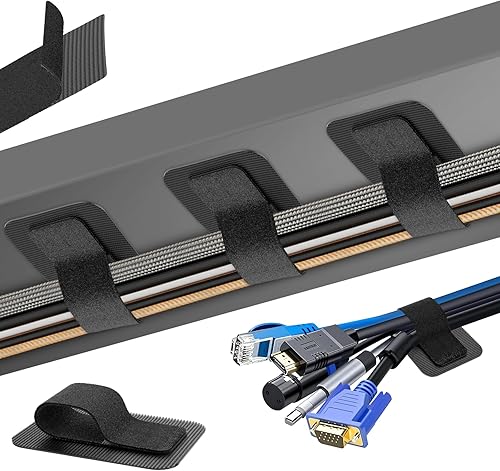
Prime Fansto Under Desk Cable Management 20 Pack

Prime Univivi Under Desk Cable Management Tray 32 Inch

Prime Mount-It! 23.6-Inch Clamp-On Under Desk Cable

Prime GRSVDF Sit Stand Desk Cable Management Spine
As an Amazon Associate we earn from qualifying purchases. Product prices and availability are accurate as of the date/time indicated.
Pros
- Strong, stable hold when surface is cleaned and adhesive is allowed to cure
- High capacity straps prevent slipping and sliding even with thick cable bundles
- No tools, no drilling and no technical skills needed for installation
- Compact, reusable and easy to reorganize as your setup changes
Cons
- Adhesive base pads are single use and cannot be reused after removal
- Requires a smooth clean surface plus 2 hour wait time for best adhesion
- Very strong grip can make initial repositioning difficult
This 20 pair under desk cable organizer kit is designed for anyone tired of tangled cords under a home office, gaming or work desk. It is especially useful for setups with monitors, chargers, power strips and PC cables that need to stay hidden but accessible.
Each extended strap holds up to 15 cables securely with reinforced hook and loop fastening that resists slipping. In real use, users report a strong and stable hold when you clean the surface first and allow the adhesive to cure before loading cables.
The design is low profile and flexible, so it fits tight corners and narrow spaces without tools or drilling. The combination of plastic and rubber straps with acrylic adhesive pads feels sturdy yet compact enough to tuck neatly out of sight.
There are a couple of tradeoffs to know. The adhesive base pads are single use, so you cannot reuse them once removed, and readjusting can take real effort due to the strong grip. You also need a smooth, clean surface for best results.
Overall, this is a practical, non invasive solution for clean and safe cable control under any desk. If you want affordable, reusable straps with strong adhesion and high capacity, this kit is an easy recommendation.
This kit includes 20 hook and loop cable straps plus 20 adhesive hook pads for under desk mounting. Straps measure 120 x 40mm with additional mounting pads for flexible placement options.
It is made from durable plastic and rubber with upgraded acrylic adhesive for indoor use. The black compact style blends neatly under desks, tables and workstations.
Installation is self adhesive with no drilling required. The adjustable, self locking design is reusable, residue free and suitable for wood, glass, tile and other smooth surfaces.
Clean the mounting surface thoroughly and let it dry completely before applying the adhesive pads. Press firmly and wait 2 hours before loading cables for maximum holding strength.
Plan your cable routes first, then mount pads in corners or along the back edge of the desk for best concealment. Use one strap per bundle and leave a little slack for easy future adjustments.
To reorganize, open the hook and loop strap without removing the base pad. If you need to relocate, use a new adhesive pad since the original base is not reusable after removal.
Pros
- Extra wide 32 inch tray fits full size power strips and multiple devices
- Choice of traceless clamp or screw mount suits renters and permanent setups
- Open ventilated steel body improves airflow and safety
- Sturdy build holds heavy adapters without sagging
Cons
- Large 32 inch size may not fit compact or small desks, check dimensions first
- Screw installation requires drilling, which may not suit glass or delicate desktops
- Black industrial style may stand out under light colored furniture
The Univivi 32 inch Under Desk Cable Management Tray is a heavy duty steel organizer designed to clear messy cords from under your desk. It is ideal for home offices, gaming stations and workspaces with multiple monitors, chargers and power strips that need one central storage spot.
In daily use, the extended tray easily holds a full size power strip plus adapters and data cables with room to spare. Enlarged cable holes and open access on both front and back make routing, plugging and rearranging cords fast and flexible for different desk layouts.
Built from durable steel with a ventilated hollow structure, the tray promotes airflow around power strips to reduce heat buildup. The industrial style black finish looks clean under most desks, and the rigid frame stays stable without shaking once mounted.
Installation offers C-clamps for no drill mounting or screws for maximum hold, though you should measure your desk first. The 32 inch length is generous but can overwhelm small desks, and screw mounting is not ideal for glass tops or very thin surfaces.
Overall, this is a practical, high capacity solution for anyone wanting a safer, tidier workspace. If you need strong steel construction, flexible mounting and room for all your power gear, the Univivi tray is a smart and reliable pick.
Brand: Univivi, Model: UN1450, Color: Black, Style: Industrial
Dimensions: 32 inch length, steel under desk tray for indoor office and home use
Installation: Dual mount with no drill C-clamp and screw in options, ventilated heat dissipating design
Pros
- No-drill clamp works on glass and standing desks where drilling is not allowed
- Sturdy alloy steel construction supports heavy power strips without bending
- Large 23.6-inch capacity handles multiple cables, docks and surge protectors
- Open design improves airflow and makes it easy to add or remove cables
Cons
- Clamp only fits desktops between 0.2 and 1.97 inches thick, so very thick desks are not compatible
- Open wire frame organizes cables but does not fully conceal them from every viewing angle
- Single black finish and size offers limited style options for custom setups
The Mount-It! MI-7286BLK is a 23.6-inch under desk cable tray designed for users who cannot or do not want to drill into their desk. It is a smart pick for standing desk users, renters, office professionals and gamers with glass or premium desktops.
Its standout feature is the clamp-on mounting system that installs in minutes without screws or adhesive. In real use, the dual-facing setup is practical because you can hide cables inward for a clean look or flip it outward for easy access to power strips and adapters.
Build quality is a strong point thanks to powder-coated alloy steel that supports up to 11 lbs without sagging. The 23.6-inch open frame easily holds surge protectors, docking stations and bundled cords while allowing airflow to limit heat buildup.
The main limitation is compatibility, since the clamp only fits desktops from 0.2 to 1.97 inches thick. The open design also keeps cables accessible but will not completely hide them from sightlines below, so perfectionists may want an additional cover.
Overall, this is a durable and renter-friendly solution that outperforms adhesive trays for long term stability. If you need a no-drill, heavy-duty organizer for a standing or glass desk, this Mount-It! tray is an excellent choice backed by a lifetime warranty.
Model MI-7286BLK in black measures 24.75 x 5 x 5 inches with a 23.6-inch tray area and weighs 4.75 pounds. It is made from powder-coated alloy steel with a modern finish.
Installation uses a clamp mount that fits desktops 0.2 to 1.97 inches thick and supports up to 11 lbs. It is designed for computer racks and cabinets use and includes lifetime warranty coverage with US based support.
Pros
- Tool-free, no-drill mounting protects wood and composite desktops
- Flexible spine moves naturally with sit stand height transitions
- Four separate channels keep power and AV cables organized and tangle-free
- Modular fiberglass segments plus steel base offer stable, long-term durability
Cons
- Clamp mount may not fit extra thick, beveled or non-standard desk edges
- Only available in black, which may not match white or light wood setups
- Single spine may not be enough for large dual monitor setups with many cables
The GRSVDF Desk Vertebrae Cable Management Spine Kit is a vertical cord organizer made specifically for sit stand desks. It is ideal for home office workers, gamers and renters who want hidden cables without drilling into their desk.
Its standout feature is the padded C-clamp mount that secures to the desk edge with no tools or permanent damage. In daily use, the modular segments expand and contract smoothly from 21 to 51 inches, keeping power and AV cables aligned during height changes.
The quad entry design is genuinely useful for separating monitor, charger and accessory cords to prevent twisting and tension. Fiberglass segments feel flexible yet sturdy, while the reinforced steel base plate helps the column stay centered under the desk.
The clamp design will not suit every desk, especially very thick tops or rounded edges, so checking fit is important. The black-only finish and single spine format may also feel limiting for larger battlestation setups.
Overall, this is a practical, damage-free solution for cleaner sit stand cable routing. If you want simple installation, smooth movement and a tidier workspace, it is a smart pick.
Brand: GRSVDF, Color: Black, Style: Modern, Material: Fiberglass with steel base plate.
Compatibility: Sit stand desks with height range from 21 to 51 inches, indoor use.
Mounting: Padded C-clamp edge mount for no-drill installation, snap-on modular segments for length adjustment.
Matching a Part to Your Build
Use these common sit-stand builds to narrow your pick. Find the setup closest to yours, then note what to prioritize for movement, mounting, and access.
If you run a compact laptop plus display setup and you rent your space, you should start light. The Cable Management Under Desk kit uses 20 pairs of 120x40mm hook and loop straps that tuck along tight corners and hold a modest bundle without tools. Per the spec sheet, you should wait 2 hours after applying adhesive hooks before you load cables, and you should skip this style if you need to hold a heavy surge protector, since straps are not ideal for bulky bricks that need rigid support and airflow.
If you run a gaming PC with multiple displays, a dock, and a full size surge protector, you need a rigid tray under the top. The Univivi Under Desk Cable Management Tray offers a 32 inch bay with enlarged holes and a choice of C-clips for no mark mounting or screws for maximum hold, while the Mount-It! Under Desk Cable Management Tray uses a clamp on steel frame sized at 23.6 inch that fits glass and standing desks with no drilling. Both use open ventilated frames to promote airflow, and the clamp model is rated to support up to 11 lbs, but you should not buy an adhesive only tray if your underside is rough, textured, or dusty, since adhesion will be weak.
If your desk travels through a wide height range and your outlet is on the floor or wall, you need vertical control. The Desk Vertebrae Cable Management Spine Kit Fit uses snap on modular segments with a four channel entry to separate power from data leads, plus C-clamps with pads to protect the edge and a steel base plate for stability. It is designed to support smooth routing across a height range from 51 inches to 21 inches as you sit and stand, and for extra polish you can pair it with hidden lighting ideas from these RGB LED strips for a corner desk glow without letting light cables dangle.
Common Mistakes
Mistake: mounting with no cure or prep. You stick adhesive pads to a dusty underside and load them at once, then the tray sags. You should wipe with alcohol, press firm across the whole pad, leave the mount empty for the full cure window, and favor screws or clamps when the surface is rough or porous.
Mistake: pulling cables tight for photos. You cut ties short and route leads edge to edge with no service loop, then the desk lifts and unplugs your dock. You should leave a gentle loop under the top, guide everything to one rear exit, and raise and lower fully while you watch for tension before you trim ties.
Mistake: packing bricks with no air or access. You stuff a surge protector and adapters into a closed bin with no vents, then warmth builds and you cannot reach plugs. You should choose a hollow ventilated tray, keep bricks spaced so air can move, and face the tray outward if you swap plugs often. For damage free routing around edges, see how to run LED strips around a desk without damage, since the same gentle routing protects power leads.
Who Should Wait or Buy Differently
If you plan to replace your desk, move rooms, or switch from laptop to desktop PC in the next few weeks, you should wait and buy once. A full width steel tray is not ideal for a tiny folding table you will soon retire, and a full spine kit is not the right choice if your outlet will move from floor to wall after a remodel. In those cases you should use a few reusable straps for now, note which cables snag at full height, and then invest in the tray and vertical guide that fit your final layout.
Frequently Asked Questions
Do I need to drill my standing desk to hide cables?
No, you have solid no drill paths. You can use edge clamps that grip without holes, adhesive straps on smooth sealed surfaces, or a clamp on steel tray for glass and standing tops. You should only choose screws when you own the desk and you want maximum hold for a heavy strip.
How do I leave enough slack for raising and lowering?
You should bundle your under top leads into one loose loop near the center rear, then guide that loop into a vertical spine or weighted drop to the outlet. Raise to full standing height and sit back down while you watch, and add length to any lead that pulls tight. Keeping power and data in separate channels also reduces tangling during motion.
Where should the power strip live on a sit-stand desk?
You should mount the strip up under the top in a wide ventilated tray so it rides with the desk instead of hanging from the wall. That way only one main cord travels down to the outlet while everything else stays short and tidy. You should keep the tray accessible so you can reach switches and add chargers without crawling under the desk.






Write Your Review
No reviews yet. Be the first to share your experience!