

Quick answer: Best for competitive PC gaming is Alienware 34 240Hz QD-OLED Curved Gaming Monitor because it reaches 240Hz with 0.03ms response per Alienware spec, delivering infinite contrast and true blacks for immersive ultrawide play on modern GPUs while covering 99.3% DCI-P3 per Dell verification for rich color.
If your current monitor feels cramped in open worlds and shooters, moving to Best 34-Inch 1440p OLED Ultrawide Gaming Monitors for PC in 2026 changes your view completely per VESA standard for UWQHD clarity. We focused this roundup on PC gamers who want deeper contrast, wider field of view and smoother motion without jumping to full 4K. Before you upgrade, check our guide on how to choose the RTX 5080 for 1440p gaming to make sure your GPU can drive those extra pixels smoothly per NVIDIA spec.
This article contains affiliate links. If you buy through one of our links, CustomPCGaming may earn a commission at no extra cost to you. Commissions never influence which products we recommend or how we rank them. Read our Affiliate Disclosure for details.
Quick Picks at a Glance

Prime Alienware AW3425DWM 34-inch Curved Gaming Monitor

Alienware AW3425DW 34.2-inch QD-OLED Curved

ASUS ROG Strix XG34WCDG 34 Inch QD-OLED Ultrawide
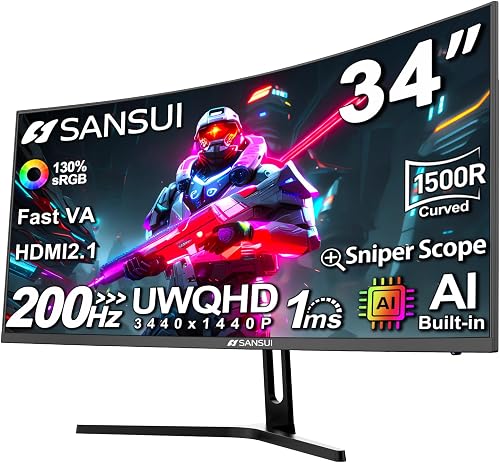
SANSUI 34 Inch Curved Ultrawide Gaming Monitor

Sceptre 34 inch Curved Ultrawide Gaming Monitor

Prime ASUS TUF Gaming VG34WQML5A 34 Inch

MSI MAG 341CQP QD-OLED X28 34-inch UWQHD 280Hz

LG 34GS95QE 34-inch UltraGear OLED Curved
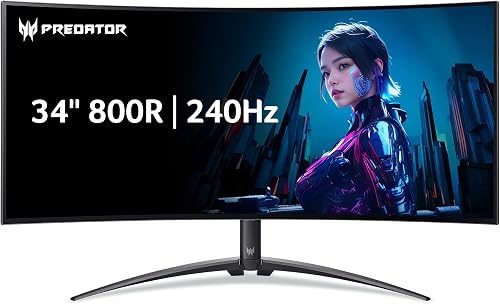
Acer Predator X34 34-Inch UWQHD OLED Curved

AOC Agon Pro AG346UCD 34 Inch QD-OLED
As an Amazon Associate we earn from qualifying purchases. Product prices and availability are accurate as of the date/time indicated.
Pros
- Fast 180Hz refresh rate with 1ms response for fluid motion clarity
- Immersive 34-inch WQHD ultrawide with 1500R curve and 21:9 aspect ratio
- Excellent color with 95% DCI-P3 and DisplayHDR 400 for vivid visuals
- AMD FreeSync Premium and VESA AdaptiveSync prevent tearing
- Ergonomic stand with height and tilt plus 3-year warranty and anti-glare matte finish
Cons
- DisplayHDR 400 offers modest HDR impact compared to HDR600 or OLED displays
- Needs a powerful GPU to fully utilize WQHD at 180Hz
- Large 21-pound ultrawide footprint requires a spacious desk and no built-in speakers
The Alienware AW3425DWM is a 34-inch WQHD ultrawide curved gaming monitor designed for immersive PC and console gaming. With its 21:9 aspect ratio and 1500R curve, it is perfect for gamers who want a wider field of view for open world, racing and competitive titles.
In real world use, the 180Hz refresh rate and 1ms gray to gray response deliver exceptionally fluid motion with minimal blur. AMD FreeSync Premium and VESA AdaptiveSync eliminate tearing, while 95 percent DCI-P3 coverage and DisplayHDR 400 produce vibrant, sharp colors for gaming and content creation.
Alienware brings its iconic design language with a matte anti-glare finish and a sturdy stand with height and tilt adjustment. The 178 degree viewing angle keeps colors consistent, and thoughtful touches like a dedicated console mode and hardware based low blue light add comfort for long sessions.
There are a few tradeoffs to consider. At DisplayHDR 400, HDR impact is modest compared to HDR600 or OLED alternatives, and driving 3440x1440 at 180Hz requires a powerful graphics card. The large 34-inch ultrawide form factor also demands ample desk space.
Overall, the AW3425DWM offers an excellent balance of immersion, speed and color accuracy for serious gamers. If you want a fast, expansive ultrawide that handles both competitive play and marathon sessions with ease, this monitor is a strong and future ready choice.
Display: 34-inch WQHD 3440x1440, 21:9, 1500R Curved, Matte Anti-Glare, LED, 178 degree viewing angle
Performance: 180Hz Refresh Rate, 1ms Response Time, 3000:1 Contrast Ratio, 400 nits Brightness
Color: 95% DCI-P3, VESA DisplayHDR 400
Sync Technology: AMD FreeSync Premium, VESA AdaptiveSync
Connectivity: HDMI, DisplayPort, USB x3, Bluetooth
Ergonomics: Height Adjustment, Tilt Adjustment, Blue Light Filter, Adaptive Sync, Curved Design
Build: 31.71 x 9.13 x 21.84 inches, 21 pounds, Black, 3 Years Warranty
Pros
- Outstanding QD-OLED image quality with infinite contrast and perfect blacks
- Exceptionally smooth and responsive 240Hz, 0.03ms performance
- Immersive 21:9 ultrawide curved format for gaming and cinematic viewing
- Wide adaptive sync support for flawless performance on NVIDIA and AMD GPUs
- Solid build quality with ergonomic stand and 3-year warranty
Cons
- QD-OLED requires care with static content to avoid potential burn-in
- Needs a powerful GPU to fully utilize 3440x1440 at 240Hz
- 250 nits typical SDR brightness is lower than some Mini-LED alternatives
The Alienware AW3425DW is a 34.2-inch ultrawide QD-OLED gaming monitor designed for enthusiasts who crave immersion and elite speed. With its 3440x1440 WQHD resolution, 21:9 aspect ratio and gentle 1800R curve, it is perfect for competitive gamers, sim enthusiasts and cinematic single player fans.
In real world use, the 240Hz refresh rate and 0.03ms response time deliver incredibly fluid motion with virtually no ghosting or blur. The QD-OLED panel impresses with 99.3 percent DCI-P3 coverage, Delta E less than 2 accuracy and DisplayHDR TrueBlack 400 with 1000 nits peak brightness, creating vibrant colors and perfect blacks that reviewers say ruin standard LED panels.
Design and build quality feel premium and thoughtfully gamer focused, with a sleek black chassis and sturdy adjustable stand. You get height, tilt and swivel adjustments, a cable management pass through, matte finish to reduce glare, and generous connectivity including two HDMI ports, DisplayPort and USB hub.
There are a few tradeoffs to consider. Like all OLEDs, it benefits from mindful use to prevent burn-in from static elements, and pushing 3440x1440 at 240Hz demands a high end graphics card. Some users also find the ultrawide curved format takes adjustment for productivity compared to flat dual monitor setups.
Overall, the AW3425DW is a top tier ultrawide that blends reference level image quality with true competitive speed. If you have the hardware to drive it and want the most immersive QD-OLED experience available, it is an outstanding choice backed by a 3-year warranty.
Display: 34.2-inch QD-OLED, 3440x1440 WQHD, 21:9, 1800R Curved, Matte Finish, 178 degree viewing angle
Performance: 240Hz Refresh Rate, 0.03ms Response Time, 1,500,000:1 Contrast Ratio, DisplayHDR TrueBlack 400, 1000 nits Peak Brightness
Color: 99.3% DCI-P3 Gamut, Delta E less than 2, 10-bit Color, QD-OLED Technology
Sync & Features: NVIDIA G-SYNC Compatible, AMD FreeSync Premium Pro, VESA AdaptiveSync, Blue Light Filter
Connectivity & Ergonomics: 2x HDMI, DisplayPort, 3x USB, Height, Tilt and Swivel Adjustable Stand, Desk Mount, 36.7W Power Consumption
Pros
- Gorgeous QD-OLED image with true blacks and vibrant, accurate color for gaming and editing
- Fast and responsive gameplay with 175Hz, 0.03ms and low motion blur
- Proactive burn-in defense with proximity sensor plus 3-year burn-in warranty
- Intuitive OSD and DisplayWidget Center praised for easy adjustment
- Lightweight yet premium ROG build with matte anti-reflective coating
Cons
- No built-in speakers, so external headphones or a soundbar are required
- Requires periodic pixel refresh cycles and may show minor OLED flicker
- Some users report color issues with Adaptive Sync on that need manual tweaking
The ASUS ROG Strix XG34WCDG is a 34-inch 3440 x 1440 QD-OLED ultrawide built for gamers, streamers and creators who want one immersive display for play and work. Its curved 21:9 panel expands your field of view for sim racing, RPGs and multitasking.
In real world use, the 175Hz refresh rate and 0.03ms response deliver exceptionally smooth, blur free motion with G-Sync Compatible tear free gaming. With DisplayHDR 400 True Black, 99.3 percent DCI-P3 coverage and Delta E under 2, colors pop for HDR games while staying accurate for photo and video editing.
Owners praise the premium ROG styling, straightforward OSD and surprisingly light chassis that makes setup and repositioning easy. The matte finish cuts reflections, the 178 degree viewing angle stays consistent, and DisplayWidget Center lets you tweak settings with a mouse.
Tradeoffs are typical for modern OLEDs. There are no built-in speakers, so you will need headphones or a USB soundbar, and you will see occasional pixel refresh prompts and minor flicker. Some users report RGB quirks with Adaptive Sync enabled that require turning it off.
Verdict: if you want a fast, color accurate 34-inch OLED ultrawide with proactive burn-in protection and a 3-year burn-in warranty, the XG34WCDG is a top pick. It is best for PC gamers upgrading from older LCD ultrawides who value visuals, speed and long term peace of mind.
Display: 34 inch curved QD-OLED, 3440 x 1440, 21:9 ultrawide, matte finish, 178 degree viewing angle.
Performance: 175Hz refresh rate, 0.03ms response, G-Sync Compatible, Extreme Low Motion Blur, 1,500,000:1 contrast.
Color: VESA DisplayHDR 400 True Black, 99.3 percent DCI-P3, true 10-bit, Delta E under 2, Flicker-Free and Blue Light Filter.
Connectivity and Extras: 2x HDMI, DisplayPort, 2x USB 3.0, USB Type-B to A, OLED Care Pro with Neo Proximity Sensor, DisplayWidget Center and ROG Gaming AI.
Pros
- Incredibly smooth 200Hz gameplay with 1ms response and FreeSync support
- Excellent color vibrancy and contrast right out of the box
- Highly immersive 1500R curve and 3440x1440 ultrawide resolution
- Great multitasking with PIP/PBP and wide 178 degree viewing angle
- VESA mount compatible and easy to set up
Cons
- VA panel may need calibration and can show slight blur or color shift at off angles
- Stand only offers tilt adjustment with no height or swivel
- No built-in speakers, audio requires headphones or external speakers
The SANSUI ES-G34C5 is a 34-inch 1500R curved ultrawide gaming monitor designed for gamers, creators and professionals who need expansive screen space. Its UWQHD 3440x1440 resolution and 21:9 aspect ratio deliver cinematic immersion for gaming while providing ample desktop real estate for work and editing.
In real world performance, the 200Hz refresh rate and OD 1ms Fast VA response make gameplay exceptionally fluid with virtually no motion blur. Support for FreeSync and VRR through HDMI 2.1 and DisplayPort 1.4 keeps action tear free, while AI features like Auto Crosshair, Sniper Scope and AI PQ enhance accuracy and picture quality.
Build quality is solid with a sleek matte black design, ultra narrow bezels and a matte anti glare coating that reduces reflections. The tilt adjustable stand is stable for desk use, and 100x100mm VESA compatibility allows for wall or arm mounting, though ergonomic flexibility is limited.
Drawbacks are modest but worth noting. Initial color and sharpness may require manual tuning and optimal viewing distance to avoid softness at angles, which is common for VA panels. The lack of built in speakers and limited stand adjustments may require additional accessories for some setups.
Overall, this monitor offers outstanding value with premium gaming specs, vibrant HDR ready color and true ultrawide immersion. It is a top recommendation for gamers and multitaskers who want high refresh rate performance and productivity features without a flagship price.
Display: 34 inch Fast VA, 1500R Curved, UWQHD 3440x1440, 21:9, Matte Anti Glare, 178 degree viewing angle
Performance: Up to 200Hz refresh rate, 1ms MPRT response, 3000:1 contrast, 300 nits brightness, HDR support, 131% sRGB and 96% DCI-P3
Gaming Tech: FreeSync, VRR, AI Blue Light Reduction, AI PQ, AI Crosshair, Sniper Scope, Night Vision, PIP and PBP modes
Connectivity: DisplayPort 1.4 x1, HDMI 2.1 x2, 3.5mm Earphone jack, No built in speakers
Design and Mounting: Tilt -5 to 15 degrees, Kensington Lock, VESA 100x100mm, Dimensions 31.8 x 8.6 x 17.96 inches, Weight 7.01 kg
Pros
- High 240Hz refresh rate and 1ms response ideal for esports, FPS and racing games
- Ultrawide QHD resolution gives much more screen space than standard 16:9 monitors
- Immersive 1500R curve plus Adaptive Sync and Blue Light Shift for comfort in long sessions
- Strong connectivity with dual HDMI and dual DisplayPort plus built in audio options
Cons
- VA panel offers strong contrast but viewing angles are narrower than IPS alternatives
- Built in speakers are convenient for everyday use but lack depth for immersive gaming
- No USB C port and limited ergonomic adjustments mentioned beyond VESA mounting
The Sceptre C345B-QU240T is a 34 inch curved ultrawide monitor built for competitive gamers, sim racers and heavy multitaskers. Its 21:9 QHD panel gives you far more horizontal space than a standard widescreen for play and productivity.
Performance is the highlight with up to 240Hz refresh rate, 1ms response with blur reduction and Adaptive Sync. Fast motion stays sharp and fluid, which helps in shooters, racing titles and high speed esports.
The 1500R curve, matte finish and 100 percent sRGB coverage create an immersive yet accurate image for games and creative work. Dual HDMI, dual DisplayPort, built in speakers and VESA compatibility add setup flexibility for desks and rigs.
There are tradeoffs to consider. The VA panel is fast and contrast rich but viewing angles are not as wide as IPS, and the integrated speakers are best for casual use. Serious players will still want a headset or external speakers.
Overall, this is a compelling choice if you want ultrawide immersion with true high refresh speed in one display. It suits gamers who want to see more, react faster and multitask without a dual monitor setup.
Screen: 34 inch curved 21:9 VA, 1500R, matte finish, 3440 x 1440 QHD resolution.
Performance: Up to 240Hz refresh rate, 1ms response with blur reduction, Adaptive Sync, 100 percent sRGB, Blue Light Shift.
Connectivity and extras: 2 x HDMI, 2 x DisplayPort, built in speakers, audio out jack, VESA wall mount compatible, Machine Black finish.
Pros
- Extremely fast 250Hz OC refresh rate with 0.5ms response for esports level smoothness
- Immersive 1500R curve with 4000:1 contrast and DisplayHDR 400 for deep blacks and punchy highlights
- Excellent color coverage with 95 percent DCI-P3 for gaming plus photo and video editing
- Strong connectivity with 2x DisplayPort 1.4, 2x HDMI 2.1, USB hub, speakers and earphone jack
- Eye care and ergonomics with Flicker-Free, Low Blue Light and full height tilt swivel adjustment
Cons
- Large 34-inch curved footprint needs deep desk space and may overwhelm small setups
- Ultrawide curved format can show color and brightness shift at extreme side angles versus flat IPS
- Full 250Hz requires overclocking over DisplayPort and a powerful GPU to drive QHD ultrawide
The ASUS TUF Gaming VG34WQML5A is a 34-inch curved ultrawide built for competitive gamers who also work and create. With 3440 x 1440 resolution and a 21:9 1500R curve, it suits FPS players, sim racers and multitaskers who want immersion plus extra desktop space.
In real use, the overclocked 250Hz refresh rate and 0.5ms response keep motion crisp and controls responsive. AMD FreeSync Premium with ELMB SYNC smooths out tearing and ghosting, so fast action stays sharp even when frame rates fluctuate.
Color and contrast stand out for the class, with 95 percent DCI-P3 coverage, 130 percent sRGB and DisplayHDR 400 support. That means vibrant games, punchy highlights and enough accuracy for photo and video editing alongside business tasks.
Build quality follows TUF Gaming standards with a sturdy adjustable stand offering height, tilt and swivel plus matte coating to cut glare. You get dual DisplayPort 1.4, dual HDMI 2.1, USB hub, speakers and earphone jack, managed easily through DisplayWidget Center.
It is large, so you will need desk depth, and hitting peak refresh demands a strong GPU and DisplayPort overclocking. Verdict: if you want a super fast curved ultrawide that balances esports speed with creative color, this ASUS is a compelling all in one choice.
Display: 34 inch 1500R curved ultrawide, 3440 x 1440 QHD, matte finish, 178 degree viewing angle, 4000:1 contrast, 400 nits brightness.
Performance: Up to 250Hz overclocked refresh rate, 0.5ms minimum response, AMD FreeSync Premium, VESA AdaptiveSync 250Hz, ELMB SYNC, DisplayHDR 400.
Connectivity and design: 2x DisplayPort 1.4, 2x HDMI 2.1, USB hub, earphone jack, built-in speakers, height tilt swivel stand, VPR Gaming AI features.
Pros
- Stunning QD-OLED color with deep blacks, high contrast and bright HDR highlights
- Extremely fast 280Hz and 0.03ms performance for esports and fast action games
- Noticeably clearer text and reduced fringing versus older OLED subpixel layouts
- Full adaptive sync support plus HDMI 2.1 with VRR and ALLM for PC and console
- AI Care Sensor and 3-year warranty for added OLED burn-in protection
Cons
- Glossy screen finish can show reflections in bright rooms
- Underside port placement makes cable management messy for some setups
- Early firmware issues reported by some users requiring updates or service
The MSI MAG 341CQP QD-OLED X28 is a 34-inch UWQHD ultrawide built for PC and console gamers who want immersion plus esports speed. With its 21:9 1800R curve, 3440x1440 resolution and 280Hz panel, it suits competitive players, RPG fans and creators who want vibrant OLED color.
In real use, the 5th-gen Tandem QD-OLED panel stands out with rich colors, true blacks and excellent motion clarity. The 0.03ms response, ClearMR 15000 certification and 1300 nits peak brightness deliver smooth, punchy HDR that owners describe as a clear step up for gaming and movies.
Text clarity is a major upgrade thanks to the new RGB Stripe layout, which virtually eliminates color fringing common on older OLEDs. Combined with accurate color, Uniform Luminance and DisplayHDR True Black 500, it stays sharp for work and consistent for creative tasks.
Design is gamer focused with a curved glossy screen, DarkArmor Film for deeper blacks and added scratch resistance, plus HDMI 2.1, DisplayPort 1.4a and USB-C connectivity. FreeSync Premium Pro and G-SYNC Compatible support plus console VRR and ALLM make switching between PC and console seamless.
It is not perfect, as the glossy finish can reflect light and the underside port layout makes cable management tricky. Overall, this is a top pick for gamers seeking next-gen OLED speed, ultrawide immersion and much clearer text in one package.
Panel: 34-inch Tandem QD-OLED, 3440 x 1440 UWQHD, 21:9, 1800R curved, glossy with DarkArmor Film
Performance: 280Hz refresh rate, 0.03ms GtG, 1,000,000:1 contrast, 1300 nits peak, DisplayHDR True Black 500, ClearMR 15000
Sync and Connectivity: AMD FreeSync Premium Pro, NVIDIA G-SYNC Compatible, 2x HDMI 2.1, DisplayPort 1.4a, USB-C, 4x USB ports
Extras: RGB Stripe layout, Uniform Luminance, AI Care Sensor, Delta E accuracy, 178-degree viewing angle, 3-year warranty
Pros
- Stunning OLED picture with perfect blacks, vibrant color and exceptional dark scene detail
- Ultra fast 240Hz and 0.03ms performance delivers smooth, responsive competitive gameplay
- Immersive 800R curved ultrawide expands field of view without extra head movement
- Wide adaptive sync support with both NVIDIA G-Sync Compatible and AMD FreeSync Premium Pro
- Flexible ergonomic stand and modern connectivity including HDMI 2.1 and DisplayPort 1.4
Cons
- 3440 x 1440 resolution is less sharp than 4K for detailed productivity or creative work
- 275 nits peak brightness is modest for very bright rooms compared to Mini LED options
- Large curved footprint needs ample desk space and a powerful GPU to reach full 240Hz
The LG 34GS95QE is a 34-inch UltraGear OLED curved ultrawide designed for PC gamers who want both speed and immersion. With 21:9 WQHD resolution and an aggressive 800R curve, it suits competitive shooters, racing and sim titles, plus cinematic single player games.
In real use, the OLED panel stands out with perfect blacks, vivid color and DisplayHDR True Black 400 clarity. The 240Hz refresh rate and 0.03ms GtG response deliver exceptionally smooth motion with minimal ghosting, while NVIDIA G-SYNC Compatible and AMD FreeSync Premium Pro keep gameplay tear free.
Design is gamer centric with a virtually borderless ultra-thin frame and full height, tilt and swivel adjustment. The matte anti-glare coating with low reflection helps in bright rooms, and HDMI 2.1 plus DisplayPort 1.4 support full 240Hz with modern graphics cards.
There are tradeoffs to consider. Peak brightness of 275 nits is modest for very bright spaces, and 3440 x 1440 is less sharp than 4K for detailed creative work. You will also need desk space for the wide curved footprint and a powerful GPU to hit 240Hz consistently.
Overall, the 34GS95QE is an excellent pick if you prioritize OLED contrast, ultrawide immersion and elite speed in one monitor. For gamers upgrading from IPS or VA who want a true visual wow factor with pro level responsiveness, it is easy to recommend.
Display: 34-inch OLED, 3440 x 1440 WQHD, 21:9 aspect, 800R curve, matte anti-glare finish, 178 degree viewing angle.
Performance: 240Hz refresh rate, 0.03ms GtG response, 1.5M:1 contrast, DisplayHDR True Black 400, Adaptive Sync with FreeSync Premium Pro and G-Sync Compatible.
Connectivity and Design: 2x HDMI 2.1, DisplayPort 1.4, USB hub, height, tilt and swivel stand, wall mount support, included HDMI, DisplayPort and USB cables.
Pros
- Stunning OLED contrast with true blacks and vivid, accurate color
- Extremely fast 240Hz and 0.01ms performance with FreeSync Premium Pro for tear free play
- Immersive 800R curved ultrawide great for gaming and replacing multi-monitor setups
- Next-gen console support plus USB-C 90W PD and versatile connectivity
- Ergonomic height, tilt and swivel stand with VESA support and built-in speakers
Cons
- OLED requires regular image retention refresh, risk of image sticking during very long static sessions
- 3440x1440 pixel density is lower than 4K, text can look less sharp up close
- Aggressive 800R curve and wide footprint need ample desk space and adjustment time
The Acer Predator X34 Xbmiiphuzx is a 34-inch 3440 x 1440 OLED ultrawide built for immersive gaming and heavy multitasking. It is ideal for PC gamers, console players and creators who want one large screen to replace a multi-monitor setup.
In real use, the 240Hz refresh rate and 0.01ms response deliver exceptionally fluid motion with minimal ghosting. Combined with AMD FreeSync Premium Pro, DCI-P3 99 percent coverage and DisplayHDR True Black 400, games look smooth, vibrant and richly detailed.
The 800R curve and 21:9 ZeroFrame design pull you into the action while keeping side content within view. Build quality feels solid with height, tilt and swivel adjustments, VESA support, built-in speakers and a clean matte finish to reduce glare.
It is not perfect. OLED care is required, as skipping the image retention refresh during marathon sessions can lead to image sticking. The 800R curve is very aggressive, pixel density is lower than 4K, and there is no dedicated KVM button for quick switching.
Overall, the Predator X34 is a top tier choice for gamers who prioritize speed, contrast and immersion. If you want a fast, future ready ultrawide for PC and HDMI 2.1 consoles with USB-C convenience, this is an exciting upgrade.
Display: 34-inch OLED UWQHD 3440 x 1440, 21:9, 800R curved, matte finish, 178-degree viewing angle
Performance: 240Hz, 0.01ms, AMD FreeSync Premium Pro, DisplayHDR True Black 400, 1,000,000:1 contrast
Connectivity: 1x DisplayPort 1.4, 2x HDMI 2.1, USB-C with 90W PD and DisplayPort over USB-C, USB 3.2 hub, KVM switch
Design: Height, tilt and swivel stand, 100 x 100mm VESA, dual 5W speakers, ZeroFrame curved design
Pros
- Gorgeous QD-OLED panel with perfect blacks and vibrant colors
- Super fast 175Hz refresh and 0.03ms response for competitive gaming
- Immersive 34 inch 21:9 ultrawide format ideal for gaming and multitasking
- G-SYNC support and HDR True Black for smooth, realistic visuals
- Ergonomic stand with tilt, swivel, height adjustment and VESA compatibility
Cons
- Glossy screen coating can reflect light in bright rooms
- Large ultrawide footprint needs ample desk space and a strong GPU to hit full refresh
- OLED technology requires care with static images to avoid burn in over time
The AOC Agon Pro AG346UCD is a 34 inch curved QD-OLED gaming monitor designed for immersive PC gaming. With its 21:9 ultrawide 3440x1440 panel, it targets gamers, streamers and multitaskers who want more screen real estate than standard 16:9 displays.
In real world use, the 175Hz refresh rate and 0.03ms response deliver exceptionally smooth and sharp motion. Combined with NVIDIA G-SYNC compatibility, gameplay stays fluid and tear free even in fast paced shooters and racing titles.
Color performance is a highlight, with QD-OLED delivering inky blacks, high contrast and vivid colors. HDR400 True Black support adds extra depth to dark scenes, making it great for atmospheric games and HDR movies.
The design is gamer focused with a curved panel for added immersion and a sturdy stand offering tilt, swivel and 150mm height adjustment. VESA compatibility gives flexibility for monitor arms, though the large footprint will need a spacious desk.
The main tradeoffs are the glossy finish, which can pick up reflections, and typical OLED care needed for static content. Overall, this is an excellent pick for gamers seeking premium ultrawide OLED speed and image quality.
Brand: AOC, Model: AG346UCD, Series: Agon Pro Gaming Monitor
Display: 34 inch QD-OLED Curved, 3440x1440 QHD Ultrawide, 21:9 aspect ratio
Performance: 175Hz refresh rate, 0.03ms GtG response, NVIDIA G-SYNC compatible, HDR400 True Black
Ergonomics: Tilt, swivel and 150mm height adjustment, VESA mount compatible, glossy screen surface
| Product | Key Spec | Best For | Value Tier |
|---|---|---|---|
| Alienware 34 240Hz QD-OLED Curved Gaming Monitor | 240Hz, 0.03ms per Alienware spec | Competitive OLED gaming | Premium |
| LG 34GS95QE 34-inch Ultragear OLED Curved | 800R curve, 240Hz per LG spec | Deepest immersion | Premium |
| ASUS TUF Gaming VG34WQML5A 34 Inch 1440p 250Hz | 250Hz OC, 0.5ms per ASUS spec | High refresh versatility | Mid-range |
| SANSUI 34-Inch Curved Gaming Monitor UWQHD 3440 x | 200Hz, 1500R per SANSUI spec | Wide view on a budget | Value |
Buying Guide: How to Choose the Right 34-Inch 1440p OLED Ultrawide for Your PC?
How Important Is Panel Type, Color and TrueBlack HDR?
True OLED ultrawides like the Alienware 34 240Hz QD-OLED Curved Gaming Monitor deliver infinite contrast and DisplayHDR TrueBlack 400 certification per VESA standard, with 99.3% DCI-P3 coverage per Alienware spec for remarkably rich color. The msi MAG 341CQP QD-OLED X28 34 UWQHD Tandem pushes further with DisplayHDR True Black 500 certification per VESA standard and up to 1300 nits peak brightness per MSI spec for striking highlights. Color accuracy rated at Delta E under 2 per manufacturer spec means your games and creative work look correct without heavy calibration.
The ASUS ROG XG34WCDG 34 Inch 1440p 175Hz Ultrawide pairs its 175Hz QD-OLED panel per ASUS spec with true 10-bit color and 99.3% DCI-P3 coverage per ASUS spec for photo ready HDR. The AOC Agon Pro 34 Curved Gaming Monitor QD OLED offers similar 175Hz speed with 0.03ms response per AOC spec plus HDR400 True Black per VESA standard. To make those deep blacks pop in a dark room, explore a bias lighting setup with a light bar versus LED strip for reduced eye fatigue.
What Refresh Rate and Response Do You Need for PC Play?
If you play shooters and racing titles, prioritize 240Hz with 0.03ms response as seen on the LG 34GS95QE 34-inch Ultragear OLED Curved per LG spec and the Acer Predator 34in WQHD 3440×1440 OLED 240Hz per Acer spec. The ASUS TUF Gaming VG34WQML5A 34 Inch 1440p 250Hz overclocks to 250Hz with 0.5ms response per ASUS spec, while the SANSUI 34-Inch Curved Gaming Monitor UWQHD 3440 x reaches 200Hz with 1ms OD response per SANSUI spec. Pair that motion clarity with a balanced RX 9070 XT gaming PC build to hold high frame rates at full ultrawide resolution per AMD spec.
Adaptive sync matters just as much for your PC, so look for AMD FreeSync Premium Pro and NVIDIA G-SYNC Compatible operation on the Alienware 34 240Hz QD-OLED Curved Gaming Monitor per Alienware spec. The New! Sceptre Curved 34-inch Prime Gaming Monitor supports up to 240Hz through DisplayPort and HDMI per Sceptre spec with blur reduction for smoother tracking. ASUS Extreme Low Motion Blur Sync on the ASUS TUF Gaming VG34WQML5A 34 Inch 1440p 250Hz per ASUS spec helps reduce ghosting while variable refresh stays active.
How Do Curve, Resolution and Immersion Affect Your Setup?
All ten picks use 3440 x 1440 resolution with a 21:9 aspect per VESA standard for about one third more horizontal space than standard QHD. Curve choice shapes immersion, from the gentle 1800R curve on the Alienware 34 240Hz QD-OLED Curved Gaming Monitor per Alienware spec to the tight 800R wrap on the LG 34GS95QE 34-inch Ultragear OLED Curved per LG spec. The Alienware 34 Curved Gaming Monitor AW3425DWM uses a 1500R curve with 180Hz refresh per Alienware spec for a balanced middle ground. For context on pixel load, see our breakdown of GPUs tuned for flawless 4K gaming to judge ultrawide demands per GPU maker specs.
The Acer Predator 34in WQHD 3440×1440 OLED 240Hz combines its 800R curve per Acer spec with 21:9 framing and 275 nits typical brightness per Acer spec for daytime clarity. Height, tilt and swivel adjustment on the LG 34GS95QE 34-inch Ultragear OLED Curved per LG spec plus 100 x 100mm VESA support per VESA standard make positioning easier. HDMI 2.1 and DisplayPort 1.4 inputs per HDMI Forum and VESA specs let you run up to 240Hz on PC without chroma compromise.
What About Burn-In Care, Ports and Eye Comfort?
OLED care is essential for long PC sessions, and the ASUS ROG XG34WCDG 34 Inch 1440p 175Hz Ultrawide includes OLED Care Pro with Neo Proximity Sensor per ASUS spec that dims to black when you step away. The msi MAG 341CQP QD-OLED X28 34 UWQHD Tandem adds an AI Care Sensor with DarkArmor Film per MSI spec for deeper blacks and stronger scratch resistance. You also get three year burn-in coverage with advance replacement per ASUS spec, plus hardware low blue light on the Alienware 34 Curved Gaming Monitor AW3425DWM per Alienware spec for marathon comfort.
For connectivity, the Acer Predator 34in WQHD 3440×1440 OLED 240Hz offers USB Type-C with 90W power delivery and KVM per Acer spec for single cable laptop docking. The SANSUI 34-Inch Curved Gaming Monitor UWQHD 3440 x provides two HDMI 2.1 ports and DisplayPort 1.4 per SANSUI spec with PIP and PBP multitasking per VESA standard. Built-in speakers on the New! Sceptre Curved 34-inch Prime Gaming Monitor per Sceptre spec keep your desk tidy, and you can plan power cleanly after choosing the right PSU wattage for RX 9060 XT builds per AMD spec.
Final Thoughts
For pure OLED immersion on your PC, we favor Alienware 34 240Hz QD-OLED Curved Gaming Monitor for its vivid color and fluid motion per Alienware spec, while ASUS TUF Gaming VG34WQML5A 34 Inch 1440p 250Hz suits high refresh players who want extra speed and versatile sync per ASUS spec.
Frequently Asked Questions
Is a 34-inch 1440p OLED ultrawide worth it for PC gaming in 2026?
Yes, if you want wider field of view plus OLED contrast without the GPU load of 4K. A 3440 x 1440 panel per VESA standard gives you more peripheral vision in RPGs and sims. Models like the Alienware 34 240Hz QD-OLED Curved Gaming Monitor per Alienware spec add 240Hz motion that feels far more responsive than older 60Hz displays.
How much HDR brightness do you need for vivid OLED gaming?
DisplayHDR True Black 400 certification per VESA standard is the baseline for deep blacks and clean shadow detail. Peak highlights around 1000 nits per VESA measurement on select QD-OLED models make HDR pop. The msi MAG 341CQP QD-OLED X28 34 UWQHD Tandem lists up to 1300 nits peak per MSI spec for even more luminous speculars.
Do you need HDMI 2.1 for a 34-inch 240Hz ultrawide?
For PC play we recommend DisplayPort 1.4 per VESA spec as your primary link for full 240Hz at 3440 x 1440 per VESA standard. HDMI 2.1 per HDMI Forum spec is ideal for consoles and newer GPUs and is included on the LG 34GS95QE 34-inch Ultragear OLED Curved per LG spec. Both inputs on most picks support adaptive sync for tear free gaming.
What PC specs pair well with a 3440×1440 OLED ultrawide?
A modern six core CPU and a mid range to high end GPU per AMD and NVIDIA specs will drive 1440p ultrawide at high settings. Memory and board choice matter for stability, so review pairing a motherboard and RAM with Ryzen 9 9950X3D when planning a new build. That balance helps you sustain 175Hz to 240Hz rates per monitor maker specs in competitive titles.
Browse more picks in our Peripherals & Monitors category, or see our related guide on 5 Massive 49-Inch Super Ultrawide Monitors for PC in 2026.
These picks are not ideal for casual or first-time players on a tight budget; they are aimed at people who want higher refresh rates, better panels, or competitive-grade input.










Write Your Review
No reviews yet. Be the first to share your experience!