

If you are asking do you need an X3D CPU for 1440p gaming, you are deciding where your budget has the most impact at a resolution where both the CPU and GPU matter. At 1440p you want smooth frame rates and consistent 1% lows without overspending on cache or cores you will not use, and that balance depends on your refresh target, your graphics card, and your platform.
This buying guide gives you a decision framework you can apply to any build. You will weigh your resolution and refresh target, your platform and socket, your case size and cooler clearance, your power budget, and whether you are building new or upgrading an existing AM5 system. Use it to decide if X3D is the right investment for you in 2026 and November.
What Actually Matters
1. How 1440p Shifts the Load Between CPU and GPU
At 1080p the CPU often limits your maximum frame rate, while at 4K the GPU is almost always the limit. 1440p sits in the middle, so your graphics card still does most of the work, but your CPU determines how stable and responsive the experience feels, especially if you target 144Hz, 165Hz, or 240Hz. If you play competitive shooters or fast paced esports titles where you chase high refresh, the CPU and its cache have more influence on frame time consistency.
If you target 60Hz to 100Hz in story driven or visually heavy games, your Graphics Cards choice will dominate results. In that scenario, owners commonly report that a mid range CPU is often enough, and money is usually better spent moving up a GPU tier. Check our guide to top RTX 5070 ti cards for 1440p gaming to see how much GPU headroom you have before the CPU becomes the next bottleneck.
2. Cache, Cores, Clocks and Platform Fit
X3D CPUs stand out because of large stacked L3 cache, which helps games that frequently access lots of small data sets. For example, per the spec sheet the AMD RYZEN 7 9800X3D 8-Core offers 96MB of L3 cache with Next Gen 3D V-Cache on the Zen 5 architecture, with up to 5.2GHz boost clocks and an advertised +~16% IPC uplift over the prior generation. That combination is designed to reduce memory latency and improve frame pacing rather than just raising peak clock speed.
Core count still matters, but most games at 1440p use 6 to 8 strong cores well and scale less beyond that. An 8 core, 16 thread design gives you headroom for background tasks like Discord, streaming, or browser tabs while gaming. Platform fit is equally important. Both example processors use Socket AM5 and are described as drop in ready for AM5 infrastructure, which means you should confirm your motherboard BIOS supports the specific chip and that your DDR5 memory is on the board QVL. If you are already on AM5, an X3D upgrade can be simple, while switching from an older socket adds motherboard and memory cost.
3. Cooling, Power and Physical Clearance
Thermal and power planning should happen before you buy. The AMD RYZEN 7 9800X3D 8-Core does not include a cooler in the box, so you will need an aftermarket air cooler or liquid cooler. Always check cooler height against your case CPU clearance, or radiator length and thickness against your case fan and radiator support. Also verify RAM clearance if you choose a large air cooler, and follow the manufacturer mounting instructions closely for correct pressure and thermal paste application.
Power draw for X3D chips is efficient for gaming, but your total system budget must include the GPU, which dominates wattage. Add your CPU and GPU requirements together, then choose a power supply with comfortable headroom above that combined draw and that meets the GPU maker recommended wattage. Handle all components with anti static precautions, and note that BIOS updates are done at your own risk and may affect warranty coverage. A well ventilated case with good front to back airflow will help maintain boost clocks more consistently.
4. Budget and Upgrade Timing
X3D is a premium feature, so weigh its cost against the rest of your build. If you are assembling a new 1440p system from scratch, compare the extra CPU cost to what that same money would buy in GPU performance. For many 1440p 144Hz builds, a balanced CPU plus a stronger GPU yields a more noticeable improvement than a premium CPU paired with a modest GPU. Browse the full Gaming CPUs category to compare tiers and see where X3D sits relative to non X3D options.
Timing also matters. If you already own an AM5 motherboard with DDR5, moving to an X3D chip can extend the life of your platform without replacing everything. If you are on an older platform, consider whether you plan to keep the system for several years. A drop in AM5 upgrade now might save you a full rebuild later, while buyers on a tight budget may find better overall value in a balanced non X3D build documented in our Budget Build Guides. Think in terms of current versus next upgrade, not just today performance.
To see how these tradeoffs look in real products, here are a few options that show the range:
This article contains affiliate links. If you buy through one of our links, CustomPCGaming may earn a commission at no extra cost to you. Commissions never influence which products we recommend or how we rank them. Read our Affiliate Disclosure for details.
Quick Picks at a Glance
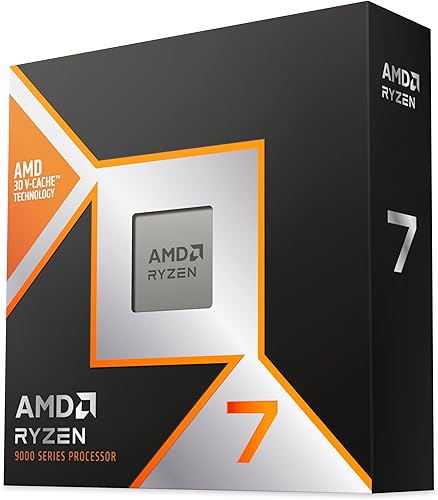
AMD Ryzen 7 9800X3D 8-Core 16-Thread
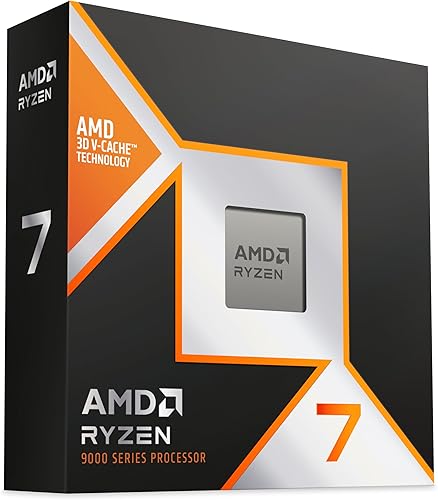
Prime AMD Ryzen 7 9850X3D Desktop Processor
As an Amazon Associate we earn from qualifying purchases. Product prices and availability are accurate as of the date/time indicated.
Pros
- Exceptional gaming performance with extremely consistent frame times
- Excellent power efficiency and manageable thermals with a good aftermarket cooler
- Easy installation on AM5 platform with broad motherboard compatibility after BIOS update
- Strong all around performance for gaming, streaming and everyday creation tasks
Cons
- Cooler not included, requires separate high quality cooling solution
- Requires AM5 motherboard and DDR5 memory, not compatible with AM4 systems
- 8-core design is less optimal for heavy workstation rendering versus higher core count CPUs
The AMD Ryzen 7 9800X3D is a high performance desktop processor designed for gamers, streamers and creators who demand top tier speed. Built on the Zen 5 architecture with next generation 3D V-Cache, it is purpose built to eliminate CPU bottlenecks in modern titles.
In real world gaming, the massive 96MB L3 cache and boost clocks up to 5.2GHz deliver outstanding frame rates and remarkably consistent frame times. Users report smooth performance in demanding and CPU heavy games, with excellent 1% lows that reduce stutter during competitive play and streaming.
The chip uses the proven Socket AM5 platform and offers drop in compatibility with existing AM5 motherboards after a BIOS update. Build quality reflects AMDs premium design, with improved thermal performance over the previous generation and efficient operation even during long sessions with a quality aftermarket cooler.
As a gaming focused CPU, it is not the best choice for heavy workstation or rendering workloads where higher core count processors excel. It also ships without a cooler, requires an AM5 board and DDR5 memory, and needs capable cooling to maintain its boost performance.
Overall, the Ryzen 7 9800X3D stands out as the go to processor for gamers who want the fastest and most stable gaming experience available. If your priority is maximum FPS, low latency and future ready AM5 support, this CPU is an excellent investment.
Model: AMD Ryzen 7 9800X3D, 8-Core, 16-Thread, Zen 5 Architecture
Cache: 96MB L3 Cache, 104MB Total Cache, 8MB L2 Cache
Clock Speed: 4.7GHz Base, Up to 5.2GHz Boost
Socket & Platform: Socket AM5, Supports DDR5 and PCIe 5.0, Windows 11 Ready
Power & Cooling: 140W, External Cooler Required, Cooler Not Included
Pros
- Exceptional gaming performance with 3D V-Cache and 104MB total cache
- Efficient 8-core, 16-thread design handles gaming, streaming and multitasking with ease
- Modern AM5 socket ensures long term compatibility and upgrade path
- Strong build quality backed by a 3-year manufacturer warranty
- Top ranked enthusiast CPU with proven reliability
Cons
- 140W TDP requires a capable cooler and power supply, not ideal for compact builds
- Gaming specialized design offers less value for heavy productivity or workstation use
- Requires AM5 motherboard and DDR5 memory, so not compatible with older AM4 systems
The AMD Ryzen 7 9850X3D is AMD's flagship gaming desktop processor, built on the Socket AM5 platform for gamers, streamers and enthusiasts who demand the highest frame rates. With 8 cores, 16 threads and AMD's renowned 3D V-Cache technology, it is purpose built for premium gaming rigs and future proof AM5 builds.
Its standout feature is the massive 104MB total cache, including 8MB secondary cache, paired with a 4.7GHz boost clock to minimize latency and maximize performance. In real world use, this delivers smoother high refresh rate gaming, faster load times and excellent multitasking for streaming and content creation while you play.
Designed for the AM5 socket, the processor supports modern standards like DDR5 and PCIe 5.0 in a compact package weighing just 3.2 ounces. AMD's solid build quality and included 3-year warranty add confidence, while the 140W design is tuned for enthusiast grade cooling and performance tuning.
There are tradeoffs to consider, as the 140W power draw demands a robust cooler and power supply and is not ideal for small form factor or low noise builds. As a gaming focused chip, users focused purely on heavy rendering or workstation tasks may find better value in higher core count alternatives.
Overall, the Ryzen 7 9850X3D lives up to its claim as a world leading gaming processor and is an outstanding choice for a premium gaming PC. If maximum FPS, low latency and AM5 longevity are your priorities, this processor is an easy recommendation.
Processor Series: AMD Ryzen 7, Model Number 100-100001973WOF, Socket AM5
Cores and Threads: 8 cores, 16 threads with 4.7GHz boost clock for high performance gaming
Cache Memory: 104MB total installed cache with 8MB secondary cache and 3D V-Cache technology
Power and Platform: 140W TDP, requires AM5 motherboard, DDR5 memory and capable cooling
Package Details: 5 x 5 inch dimensions, 3.2 ounces, includes 3-year manufacturer warranty
Matching a Part to Your Build
Scenario 1: High refresh 1440p with a strong GPU. You have or plan to buy a GPU in the RTX 5070 Ti class or similar and you play competitive shooters at 165Hz to 240Hz. Here an X3D CPU makes the most sense, because your GPU has headroom and your CPU will be asked to push high frame rates with stable lows. The AMD RYZEN 7 9800X3D 8-Core is a strong illustration of this approach, with its 96MB L3 cache, Zen 5 architecture, and up to 5.2GHz boost that targets gaming frame consistency. Pair it with fast DDR5, enable EXPO in BIOS if your kit supports it, and make sure your cooler can sustain boost under load.
Scenario 2: Balanced 1440p at 100Hz to 144Hz on a new build. You want smooth 1440p for a mix of single player and multiplayer games, and you are buying motherboard, RAM, and CPU together. If your GPU is mid range, the difference between X3D and non X3D will be smaller at 1440p, because you will be GPU limited in most titles. In this case you could choose the AMD RYZEN 7 9800X3D 8-Core if you want maximum longevity and the best 1% lows, or consider the more premium choice like the AMD Ryzen™ 7 9850X3D Desktop Processor if you prefer the newest X3D option and are comfortable with the higher end pick. Either way, prioritize a GPU that can actually drive your monitor before maximizing CPU cache.
Scenario 3: AM5 owner looking for a drop in gaming boost. You already have an AM5 board and DDR5 from a previous build and you want better gaming responsiveness without rebuilding. Because these chips are drop in ready for Socket AM5, you can often update your BIOS and swap the CPU. The AMD RYZEN 7 9800X3D 8-Core fits this path well if you want proven 8 core, 16 thread performance with 3D V-Cache, while the AMD Ryzen™ 7 9850X3D Desktop Processor represents the newer, more premium X3D tier for those who want the latest generation. Confirm BIOS support for your exact board, clear CMOS if the maker recommends it, and recheck cooler mounting pressure after installation.
Common Mistakes
Mistake 1: Undersizing the power supply. Builders often budget for the CPU alone and forget the GPU dominates power draw at 1440p. Do not pick a PSU based only on CPU TDP. Add CPU and GPU needs, follow the graphics card maker recommended wattage, and leave headroom for transients and future upgrades. A PSU that is too small can cause shutdowns under load or prevent boost from being sustained.
Mistake 2: Buying a cooler that does not fit. A great cooler that does not clear your case or RAM is not useful. The example X3D chip ships without a cooler, so you must choose one. Check the case spec for CPU cooler height or radiator support, measure RAM height if you use tall heat spreaders, and verify motherboard heatsink clearance. Follow the cooler maker instructions for mounting hardware and fan orientation to avoid poor contact or airflow restrictions.
Mistake 3: Mismatched memory or platform expectations. AM5 uses DDR5, and memory speed and stability affect gaming smoothness. Buying very slow DDR5 or mixing kits can limit performance, while chasing the fastest kit without checking your motherboard QVL can cause instability. Also, do not assume any AM5 board works out of the box with a new X3D chip, you may need a BIOS update, which is done at your own risk. Research board support, enable the correct memory profile, and keep your BIOS and chipset drivers current.
Who Should Wait or Buy Differently
An X3D CPU is not ideal for every 1440p gamer. If you play mostly at 60Hz, use a mid range or entry level GPU, or are building on a strict budget where every dollar counts toward the graphics card, you are often better off with a balanced non X3D CPU and a stronger GPU. It is also not a good fit if you need heavy productivity performance per dollar for rendering or compilation, where a higher core count non X3D chip may offer better value. If your current system is already GPU limited at 1440p, waiting and putting the budget toward your next GPU upgrade will usually improve your experience more than adding cache you cannot fully use yet.
Frequently Asked Questions
Do you need an X3D CPU for 1440p 144Hz gaming?
Not always. At 1440p 144Hz, your GPU is usually the main factor, but an X3D CPU can help if you have a strong GPU and want higher, more stable frame rates in CPU sensitive games. If your GPU is mid range or you mostly play GPU heavy titles, a balanced CPU plus a better GPU often gives you more benefit for the money.
Is an X3D CPU worth it if you already have an AM5 motherboard?
It can be, because Socket AM5 X3D chips are designed as drop in upgrades, so you may only need a BIOS update and a capable cooler. This makes X3D attractive for extending the life of your platform without buying a new board and RAM. Just confirm your board supports the specific processor and that your cooler and case have adequate clearance.
Will an X3D CPU help if you plan to upgrade your GPU later?
Yes, if you plan to move to a faster GPU in the next year or two, an X3D CPU can remove a future bottleneck at 1440p high refresh. It helps keep 1% lows smooth when the new GPU pushes more frames. If a GPU upgrade is far off or you are happy at 60Hz, you may want to wait and allocate budget to the GPU first.
Write Your Review
No reviews yet. Be the first to share your experience!