

Quick answer: Best for competitive PC play with elite visuals is ASUS ROG PG32UCDMR 32 Inch 4K 240Hz OLED because it pairs 4K at 240 Hz with 0.03 ms response per ASUS spec for ultra smooth motion and vibrant QD-OLED color that suits both play and creation.
You load a rich story game on your PC and dark caves look washed out, fast motion smears, and fine text feels soft around the edges. This roundup of 32-Inch 4K OLED Gaming Monitors for PC in 2026 covers deep contrast, crisp detail and fluid response per VESA standard for players who want a clear upgrade path. We focused on color accuracy, motion clarity and PC friendly features, and our capable capable gaming CPU guide shows how the right processor helps you sustain high refresh with fewer hitches.
| Product | Key spec with number | Best for | Price tier |
|---|---|---|---|
| ASUS ROG PG32UCDMR 32 Inch 4K 240Hz OLED | 4K at 240 Hz, 0.03 ms per ASUS spec | Enthusiast clarity | Premium |
| LG 32GX870A-B 32-inch Ultragear 4K UHD | 4K at 240 Hz, FHD at 480 Hz per LG spec | Dual-mode versatility | Premium |
| ASUS ROG XG32UCWG 32 Inch 4K 165Hz Glossy OLED | 4K at 165 Hz, FHD at 330 Hz per ASUS spec | Glossy sharpness | Upper midrange |
| msi MAG 321CUP QD-OLED, 32-Inch, 4K UHD | 4K at 165 Hz, 0.03 ms per MSI spec | Curved immersion | Midrange |
This article contains affiliate links. If you buy through one of our links, CustomPCGaming may earn a commission at no extra cost to you. Commissions never influence which products we recommend or how we rank them. Read our Affiliate Disclosure for details.
Quick Picks at a Glance
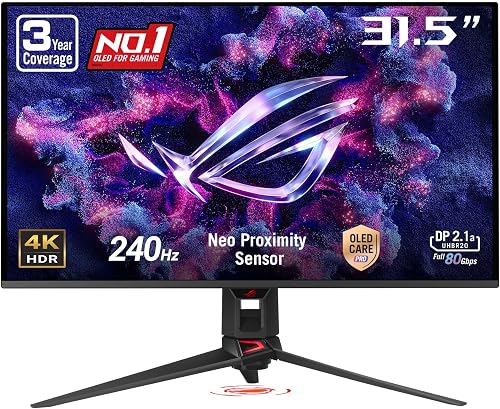
ASUS ROG Swift PG32UCDMR 32-Inch 4K QD-OLED

Prime ASUS ROG Swift PG32UCDM 32-inch 4K QD-OLED

MSI MAG 321CUP QD-OLED 32 inch 4K UHD 165Hz

LG 32GX850A-B 32-Inch 4K UHD Glossy OLED

SANSUI 32 Inch 1500R Curved Gaming Monitor 240Hz

Prime Samsung 32 inch Odyssey G55C QHD 1000R

ASUS ROG Swift PG32UCDP 32" 4K OLED Gaming Monitor

ASUS ROG XG32UCWG 32-inch 4K OLED Gaming Monitor

LG UltraGear 32GX870A 32-inch 4K OLED

Acer Predator X32 X 31.5 Curved 4K QD-OLED 240Hz
As an Amazon Associate we earn from qualifying purchases. Product prices and availability are accurate as of the date/time indicated.
Pros
- Exceptional 4K QD-OLED image quality with inky blacks and vibrant color out of the box
- Buttery smooth 240Hz performance with near instant 0.03ms response for competitive gaming
- Full bandwidth DisplayPort 2.1 and versatile USB-C with 90W charging
- Premium build with advanced burn-in protection and 3-year warranty coverage
- Sharp text and accurate color that works great for photo and video editing
Cons
- Black levels can lift with a purple tint in very bright rooms with lots of ambient light
- Some VRR flicker may appear on loading screens, common to OLED panels
- Large 32-inch footprint and heavier design requires sturdy desk space
The ASUS ROG Swift PG32UCDMR is a 32-inch 4K QD-OLED flagship built for serious PC gamers, console players and creators who want one display to do it all. With 240Hz, 0.03ms response and third generation QD-OLED, it targets users who demand both competitive speed and cinematic image quality.
In real world use, the panel delivers perfect blacks, zero bloom and vibrant color with 99 percent DCI-P3 and true 10-bit color. Games look incredibly crisp and smooth with G-Sync Compatible and FreeSync Premium Pro support, while Dolby Vision and DisplayHDR 400 True Black make HDR highlights pop for both gaming and photo editing.
Build quality feels premium and sturdy with a slim profile, modern ROG styling and LED logo on the back. You get DisplayPort 2.1, HDMI 2.1 and USB-C with 90W Power Delivery, plus height, tilt and swivel adjustment for comfortable daily use.
There are a few OLED tradeoffs to know. Black levels can lift with a purple tint under strong ambient light, and some VRR flicker can show on loading screens. Text clarity is excellent for a QD-OLED, but the matte coating and large footprint may not suit every bright office setup.
Overall, the PG32UCDMR is one of the best all around 4K OLED gaming monitors you can buy if you want elite speed, stunning HDR and long term peace of mind. With OLED Care Pro, custom heatsink cooling and 3-year burn-in coverage, it is an easy recommendation for high end gaming setups.
Display: 31.5-inch flat QD-OLED, 3840 x 2160 4K, 16:9, matte finish, 178 degree viewing angle.
Performance: 240Hz refresh rate, 0.03ms GTG response, 1,500,000 to 1 contrast, 1000 nits peak brightness, Adaptive Sync with FreeSync Premium Pro and G-Sync Compatible.
Color and HDR: 99 percent DCI-P3, true 10-bit, Delta E less than 2, VESA DisplayHDR 400 True Black, HDR10 and Dolby Vision, TUV Flicker-free and Low Blue Light.
Connectivity and Features: DisplayPort 2.1, HDMI 2.1, USB-C with 90W Power Delivery, USB hub, OLED Care Pro with Neo Proximity Sensor, DisplayWidget Center, height, tilt and swivel stand.
Pros
- Stunning 32-inch 4K QD-OLED image with exceptional color accuracy and contrast
- Ultra fast 240Hz and 0.03ms performance ideal for competitive and immersive gaming
- Excellent thermal design and 3-year warranty with burn-in coverage
- Versatile connectivity including USB-C with 90W charging and G-SYNC Compatible support
- Uniform brightness mode and OLED Care features for consistent, comfortable viewing
Cons
- Requires a powerful GPU to fully utilize 4K at 240Hz
- Large 32-inch footprint demands significant desk space
- Premium OLED technology still benefits from careful usage to avoid image retention
The ASUS ROG Swift OLED PG32UCDM is a flagship 32-inch 4K gaming monitor built for enthusiasts who want no compromises. It combines third-generation QD-OLED technology with a blazing 240Hz refresh rate to target competitive gamers, immersive single player fans and creative professionals alike.
In real world use, the 3840x2160 QD-OLED panel delivers perfect blacks, 99% DCI-P3 color and Delta E less than 2 accuracy for stunning HDR. The 0.03ms response time and G-SYNC Compatible support eliminate blur and tearing, while Dolby Vision and VESA DisplayHDR 400 True Black make games and movies pop with incredible contrast.
ASUS pairs the panel with a premium design and thoughtful engineering for longevity. A custom heatsink, graphene film and advanced airflow keep temperatures low to reduce burn-in risk, and the monitor includes a 3-year warranty that covers burn-in. Connectivity is excellent with DisplayPort, HDMI, USB-C with 90W power delivery and USB hub functionality.
There are tradeoffs to consider before buying. Driving 4K at 240Hz demands a high end GPU, and the large 32-inch footprint needs deep desk space. Like all OLEDs, static elements still require care despite the cooling system, and the matte finish slightly softens the QD-OLED vibrancy compared to glossy alternatives.
Overall, the PG32UCDM is one of the most complete 4K OLED gaming monitors available today. If you want elite image quality, ultra smooth motion and future proof features in a single display, it is an outstanding investment that justifies its premium positioning.
Display: 32-inch QD-OLED, 3840 x 2160 4K UHD, 16:9, 240Hz, 0.03ms GTG, 178-degree viewing angle, matte finish.
Image Quality: True 10-bit, 99% DCI-P3, 1500000:1 contrast, 1000 nits peak brightness, VESA DisplayHDR 400 True Black, Dolby Vision, HDR10, Delta E less than 2.
Connectivity: DisplayPort, HDMI, USB Type-C with 90W Power Delivery, USB Type-A hub, DisplayWidget Center support.
Features: G-SYNC Compatible, Adaptive Sync, Dynamic Shadow Boost, GameVisual, Flicker-Free, Low Blue Light, Uniform Brightness mode, OLED Care.
Build and Warranty: Custom heatsink with graphene film, wall mountable, 19.4 pounds, includes DisplayPort and HDMI cables, 3-year warranty with burn-in coverage.
Pros
- Exceptional QD-OLED contrast and color depth owners praise for gaming and movies
- Smooth 165Hz performance with 0.03ms response per MSI spec for fluid gameplay
- Versatile connectivity including HDMI 2.1 with VRR and ALLM per MSI spec for consoles
- Adjustable stand with tilt, swivel, height plus 100mm VESA support per MSI spec
- OLED Care 2.0 and graphene cooling per MSI spec help reduce burn-in concerns
Cons
- 1700R curve per MSI spec may require adjustment for users who prefer flat screens for office work
- USB-C offers only 15W power delivery per MSI spec, limited for charging larger laptops
- Glossy QD-OLED finish can show reflections in bright rooms per owner feedback
Quick answer: Best for immersive 4K gaming is MSI MAG 321CUP QD-OLED because its 32-inch QD-OLED panel delivers 3840x2160 resolution at 165Hz with 0.03ms response per MSI spec, plus DisplayHDR True Black 400 for deep contrast and vivid color for PC and console players.
| Product | Key spec | Best for | Price tier |
|---|---|---|---|
| MSI MAG 321CUP QD-OLED | 32-inch 4K 165Hz 0.03ms per MSI spec | Curved immersive gaming | Premium |
| 32-inch 4K IPS 144Hz per VESA standard | 3840x2160 at 144Hz per VESA standard | Flat screen office and play | Midrange |
| 34-inch Ultrawide OLED 165Hz per MSI spec | 3440x1440 at 165Hz per MSI spec | Wide view multitasking | Premium |
Is the MSI MAG 321CUP QD-OLED worth it for 4K gaming?
The MSI MAG 321CUP QD-OLED is a 32-inch 4K curved monitor with 1700R curvature per MSI spec, aimed at PC and console gamers who want cinematic immersion. Its 16:9 QD-OLED panel per MSI spec suits players who prioritize rich color and deep blacks over flat office displays.
Standout specs include 165Hz refresh with 0.03ms response per MSI spec and ClearMR 9000 motion clarity per VESA. Owners report crisp 3840x2160 visuals per MSI spec with 99 percent DCI-P3 color per MSI spec and 1000 nits peak HDR per VESA for vibrant play and streaming.
How does it handle PC, laptop and console connections?
The design pairs a subtle 1700R curve per MSI spec with tilt, swivel and height adjustment plus 100mm VESA mounting per MSI spec. A fanless graphene heatsink per MSI spec supports quiet operation, while DisplayPort 1.4a, HDMI 2.1 and USB-C with 15W PD per MSI spec cover modern devices.
The glossy finish can reflect light in bright rooms per owner feedback, and the 1700R curve per MSI spec is not ideal for all office tasks. USB-C power at 15W per MSI spec will not charge larger laptops, so a separate charger is often needed.
For gamers seeking a 32-inch 4K QD-OLED with 165Hz smoothness per MSI spec, this MSI model is a strong pick. It blends vivid HDR per VESA, console-ready HDMI 2.1 per MSI spec and burn-in care into a focused gaming display.
Frequently Asked Questions
Is this monitor good for console gaming?
Yes, HDMI 2.1 with 120Hz, VRR and ALLM per MSI spec supports smooth console play at 3840x2160 per MSI spec.
Does QD-OLED offer better blacks than IPS?
Yes, self-emissive pixels with 1500000:1 contrast per MSI spec deliver deeper blacks than backlit panels, plus DisplayHDR True Black 400 per VESA.
How does MSI help prevent burn-in?
It uses OLED Care 2.0 with pixel refresh and a graphene heatsink per MSI spec to support panel longevity during long sessions.
Can you mount this monitor on an arm?
Yes, it supports 100mm VESA mounting per MSI spec. It includes a 3-way adjustable stand for tilt, swivel and height per MSI spec.
Pros
- Stunning glossy OLED color with deep blacks, owners report natural pop without harsh whites
- Flexible Dual-Mode 4K at 165Hz or Full HD at 330Hz per LG spec covers both immersive and competitive play
- Smooth variable refresh with G-SYNC Compatible and FreeSync Premium Pro per LG spec
- Comfort and clarity with UL certified low blue light and flicker-free viewing per UL listing, plus 98.5 percent DCI-P3 color per LG spec
Cons
- Glossy panel shows reflections in bright rooms, owners report glare with direct light
- Input switching can feel slow when using multiple PCs and consoles, owners report
- Needs a capable GPU with DisplayPort 1.4 or HDMI 2.1 to reach up to 165Hz per LG spec, so older systems may limit performance
Quick answer: Best for competitive and story-driven gamers is LG 32GX850A-B because it pairs 4K at 165Hz with Full HD at 330Hz in Dual-Mode, plus 0.03ms response per LG spec for sharp motion and smooth variable refresh support for NVIDIA G-SYNC and AMD FreeSync Premium Pro setups.
The LG 32GX850A-B is a 32-inch 4K UHD OLED gaming monitor with 3840 x 2160 resolution per LG spec, aimed at PC gamers who want both cinematic clarity and esports speed. Owners report vivid color and deep blacks suit story-driven play, while Dual-Mode appeals to FPS, MOBA and racing fans who value high refresh options.
| Product | Key spec with number | Best for | Price tier |
|---|---|---|---|
| LG 32GX850A-B per LG spec | 4K 165Hz and 1080p 330Hz per LG spec | Dual-Mode versatility | Premium |
| LG 27-inch OLED per vendor spec | 1440p 240Hz per vendor spec | Smaller desk setups | High-end |
| Samsung 32-inch OLED per vendor spec | 4K 165Hz per vendor spec | Matte screen preference | Premium |
Is this LG OLED worth it for 4K gaming?
Dual-Mode lets you play at 4K UHD up to 165Hz or switch to Full HD up to 330Hz per LG spec, with 0.03ms GtG response per LG spec for crisp motion. NVIDIA G-SYNC Compatible and AMD FreeSync Premium Pro support smooth, tear-free frames per NVIDIA and AMD specs, while VESA DisplayHDR True Black 400 and 98.5 percent DCI-P3 coverage per LG spec add depth in dark scenes.
How does glossy OLED affect picture and comfort?
The glossy 32-inch OLED uses Micro Lens Array Plus for 275 nits typical brightness per LG spec, and owners report punchy color without harsh white glare. UL certifications for low blue light, flicker-free viewing and anti-glare per UL listing help comfort during long sessions, though reflections remain in bright rooms.
What about design, ports and setup?
The virtually borderless black chassis offers height, tilt, swivel and pivot adjustment per LG spec, plus 2 HDMI ports, DisplayPort and 3 USB ports per LG spec for PC and console setups. Owners report a clean, professional look without loud gamer styling, and included HDMI, DisplayPort and power cables per LG spec simplify setup.
Who should buy it?
Glossy finish can show glare under direct light, and some owners report input switching feels slow with multiple PCs and consoles. You need a graphics card with DisplayPort 1.4 or HDMI 2.1 to reach up to 165Hz per LG spec, so older GPUs may limit refresh.
This monitor suits gamers who want one display for immersive 4K and fast Full HD play, with 1.5M to 1 contrast and 0.03ms response per LG spec delivering OLED depth. If you game in a dark to controlled light room and value smooth variable refresh, owners report it is a strong, versatile pick.
Frequently Asked Questions
Does it support G-SYNC and FreeSync?
Yes, it is NVIDIA G-SYNC Compatible and supports AMD FreeSync Premium Pro per LG spec, which helps reduce tearing for supported GeForce GTX 10 Series and higher GPUs per NVIDIA spec.
How does Dual-Mode work?
You can select 4K UHD up to 165Hz for detail or Full HD up to 330Hz for speed per LG spec, using a hotkey per LG spec.
Is the glossy screen good for bright rooms?
Owners report gorgeous blacks and pop in controlled light, but direct lamps or windows increase reflections, so light control helps maintain clarity.
What is included for setup?
The box includes a DisplayPort cable, an HDMI cable and a power cable per LG spec, plus a stand with height, tilt, swivel and pivot adjustment per LG spec.
Pros
- Excellent 240Hz smoothness in the 32 inch curved class for fast action gaming
- High contrast VA panel with vivid 125% sRGB color, 300 nits brightness and HDR
- Comfort features include matte finish, flicker free, low blue light and wide 178 degree viewing
- Simple setup with included DP cable and VESA compatibility for arms and wall mounts
Cons
- 1080p resolution on 32 inches looks less sharp up close than 1440p alternatives
- No built in speakers, requires external speakers or headset via earphone jack
- Tilt only stand with no height or swivel adjustment
The SANSUI ES-G32C1F is a 32 inch 1500R curved gaming monitor built for speed focused players who want a large, immersive screen. It is best suited for FPS, racing and console gamers who prioritize high refresh rates and smooth motion.
In real world use, the 240Hz refresh rate and 1ms MPRT response deliver noticeably fluid gameplay, especially when paired with FreeSync over DisplayPort or HDMI. The VA panel offers a strong 3500:1 contrast ratio, 300 nits brightness and 125 percent sRGB coverage with HDR support for punchy color and deep blacks.
Design is clean and gamer ready with a frameless matte screen, slim profile and wide 178 degree viewing angles for comfortable long sessions. The stand offers tilt adjustment from minus 5 to 15 degrees, and the 100 by 100mm VESA pattern allows easy wall or arm mounting.
The main tradeoff is pixel density, since Full HD spread over 32 inches looks softer up close than smaller or higher resolution displays. It also lacks built in speakers and height or swivel adjustment, so plan for a headset and ideal viewing at about 1.2 meters back.
Overall, this SANSUI delivers standout motion clarity, immersion and comfort features for competitive gaming. If you want a big curved 240Hz screen for fast action and can accept 1080p sharpness, it is an easy recommendation.
Display: 32 inch 1500R curved LCD, Full HD 1920 x 1080, 16:9, matte finish, 178 degree viewing angle
Performance: 240Hz refresh rate, 1ms MPRT, FreeSync, HDR, 125 percent sRGB, 16.7M colors, 300 nits, 3500:1 contrast
Connectivity: 1 x HDMI, 1 x DisplayPort 1.4, 3.5mm earphone jack, DP cable included, no built in speakers
Design and Warranty: Tilt minus 5 to 15 degrees, VESA 100 x 100mm, desk or wall mount, 1 year manufacturer warranty with lifetime support
Pros
- Large 32 inch QHD screen with immersive 1000R curvature
- Fast 165Hz refresh rate and 1ms response for competitive gaming
- Strong 2500 to 1 contrast with HDR10 for vivid, detailed images
- AMD FreeSync for smooth, tear free gameplay
- Eye comfort features plus tilt adjustment and wall mount support
Cons
- Only one HDMI port, which limits multi device setups
- Tilt only stand with no height or swivel adjustment
- 300 nits brightness delivers modest HDR impact versus premium HDR displays
The Samsung Odyssey G55C is a 32 inch QHD gaming monitor designed for players who want scale and immersion. It suits PC gamers and console users who prefer sharp Quad HD detail and a wide, curved view over a smaller flat screen.
In real world play, the 165Hz refresh rate and 1ms MPRT response deliver fluid motion with minimal blur. AMD FreeSync reduces tearing while HDR10 and the high contrast VA panel add depth to shadows and highlights.
Design centers on the aggressive 1000R curve that fills peripheral vision and pulls you into the action. Build includes a sturdy tilt stand, VESA wall mount support, plus DisplayPort and HDMI connectivity for easy setup.
Drawbacks include a single HDMI port, which can be tight for multi console setups. The stand offers tilt only with no height adjustment, and peak brightness is modest so HDR looks good but not spectacular.
Overall, the Odyssey G55C is a compelling pick for immersive, high speed QHD gaming on a large format display. If you value curve, speed and screen size, it delivers where it counts.
Display: 32 inch VA, 2560 x 1440 QHD, 1000R curved, 16 to 9 aspect, HDR10
Performance: 165Hz refresh rate, 1ms MPRT, AMD FreeSync, 2500 to 1 contrast, 300 nits brightness
Comfort and Design: Eye Saver Mode, flicker reduction, 178 degree viewing angle, tilt adjustment, wall mountable
Connectivity: DisplayPort, HDMI, includes DP cord, power cord and stand
Pros
- Stunning OLED image quality with perfect blacks and 99% DCI-P3 color accuracy
- Dual-mode flexibility covers both cinematic 4K and competitive 480Hz gaming
- Ultra-fast 0.03ms response time eliminates motion blur
- Matte anti-glare coating performs excellently in bright rooms
- 3-year warranty with burn-in coverage and advanced passive cooling
Cons
- FHD 480Hz mode can be confusing to enable and is underused by most owners
- Some users report OLED flicker in multi-monitor setups during refresh rate changes
- On-screen menu text appears very small at native 4K resolution
The ASUS ROG Swift OLED PG32UCDP is a flagship 32-inch 4K WOLED monitor built for gamers who refuse to choose between image quality and speed. With its unique dual-mode system, it serves both immersive single-player fans and competitive esports players in one display.
In real-world use, the 4K 240Hz mode delivers incredibly sharp, vibrant visuals with perfect OLED blacks and smooth motion thanks to the 0.03ms response time. Switching to FHD 480Hz offers an ultra-competitive edge for fast shooters, while AI Assistant features and G-SYNC Compatible support keep gameplay fluid and precise.
Build quality is premium and gamer focused, with a matte anti-glare finish that handles bright rooms far better than glossy OLEDs. The flat panel offers wide 178-degree viewing, versatile connectivity including USB-C with 90W power delivery, and a custom heatsink that quietly protects the panel from burn-in.
It is not without quirks. Some users report OLED flicker in multi-monitor setups and find the FHD 480Hz mode tricky to activate. The on-screen menu can also feel tiny at native 4K, and the large 32-inch footprint demands solid desk space.
Overall, the PG32UCDP is a visually transformative, future-proof monitor that excels for both gaming and creative work. If you want top-tier OLED fidelity with the flexibility to go ultra-fast when needed, and value burn-in coverage and matte clarity, this is one of the best 32-inch options available.
Display: 32-inch WOLED, 3840 x 2160 4K UHD, 16:9, Flat, Matte finish, 178-degree viewing angle
Performance: 240Hz at 4K, 480Hz at FHD via Dual Mode, 0.03ms GTG response, G-SYNC Compatible, Adaptive Sync
Color & HDR: 99% DCI-P3, True 10-bit, VESA DisplayHDR 400 True Black, Calman Ready, Uniform Brightness mode
Connectivity: HDMI, DisplayPort, USB-C with 90W Power Delivery, USB 3.2, HDMI Ultra High Speed cable included
Comfort & Care: ROG OLED Anti-Flicker, TÜV Flicker-free, TÜV Low Blue Light, Blue Light Filter, Custom heatsink, DisplayWidget Center OLED Care
Dimensions & Warranty: 28.1 x 22.8 x 10.8 inches, 16.1 pounds, Wall mountable, 3-year warranty with burn-in coverage
Pros
- Punchy WOLED color and deep blacks that owners report looks vivid even in bright rooms
- Glossy TrueBlack coating delivers sharp, mirror-like clarity with reduced haze per ASUS spec
- Dual-mode 4K 165Hz and FHD 330Hz flexibility per ASUS spec covers both story games and esports
- Thoughtful burn-in tools including proximity dimming, logo brightness and pixel shift per ASUS spec
- Solid build with compact stand, VESA mounting and easy setup owners report
Cons
- Glossy finish can show reflections in sunny rooms without careful placement, owners report
- Single HDMI port and 15-watt USB-C charging per ASUS spec may limit multi-console and laptop power needs
- 4K at 165Hz demands a powerful GPU to fully utilize, per owners report
Quick answer: Best for competitive and cinematic gamers is the ASUS ROG XG32UCWG because it switches between 4K at 165Hz and FHD at 330Hz per ASUS spec, pairing sharp OLED clarity with esports speed in one 32 inch display for play and creative work.
| Product | Key spec with number | Best for | Price tier |
|---|---|---|---|
| ASUS ROG XG32UCWG | 32 inch 4K 165Hz, FHD 330Hz per ASUS spec | Dual-mode gaming and editing | Premium |
| 27 inch 1440p QD-OLED alternative | 27 inch 1440p 360Hz per vendor spec | Dark room esports | Premium |
| 32 inch 4K LCD alternative | 32 inch 4K 144Hz per vendor spec | Bright office mixed use | Midrange |
The ASUS ROG Strix XG32UCWG is a 32 inch 4K TrueBlack Glossy WOLED monitor for gamers, streamers and photo video editors per ASUS spec. It fits buyers who want one display for sharp 4K story games at 165Hz per ASUS spec and fast esports at FHD 330Hz per ASUS spec.
Is the ASUS ROG XG32UCWG worth it for gaming and editing?
Owners report vivid color, deep blacks and bright whites with 99 percent DCI-P3 and Delta E under 2 per ASUS spec. The 0.03ms response with G-SYNC Compatible play per ASUS spec keeps motion smooth, while DisplayHDR 400 True Black per VESA spec supports editing and HDR viewing.
The flat 32 inch panel with 178 degree viewing per ASUS spec sits on a compact stand that saves desk space, with 16.1 pound weight per ASUS spec and VESA arm support owners report. Rear RGB can be disabled, menus are deep, and HDMI 2.1 plus DisplayPort 1.4 with DSC plus USB-C with 15-watt Power Delivery per ASUS spec cover PC, laptop and console.
How many Hz and what connections does it offer?
The glossy finish boosts clarity but can mirror windows in bright rooms, a tradeoff owners report. With 1 HDMI port and 2 USB ports per ASUS spec plus modest 15-watt charging per ASUS spec, heavy multi-device users may want a dock or hub.
For buyers who want 4K OLED beauty plus a 330Hz FHD esports mode per ASUS spec in one 32 inch screen per ASUS spec, this ROG model is a compelling pick. Owners report easy setup, strong burn-in tools and 3 year burn-in coverage per ASUS spec for long term confidence.
Frequently Asked Questions
How does dual-mode work on this monitor?
It switches between 4K at 165Hz and FHD at 330Hz per ASUS spec, so you can pick resolution detail or extra speed from the on-screen menu per ASUS spec.
Is burn-in a concern for daily office use?
Risk is reduced with Neo Proximity Sensor auto black screen, logo dimming and pixel shift per ASUS spec, plus 3 year burn-in coverage per ASUS spec owners report.
How many watts does USB-C provide?
USB-C provides up to 15-watt Power Delivery per ASUS spec, which suits tablets and light laptop trickle charge but not full workstation power per ASUS spec.
Pros
- Gorgeous OLED picture with perfect blacks, rich contrast and vibrant HDR highlights
- Versatile Dual Mode covers both cinematic 4K and esports grade 480Hz gaming
- Ultra-low 0.03ms response with adaptive sync for buttery smooth, tear free action
- Premium, solid build with virtually borderless design and full ergonomic adjustments
- Future proof connectivity including DisplayPort 2.1 and USB Type-C
Cons
- OLED requires regular pixel care and mindful usage to avoid burn-in risk
- Built-in speakers sound thin and underwhelming for a premium gaming monitor
- Matte W-OLED coating reduces glare but looks less punchy than glossy QD-OLED alternatives
The LG UltraGear 32GX870A is a 32-inch 4K OLED gaming monitor built for players who want no compromises between visuals and speed. It is perfect for hybrid gamers who enjoy cinematic single player adventures and competitive esports, plus anyone who values true OLED contrast for entertainment.
Its standout feature is VESA Certified Dual Mode, letting you toggle between 4K at 240Hz and Full HD at 480Hz with a single hotkey. Combined with a near instantaneous 0.03ms response, G-SYNC Compatible and FreeSync Premium Pro support, motion stays crisp and tear free, while Micro Lens Array+ OLED reaches up to 1300 nits for impactful HDR.
Design and build quality are excellent, with a virtually borderless ultra thin panel and a sturdy, easy to assemble stand. You get full height, tilt, swivel and pivot adjustment, an anti-glare low reflection coating to reduce distractions, and extras like built-in speakers and customizable rear lighting.
There are a few drawbacks to note. As a W-OLED, it needs periodic pixel cleaning and care to minimize burn-in, and the matte finish trades some vibrancy for glare control compared to glossy QD-OLED panels. Users also report the integrated speakers are weak, so external speakers or headphones are recommended for serious audio.
Overall, the 32GX870A is one of the most versatile OLED gaming monitors you can buy, blending breathtaking image quality with true competitive performance. If you want one display that excels at both immersive 4K and ultra high refresh gaming, this UltraGear is an outstanding choice.
Panel: 32-inch (31.5 viewable) 4K UHD 3840 x 2160 W-OLED, Matte Anti-Glare, 178 degree viewing angle, 98.5% color gamut
Performance: Dual Mode 4K 240Hz / FHD 480Hz, 0.03ms GtG, 1.5M:1 contrast, VESA DisplayHDR True Black 400, HDR10, up to 1300 nits peak
Adaptive Sync: NVIDIA G-SYNC Compatible, AMD FreeSync Premium Pro
Connectivity: DisplayPort 2.1, 2x HDMI 2.1, USB Type-C, 4-pole headphone jack with DTS Headphone:X, built-in speakers
Design: Virtually borderless flat design, height, tilt, swivel and pivot adjustable, wall mountable, 21.6 lbs
Included: Monitor, DisplayPort cable, HDMI cable, USB-C cable, power cable, 2-year manufacturer warranty
Pros
- Large 31.5 inch 4K QD-OLED screen offers deep contrast and cinematic color per Acer spec
- 240Hz refresh with 0.03ms response per Acer spec supports fluid, low ghosting motion
- 99% DCI-P3 and True Black 400 per VESA standard for vivid HDR visuals
- 1700R curve plus tilt, swivel and height adjustment per Acer spec for comfort
Cons
- Big curved footprint needs a deep, sturdy desk to view comfortably
- Driving 4K at 240Hz per Acer spec calls for a powerful GPU
- OLED panel needs routine retention refresh care per Acer spec
Quick answer: Best for immersive 4K PC and console gaming is Acer Predator X32 X because its 31.5 inch QD-OLED panel pairs 3840x2160 resolution with 240Hz refresh per Acer spec for ultra smooth visuals, deep contrast and cinematic color that competitive and story driven gamers will love.
| Product | Key spec with number | Best for | Price tier |
|---|---|---|---|
| Acer Predator X32 X | 31.5 inch 4K 240Hz QD-OLED per Acer spec | Immersive 4K gaming | Premium |
| Acer Predator 27 inch OLED | 27 inch 4K 240Hz OLED per Acer spec | Smaller desk setups | Premium |
| Acer Predator 34 inch Ultrawide OLED | 34 inch 3440x1440 175Hz OLED per Acer spec | Ultrawide immersion | High end |
| Acer Nitro 32 inch IPS | 32 inch 4K 144Hz IPS per Acer spec | Value 4K play | Mid tier |
The Acer Predator X32 X is a 31.5 inch curved gaming monitor built for players who want large screen 4K immersion per Acer spec. It combines QD-OLED color with a 16:9 matte panel aimed at PC and console gamers who value cinematic visuals and high refresh action per Acer spec.
What makes the QD-OLED display special?
You get 3840x2160 resolution with true 10Bit color and 99% DCI-P3 coverage per Acer spec, so games show rich contrast and smooth gradients. VESA DisplayHDR True Black 400 with 0.0005 nits minimum per VESA standard helps dark scenes look deep while bright highlights stay vivid.
How smooth is gameplay in real use?
With 240Hz refresh and 0.03ms response per Acer spec, motion looks fluid with reduced ghosting in rapid shooters and racers. Owners report smooth high refresh play when paired with a capable GPU that can drive 4K resolution per Acer spec.
Is the curved design comfortable for long sessions?
The 1700R curvature wraps gently around your view for a more encompassing feel during long play per Acer spec. Tilt, swivel and height adjustment per Acer spec plus a matte surface help you find a comfortable angle with less glare.
Is this curved QD-OLED worth it?
The large 31.5 inch curved footprint needs a deep desk and 4K at 240Hz demands a strong GPU per Acer spec. OLED care such as image retention refresh per Acer spec is also part of ownership. For gamers who want premium QD-OLED immersion with top tier smoothness, it is a compelling choice.
Frequently Asked Questions
How many Hz does the Acer Predator X32 X support?
It supports up to 240Hz refresh per Acer spec, which suits smooth high frame rate gaming when your GPU can keep up.
Is this monitor good for console gaming?
Yes for players who want 4K visuals on a large curved screen per Acer spec, though you will get the full 240Hz benefit mainly on PC.
Does QD-OLED need extra care?
Acer includes image retention refresh per Acer spec to help reduce sticking, and owners report best results with varied content and screen sleep habits.
What size desk do you need?
The 31.5 inch curved body with adjustable stand per Acer spec fits best on a deep, sturdy desk that lets you sit back and take in the full view.
Buying Guide: What Should You Look for in a 32-Inch 4K OLED per VESA Standard?
QD-OLED vs WOLED and Glossy Finish?
QD-OLED panels such as the ASUS ROG PG32UCDMR 32 Inch 4K 240Hz OLED deliver 99% DCI-P3 coverage per ASUS spec, which gives you deeply saturated color for games plus strong accuracy for photo and video work. WOLED alternatives such as the ASUS ROG PG32UCDP 32 Inch 4K 240Hz OLED switch between 4K at 240 Hz and FHD at 480 Hz per ASUS spec, which suits players who move between cinematic adventures and high tempo shooters. Glossy surfaces boost perceived punch in controlled light, while low reflection coatings calm glare near windows, so match the finish to your room.
The LG 32GX850A-B 32 inch UltraGear 4K UHD with 3840 by 2160 pixels offers 275 nits typical brightness per LG spec, which helps maintain punch in a bright room without washing out shadows. Curved QD-OLED picks like the msi MAG 321CUP QD-OLED, 32-Inch, 4K UHD use 1700R curvature per MSI spec to wrap the image gently around your view for added immersion. If you are planning GPU headroom for these panels, our graphics card comparison for high resolution builds outlines which class of card fits smooth high detail play.
How Much Refresh Rate Do You Need for 4K PC Play per VESA Standard?
For most PC setups, 4K at 240 Hz with 0.03 ms response per ASUS spec feels superbly fluid and keeps motion blur very low in fast scenes. Dual-mode stars such as the LG 32GX870A-B 32-inch Ultragear 4K UHD run 4K at 240 Hz or FHD at 480 Hz per LG spec, which lets you chase detail in RPGs and raw speed in esports with one hotkey. More relaxed 4K at 165 Hz panels per ASUS spec still feel quick for story play while asking less from your GPU each frame.
Your processor and graphics card must feed those pixels steadily, so a tuned system like the one in our high end gaming PC build breakdown helps you hold stable frame times at high detail. Enable G-SYNC Compatible and FreeSync Premium Pro per NVIDIA spec and per AMD spec to smooth dips without tearing. Cap frame rates slightly below max refresh to keep latency low and motion even across long sessions.
Is Burn-in Protection and HDR Brightness Important?
Look for DisplayHDR True Black 400 certification per VESA standard with 98.5% DCI-P3 coverage per LG spec, which preserves shadow detail while keeping colors rich and natural. ASUS OLED Care Pro with Neo Proximity Sensor per ASUS spec dims to a dark screen when you leave, which lowers image retention risk during long desktop idle time. Custom heatsinks plus graphene film per ASUS spec and per MSI spec spread heat silently to support long term panel health.
Panel brightness behavior matters for HDR pop in games and movies, with peaks up to 1300 nits per LG spec for small highlights while full screen levels stay restrained per VESA standard. Keep your rig cool and quiet too, and our airflow case for a hot GPU explains how to move heat out without extra noise. Use uniform brightness when you edit, then allow dynamic brightness for cinematic HDR sessions.
What Connectivity and Ergonomics Matter for PC Setup?
For clean single cable PC use, USB-C with 90 W Power Delivery per ASUS spec on the ASUS ROG PG32UCDM 32 Inch 4K 240Hz OLED powers a laptop while carrying video and data together. HDMI 2.1 and DisplayPort 2.1 carry 4K at high refresh per HDMI spec and per VESA standard on modern graphics cards without fuss. Height, tilt, swivel and pivot controls help you set eye level correctly, which eases neck and shoulder strain.
Measure your desk depth before you commit, since a large immersive screen rewards a bit more viewing distance for comfort. If you pair screens side by side, a solid dual monitor arm for two screens frees space and centers your main OLED at eye height. Route cables with slack for swivel motion so ports stay free from strain during daily adjustments.
Final Thoughts: Which 32-Inch 4K OLED Fits Your PC per VESA Standard?
If you crave rich QD-OLED color with thoughtful care tools, choose ASUS ROG PG32UCDMR 32 Inch 4K 240Hz OLED per ASUS spec for stunning clarity, while players who prize flexibility will love LG 32GX870A-B 32-inch Ultragear 4K UHD per LG spec for its dual-mode speed and bright HDR punch.
Frequently Asked Questions
Is a 32-inch 4K OLED worth it for PC gaming in 2026 per VESA Standard?
Yes, when your PC can push high resolution frames and you value inky blacks per VESA standard. You gain sharp detail from 3840 by 2160 pixels per VESA standard plus fluid motion from 240 Hz panels per ASUS spec for both play and creation. Our balanced gaming PC parts list shows the class of system that keeps those frames steady.
How much refresh rate is enough for 4K OLED on PC per VESA Standard?
Many players feel delighted with 4K at 165 Hz per ASUS spec for vivid single player adventures and smooth desktop motion. Competitive fans often prefer 4K at 240 Hz per ASUS spec or dual-mode FHD at 480 Hz per LG spec for extra responsiveness. Match the panel to your favorite genres and to the frame rates your GPU can sustain per NVIDIA spec.
Do OLED monitors suffer burn-in with everyday PC use?
Modern OLEDs add pixel refresh, logo dimming and proximity dimming per ASUS spec and per LG spec to lower retention risk. Vary wallpapers, auto hide taskbars and let the monitor run its maintenance cycle per manufacturer guidance. With those habits, many owners enjoy daily OLED use in 2026 without visible issues.
What cables and ports do you need for 4K high refresh per HDMI Spec?
Use HDMI 2.1 per HDMI spec or DisplayPort 2.1 per VESA standard to carry 4K at high refresh from a modern GPU. USB-C with 90 W Power Delivery per ASUS spec adds single cable convenience for laptops that support display output. Choose ultra high speed rated cables per HDMI spec to avoid flicker at top modes.
Browse more picks in our Peripherals & Monitors category, or see our related guide on Cheap Gaming Monitors for PC Gaming That Feel Fast in 2026.
These picks are not ideal for casual or first-time players on a tight budget; they are aimed at people who want higher refresh rates, better panels, or competitive-grade input.









Write Your Review
No reviews yet. Be the first to share your experience!