

Quick answer: Best for competitive shooters is Dell 24 240Hz Gaming Monitor – SE2426HG because it reaches 240Hz with 0.5ms per Dell specs, while best for sharp immersion is Hikers 27 Inch Curved Gaming Monitor 280Hz 240Hz with 2560×1440 at 280Hz per HiKERS specs.
You want smooth aim and rich color without rebuilding your whole desk around a new screen. This roundup is for PC players who value fluid motion, clear text and simple connections, and we evaluated panel smoothness, color coverage and port choice for you. For extra context on speed tiers, see our notes on 180Hz gaming monitors for PC before you pick size.
This article contains affiliate links. If you buy through one of our links, CustomPCGaming may earn a commission at no extra cost to you. Commissions never influence which products we recommend or how we rank them. Read our Affiliate Disclosure for details.
Quick Picks at a Glance

Dell SE2426HG 24 Inch FHD 240Hz IPS Gaming Monitor

Sceptre 24-Inch Curved Gaming Monitor 1080p 180Hz

Prime Sceptre E275W-FW100T 27 Inch FHD 100Hz

Prime Sceptre 22-Inch FHD 1080p 144Hz Gaming Monitor

SANSUI 24 Inch 180Hz FHD 1080P Gaming Monitor

Prime SANSUI 24 Inch Curved Gaming Monitor 160Hz FHD
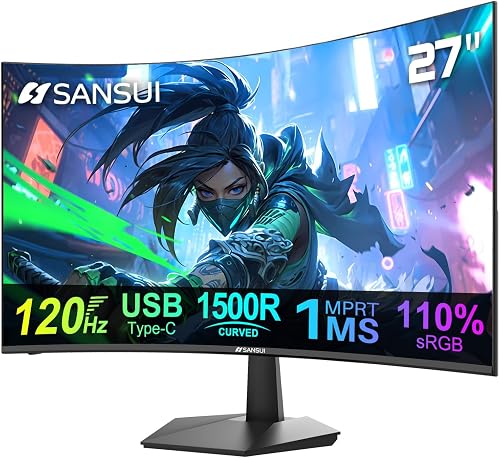
Prime SANSUI 27 Inch Curved Monitor 120Hz 1ms USB-C HDR

Sceptre 32-Inch Curved 240Hz Gaming Monitor 1080p

Prime Sceptre 24-Inch Curved Gaming Monitor 1080p 180Hz

HiKERS 27 Inch Curved 2K QHD Gaming Monitor 280Hz
As an Amazon Associate we earn from qualifying purchases. Product prices and availability are accurate as of the date/time indicated.
Pros
- Exceptionally smooth 240Hz performance praised for FPS and fast paced titles
- Excellent out of the box color accuracy and sharp IPS clarity
- Quick and easy setup with solid build quality and clean cable management
- TÜV certified eye comfort ideal for extended gaming and work sessions
- Great value for a high refresh rate IPS monitor
Cons
- Limited to 1080p FHD resolution, not ideal for 4K gaming or detailed creative work
- Ergonomics limited to tilt only, no height, swivel or pivot adjustment
- No HDR support, USB hub or built in speakers, with modest 300 nits brightness
The Dell SE2426HG is a 23.8-inch FHD gaming monitor designed to deliver high speed performance at an accessible level. It is aimed at competitive gamers, casual players and everyday users who want smooth visuals for both gaming and entertainment.
In real world use, the 240Hz refresh rate and 0.5ms Fast IPS response deliver noticeably fluid motion and reduced input lag. Combined with AMD FreeSync Premium and HDMI VRR, gameplay stays tear free and responsive on both PC and console, while 99 percent sRGB coverage keeps colors vivid and accurate.
The monitor features a sleek, modern black design with a matte anti glare coating and wide 178 degree viewing angles. Build quality is solid for its class at just 7.4 pounds, and setup is quick with the included HDMI cable, tilt adjustment and convenient cable management.
As an FHD display, it lacks the sharpness of 1440p or 4K options and does not offer HDR or advanced ergonomic adjustments beyond tilt. Brightness is rated at 300 nits with a standard 1000 to 1 contrast ratio, which is adequate but not exceptional for bright rooms or professional color work.
Overall, the SE2426HG stands out as a strong value pick for gamers who prioritize speed, color accuracy and eye comfort. If you want a reliable 240Hz IPS monitor for competitive gaming and daily use without extra cost, this Dell is an excellent choice.
Display: 23.8-inch FHD 1920x1080 Fast IPS, 240Hz, 0.5ms response, 300 nits brightness, 1000:1 contrast ratio
Color and Viewing: 99% sRGB gamut, 178 degree viewing angles, matte anti glare finish, 16:9 aspect ratio
Sync Technology: AMD FreeSync Premium with HDMI VRR support for tear free gaming
Connectivity: 2x HDMI 2.0, 1x DisplayPort 1.4
Design and Comfort: Flat black design, tilt adjustment, desk mount, TÜV Rheinland 3-Star eye comfort certified
In the Box: Monitor with stand, HDMI 2.0 cable 1.8m, power cable, QR card and safety information
Pros
- High refresh 180Hz panel per Sceptre specs delivers smooth visuals owners report for gaming and everyday use
- Curved 24-inch 1080p screen per Sceptre specs with 100% sRGB per Sceptre specs earns praise for clear color and immersion
- Versatile connectivity with dual HDMI and dual DisplayPort per Sceptre specs plus built-in speakers
- Eye comfort features and easy setup owners report as simple and beginner friendly
Cons
- 1080p resolution per Sceptre specs limits sharpness for 4K content and detailed pro photo work
- Built-in speakers save space but owners report external speakers sound fuller for movies and music
- 24-inch curved size per Sceptre specs may feel small for multitasking or users wanting ultrawide immersion
Quick answer: Best for budget gamers and home office users is the Sceptre C248B-FWT168 24-inch curved monitor because it offers 180Hz refresh per Sceptre specs for smooth play, plus 100% sRGB color per Sceptre specs and built-in speakers for everyday versatility with FreeSync support per Sceptre specs.
| Product | Key spec | Best for | Price tier |
|---|---|---|---|
| Sceptre Curved Gaming Monitor | 24-inch 1080p 180Hz per Sceptre specs | budget curved gaming | Budget |
| Flat Office Monitor | 24-inch 1080p 100Hz per vendor specs | work and study | Budget |
| Ultrawide Gaming Monitor | 34-inch 1440p 144Hz per vendor specs | immersive multitasking | Mid-range |
This Sceptre curved monitor blends gaming focus with everyday comfort for students, home offices and first setups. Owners report simple setup and vivid images that suit play, streaming and light creative work.
Is the Sceptre 24-inch curved monitor good for gaming?
Yes, it shines for quick play with up to 180Hz refresh and 1ms response per Sceptre specs for fluid motion. AMD FreeSync Premium per Sceptre specs helps reduce tearing, while FPS and RTS modes per Sceptre specs tune color and contrast for clearer targets.
How vivid is the display for movies and work?
The 24-inch Full HD panel with 100% sRGB coverage per Sceptre specs delivers rich color for films and photo viewing. Blue-Light Shift and a matte finish per Sceptre specs ease eye strain, and owners report comfortable viewing during long sessions.
What about design, sound and connectivity?
The machine black curved shape adds immersion while saving space, and VESA support per vendor specs allows wall or arm mounting. Dual HDMI and dual DisplayPort inputs per Sceptre specs cover PC and console, plus built-in speakers and audio out per Sceptre specs keep sound simple.
Is this Sceptre monitor worth it despite its limits?
Full HD resolution per Sceptre specs is crisp at this size but lacks detail for pro editing or dense multitasking. Built-in sound is handy, though owners report a separate soundbar or headphones give fuller audio for movies.
Should you buy this monitor for gaming and everyday use?
For smooth play, vibrant color and easy connectivity in a compact curved design, this pick stands out. Owners report strong value for play, study and streaming, making it a smart choice for first gaming setups.
Frequently Asked Questions
Does it support AMD FreeSync?
Yes, it supports AMD FreeSync Premium per Sceptre specs to help reduce screen tearing during gaming.
How many inputs does it have for PC and console?
It offers dual HDMI and dual DisplayPort inputs per Sceptre specs, plus audio out per Sceptre specs for flexible hookup.
Does it have built-in speakers?
Yes, it includes built-in speakers per Sceptre specs and an audio out jack per Sceptre specs for headphones or external sound.
Can you wall mount it?
Yes, it supports VESA wall mounting per vendor specs to free desk space and adjust viewing angle.
Pros
- Smooth 100Hz performance with 1ms response and FreeSync for affordable gaming
- Excellent color accuracy with 100% sRGB coverage for gaming and content creation
- Versatile connectivity with two HDMI ports and one DisplayPort
- Built-in speakers and Blue Light Shift add everyday convenience and comfort
- Lightweight frameless design with VESA mount compatibility
Cons
- 1080p resolution on 27 inches is less sharp than QHD or 4K alternatives
- Basic stand with limited height and swivel adjustment, VESA mount recommended for ergonomics
- Built-in speakers are convenient but lack bass and volume for immersive audio
The Sceptre E275W-FW100T is a 27-inch Full HD gaming monitor designed for budget conscious gamers, students and home office users who want smooth performance without a premium price. It balances everyday productivity with casual gaming, making it a versatile choice for mixed use setups.
In real world use, the 100Hz refresh rate and 1ms response time deliver noticeably smoother motion than standard 60Hz displays, especially in fast paced games. AMD FreeSync helps eliminate screen tearing, while 100% sRGB coverage ensures vibrant, accurate colors for gaming, streaming and light photo editing.
Design wise, the monitor features a frameless, matte flat panel that reduces glare and maximizes screen space in multi monitor setups. At just 7.2 pounds, it feels lightweight yet sturdy, and the VESA mount compatibility lets you free up desk space or achieve the perfect viewing angle.
There are some tradeoffs to consider at this level, including the 1080p resolution which is sharp but not as detailed as QHD or 4K on a 27 inch screen. The included stand offers basic tilt only, and the built in speakers are functional for casual use but lack depth for immersive gaming or media.
Overall, the Sceptre 27-inch Prime Gaming Monitor delivers impressive value with smooth performance, strong color accuracy and thoughtful extras like Blue Light Shift and FPS/RTS modes. If you need an affordable, reliable 100Hz display for gaming and daily work, this is a smart and practical pick.
Display: 27-inch LED, 1920 x 1080 FHD, 16:9 Aspect Ratio, Matte Finish, 100Hz Refresh Rate, 1ms Response Time, 2000:1 Contrast Ratio, 170 Degree Viewing Angle
Color and Performance: 100% sRGB Gamut, LED Backlighting, AMD FreeSync, FPS and RTS Game Modes, Blue Light Shift Eye Care Technology
Connectivity and Audio: 2x HDMI Ports, 1x DisplayPort, Audio In, Headphone Jack, Built-in Speakers
Design and Build: Frameless Flat Design, Machine Black Color, VESA Wall Mountable, Dimensions 24.13 x 17.21 x 7.66 inches, Weight 7.2 lbs, Model E275W-FW100T
Pros
- High 144Hz refresh rate and fast 1ms response for smooth casual gaming
- Versatile HDMI and DisplayPort connectivity with FreeSync support
- Built-in speakers eliminate the need for external audio
- Eye care features with Blue Light Shift and matte finish
- Compact VESA compatible design ideal for dual monitor or wall mount setups
Cons
- 22-inch 1080p size may feel small for immersive gaming or heavy multitasking
- Single HDMI port limits direct connection of multiple HDMI devices
- Color performance suits casual use more than professional photo and video editing
The Sceptre E225W-FW144 is a 22-inch Full HD monitor built for budget gaming, office work and study setups. With its compact 1080p panel, it suits students, remote workers and casual gamers who need speed without taking up much desk space.
Performance centers on the 144Hz refresh rate, 1ms response time and AMD FreeSync support. In real world use, gameplay looks noticeably smoother than standard 60Hz panels, while scrolling, video and everyday multitasking feel fast and responsive.
The design uses a slim, nearly bezel free flat panel in Machine Black with a matte anti glare finish. Built in speakers keep your setup clean, while HDMI, DisplayPort and VESA wall mount support make dual monitor or small space installation simple.
There are tradeoffs to keep in mind for the compact size and focused feature set. The 22-inch screen and single HDMI port can feel limiting for immersive gaming or multi device setups, and color performance is geared for casual use rather than professional photo editing.
Overall, this Sceptre monitor delivers strong value for users who prioritize speed, eye comfort and simplicity. If you want an affordable, space saving 144Hz display for gaming, business and school, it is a practical pick.
Screen Size: 22 inches, Full HD 1920 x 1080, 16:9 LED panel with matte finish
Refresh Rate: Up to 144Hz, 1ms response time, AMD FreeSync, 2000:1 contrast ratio
Connectivity: 1 x HDMI, 1 x DisplayPort, built in speakers
Design: Flat Machine Black, slim bezel, 170 degree viewing angle, VESA wall mount compatible
Model: E225W-FW144G, 2026 FW144 Series, 1 year manufacturer warranty
Pros
- High 180Hz refresh rate and fast 1ms response ideal for FPS, racing and action games
- High contrast VA panel delivers rich color, deep blacks and immersive image quality
- Eye care features and matte finish help reduce strain during extended work or play
- Easy setup with HDMI and DisplayPort inputs, audio jack and included HDMI cable
Cons
- No built-in speakers, requires headphones or external speakers via the audio jack
- Limited to 1080p resolution, not ideal for detailed photo or video editing work
- Only one HDMI port, which may require cable swapping for multiple consoles
The SANSUI ES-G24F4H is a 24 inch FHD gaming monitor designed for fast paced PC gaming and everyday office use. It is best for entry level gamers, students and remote workers who want one affordable screen for both play and productivity.
In real world use, the 180Hz refresh rate with 1ms MPRT and FreeSync delivers visibly smoother motion in shooters and racing titles. The 110% sRGB coverage, HDR support and 4000:1 contrast produce punchy colors and deep blacks that stand out in this class.
The flat 16:9 design with slim bezels and matte finish fits well on smaller desks and helps reduce glare. Setup is simple with HDMI 2.0 and DisplayPort 1.4 both capable of full 180Hz, plus 75mm VESA support for wall or arm mounting.
It is not perfect, as there are no built-in speakers and only one HDMI port, so multi device setups need some planning. The 1080p resolution looks sharp at 24 inches but lacks the extra detail of higher resolution panels for creative work.
Overall, this SANSUI monitor offers excellent motion clarity, strong contrast and helpful gaming assists for daily use. If you want smooth FHD performance with eye care in a compact 24 inch size, it is a practical and reliable choice.
Display: 24 inches, 1920 x 1080 FHD, VA LCD panel, flat 16:9 design with matte finish.
Performance: 180Hz refresh rate, 1ms MPRT response, FreeSync, 4000:1 contrast, 300 cd/m2 brightness.
Color and Care: 110% sRGB, 80% DCI-P3, HDR, anti-flicker and low blue light eye care technology.
Connectivity: 1 x HDMI 2.0, 1 x DisplayPort 1.4, audio jack, VESA 75mm x 75mm, HDMI cable included in box.
Pros
- Fast 160Hz refresh and 1ms response ideal for competitive gaming
- Immersive 1500R curve with high contrast VA panel
- Rich color performance with 110% sRGB and HDR
- Useful gaming features like FreeSync, crosshair and multiple game modes
- Tilt adjustment and VESA compatibility for comfortable setup
Cons
- 1080p resolution is less sharp than 1440p alternatives
- No built-in speakers, external audio required
- Only one HDMI port, limited for multi-console setups
The SANSUI ES-G24C1L is a 24-inch 1500R curved gaming monitor built for budget conscious PC and console gamers who want speed and immersion. It pairs a Full HD VA panel with a 160Hz refresh rate, making it ideal for FPS, RTS and action titles.
In real world use, the 160Hz refresh with 1ms MPRT and FreeSync support keeps motion smooth and largely free of tearing. The 110 percent sRGB gamut, 3000:1 contrast ratio and HDR support produce punchy colors and deep blacks that suit both gaming and movies.
The design centers on immersion with a tight 1500R curve, slim frameless edges and a matte anti glare finish. Tilt adjustment from -5 to 15 degrees plus 75 x 75mm VESA compatibility makes it easy to find a comfortable angle or wall mount it.
There are tradeoffs to note, including Full HD rather than Quad HD resolution and no built in speakers. Connectivity is also basic with one HDMI 2.0, one DisplayPort 1.4 and an audio jack, so multi device users may need a switch.
Overall, this SANSUI curved monitor delivers strong gaming value with fast performance, vivid contrast and useful game modes. It is a smart choice for gamers upgrading from a 60Hz or 75Hz flat screen who want a more responsive and immersive setup.
Model: SANSUI ES-G24C1L, 24 Inch 1500R Curved VA Monitor
Resolution and Performance: 1920 x 1080 FHD, 160Hz refresh, 1ms MPRT, FreeSync, HDR
Image Quality: 110 percent sRGB, 300 nits brightness, 3000:1 contrast, 16.7M colors, matte finish
Connectivity: HDMI 2.0 x1, DisplayPort 1.4 x1, 3.5mm audio out, no speakers
Design: 16:9 frameless design, tilt -5 to 15 degrees, VESA 75 x 75mm compatible
Pros
- Curved immersive display suits gaming, office work and media
- High refresh rate with Adaptive Sync supports smooth motion
- USB Type-C simplifies setup with laptops and mobile devices
- Built-in speakers and VESA mount add everyday convenience
- Eye care features help reduce strain during long sessions
Cons
- 1080p resolution on 27 inches looks less sharp than higher resolution panels
- Limited to one HDMI port, so multi device users may need to swap cables
- Short 90 day manufacturer warranty per SANSUI spec may concern some buyers
Quick answer: Best for budget gaming and home office use is the SANSUI ES-27C1 27 inch curved monitor because it offers 120Hz refresh and 1ms response per SANSUI spec for smooth visuals, plus USB Type C, built in speakers, and eye comfort features in one versatile display.
| Product | Key spec with number | Best for | Price tier |
|---|---|---|---|
| SANSUI ES-27C1 Curved | 27 inch 120Hz per SANSUI spec | Gaming and office | Budget |
| Flat 27 inch Office Monitor | 27 inch 100Hz per vendor spec | Spreadsheets and browsing | Budget |
| Curved 27 inch Gaming Monitor | 27 inch 165Hz per vendor spec | Competitive play | Mid range |
Who is the SANSUI ES-27C1 best for?
The SANSUI ES-27C1 is a 27 inch curved 1080p monitor designed for gaming, business and home office use per SANSUI spec. It suits gamers, students, remote workers and photo video editors who want an immersive display with built in speakers.
How smooth is 120Hz for gaming and everyday use?
It delivers 120Hz refresh with 1ms MPRT response and Adaptive Sync per SANSUI spec for fluid motion in games and scrolling. Owners report smooth play with reduced tearing, while 110% sRGB, 4000:1 contrast and 300 nits brightness per SANSUI spec support vivid color.
How is the design, comfort and connectivity?
The curved matte panel offers 178 degree viewing, minus 5 to 15 degree tilt and 100 x 100mm VESA support per SANSUI spec. USB Type-C, HDMI 1.4 and dual 2W speakers per SANSUI spec keep desks tidy, plus HDR, anti-glare, anti-flicker and low blue light add comfort.
Is the SANSUI 27 inch curved monitor worth it?
The trade offs are 1080p resolution on 27 inches per SANSUI spec, which is less crisp than higher resolution options, and a single HDMI input. With 35 watts power use per SANSUI spec and 90 day manufacturer coverage per SANSUI spec, it remains a practical value choice for everyday gaming and office tasks.
Frequently Asked Questions
How many watts does the SANSUI ES-27C1 need?
It uses 35 watts power consumption with 110 volts input per SANSUI spec, which suits typical home office setups.
Does it work with laptops and smartphones over USB Type-C?
Yes, it includes USB Type-C and HDMI 1.4 inputs per SANSUI spec for desktops, laptops, smartphones and tablets.
Is this monitor good for eye comfort?
Yes, it offers anti-glare matte finish, anti-flicker, low blue light and 3H hard coating per SANSUI spec to help ease strain.
Pros
- High 240Hz refresh rate per Sceptre spec ideal for competitive play
- Large curved screen owners report as immersive for gaming and media
- Wide 110% sRGB coverage per Sceptre spec for vibrant visuals
- Multiple high refresh ports, built-in audio and tilt plus VESA options per Sceptre spec
Cons
- 1080p resolution on 32 inches per Sceptre spec can look soft up close compared with higher resolution displays
- Built-in speakers are basic per owners report, separate speakers sound fuller
- One owner reported a black screen failure after months, limited to 1 year warranty per Sceptre spec
Quick answer: Best for competitive 1080p gamers seeking immersive curved visuals is the Sceptre C325B-FWD240.A1 32-inch curved monitor because its 240Hz refresh rate per Sceptre spec delivers ultra smooth motion for fast shooters, racing titles and everyday entertainment on compatible desktop PCs with FreeSync Premium support.
This 32-inch curved gaming display from Sceptre pairs esports focused speed with comfort features for work and play, per Sceptre spec and owners report.
| Product | Key spec with number | Best for | Price tier |
|---|---|---|---|
| Sceptre C325B-FWD240.A1 per Sceptre spec | 240Hz Full HD VA per Sceptre spec | Competitive FPS play | Value |
| Typical 32-inch 144Hz monitor per manufacturer spec | 144Hz Full HD VA per manufacturer spec | Casual gaming and media | Value |
| Typical 27-inch 165Hz monitor per manufacturer spec | 165Hz QHD IPS per manufacturer spec | Mixed work and play | Mid-range |
Who is this monitor best for?
Built around a 32-inch 1920x1080 VA panel per Sceptre spec, this model suits FPS and RTS players who want a large, enveloping view without moving to higher resolution. Owners report it also works well for movie viewing, casual photo editing and office tasks where 110% sRGB coverage per Sceptre spec helps colors look rich.
How smooth is gameplay for competitive titles?
With up to 240Hz refresh through DisplayPort and HDMI 1 per Sceptre spec plus 1ms MRPT per Sceptre spec, motion looks fluid and blur is reduced in fast action. AMD FreeSync Premium and Adaptive Sync per Sceptre spec help reduce tearing and stutter for smoother on screen movement, which owners report makes tracking targets feel more responsive.
What about design, comfort and everyday use?
The 1500R curved Matte screen with 1000:1 contrast and 280 cd/m2 brightness per Sceptre spec fills peripheral vision while limiting glare during day use. Blue Light Shift, Flicker-Free backlight and tilt adjustment per Sceptre spec support longer viewing sessions, and built-in speakers plus VESA wall mount support per Sceptre spec add flexible setup options.
Is this Sceptre curved gaming monitor worth it?
Full HD spread over 32 inches per Sceptre spec can look less crisp than higher resolution panels at close distance, and built-in audio is basic compared with separate speakers per owners report. One owner noted a black screen failure after several months of use, so buyers wanting long term peace of mind should note the 1 year limited warranty per Sceptre spec.
Overall this curved display remains a strong pick for budget minded gamers who value size, speed and immersion, per owners report. If you play fast paced titles on desktop and want 240Hz motion with FreeSync Premium per Sceptre spec, it delivers clear everyday value.
Frequently Asked Questions
How many HDMI ports does it have?
It includes 2 HDMI ports plus DisplayPort for PC connection per Sceptre spec, with up to 240Hz available on HDMI 1 and DisplayPort per Sceptre spec.
Does this monitor support FreeSync for gaming?
Yes, it supports AMD FreeSync Premium with Adaptive Sync per Sceptre spec to sync the graphics card and display for reduced tearing. Owners report smoother motion in FPS and RTS modes when the feature is enabled.
Is the picture sharp enough on this large screen?
At 1920x1080 resolution on 32 inches per Sceptre spec, pixels are larger than on smaller Full HD displays, so text can look softer up close. Owners report games and video still look clear and immersive from normal viewing distance.
Can you mount this monitor on the wall?
Yes, it offers VESA wall mount compatibility and tilt adjustment per Sceptre spec for flexible placement on an arm or wall. Its 28 inch width and 20 inch height per Sceptre spec suit larger desks and living spaces.
Pros
- High 180Hz refresh and 1ms response ideal for esports on a budget per Sceptre spec
- Curved 24 inch 1080p panel balances sharpness and high frame rates per Sceptre spec
- Generous connectivity with dual HDMI and dual DisplayPort per Sceptre spec
- Built in speakers and VESA support save desk space
Cons
- VA panel viewing angles are narrower than IPS alternatives
- 1080p resolution limits detail for creative work versus 1440p options
- Built in speakers suit casual use but owners report a headset or soundbar sounds fuller
Quick answer: Best for budget competitive gamers is Sceptre C248B-FW180T because it pairs a 24 inch 1500R curved VA panel with 180Hz refresh per Sceptre spec for fluid esports play, plus 1ms Blur Reduction, Adaptive Sync, and built in speakers for a complete setup.
| Product | Key spec | Best for | Price tier |
|---|---|---|---|
| Sceptre C248B-FW180T | 24 inch 180Hz per Sceptre spec | Competitive gaming | Budget |
| Sceptre 27 inch Curved | 27 inch 165Hz per Sceptre spec | Immersive play | Budget |
| ASUS TUF 24 inch | 24 inch 180Hz per ASUS spec | Esports versatility | Mid range |
Who is the Sceptre C248B-FW180T for?
This is a 24 inch Full HD curved monitor built for PC and console gamers who want speed without complexity per Sceptre spec. The 1500R VA panel pulls edges closer for immersion per Sceptre spec. It fits first time builders, dorm setups, and dual screen upgrades.
How smooth is gameplay at 180Hz?
You get up to 180Hz refresh with 1ms Blur Reduction for crisp motion in shooters and racers per Sceptre spec. Adaptive Sync keeps frames tear free when action spikes per Sceptre spec. The VA panel with 100% sRGB coverage delivers deep blacks and vivid color per Sceptre spec.
What is the design and build like?
The Machine Black cabinet uses a slim frameless matte screen that suits dual monitor rows per Sceptre spec. You get 2 HDMI ports and 2 DisplayPorts plus built in speakers and audio out per Sceptre spec. VESA support allows wall or arm mounting to free desk space per Sceptre spec.
Are there any drawbacks?
Contrast and color pop are strong, but VA viewing angles are tighter than IPS. The 1920 x 1080 resolution keeps frame rates high yet offers less detail than higher resolution panels per Sceptre spec. Built in audio works for casual play, though owners report dedicated speakers sound richer.
Is this Sceptre monitor worth it?
For gamers seeking a curved screen for rapid shooters, this model hits the right balance. Speed, curve, color, and connectivity come together in a simple package per Sceptre spec. If you want immersive 1080p play per Sceptre spec without extra tuning, it is a smart pick.
Frequently Asked Questions
How many HDMI and DisplayPort inputs does it have?
It includes 2 HDMI ports and 2 DisplayPorts for up to 180Hz operation per Sceptre spec, so you can keep a PC, laptop, and console connected.
Does it support Adaptive Sync for gaming?
Yes, Adaptive Sync pairs the display refresh with your GPU output to reduce tearing per Sceptre spec, which helps keep 1080p gameplay fluid during demanding scenes per Sceptre spec.
Is the 24 inch screen good for eye comfort?
It offers Blue Light Shift and a matte 24 inch panel to ease strain during long sessions per Sceptre spec, plus a 1500R curve that keeps edges in view per Sceptre spec.
Can you mount it or use external speakers?
Yes, it supports VESA mounting and includes built in speakers plus an audio out jack for headsets or soundbars per Sceptre spec, giving flexible desk options.
Pros
- Extremely high 280Hz refresh rate ideal for FPS and competitive gaming
- True HDMI 2.1 connectivity supports modern consoles and high refresh PC gaming
- High contrast curved VA screen delivers immersive image with wide viewing angles
- Wide color coverage with HDR10 for vibrant gaming and entertainment
- Includes HDMI 2.1 cable and VESA mount support for easy setup
Cons
- No built in speakers, requires headphones or external audio
- Tilt only stand with limited ergonomic adjustment for height or swivel
- VA panel motion clarity may not match IPS or OLED for some competitive players
The HiKERS G27H1Q Pro is a 27-inch curved 2K QHD monitor built for competitive gamers who want high speed without giving up image quality. It is best suited for FPS, racing and esports players on PC, PS5, Xbox and Switch.
Performance centers on a fast VA panel that reaches up to 280Hz with 1ms MPRT for smooth motion and reduced blur. FreeSync and G-Sync compatibility plus HDMI 2.1 VRR help eliminate tearing for consistent gameplay across PC and console.
Image quality stands out with 2560 x 1440 resolution, 5000:1 contrast, 350 nits brightness and HDR10 support. With 134 percent sRGB and 99 percent DCI-P3 coverage, colors look vivid for gaming, streaming and everyday entertainment.
Design uses a frameless curved matte screen with 178 degree viewing and tilt adjustment for comfortable positioning. It includes dual HDMI 2.1 ports, DisplayPort 1.4, an earphone jack and 100 x 100mm VESA support, though it lacks built in speakers.
For gamers seeking high refresh 2K performance with full console support, this monitor offers strong value and versatility. If you need full ergonomic adjustment or built in audio, plan for accessories, but for pure speed and immersion it delivers.
Display: 27 inch curved VA, 2560 x 1440 QHD, 16:9 aspect, matte finish, 178 degree viewing angle.
Performance: Up to 280Hz refresh, 1ms MPRT, Adaptive Sync with FreeSync and G-Sync compatible.
Image Quality: 5000:1 contrast, 350 nits brightness, HDR10, 134 percent sRGB, 99 percent DCI-P3.
Connectivity and Mount: 2 x HDMI 2.1, 1 x DisplayPort 1.4, earphone port, VESA 100 x 100mm, tilt minus 5 to 15 degrees.
| Product | Key spec | Best for | Price tier |
|---|---|---|---|
| Dell 24 240Hz Gaming Monitor – SE2426HG | 240Hz IPS, 0.5ms per Dell specs | Esports shooters | Value tier |
| SANSUI 24 Inch 180Hz Gaming Computer Monitor | 180Hz, 1ms per SANSUI specs | Everyday ranked play | Budget tier |
| Sceptre New 24-inch Curved Gaming Monitor 1080p | 180Hz curved, 100% sRGB per Sceptre specs | Immersive desk setups | Budget tier |
| Sceptre Curved 32-Inch Prime Gaming Monitor 1080p | 240Hz, 1500R per Sceptre specs | Large curved play | Mid tier |
| Hikers 27 Inch Curved Gaming Monitor 280Hz 240Hz | 280Hz, 2560×1440 per HiKERS specs | Sharp 2K speed | Mid tier |
Buying Guide: How Much Speed Do You Need for PC Gaming in 2026?
We focused on motion clarity, color accuracy and everyday usability to keep this list practical for you. You will see how refresh, panel type and ports affect feel, and we kept notes concise so you can compare quickly.
Refresh Rate and Response Time
If you play shooters, prioritize high refresh and low response so motion stays readable during fast flicks. The Dell 24 240Hz Gaming Monitor – SE2426HG delivers 240Hz with 0.5ms per Dell specs for crisp tracking, and the Sceptre Curved 32-Inch Prime Gaming Monitor 1080p also pushes 240Hz per Sceptre specs for large screen momentum. You will notice cleaner tracking in fast pans and less blur in close fights.
For balanced play, mid high refresh feels fluid without demanding a flagship GPU in most titles. The SANSUI 24 Inch 180Hz Gaming Computer Monitor hits 180Hz with 1ms per SANSUI specs for daily ranked play, while the SANSUI 24 Inch Curved 160Hz Gaming Monitor,1500R reaches 160Hz with 1ms per SANSUI specs for curved focus, and you can compare sizes in our guide to 27-inch 240Hz gaming monitors. This range suits shooters, racers and action games alike.
Screen Size, Resolution and Panel Type
Size shapes aim and immersion, while panel tech shapes color and viewing angles for work and play. The Dell 24 240Hz Gaming Monitor – SE2426HG uses IPS with 99% sRGB per Dell specs for clean color at wide angles, while the SANSUI Curved Monitor 27 inch 120Hz USB Type-C offers 110% sRGB with 4000:1 contrast per SANSUI specs for deeper VA punch. Pick compact for focus or larger for presence.
If you want sharper detail, choose higher resolution for your main display rather than settling for soft visuals. The Hikers 27 Inch Curved Gaming Monitor 280Hz 240Hz delivers 2560×1440 at 280Hz with 134% sRGB per HiKERS specs for detailed worlds, and our look at entry-level ultrawide gaming monitors shows how wider views help chat, timelines and minimaps. Sharpness helps you spot movement at distance.
Adaptive Sync, Ports and Compatibility
Tearing ruins aim, so look for adaptive sync that matches your GPU output across PC and console. The Dell 24 240Hz Gaming Monitor – SE2426HG supports FreeSync Premium with HDMI VRR per Dell specs for smooth hybrid play, and the Sceptre New 22-Inch Gaming Monitor, FHD 1080p keeps hookup simple with HDMI and DisplayPort per Sceptre specs for compact desks. Smooth frames keep tracking consistent.
Modern hookups matter if you dock a laptop or share the screen with consoles in a small room. The SANSUI Curved Monitor 27 inch 120Hz USB Type-C includes USB Type-C plus HDMI 1.4 per SANSUI specs for flexible hookup, while the Hikers 27 Inch Curved Gaming Monitor 280Hz 240Hz offers two HDMI 2.1 ports and one DP 1.4 per HiKERS specs for high bandwidth, and our breakdown of a 1440p gaming PC build helps you match GPU to panel. Plan cables before you mount.
Comfort, Audio and Setup Flexibility
Long sessions demand low blue light, flicker control and tilt you can live with every day. The Sceptre New 24-inch Curved Gaming Monitor 1080p uses Blue-Light Shift per Sceptre specs to ease eye strain, and the SANSUI 24 Inch 180Hz Gaming Computer Monitor adds anti-flicker with low blue light per SANSUI specs for late night queues. Comfort features help you stay focused longer.
Built-in speakers and VESA support keep budget desks tidy without extra gear or clutter. The Sceptre 27-inch Prime Gaming Monitor 100Hz 1ms includes built-in speakers with 100Hz over HDMI and DisplayPort per Sceptre specs for simple audio, while the New! Sceptre Curved 24-inch Prime Gaming Monitor brings dual HDMI plus dual DisplayPort up to 180Hz per Sceptre specs for multi device use, and you can borrow tidy ideas from 5K gaming monitors for sharp detail setups. Flexible mounting opens desk space.
Final Thoughts
For pure competitive speed, we recommend Dell 24 240Hz Gaming Monitor – SE2426HG for its 240Hz IPS clarity per Dell specs, and for sharper immersion we suggest Hikers 27 Inch Curved Gaming Monitor 280Hz 240Hz with 2560×1440 at 280Hz per HiKERS specs for November upgrades.
Frequently Asked Questions
Is 180Hz enough for PC gaming in 2026?
Yes, that tier feels fluid for most shooters, racers and action titles without stressing mainstream GPUs. The SANSUI 24 Inch 180Hz Gaming Computer Monitor runs 180Hz with 1ms per SANSUI specs for responsive daily play, and the New! Sceptre Curved 24-inch Prime Gaming Monitor reaches 180Hz with 1ms per Sceptre specs for curved immersion. You get smooth tracking without needing top tier hardware.
Do cheap gaming monitors support FreeSync for PC and consoles?
Many do, and that support prevents tearing when frame rates dip in busy scenes. The Dell 24 240Hz Gaming Monitor – SE2426HG offers FreeSync Premium with HDMI VRR per Dell specs for PC and console use, and you can keep wiring neat with a cable tray and monitor arm clamp combo while you connect over HDMI and DisplayPort per manufacturer specs. Switching inputs stays simple for shared setups.
What screen size should you pick for a budget setup?
Pick compact for focus and large for immersion based on viewing distance and desk depth. The SANSUI 24 Inch 180Hz Gaming Computer Monitor runs 180Hz with 1ms per SANSUI specs for tight aim at close range, and the Sceptre 27-inch Prime Gaming Monitor 100Hz 1ms delivers 100Hz with 1ms per Sceptre specs for mixed work and play. Measure your desk depth before you commit to a larger curve.
Are curved monitors worth it for affordable PC gaming?
Curved panels wrap your view and help large screens feel closer during long matches. The SANSUI 24 Inch Curved 160Hz Gaming Monitor,1500R uses 1500R curvature at 160Hz per SANSUI specs for focused play, and the Sceptre Curved 32-Inch Prime Gaming Monitor 1080p pairs 1500R with 240Hz per Sceptre specs for wide immersion in 2026. Sit centered for the most even image across the curve.
Browse more picks in our Peripherals & Monitors category, or see our related guide on Best 180Hz Gaming Monitors for PC in 2026: 9 Sharp Picks.
These picks are not ideal for casual or first-time players on a tight budget; they are aimed at people who want higher refresh rates, better panels, or competitive-grade input.








Write Your Review
No reviews yet. Be the first to share your experience!