

Choosing between 1440p and 4K is not just about sharpness, it is about whether your graphics card can actually drive the pixels you are paying for. If you ask does your GPU matter for choosing a 1440p vs 4K monitor, the answer is yes, and it affects everything from the refresh rate you will realistically see to the features worth paying for.
In September 2026, this decision comes down to a few variables you can weigh before you shop: your target resolution and refresh rate, your current GPU tier and power budget, your case and desk space, and whether you are buying for the card you have now or the one you plan to upgrade to next. This guide gives you a simple framework to make that call, with a few example monitors to show how the specs translate to real builds.
What Actually Matters
1. Your GPU Output at Each Resolution
Resolution directly sets how much work your GPU has to do each frame. A 3840 x 2160 panel has substantially more pixels than a 2560 x 1440 panel, so holding the same refresh rate at 4K requires considerably more graphics power. That is why the same card that feels fluid at 1440p can feel constrained at 4K, even with identical game settings.
Think in terms of your GPU comfort zone. If your card is designed for high refresh 1440p gaming, you will often see smoother motion at 2560 x 1440 with high settings than at 3840 x 2160 where you may need to lower settings or accept a lower frame rate to stay smooth. If you have a higher end GPU with more headroom, 4K becomes more practical without major compromises. For context on how mid range cards handle 1440p, see our comparison of RTX 4060 ti vs RTX 5060.
2. Refresh Rate Versus Resolution
Refresh rate and resolution pull in opposite directions for your GPU. A 180Hz QHD display asks your system to deliver many frames quickly, which favors competitive games where motion clarity and low input lag matter. A 4K display at 160Hz or 72Hz asks for far more detail per frame, which favors immersive, visually rich games where you may prioritize image quality over maximum frame rate.
Decide which trade you prefer. If you play fast shooters or esports titles and value responsiveness, a 180Hz panel at 2560 x 1440 is easier for most GPUs to keep fed. If you play story driven or open world games and want the sharpest image on a 27 inch screen, a 3840 x 2160 panel at 160Hz or with DFR technology that offers 72Hz at 3840 x 2160 and 144Hz at 1920 x 1080 gives you flexibility, but you should expect to tune settings or use variable refresh rate to keep motion smooth. Browse more options in our category archive for monitor guides.
3. Panel Tech and Sync Features That Affect Feel
Specs beyond resolution change how smooth and accurate the image feels, even when your GPU is the limiting factor. All of the example monitors here use IPS panels, which owners commonly report as offering wide viewing angles and consistent color. Response time matters for ghosting, with options rated at 1ms GTG and up to 0.5ms GTG, and technologies like ASUS Extreme Low Motion Blur Sync aim to reduce blur while variable refresh rate is active.
Adaptive sync is especially important when your GPU cannot lock to the monitor maximum. Look for FreeSync Premium, G-SYNC Compatible, or AdaptiveSync support so the display can match its refresh to your GPU output and reduce tearing. Color and HDR support also matter if you create content: coverage like 130% sRGB or 95% DCI-P3 and HDR10 support will be more noticeable than raw resolution if you do photo or video work. Good airflow around a hard working GPU also helps maintain consistent performance, so consider how to choose an airflow case for a hot GPU when you plan your build.
4. Connectivity, System Balance and Upgrade Path
Your GPU, cable and port choice set the ceiling for what the monitor can receive. Features like Display Stream Compression on some 4K 160Hz models help carry high resolution and high refresh over a single DisplayPort cable, while a USB Type-C hub that supports DisplayPort signal can simplify a setup with a laptop or reduce desk clutter. Check that your GPU has the right outputs and that you have the included DisplayPort cable handy.
Also weigh your whole system and your timeline. A 4K panel makes more sense if you plan to keep the monitor through your next GPU upgrade, while a 1440p panel is often the smarter value if you intend to stay on your current card for a couple of years. If you are also evaluating cooling and power for a future upgrade, our guide to how to choose a CPU cooler for ryzen 7 9800X3D shows how to check clearance and headroom, which is the same mindset to apply to GPU and monitor pairing.
A few options that show the range:
This article contains affiliate links. If you buy through one of our links, CustomPCGaming may earn a commission at no extra cost to you. Commissions never influence which products we recommend or how we rank them. Read our Affiliate Disclosure for details.
Quick Picks at a Glance
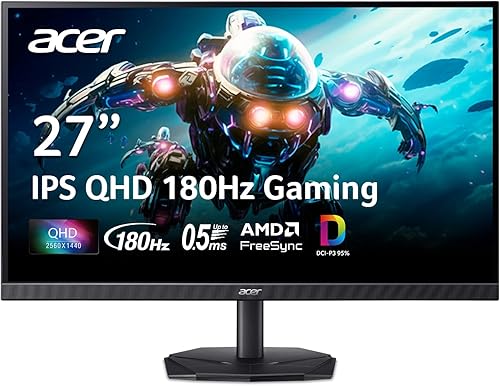
Prime Acer Nitro KG271U 27-inch QHD 180Hz IPS

ASUS TUF Gaming VG27AQ3A 27-inch QHD 180Hz IPS

ASUS ROG Strix XG27ACS 27 Inch QHD 180Hz 1ms

Prime ASUS TUF Gaming VG27UQ1A 27" 4K 160Hz

Acer Nitro VG270K 27-Inch 4K UHD IPS
As an Amazon Associate we earn from qualifying purchases. Product prices and availability are accurate as of the date/time indicated.
Pros
- Blazing 180Hz refresh rate and 0.5ms response for ultra-smooth motion
- Crisp QHD IPS panel with wide 178-degree viewing angles and 95% DCI-P3 coverage
- AMD FreeSync prevents tearing and stuttering without extra hardware
- Slim zero-frame design ideal for immersive and multi-monitor setups
- Built-in speakers and tilt adjustment add everyday convenience
Cons
- 250 nits brightness limits HDR impact compared to brighter HDR displays
- Stand offers only tilt adjustment, no height, swivel or pivot control
- Built-in speakers are convenient but lack bass and depth for immersive audio
The Acer Nitro KG271U N3bmiipx is a 27-inch QHD gaming monitor built for players who want sharp visuals and competitive speed without compromise. With its 2560x1440 IPS panel, it hits the sweet spot between Full HD and 4K, making it ideal for gamers, designers and everyday users who want clarity and performance.
In real world use, the 180Hz refresh rate and 0.5ms GTG response time deliver noticeably smoother motion and reduced ghosting in fast paced titles. AMD FreeSync keeps frames synced to your GPU to eliminate tearing, while DCI-P3 95% coverage and HDR10 support produce vibrant, accurate colors for both gaming and creative work.
Design wise, the zero-frame construction maximizes screen space and looks great in multi-monitor setups, while the matte finish reduces glare during long sessions. The monitor is lightweight at 5.5kg, supports wall mounting, and includes DisplayPort and dual HDMI ports plus built-in speakers for a clean, space saving desk setup.
There are some tradeoffs to note. Brightness is rated at 250 nits, which is fine for indoor use but limits HDR punch compared to brighter panels, and the 1000:1 contrast is typical for IPS. Ergonomics are also basic, with tilt only and no height, swivel or pivot adjustment.
Overall, the KG271U offers an impressive mix of speed, resolution and color accuracy that punches above its class. If you want a fast, versatile 27-inch QHD monitor for competitive gaming and color sensitive work, this is a compelling and well balanced choice.
Display: 27-inch IPS, QHD 2560x1440, 16:9, Matte Finish, 178-degree Viewing Angle
Performance: Up to 180Hz Refresh Rate, 0.5ms GTG Response Time, 1000:1 Contrast Ratio, 250 nits Brightness
Color & HDR: 95% DCI-P3 Coverage, HDR10 Support, Flicker-less and ComfyView Technology
Sync & Connectivity: AMD FreeSync, 2x HDMI, 1x DisplayPort, Built-in Speakers
Design & Mounting: Zero-Frame Design, Tilt Adjustment, Wall Mount Support, Dimensions 24.2 x 18.14 x 8.28 inches, 5.5kg
Pros
- Super smooth 180Hz refresh rate with 1ms response for fluid, competitive gaming
- Excellent color reproduction with 130% sRGB and 178 degree wide viewing angles
- Seamless variable refresh rate support including FreeSync Premium, G-SYNC Compatible and PS5 VRR
- Intuitive menu and GamePlus tools with fast, easy setup and VESA mount compatibility
Cons
- Integrated speakers are weak and tinny with very little bass
- HDR is entry level HDR10 and cannot match OLED or true HDR displays
- Matte coating and basic stand design may feel plain compared to premium models
The ASUS TUF Gaming VG27AQ3A is a 27-inch QHD gaming monitor designed for competitive players and immersive gamers who want sharp visuals and high speed. With its 2560x1440 Fast IPS panel, it offers the perfect balance of detail and performance for both PC and next-gen console gaming.
Real-world performance stands out with a blistering 180Hz refresh rate and 1ms response time that keeps motion crisp and ghosting minimal. ASUS ELMB Sync works simultaneously with FreeSync Premium, G-SYNC Compatible and AdaptiveSync to eliminate tearing, and users report silky smooth gameplay with vibrant colors from the 130% sRGB gamut.
Design is clean and functional with a frameless, flat matte panel, wide 178 degree viewing angles and solid build quality. Setup is quick, the on-screen menu is intuitive, and useful GamePlus features like FPS counter, crosshair overlay and display alignment add value, along with versatile HDMI and DisplayPort connections.
There are some drawbacks to note. The built-in speakers are convenient but sound thin and lack bass, so headphones or external speakers are recommended. HDR10 support improves contrast but remains basic and does not deliver the deep blacks or brightness of higher end HDR or OLED panels.
Overall, the VG27AQ3A offers outstanding value for gamers seeking fast, colorful and tear-free QHD performance. It blends competitive speed, color accuracy and user friendly features in a well built package, making it a smart upgrade for anyone moving up from 1080p.
Display: 27-inch Fast IPS, QHD 2560x1440, 180Hz, 1ms response, 130% sRGB, HDR10, 1000:1 contrast, 178 degree viewing angle, matte finish, flat 16:9
Sync Technology: ELMB Sync, AMD FreeSync Premium, G-SYNC Compatible, VESA AdaptiveSync with variable refresh rate support
Connectivity and Features: 2x HDMI, DisplayPort, 3.5mm audio, integrated speakers, Flicker-Free, Blue Light Filter, 100x100 VESA mounting, included DisplayPort cable and power adapter, 3 Year Warranty
Pros
- Excellent motion clarity with 180Hz refresh rate and 1ms response time
- Vibrant Fast IPS colors with wide 178-degree viewing angles and HDR support
- Sturdy, premium build with highly adjustable ergonomic stand
- Effective variable refresh rate performance with minimal tearing or ghosting
- Convenient USB-C connectivity and DisplayWidget Center for easy setup
Cons
- USB-C hub has limited power delivery and no KVM switch
- Matte anti-glare coating can look slightly fuzzy on bright white backgrounds
- Some units report backlight glow or stuck pixels, quality control can vary
The ASUS ROG Strix XG27ACS is a 27-inch QHD gaming monitor built for competitive and everyday gamers who want high refresh rate performance without moving to 4K. It is also a strong fit for creators and professionals who need accurate colors and flexible connectivity in one display.
Performance is a highlight thanks to the Fast IPS panel with 180Hz refresh rate and 1ms GTG response for fluid, sharp motion. G-SYNC compatibility and ELMB SYNC work together to cut tearing and ghosting, and users praise its vivid colors, deep blacks for an IPS, and strong brightness even at lower settings.
Design and build quality feel premium with a sturdy stand that offers tilt, swivel, pivot and height adjustment for ergonomic positioning. The matte finish, slim bezels and clean ROG styling look great on any desk, while the rear joystick and DisplayWidget Center software make OSD adjustments quick and intuitive.
There are a few drawbacks to consider. The USB-C port handles video and acts as a USB hub but provides limited power and lacks a KVM switch. A handful of users also mention a slightly fuzzy look from the anti-glare coating on whites and occasional backlight glow or stuck pixels.
Overall, the XG27ACS delivers smooth, responsive 1440p gaming with practical features and excellent adjustability. If you want a fast, color accurate and versatile 27-inch monitor for gaming, work and content creation, it is an excellent all around choice.
Display: 27 inch Fast IPS, 2560 x 1440 QHD, 16:9, Matte, 400 nits, HDR
Performance: 180Hz refresh rate, 1ms GTG response, 178-degree viewing angles
Sync Technology: G-SYNC Compatible, ASUS Extreme Low Motion Blur Sync (ELMB SYNC)
Connectivity: 2x HDMI, DisplayPort, USB Type-C with DisplayPort signal and USB hub
Ergonomics: Tilt, Swivel, Pivot, Height Adjustable, Wall Mount compatible, Flicker-Free and Blue Light Filter
In the Box: XG27ACS monitor, DisplayPort cable, power cord, quick start guide, ROG pouch
Pros
- Excellent 4K 160Hz Fast IPS performance for both competitive and immersive gaming
- Rare ELMB Sync support allows blur reduction and adaptive sync at the same time
- Broad GPU compatibility with G-SYNC Compatible and FreeSync Premium
- Console ready with HDMI 2.1 and DSC for next gen 4K 120Hz gaming
- Strong color reproduction with 95% DCI-P3 and HDR support
Cons
- Only one HDMI port limits multi-device console and PC setups
- 1000:1 contrast ratio is typical IPS, blacks are not as deep as VA or OLED panels
- No built-in USB hub, and stand features are basic for the category
The ASUS TUF Gaming VG27UQ1A is a 27-inch 4K UHD monitor built for gamers who want resolution and speed in one package. It targets PC enthusiasts and console players who need high refresh 4K gaming with reliable adaptive sync support.
In real world use, the 160Hz Fast IPS panel with 1ms response feels incredibly responsive and smooth. ELMB Sync combined with FreeSync Premium and G-SYNC Compatible keeps motion sharp and tear free, while DSC and HDMI 2.1 enable 4K 120Hz on modern consoles without color compromise.
Design is classic TUF Gaming in matte black with a flat 27-inch screen and slim bezels. The matte finish reduces glare, viewing angles are wide at 178 degrees, and the 100 x 100 VESA mount offers flexible setup despite the 10.6 pound build.
There are some tradeoffs to note. A single HDMI port is limiting if you run multiple consoles and a PC, and the 1000:1 IPS contrast cannot match the deep blacks of VA or OLED. It also lacks a USB hub and integrated speakers.
Overall, the VG27UQ1A is a compelling choice for gamers who prioritize 4K sharpness, high refresh rates and excellent motion handling. If you want a versatile 4K monitor for both PC and console gaming with strong color and smooth performance, it delivers great value.
Panel: 27-inch Fast IPS, 3840 x 2160 4K UHD, 16:9, Matte finish, 178-degree viewing angle. Brightness and contrast rated at 1000:1 with HDR support and 95% DCI-P3 gamut.
Performance: 160Hz refresh rate, 1ms response time, ELMB Sync, NVIDIA G-SYNC Compatible, AMD FreeSync Premium and Variable Overdrive. Display Stream Compression enabled for high bandwidth performance.
Connectivity: HDMI 2.1 and DisplayPort, with support for 4K 120Hz on consoles without chroma subsampling. VESA 100 x 100 mount compatible for wall or arm mounting.
In the Box: VG27UQ1A gaming monitor, DisplayPort cable, L-shaped screwdriver, power cord, quick start guide and warranty card. Backed by a 3 year warranty.
Pros
- Sharp 4K UHD IPS panel with excellent detail and wide viewing angles
- Versatile DFR lets you prioritize resolution or refresh rate for different content
- Very fast 0.5ms response time with AMD FreeSync for smooth, tear-free gaming
- Slim ZeroFrame design ideal for immersive and multi-monitor setups
- Wide 95% DCI-P3 color gamut with HDR10 for enhanced contrast and color
Cons
- HDR performance is limited and may not be detected as true HDR10 on consoles like Xbox Series X
- Limited to 72Hz at full 4K, requires dropping to 1080p to reach 144Hz
- Stand offers only tilt adjustment and no VESA mounting screws are included
The Acer Nitro VG270K L1 is a 27-inch 4K UHD IPS gaming monitor designed for players who want both visual fidelity and competitive speed. With its unique Dynamic Frequency Refresh technology, it appeals to hybrid users who switch between cinematic single-player games, fast-paced esports titles and everyday productivity.
In real-world use, the 3840x2160 IPS panel delivers crisp, vibrant images with 95 percent DCI-P3 coverage and solid HDR10 processing. Gamers will appreciate the flexibility to run 4K at 72Hz for stunning detail or drop to 1080p at 144Hz for ultra-smooth motion, while AMD FreeSync and a 0.5ms response time keep gameplay fluid and free of tearing or ghosting.
Design wise, the Nitro VG270K features Acer's ZeroFrame near bezel-less design that maximizes screen area and looks great in multi-monitor setups. The matte ComfyView finish reduces glare and eye strain, the chassis is compact at just over 24 inches wide, and connectivity is straightforward with DisplayPort 1.4 and two HDMI 2.0 ports plus VESA 100x100 support.
There are some trade-offs to consider. True HDR performance is underwhelming and several users report consoles failing to detect HDR10, so do not expect high-end HDR impact. You also cannot get 4K and 144Hz simultaneously, and the included stand offers only tilt adjustment with no height or swivel, plus mounting screws are not included.
Overall, the VG270K is a versatile and affordable entry into 4K gaming that balances resolution, speed and color quality. It is best suited for casual to competitive gamers and media viewers who value flexibility over premium HDR or ultra-high 4K refresh rates, and it earns strong marks for everyday versatility.
Matching a Part to Your Build
Scenario 1: You have a mid range GPU and want high refresh competitive play. Prioritize 2560 x 1440 at 180Hz with strong sync support. The Acer Nitro 27in QHD 2560×1440 IPS 180Hz and the ASUS TUF Gaming VG27AQ3A 27 Inch 1440p 180Hz both offer 27 inch QHD at 180Hz with IPS panels and response times rated at 1ms or up to 0.5ms GTG, plus FreeSync Premium and G-SYNC Compatible support on the ASUS model. These are easier for a mid range card to drive at high refresh than any 4K option, and ELMB Sync helps keep fast motion sharp when variable refresh rate is active.
Scenario 2: You have a high end GPU or you are buying the monitor to last through your next upgrade. Consider 3840 x 2160 if you value image detail and are comfortable tuning settings to hold smooth motion. The ASUS TUF Gaming 27” 4K HDR Monitor (VG27UQ1A) provides 27 inch 4K at 160Hz with a Fast IPS panel, 95% DCI-P3 and HDR support, plus G-SYNC Compatible and FreeSync Premium with Display Stream Compression to handle the bandwidth. The Acer Nitro 27in 4K 3840×2160 IPS 72Hz DFR 144Hz is the more flexible pick if you want to switch modes, offering up to 72Hz at 3840 x 2160 and 144Hz at 1920 x 1080 via DFR, which lets you choose resolution or refresh depending on the game.
Scenario 3: Mixed gaming, work and content creation on a modest GPU. If your card is entry level or you split time between games, office work and streaming, a 27 inch 1440p panel with USB-C is often the balanced choice. The ASUS ROG XG27ACS 27 Inch 1440p 180Hz USB-C G-SYNC gives you 2560 x 1440 at 180Hz, 1ms GTG, ELMB Sync and a USB Type-C hub that supports video transmission in DisplayPort signal, so you can connect peripherals with less clutter. You get sharp text for work, smooth gaming when your GPU can push it, and you avoid paying for 4K pixels your current card will struggle to fill.
Common Mistakes
Mistake 1: Buying 4K for the spec sheet when your GPU is a 1440p card. A 4K 160Hz display will still work, but if your GPU cannot deliver frames near that refresh in your favorite titles, you will spend most of your time well below the monitor maximum and may need to lower resolution or settings. It is often better to match a 180Hz QHD monitor to a mid range GPU and enjoy consistently high, tear free performance with adaptive sync.
Mistake 2: Overlooking cable, port and mode limits. Not every port or cable supports 4K at high refresh without compression, and some monitors use DFR to offer different refresh ceilings at different resolutions. Check the spec sheet for what refresh you get at 3840 x 2160 versus 1920 x 1080, confirm you have DisplayPort available, and use the included cable when possible to avoid limiting your new display.
Mistake 3: Chasing refresh or resolution while ignoring panel fit. A 27 inch screen at 1440p already looks sharp at typical desk distances, while 4K shines most when you sit close or do detail work. Also check practical fit: stand footprint, VESA mount needs, and whether you actually need built in speakers or a USB hub. Paying for HDR or wide gamut only matters if you will use it, and a high refresh number matters less if you prefer single player visuals over competitive speed.
Who Should Wait or Buy Differently
A 4K monitor is not ideal for you if your current GPU is already stretched at 1440p, if you mainly play competitive titles where 180Hz at QHD gives you more benefit, or if you are on a tight power or budget plan that does not include a GPU upgrade in the next year. In those cases, a quality 27 inch 1440p 180Hz IPS display is not a good fit to skip, it is the more sensible buy, and you can revisit 4K when your graphics headroom grows. If you are unsure about platform costs around an upgrade, reviewing how to choose a B550 motherboard for gaming can help you weigh where your money makes the biggest difference.
Frequently Asked Questions
Does my GPU really decide between 1440p and 4K?
Yes. Your GPU sets the frame rate you can sustain at each resolution, and that determines whether you will actually see the benefit of a higher resolution or higher refresh. If your card is comfortable at 2560 x 1440 but struggles at 3840 x 2160, a 1440p display will usually feel smoother and look better in motion than a 4K display running with reduced settings.
Should I buy a 4K monitor now for a GPU I plan to buy later?
You can, if you are comfortable using lower settings or lower refresh until you upgrade and you value the extra detail for work or media now. Monitors with adaptive sync and flexible modes, like DFR that allows 72Hz at 4K and 144Hz at 1080p, make this transition easier. If you have no near term upgrade planned, a 1440p 180Hz model is usually the better match for the GPU you have today.
Is 27 inches the right size for both resolutions?
For most desks, 27 inches is a sweet spot for both 2560 x 1440 and 3840 x 2160, offering good pixel density without requiring you to sit unusually close. At 1440p you get sharp text and high refresh that is easier to drive, while at 4K you get extra detail that is most noticeable in close viewing or creative work. Choose based on your GPU headroom and whether you prioritize speed or detail.
Browse more picks in our Peripherals & Monitors category.



Write Your Review
No reviews yet. Be the first to share your experience!