

You are picking the foundation for an AM4 gaming build, and the B550 board you choose will decide how well your CPU holds boost clocks, what drives and cards you can add, and how clean your daily experience feels at your target resolution and refresh rate. Before you compare specific models, you need to weigh your platform and socket plans, your case size and clearance, your power budget, and whether you are building for what you play now or for a CPU and GPU upgrade next year.
This buying guide for how to choose a B550 motherboard for gaming, VRM, IO, price walks you through that decision framework so you can spend where it matters and skip where it does not. If you are still mapping the rest of your system, our Motherboards & Compatibility hub and our Budget Build Guides can help you align the board with your CPU, cooler, and case choice.
What Actually Matters
VRM Quality and Power Delivery
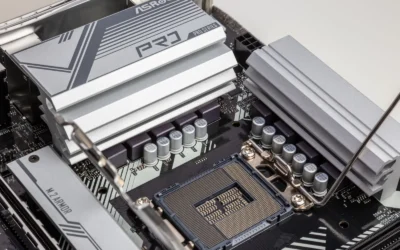
The voltage regulator module, or VRM, is what feeds clean, stable power to your Ryzen processor, and it matters most when you run a higher core count chip or push sustained loads in CPU heavy games. You should look at the number and rating of power stages, the quality of chokes and capacitors, and whether the board uses a teamed or twin design that spreads heat more evenly. A stronger VRM does not give you more frames on its own, but it helps the CPU maintain its boost behavior longer without thermal throttling on the board itself.
Cooling around the VRM is just as important as the stage count. Extended heatsinks, thermal pads that cover chokes as well as MOSFETs, and good airflow from your case fans keep that power delivery steady. If you plan to run a Ryzen 7 or Ryzen 9 5000 series chip, or you want to enable Precision Boost Overdrive, prioritize boards that explicitly list DrMOS stages and robust heatsinks. If you are pairing a Ryzen 5 with a modest air cooler and no manual overclocking, you can save money here without hurting gaming performance. Remember that BIOS updates and any overclocking are done at your own risk and may affect warranty, and you should follow the manufacturer mounting instructions and use anti-static handling when you install the board.
IO, Connectivity and Networking
IO determines how pleasant your build feels every day, from rear USB options to networking and audio. For gaming, count the USB ports you actually need, check for a USB 3.2 Gen 2 Type-C port on the rear and a front panel header for your case, and note the video outputs if you ever need to run integrated graphics on a G-series processor. Networking is a clear divider between boards, some offer WiFi 6E with Bluetooth 5.2 or 5.3 and 2.5Gb Ethernet, while more affordable options stick to WiFi 6 or 1Gbps LAN, which is still fine for most homes but slower on a multi-gig network.
Think about your peripherals and your router, not just the spec sheet. If you game on WiFi, a board with WiFi 6E and an external antenna gives you more headroom in crowded airspace, and Bluetooth 5.3 helps with controllers and headsets. If you are wired, Intel 2.5Gb LAN with LANGuard style protection is a nice step up, but you will only see the benefit if your switch and internet plan support it. Also check internal headers, like the number of fan headers, addressable RGB headers, and whether there is a Thunderbolt header or SPI TPM header if you need them for future add in cards or security features.
Memory, Storage and PCIe Layout
B550 is a DDR4 platform, so your memory choice and board topology set your ceiling for speed and stability. Most boards provide four DIMMs and support overclocked kits well beyond JEDEC speeds, with some models listing support for 4800+MHz OC in a one DIMM per channel, single rank setup. In practice, you should buy a kit that is on the board memory QVL, enable the EXPO or XMP profile in the BIOS, and know that very high speeds depend heavily on your CPU memory controller and whether you populate two or four sticks.
Storage and graphics expansion are where PCIe 4.0 matters on B550. The primary x16 slot and the first M.2 slot usually run at PCIe 4.0, while the second M.2 slot often runs at PCIe 3.0, so plan your fastest NVMe drive for that top slot with its heatsink or Shield Frozr cover to avoid thermal throttling. If you use multiple Gen4 drives, a large GPU with a thick cooler, or you want a front USB-C port that runs at full speed, look closely at lane sharing, M.2 heatsink coverage, and whether the board keeps Steel Armor or similar reinforcement on the main PCIe slot. For ideas on how GPU choice interacts with lane and power needs, see our top RTX 5070 ti cards for 1440p gaming overview.
Price Versus Features and Upgrade Path
Price on B550 is not just about brand, it reflects how much VRM, cooling, IO, and software polish you get. A more premium choice typically adds WiFi 6E, 2.5Gb LAN, better audio with Audio Boost style enhancements, BIOS Flashback for CPU less updates, and more refined fan control like Fan Xpert or Q-Fan. A value focused board trims those extras but keeps the core gaming essentials, AM4 support for Ryzen 3000, 4000 G-series and 5000 series, dual M.2 slots, and PCIe 4.0 for your GPU and primary SSD.
Decide what you will actually use in the next two to three years. If you know you will keep this system on AM4 for a long time and you want the best networking and the most flexible IO, paying more for a well cooled board with strong power delivery makes sense. If you are building to a tight budget and plan to put more money into your GPU or a larger SSD, a simpler board that still offers Q-Flash Plus style BIOS updates, solid heatsinks, and the right USB mix is often the smarter move. Check the board dimensions against your case, confirm cooler height and radiator clearance, and compare the feature list to your real needs rather than chasing every header you might never plug in.
The four examples below show how that range looks in practice, from value ATX to more feature rich options, so you can see where your money goes:
This article contains affiliate links. If you buy through one of our links, CustomPCGaming may earn a commission at no extra cost to you. Commissions never influence which products we recommend or how we rank them. Read our Affiliate Disclosure for details.
Quick Picks at a Glance

MSI B550 Gaming WIFI6E ATX Motherboard for AMD

ASUS ROG Strix B550-F Gaming WiFi II AM4 ATX

GIGABYTE B550 Gaming X V2 AM4 ATX Motherboard

ASUS TUF Gaming B550-PLUS WiFi II AM4 ATX
As an Amazon Associate we earn from qualifying purchases. Product prices and availability are accurate as of the date/time indicated.
Pros
- Excellent stability and memory compatibility with refreshed BIOS and latest AGESA microcode
- Robust 8+2+1 DrMOS power design and extended cooling for sustained performance
- Integrated WiFi 6E and Bluetooth 5.3 plus 10Gbps USB Type-C adds strong value
- PCIe 4.0 x16 and Gen4 M.2 support for high-end GPUs and NVMe SSDs
- Easy installation and durable build with Steel Armor and 2oz copper PCB
Cons
- AM4 and DDR4 platform has no upgrade path to DDR5 or Ryzen 7000 and newer CPUs
- Only 1Gbps LAN, lacks faster 2.5Gbps Ethernet found on newer boards
- Not compatible with AMD Ryzen 5 3400G and Ryzen 3 3200G processors
The MSI B550 Gaming WIFI6E is an ATX motherboard built for AMD AM4 and Ryzen 5000 series processors, including 5000 G-Series and 3000 series CPUs. It is ideal for gamers and budget-conscious builders who want modern features without moving to the pricier AM5 and DDR5 platform.
In real-world use, it delivers rock-solid stability thanks to its refreshed BIOS and latest AGESA microcode, eliminating early B550 bugs like fTPM stutters. Users report plug-and-play setup, excellent memory compatibility up to 4800+MHz OC, and fast load times via its PCIe 4.0 x16 slot and Gen4 M.2 with Shield Frozr.
Build quality is a clear strength, with an 8+2+1 Duet Rail Power System using 50A DrMOS, 2oz thickened copper PCB, and PCIe Steel Armor for heavy graphics cards. Cooling is well handled by an extended heatsink, chipset heatsink, thermal pads, and M.2 Shield Frozr to keep VRMs and storage cool under load.
There are some platform limitations to consider. As an AM4 and DDR4 board, it is not upgradeable to Ryzen 7000 or DDR5, and it lacks 2.5G LAN, offering only 1Gbps. It also has just one Gen4 M.2 slot and is not compatible with Ryzen 5 3400G and Ryzen 3 3200G.
Overall, the B550 Gaming WIFI6E is a fantastic value for a dependable Ryzen 5000 gaming build with modern connectivity like WiFi 6E, Bluetooth 5.3 and USB 10Gbps Type-C. If you want an affordable, hassle-free and durable foundation for gaming and everyday use, this board is an easy recommendation.
Socket: AM4 for AMD Ryzen 5000, 5000 G-Series, 4000 G-Series and 3000 Series processors
Chipset: AMD B550, ATX form factor with 8+2+1 Duet Rail Power System, 50A DrMOS and Core Boost
Memory: 4x DDR4 DIMM slots, Memory Boost up to 4800+MHz OC, 1DPC 1R
Expansion and Storage: 1x PCIe 4.0 x16 slot with Steel Armor, 1x M.2 Gen4 x4 64Gbps with Shield Frozr, 1x M.2 Gen3 x4 32Gbps
Connectivity: WiFi 6E, Bluetooth 5.3, Realtek 1G LAN, USB 10Gbps Type-C, 7.1 HD Audio with Audio Boost, 4K/30Hz display support
Pros
- Handles high end Ryzen 9 CPUs with warm but well controlled VRM temperatures
- Comprehensive next gen connectivity including WiFi 6E, 2.5Gb LAN and USB Type-C
- Dual PCIe 4.0 M.2 slots and PCIe 4.0 x16 support for fast storage and graphics
- Highly praised for easy installation, reliable first time POST and intuitive BIOS
Cons
- AM4 and DDR4 platform limits upgrade path to Ryzen 7000 and DDR5
- Fewer PCIe 4.0 lanes and expansion than X570 chipset boards
- Retail packaging can be minimal and may not include spare motherboard screws
The ASUS ROG Strix B550-F Gaming WiFi II is an ATX motherboard designed for the AMD AM4 socket and Ryzen 3000, 5000 and G-series processors. It is ideal for gamers, creators and DIY builders who want high end features and reliable overclocking without stepping up to X570.
In real world use it delivers fast PCIe 4.0 performance through dual M.2 slots and a primary x16 slot, plus smooth networking via WiFi 6E and Intel 2.5Gb Ethernet. Owners report stable operation even with demanding chips like the Ryzen 9 5950X with PBO enabled, and many highlight instant posting and fast boot times.
Design and build quality are standout strengths, with a 12+2 teamed power stage layout, ProCool power connector, alloy chokes and durable capacitors. The Stack Cool 3+ PCB design improves heat dissipation, while Aura Sync RGB, HDMI 2.1 and DisplayPort 1.2 add modern style and display flexibility.
Drawbacks are tied to the platform itself, as this board does not support DDR5 or Ryzen 7000 and newer CPUs. It also provides fewer PCIe 4.0 lanes than X570, and some buyers note the box arrives with minimal padding and no extra mounting hardware.
Overall, it remains one of the most well rounded B550 options, balancing power delivery, cooling and connectivity at a competitive point in the market. If you are building or upgrading an AM4 system, it is a reliable and future ready choice for gaming and productivity.
Socket / Chipset: AM4, AMD B550 for Ryzen 3000, 5000 and 4000/5000 G-Series
Memory: 4x DDR4 slots, up to 128GB, Dual Channel
Expansion: PCIe 4.0 x16, 5x PCIe slots total, 2x M.2 slots, 6x SATA 6Gb/s
Networking: WiFi 6E (802.11ax), Bluetooth 5.2, Intel 2.5Gb Ethernet with LANGuard
Rear I/O: USB 3.2 Gen 2 Type-C, multiple USB ports, HDMI 2.1, DisplayPort 1.2, Optical S/PDIF, 2.5Gb LAN
Features: 12+2 Teamed Power Stages, ProCool Connector, BIOS Flashback, Aura Sync Addressable Gen 2 RGB, Stack Cool 3+
Pros
- Excellent value for AM4 and DDR4 builds, perfect for reusing existing memory
- PCIe 4.0 support for GPU and primary M.2 delivers next gen speed
- Q-Flash Plus and integrated I/O shield make installation and BIOS updates easy
- Robust 10+3 phase power and advanced VRM cooling for stable performance
- Strong user satisfaction for reliability, boot speed and ease of use
Cons
- No built in WiFi, requires separate adapter or card for wireless connectivity
- AM4 and DDR4 only, not compatible with DDR5 or Ryzen 7000 and newer CPUs
- Only one M.2 slot is PCIe 4.0, second is PCIe 3.0, and LAN is GbE not 2.5GbE
The GIGABYTE B550 Gaming X V2 is a full ATX motherboard for the AMD AM4 socket, supporting Ryzen 5000, 4000 and 3000 series processors. It is built for budget conscious gamers, upgraders and DIY builders who want modern features while reusing DDR4 memory and ATX cases.
In real world use it delivers fast, stable performance thanks to its Digital Twin 10+3 power phase design and PCIe 4.0 support for graphics and NVMe SSDs. Users report quick boots, smooth gameplay with cards like the RX 6600 and RX 580, and noticeable gains moving from PCIe 3.0 to 4.0, with AMD StoreMI helping to accelerate traditional storage.
Design and build quality are strong for the class, with premium chokes and capacitors, advanced VRM heatsinks and an integrated I/O shield that speeds up assembly. You get four DDR4 DIMM slots up to 128GB with XMP support, dual M.2 slots, front USB-C, multiple USB 3.2 ports and RGB Fusion headers for cooling and lighting.
There are a few tradeoffs to note. Wireless is not built in, so you will need an adapter for WiFi or Bluetooth, and as an AM4 DDR4 board it cannot be upgraded to DDR5 or AM5 CPUs. Only the primary M.2 is PCIe 4.0 while the second is PCIe 3.0, and networking tops out at GbE LAN.
Overall the B550 Gaming X V2 is a smart, dependable value pick for AM4 builds. It blends current connectivity, solid thermals and builder friendly features in a proven platform, making it an excellent choice for affordable DDR4 gaming systems.
Platform: AMD B550 Chipset, Socket AM4, ATX Form Factor, supports Ryzen 5000, 4000, 3000 Series
Memory: 4x DDR4 DIMM slots, up to 128GB, XMP support, 3200MHz and higher via overclocking
Expansion and Storage: 1x PCIe 4.0 x16, 1x PCIe 4.0 M.2, 1x PCIe 3.0 M.2, 4x SATA 3 ports
Connectivity: Front USB 3.2 Gen 1 Type-C, 3x USB 3.2 Gen 2 Type-A, 1x USB 3.2 Gen 1 Type-A, 2x USB 2.0, 1x HDMI, 1x GbE LAN, Optical S/PDIF, RGB Fusion headers
Special Features: Digital Twin 10+3 Power Phase, Advanced VRM Heatsink, Integrated I/O Shield, Q-Flash Plus, AMD StoreMI Technology
Pros
- Proven stability and durability with military-grade components and robust power design
- Ryzen 5000 ready out of the box with BIOS FlashBack support
- Excellent thermal design with fanless heatsinks and customizable Fan Xpert 4 control
- Strong connectivity with WiFi 6, 2.5Gb LAN and PCIe 4.0 M.2
- Intuitive BIOS that is easy to navigate for beginners and enthusiasts
Cons
- Top RGB header placement can be blocked by large CPU coolers
- WiFi drivers may require manual installation via ASUS DriverHub
- AM4 and DDR4 platform offers no upgrade path to AM5 and DDR5
The ASUS TUF Gaming B550-PLUS WiFi II is an ATX motherboard built for AMD AM4 socket and Ryzen 3000 and 5000 series CPUs. It is ideal for gamers and PC builders who want proven AM4 performance and long term stability without moving to the newer AM5 platform.
In real world use it delivers rock solid stability thanks to its 8+2 DrMOS power stages and optimized power delivery. You get PCIe 4.0 for a fast NVMe SSD, dual M.2 slots, plus WiFi 6 and 2.5Gb LAN with LANGuard that keep gaming, streaming and file transfers smooth and responsive.
Build quality is a clear strength, with military grade components, alloy chokes, durable capacitors and fanless VRM and PCH heatsinks. The board has a clean TUF aesthetic with textured details, Aura Sync RGB headers, and comprehensive cooling control via Fan Xpert 4 and UEFI Q-Fan.
There are a few tradeoffs to note. The RGB header placement at the top can be blocked by larger CPU coolers, forcing you to route cables to the bottom header. WiFi drivers can also be finicky and often work best when installed through ASUS DriverHub rather than the website download.
Overall, this is one of the most balanced and dependable B550 options for AM4 builds. If you want modern connectivity, easy BIOS navigation and durable performance for gaming and everyday computing, it is an excellent choice.
Socket: AM4, supports AMD 3rd Gen Ryzen and Ryzen 5000 series
Chipset: AMD B550 with PCIe 4.0 support
Memory: 4x DDR4 DIMM slots, up to 128GB
Storage: Dual M.2 slots (one PCIe 4.0 x4), 6x SATA 6Gb/s ports
Networking: WiFi 6 (802.11ax), Bluetooth 5.2, 2.5Gb Ethernet with LANGuard
Expansion: 5x PCIe slots, HDMI 2.1, DisplayPort 1.2, USB 3.2 Gen 2 Type-C and Type-A
Form Factor: ATX, 24-pin main power, Addressable Gen 2 RGB headers and Aura Sync
Matching a Part to Your Build
Your board should match your CPU, GPU, and case, not just your wish list. Use these scenarios to see how the trade offs play out with the example boards, and always verify clearance and power in your own chassis before you buy.
Scenario 1: Value 1080p gaming with a Ryzen 5 5600 and a mid range GPU. You want low cost, reliable power, and room for two NVMe drives. The ryzen 5 7600 RX 7700 XT 1000 dollar gaming PC amazon build breakdown shows how builders balance CPU and GPU spend, and the same logic applies on AM4. The GIGABYTE B550 Gaming X V2 AMD AM4 ATX Motherboard fits here with its Digital Twin 10+3 power phase, dual M.2 slots with one PCIe 4.0 and one PCIe 3.0, and Q-Flash Plus for easy BIOS updates, while the ASUS TUF Gaming B550-PLUS WiFi II AMD AM4 adds WiFi 6, 2.5Gb LAN, and Fan Xpert controls if you want better networking without stepping to the higher-end pick. Both keep the essentials and leave more budget for your graphics card.
Scenario 2: 1440p high refresh with a Ryzen 7 5800X3D or Ryzen 9 and a powerful GPU. Here VRM and cooling move up your priority list. The Asus ROG Strix B550-F Gaming WiFi II AMD AM4 is the more premium choice in this set with its 12+2 teamed power stages, ProCool power connector, WiFi 6E, 2.5Gb Ethernet, and dual M.2 with PCIe 4.0 readiness, plus BIOS Flashback and Aura Sync headers for a cleaner build. The MSI B550 Gaming WIFI6E Motherboard, ATX is another strong fit with its 8+2+1 Duet Rail Power System with 50A DrMOS, Extended Heatsink and M.2 Shield Frozr, and WiFi 6E with Bluetooth 5.3, plus a PCIe 4.0 x16 slot with Steel Armor. Either gives you steadier power delivery and better thermals for sustained boosts than a bare bones board.
Scenario 3: Living room or small space build where WiFi and front panel IO matter. If you cannot run Ethernet, prioritize WiFi 6E and Bluetooth 5.2 or 5.3, and make sure the board has the front USB 3.2 Gen 1 Type-C header your case needs. The ASUS TUF Gaming B550-PLUS WiFi II AMD AM4 and the MSI B550 Gaming WIFI6E Motherboard, ATX both cover that, with HDMI 2.1 and DisplayPort outputs for G-series APUs and rear USB 10Gbps Type-C on the MSI model. If you plan to use a large air cooler or a 240mm or 360mm radiator, measure cooler height and radiator clearance against your case manual before you commit, and confirm that tall RAM will not interfere with the cooler.
Common Mistakes
Mistake 1: Pairing a power hungry CPU with a weak VRM and little airflow. You buy a high core count Ryzen chip, then choose the cheapest board with minimal heatsinks and block airflow with a solid front panel and no exhaust fan. The board heats up, the CPU cannot hold its boost, and you blame the processor. Fix it by matching VRM strength and heatsink coverage to your CPU, and by planning case airflow so the VRM and M.2 heatsinks get fresh air.
Mistake 2: Ignoring BIOS compatibility and update method. B550 boards may need a newer BIOS to support Ryzen 5000 and 5000 G-series processors, and not every board lets you update without a supported CPU installed. Look for BIOS Flashback or Q-Flash Plus if you do not have an older AM4 chip on hand, and follow the maker guide exactly. Remember that flashing is done at your own risk, use a reliable USB drive, do not cut power during the process, and handle the board with anti-static precautions.
Mistake 3: Overpaying for IO you will not use or under buying storage flexibility. You pay extra for WiFi 6E, Thunderbolt headers, and extra RGB zones, then you use Ethernet and never add a second drive. Or you save a little and end up with only one usable M.2 slot after your GPU covers the second one. Map your real needs, count the USB Type-A and Type-C ports you need on the rear, confirm the number and speed of M.2 slots, and check whether the second slot is PCIe 3.0 or 4.0 so your drive plan matches the board layout.
Who Should Wait or Buy Differently
A B550 board is not ideal for you if you are planning a new build on a newer socket, like AM5 with DDR5, or if you need CPU PCIe 5.0 for next generation GPUs and Gen5 SSDs, since B550 tops out at PCIe 4.0 for the primary GPU and M.2 slots. It is also not a good fit if you need more than two M.2 slots at full speed, extensive USB4 or Thunderbolt IO, or you want guaranteed support for future processors beyond the Ryzen 5000 family. In those cases, waiting for a newer platform or choosing a different chipset will save you from a side grade in September 2026.
Frequently Asked Questions
Do I need a high end VRM for gaming on B550?
Not always. For a Ryzen 5 with stock settings and a good case, a well cooled 8+2 or 10+3 phase design is usually enough for steady gaming. You should prioritize a stronger VRM with DrMOS stages and larger heatsinks if you run a Ryzen 7 or 9, enable overclocking features, or keep the CPU under long all core loads.
What IO should I prioritize for a gaming build?
Focus on networking and USB that match your setup. If you game on WiFi, look for WiFi 6 or 6E with Bluetooth 5.2 or 5.3 and a good antenna, and if you are wired, 2.5Gb LAN is a nice bonus. Also confirm you have enough rear USB ports, a rear USB 3.2 Gen 2 Type-C if you use modern peripherals, and a front panel Type-C header that matches your case.
Will any B550 board work with a Ryzen 5000 CPU out of the box?
Most B550 boards now ship with Ryzen 5000 ready firmware, but some older stock may still need an update. To avoid issues, choose a board with BIOS Flashback or Q-Flash Plus so you can update without a compatible CPU, and check the support page for the exact BIOS version listed for your processor before you assemble.




Write Your Review
No reviews yet. Be the first to share your experience!