

If you are asking is the ID-Cooling FROZN A620 enough to cool a Ryzen 7 9800X3D, you are really asking how to match cooler capability to a high performance gaming CPU without overspending or creating new problems in your case. The 9800X3D is efficient for gaming but it can still run hot under sustained all core loads, and your choice affects noise, boost behavior, and how much headroom you have for warm ambient temperatures.
This buying guide gives you a decision framework you can reuse for any build in 2026. You will weigh your resolution and refresh target, your platform and socket, your case size and clearance, your power and noise budget, and whether you are building for today or planning a next step upgrade. Instead of chasing a single recommendation, you will learn how to read the specs that actually predict fit and comfort, and you will see a few example coolers that show the range from dual tower air to 360mm AIO. For broader context on balancing your full parts list, this Ryzen 5 7600 and RX 7700 XT build breakdown shows how CPU, GPU, and cooling choices interact at different budgets.
What Actually Matters
Cooler Type and Real Thermal Headroom
Start with how heat moves from the CPU to the air. A dual tower air cooler uses heat pipes and fin stacks plus fans to dissipate heat, while an AIO moves heat to a radiator with liquid and then to air. Per the spec sheet, the example dual tower uses six 6mm copper heat pipes and two 120mm fans with up to 78CFM airflow, which owners commonly report as strong for mainstream gaming loads. The example 360mm AIOs list a 350W TDP rating with a 396 x 120 x 27 mm aluminum radiator, which signals more surface area for sustained heavy loads.
For the Ryzen 7 9800X3D, think about your typical workload. If you mainly game at 1440p or 4K where the GPU is often the limiter, a capable dual tower can keep temperatures in a comfortable range with good case airflow. If you also do long compiles, rendering, or streaming while gaming, the extra radiator area of a 360mm AIO gives you more thermal headroom and often lower fan speeds under extended load. Compare the rated TDP and radiator or fin area, then check owner feedback on noise and temperatures in similar cases rather than focusing on marketing claims.
Case Fit, Height, and RAM Clearance
Fit is where many builds go wrong, so check your case spec sheet before you buy. Air cooler height is the first filter. The example dual tower lists a 157mm total height, so your case needs at least that much CPU cooler clearance, ideally a few millimeters more for safe airflow. Also look at RAM clearance. That cooler lists 42mm clearance for standard RAM and up to 65mm with the cut out fin, which matters if you use tall RGB modules.
For AIOs, check radiator support. The example 360mm units use a 396 x 120 x 27 mm radiator plus fans, so you need a case that officially supports a 360mm radiator on the top or front and has enough tube routing space. Measure front to back clearance for thick radiators and verify that a front mounted radiator will not block your GPU length. Always follow the manufacturer mounting instructions and check cooler height or radiator clearance against your specific case model. If you are planning a GPU upgrade, review current GPU options with our top RTX 5070 ti cards for 1440p gaming to see how card length and power affect case choice.
Noise, Fan Control, and Everyday Comfort
Cooling performance means little if the system is unpleasant to use. Look at fan control and noise ratings. The example air cooler uses PWM functional fans with a max noise level of 29.9dB(A) and FDB fans for quieter operation, which lets the motherboard adjust speed automatically based on temperature. The example AIOs list pump speeds up to 2,900 RPM at around 25 dB(A) and fans that run from 300 to 2000 RPM with max noise around 27.2 dB(A) and airflow up to 58 CFM at 1.94 mmH2O.
Translate those numbers into daily use. A cooler that can move enough air at lower RPM will be quieter while you browse or play less demanding games. PWM control and a sensible fan curve matter more than peak airflow. If you value a quiet room, prioritize coolers with low minimum RPM, fluid dynamic or ceramic bearings, and good vibration isolation. Also consider pump noise for AIOs, since the pump runs constantly. Owners commonly report that a well tuned air cooler is very quiet at idle, while a 360mm AIO can stay quieter under long sustained loads because the larger radiator does not need high fan speeds.
Socket Support, Installation, and Platform Longevity
Compatibility and ease of installation affect both your current build and future upgrades. All three example coolers support modern Intel LGA1851, LGA1700, LGA1200, LGA115x and AMD AM5 and AM4 sockets, which covers the Ryzen 7 9800X3D on AM5 and leaves room for a future platform change. Check that the mounting hardware for your socket is included and that the backplate and standoffs match your motherboard.
Also weigh long term maintenance. Air coolers have fewer failure points and no liquid, and the example dual tower is described as hassle free installation for Intel and AMD sockets. AIOs add a pump with an expected lifespan around 50,000 hours, plus tubing and a copper cold plate, and they offer features like a real time temperature display or a 1.48 inch 240×240 px customizable LCD. Those extras are nice for monitoring and personalization, but they add complexity and cables. Browse more cooler evaluations in our CPU coolers category archive to compare mounting systems and socket coverage across brands.
To see how these ideas map to real products, here are a few options that show the range:
This article contains affiliate links. If you buy through one of our links, CustomPCGaming may earn a commission at no extra cost to you. Commissions never influence which products we recommend or how we rank them. Read our Affiliate Disclosure for details.
Quick Picks at a Glance
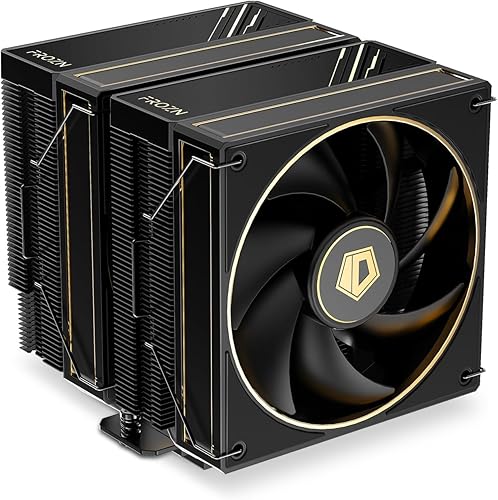
Prime ID-COOLING FROZN A620 GDL Dual-Tower CPU Air

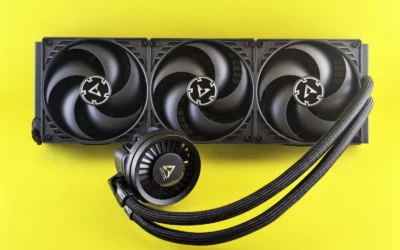
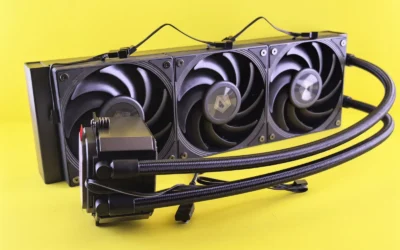
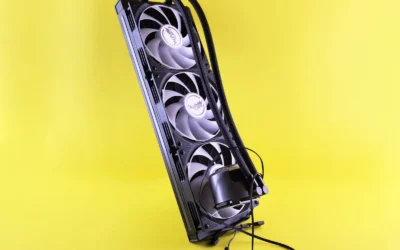
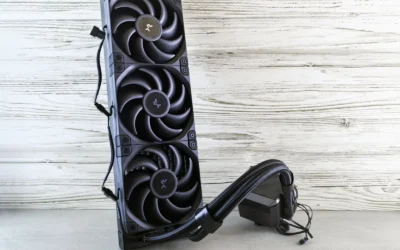
Prime ID-COOLING FX360 TD 360mm AIO Liquid CPU Cooler

Prime ID-COOLING FX360 LCD 360mm AIO CPU Cooler
As an Amazon Associate we earn from qualifying purchases. Product prices and availability are accurate as of the date/time indicated.
Pros
- Strong cooling performance that outperforms popular rivals like the Peerless Assassin in user testing
- Very quiet operation thanks to FDB bearings and PWM control, even at high airflow
- Wide compatibility with modern Intel and AMD sockets, good case and RAM fit
- Stylish Limited Edition design that elevates the look of any build
- Straightforward installation with clear hardware and flexible fan positioning
Cons
- Aluminum fins feel thin and fragile, black coating can scratch easily if mishandled
- Plastic top cover with FROZN logo feels cheaper than the rest of the cooler
- Large dual-tower footprint may require raising the front fan for tall RAM or compact cases
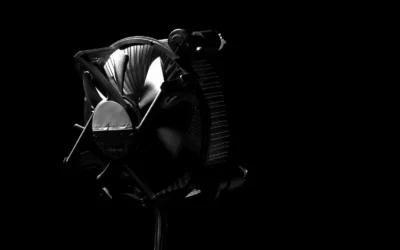
The ID-COOLING FROZN A620 GDL Limited Edition is a dual-tower CPU air cooler built for gamers, creators and PC builders who need serious thermal headroom without moving to liquid cooling. With support for Intel LGA1851, LGA1700, LGA1200 and AMD AM5 and AM4, it is a versatile upgrade from stock coolers for mid-range to high-end systems.
Performance is a clear highlight thanks to six 6mm copper heat pipes and two 120mm FDB PWM fans delivering up to 78 CFM. In real world use, owners report excellent temperature control on hot chips like the Intel Core i7-13700K, with some seeing about 4 degrees lower temps than the Thermalright Peerless Assassin while keeping noise low through PWM speed control.
Design is another strength, with a matte black dual-tower and subtle gold line detailing that blends nicely into dark interiors. At 157mm tall it fits most tower cases, and the thoughtful RAM clearance of 42mm standard and 65mm with the cut-out fin lets you shift the front fan up to accommodate taller memory without losing cooling efficiency.
There are a few drawbacks to consider. The aluminum fins are thin and can bend or scratch if you are not careful during installation, and the plastic top plate feels less premium than the metal heatsink. Its large dual-tower size also demands careful measurement in smaller cases and may block tall RAM if not adjusted.
Overall, the FROZN A620 GDL delivers outstanding cooling, quiet operation and premium looks for its class. If you want reliable air cooling that handles demanding CPUs, installs easily and looks great in your case, it is an excellent value pick that competes well above its price range.
Cooling Method: Air, Dual-Tower Heatsink with 6 x 6mm Copper Heat Pipes
Fans: 2 x 120mm FDB PWM Fans, Max 2000 RPM, Max Airflow 78 CFM, Noise 29.9 dB(A)
Connector: 4-Pin PWM
Dimensions: 4.72 x 4.72 x 6.18 inches, 157mm Height
Material: Aluminum Heatsink with Copper Heat Pipes
Compatibility: Intel LGA1851/1700/1200/1150/1151/1155/1156 and AMD AM5/AM4
RAM Clearance: 42mm Standard, 65mm with Cut-Out Fin
Included: Heatsink, 2 Cooling Fans, Mounting Hardware
Pros
- Excellent 350W TDP cooling capacity for high-performance and overclocked CPUs
- Practical real-time LCD temperature display with stylish ARGB ring
- Very quiet operation from ceramic pump and optimized fans
- Wide universal compatibility with latest Intel and AMD sockets
- Premium durable build with copper cold plate and braided tubing
Cons
- Requires a case that supports a 360mm radiator, not suitable for compact builds
- LCD is limited to CPU temperature only, no custom graphics or stats
- Aluminum radiator instead of copper may limit ultimate thermal conductivity
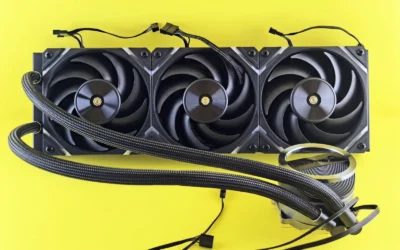
The ID-COOLING FX360 TD is a 360mm all-in-one liquid CPU cooler designed for gamers, enthusiasts and creators running demanding Intel and AMD systems. It is best suited for users who need strong thermal headroom for high-end CPUs while adding real-time monitoring to their build.
Its standout feature is the integrated LCD on the pump head that shows real-time CPU temperature at a glance, framed by a vibrant ARGB ring. Combined with a 350W TDP rating, a 2,900 RPM ceramic bearing pump and three AS-120-ARGB V2 fans, it delivers strong, consistent cooling while keeping noise as low as 25 to 27.2 dB(A).
Design and build quality are impressive for this class, with a copper cold plate for efficient heat transfer, a large 396 x 120 x 27 mm aluminum radiator and premium braided sleeved tubing. The pump is rated for around 50,000 hours, which points to reliable long-term performance for daily gaming and heavy workloads.
There are a few tradeoffs to consider. The full-size 360mm radiator needs a mid-tower or larger case with proper front or top clearance. Also, the LCD is functional but basic, displaying only CPU temperature without the fully customizable screens found on more expensive coolers.
Overall, the FX360 TD offers a compelling mix of performance, quiet efficiency and visual appeal with broad socket support. It is a smart pick for builders who want effective cooling, useful temperature visibility and synchronized ARGB style in a single, future-ready package.
Model: ID-COOLING FX360 TD 360mm AIO Liquid Cooler
Cooling Capacity: 350W TDP with 396 x 120 x 27 mm aluminum radiator
Pump: Ceramic bearing, up to 2,900 RPM plus/minus 10 percent, approx. 25 dB(A), 50,000-hour lifespan
Fans: 3 x 120mm AS-120-ARGB V2, max noise approx. 27.2 dB(A)
Display and Lighting: Integrated LCD for real-time CPU temperature with ARGB ring and ARGB fans
Socket Compatibility: Intel LGA1851, LGA1700, LGA1200, LGA115x and AMD AM5, AM4
Materials: Copper cold plate, aluminum radiator, braided sleeved tubing
Connector: 4-Pin power connector
Pros
- Strong 350W cooling capacity ideal for overclocking and heavy workloads
- Customizable LCD display for real time monitoring and personal expression
- Quiet and efficient operation with ceramic pump and low noise fans
- Broad compatibility with latest Intel and AMD platforms
- Premium materials including copper cold plate and aluminum radiator
Cons
- Installation can be challenging for beginners compared to smaller AIOs
- Some users report pump grinding noise and higher idle temperatures after extended use
- LCD features require software setup and customer support can be difficult to reach
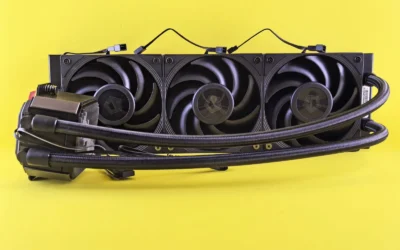
The ID-COOLING FX360 LCD is a 360mm all in one liquid CPU cooler designed for enthusiasts, gamers and streamers who demand both performance and personalization. With support for the latest Intel and AMD sockets, it is built for high end rigs and overclocked systems that need serious thermal headroom.
Its standout feature is the 1.48 inch 240x240 full color LCD with an ARGB ring, letting you show system stats, custom images or animations directly on the pump head. In real world use, the 350W TDP rating and triple 120mm fans deliver strong cooling under load, with many users reporting stable temperatures even during streaming and gaming sessions.
Build quality feels premium thanks to the copper cold plate, aluminum radiator and sleeved tubing that offers flexibility for mid and full tower cases. The 2900 RPM ceramic bearing pump and 300 to 2000 RPM fans balance airflow and acoustics well, keeping noise around 27 dB(A) while pushing up to 58 CFM.
There are some drawbacks to consider. Installation is not as beginner friendly as smaller coolers, and a few users noted higher idle temps or a grinding pump noise after extended use. The LCD also depends on software configuration, which adds an extra setup step and support experiences have been mixed.
Overall, the FX360 LCD offers an impressive mix of cooling power, quiet operation and visual customization that is hard to find at this level. If you want a future proof 360mm AIO that cools effectively and makes your build stand out, it is a compelling choice for performance focused builders.
Model: ID-COOLING FX360 LCD | Cooling Method: Liquid AIO, 350W TDP
Radiator: 396 x 120 x 27 mm Aluminum | Cold Plate: Copper | Tubing: Premium Sleeved
Display: 1.48 inch LCD, 240x240 px, 18-bit 262K Colors plus ARGB Lighting Ring
Pump: Up to 2900 RPM, Ceramic Bearing | Fans: 3x 120mm AS-120-ARGB-V2, 300-2000 RPM, 58 CFM, 1.94 mmH2O
Noise Level: Approx. 27 dB(A) | Connector: 4-Pin | Compatibility: Intel LGA1851/1700/1200/115x and AMD AM5/AM4
Matching a Part to Your Build
Scenario 1: Compact mid tower focused on gaming value. You have a case with about 160mm CPU clearance, standard height RAM, and you play at 1440p with a focus on low noise at idle. The budget gaming PC breakdown is a useful reference for how to allocate budget between CPU, GPU, and cooling. In this scenario, the ID-COOLING FROZN A620 GDL Limited Edition is a logical illustration. Its 157mm height and 42mm RAM clearance fit many tower cases, and its dual tower with six heat pipes and two 120mm PWM fans is often enough for gaming on the 9800X3D when case airflow is solid. You get simple installation and no pump maintenance, but you should verify your exact case clearance and RAM height first.
Scenario 2: Warm room or heavy all core work plus gaming. You stream, compile, or run long productivity tasks where the CPU stays loaded for minutes at a time, or your ambient temperature is high in September. Here the ID-COOLING FX360 TD 360mm AIO CPU Cooler shows why a larger radiator helps. Its 396 x 120 x 27 mm radiator and 350W TDP rating provide more surface area to spread heat, and the three 120mm fans can run at moderate speed while still moving plenty of air. The integrated real time CPU temperature display and ARGB ring add monitoring without extra software. You will need a case that supports a 360mm radiator and you should plan fan and pump curves for quiet operation.
Scenario 3: Showcase build where looks and monitoring matter. You want a clean aesthetic with visible system stats and you have a mid or full tower with front or top 360mm support. The ID-COOLING FX360 LCD 360mm AIO CPU Cooler illustrates this path. It offers the same 350W TDP class and 396 x 120 x 27 mm radiator size, plus a 1.48 inch 240×240 px full colour LCD for stats, images, or animations and an ARGB lighting ring. Per the spec sheet it uses a copper cold plate, braided sleeved tubing, and fans rated up to 58 CFM at 1.94 mmH2O from 300 to 2000 RPM. It is the more premium choice for builders who want both headroom and personalization, provided your case has the radiator clearance and you are comfortable routing extra cables for the display.
Common Mistakes
Mistake 1: Buying a cooler that does not clear your case or RAM. A 157mm tall dual tower will not fit a compact case rated for 155mm, and tall RGB RAM can force you to raise the front fan and exceed your height limit. For AIOs, a 396mm long radiator will not fit a case that only supports 240mm or 280mm up top. Always check the case manual for CPU cooler height and radiator support, and compare against the cooler spec sheet before ordering.
Mistake 2: Ignoring power and airflow headroom. Even efficient gaming CPUs benefit from good case airflow and a sensible power budget. Do not pair a high end CPU and GPU with a minimal power supply or a case with blocked front intake. Follow the GPU maker recommended wattage and leave headroom over combined draw, and set a balanced fan curve so the cooler is not forced to run at maximum speed to compensate for poor airflow.
Mistake 3: Paying for features you will not use. A 360mm AIO with a customizable LCD is appealing, but if you never look at the display or your case hides the pump head, you may be better served by a simpler dual tower or a non LCD AIO with the same thermal class. Conversely, do not assume any low profile cooler will handle sustained all core loads just because it fits. Match the cooler class to your actual workload and case, not just to price or looks.
Who Should Wait or Buy Differently
If your case cannot provide the clearance for a 157mm air cooler or a 396 x 120 x 27 mm radiator, or you are planning to move to a smaller form factor soon, this class of cooler is not ideal for you and you should wait or choose a different size. The dual tower air option is not a good fit for very tight ITX cases or builds with extra tall RAM that would block the fan, while a 360mm AIO is not recommended for cases that only support 240mm radiators or for builders who prefer minimal maintenance and fewer cables. If you are sensitive to pump noise or want the simplest long term setup, a well ventilated case with a capable air cooler may be the more comfortable path, and if you need maximum sustained headroom for heavy production work, consider confirming your case supports a 360mm radiator before committing. For more help timing your purchase, see our 1440p GPU guide for 2026 to coordinate CPU cooling with your next graphics upgrade.
Frequently Asked Questions
Is the ID-Cooling FROZN A620 enough to cool a Ryzen 7 9800X3D for gaming?
For most gaming focused builds with good case airflow, a capable dual tower like the ID-COOLING FROZN A620 GDL Limited Edition is often enough, per owner reports and its six heat pipe, dual 120mm fan design. You should still verify your case has at least 157mm cooler clearance and that your RAM height fits within 42mm or 65mm with the cut out, and set a balanced PWM fan curve.
When should I choose a 360mm AIO over a dual tower air cooler?
Choose a 360mm AIO when you expect long sustained all core loads, have a warm room, or want lower fan speeds under extended stress. The example 360mm units list a 350W TDP rating and a large 396 x 120 x 27 mm radiator, which provides more surface area than a typical air cooler, but you must have a case that supports a 360mm radiator.
What should I check before installing any CPU cooler?
Check socket compatibility for AM5, confirm cooler height or radiator length against your case manual, and confirm RAM clearance. Follow the manufacturer mounting instructions, handle components with anti static precautions, and remember that BIOS updates and overclocking are done at your own risk and may void warranty.
Browse more picks in our CPU Cooling category.
Write Your Review
No reviews yet. Be the first to share your experience!