

You know the feeling, you launch a demanding game late at night and your PC sounds like a small jet preparing for takeoff. That constant hum and rattle pulls you out of the experience and can even bother others in the same room. Finding a case that keeps your hardware cool while staying whisper quiet is the key to truly immersive gaming.
In this guide we focused on the best quiet PC case for a gaming build and how to pick the right balance of silence, airflow and usability. We compared design, fan quality and layout across seven current options to see which ones make quiet gaming easier. For more context on chassis design, explore our Cases & Airflow guides before you decide.
This article contains affiliate links. If you buy through one of our links, CustomPCGaming may earn a commission at no extra cost to you. Commissions never influence which products we recommend or how we rank them. Read our Affiliate Disclosure for details.
Quick Picks at a Glance

Prime Lian Li V100RX Mid-Tower ATX Gaming PC Case

CORSAIR 4000D RS ARGB Mid-Tower ATX PC Case
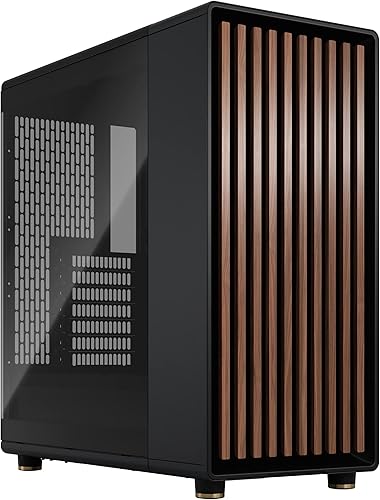
Prime Fractal Design North Charcoal Black ATX Mid Tower

Prime Fractal Design Meshify 2 Compact ATX Mid Tower

NZXT H5 Flow Compact ATX Mid-Tower PC Case

MUSETEX K2 ATX Gaming PC Case with 7 PWM ARGB

DARKROCK EC2 ATX Mid Tower Gaming PC Case
As an Amazon Associate we earn from qualifying purchases. Product prices and availability are accurate as of the date/time indicated.
Pros
- Excellent out of box value with four PWM ARGB fans and ARGB strip included
- Strong cooling performance with up to 61.47 CFM airflow and quiet hydraulic bearings
- Wide compatibility for high end hardware including large GPUs and 360mm radiators
- Back-connect motherboard support and tool-less panels simplify building and cable management
Cons
- Heavier than many mid-towers at 8.2 kg, less ideal for frequent moving
- Plastic trim does not feel as premium as Lian Li's full aluminum cases
- 1-year warranty is shorter than many competing cases in this class
The Lian Li V100RX is a mid-tower ATX case designed for gamers and enthusiast builders who want a clean, modern showcase without a complicated build. It is especially well suited for first time builders and anyone moving to back-connect motherboards for neater cable routing.
Out of the box it impresses with four PWM-controlled 120mm ARGB fans with daisy-chain wiring and a built-in 26-LED ARGB strip that syncs with motherboard software. Airflow is strong and quiet thanks to hydraulic bearings, up to 61.47 CFM and controlled noise levels, while support for GPUs up to 420mm and top 360mm radiators gives real headroom for high end hardware.
Build quality blends tempered glass, stainless steel and plastic with a focus on accessibility and clean aesthetics. Both side panels use tool-less mounting for quick access, the bottom-mounted PSU layout improves thermals, and dust filters help keep the interior clean over time.
There are a few tradeoffs to consider. At 8.2 kg it is heavier than compact mid-towers, and the use of plastic trim will not feel as premium as Lian Li's full aluminum models. The feature set is also centered on ATX builds, so users wanting extensive storage bays or a smaller footprint may want to look elsewhere.
Overall the V100RX delivers excellent value for a feature-rich, airflow-focused case that looks great and builds easily. If you want vibrant ARGB lighting, generous clearance and modern back-connect support in a well ventilated mid-tower, it is a smart and stylish choice.
Model: Lian Li V100RX | Case Type: Mid Tower ATX | Color: Black | Material: Plastic, Stainless Steel, Tempered Glass
Motherboard Support: ATX, Micro-ATX, Mini-ITX, Back-Connect ATX and Micro-ATX | GPU Clearance: Up to 420mm | CPU Cooler Clearance: Up to 178mm | Radiator Support: Up to 360mm on top
Included Fans: 4x 120mm PWM ARGB Fans, 1800 RPM, 61.47 to 60.4 CFM, 2.54 to 2.17 mm-H2O, 26.5 to 30.8 dBA, Hydraulic Bearing | Lighting: Integrated 26-LED ARGB Strip with Motherboard Sync
PSU Mount: Bottom Mount | Cooling Method: Air | Features: Built-In Fans, Dust Filter, RGB Lighting, Tool-less Side Panels | Weight: 8200 g
Pros
- Excellent airflow keeps components cool under heavy gaming and intensive workloads
- Highly modular and spacious layout simplifies building and future upgrades
- Three quiet ARGB fans included with customizable lighting and Zero RPM mode
- Smart cable management with covers, straps and hidden SSD and HDD mounts
- Compatible with modern reverse-connection motherboards from ASUS BTF, MSI Zero and Gigabyte Stealth
Cons
- Very large power supplies can make rear cable management tight
- Fans become noticeably loud at full speed without a tuned fan curve
- Frame feels lightweight and less rigid until fully assembled
The CORSAIR FRAME 4000D RS ARGB is a modular mid-tower ATX case designed for gamers, enthusiasts and first-time builders who want flexibility without complexity. It supports ATX, mATX and ITX motherboards, including reverse-connection models from ASUS, MSI and Gigabyte, making it ideal for clean, modern builds.
Real world performance is a highlight, thanks to the 3D Y-Pattern front panel and InfiniRail mounting system that supports dual 360mm radiators and versatile fan layouts. The three included RS ARGB PWM fans deliver strong, targeted airflow with daisy-chain wiring and Zero RPM mode for near silent operation at low loads.
Design and build quality focus on usability and clean aesthetics, with an alloy steel and aluminum frame and fully removable panels for easy access. Thoughtful details like the integrated GPU anti-sag arm, cable covers, straps and hidden drive trays help every build look tidy and professional.
There are a few drawbacks to note. The chassis can feel a bit lightweight before all panels are secured, and extra large power supplies leave limited space for cable routing in the rear. The stock fans are quiet at low speeds but get loud at maximum RPM, so adjusting your fan curve is recommended.
Overall, the 4000D RS ARGB offers outstanding cooling, customization and builder-friendly features in a sleek package. If you want a future-proof mid-tower that stays cool, looks clean and adapts to future upgrades, it is an excellent choice.
Model: CORSAIR 4000D RS ARGB FRAME Modular Mid-Tower, CC-9011296-WW, Black
Compatibility: ATX, mATX, ITX motherboards, including ASUS BTF, MSI Zero, Gigabyte Stealth reverse-connection boards
Cooling Support: Up to dual 360mm radiators, InfiniRail system for front and roof fans up to 200mm, 140mm in roof
Included Fans: 3x CORSAIR RS ARGB PWM 120mm fans with 8 LEDs per fan and +5V ARGB motherboard control
Materials and Dimensions: Alloy Steel and Aluminum, 19.17 x 9.41 x 19.13 inches, 22.7 pounds, 7 expansion slots
Storage and I/O: 3 internal bays with 2 trays for SSD or HDD, 3x USB 3.0 ports, RGB lighting, rear PSU mount
Pros
- Stunning furniture grade design with real walnut wood and metal accents
- Excellent thermal performance from mesh ventilation and included PWM fans
- Generous compatibility for large GPUs and front radiators
- Premium build quality with tempered glass and sustainably sourced materials
- Thoughtful, tool friendly layout that simplifies installation and upgrades
Cons
- Mid tower footprint is relatively large and needs ample desk or floor space
- Dark tempered glass and charcoal finish can show dust and fingerprints
- Limited to four total drive mounts, not ideal for heavy storage builds
The Fractal Design North Charcoal Black TG Dark is an ATX mid tower airflow case designed for gamers and creators who want performance without sacrificing style. It is perfect for those building a living room friendly PC that looks like premium furniture while housing high end components.
Standout features include the genuine walnut wood front paired with fine mesh ventilation that delivers natural, quiet airflow. In real world use, the open front and two included 140mm Aspect PWM fans provide strong cooling for modern GPUs up to 355mm, or up to 300mm with a 360mm front radiator installed.
Build quality is exceptional, with a sturdy metal chassis, sustainably sourced wood bars, and subtle brass accents. The clear tempered glass side panel offers scratch resistance and a perfect view of your build, while the integrated tab makes removing the top panel quick and tool free.
There are a few tradeoffs to consider. At 17.6 inches deep and 9.5 kg, it is not the most compact case for small spaces. Storage is also modest with two combo 3.5 and 2.5 inch mounts and two dedicated 2.5 inch mounts, which may limit heavy NAS style builds.
Overall, the North is a top tier choice for anyone who values airflow, build ease, and distinctive design. If you want a case that performs as good as it looks and earns its best seller status, this is a highly recommended option for your next ATX build.
Model: Fractal Design North Charcoal Black TG Dark FD-C-NOR1C-02
Form Factor: Mid Tower ATX, supports ATX, mATX and ITX motherboards, 7 bridgeless expansion slots
Cooling: Air cooling optimized, 2x 140mm Aspect PWM fans included, supports up to 360mm front radiator, GPU clearance 355mm
Storage: 2x combined 3.5 inch and 2.5 inch mounts plus 2x dedicated 2.5 inch mounts
Connectivity: 1x USB 2.0, 2x USB 3.0, 1x USB Type C, integrated dust filters
Dimensions and Weight: 17.6 x 8.46 x 18.46 inches, 9.5 kg, materials include metal, tempered glass and genuine walnut wood
Pros
- Excellent airflow and thermal performance for a compact mid tower
- Supports large GPUs and versatile radiator configurations
- Includes three Dynamic X2 fans and effective dust filtering
- Premium build with screwless tempered glass and fully removable top panel
- Smart space efficient ATX layout that rivals larger cases
Cons
- Front radiator installation limits GPU length to 305mm
- Light tinted glass mutes RGB lighting compared to clear panels
- Only two 3.5 inch bays may be limiting for storage heavy builds
The Fractal Design Meshify 2 Compact is a compact ATX mid tower designed for gamers, creators and enthusiasts who want big case performance in a smaller footprint. It balances high airflow, modern features and flexible hardware support without taking up unnecessary desk space.
In practice, the angular mesh front and open interior deliver excellent cooling with a smooth front to rear airflow path. You can install GPUs up to 360mm, front radiators up to 360mm or 280mm, and up to seven 120mm fans, with one 120mm and two 140mm Dynamic X2 fans already included for strong out of the box thermals.
Build quality is a clear strength, with a steel chassis, bolt free light tinted tempered glass and a fully removable top panel for easy access. The filtered airflow design, removable nylon front filter and thoughtful cable management make the case both premium to the touch and practical to build in.
The compact size does involve some tradeoffs. Using a large front radiator limits GPU length to 305mm, storage is capped at two 3.5 inch bays, and the light tint on the glass can soften RGB showcase builds. It also lacks native support for larger E-ATX motherboards.
Overall, the Meshify 2 Compact is an outstanding choice if you want efficient cooling, smart space utilization and a stealthy modern look. For most ATX builders who value airflow, ease of building and a compact form factor, it offers the capacity of a larger tower in a much neater package.
Pros
- Excellent thermal performance, especially for GPUs, praised by users with high-end cards like RTX 5080 and 5070
- Spacious yet compact interior makes building easy and accessible even for first-time builders
- Smart cable management system with wide channels and straps for a clean, professional look
- Supports large 360mm front radiators for powerful AIO cooling and future upgrades
- Solid build quality with durable metal construction, no sharp edges and effective dust filtration
Cons
- Optimal GPU cooling requires two additional 120mm bottom fans that are not included
- Mesh side panel exposes the PSU basement, making it difficult to fully hide cables
- Only two fans included, so extra fans are recommended to maximize airflow potential
The NZXT H5 Flow CC-H52FB-01 is a compact ATX mid-tower case designed for gamers and DIY builders who want powerful cooling in a smaller footprint. It supports ATX, Micro-ATX and Mini-ITX motherboards, making it versatile for both new builds and upgrades without dominating your desk.
Its standout strength is GPU-focused airflow. The perforated PSU shroud lets you mount two 120mm fans below to feed fresh air directly to your graphics card, while mesh on the front, top and side maximizes ventilation. Users report noticeably lower temperatures, even with high-end GPUs and overclocked CPUs paired with a 360mm front AIO.
Design and build quality impress for the category. The metal chassis feels sturdy with smooth edges, and the minimalist black aesthetic fits any gaming setup. Inside, wide channels, hooks and straps make cable routing simple, and reviewers consistently highlight how easy and clean the building experience is.
There are minor drawbacks to note. To get the best GPU cooling you need to purchase extra bottom fans, and the open mesh design means cables in the basement remain visible. Baseline cooling with the two included fans is good, but not fully optimized until you add more airflow.
Overall, the H5 Flow is an outstanding value for its cooling performance, radiator support and builder-friendly layout. If you want a compact case that runs cool, is easy to build in and is ready for future upgrades, it is one of the top mid-tower choices available.
Case Type: Compact ATX Mid-Tower with bottom-mounted PSU, supports ATX, Micro-ATX and Mini-ITX motherboards, 7 expansion slots, 4 internal bays for 3.5 inch drives.
Cooling Support: Up to 360mm radiator in front, up to 240mm radiator on top, perforated PSU shroud for two 120mm bottom fans, includes two 120mm Quiet Airflow fans (front and rear).
Design and Connectivity: Metal construction, dimensions 18.31 x 16.93 x 8.86 inches, ultra-fine mesh panels for airflow and dust filtering, front I/O with USB ports, seamless cable management with channels, hooks and straps.
Pros
- Exceptional value with 7 included PWM ARGB fans so you save on extra cooling
- Excellent airflow and cooling performance even under heavy gaming loads
- Spacious, builder-friendly interior with good cable management and dust filters
- Stunning panoramic glass design that highlights components and RGB effects
- Broad compatibility with ATX, Micro-ATX, Mini-ITX boards and large GPUs
Cons
- Large, angular footprint requires ample desk or floor space
- Instructions could be clearer for first-time builders
- Cable routing for additional AIO or RGB cables can be tight near the bottom and sides
The MUSETEX K2 is a mid tower ATX gaming case designed for builders who want a high end showcase look without a high end price. It is ideal for gamers, RGB enthusiasts and first time builders who want powerful cooling and easy installation in one package.
Its standout feature is the seven pre-installed PWM ARGB fans, expandable to ten, which provide strong, quiet airflow right out of the box. With support for 400mm GPUs, 165mm CPU coolers and 360mm top radiators, it handles high performance hardware with ease while keeping temperatures low during intense gaming.
Design wise, the 270 degree dual tempered glass creates a true panoramic view that beautifully displays your components, lighting and collectibles. The partitioned interior, bottom mounted PSU and thoughtful cable routing channels make for a clean build, while metal construction and dust filters add durability and easy maintenance.
There are a few tradeoffs to consider. The case is fairly large and angular, so it needs generous desk or floor space. Some users note the manual lacks detail and routing extra AIO or RGB cables near the bottom can be a bit tight.
Overall, the MUSETEX K2 delivers premium aesthetics, excellent cooling and spacious compatibility at an outstanding value. If you want a visually striking, airflow focused case that simplifies your build, it is an easy recommendation.
Model: MUSETEX K2 Mid Tower, Black, ATX
Motherboard Support: ATX, Micro-ATX, Mini-ITX
Dimensions: 16.73 x 8.35 x 18.5 inches, 15 pounds, Metal, Plastic and Tempered Glass
GPU and Cooler Clearance: GPU up to 400mm, CPU cooler up to 165mm, Top radiator up to 360mm
PSU Support: Up to 140mm with HDD cage, 150 to 180mm without HDD cage, Bottom mount
Fans: 7x 120mm PWM ARGB included (3 reverse side, 3 top, 1 rear), expandable to 10, 600 to 1300 RPM, 24.72 CFM, 20.8 dB(A), Hydraulic bearing
I/O Panel: 1x Type-C, 2x USB 3.0, Microphone and Audio, Power and Restart buttons
Features: 270 degree dual tempered glass, RGB lighting, dust filters, 8 internal bays, 10 year warranty
Pros
- Excellent cooling potential with mesh front and extensive fan and radiator support
- Hinged tempered glass door makes installation, cleaning and upgrades easy
- Spacious interior accommodates large 50 series GPUs and multiple motherboard sizes
- Sleek, mature styling with practical magnetic dust filters
- Strong airflow and upgrade headroom for a budget friendly case
Cons
- Lightweight metal construction has some flex compared to premium cases
- Only one fan included, additional fans needed for optimal airflow
- Cable management is decent but requires extra effort for a pristine look
The DARKROCK EC2 is an ATX mid tower gaming case built for gamers and first-time builders who want modern features in a compact footprint. It supports ATX, Micro-ATX and Mini-ITX motherboards and offers a smart balance of size, airflow and expandability.
In real world use it excels at cooling thanks to its full mesh front panel and support for up to eight 120mm fans and a 360mm front radiator. This setup keeps components cool during gaming while leaving plenty of room for large GPUs up to 340mm, including 50 series cards.
Design is both sleek and functional, with a hinged tempered glass door that opens easily for building and showcasing your hardware. Magnetic dust filters on the top and bottom help keep dust out, and well placed cutouts make cable routing straightforward.
Build quality is impressive for the class, though the lighter metal does have some flex and the finish is not as rigid as premium cases. Cable management is good but not flawless, so achieving a perfectly clean look takes a bit of patience, and you will want to add extra fans.
Overall the EC2 delivers outstanding value with strong cooling, modern Type-C connectivity and a mature, airflow focused design. It is a top choice for anyone seeking an affordable, future ready case that is easy to build in and easy to upgrade.
The EC2 is a mid tower case measuring 15.1 x 8.6 x 17.6 inches with bottom mounted PSU support up to 200mm and seven expansion slots. It supports ATX, Micro-ATX and Mini-ITX motherboards and offers three internal bays for storage drives.
Cooling support includes up to eight 120mm fans and one 360mm radiator on the front, with air and water cooling compatibility. The chassis uses metal, plastic and tempered glass with a mesh front panel and hinged glass door design.
Front I/O includes Type-C and USB 3.0 connectivity for modern devices. The case accommodates GPUs up to 340mm in length, making it ready for high performance gaming builds.
This case is perfect for budget focused gamers, students and first-time builders who want excellent airflow without a bulky tower. Its compact mid tower size fits well on smaller desks while still supporting full size ATX builds.
It is also great for upgraders who need room for larger graphics cards and future cooling upgrades. If you value easy access, clean aesthetics and modern connectivity, the EC2 is a smart and practical choice.
Buying Guide: How to Choose a Quiet Case That Still Cools
Silence is not just about adding foam, it is about smart airflow that lets fans spin slower. The right case lets you run large fans at low RPM while still moving plenty of air over your GPU and CPU. If you are planning a complete system, our Budget Build Guides can help you match your case choice to the rest of your components.
Airflow Design That Keeps Noise Low
Look for a front panel that breathes without creating turbulence. A fine mesh or 3D perforated pattern, like the Y-pattern on the CORSAIR 4000D RS ARGB Frame Modular Mid-Tower ATX or the angular mesh on the Fractal Design Meshify 2 Compact Black ATX, gives cool air a low restriction path. That means your fans do not have to work as hard to keep temperatures down.
Top and side ventilation also matter for a quiet gaming build. The NZXT H5 Flow – Compact ATX Mid-Tower PC Case uses ultra fine mesh on the top, front and side plus a perforated PSU shroud to feed the GPU with fresh air. The Fractal Design North Charcoal Black Tempered Glass adds a natural, open front with integrated mesh that supports natural ventilation while keeping fan speeds modest.
Fans, PWM Control and Zero RPM Modes
Fan quality determines how quiet your system will be under load. Hydraulic bearings, PWM control and low noise ratings help you fine tune speed curves for silence at idle and controlled airflow when gaming. The ability to run fans slower without losing pressure is more important than simply adding more fans.
The Lian Li V100-ATX Mid-Tower PC Case-Black-V100RX includes four PWM controlled 120mm ARGB fans with daisy chain connectivity and noise levels around 26.5 to 30.8 dBA, so you can synchronize and slow them down through your motherboard. The CORSAIR 4000D RS ARGB Frame Modular Mid-Tower ATX offers Zero RPM mode for near silent operation at low loads, while the MUSETEX ATX PC Case 7 PWM ARGB Fans Pre-Installed lets you adjust seven fans between 600 and 1300 RPM for a balance of light and quiet cooling. Check our Graphics Cards section to see how GPU heat output affects your fan strategy.
Dampening, Build Quality and Vibration Control
Even quiet fans can create buzz if the case vibrates. Look for solid steel construction, secure panel mounting and dust filters that do not rattle. Magnetic dust filters on the top and bottom, as seen on the DARKROCK EC2 ATX Mid Tower Gaming Computer PC, help keep dust out without adding loose parts that vibrate.
Thoughtful build details reduce noise over time. The Lian Li V100-ATX Mid-Tower PC Case-Black-V100RX uses tool less side panels for a snug, rattle free fit, and the NZXT H5 Flow – Compact ATX Mid-Tower PC Case provides wide cable channels with hooks and straps so cables do not obstruct airflow or touch fans. A clean interior not only looks better, it also prevents turbulence and ticking sounds.
Clearance and Layout for Modern Gaming Hardware
A cramped case forces fans to run faster. Confirm GPU length, CPU cooler height and radiator support before you buy. The MUSETEX ATX PC Case 7 PWM ARGB Fans Pre-Installed supports GPUs up to 400mm and CPU coolers up to 165mm, while the DARKROCK EC2 ATX Mid Tower Gaming Computer PC handles GPUs up to 340mm and up to eight 120mm fans plus a 360mm front radiator for flexible cooling.
Also consider motherboard and storage layout. The Lian Li V100-ATX Mid-Tower PC Case-Black-V100RX supports ATX, Micro ATX, Mini ITX and even back connect ATX or Micro ATX boards for cleaner routing, and it fits GPUs up to 420mm with CPU coolers up to 178mm. The Fractal Design North Charcoal Black Tempered Glass and Meshify 2 Compact Black ATX both offer smart drive mounts and bridgeless expansion slots, which you can see applied in our Ryzen 5 7600 and RX 7700 XT build breakdown for balanced component spacing.
When you compare these layouts, prioritize the hardware you actually plan to use. If you want a large air cooler or a 360mm radiator up top, verify that clearance does not compromise quiet fan placement. A case that fits your cooler and GPU with room to spare will always run quieter than one that is maxed out.
Final Thoughts
For a truly quiet gaming build, we recommend the Fractal Design North Charcoal Black Tempered Glass if you want refined silence with natural airflow, and the NZXT H5 Flow – Compact ATX Mid-Tower PC Case if you prefer a compact, high airflow foundation that lets fans stay slow and steady.
Frequently Asked Questions
What makes a PC case quiet for gaming in 2026?
A quiet case combines low restriction airflow, quality PWM fans and a rigid chassis that resists vibration. Mesh or perforated panels let you run larger fans at lower RPM, while features like Zero RPM modes and hydraulic bearings keep idle noise minimal. Good cable management also helps by keeping airflow paths clear.
Do I need sound dampening foam or is mesh better for a quiet gaming build?
Both approaches can work, but mesh with well tuned fans often wins for gaming because it lowers temperatures so fans spin slower. Foam can help with high pitched noise, yet it can trap heat if airflow is limited. In 2026, most quiet gaming builds favor filtered mesh, PWM control and rubber mounted fans over heavy foam.
How many fans do you need for a quiet yet cool gaming PC?
Two to three well placed 120mm or 140mm fans are often enough when the case has an open front and clear exhaust. The Fractal Design Meshify 2 Compact Black ATX for example supports up to seven 120mm fans but includes one 120mm and two 140mm fans that already create a smooth front to rear path. Focus on placement and speed control rather than maximum fan count.
Will a quiet case still handle a powerful GPU like an RTX 5070 Ti?
Yes, if it provides sufficient GPU clearance and intake near the graphics card. Cases like the NZXT H5 Flow with its perforated PSU shroud or the CORSAIR 4000D RS ARGB with its InfiniRail mounting system let you direct cool air straight to the GPU. Pair your case choice with efficient cooling and see our top RTX 5070 ti cards for 1440p gaming to match performance and thermals.
This roundup is not a good fit if you need a compact small-form-factor build or a silent-focused case; these picks prioritize airflow and standard ATX layouts.

Write Your Review
No reviews yet. Be the first to share your experience!