

You know the moment when your wired mouse drags at the worst possible second, your flick shot misses, and you realize your gear is holding you back. If you are hunting for the best wireless gaming mouse under 100 dollars that feels fast, precise, and comfortable for long sessions, this guide was created for you and focuses on what actually matters in real gameplay.
We evaluated sensor performance, wireless stability, ergonomics, and software control to help you make a confident decision without guesswork. You will find a clear breakdown of our top recommendation below, plus a practical buying guide to match your grip style and game library. Explore more gear insights in our Peripherals & Monitors collection and see how we approach value in our Budget Build Guides.
This article contains affiliate links. If you buy through one of our links, CustomPCGaming may earn a commission at no extra cost to you. Commissions never influence which products we recommend or how we rank them. Read our Affiliate Disclosure for details.
Quick Picks at a Glance
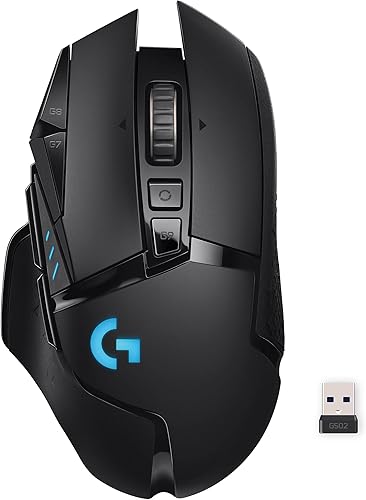
Logitech G502 LIGHTSPEED Wireless Gaming Mouse
As an Amazon Associate we earn from qualifying purchases. Product prices and availability are accurate as of the date/time indicated.
Pros
- Exceptionally accurate and responsive tracking that feels just as fast as wired
- Deep customization with 11 programmable buttons, adjustable weights and RGB
- Long 60 hour battery life with optional PowerPlay infinite charging support
- Comfortable ergonomic design for right handed users with durable, tactile build quality
Cons
- Still charges via Micro USB instead of modern USB-C
- Heavier than ultralight mice, not ideal for players who prefer minimal weight
- PowerPlay wireless charging system sold separately at additional cost
The Logitech G502 LIGHTSPEED is a premium wireless gaming mouse built for players who want total control and precision. It is ideal for right handed gamers who play FPS, MMO or strategy titles and value extra buttons, tunable weight and reliable wireless performance.
Performance is where it shines, with the HERO 25K sensor offering 1:1 tracking up to 25,600 DPI and LIGHTSPEED wireless delivering a 1ms response. In real world gaming it feels as responsive as wired, with smooth tracking, crisp clicks from metal spring tensioned switches and 11 programmable buttons that handle macros and shortcuts effortlessly.
Design and build quality are excellent, with an ergonomic shape that stays comfortable during long sessions and a solid, tactile feel. The dual mode hyper fast scroll wheel, adjustable weight system and LIGHTSYNC RGB with 16.8 million colors let you fine tune both feel and aesthetics to match your setup.
There are a few drawbacks to consider. The mouse still uses Micro USB charging which feels outdated, and its weight is noticeably heavier than ultralight competitors. The PowerPlay system that enables infinite wireless charging is also sold separately, which adds to the total investment.
Overall, the G502 LIGHTSPEED remains a top choice for gamers who prioritize versatility, accuracy and customization over minimal weight. If you want a proven, feature rich wireless mouse that excels in both competitive and everyday use, it is an outstanding and long lasting option.
Sensor: HERO 25K optical, 100 to 25,600 DPI, 400+ IPS, zero smoothing or filtering
Connectivity: LIGHTSPEED wireless 1ms report rate, 5 meter range, USB receiver stored in mouse
Buttons: 11 programmable buttons, metal spring tensioning, hyper fast dual mode scroll wheel
Battery: Up to 60 hours, rechargeable Lithium Polymer, PowerPlay wireless charging compatible
Design: Right handed ergonomic, adjustable weight system with six weights, LIGHTSYNC RGB, 1.6 x 3 inch footprint
Compatibility: Windows 7 or later, macOS 10.11 or later, Chrome OS
Buying Guide: How to Choose a Wireless Gaming Mouse
Sensor Accuracy and Tracking Precision
Your sensor determines whether your aim feels consistent across different surfaces and speeds. Look for a modern optical sensor with true 1 to 1 tracking, high IPS rating, and a wide DPI range that remains stable without smoothing or acceleration. The Logitech G502 Lightspeed Wireless Gaming Mouse features the HERO 25K sensor, which offers extremely precise tracking and sensitivity from 100 to 25,600 DPI through Logitech G HUB.
You should prioritize how the sensor behaves at your preferred sensitivity, not just the maximum number on the spec sheet. A sensor that maintains accuracy during fast swipes and slow micro adjustments will help you stay confident in shooters, MOBAs, and battle royale titles. We also recommend verifying lift off distance and surface calibration options, since these details affect control when you reposition quickly.
Wireless Performance and Battery Reliability
Wireless freedom only matters if the connection stays rock solid under pressure. Focus on low latency wireless technology, a reliable 1 ms report rate, and a robust receiver that resists interference from other peripherals. The Logitech G502 Lightspeed Wireless Gaming Mouse uses LIGHTSPEED ultra fast wireless technology relied on by professionals, so your inputs register instantly without the drag of a cable.
Battery life and charging convenience shape your daily experience more than you expect. Consider how the mouse charges, whether it supports wireless charging ecosystems, and how easy it is to top up between sessions. This model is compatible with the PowerPlay wireless charging system, which keeps compatible mice charged while you play and at rest, and you will appreciate thoughtful touches like quiet gaming PC cases that stay cool without the noise that keep your entire setup focused on performance rather than distractions.
Ergonomics, Weight, and Button Layout
Comfort directly influences accuracy, especially during extended ranked sessions. Pay attention to overall shape, thumb rest design, weight distribution, and whether the shell supports your natural grip, whether palm, claw, or fingertip. The Logitech G502 Lightspeed Wireless Gaming Mouse retains the iconic G502 form factor that many players love, with a sculpted body and accessible controls that reduce hand fatigue.
Button count and placement should match your workflow, not just add complexity. Eleven customizable buttons give you room for macros, push to talk, melee, or inventory shortcuts without stretching. The hyper fast scroll wheel is another practical advantage, letting you fly through long web pages, weapon wheels, or creative timelines. If you are refining airflow and desk comfort alongside peripherals, our guide on how to choose an airflow case for a hot GPU pairs well with ergonomic upgrades.
Software, Customization, and Long Term Value
Great hardware becomes exceptional when software lets you tailor it to each game. Look for intuitive customization that lets you remap buttons, create per game profiles, adjust DPI stages, and fine tune surface tuning without hassle. With Logitech G HUB, you can assign macros and shortcuts to the eleven buttons on the Logitech G502 Lightspeed Wireless Gaming Mouse and switch profiles automatically when you launch different titles.
Long term value also comes from build quality, support, and ecosystem compatibility. A mouse that integrates with your existing charging mat, receiver, and software will save you time and keep your desk cleaner. For context on balancing performance and value across your entire rig, see our analysis of comparing top air coolers for your gaming PC and our balanced 1000 dollar gaming PC build to understand how peripherals fit into a complete 2026 setup.
Final Thoughts
If you want a proven, comfortable, and highly customizable option for competitive and everyday play, the Logitech G502 Lightspeed Wireless Gaming Mouse stands out for its HERO 25K precision and LIGHTSPEED responsiveness, while the same Logitech G502 Lightspeed Wireless Gaming Mouse also shines for creators and MMO players who benefit from eleven programmable controls and hyper fast scrolling.
Frequently Asked Questions
What makes a wireless gaming mouse good for competitive gaming in 2026?
A competitive wireless mouse should deliver low latency, stable tracking without smoothing, and a comfortable shape that supports your grip. Prioritize a proven sensor, reliable wireless protocol, and enough battery life to avoid mid match interruptions. Software that lets you store DPI stages and profiles per game also helps you stay consistent.
Is the Logitech G502 Lightspeed Wireless Gaming Mouse comfortable for long sessions?
Yes, its sculpted ergonomic design, thumb rest, and balanced weight make it comfortable for extended play and productivity. The familiar G502 shape supports palm and claw grips well, and the placement of primary buttons reduces strain. If you game for hours, pairing it with an ergonomic desk setup and proper airflow, as covered in our airflow case guidance, further improves comfort.
How important is PowerPlay wireless charging for this mouse?
PowerPlay is optional but highly convenient if you want to eliminate charging downtime entirely. The mouse works excellently without it using its standard charging method, but adding the PowerPlay system keeps it topped up while at rest and during play. Consider it if you dislike plugging in or want a cleaner, always ready setup in 2026.
Can I customize buttons and DPI on the Logitech G502 Lightspeed Wireless Gaming Mouse?
Absolutely, you can fully customize all eleven buttons, create multiple DPI stages, and build per game profiles using Logitech G HUB. The HERO 25K sensor supports a wide sensitivity range, and the software update enables precise tuning without smoothing or acceleration. This flexibility makes the mouse adaptable for FPS, MOBA, MMO, and creative applications.
These picks are not ideal for casual or first-time players on a tight budget; they are aimed at people who want higher refresh rates, better panels, or competitive-grade input.




Write Your Review
No reviews yet. Be the first to share your experience!