

If you are learning how to combine a cable tray with a monitor arm clamp, you are really solving a space conflict at the back edge of your desk. You want your screens floating where you want them, your power strip and bricks hidden underneath, and no cables pulling when you swivel or raise the desk. Get the clamp zones, cable path, and tray size right and your setup stays tidy through daily use and future upgrades.
In this buying guide you will work through the decision in order. You will check your desk thickness and edge clearance, plan slack for full motion, size the tray for your power load, then match monitor weight and VESA patterns. For more ideas in this category, browse these Cable Management & Under-Desk guides as you plan.
What Actually Matters
Clamp Zones and Desk Edge Real Estate
Start with your desk edge because both parts want the same prime location. Most monitor arms use a heavy-duty C-clamp or a grommet mount, and many support desks from around 0.4 inch on the thin end up to around 3.1 inch or 2.76 inch on the thick end per the spec sheet. Your tray may also clamp on with no drilling, which is ideal for renters but adds a second clamp that can collide with the arm base.
Measure your top thickness with a ruler and look underneath for aprons, crossbars, or standing desk frames that block clamps. You want each clamp to sit on flat material with room to tighten, plus open space between them so you can route cables in a soft curve. If your desk has a rear lip, a cable notch, or a very thick butcher-block edge, confirm the clamp range and consider a grommet hole option where the spec sheet lists support for 0.4 inch to 1.9 inch or a hole diameter range of 0.39 inch to 2.36 inch.
Cable Path From Screen To Tray To Floor
Think of your cables in two sections. The upper section runs from your monitor and laptop down the arm, and the lower section runs from the tray to the wall outlet. Arm clips and built-in guides keep the upper run close to the arm so cables move with the screen instead of snagging. Per the spec sheets, many arms offer 180-degree swivel and 360-degree rotation with tilt ranges such as +90-degree to -90-degree or -45-degree to +90-degree, so you need a gentle service loop behind the mount.
You should be able to tilt, swivel, rotate to portrait, and raise the arm through its full height range without tension. Examples in the data include smooth height adjustment from 6.25 inch to 16 inch above the desk and arms that raise up to 17.3 inch. Route display, power, and USB cables with enough slack for the tallest and most rotated position, then drop the bundle straight into the tray. A clean look like those in this minimalist RGB desk setup comes from hiding the drop, not pulling it tight.
Tray Size, Load, and Airflow
Size your tray for the bulkiest items first, usually a power strip plus one or two large adapters. A 25.3-inch wire basket gives you room to lay a strip flat with bricks beside it rather than stacked, which keeps plugs accessible and reduces strain on prongs. Split designs that ship in two sections are common and assemble with included screws, so check that the assembled length fits between your legs, PC, and any standing desk frame.
Choose metal open-mesh construction when you run warm bricks and chargers all day. The open rack design promotes airflow around electrical gear and helps you see what is plugged where. Avoid cramming excess cable coils on top of adapters, follow the manufacturer mounting instructions for weight limits, and leave the tray easy to open so you can add a headset charger or light bar supply later without redoing everything.
Monitor Weight, VESA, and Upgrade Room
Match your screens to the arm before you worry about cable dressing. Most arms in this group support 17 inch to 32 inch monitors with 75x75mm or 100x100mm VESA patterns, with weight support noted as up to 19.8 lbs, up to 17.6 lbs, or a range such as 4.4 to 22 lbs depending on the model. Laptop trays add another check, with support for 10 inch to 15.6 inch notebooks up to 9.9 lbs or up to 17 inch notebooks on other designs.
Consider your next upgrade as well as your current screen. If you plan to move from a light 27 inch panel to a heavier 32 inch panel, or add a second arm on a shared pole that fits poles from 1.1 inch to 2.4 inch in diameter, leave weight headroom and pole space now. Owners commonly report that wobble and sag show up when an arm runs near its upper limit, so staying comfortably under the rated load keeps motion smooth and cables settled.
To see how these specs look in practice, here are a few options that show the range:
This article contains affiliate links. If you buy through one of our links, CustomPCGaming may earn a commission at no extra cost to you. Commissions never influence which products we recommend or how we rank them. Read our Affiliate Disclosure for details.
Quick Picks at a Glance

VIVO Dual Monitor and Laptop Desk Mount for 17

Prime NoetixCo 25.3'' Under Desk Cable Management Tray
Prime VIVO Pole Mount Monitor Arm for 17 to 32 Inch

MOUNT PRO 2-in-1 Laptop and Monitor Desk Mount Arm

Prime VIVO Monitor Stand Cable Management Clips
As an Amazon Associate we earn from qualifying purchases. Product prices and availability are accurate as of the date/time indicated.
Pros
- Supports both a monitor and laptop for an efficient dual screen workflow
- Full motion tilt, swivel and rotation for customized ergonomic viewing
- Wide height adjustment helps reduce neck and eye strain
- Includes both C-clamp and grommet hardware for flexible installation
- Ventilated laptop tray keeps notebook cool and secure
Cons
- Mechanical arms require manual tightening, not as fluid as gas spring models
- 9.9 lb laptop limit excludes some larger or heavier notebooks
- Laptop tray footprint needs more desk depth than a monitor only mount
The VIVO STAND-V002O-L is a dual arm desk mount designed to hold a 17 to 32 inch monitor alongside a 10 to 15.6 inch laptop. It is built for remote workers, students and multitaskers who need a compact dual screen setup without buying two full monitors.
You get full motion control with 90 degree tilt, 180 degree swivel and 360 degree rotation for easy portrait or landscape viewing. The 9.7 inch height range from 6.25 to 16 inches lets you dial in eye level comfort and reduce neck strain during long work sessions.
The frame combines alloy steel, aluminum and plastic for a sturdy yet smooth articulating feel. The ventilated laptop tray uses an adjustable clamp and rubber tabs to keep your notebook secure while promoting airflow to reduce heat buildup.
Because it uses mechanical arms rather than gas springs, you will need to tighten joints manually to balance heavier screens. The laptop weight limit of 9.9 lbs and 15.6 inch size cap also mean bulky gaming laptops may not fit.
Overall, this VIVO mount is a smart, space saving upgrade for anyone pairing a laptop with a single monitor. It delivers solid ergonomics, flexible C-clamp or grommet mounting, and reliable daily performance for home offices.
Model: VIVO STAND-V002O-L in Black, tabletop mount with articulating dual arms.
Monitor Compatibility: Fits 17 to 32 inch screens up to 19.8 lbs with 75x75mm and 100x100mm VESA patterns.
Laptop Compatibility: Fits 10 to 15.6 inch notebooks up to 9.9 lbs on ventilated tray with clamp.
Adjustment Range: Plus 90 to minus 90 degree tilt, 180 degree swivel, 360 degree rotation, 6.25 to 16 inch height.
Mounting and Materials: C-clamp for 0.4 to 3.1 inch desks and grommet for 0.4 to 1.9 inch desks, built from alloy steel, aluminum and plastic.
Pros
- Tool free clamp installation, no screws in your desk
- Large capacity fits power strips and multiple adapters
- Durable carbon steel with sleek modern black finish
- Ventilated mesh keeps equipment cool and visible
- Fast 3 minute assembly with included hardware
Cons
- Ships in two pieces and needs screw connection before use
- 4.5 inch width can be tight for very large power bricks
- Clamp may not fit extra thick, beveled or irregular desk edges
The NoetixCo Under Desk Cable Management Tray is a 25.3 inch clamp on basket for organizing power strips and computer cables. It is made for remote workers, students and gamers who want a tidy setup without drilling holes in their desk.
The standout feature is the no drill clamp system that tightens securely under most flat desks and standing desks. In real use, it holds a full power strip plus adapters steady, keeps cords off the floor and moves cleanly with height adjustable desks.
Built from premium carbon steel with a minimalist black finish, the tray feels solid and looks clean in any office. The open mesh base supports heavy bricks while allowing airflow and easy access to cables from above.
There are a few tradeoffs to note. It ships in two sections that must be screwed together first, and the 4.5 inch width can be snug for oversized hubs. Very thick or uniquely shaped desk edges may also limit clamp fit.
Overall, this is a practical, durable and renter friendly fix for cable clutter. If you want large capacity storage, fast tool free mounting and a neat gaming or office setup, it is an easy recommendation.
Brand: NoetixCo
Color: Black
Material: Premium Carbon Steel
Dimensions: 25.3L x 4.5W inches
Mounting: No drill clamp on, tool free
Design: Modern open mesh tray, two piece assembly
Best for: Standing desk, home office and gaming setup
Pros
- Solid alloy steel construction holds monitors firmly without slipping or sagging
- Extremely versatile fit for production carts, metro shelves, C-stands and desk poles
- Smooth tilt, swivel and rotate functions support ergonomic viewing and portrait mode
- Easy to install, adjust and relocate with removable VESA plate
Cons
- Pole is not included, so you must already have a compatible pole
- Compact arm length may feel short for larger 32 inch screens in tight setups
- Deeply recessed VESA sockets can require extra alignment and no rubber pad is included for metal poles
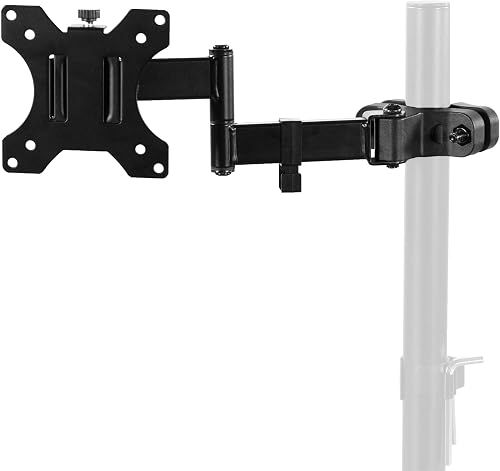
The VIVO MOUNT-POLE01A is a clamp on VESA bracket that adds a monitor to an existing pole, rather than a full stand. It is built for creators, office workers and DIY setups using production carts, shelving poles, C-stands or multi monitor poles.
It supports 17 to 32 inch screens up to 17.6 lbs with 75mm and 100mm VESA patterns. Users praise its stable hold on metro shelf poles and dual monitor poles, plus easy flipping between horizontal and vertical for photoshoots and client viewing.
The mount uses heavy duty alloy steel with tilt, swivel and rotation plus a swiveling arm for flexible positioning. Cable clips route cords along the arm, and the clamp rotates fully around the pole for quick collaboration and screen sharing.
The pole is not included, and the arm itself is fairly compact, so measure your screen and clearance first. Some monitors with recessed VESA holes need careful alignment, and there is no rubber liner to protect bare metal poles.
For its versatility and solid locking strength, this is a smart upgrade for custom workstations and mobile carts. If you already have a pole in the 1.1 to 2.4 inch range, it delivers pro level flexibility in a simple, reliable package.
Model: MOUNT-POLE01A by VIVO, black alloy steel pole mount bracket, pole not included.
Compatibility: 17 to 32 inch monitors and TVs up to 17.6 lbs, VESA 75x75mm and 100x100mm, pole diameter 1.1 to 2.4 inches.
Motion: 30 degree tilt up and down, 180 degree swivel, 360 degree rotation, full 360 degree clamp rotation around pole.
In the Box: Monitor arm with removable VESA plate, mounting hardware, cable clips, instruction manual, backed by 3 year warranty.
Pros
- Solid aluminum build feels sturdy and holds laptop without wobbling once tightened
- Easy assembly with straightforward instructions and included tools
- Highly adjustable positioning improves comfort and saves valuable desk space
- Backed by 10-year warranty for long term confidence
Cons
- Height adjustment can feel stiff and takes extra effort to move
- Not compatible with 1000R, 1500R and 1800R curved monitors
- Laptop security strap may interfere with keyboard or trackpad, best used with external mouse and keyboard
The MOUNT PRO Laptop Arm Mount is a 2-in-1 desk solution that holds notebooks up to 17 inches or monitors from 13 to 32 inches. It is built for home office professionals, students, programmers, designers and gamers who need a flexible, space saving setup.
In daily use, the full motion arm allows tilt from minus 45 to plus 90 degrees, 180 degree swivel and 360 degree rotation for monitors. Users report it holds laptops securely without wobbling and stays in place once positioned, making it easy to switch between work, calls and gaming.
The mount uses brushed aluminum construction with a ventilated laptop tray for better airflow. Six anti slip pads plus locking latches keep devices secure, while built in cable management routes wires along the arm for a cleaner desk.
It is not compatible with 1000R, 1500R or 1800R curved screens, and 360 degree rotation is recommended only for monitor mode for safety. Some users find height adjustment a bit stiff at first and note the security strap can overlap the keyboard if you type directly on the laptop.
Overall, this is a sturdy, versatile and easy to install mount that frees up valuable desk space and improves posture. If you want one affordable arm that works for both laptop and monitor setups, it is a smart and practical pick.
Compatibility: Laptops up to 17 inches, monitors 13 to 32 inches with VESA 75x75mm and 100x100mm, supports 4.4 to 22 lbs.
Adjustment: Minus 45 to plus 90 degree tilt, 180 degree swivel, 360 degree rotation for monitor mode, up to 17.3 inch lift height.
Mounting: Tabletop clamp or grommet install for desks 0.39 to 2.76 inches thick, grommet hole 0.39 to 2.36 inches.
Materials and Finish: Aluminum construction in black with brushed finish, ventilated tray with anti slip pads and safety latches.
Pros
- Snap-on installation requires no tools or hardware
- Specifically engineered for VIVO monitor stands for a secure fit
- Holds multiple cables per clip to reduce desk clutter
- Durable plastic design resists slipping and breakage
- Lightweight and discreet black finish matches most mounts
Cons
- Only fits specific VIVO STAND-V models with 35mm pole and square arms
- Plastic clips may not support very thick or heavy cable bundles
- No universal mounting option for non-VIVO stands or desks
The VIVO PT-SD-WC05C is a 5-piece cable management kit made specifically for VIVO desk monitor stands. It includes one pole clip and four arm clips to guide monitor power and video cables neatly along the mount. It is ideal for office workers, gamers and anyone using a compatible STAND-V series setup.
In daily use, the clips keep HDMI, DisplayPort, USB and power cords routed tightly against the pole and arms. This prevents sagging cables, frees up desk space and makes cleaning much easier. Once snapped on, cables slide in and out easily when you need to add or swap a monitor.
Each clip is molded from strong, lightweight plastic with a clean matte black finish. The pole clip fits 35mm round poles while the arm clips fit 30 x 20mm square tubing for a snug, rattle-free hold. The low profile design blends in with modern VIVO mounts instead of standing out.
The main limitation is compatibility, since these clips only fit listed VIVO STAND-V models and specific tube sizes. They are also best for standard monitor cables, as very thick braided bundles may fit tightly. They are not designed as a universal solution for other brands or desk types.
Overall, this is a simple, effective upgrade for a cleaner workstation. If you own a compatible VIVO stand and want fast, tool-free cord control, this 5-piece set delivers excellent value and a much tidier setup.
This kit is designed for VIVO models STAND-V001, STAND-V001L, STAND-V002, STAND-V002C, STAND-V002F, STAND-V002FG, STAND-V004FG, STAND-V011, STAND-V012, STAND-V012C, STAND-V012F, STAND-V101D, STAND-V102D and STAND-V102K. Check your model number before ordering to ensure a proper fit.
The large clip fits 35mm round poles and the four smaller clips fit 30 x 20mm square monitor arms. Installation requires no tools or hardware, just snap each clip onto the pole or arm and press cables into place. For best results, route power on one side and video cables on the other to reduce tangling.
Matching a Part to Your Build
If you run a single monitor plus a laptop on a solid desk, prioritize an arm with a secure tray and ventilation plus a wide tray underneath. The VIVO Universal Adjustable Monitor and Laptop Desk shows this formula with dual mechanical arms, adjustable laptop clamp and rubber tabs, and C-clamp support for tops 0.4 inch to 3.1 inch thick. Pair that style of mount with the Cable Management Under Desk 25.3-inch basket, mount the tray slightly off-center from the arm base, and drop your dock power and monitor power straight down with a soft loop.
If you rent or use a standing desk where drilling is not allowed, choose no-drill clamping on both ends and plan for movement. The Cable Management Under Desk uses a clamp-on design with no tools or screws required for the desk attachment, while the MOUNT PRO Laptop Arm Mount for Desk offers clamp or grommet mounting for desks 0.39 inch to 2.76 inch thick and built-in guides along the arms. Mount the tray where the desk frame will not pinch cables at sitting and standing height, leave extra slack at the rear for lift travel, and add glow without clutter by following ideas from these RGB LED strips for a corner desk glow.
If you already own a pole setup or your cables slide off smooth arms, focus on the routing hardware itself. The VIVO Black Pole Mount Monitor Arm for 17 to 32 fits poles 1.1 inch to 2.4 inch in diameter and includes cable clips to route cords along the arm, which helps when you reuse a sturdy pole. Add the VIVO Cable Management Clips for Desk Monitor set with 1 pole clip and 4 arm clips to keep each cable in its own channel. You should not buy more clips than your arms can hold, so count your moving joints first and keep one spare channel for a future USB cable.
Common Mistakes
• Stacking clamps in the same spot. When the arm C-clamp and the tray clamp fight for the same few inches of edge, one of them ends up half seated and works loose. Offset them left to right, confirm clearance under the top, and tighten each clamp on flat material per the manual.
• Dressing cables with no slack for motion. If you zip everything tight while the screen faces forward, the first swivel to portrait or lift to standing height yanks connectors. Pose the arm at its highest, most rotated position, add a relaxed loop behind the mount, then secure with clips so the loop flexes instead of the plug.
• Overfilling the tray and blocking airflow. A tidy tray is not a stuffed tray. Spread the power strip and bricks in a single layer in a ventilated metal basket, keep coiled excess beside rather than on top of adapters, and leave room to unplug without lifting the whole bundle. For powered desk accents, review low-heat placement tips in this guide to LED desk lighting for eye comfort.
Who Should Wait or Buy Differently
A clamp-on tray plus arm combo is not ideal for glass tops with no frame, desks with deep aprons that leave no flat clamping area, or very heavy 32 inch panels already near an arm upper weight limit. If your edge cannot take two clamps, if your pole diameter falls outside the 1.1 inch to 2.4 inch range noted in the specs, or if you need curved ultrawide support that some 2-in-1 mounts exclude, pause and measure again. You may be better served by a freestanding mount, a drilled grommet solution where your lease allows it, or a larger ventilated tray system before you add arms and clips.
Frequently Asked Questions
Where should the tray sit relative to the monitor arm clamp?
Offset the tray to one side of the arm base so both clamps grip flat material and cables can curve gently into the basket. Centered mounting looks neat but often forces a sharp bend. Leave the bundle easy to reach so you can adjust height and swivel without pulling.
How much slack do I need for tilt, swivel, and rotation?
Provide enough loose cable to cover full tilt, 180-degree swivel, 360-degree rotation, and full lift, then add a small service loop behind the mount. According to owners, the most common failure is a DisplayPort or power plug that feels fine facing forward but strains in portrait. Pose, loop, then clip.
Will arm clips replace an under-desk tray?
No, they serve different jobs. Clips such as the 1 pole clip and 4 arm clips set guide thin cables along moving arms, while a 25.3-inch tray holds the power strip and bulky adapters. Use clips up top for motion control and a ventilated tray below for weight, heat dissipation, and quick access.






Write Your Review
No reviews yet. Be the first to share your experience!