

If you are asking is the RTX 5080 good for 1440p in 2026, you are really asking whether you need that much GPU for your monitor and how to pick the right card for your system. At 1440p, this class of GPU is positioned for very high refresh rate gaming and for headroom that keeps you comfortable for several years, but it only makes sense if the rest of your build can support it.
This buying guide walks you through how to choose, not just which model to buy. You will weigh your resolution and refresh target, your platform and CPU pairing, your case size and clearance, your power budget, and whether you are building for now or for a future monitor upgrade. Use the framework below to match a card to your actual needs, then compare a few example designs that show the range.
What Actually Matters
Resolution, Refresh Rate and VRAM Headroom
Start with your monitor. For 1440p 144Hz to 240Hz, you want a GPU that can stay above your refresh target in the games you play most, with settings you are happy to use. The RTX 5080 cards in this generation share 16GB of GDDR7 on a 256-bit interface, with speeds like 30 Gbps per the spec sheet, which gives you plenty of memory for ultra textures at 1440p and some cushion if you move to 4K later.
Do not buy on VRAM alone. At 1440p, 16GB is already generous, and you should evaluate the whole package including architecture and features. If you mainly play lighter competitive titles at 1440p 165Hz, you may not need this tier, and a lower tier could be a better value. If you want maxed settings in demanding single player games while pushing high refresh, the extra headroom is where this tier earns its place. For a direct comparison at the same resolution, see our look at top RTX 5070 ti cards for 1440p gaming.
Power, Connectors and Thermal Design
Power planning is critical with this class of card. One of the example specs lists a minimum 850W PSU with a 16-pin 12V-2×6 (12VHPWR) connector required, so you should follow the GPU maker recommended wattage and add headroom over your combined CPU and GPU draw. Check your current PSU model, its age, and whether it has the native 16-pin cable or needs an adapter, and verify the connector is fully seated per the manufacturer instructions.
Cooling design affects noise, temperatures, and case airflow. You will see different approaches, from a 2.5-slot design with three 90mm BladeLink fans, vapor chamber, composite heatpipes and pass-through airflow, to a larger 3.6-slot massive fin array with three Axial-tech fans and a phase-change thermal pad. A bigger cooler can run quieter under load, but it needs more slot clearance and good case airflow. Always handle installation with anti-static precautions and follow the maker guidance for fan curves and support brackets.
Case Fit, Slot Width and Airflow
Measure before you buy. Cards in this tier vary a lot in physical size, and one example is listed at 348mm (13.7 inches) long, 3.6 slots thick, and 4.3 lbs, with a GPU bracket included. Compare length against your case GPU clearance, thickness against your PCIe slot spacing and bottom clearance, and weight against whether you need a support stand or bracket to prevent sag.
Also consider airflow direction. Pass-through designs and large fin arrays rely on front to back airflow, so you want at least two intake fans and an unobstructed exhaust path. If your case is compact or has a solid front panel, a slightly slimmer 2.5-slot card may be easier to live with than a 3.6-slot model. You can browse more options and sizing notes in our Graphics Cards category to compare cooler footprints side by side.
Features, Outputs and Platform Longevity
All of the examples here are built on NVIDIA Blackwell architecture with DLSS 4 and PCIe 5.0 support, which matters if you want frame generation and upscaling options for the next few years. For outputs, look for the combination you need, such as 3x DisplayPort 2.1b and 1x HDMI 2.1b with 8K readiness and support for up to four displays, so you can run a high refresh 1440p primary plus secondary monitors without adapters.
Think about how long you keep GPUs. If you upgrade monitors every three to four years, the feature set and 16GB frame buffer give you flexibility to move from 1440p to 4K or to ultrawide without an immediate replacement. If you upgrade more often or you are building a strict budget system, you may get better overall value by putting funds into CPU, memory, or storage. Our Budget Build Guides can help you balance the whole system budget.
The short list below shows a few options that show the range, from slimmer to very large coolers, so you can see how specs and dimensions change the fit for your build as of November 2026:
This article contains affiliate links. If you buy through one of our links, CustomPCGaming may earn a commission at no extra cost to you. Commissions never influence which products we recommend or how we rank them. Read our Affiliate Disclosure for details.
Quick Picks at a Glance

ZOTAC Gaming GeForce RTX 5080 Solid CORE OC 16GB
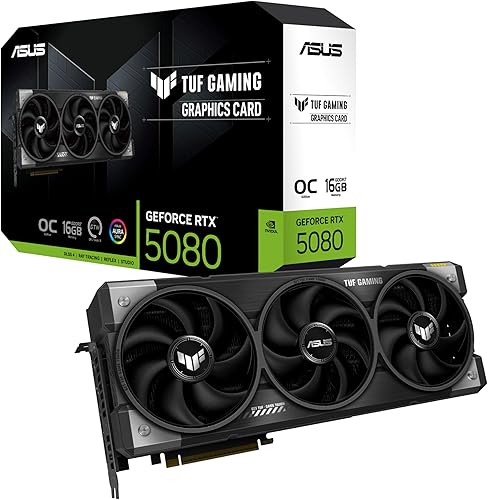
ASUS TUF Gaming GeForce RTX 5080 OC Edition 16GB

GIGABYTE GeForce RTX 5080 Gaming OC 16GB GDDR7
As an Amazon Associate we earn from qualifying purchases. Product prices and availability are accurate as of the date/time indicated.
Pros
- Outstanding 4K and 1440p performance with max settings and ray tracing enabled
- Excellent thermal performance, stays under 70 degrees and remains whisper quiet under load
- Very solid build quality with metal backplate, reinforced structure and included support stand
- DLSS 4 boosts frame rates while maintaining excellent image quality
- Easy installation with helpful 12V power indicator light
Cons
- Very large 2.5 slot, 11.9 inch card requires a spacious case and support bracket
- Firestorm software for RGB control is limited and less refined than Afterburner
- RGB defaults to blue when not using ZOTAC software
The ZOTAC Gaming GeForce RTX 5080 Solid CORE OC is a high end Blackwell graphics card designed for gamers who demand flawless 4K performance. Built for enthusiasts, sim racers and creators, it combines 16GB of GDDR7 memory and PCIe 5.0 to handle the most demanding titles with ease.
Real world performance is outstanding, with users reporting smooth 4K gameplay at ultra settings with ray tracing enabled. Thanks to DLSS 4 and 30 Gbps memory speed, games like Cyberpunk 2077 run well above 60 FPS at 4K, while triple screen 1440p sim setups see major frame rate gains.
Design and cooling are major strengths. The IceStorm 3.0 system uses a massive heatsink, vapor chamber, composite heatpipes and three 90mm BladeLink fans with pass through airflow. The result is cool, quiet operation even during extended sessions, plus a durable metal backplate and reinforced frame.
There are a couple of drawbacks to note. The card is enormous and needs a large case with good clearance, and the included support stand is essential. The SPECTRA RGB lighting is attractive but relies on ZOTAC Firestorm software, which reviewers find less intuitive than alternatives.
Verdict: The Solid CORE OC is a rock solid RTX 5080 that delivers flagship level gaming, excellent thermals and quiet acoustics in a stealthy package. For anyone seeking reliable 4K power without the compromises of louder or hotter cards, it is an excellent choice.
GPU: NVIDIA GeForce RTX 5080 Blackwell architecture with DLSS 4
Memory: 16GB GDDR7, 256 bit, 30 Gbps
Interface: PCI Express 5.0 x16, 3x DisplayPort 2.1b, 1x HDMI 2.1b, 8K Ready, 4 Display Ready, HDCP 2.3, VR Ready
Cooling: IceStorm 3.0 with vapor chamber, composite heatpipes, 3x 90mm BladeLink fans, FREEZE Fan Stop, Active Fan Control
Design: 2.5 slot, 11.9 x 2.2 inches, Metal Backplate, Reinforced Frame, SPECTRA RGB Lighting, Bundled GPU Support Stand
Included: Graphics card, GPU Support Stand, 3x 8 pin to 16 pin cable, User Manual, Quick Start Guide
Pros
- Exceptionally cool and quiet operation, even during demanding AAA gaming and sustained AI generation
- Excellent build quality with rugged TUF construction and included GPU support bracket to prevent sag
- Strong 4K gaming and local AI performance thanks to 16GB GDDR7 and DLSS 4
- Premium connectivity with DisplayPort 2.1a and HDMI 2.1b for high-refresh 4K and 8K displays
- Intuitive tuning and monitoring via GPU Tweak III software
Cons
- Massive 3.6-slot, 13.7-inch footprint requires a large case and may block adjacent PCIe slots
- Requires 850W PSU with 16-pin 12V-2x6 connector, so many upgraders will need a new power supply
- Minimal RGB lighting will disappoint builders seeking a flashy, highly customizable light show
The ASUS TUF Gaming GeForce RTX 5080 OC Edition is a flagship Blackwell graphics card built for serious gamers, creators and AI enthusiasts who demand uncompromising 4K performance. With 16GB of ultra-fast GDDR7 memory and DLSS 4, it is designed to handle the most demanding AAA titles and local AI workloads with ease.
In real-world use, owners report impressively low temperatures and near-silent operation, often staying under 60 degrees Celsius during extended Cyberpunk 2077 sessions and idling around 25 degrees. The factory overclock to 2730 MHz plus DLSS 4 delivers smooth, high-frame-rate 4K gaming, while 16GB GDDR7 proves excellent for ComfyUI video generation and other creative tasks.
Build quality is a true highlight, with a rugged TUF design featuring military-grade components, protective PCB coating and Auto-Extreme manufacturing for long-term reliability. The massive 3.6-slot fin array with three Axial-tech fans and a phase-change thermal pad ensures lasting cooling, and the included GPU holder helps prevent sag despite its 4.3-pound weight.
Its size is the main trade-off, as the 13.7-inch length and 3.6-slot width demand a large case with excellent clearance and slot spacing. You will also need an 850W power supply with a 16-pin 12V-2x6 connector, so many users upgrading from older 30-series cards should plan for a PSU upgrade as well.
Overall, the TUF RTX 5080 OC Edition delivers on its promise of durability, cool quiet power and next-gen features in a tank-like package. If you have the case space and power to support it, it is an outstanding choice for a high-end, future-proof gaming and creation rig that will stay reliable for years.
GPU: NVIDIA GeForce RTX 5080 Blackwell architecture, 16GB GDDR7, Boost Clock up to 2730 MHz in OC Mode and 2700 MHz in Default Mode, PCI-Express x16 interface.
Cooling and Power: Triple Axial-tech fans, 3.6-slot design with massive fin array, phase-change thermal pad, requires 850W PSU with 16-pin 12V-2x6 connector.
Connectivity and Build: 3x Native DisplayPort 2.1a, 2x Native HDMI 2.1b, max resolution 7680 x 4320, dimensions 13.7 x 5.7 inches, weight 5 pounds. Includes TUF graphics card holder, TUF magnet, Velcro hook and loop, and user manual. 3-year warranty.
Pros
- Excellent thermal performance, stays cool even during extended gaming sessions
- Very quiet operation even at full load
- Strong 4K performance with easy overclocking headroom
- Premium build quality with subtle, customizable RGB lighting
- Straightforward VBIOS updates and 3-year manufacturer warranty
Cons
- Very large 13.46 inch length requires a spacious ATX case and careful fit planning
- Heavy 4-pound design needs the included VGA holder and adequate case support
- Requires triple 8-pin power via included 12V-2x6 adapter, needs a capable power supply
The GIGABYTE GeForce RTX 5080 Gaming OC 16G is a high-end graphics card built on NVIDIA Blackwell architecture, designed for gamers and creators who demand flawless 4K performance and AI acceleration. It is a clear step up for users coming from RTX 3080 or 3090 class cards who want a future-proof upgrade.
In real-world use it delivers stunning frame rates with DLSS 4, enhanced RT Cores and Tensor Cores, and 16GB of ultra-fast GDDR7 memory. Reviewers consistently report cool operation around 60 degrees under load and quiet performance even after hours of gaming, with easy overclocking headroom.
Build quality is excellent, featuring a robust WINDFORCE triple-fan cooler, a large heatsink and subtle RGB lighting on the fans and top edge. The card feels premium and well constructed, and the included versatile VGA holder helps support its weight inside the case.
The main drawback is its sheer size, at over 13 inches long it requires a roomy ATX case and may need you to relocate front fans or radiators. It also uses a 12V-2x6 to triple 8-pin adapter, so you will need adequate power connectors and case clearance.
Overall, this is a top-tier choice for enthusiasts who want cool, quiet and powerful 4K gaming with modern features like PCIe 5.0 and 8K display support. If you have the space and a capable power supply, it offers outstanding performance and reliability for a high-end build.
GPU: NVIDIA GeForce RTX 5080, Blackwell architecture, 2.73 GHz boost clock
Memory: 16GB GDDR7, 256-bit interface, 30000 MHz memory clock
Interface: PCI-Express x16 5.0, includes 12V-2x6 to 3x PCIe 8-pin adapter
Cooling: WINDFORCE triple-fan cooling system
Outputs: DisplayPort, HDMI, maximum resolution 7680x4320
Dimensions and Weight: 13.46 x 5.59 inches, 4 pounds, model GV-N5080GAMING OC-16GD
Compatibility: Desktop, includes graphics card, VGA holder, manual and warranty notice
Matching a Part to Your Build
Scenario 1: You want max settings at 1440p 240Hz on a high end rig. You have a modern CPU, a 850W or larger quality PSU with the correct 16-pin cable, and a mid tower or larger case with good airflow. In this case, prioritize a card with strong cooling and higher boost behavior, such as the ASUS TUF Gaming GeForce RTX™ 5080 16GB GDDR7 OC which lists an OC mode boost of 2730 MHz and a default mode of 2700 MHz, plus a massive fin array and three Axial-tech fans. You will appreciate lower noise at sustained load and the included bracket for support, but confirm you have 3.6 slots of clearance and 348mm of length.
If your case is a bit tighter or you prefer a slimmer card that still offers advanced cooling, the ZOTAC Gaming GeForce RTX 5080 Solid CORE OC DLSS 4 is a useful contrast. It is listed as a 2.5-slot card with IceStorm 3.0 Advanced Cooling, three 90mm BladeLink fans, vapor chamber and composite heatpipes, plus a metal backplate and bundled GPU support stand. You keep the same 16GB GDDR7 256-bit 30 Gbps and PCIe 5.0 foundation, but in a form factor that is often easier to fit without crowding your other PCIe devices.
Scenario 2: You have a compact mid tower and care about fit and thermals. Measure your case GPU length limit, check the thickness of any bottom radiator or fans, and look at PSU cable routing for the 16-pin connector. The GIGABYTE GeForce RTX 5080 Gaming OC 16G Graphics with its WINDFORCE cooling system and PCIe 5.0 interface is another example of the same core Blackwell and DLSS 4 platform with 16GB GDDR7, so you can focus on which cooler dimensions and fan design match your chassis. Owners commonly report that larger coolers run quieter but need more clearance, so pick the slimmest cooler that still meets your noise expectations.
For a compact build, also think about weight and support. A card around 4.3 lbs will benefit from a support bracket or stand to avoid PCB flex, and you should ensure your case has a solid mounting point for it. If you are reusing an older case, verify front intake is not choked and that your PSU has the recommended wattage headroom. If you are planning a full new build on a tighter budget, review a balanced parts list like our ryzen 5 7600 RX 7700 XT 1000 dollar gaming PC amazon build to see where a 5080 tier would change your budget allocation.
Scenario 3: You create content or plan to move to 4K later. If you edit video, work with large textures, or expect to keep this GPU through a monitor upgrade, the 16GB frame buffer and DisplayPort 2.1b outputs give you flexibility. Any of the three examples provides that baseline, so choose based on cooler size, noise preference, and whether you value extras like SPECTRA RGB lighting, protective PCB coating, or GPU Tweak III software for monitoring. Just remember to keep your PSU and case choice aligned with the card you pick, not the other way around.
Common Mistakes
Mistake 1: Undersizing the power supply or ignoring the connector. It is easy to focus on wattage alone and forget the cable. If the spec sheet calls for a minimum 850W PSU with a 16-pin 12V-2×6 connector, follow that recommendation and leave headroom for transient spikes and future CPU upgrades. An older 750W unit with adapters may work in some systems, but it is not recommended for this tier unless the maker explicitly allows it, and you should never force a connector that does not seat cleanly.
Mistake 2: Buying a card that does not fit your case or blocks airflow. A 3.6-slot, 348mm card can interfere with front radiators, bottom fans, or drive cages, and it can starve for air in a case with a solid front panel. Always check length, thickness, and weight support, and confirm your case has enough intake and exhaust to feed a large fin array. If clearance is tight, a 2.5-slot design with pass-through airflow is often the safer choice for temperatures and noise.
Mistake 3: Overpaying for VRAM or features you will not use at 1440p. At 1440p, 16GB is already ample, so do not stretch your budget for a more premium choice solely for memory size if it means compromising on CPU, cooling, or a quality PSU. Similarly, if you do not need four display outputs or 8K readiness, prioritize thermals, noise, and warranty support instead. Balance the system, because a well matched CPU, fast memory, and good airflow will affect your experience more than a small clock difference.
Who Should Wait or Buy Differently
This tier is not ideal for everyone at 1440p. If you play mostly esports titles at 1080p or 1440p 144Hz, if your PSU is below the recommended 850W and you do not plan to replace it, or if your case cannot comfortably house a 320mm plus card that is 2.5 to 3.6 slots thick, you will get better value from a lower tier GPU and a more balanced build. It is also not a good fit if you are on a strict budget where the GPU would force you to cut corners on cooling, storage, or a reliable power supply. In those cases, wait for a sale, consider a 5070 Ti class option for 1440p, or put the difference into a CPU and monitor upgrade that you will notice every day.
Frequently Asked Questions
Is the RTX 5080 overkill for 1440p?
For many 1440p 144Hz setups it is more than you need, but it makes sense if you target 1440p 240Hz, want ultra settings with ray tracing, or plan to keep the card for several years. If your monitor is 1080p or you are happy with high instead of ultra settings, a lower tier will be more cost effective.
What power supply do you need for an RTX 5080 at 1440p?
Follow the maker recommendation on the card you choose. One example in this group specifies a minimum 850W PSU with a 16-pin 12V-2×6 connector, so you should use a quality unit that meets that spec and leaves headroom over your total system draw. Verify cable compatibility and that the connector seats fully per the instructions.
Will a 16GB RTX 5080 be good for future games at 1440p?
Based on the spec sheets, the 16GB GDDR7 256-bit memory and Blackwell features with DLSS 4 give you solid headroom for upcoming titles at 1440p and even some 4K. Future demands vary by game, but owners commonly report that this memory size is comfortable for high texture settings at 1440p. Pair it with a capable CPU and adequate cooling to get the most longevity.





Write Your Review
No reviews yet. Be the first to share your experience!