

You love the sharpness of QHD but you do not want to sacrifice the fluidity that makes competitive shooters feel responsive. Many 1440p displays still cap at 144Hz or 165Hz, leaving extra frames from your GPU unused, while 4K 240Hz options demand far more power and budget than most players need.
In this guide we evaluated three compelling 27-inch 1440p 180Hz options to help you find your ideal match for 2026. Whether you prioritize esports speed, color accuracy for creation, or versatile connectivity, you will see how each model handles motion, sync and daily usability. For broader context on pairing your display, explore our overview of graphics card pairing to balance resolution and frame rate.
This article contains affiliate links. If you buy through one of our links, CustomPCGaming may earn a commission at no extra cost to you. Commissions never influence which products we recommend or how we rank them. Read our Affiliate Disclosure for details.
Quick Picks at a Glance
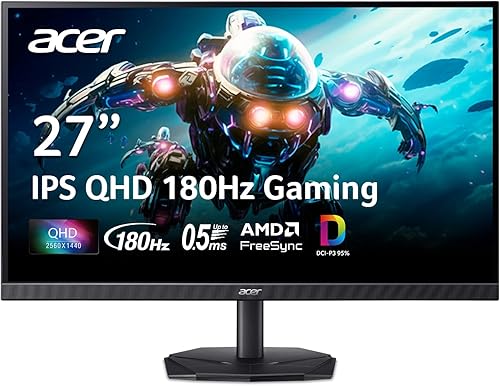
Prime Acer Nitro KG271U 27-inch QHD 180Hz IPS

ASUS TUF Gaming VG27AQ3A 27-inch QHD 180Hz IPS

ASUS ROG Strix XG27ACS 27 Inch QHD 180Hz 1ms
As an Amazon Associate we earn from qualifying purchases. Product prices and availability are accurate as of the date/time indicated.
Pros
- Blazing 180Hz refresh rate and 0.5ms response for ultra-smooth motion
- Crisp QHD IPS panel with wide 178-degree viewing angles and 95% DCI-P3 coverage
- AMD FreeSync prevents tearing and stuttering without extra hardware
- Slim zero-frame design ideal for immersive and multi-monitor setups
- Built-in speakers and tilt adjustment add everyday convenience
Cons
- 250 nits brightness limits HDR impact compared to brighter HDR displays
- Stand offers only tilt adjustment, no height, swivel or pivot control
- Built-in speakers are convenient but lack bass and depth for immersive audio
The Acer Nitro KG271U N3bmiipx is a 27-inch QHD gaming monitor built for players who want sharp visuals and competitive speed without compromise. With its 2560x1440 IPS panel, it hits the sweet spot between Full HD and 4K, making it ideal for gamers, designers and everyday users who want clarity and performance.
In real world use, the 180Hz refresh rate and 0.5ms GTG response time deliver noticeably smoother motion and reduced ghosting in fast paced titles. AMD FreeSync keeps frames synced to your GPU to eliminate tearing, while DCI-P3 95% coverage and HDR10 support produce vibrant, accurate colors for both gaming and creative work.
Design wise, the zero-frame construction maximizes screen space and looks great in multi-monitor setups, while the matte finish reduces glare during long sessions. The monitor is lightweight at 5.5kg, supports wall mounting, and includes DisplayPort and dual HDMI ports plus built-in speakers for a clean, space saving desk setup.
There are some tradeoffs to note. Brightness is rated at 250 nits, which is fine for indoor use but limits HDR punch compared to brighter panels, and the 1000:1 contrast is typical for IPS. Ergonomics are also basic, with tilt only and no height, swivel or pivot adjustment.
Overall, the KG271U offers an impressive mix of speed, resolution and color accuracy that punches above its class. If you want a fast, versatile 27-inch QHD monitor for competitive gaming and color sensitive work, this is a compelling and well balanced choice.
Display: 27-inch IPS, QHD 2560x1440, 16:9, Matte Finish, 178-degree Viewing Angle
Performance: Up to 180Hz Refresh Rate, 0.5ms GTG Response Time, 1000:1 Contrast Ratio, 250 nits Brightness
Color & HDR: 95% DCI-P3 Coverage, HDR10 Support, Flicker-less and ComfyView Technology
Sync & Connectivity: AMD FreeSync, 2x HDMI, 1x DisplayPort, Built-in Speakers
Design & Mounting: Zero-Frame Design, Tilt Adjustment, Wall Mount Support, Dimensions 24.2 x 18.14 x 8.28 inches, 5.5kg
Pros
- Super smooth 180Hz refresh rate with 1ms response for fluid, competitive gaming
- Excellent color reproduction with 130% sRGB and 178 degree wide viewing angles
- Seamless variable refresh rate support including FreeSync Premium, G-SYNC Compatible and PS5 VRR
- Intuitive menu and GamePlus tools with fast, easy setup and VESA mount compatibility
Cons
- Integrated speakers are weak and tinny with very little bass
- HDR is entry level HDR10 and cannot match OLED or true HDR displays
- Matte coating and basic stand design may feel plain compared to premium models
The ASUS TUF Gaming VG27AQ3A is a 27-inch QHD gaming monitor designed for competitive players and immersive gamers who want sharp visuals and high speed. With its 2560x1440 Fast IPS panel, it offers the perfect balance of detail and performance for both PC and next-gen console gaming.
Real-world performance stands out with a blistering 180Hz refresh rate and 1ms response time that keeps motion crisp and ghosting minimal. ASUS ELMB Sync works simultaneously with FreeSync Premium, G-SYNC Compatible and AdaptiveSync to eliminate tearing, and users report silky smooth gameplay with vibrant colors from the 130% sRGB gamut.
Design is clean and functional with a frameless, flat matte panel, wide 178 degree viewing angles and solid build quality. Setup is quick, the on-screen menu is intuitive, and useful GamePlus features like FPS counter, crosshair overlay and display alignment add value, along with versatile HDMI and DisplayPort connections.
There are some drawbacks to note. The built-in speakers are convenient but sound thin and lack bass, so headphones or external speakers are recommended. HDR10 support improves contrast but remains basic and does not deliver the deep blacks or brightness of higher end HDR or OLED panels.
Overall, the VG27AQ3A offers outstanding value for gamers seeking fast, colorful and tear-free QHD performance. It blends competitive speed, color accuracy and user friendly features in a well built package, making it a smart upgrade for anyone moving up from 1080p.
Display: 27-inch Fast IPS, QHD 2560x1440, 180Hz, 1ms response, 130% sRGB, HDR10, 1000:1 contrast, 178 degree viewing angle, matte finish, flat 16:9
Sync Technology: ELMB Sync, AMD FreeSync Premium, G-SYNC Compatible, VESA AdaptiveSync with variable refresh rate support
Connectivity and Features: 2x HDMI, DisplayPort, 3.5mm audio, integrated speakers, Flicker-Free, Blue Light Filter, 100x100 VESA mounting, included DisplayPort cable and power adapter, 3 Year Warranty
Pros
- Excellent motion clarity with 180Hz refresh rate and 1ms response time
- Vibrant Fast IPS colors with wide 178-degree viewing angles and HDR support
- Sturdy, premium build with highly adjustable ergonomic stand
- Effective variable refresh rate performance with minimal tearing or ghosting
- Convenient USB-C connectivity and DisplayWidget Center for easy setup
Cons
- USB-C hub has limited power delivery and no KVM switch
- Matte anti-glare coating can look slightly fuzzy on bright white backgrounds
- Some units report backlight glow or stuck pixels, quality control can vary
The ASUS ROG Strix XG27ACS is a 27-inch QHD gaming monitor built for competitive and everyday gamers who want high refresh rate performance without moving to 4K. It is also a strong fit for creators and professionals who need accurate colors and flexible connectivity in one display.
Performance is a highlight thanks to the Fast IPS panel with 180Hz refresh rate and 1ms GTG response for fluid, sharp motion. G-SYNC compatibility and ELMB SYNC work together to cut tearing and ghosting, and users praise its vivid colors, deep blacks for an IPS, and strong brightness even at lower settings.
Design and build quality feel premium with a sturdy stand that offers tilt, swivel, pivot and height adjustment for ergonomic positioning. The matte finish, slim bezels and clean ROG styling look great on any desk, while the rear joystick and DisplayWidget Center software make OSD adjustments quick and intuitive.
There are a few drawbacks to consider. The USB-C port handles video and acts as a USB hub but provides limited power and lacks a KVM switch. A handful of users also mention a slightly fuzzy look from the anti-glare coating on whites and occasional backlight glow or stuck pixels.
Overall, the XG27ACS delivers smooth, responsive 1440p gaming with practical features and excellent adjustability. If you want a fast, color accurate and versatile 27-inch monitor for gaming, work and content creation, it is an excellent all around choice.
Display: 27 inch Fast IPS, 2560 x 1440 QHD, 16:9, Matte, 400 nits, HDR
Performance: 180Hz refresh rate, 1ms GTG response, 178-degree viewing angles
Sync Technology: G-SYNC Compatible, ASUS Extreme Low Motion Blur Sync (ELMB SYNC)
Connectivity: 2x HDMI, DisplayPort, USB Type-C with DisplayPort signal and USB hub
Ergonomics: Tilt, Swivel, Pivot, Height Adjustable, Wall Mount compatible, Flicker-Free and Blue Light Filter
In the Box: XG27ACS monitor, DisplayPort cable, power cord, quick start guide, ROG pouch
Buying Guide: How to Choose a 1440p 180Hz Gaming Monitor
Choosing among 180Hz QHD monitors means looking beyond the headline refresh rate. We focused on real world factors that affect your aim, your immersion and your desk setup, so you can match a monitor to your play style rather than just a spec sheet. Our peripherals and monitors coverage follows the same practical approach.
Refresh Rate and Motion Clarity at 180Hz
At 180Hz you get noticeably smoother tracking than 144Hz, especially when you flick or track fast targets in shooters and battle royales. All three monitors here hit 180Hz at 2560 x 1440, but how they handle blur makes a difference. Look for a Fast IPS panel with a true 1ms GTG response and effective overdrive to keep moving edges crisp.
The ASUS TUF Gaming VG27AQ3A 27 Inch 1440p 180Hz and ASUS ROG XG27ACS 27 Inch 1440p 180Hz USB-C G-SYNC both offer ASUS Extreme Low Motion Blur Sync, which lets ELMB work together with variable refresh rate to reduce ghosting without introducing tearing. The Acer Nitro 27in QHD 2560×1440 IPS 180Hz pushes even faster with up to 0.5ms GTG, which helps smearing stay minimal during dramatic transitions. If you value a quiet, focused environment for long sessions, consider how your display fits into a quiet gaming setup that stays cool.
Panel Technology and Color Performance
All three picks use 27-inch IPS panels in 16:9, giving you wide viewing angles and consistent color compared to older VA alternatives. That matters when you lean back, collaborate with a friend, or edit photos between matches. A strong sRGB and DCI-P3 coverage ensures games look vibrant without oversaturation, and it helps creative work remain accurate.
The ASUS TUF Gaming VG27AQ3A 27 Inch 1440p 180Hz covers 130% sRGB for punchy, well saturated tones, while the Acer Nitro 27in QHD 2560×1440 IPS 180Hz supports DCI-P3 95%, a sweet spot for color critical tasks like photo editing and film work. The ASUS ROG XG27ACS 27 Inch 1440p 180Hz USB-C G-SYNC also leverages Fast IPS for sharp visuals at high frame rates, plus HDR10 support across the lineup adds depth to bright highlights and shadow detail when you enable compatible content.
Adaptive Sync and Connectivity Essentials
Tearing and stutter break immersion, so confirm robust adaptive sync support. The ASUS TUF Gaming VG27AQ3A 27 Inch 1440p 180Hz is FreeSync Premium, G-SYNC Compatible and AdaptiveSync certified, enabling variable refresh rate by default for buttery gameplay across AMD and NVIDIA GPUs. The Acer Nitro 27in QHD 2560×1440 IPS 180Hz uses AMD FreeSync to sync monitor and GPU frames, while the ROG model adds G-SYNC compatibility with ELMB Sync for tear free clarity.
Connectivity shapes your daily convenience. If you use a laptop or want a cleaner desk, the ASUS ROG XG27ACS 27 Inch 1440p 180Hz USB-C G-SYNC stands out with a USB Type-C hub that carries DisplayPort signal and serves as a hub for wired peripherals, reducing cable clutter. All three include DisplayPort as primary for 180Hz, so verify your GPU and cable support QHD at full refresh. Pairing advice from a balanced 1440p gaming build can help you avoid bottlenecks.
Ergonomics, HDR and Extra Features
Comfort and extras determine whether a monitor delights you after the first week. Check for tilt, height and swivel adjustments, VESA mount support, and thoughtful touches like zero-frame design on the Acer Nitro 27in QHD 2560×1440 IPS 180Hz that maximizes screen area. Integrated speakers, as on the TUF model, offer convenient audio without external speakers, though dedicated headphones or speakers still sound richer.
HDR10 on these displays enhances contrast in supported games and media, but true HDR impact still depends on peak brightness and local dimming. Software matters too, ASUS DisplayWidget Center on the ROG XG27ACS lets you adjust OSD settings with your mouse instead of fumbling with buttons. Both ASUS models also include a complimentary 3-month Adobe Creative Cloud subscription valid to 8/31/2028, a nice bonus if you create content alongside gaming.
As of September 2026, 180Hz QHD has become the sweet spot for players who want sharper image quality than 1080p without the GPU demands of 4K. We prioritized models that deliver consistent overdrive, reliable sync and practical connectivity, so your choice comes down to whether you value USB-C versatility, maximum color gamut, or proven all-around balance.
Final Thoughts
If you want versatile connectivity and refined tuning, ASUS ROG XG27ACS 27 Inch 1440p 180Hz USB-C G-SYNC is our top recommendation for its USB-C hub and DisplayWidget Center, while Acer Nitro 27in QHD 2560×1440 IPS 180Hz is ideal when you prioritize ultra responsive 0.5ms performance and strong DCI-P3 color for both play and creative work.
Frequently Asked Questions
Is 180Hz noticeably better than 144Hz for 1440p gaming?
Yes, especially in fast paced shooters where you track moving targets. The jump from 144Hz to 180Hz shortens frame intervals, lowers perceived input lag and makes motion appear more continuous. You will notice it most when your GPU can consistently push above 144 fps at QHD.
Do I need a powerful GPU to benefit from a 1440p 180Hz monitor in 2026?
You do not need a flagship, but you should aim for a mid range to upper mid range GPU that sustains high frame rates at 2560 x 1440. Even if you do not hit 180 fps in every title, adaptive sync keeps gameplay smooth, and you can lower settings for competitive games. Reviewing airflow for hot GPUs helps maintain consistent performance under load.
What is ELMB Sync and should I use it?
ELMB Sync allows Extreme Low Motion Blur to operate at the same time as variable refresh rate, reducing ghosting and tearing simultaneously. It is useful when you want sharper motion clarity without sacrificing smooth sync. Try it in your favorite shooter and toggle it to see if you prefer the slightly dimmer image for crisper motion.
Is a 27-inch QHD monitor good for both gaming and content creation?
Absolutely. 27 inches at 2560 x 1440 offers high pixel density without making text too small, and IPS panels provide accurate colors and wide angles. Models with wide gamut like DCI-P3 95% and strong sRGB coverage handle editing well, while 180Hz and adaptive sync keep games fluid. For a cohesive desk, also consider your case and airflow to keep your system quiet during long creative sessions.
These picks are not ideal for casual or first-time players on a tight budget; they are aimed at people who want higher refresh rates, better panels, or competitive-grade input.



Write Your Review
No reviews yet. Be the first to share your experience!