

Choosing how to choose a gaming monitor for an RTX 5070 build comes down to balancing what your graphics card can comfortably drive against what you actually notice while playing. The RTX 5070 is positioned as a strong 1440p card that can also push very high frame rates at 1080p, so your monitor choice will shape whether you prioritize sharpness, speed, or immersion.
Before you compare individual models, it helps to frame the decision around a few variables: your target resolution and refresh rate, the types of games you play, your desk space and viewing distance, your power and cable setup, and whether you are buying for your current build or planning for your next GPU upgrade. Getting these right first makes the rest of the spec sheet much easier to interpret in September 2026.
What Actually Matters
Resolution and Refresh Rate Pairing
Resolution determines how sharp the image looks and how hard your GPU has to work. With an RTX 5070, 1920 x 1080 is the easiest to drive at very high frame rates, while 2560 x 1440 gives you noticeably more detail and is often seen as the sweet spot for this class of card. An ultrawide 2560 x 1080 sits in between, offering a wider field of view without the same pixel count as full 1440p.
Refresh rate tells you how many times the screen can update per second, and you want it to match the frame rates you realistically expect. If you mainly play competitive shooters and want to stay above 200 frames per second, a 240Hz panel makes sense. If you play cinematic single player games where you value detail over peak speed, a 180Hz QHD panel can be a better balance. Think about your favorite titles first, then check what frame rates owners commonly report for similar builds before you lock in a refresh target.
Also consider how long you plan to keep the monitor. A display often outlasts a GPU, so if you expect to keep it through your next upgrade, leaning toward 1440p can give you more headroom. If you upgrade GPUs frequently and want maximum competitive advantage now, prioritizing refresh rate over resolution may serve you better. For a helpful comparison of how different cards handle 1440p, you can review RTX 4060 ti vs RTX 5060 to see how resolution demands scale.
Panel Type, Response Time and Adaptive Sync
Panel technology affects color, viewing angles, and motion clarity. Fast IPS panels are common for gaming because they offer wide 170 to 178 degree viewing angles and strong color coverage such as 99 percent sRGB, which helps games and creative work look consistent from different seating positions. Response time, listed as low as 0.3ms, 0.5ms, or 1ms GtG on spec sheets, indicates how quickly pixels can change, and lower values help reduce ghosting in fast motion.
Adaptive sync is important for an RTX 5070 build. Look for FreeSync Premium and G-SYNC compatibility, which help eliminate tearing and stutter when your frame rate fluctuates. Features like Extreme Low Motion Blur Sync aim to keep motion sharp while variable refresh rate is active, which you will appreciate in fast paced games. Per the spec sheet, these technologies work together to keep gameplay smooth without you needing to cap your frame rate manually.
Do not get too focused on a single response time number alone. Real world clarity depends on overdrive tuning, refresh rate, and how the monitor handles motion blur reduction. If you are sensitive to blur, prioritize a panel that offers a well reviewed motion blur reduction mode that works with adaptive sync. If you value color accuracy for content creation, prioritize sRGB coverage and good factory calibration over the absolute lowest response time.
Size, Aspect Ratio and Viewing Comfort
Size and aspect ratio change how immersive a game feels and how much desk space you need. A 27 inch 16:9 display is a versatile choice that fits most desks and keeps pixel density reasonable at both 1080p and 1440p. A 30 inch 21:9 ultrawide with a curve that mirrors your field of vision can feel more immersive for racing and open world games, while a 32 inch QHD panel gives you a larger image with higher pixel density than Full HD.
Viewing comfort matters for long sessions. Check for low blue light modes, flicker free operation, and certifications like TUV Rheinland eye comfort, which aim to reduce eye fatigue while preserving color quality. Curved ultrawide panels can help reduce eye movement at the edges, but they need more desk depth to view comfortably. Measure your viewing distance and ensure you have enough room to sit at least an arm length from a 32 inch screen.
Stand ergonomics also affect comfort. A height adjustable stand that pivots, tilts, and swivels lets you align the screen to eye level and reduce neck strain. If you use a monitor arm, verify VESA compatibility and weight limits. Your case and desk choice also play a role here, and you can get ideas for a quiet, spacious setup from quiet gaming PC cases that stay cool without the noise.
Connectivity, Ergonomics and Extra Features
Ports determine what refresh rates you can actually use. DisplayPort 1.4 is typically needed to reach the highest refresh rates like 240Hz at Full HD or 180Hz at QHD, while HDMI ports may be limited depending on version. If you plan to connect both a PC and a console, look for multiple HDMI inputs plus DisplayPort, and features like Auto Source Switch that instantly change inputs when you power on a device.
Extra gaming features can be useful but should not drive your decision alone. Black Equalizer to brighten dark shadows, Virtual Aim Point overlays, and FPS or RTS picture presets are nice to have for competitive play, but they do not replace core image quality. Built in speakers are convenient for conference calls and casual use, though they rarely replace dedicated headphones or speakers for gaming.
Consider your full build context as well. A hot GPU benefits from good airflow, which keeps your system quieter during long gaming sessions, as explained in how to choose an airflow case for a hot GPU. And if you are planning the rest of your platform, how to choose a B550 motherboard for gaming can help you think through how your motherboard choice interacts with your overall budget for peripherals like a monitor.
To illustrate how these tradeoffs look in practice, here are a few options that show the range of what you might pair with an RTX 5070:
This article contains affiliate links. If you buy through one of our links, CustomPCGaming may earn a commission at no extra cost to you. Commissions never influence which products we recommend or how we rank them. Read our Affiliate Disclosure for details.
Quick Picks at a Glance
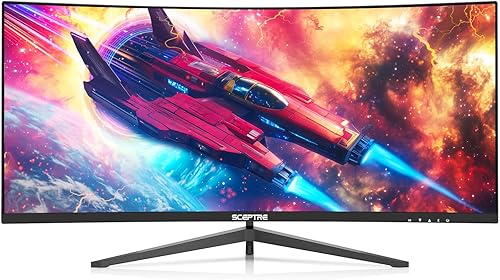
Sceptre 30-inch Curved Ultrawide Gaming Monitor

Prime Dell SE2726HG 27-Inch 240Hz Gaming Monitor
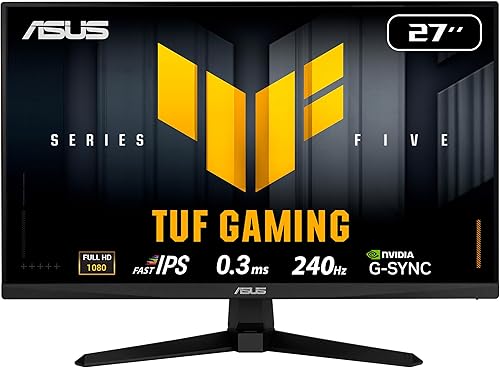
ASUS TUF VG279QM5A 27-inch 1080p 240Hz Fast IPS

Prime Samsung 32" Odyssey G5 QHD Gaming Monitor – 180Hz
As an Amazon Associate we earn from qualifying purchases. Product prices and availability are accurate as of the date/time indicated.
Pros
- Exceptionally smooth 200Hz performance with FreeSync Premium for competitive gaming
- Immersive curved ultrawide design enhances both gaming and multitasking productivity
- Quick plug-and-play setup praised by users with flexible multi-port connectivity
- Strong color accuracy and contrast with 100% sRGB and VA panel technology
- Sleek edgeless design with LED rear lighting and built-in speakers
Cons
- 2560x1080 WFHD stretches pixels on a 30-inch panel, less sharp than QHD ultrawides
- VA panel viewing angles are narrower than IPS alternatives
- Built-in speakers are convenient but lack depth for immersive gaming audio
The Sceptre C305B-200UN is a 30-inch curved ultrawide gaming monitor built for gamers, streamers and multitaskers who want panoramic immersion without a dual monitor setup. Its 21:9 aspect ratio and 2560x1080 WFHD resolution wrap naturally around your vision for a more engaging and productive workspace.
Performance is the highlight, with a 200Hz refresh rate over DisplayPort, 1ms MPRT response and AMD FreeSync Premium for tear-free, ultra-fluid gameplay. In real world use it delivers crisp motion in fast shooters, vibrant 100 percent sRGB colors and strong contrast that works well for both gaming and creative tasks.
Design and build focus on function and style, with an edgeless matte screen that cuts glare, a modern Machine Black chassis with subtle LED rear lighting and a solid stand. You get two HDMI and two DisplayPort inputs plus built-in speakers for convenient audio, and VESA support for wall or arm mounting.
There are tradeoffs to note, as WFHD resolution is less pixel dense than QHD on a 30-inch screen so fine detail is not as razor sharp. The VA panel provides excellent contrast but viewing angles are slightly more limited than IPS, and the integrated speakers suit casual use rather than high fidelity sound.
Overall, the C305B-200UN offers outstanding value for anyone prioritizing high refresh rate smoothness and ultrawide immersion on a budget. If you want competitive gaming performance, effective PBP and PIP multitasking and comfort features in one affordable package, this Sceptre is a smart pick.
Display: 30-inch Curved VA, 2560x1080 WFHD, 21:9 Aspect Ratio, 200Hz Refresh Rate, 1ms MPRT, 5ms GTG, 300 nits Brightness, 1000:1 to 3000:1 Contrast
Color and Technology: 100% sRGB, HDR Support, LED Backlight, Matte Finish, 170 degree H/V Viewing Angle, Blue Light Shift, Anti-Flicker
Gaming Features: AMD FreeSync Premium, FPS and RTS Custom Modes, Curved Design for Immersion and Reduced Eye Strain
Multitasking: Picture-by-Picture (PBP) and Picture-in-Picture (PIP) for dual source viewing
Connectivity and Audio: 2x HDMI, 2x DisplayPort, Built-in Speakers
Design and Dimensions: Edgeless Design with LED Rear Lighting, Machine Black, 27.8 x 16 x 7.4 inches, VESA Wall Mount Compatible, Model C305B-200UN
Pros
- Blazing 240Hz refresh rate and 0.5ms response perfect for competitive gaming
- Fast IPS technology provides excellent color accuracy and wide viewing angles
- FreeSync Premium and HDMI VRR eliminate tearing and stuttering
- TÜV 3-Star certified eye comfort for longer, more comfortable sessions
- Lightweight design backed by a 3 year Dell warranty
Cons
- 1080p resolution on 27 inches offers lower pixel density than 1440p options
- Stand only tilts, no height, swivel or pivot adjustment
- 300 nits brightness and 1000:1 contrast are good for SDR but not true HDR
The Dell SE2726HG is a 27-inch Full HD gaming monitor designed for players who prioritize speed and smoothness over ultra high resolution. With its 240Hz refresh rate and fast IPS panel, it targets competitive gamers, esports enthusiasts and anyone who wants fluid entertainment on PC or console.
In real world use, the 240Hz panel and 0.5ms response time deliver noticeably smoother motion and reduced input lag in fast shooters and racing games. AMD FreeSync Premium and HDMI VRR keep gameplay tear free, while 99 percent sRGB coverage ensures colors stay vivid and accurate across wide 178 degree viewing angles.
The design is clean and functional with a matte anti glare coating that cuts reflections and a slim black chassis that fits any desk setup. At just 8.2 pounds it is easy to position, and the tilt adjustable stand provides basic ergonomic flexibility, while dual HDMI and DisplayPort 1.4 offer simple connectivity for multiple devices.
There are some tradeoffs to consider. The 1080p resolution on a 27 inch screen means pixel density is lower than 1440p alternatives, so text and fine details are less sharp for work or creative tasks. The stand only tilts with no height or swivel adjustment, and 300 nits brightness is solid for SDR but not bright enough for true HDR impact.
Overall, the SE2726HG is a compelling choice for gamers who want elite level speed, IPS color quality and eye comfort at an accessible point. If you value ultra smooth competitive performance and tear free console and PC gaming over 4K sharpness, this Dell delivers excellent value backed by a 3 year warranty.
Display: 27-inch FHD 1920x1080 IPS, 240Hz, 0.5ms response, 300 nits brightness, 1000:1 contrast, 178 degree viewing angle, matte finish
Color and Sync: 99 percent sRGB, AMD FreeSync Premium, HDMI VRR, TÜV Rheinland 3-Star Eye Comfort
Connectivity: 2x HDMI 2.0, 1x DisplayPort 1.4, tilt adjustment, anti glare screen
Dimensions and Warranty: 24.05 x 17.83 x 7.4 inches, 8.2 pounds, Black, includes HDMI cable and power cable, 3 Year Dell Warranty
Pros
- Exceptionally fast 240Hz refresh rate and 0.3ms response for competitive edge
- Excellent adaptive sync support with both FreeSync Premium and G-SYNC Compatible
- Vibrant Fast IPS panel with 99% sRGB and wide 178-degree viewing angles
- Useful gaming enhancements including ELMB SYNC, GamePlus and Shadow Boost
- Backed by a 3-year warranty with DisplayPort cable included
Cons
- 1080p resolution on a 27-inch panel may lack sharpness compared to 1440p alternatives
- Only one HDMI port limits connectivity for multiple consoles
- 300 nits brightness is solid for SDR but modest for HDR content
The ASUS TUF VG279QM5A is a 27-inch Full HD Fast IPS gaming monitor engineered for competitive play. It is built for FPS and esports gamers who value speed, responsiveness and smoothness over higher resolution.
In real world performance, the 240Hz refresh rate and 0.3ms response time deliver fluid, blur-free visuals during fast action. FreeSync Premium and G-SYNC compatibility plus ELMB SYNC work together to eliminate tearing and ghosting for sharp, seamless gameplay.
The design features a matte anti-glare finish, slim bezels and a flat panel with wide 178-degree viewing angles. Build quality is solid at 9.9 pounds, and it offers DisplayPort 1.4, HDMI, an earphone jack and 2W built-in speakers with easy mouse control via DisplayWidget Center.
Drawbacks include the 1080p resolution which can look less crisp on a 27-inch screen than 1440p options. Brightness at 300 nits is fine for most rooms but not impactful for HDR, and the stock stand may feel basic for users who prefer full ergonomic adjustment.
Overall, the VG279QM5A delivers outstanding speed, accurate 99 percent sRGB color and gamer-focused features in a reliable package. It is a compelling choice for competitive gamers seeking responsive, tear-free performance with trusted ASUS TUF durability.
Display: 27-inch Fast IPS, 1920 x 1080 FHD, 240Hz, 0.3ms, 1000:1 contrast, 300 nits brightness, 178-degree viewing angles, matte finish.
Color and Sync: 99% sRGB gamut, FreeSync Premium, G-SYNC Compatible, VESA AdaptiveSync 240Hz, ELMB SYNC, Flicker-Free and Low Blue Light.
Connectivity and Features: DisplayPort 1.4, HDMI, earphone jack, 2W x 2 speakers, GameVisual, GamePlus, Shadow Boost, DisplayWidget Center support.
Dimensions and Warranty: 24.21 x 17.83 x 7.6 inches, 9.9 pounds, black flat design, includes DisplayPort cable and power cord, 3-year warranty with ARR.
Pros
- Buttery smooth 180Hz and 1ms performance ideal for fast-paced shooters and esports
- Sharp QHD resolution on a large 32-inch IPS panel with wide viewing angles
- Tear-free gaming with both G-Sync Compatible and FreeSync Adaptive Sync
- Fully adjustable ergonomic stand for personalized comfort during long sessions
- Helpful gaming features including HDR10, Black Equalizer and Virtual Aim Point
Cons
- 300 nits brightness and 1000:1 contrast limit true HDR impact versus premium HDR displays
- Only one HDMI port may restrict multi-console or multi-device setups
- IPS LCD cannot match the deep blacks and contrast of VA or OLED panels
The Samsung Odyssey G5 G50F is a 32-inch QHD gaming monitor designed for players who want a large, sharp canvas without stepping up to 4K. It is well suited for competitive gamers, casual enthusiasts and creators who need smooth performance and accurate color on a flat IPS display.
In real world use, the 2560x1440 resolution delivers noticeably crisper detail than 1080p, while the 180Hz refresh rate and 1ms GtG response keep motion ultra smooth. G-Sync Compatible and FreeSync support work together to eliminate screen tearing, and HDR10 adds brighter highlights and more nuanced shadows for richer game scenes.
Design wise, the monitor features a clean matte black finish and a sturdy ergonomic stand that offers height adjustment, tilt, swivel and pivot. The matte coating reduces glare, the 178 degree IPS viewing angle keeps colors consistent, and Auto Source Switch+ makes switching between PC and console inputs seamless.
There are some tradeoffs to consider. Peak brightness of 300 nits and a 1000:1 contrast ratio mean HDR is more subtle than on premium HDR displays, and the single HDMI port may feel limiting if you connect multiple consoles. As an IPS LCD, it also cannot match the infinite contrast of OLED panels.
Overall, the Odyssey G5 G50F delivers excellent value for gamers seeking speed, sharpness and comfort in a large format. If you want fluid 180Hz gameplay, versatile ergonomics and reliable Samsung build quality for desktop gaming and everyday use, this is a compelling choice.
Display: 32-inch Flat IPS, QHD 2560x1440, 180Hz, 1ms GtG, 16:9 Aspect Ratio, Matte Finish, 178 degree Viewing Angle
Picture Quality: HDR10, 300 nits Brightness, 1000:1 Contrast Ratio, 99% Color Gamut, 0.27 Pixel Pitch
Adaptive Sync: G-Sync Compatible and FreeSync for tear-free, low-lag gaming
Connectivity: DisplayPort, 1x HDMI, Auto Source Switch+ for instant input detection
Ergonomics: Height Adjustable Stand with Tilt, Swivel and Pivot, Desk Mount, Black Design
Model Info: Samsung S32FG502EN (FBASAMLS32FG502ENXZA), LCD Display Technology, 1 Year Manufacturer Warranty
Matching a Part to Your Build
If you play competitive shooters and want the highest frame rates for the RTX 5070, prioritize 1080p at 240Hz. The ASUS TUF VG279QM5A 27 Inch 1080p 240Hz Fast IPS and the Dell 27 240Hz Gaming Monitor – SE2726HG both offer 27 inch Full HD panels with 240Hz refresh rates and Fast IPS technology. The ASUS model lists a 0.3ms minimum response time and ELMB Sync for blur reduction, while the Dell model lists a 0.5ms response time, 99 percent sRGB coverage, and TUV 3 star eye comfort certification. Either approach suits a player who values speed and low input lag over extra resolution.
If you want more detail and a larger canvas for mixed gaming, the Samsung 32” Odyssey G5 (G50F) shows the QHD path. Its 2560 x 1440 resolution delivers more than 1.7 times the pixel density of Full HD, with a 180Hz refresh rate and 1ms GtG response time, plus G-Sync compatibility and HDR10 support. This is a strong fit if you play story driven games, RPGs, or simulators where sharpness and a 32 inch viewing area matter, and you are comfortable letting your RTX 5070 work harder to maintain high frame rates at 1440p.
If you crave immersion on a wide field of view without jumping to full 1440p ultrawide pixel counts, consider the ultrawide option. The Sceptre Prime Curved 30-inch Gaming Monitor 200+Hz offers a 30 inch curved 21:9 panel at 2560 x 1080 with 200+Hz via DisplayPort, a 5ms GtG response time, 170 degree viewing angles, and AMD FreeSync. Its Picture by Picture and built in speakers add versatility for multitasking. This suits racing, flight, and open world games where peripheral vision adds to the experience, though you should note the lower vertical pixel count compared to QHD.
Common Mistakes
Mistake 1: Mismatching refresh rate and GPU output. Buying a 240Hz monitor will not help if your RTX 5070 build is targeting 1440p ultra settings in demanding games where you commonly see far lower frame rates. Check the refresh rate you can actually sustain in your favorite titles, and remember that you need the right cable and port, often DisplayPort, to reach the advertised maximum.
Mistake 2: Ignoring size, pixel density, and desk fit. A 32 inch QHD screen can look impressive, but at close viewing distances you may notice larger pixels than on a 27 inch QHD panel, and a 30 inch ultrawide needs extra desk width and depth to view comfortably. Measure your desk, viewing distance, and stand footprint before you buy, and confirm that a height adjustable stand or monitor arm will let you achieve proper eye level alignment.
Mistake 3: Overlooking adaptive sync and eye comfort features. Skipping FreeSync Premium or G-SYNC compatibility can leave you with tearing when frame rates vary, which is common even with a powerful card. Similarly, ignoring low blue light modes, flicker free design, or TUV certification can lead to fatigue during long sessions. Review the spec sheet for these features rather than focusing only on resolution and refresh rate.
Who Should Wait or Buy Differently
A high refresh 1080p or ultrawide 1080p monitor is not ideal for you if your primary goal is maximum sharpness for creative work, or if you plan to keep your display for many years and want the extra detail of 1440p or higher. It is also not a good fit if your desk is very shallow, where a 32 inch screen would force you to sit too close, or if you need excellent color accuracy for photo or video editing and would benefit from a panel with stronger factory calibration and wider gamut coverage. In those cases, waiting for a well reviewed 27 inch 1440p 180Hz or higher model with the ergonomics and ports you need may be the smarter move, especially if you are also considering a future GPU upgrade that will handle higher resolutions more easily.
Frequently Asked Questions
Is 1080p 240Hz or 1440p 180Hz better for an RTX 5070?
It depends on your priorities. 1080p at 240Hz lets the RTX 5070 push very high frame rates with lower input lag, which helps competitive players. 1440p at 180Hz looks sharper and is still fast enough for most gamers, but it demands more from the GPU to maintain high frame rates.
Do I need G-SYNC or FreeSync with an RTX 5070?
You do not strictly need it, but it is highly recommended. Adaptive sync such as FreeSync Premium and G-SYNC compatibility smooths out tearing and stutter when your frame rate moves up and down, which happens often even with a strong card. Most modern gaming monitors include this support, so prioritize it when comparing otherwise similar models.
What cables and ports do I need to reach the advertised refresh rate?
Use DisplayPort 1.4 for the highest refresh rates, such as 240Hz at 1920 x 1080 or 180Hz at 2560 x 1440, as HDMI may be limited by version. Check the monitor spec sheet for port versions and what is included in the box, like a DisplayPort cable. Also ensure your RTX 5070 and monitor both support the same adaptive sync standard over the connection you plan to use.
Browse more picks in our Peripherals & Monitors category.


Write Your Review
No reviews yet. Be the first to share your experience!