

Video credit: CRATER. Original video: https://www.youtube.com/watch?v=NhTo_-pkWTA. This is our own independent breakdown and is not affiliated with the video creator. As an Amazon Associate, CustomPCGaming earns from qualifying purchases. Product prices shown in the video may have changed.
Watch the build
Parts in this build
- Intel Core Ultra 5 245K
- MSI GeForce RTX 5060 Ti 16GB Ventus
- MSI PRO B860-P WiFi
- Corsair Vengeance 32GB DDR5 6000
- WD Black SN850X 2TB
- be quiet! Pure Power 12 M 750W
- Cooler Master NR200P V2
- Thermalright AXP90-X47
Parts list is our summary of the video for reference. Confirm current specs and price on the retailer page before buying.
Watch: The Build Video
This is our independent parts analysis and is not affiliated with the video creator. As an Amazon Associate, CustomPCGaming earns from qualifying purchases. Product prices shown in the video may have changed.
The video embedded here shows a real build in this class and budget, not this exact parts list. It is built around a small form factor case, so cooler height and card length are the tight constraints. If you are planning a compact mid class build, you can use it as a visual reference for how parts fit, how cables route, and how airflow works in this size class before you finalize your own list.
What This Build Is
This small form factor gaming pc build in the mid class breakdown is aimed at 1440p high settings with a balanced platform that keeps the processor from holding the graphics card back. It is centered on the Intel Core Ultra 5 245K and an MSI GeForce RTX 5060 Ti 16GB Ventus class card, which is the pairing this build is planned around.
You are getting a current Intel LGA1851 platform with DDR5, a 2TB SSD sized for a modern library, and a compact case that prioritizes airflow and clearance. This is not an entry level 1080p box and it is not a flagship 4K system. It sits in the middle where you can play at high settings at 1440p while keeping the system small enough for a desk or living room.
Builds at this level usually keep the board and cooler practical and put the budget into the CPU and graphics card. That is exactly what this list does. You get a proven B860 board with the I/O you need, a low profile cooler that fits the case, and a modern ATX 3.1 supply with headroom above the combined draw of the CPU and GPU.
If you want context on how case choice affects thermals in this class, our Cases & Airflow archive collects our case and airflow guides in one place. For compact builds specifically, you may also want to review our guide to small form factor cases for RTX 5070 builds to see how clearance and ventilation scale with card size.
What you trade away at this budget is headroom for very high refresh competitive play and for heavy workstation tasks. You have 32GB of DDR5, which is the sweet spot for gaming on this platform, but you are not paying for an oversized board, a large AIO, or a 1000W supply. That keeps the build focused and leaves you a clear path to upgrade the GPU or platform later without replacing everything.
You should also expect a small form factor build to require more planning than a mid tower. You need to check cooler height against the case, confirm the graphics card length and slot thickness, and plan cable routing early. When you do that, you get a quiet, compact system that still has the CPU and GPU muscle for 1440p high settings.
This build is a good fit if you want a tidy, portable system that prioritizes gaming performance per liter. It is not the right choice if you need maximum upgrade flexibility, multiple large radiators, or room for many drives. In those cases a larger airflow case will serve you better, as we compare in mesh front case vs tempered glass front case.
Parts Breakdown
This is the core of the article. The table below shows what is common at this level on the left and our current 2026 pick on the right, with a short note on why we chose it. After the table we explain the two most important choices in more detail.
This article contains affiliate links. If you buy through one of our links, CustomPCGaming may earn a commission at no extra cost to you. Commissions never influence which products we recommend or how we rank them. Read our Affiliate Disclosure for details.
Quick Picks at a Glance
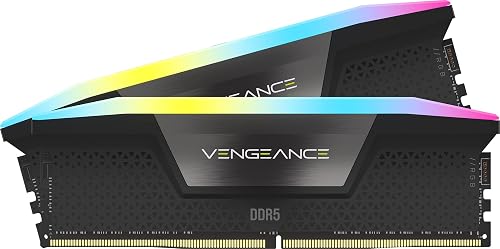
CORSAIR Vengeance RGB DDR5 32GB (2x16GB)

Intel Core Ultra 5 245K 14-Core Unlocked Desktop

Cooler Master NR200P MAX V2 Mini-ITX Case Bundle

ASUS Dual GeForce RTX 5060 OC Edition 8GB GDDR7

be quiet! Pure Power 13 M 750W ATX 3.1 PSU

MSI PRO B860M-A WiFi mATX Motherboard for Intel

Prime Thermalright AXP90-X47 Full Copper Low Profile CPU
As an Amazon Associate we earn from qualifying purchases. Product prices and availability are accurate as of the date/time indicated.
Pros
- High frequency 6000MHz performance with low CL30 latency for responsive multitasking
- Brilliant individually addressable RGB lighting visible from any angle
- Dual compatibility with AMD EXPO and Intel XMP 3.0 for easy setup
- Stable overclocking with onboard voltage regulation and custom PCB design
- Backed by Corsair build quality and a limited lifetime warranty
Cons
- Maximum 6000MHz speed requires manual BIOS tuning and compatible motherboard and CPU
- Premium price for RGB and high speed bin compared to standard DDR5 kits
- Some systems may need to run below full speed for stability, especially on certain AMD boards
The CORSAIR Vengeance RGB DDR5 32GB kit (2x16GB, 6000MHz, CL30) is a high performance memory kit designed for modern gaming and workstation desktops. It is built for enthusiasts, gamers and creators who want top tier DDR5 bandwidth, low latency and striking aesthetics on both AMD and Intel platforms.
In real world use, the 6000MHz speed and CL30 timings provide noticeably smoother gaming, faster rendering and lag free multitasking. Enabling AMD EXPO or Intel XMP 3.0 in BIOS unlocks the full speed instantly, while CORSAIR iCUE allows real time monitoring and voltage tuning for stable overclocking.
Design and build quality are excellent, with a sleek gray aluminum heat spreader and a panoramic light bar housing ten ultra bright, individually addressable RGB LEDs per module. The custom PCB ensures clean signal integrity, while onboard voltage regulation gives more precise control than traditional motherboard based overclocking.
There are a few drawbacks to consider. You must enable EXPO or XMP in BIOS to reach the advertised speed, and some motherboard and CPU combinations may default to lower speeds like 5200MHz for stability. The 1.40V operating voltage and RGB premium also mean it costs more than basic DDR5 options.
Overall, Vengeance RGB DDR5 is one of the best DDR5 kits for users who want both elite performance and standout lighting. If you want fast, reliable memory that looks as good as it performs and you have a compatible DDR5 system, it is an outstanding upgrade.
Capacity: 32GB (2x16GB) Dual Channel Kit, DDR5, 288-Pin DIMM, Model CMH32GX5M2B6000Z30K
Performance: 6000MHz, Timings CL30-36-36-76, Voltage 1.40V, Intel XMP 3.0 and AMD EXPO Support
Features: Ten-zone RGB LEDs per module, panoramic light bar, onboard voltage regulation, custom high performance PCB
Compatibility: Desktop DDR5 systems, optimized for latest Intel and AMD motherboards, iCUE software control
Choose this 6000MHz CL30 kit if you want the sweet spot for DDR5 gaming and creation, balancing high frequency with low latency. Lower latency kits offer better responsiveness than higher speed CL36 or CL40 alternatives in many games.
Make sure your motherboard and CPU support DDR5 and 6000MHz EXPO or XMP profiles, and that your case has clearance for RGB DIMMs. Update your BIOS before installation for best compatibility.
If you prioritize budget over lighting, consider a non RGB Vengeance kit with similar specs. If you want maximum aesthetics and easy tuning with iCUE, this RGB model is worth the premium.
Pros
- Excellent multicore performance for gaming and productivity
- Runs cool and power efficient for 24/7 operation
- Modern platform with DDR5 and PCIe 5.0 future proofing
- Built-in AV1 encoding saves cost on a discrete GPU
Cons
- No thermal solution included, aftermarket cooler required
- Requires new LGA 1851 motherboard with Intel 800 series chipset
- 125W base power needs robust cooling and power delivery
The Intel Core Ultra 5 245K is a Series 2 unlocked desktop processor built for gamers, creators and power users who want efficient multitasking. With 14 cores and 14 threads, it balances high performance with modern efficiency on the Intel 800 series platform.
In real world use, the hybrid architecture with 6 Performance cores and 8 Efficiency cores handles gaming, streaming and productivity with ease. The 5.2 GHz boost clock and 26MB cache deliver quick responsiveness, while DDR5 and PCIe 5.0 support keep your system ready for next generation GPUs and storage.
Built on Intel's latest hybrid design, the chip intelligently prioritizes workloads to run cooler and quieter under load. Reviewers note it runs efficiently for 24/7 builds like media servers and benefits from built in AV1 encoding that removes the need for a discrete GPU.
There are a few tradeoffs to consider. No thermal solution is included, so you will need an aftermarket cooler, and it requires a new LGA 1851 motherboard which adds to upgrade costs. Its 125W base power also demands solid cooling and power delivery for sustained performance.
Overall, the 245K is a powerful and efficient mid range CPU that offers excellent value for new builds and upgrades. If you want unlocked performance, modern connectivity and efficient operation for gaming and productivity, it is a compelling choice.
Processor: Intel Core Ultra 5 245K, 14 cores (6 P-cores + 8 E-cores), 14 threads, up to 5.2 GHz, 26MB total cache with 24MB L2 cache, unlocked.
Platform: LGA 1851 socket, Intel 800 Series chipset compatible, DDR5 support, PCIe 5.0 and 4.0 support, Intel Optane Memory support, Turbo Boost Max Technology 3.0.
Power and Package: 125W Processor Base Power, no thermal solution included, Windows 11 ready, 3 year manufacturer warranty, model BX80768245K.
Pros
- Pre-routed AIO and PSU dramatically simplifies SFF building, even for first-time builders
- Excellent thermal performance for both CPU and GPU in a tiny chassis
- Supports full-length, high-end graphics cards in vertical orientation
- Premium build quality with tool-less panels and durable metal construction
- Custom short-length cables reduce clutter and improve airflow
Cons
- Mini-ITX motherboards only, which limits board selection and features
- Compact interior can be tight to work in, especially for builders with large hands
- Bundle approach offers less flexibility if you already own a PSU or cooler
The Cooler Master NR200P MAX V2 is a premium Mini-ITX case bundle that includes a custom 280mm AIO cooler and an 850W SFX Gold ATX 3.1 PSU, all pre-installed and pre-routed. It is designed for gamers, creators and SFF enthusiasts who want flagship performance in a compact footprint without the usual small form factor complications.
Real world performance is a major strength, with the 280mm liquid cooler easily handling high-end CPUs and the vented panels keeping GPU temperatures impressively low. The vertical GPU mount supports cards up to 357.6mm, including RTX 5080 and RX 9070 XT class cards, and the included PCIe 4.0 riser ensures full bandwidth and stable performance.
Build quality is excellent for the category, featuring a sturdy mix of metal, plastic and tempered glass with tool-less side panels for easy access. At just 18.25L, the chassis feels dense and well engineered, while custom short cables and a 90-degree 12V-2x6 connector keep wiring clean, safe and efficient.
The compact design does involve tradeoffs. It only supports Mini-ITX motherboards, so your options are more limited and often pricier than larger boards. The tight interior can also be challenging for builders with large hands or those installing multiple storage drives, and careful cable management is still required.
Overall, the NR200P MAX V2 is one of the easiest and most complete ways to build a powerful small form factor PC. If you want a compact, cool and future ready system that works out of the box with next generation components, this bundle is an outstanding choice and a top recommendation.
The NR200P MAX V2 measures 14.84 x 7.28 x 11.49 inches and weighs 7700g, with an 18.25L volume optimized for Mini-ITX builds. It includes a pre-installed ML280mm AIO, V850 SFX Gold ATX 3.1 PSU, and PCIe Gen4 riser cable.
Key specs include support for GPUs up to 357.6mm via vertical mounting, 3.5 inch drive bays, and cooling for up to two 140mm fans. The case offers both tempered glass and vented panel options and uses a bottom mount PSU layout with air and water cooling support.
Pros
- Excellent 1080p and solid 1440p gaming performance with DLSS 4
- Cool and quiet operation thanks to Axial-tech dual fan design
- Compact SFF-Ready size ideal for smaller cases and tight builds
- Future-ready connectivity with PCIe 5.0 and DisplayPort 2.1b
- Strong build quality backed by 3-year ASUS warranty
Cons
- 8GB VRAM may limit performance in demanding 4K or future AAA titles
- Not a major leap for users already on RTX 4060 or higher
- Compact dual-fan cooler can still ramp up under sustained heavy loads
The ASUS Dual GeForce RTX 5060 OC Edition is a compact graphics card built for gamers who want next-gen performance in a small form factor. Built on NVIDIA Blackwell architecture, it is ideal for 1080p and 1440p gaming in SFF and mid-tower builds.
In real-world use, it delivers smooth high refresh rate gameplay with DLSS 4 boosting frame rates in modern titles. The 8GB GDDR7 memory and PCIe 5.0 interface provide fast bandwidth that helps overcome the VRAM limit, with users reporting strong 1080p performance and 130 plus fps with shaders.
Design wise, the 2.5-slot card measures just 9 inches long and uses two Axial-tech fans with a barrier ring for focused airflow. The smaller fan hub and 0dB Technology keep it quiet at idle and cool under load, while the clean Dual styling fits any build.
The main drawback is the 8GB VRAM, which feels conservative compared to the previous 12GB RTX 3060 and may limit future 4K texture packs. It is also more of an incremental upgrade if you already own a recent 40-series card.
Overall, the ASUS Dual RTX 5060 is a smart, efficient choice for budget to mid-range builders seeking cool, quiet, and compact next-gen gaming. If you want modern features and reliable 1080p performance without a huge card or power draw, it is an excellent value.
Graphics Processor: NVIDIA GeForce RTX 5060, Blackwell Architecture, 623 AI TOPS
Memory: 8GB GDDR7
Clock Speed: 2535 MHz Default, 2565 MHz OC Mode
Interface: PCI Express 5.0 x16
Outputs: 3x Native DisplayPort 2.1b, 1x Native HDMI 2.1b, Max Resolution 7680x4320
Cooling: Dual Axial-tech Fans, 2.5-Slot Design, 0dB Technology
Model: DUAL-RTX5060-O8G, Dimensions: 9 x 4.8 inches, Weight: 1.4 lbs, SFF-Ready
Pros
- Exceptionally quiet operation with Zero RPM mode and airflow optimized fan
- Future proof connectivity for PCIe 5.1 graphics cards
- High 80 PLUS Gold efficiency reduces heat and power costs
- Fully modular design simplifies cable management
- Solid build quality with reliable single rail power delivery and 10 year warranty
Cons
- Included cables are not braided and look plain compared to premium competitors
- Customer support responsiveness has been reported as slow by some users
- 750W may be limiting for extreme flagship builds with top tier GPUs
The be quiet! Pure Power 13 M 750W is an ATX 3.1 fully modular power supply designed for gamers, creators and quiet PC enthusiasts. It is a great fit for modern mid to high end builds that need efficient, stable power for current and next generation hardware.
In real world use it stands out for efficiency and stability, delivering up to 94.3% efficiency with 80 PLUS Gold certification for cooler, quieter operation. The native 12V-2x6 connector plus four PCIe 6+2 pin connectors covers both new PCIe 5.1 and current GPUs, and the single massive 12V rail handles power spikes up to double the rated wattage with ease.
Design and build quality are excellent for the class, with a compact ATX footprint, sturdy construction and fully modular cables that make installation tidy. The be quiet! fan features airflow optimized blades and semi-passive cooling, staying completely off at low loads and remaining very quiet under heavier gaming or creative tasks.
There are a couple of drawbacks to consider. The cables are functional but not braided, which some builders feel looks less premium and less durable. A few owners also noted slow customer support responses, and users planning extreme overclocked or flagship GPU systems may want higher wattage headroom.
Overall, the Pure Power 13 M 750W delivers an impressive mix of silence, efficiency and future ready features. For most gaming and productivity PCs where quiet operation and dependable power matter, it is a highly recommended choice.
Model: be quiet! Pure Power 13 M 750W BP026US, ATX 3.1, PCIe 5.1
Efficiency: 80 PLUS Gold certified, up to 94.3% efficiency with LLC topology
Connectors: 1x native 12V-2x6, 4x PCIe 6+2 pin, fully modular ATX cabling
Cooling: 1x airflow optimized fan with semi-passive Zero RPM mode, air cooling
Form Factor and Size: ATX, 6.3 x 5.91 x 3.39 inches, 2.94 kg, single 12V rail design
Pros
- Proven rock solid stability even with high speed DDR5 at 8000MHz and heavy 24/7 use
- Premium next gen connectivity including WiFi 7, 5G LAN, Bluetooth 5.4 and Thunderbolt 4 with 8K display support
- Strong thermal design with extended heatsink, chipset heatsink and 7W/mK MOSFET pads
- PCIe 5.0 and M.2 Gen5 support provides excellent future upgrade headroom
- User friendly features like BIOS flash without CPU and easy Windows 11 installation
Cons
- mATX form factor offers fewer PCIe slots and expansion options than full ATX boards
- Front panel power switch headers are not clearly labeled, making setup tricky
- Only 4 SATA ports which may limit large NAS or storage heavy builds
The MSI PRO B860M-A WiFi is a micro ATX motherboard built for Intel Core Ultra Series 2 processors on the LGA 1851 socket and B860 chipset. It is designed for professionals, creators and compact gamers who want efficient, stable performance without sacrificing next generation features.
Real world performance stands out for stability and memory handling, with users reporting rock solid operation even with DDR5 at 8000MHz and 6400MHz. You get a PCIe 5.0 x16 slot for top tier GPUs and triple M.2 slots including a Gen5 x4 slot with EZ M.2 Shield Frozr II to keep SSDs cool under load.
Build quality reflects MSI business elegance with a durable server grade PCB, improved SMT soldering and Steel Armor on the PCIe slot. Cooling is comprehensive with a 12 Duet Rail P-PAK VRM, dual 8 pin CPU power, extended heatsink, chipset heatsink and 7W/mK MOSFET thermal pads for reliable power delivery.
The compact mATX layout does mean fewer PCIe slots and only four SATA ports, which may limit heavy expansion or large storage arrays. Some users also noted the front panel power switch headers are not clearly labeled, which can make the initial build a bit fiddly.
Overall, the PRO B860M-A WiFi offers exceptional value by combining future ready specs like WiFi 7, Bluetooth 5.4, 5G LAN and Thunderbolt 4 in a compact, reliable package. It is an excellent choice for anyone building a modern Intel system that needs strong connectivity, fast storage and proven everyday stability.
Socket: LGA 1851 for Intel Core Ultra Series 2, Chipset: Intel B860, Memory: 4x DDR5 DIMM up to 256GB and 8600+ MT/s OC, Storage: 1x M.2 Gen5 x4 128Gbps, 1x M.2 Gen4 x4 64Gbps, 1x M.2 Gen4 x2 32Gbps plus 4x SATA ports.
Expansion: 1x PCIe 5.0 x16 with Steel Armor, Connectivity: WiFi 7, Bluetooth 5.4, Realtek 5G LAN, Thunderbolt 4 Type-C 40Gbps with display output, 7.1 HD Audio with Audio Boost, Form Factor: mATX, Warranty: 3 Year Manufacturer.
Pros
- Excellent cooling performance for a 47mm low-profile cooler
- Very quiet operation even under gaming and heavy loads
- Full copper build improves conductivity and offers a distinctive premium look
- Broad compatibility with modern Intel and AMD sockets
- Compact size fits popular SFF cases like Dan A4-H2O and Fractal Terra
Cons
- Instruction manual can be confusing, especially for AM5 backplate installation
- Slim 92mm fan may require tuning for the best noise to performance balance
- Limited headroom for heavily overclocked or very high TDP CPUs
The Thermalright AXP90-X47 Full Copper is a 47mm tall low-profile air cooler built for compact ITX and SFF desktops. It is ideal for builders using slim cases where clearance is limited but reliable cooling is still essential.
With four 6mm copper heatpipes, AGHP technology and a 92mm TL-9015R slim PWM fan, it moves up to 42.58 CFM while staying under 22.4 dBA. Users report it quietly handles chips like the Ryzen 7 7800X3D and Intel i5-12500T, keeping gaming temps around 75C in tight cases.
The full copper construction sets it apart from aluminum alternatives, offering better thermal conductivity and a striking premium look. It uses an all-metal mounting platform with a secure backplate and secondary reflow soldering for long-term durability and stable contact.
Installation is not always straightforward, as the manual can be confusing regarding backplate use on certain AM5 motherboards like ASRock B650I models. As a low-profile cooler, it also has thermal limits and is not intended for heavily overclocked high TDP processors.
For SFF enthusiasts who need maximum cooling in minimum space, the AXP90-X47 Full Copper is one of the best value options available. It combines compact dimensions, quiet operation and premium materials in a cooler that punches well above its size.
Model: Thermalright AXP90-X47 Full Copper, 47mm Low Profile Design
Fan: 92mm TL-9015R Slim PWM Fan, 2700 RPM Max, 42.58 CFM, 22.4 dBA, 4-Pin Connector
Heatpipes: 4 x 6mm Copper Heatpipes with AGHP Technology
Compatibility: Intel LGA 1150/1151/1200/1700/1851 and AMD AM4/AM5
Dimensions & Material: 3.74 x 1.85 x 3.72 inches, Full Copper with Metal, Plastic and Silicone Components
| Part | Common at this level | Our 2026 pick | Why |
|---|---|---|---|
| CPU | a cpu in the same class | Intel Core Ultra 5 245K | a current platform match for this GPU tier so the processor does not hold it back |
| GPU | a gpu in the same class | MSI GeForce RTX 5060 Ti 16GB Ventus | the class of card this build is planned around |
| Motherboard | a motherboard in the same class | MSI PRO B860-P WiFi | a board with a proven VRM and the I/O this build needs, without paying for features it will not use |
| Memory | a memory in the same class | Corsair Vengeance 32GB DDR5 6000 | the tuned capacity and speed sweet spot for this platform |
| SSD | a ssd in the same class | WD Black SN850X 2TB | responsive storage sized for a modern game library |
| Power Supply | a power supply in the same class | be quiet! Pure Power 12 M 750W | a modern ATX 3.1 unit with headroom above the combined draw of the CPU and GPU |
| Case | a case in the same class | Cooler Master NR200P V2 | good stock airflow and clearance for the cooler and graphics card in this build |
| CPU Cooler | a cpu cooler in the same class | Thermalright AXP90-X47 | quiet, capable cooling that keeps this CPU in its normal boost range |
The graphics card is the anchor. The MSI GeForce RTX 5060 Ti 16GB Ventus class defines the performance target for this build, so every other part is chosen to let it run without compromise in a small case. You want a card that fits the NR200P V2 length and slot clearance, with enough case airflow to keep it quiet under load. This class of card is intended for 1440p high settings, and it benefits from a CPU that will not hold it back at that resolution.
The processor is the Intel® Core™ Ultra 5 Desktop Processor 245K 14 with 14 cores (6 P-cores + 8 E-cores) up to 5.2 GHz and 26M Cache. Per the spec sheet it is a 125W processor that supports DDR5 and PCIe 5.0 and 4.0 on Intel 800 Series Chipset based motherboards. In this build it is a current platform match for the GPU tier, which helps keep frame pacing consistent at 1440p and leaves you headroom for background tasks while you game.
Memory and storage are chosen for balance. The CORSAIR Vengeance RGB DDR5 RAM 32GB (2x16GB) kit at up to 6000MHz is the tuned capacity and speed sweet spot for this platform, and owners commonly report stable operation when you enable the EXPO or XMP profile and stay on the board QVL. The 2TB WD Black SN850X gives you responsive load times and enough space for a modern library without forcing you to juggle installs. The Thermalright AXP90-X47 Full Cooper Low Profile CPU at 47mm total height with 4x6mm heatpipes is selected specifically because it fits the tight cooler clearance of a small form factor case while keeping the CPU in its normal boost range.
Compatibility Check
Will all of these parts fit and work together in a small form factor case without surprises? That is the question you should answer before you buy, and this build needs a few specific checks because it is compact.
This build is Intel LGA1851 (Core Ultra Series 2). Use a 32GB DDR5 6000 kit on the memory QVL, confirm cooler support for the socket, and size the supply above the combined CPU and GPU draw with a native 12V-2×6 cable for an RTX 50 card. That sentence is your quick checklist for this platform.
Start with socket and chipset. The Intel Core Ultra 5 245K requires an Intel 800 series board with LGA1851. Our pick is the MSI PRO B860-P WiFi class board, represented in our data by the MSI PRO B860M-A WiFi Motherboard, mATX which supports Intel Core Ultra Processors Series 2 on LGA1851 with a 12 Duet Rail Power System. The board includes PCIe 5.0 x16 support, DDR5 Memory Boost, and Wi-Fi 7, which covers the I/O this build needs without paying for flagship extras you will not use in a compact gaming system.
BIOS compatibility is usually straightforward on B860 for Core Ultra Series 2, but you should still verify that the board ships with a BIOS that supports your specific CPU stepping. If you buy early stock or open box, you may need a BIOS update. BIOS updates are done at your own risk and may void warranty if interrupted, so follow the board maker instructions, use a reliable power source, and do not power off during the flash.
Memory support deserves attention. The CORSAIR Vengeance RGB DDR5 RAM 32GB kit is rated up to 6000MHz CL30-36-36-76 at 1.40V and requires overclocking via BIOS adjustments to reach its rated speed. Maximum speed depends on your motherboard and CPU, so check the board QVL for that exact kit and be prepared to enable EXPO or XMP in BIOS. Using a kit on the QVL reduces the chance of training issues and helps you reach the tuned speed sweet spot for this platform.
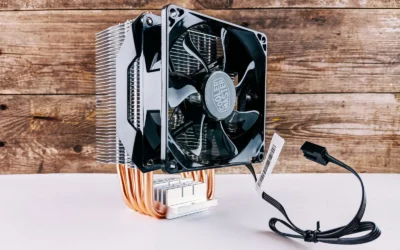
Cooler clearance is the tightest constraint in this case class. The Thermalright AXP90-X47 is a 47mm tall low profile cooler with a 92mm slim PWM fan and 4x6mm heatpipes, rated at Noise 22.4DBA. That height is chosen to fit the Cooler Master NR200P V2 class chassis. You must confirm cooler support for LGA1851 and follow the mounting instructions for your socket. Use the included backplate hardware, apply thermal paste as directed, and handle parts with anti-static precautions. A low profile cooler like this keeps the CPU in its normal boost range when case airflow is good, but it has less thermal headroom than a large tower or AIO.
GPU length and slot clearance come next. The Cooler Master NR200P V2 is a compact Mini-ITX case with good stock airflow and vertical GPU mounting in some configurations. Our data for the related Cooler Master NR200P MAX V2 Mini-ITX PC Case notes support for high end GPUs up to 357.6mm with a PCIe 4.0 riser cable in that bundle, which shows the family is designed for long cards, but you should still verify the exact card length and thickness for the Ventus model you buy against the case spec sheet. Also confirm PCIe slot version and that the riser, if used, is rated for PCIe 4.0 or 5.0 as required.
Power supply headroom and connectors are critical for RTX 50 cards. Our pick is the be quiet! Pure Power 13 M 750W, ATX 3.1, which is an 80 PLUS Gold fully modular unit with native 12V-2×6 support for next generation PCIe 5.1 graphics cards and 4 PCIe 6+2 pin connectors for current generation cards. It provides 750W of continuous power on a single 12V rail and is designed to handle power excursions above its rated power for short periods. Size the supply above the combined CPU and GPU draw and follow the GPU maker recommended wattage, and use the native 12V-2×6 cable rather than adapters where possible. Never assume a supply handles any card, always check the connector type and wattage guidance for your exact GPU.
Finally, plan assembly order for a small case. Install the M.2 drive and memory on the board first, mount the board, then the cooler, then route power cables before you drop in the GPU. For radiator or fan clearance questions in compact cases, our guide how to choose a case for GPU clearance and radiator support walks through how to compare GPU length, cooler height, and radiator support before you buy.
Performance: What To Expect
No verified frame rate numbers are available for this build, so we will keep this section qualitative and will not invent figures for the recommended parts.
What you can expect in practice is a system that targets 1440p high settings with the GPU as the primary performance driver and the CPU chosen so it does not hold the card back at that resolution. In day to day gaming that means you can prioritize higher texture and detail settings while keeping the system responsive for background tasks like voice chat, a browser, or light streaming.
The parts we picked shape that experience in specific ways. The Intel Core Ultra 5 245K with its hybrid 14 core layout helps maintain consistent pacing when games use multiple threads, while the 32GB DDR5 6000 kit keeps memory bandwidth in the sweet spot for this platform when you run the correct profile. The 2TB SSD keeps load times short and gives you room for several large titles plus your OS and apps without constant uninstalls.
Thermals and noise in a small form factor case depend on airflow and fan tuning as much as on the parts themselves. The NR200P V2 class case with good stock airflow, paired with the low profile Thermalright cooler, is intended to keep the CPU in its normal boost range without excessive noise. You will get the best results if you set a sensible fan curve, keep cables clear of intake paths, and place the case where it can breathe. If you move up a GPU tier or push for higher refresh targets, you would want more cooling and power headroom, which we cover in the next section.
Three Ways to Build This
Lower Cost Version
Go one GPU tier down with a cheaper CPU, a budget air cooler, a 1TB drive, and an entry board. You keep the same small form factor idea but trim capacity and board features to lower the overall cost. This suits a first build on a tight budget where you still want 1080p to 1440p play and a clear upgrade path later.
Who it is for: you want to get in the door now, you are comfortable upgrading the GPU or storage in a year or two, and you do not need Wi-Fi 7 or extra M.2 slots right away. Who should skip it: you already own a large 1440p high refresh monitor and want to push higher settings without upgrading soon.
Balanced Version (Our Recommendation)
This is the parts list in the table: Intel Core Ultra 5 245K, MSI GeForce RTX 5060 Ti 16GB Ventus class, MSI PRO B860-P WiFi, CORSAIR Vengeance RGB DDR5 RAM 32GB (2x16GB) 6000, WD Black SN850X 2TB, be quiet! Pure Power 13 M 750W, ATX 3.1, Cooler Master NR200P V2 class case, and Thermalright AXP90-X47 Full Cooper Low Profile CPU cooler. It balances CPU and GPU so the processor does not hold the card back at 1440p, while keeping the board and cooler practical for the case size.
Who it is for: most gamers who want a compact system with headroom to upgrade later, who value quiet operation and a clean build over flagship board features. It is the most versatile of the three and the one we recommend for 2026 if you are building in this class.
Higher End Version
Move up a GPU tier and to a Ryzen 7 9800X3D or Ryzen 9 9950X3D with a 360mm AIO and a 1000W supply. You also step up the board and cooling to support high refresh play and years of headroom. In a small form factor case this may mean moving to a larger compact chassis that supports a 360mm radiator, so check radiator support and GPU clearance carefully.
Who it is for: you target high refresh 1440p or want to keep the system longer without a GPU swap, and you are willing to pay for a larger cooler and supply to support it. Who should skip it: you prefer the smallest possible case or you are sensitive to noise and complexity, since a 360mm AIO adds cost, weight, and more points of failure than a low profile air cooler.
FAQ
Is the Thermalright AXP90-X47 enough to cool the Intel Core Ultra 5 245K in a small form factor case?
It is chosen because its 47mm height fits the Cooler Master NR200P V2 class case and its 4 heatpipe design is intended to keep this CPU in its normal boost range with good case airflow. You should set a sensible fan curve, confirm LGA1851 mounting support, and keep intake paths clear. If you plan heavy all core workloads or want lower noise under sustained load, consider a larger cooler or a case that supports a bigger air cooler or AIO.
Do I need DDR5 6000 for this Intel LGA1851 build, or can I use a slower kit?
You can use a slower kit, but 32GB DDR5 6000 is the tuned sweet spot for this platform and matches our pick, the CORSAIR Vengeance RGB DDR5 RAM 32GB (2x16GB) up to 6000MHz. To reach the rated speed you must enable EXPO or XMP in BIOS and ideally use a kit on the board QVL. If you use a slower kit you may see slightly lower responsiveness in some games, but stability is usually easier to achieve.
Will the MSI GeForce RTX 5060 Ti 16GB Ventus fit in the Cooler Master NR200P V2 and what power cable do I need?
Fit depends on the exact card length and slot thickness versus the case clearance, so check the card spec sheet against the case spec sheet before you buy. For power, use a modern ATX 3.1 supply with a native 12V-2×6 cable for RTX 50 cards, like the be quiet! Pure Power 13 M 750W, ATX 3.1, and size the wattage above the combined CPU and GPU draw while following the GPU maker recommended wattage. Handle power connections with care and avoid adapters if a native cable is available.
Final Verdict
This small form factor mid class build gives you a compact 1440p high settings system without overspending on board or cooling features you will not use. It keeps the CPU and GPU balanced, puts the budget where it matters for gaming, and respects the real constraints of a small case like cooler height and card length. If you want a tidy desk footprint and quiet operation, it is a practical 2026 template you can build now and upgrade later.
Our pick: the Balanced version we recommend, with the Intel Core Ultra 5 245K, MSI GeForce RTX 5060 Ti 16GB Ventus class, 32GB DDR5 6000, 2TB SSD, and 750W ATX 3.1 supply in the Cooler Master NR200P V2 with the Thermalright AXP90-X47, for most gamers who want headroom to upgrade later without moving to a larger case.

Write Your Review
No reviews yet. Be the first to share your experience!