

If you are asking is the Fractal Pop Air a good airflow case for a hot GPU, you are really asking how to keep a high power graphics card cool, quiet, and consistent without choking it in a stylish but restrictive box. Your decision comes down to a few linked variables: your resolution and refresh target, your platform and socket, the physical size and clearance of the case, your power budget and heat output, and whether you are building for what you own now or what you plan to upgrade to next.
This buying guide gives you a decision framework you can use for any airflow case in November 2026, not just one model. You will learn what actually matters for GPU thermals, how to read a spec sheet like the one for modern panoramic cases, and how to match a case to your specific build. For a broader view of enclosure options, you can also browse our Cases & Airflow category before you finalize your choice.
What Actually Matters
Airflow Path and Panel Design
For a hot GPU, the most important factor is how air enters, moves across the card, and exits. Look for ventilated front and side panels, not solid glass that blocks intake. Mesh, perforated steel, or ventilated panels let cool air reach the GPU fans directly, while a mostly sealed front forces the card to recirculate warm air inside the case.
You should also consider where the air goes after it cools the GPU. A case with clear exhaust paths at the rear and top prevents heat from pooling around the graphics card backplate and memory. When you research a case, check owner photos and the spec sheet for the location of vents, not just how it looks from the front. A panoramic glass side can be great for display, but it needs to be paired with real intake elsewhere to work for a hot GPU.
Included Fans, Fan Mounts, and Radiator Support
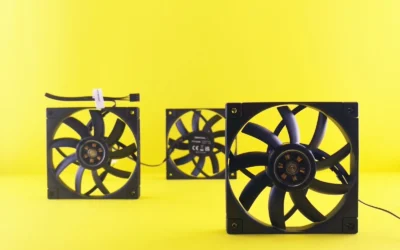
Count and placement matter more than marketing claims about airflow. You want strong intake at the front or bottom that feeds the GPU, and at least one or two exhaust fans to pull hot air out. Four included fans, like the reverse-blade fans found on some newer dual-chamber designs, give you out of the box coverage without an immediate extra purchase, but you should still verify how many mounts remain open for expansion.
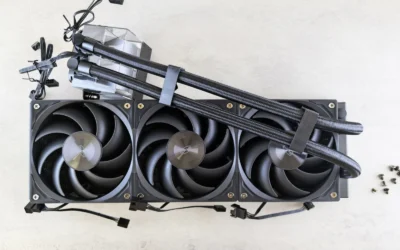
Radiator support is your second check, especially if you plan to cool your CPU with an AIO. A case that supports top-mounted radiators up to 360 mm gives you flexibility to move CPU heat to the top and out of the case, so it does not add to the GPU heat load. Always check cooler height and radiator clearance against your specific case before you buy, and follow the manufacturer mounting instructions for both the case and the cooler to avoid interference with RAM or the top panel.
GPU Clearance, Case Size, and Internal Layout
A hot GPU is often a long and thick GPU. You need to confirm maximum graphics card length and thickness, plus how close that card will sit to the side panel, the PSU shroud, or a vertical mount. A spec that lists support for graphics cards up to 412 mm in length tells you that even large triple-fan cards will fit lengthwise, but you should still check width clearance so the fans are not pressed against glass.
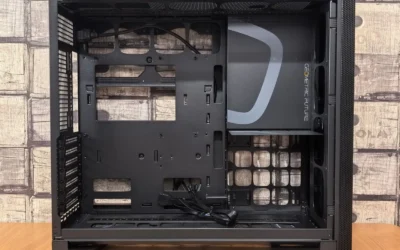
Internal layout changes how heat behaves. A traditional single chamber puts the GPU, CPU, and PSU heat in one space, while a dual-chamber layout moves cables and drives behind the motherboard tray for a cleaner front chamber and potentially smoother airflow around the GPU. Dual-chamber can help with cable clutter and make your build easier to keep tidy, which indirectly helps airflow because stray cables do not block intake. Make sure the form factor you choose, whether ATX, mATX, or ITX, still leaves room for good cable routing and future GPU upgrades.
Noise, Dust Filtering, and Daily Usability
Airflow at the cost of constant high fan speed is not a good trade if you sit next to the PC. Cases with ventilated panels and multiple large fan mounts can move the same amount of air at lower RPM, which helps keep noise down. Look for removable dust filters on intake areas and tool-free panels that make cleaning easy, because dust buildup is one of the fastest ways a good airflow case becomes a poor one.
Usability details also affect your experience over time. Easily removable panels, including a glass side and front, make it simple to dust, repaste, or swap a GPU without fighting the case. If you value a quiet room, prioritize cases that let you run a gentle fan curve rather than those that rely on running fans at full speed to compensate for a restrictive front.
To see how these ideas look in a current design, here are a few options that show the range:
This article contains affiliate links. If you buy through one of our links, CustomPCGaming may earn a commission at no extra cost to you. Commissions never influence which products we recommend or how we rank them. Read our Affiliate Disclosure for details.
Quick Picks at a Glance

Fractal Design Pop 2 Vision Black RGB Panoramic
As an Amazon Associate we earn from qualifying purchases. Product prices and availability are accurate as of the date/time indicated.
Pros
- Excellent out of the box cooling with four reverse fans and ventilated panels
- Spacious interior supports large graphics cards and 360mm top radiators
- Striking panoramic glass aesthetic with smart dual-chamber cable management
- User friendly build experience with tool-free access and dust filtration
Cons
- Heavy at 24.9 pounds with a fairly large mid-tower footprint
- Glass side and front panels require careful handling and regular cleaning
- Spec sheet lists Mini ITX and Micro ATX only, conflicting with ATX and E-ATX claims in title
The Fractal Design Pop 2 Vision Black RGB is a panoramic mid-tower gaming case built to showcase high end hardware in a clean, gallery like presentation. It is ideal for gamers and PC enthusiasts who want a visually striking build with modern cable hiding features.
In real world use, the four pre-installed reverse blade fans provide impressive airflow right out of the box, while ventilated panels keep temperatures stable under load. Support for GPUs up to 412mm and top mounted 360mm radiators gives you plenty of headroom for powerful gaming components and future upgrades.
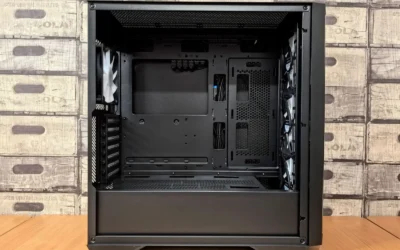
Build quality is a clear strength, with a sturdy dual-chamber layout that separates cables and drives from the main showcase area. The panoramic glass front and side panels offer an unobstructed view, while tool-free removal and integrated dust filters make assembly and upkeep simple.
There are a few tradeoffs to consider. At 24.9 pounds the case is heavier than many mid-towers, and the all glass design requires careful handling and frequent dusting to maintain its look. The specifications list only Mini ITX and Micro ATX support, which conflicts with the title claim of ATX and E-ATX compatibility and may cause confusion.
Overall, the Pop 2 Vision delivers a premium showcase experience with strong cooling, generous hardware support, and thoughtful RGB controls. If you want a clean, modern case that highlights your build while keeping thermals in check, it is an excellent choice for your next gaming PC.
Model: FD-C-POV2A-02 | Brand: Fractal Design | Color: Black RGB | Case Type: Midi Tower Dual-Chamber
Dimensions: 17.09 x 11.69 x 17.36 inches | Weight: 24.9 pounds | Motherboard Support: Mini ITX, Micro ATX (ATX, E-ATX noted in title)
GPU Clearance: Up to 412mm | Radiator Support: Up to 360mm top mounted | Cooling: Air cooling with four reverse blade fans included
Features: Panoramic glass side and front panels, ventilated panels, dust filter, tool-free panel removal, reverse connector motherboard ready, RGB lighting with dual control buttons
Matching a Part to Your Build
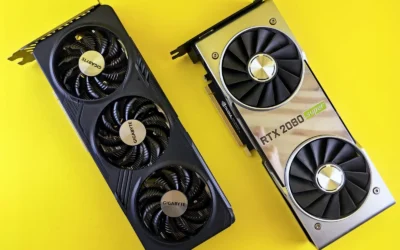
Scenario 1: You run a high wattage GPU for 1440p or 4K high refresh gaming. If your graphics card is known to run hot, prioritize ventilated panels and strong direct intake over a fully sealed glass front. The top RTX 5070 ti cards for 1440p gaming roundup is a good reminder that many modern cards are thick triple-fan models that need breathing room, so look for a case with four included fans and open bottom or side intake that feeds the GPU fans directly. You should also confirm that your power supply has enough headroom over the combined GPU and CPU draw and meets the GPU maker recommended wattage, rather than assuming any case or PSU can handle any card.
The Fractal Design Pop 2 Vision Black RGB Panoramic is a useful example here. Per the spec sheet it includes four reverse-blade fans and ventilated panels for out of the box airflow, plus a panoramic glass view that still relies on those vents for intake. It also supports graphics cards up to 412 mm long, which covers most hot, high end cards, and top-mounted radiators up to 360 mm if you want to exhaust CPU heat separately. Assessed against owner feedback, this combination is aimed at builders who want display and airflow without immediately buying extra fans.
Scenario 2: You are building on a midrange platform and planning a GPU upgrade in a year or two. If you currently use something like the setup in our ryzen 5 7600 RX 7700 XT 1000 dollar gaming PC amazon build but expect to move to a hotter card later, buy clearance now. Choose a case that already fits long cards and has extra fan mounts you can populate later, rather than a compact case that is perfect today but tight tomorrow. A dual-chamber layout with a clean front chamber can make that future swap easier, because you will have space to route thicker GPU power cables and keep them away from intake fans.
Scenario 3: You care about noise and ease of building as much as raw cooling. If you work or game in a quiet room, look for a case that can cool with low fan speeds and easy maintenance. Tool-free access with easily removable panels, including a glass side and front, helps you clean filters and adjust fan curves without a full teardown. Pair that with a case that supports a 360 mm top radiator so you can keep CPU heat from mixing with GPU heat, and check the Graphics Cards section to see how different card coolers behave in airflow focused enclosures. For this type of build, a case that balances ventilated panels with sound-dampening potential and good cable management will serve you better than a case that maximizes open mesh everywhere.
Common Mistakes
Mistake 1: Underestimating power and heat together. Builders often pick a case for looks and then pair it with a hot GPU and a power supply that is just barely enough. You should size your PSU with headroom above the combined CPU and GPU draw and follow the graphics card maker recommended wattage, and then pick a case that can actually exhaust that heat. A beautiful case with poor intake will force your GPU fans to work harder and louder.
Mistake 2: Buying a cooler or card that does not clear the case. It is common to order a tall air cooler or a thick AIO and discover it hits the side panel, RAM, or top radiator bracket. Before you buy, compare the cooler height or radiator thickness and fan stack against the case clearance spec, and confirm that long GPUs up to 412 mm will not interfere with front fans or a front radiator. Following the manufacturer mounting instructions and dry fitting without power can save you a return.
Mistake 3: Chasing the wrong upgrade. Some builders overspend on extra VRAM or faster memory that their platform cannot fully use, while ignoring airflow that would actually improve performance stability. For a hot GPU, money is often better spent on a case with proven ventilation, an extra intake fan, or better dust filtering than on a spec bump that does not address thermal throttling. If you are on a tight budget, our Budget Build Guides can help you prioritize where airflow and clearance give you the most value.
Who Should Wait or Buy Differently
This type of panoramic, airflow oriented case is not ideal for everyone. It is not a good fit if you need the smallest possible footprint for a dorm or small desk, if you plan to use a very small motherboard and want a compact mATX or ITX enclosure, or if you prefer a fully enclosed, noise isolated case with solid panels and minimal glass. If you also need maximum radiator thickness for custom loop cooling or you know you will run multiple large radiators, you should wait and compare cases that explicitly list support for thicker radiators and additional mount points beyond a single 360 mm top position. For those builders, a more compact or more radiator focused chassis may be the right choice.
Frequently Asked Questions
Is a glass front case bad for a hot GPU? A solid glass front without side or bottom vents can restrict intake and cause higher GPU temperatures, because the card recirculates warm air. If you love the panoramic look, choose a design that pairs glass with ventilated panels and multiple intake fans, so the GPU still gets fresh air from the side or bottom.
How many fans do I really need for a hot GPU? You need enough intake to feed the GPU and enough exhaust to remove heat, not just a high fan count. A case that includes four fans out of the box gives you a solid starting point, but you should still plan your fan curve and make sure you have filtered intake and clear exhaust at the rear and top.
Will a dual-chamber case help GPU temperatures? A dual-chamber layout mainly helps with cable management and a clean front chamber, which can indirectly improve airflow by keeping cables out of the intake path. The bigger impact on GPU thermals still comes from ventilated panels, fan placement, and keeping the card away from restrictive glass, so evaluate those first.


Write Your Review
No reviews yet. Be the first to share your experience!