

Choosing a case around NZXT H7 Flow GPU clearance and radiator support explained is really a decision about fit and future flexibility. You want to know if your graphics card will breathe and fit without blocking fans or cables, whether your preferred radiator size has a real mounting location, and how that choice affects noise, temperatures, and upgrade headroom for your build.
Before you lock in a case, weigh your resolution and refresh target, your platform and socket and the cooler it needs, your case size and clearance for long GPUs and thick radiators, your power budget and fan count, and whether you are buying for your current parts or your next GPU and CPU upgrade. This framework helps you compare any airflow case, including the examples below, without guessing.
What Actually Matters
GPU Clearance Is More Than Just Length
Length gets the most attention, but width and thickness matter just as much for modern cards. A triple slot card with a bulky cooler can crowd side panels, bottom fans, or front radiator tubing, and power connector placement can add extra height you need to account for. Always check the case spec sheet for maximum GPU length, width, and slot count, then compare it to your card spec sheet and allow room for cables and airflow.
You should also think about how you will support the card. Heavy cards can sag over time, which stresses the PCIe slot and looks uneven. If you plan to keep a large card for several years, factor in whether you will use a horizontal support bracket or a vertical mount, and whether that choice changes clearance for bottom intake fans or front radiators. Owners commonly report that verifying both length and thickness before ordering avoids last minute returns.
Radiator Support and Where It Really Fits
Radiator support is not just a maximum size number, it is about where that radiator can live without blocking other parts. Per the spec sheet, the NZXT H7 Flow supports up to 420mm radiators in the front and up to 360mm radiators in the top, which gives you two distinct paths for CPU cooling. Front mounting often gives you the largest size option but shares space with GPU length and tubing runs, while top mounting keeps the front open for airflow but depends on motherboard VRM heatsink height and RAM clearance.
When you evaluate any case, check the supported radiator sizes for each location, the fan sizes that match those radiators, and the thickness limit when fans are included. Follow the manufacturer mounting instructions and check cooler height or radiator clearance against your case before you buy. If you are considering a thick radiator plus push pull fans, confirm that the case still allows your GPU and cables to fit comfortably. For more context on how case choice interacts with overall part selection, browse the Cases & Airflow archive.
Airflow Path and Direct GPU Cooling
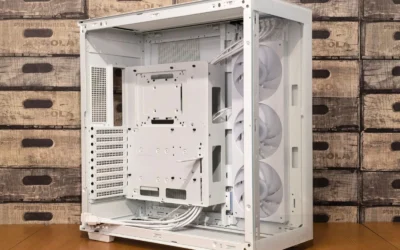
Mesh panels and fan positions define how cool air reaches your GPU and how hot air leaves. The H7 Flow uses high performance mesh panels to maximize intake and exhaust while filtering dust, and it comes equipped with three front mounted 120mm fans for out of the box cooling. It also supports three bottom mounted 120mm fans for direct GPU cooling while keeping a narrow mid tower footprint, which is a useful option if you run a high power graphics card at 1440p or 4K.
Think about your airflow plan as a path. Front fans bring in cool air, bottom fans feed the GPU directly, and top and rear fans exhaust heat. If you add a front radiator, part of that intake air will be warmed before it reaches the GPU, so you may want stronger bottom intake to compensate. If you use an air cooled CPU, top exhaust matters more. Your fan count, dust filtering needs, and noise tolerance should guide whether you prioritize mesh openness, extra bottom intake, or radiator capacity. You can see how builders balance these tradeoffs in our ryzen 5 7600 RX 7700 XT 1000 dollar gaming PC amazon build breakdown, which shows how case airflow supports mainstream GPUs.
Cable Management, Build Ease, and Future Upgrades
Clearance is not only about parts fitting, it is about building comfortably and upgrading later. An intuitive cable management system with wide channels, built in hooks, and included straps makes it easier to route thick GPU power cables and radiator tubing without pinching or blocking airflow. That matters when you add bottom fans or a vertical GPU mount, because cables and risers need clean paths.
Consider your next upgrade as well. If you plan to move to a longer or thicker GPU in a year or two, or switch from air cooling to a larger AIO, choose a case that leaves headroom in both GPU length and radiator support. Check your platform and socket cooler requirements, your power supply length, and whether a long power supply bay will reduce GPU space. A little extra room now saves you from replacing the case later. For help matching a case to a powerful GPU upgrade, see our top RTX 5070 ti cards for 1440p gaming guide.
A few options that show the range for clearance, cooling, and mounting:
This article contains affiliate links. If you buy through one of our links, CustomPCGaming may earn a commission at no extra cost to you. Commissions never influence which products we recommend or how we rank them. Read our Affiliate Disclosure for details.
Quick Picks at a Glance
Prime nkomax GPU Brace Support

Prime NZXT H7 Flow Mid-Tower ATX Airflow Case

Prime NZXT AB-RH175-B1 Vertical GPU Mounting Kit
As an Amazon Associate we earn from qualifying purchases. Product prices and availability are accurate as of the date/time indicated.
Pros
- Strong and durable all aluminum build lasts longer than plastic alternatives
- Wide adjustable range covers most ATX cases and GPU heights
- Magnetic base provides stable, easy placement without tools or case modifications
- Small footprint and cushioned pad protect GPU and maintain clean interior aesthetics
Cons
- Single point support may not fully stabilize extra long or ultra heavy flagship cards
- L size 74-120mm range is not suitable for compact cases with lower clearance
- Only available in Black and lacks height markings for precise adjustment
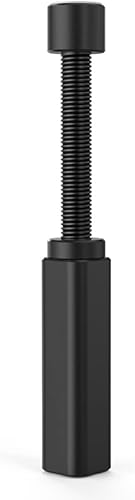
The nkomax NKMAX-GPUL is a compact telescoping GPU support stand built to stop graphics card sag in desktop gaming and workstation builds. It is ideal for anyone running a large, heavy card that puts stress on the PCIe slot and motherboard.
Its screw adjustment extends from 74mm to 120mm, covering most standard and long power supply layouts without needing extra tools. The hidden magnet in the base anchors it firmly to the case floor, while the cushioned top pad holds the card steady without scratching.
Build quality is a clear step above plastic alternatives, with a full aluminum body finished in polished and sandblasted anodizing. CNC high speed edge washing gives it clean, high gloss edges that look premium inside a tempered glass case and resist aging over time.
As a single post stand, it supports one contact point, so very long or ultra heavy GPUs may still show slight flex at the far end. The L size range also means small form factor cases under 74mm clearance will need a different model.
Overall, this is a simple, effective and durable fix for GPU sag that installs in seconds and stays put. For builders who want long term peace of mind without a bulky bracket, it is an excellent value and a smart addition to any modern build.
Brand: nkomax
Model: NKMAX-GPUL (Manufacturer Part: SSZJ-L)
Material: All Aluminum with Polished and Sandblasted Anodized Finish
Adjustable Height: 74 to 120mm (L Size)
Base: Hidden Magnetic Design for Tool Free Installation
Top Support: Cushioned Anti Scratch Pad
Dimensions: 0.6 x 0.6 x 2.9 inches | Weight: 0.03 kg
Color: Black | Finish: Polished
Pros
- Excellent airflow and thermal performance for both CPU and GPU
- Three included front fans provide strong cooling without extra purchases
- Flexible cooling options with support for large front and top radiators
- Smart cable management system simplifies building and improves airflow
- Clean, modern NZXT design with solid metal and plastic construction
Cons
- Bottom fans for dedicated GPU cooling are not included and must be purchased separately
- Only one 3.5 inch internal bay limits traditional hard drive expansion
- Large dimensions and 11.35 kg weight require ample desk or floor space
The NZXT H7 Flow CM-H72FB-01 is a mid-tower ATX airflow case designed for gamers and performance focused builders who prioritize cooling. It balances a relatively narrow footprint with full support for ATX motherboards and high end components.
Its standout feature is dedicated GPU cooling with space for three 120mm bottom fans that feed fresh air directly to the graphics card. Out of the box, three included front fans and high flow mesh panels deliver strong airflow, while support for up to 420mm front and 360mm top radiators makes it ideal for custom liquid cooling.
Build quality is solid with a mix of metal and plastic, clean lines and the signature NZXT minimalist aesthetic in black. The intuitive cable management system with wide channels, hooks and straps keeps the interior tidy and simplifies the build process, even for less experienced builders.
There are a few tradeoffs to consider. The bottom fans for GPU cooling are not included, so you will need to budget for them, and storage expansion is limited with just one 3.5 inch bay. At over 21 inches tall and 11.35 kg, it is still a substantial case that needs adequate space.
Overall, the H7 Flow is a top choice for airflow first builds that need excellent thermal headroom without moving to a full tower. If you want cool, quiet performance, flexible radiator options and a clean showcase for your components, it delivers outstanding versatility.
Model: NZXT H7 Flow CM-H72FB-01, Black, Mid-Tower ATX
Cooling: 3x 120mm front fans included, supports 3x 120mm bottom fans for GPU, up to 420mm front radiator and 360mm top radiator
Motherboard & Expansion: ATX compatible, 7 expansion slots, bottom mount PSU
Storage & I/O: 1x 3.5 inch internal bay, USB ports include USB 3.0 and USB 2.0
Materials & Dimensions: Metal and plastic construction, 18.43 x 9.6 x 21.42 inches, 11.35 kg
Pros
- Very sturdy steel construction eliminates sag and flex even with heavy GPUs
- Includes high quality PCIe 4.0 riser cable that is backward compatible
- Securely holds high end cards like RTX 4080 Super and RX 6000 series
- Clean vertical display dramatically improves build aesthetics
- Easy and stable installation in compatible H7 cases
Cons
- Designed specifically for NZXT H7 series, requires modification to fit H5 Flow and other cases
- Higher cost than generic universal vertical mounts
- Requires extra clearance for DisplayPort and HDMI cables to seat properly
The NZXT AB-RH175-B1 Vertical GPU Mounting Kit is a dedicated accessory for NZXT H7 series cases that lets you mount your graphics card vertically for a full showcase view. It is built for gamers and enthusiasts who want to highlight their GPU as the centerpiece of their build while maintaining proper cooling and structural support.
The standout feature is the included 175mm PCIe 4.0 x16 riser cable, which delivers high speed bidirectional data transfer and remains backward compatible with older generations. In real world use, reviewers report stable performance with demanding cards including AMD 6000 series and NVIDIA RTX 30 and 40 series models, with no loss in performance or stability.
Build quality is a major strength, thanks to the thick alloy steel bracket with a powder coated black finish that matches NZXT cases perfectly. The bracket feels solid, prevents sag even with heavy cards like the RTX 4080, and holds the GPU securely with no flex or wobble once installed.
The main drawback is its limited compatibility, as it is designed specifically for H7 series cases and does not fit other models like the H5 Flow without case modification. Some users also note the premium cost for a mounting kit and the need to ensure extra clearance for display cables to seat properly.
Overall, this is an excellent choice for H7 owners who want a premium, sag free vertical mount that looks great and performs reliably. If you own a compatible case and want to display a high end GPU securely, this kit delivers a clean, professional result that justifies the investment.
Model Number: AB-RH175-B1
Compatibility: NZXT H7 Series Cases
Riser Cable: 175mm PCIe 4.0 x16, backward compatible
Material: Alloy Steel with Powder Coated Black Finish
Mounting Type: Vertical GPU Bracket
Dimensions: 6 x 6 x 7 inches, 1.5 pounds
Warranty: 2 Years Manufacturer Warranty
Matching a Part to Your Build
If you are building a high refresh 1440p system with a large triple fan graphics card and a 360mm AIO, prioritize top radiator support and bottom GPU airflow. The Cases & Airflow focused design of the NZXT H7 Flow – Mid-Tower ATX Airflow PC Case gives you that flexibility, with up to 360mm support on top for the CPU and room for three 120mm bottom fans to feed the GPU directly. You keep front intake open, avoid tubing conflicts, and maintain strong exhaust. Just verify your motherboard and RAM height will still clear a top mounted radiator with fans.
If you want to showcase a heavy card and reduce sag while keeping a clean look, consider vertical mounting. The NZXT Vertical GPU Mounting Kit uses a sturdy steel bracket to hold the card vertically and includes a 175mm PCIe 4.0 x16 riser cable for high speed data transfer, designed to fit NZXT H7 Series cases with clearance for air and AIO cooling. This approach highlights the card face and can help with sag, but it changes airflow around the GPU and may reduce the benefit of bottom intake fans, so weigh looks against direct cooling performance. Owners commonly report checking PCIe slot spacing and case rear bracket compatibility before choosing this route.
If you already own a long, heavy GPU and want a simple, low profile fix for sag in a traditional horizontal layout, a standalone support is the practical pick. The Graphics Card GPU Brace Support adjusts from 74 to 120mm, uses an all aluminum design with a hidden magnet in the base, and includes a cushioning pad to protect the card. It works with various chassis configurations, including long power supply bays, and installs without tools. This is ideal when you want to keep your current case and cooling layout, add bottom fans for the GPU, and still ensure the card sits level over time. For budget focused builds where every part must earn its place, our Budget Build Guides can help you decide where a brace, extra fans, or a larger case gives the most value.
Common Mistakes
Picking a radiator that does not actually fit where you planned. A case may list 420mm front support, but a long GPU, front mounted tubing, or a thick radiator with fans can create conflicts. Always cross check radiator length, thickness, and fan stack against GPU length and power cable routing for that specific mounting location, and follow the manufacturer instructions for clearances.
Forgetting bottom fan clearance when using a large GPU or vertical mount. Three 120mm bottom fans can greatly help GPU temperatures, but a very thick card, a sag bracket, or a vertical bracket can reduce that space or redirect airflow. If direct GPU cooling is a priority for your power budget and noise goals, decide on your GPU mounting style before you buy extra fans.
Ignoring cable and power supply bay length. A long power supply or stiff 12VHPWR style cables can eat into GPU clearance and make a tight case feel even tighter. Measure your power supply, plan your cable bends, and leave room for airflow around the GPU. Also handle parts with anti static precautions and avoid forcing panels or brackets that do not line up.
Who Should Wait or Buy Differently
This type of airflow mid tower is not ideal for you if you need a compact small form factor case for a tight desk, if you plan to use a very thick custom loop with multiple large radiators in every position at once, or if you prefer a solid front panel for silence over mesh for airflow. It is also not the right choice if you want to avoid any extra fan purchases and your current GPU already runs hot in a restricted case, since you may still want those three bottom 120mm fans to get the most direct GPU cooling. If your platform and socket require a very tall air cooler, double check cooler height against the case spec sheet, and if you are unsure about vertical mounting, keep the traditional horizontal layout with a simple brace until you are ready to commit to a riser setup.
Frequently Asked Questions
How do I know if my GPU will fit the NZXT H7 Flow?
Check your graphics card spec sheet for length, slot width, and power connector height, then compare it to the case spec sheet for maximum GPU clearance. Allow extra space for power cables, bottom fans if you use them, and any front radiator tubing. If you use a support bracket or vertical mount, factor in how that changes the clearance envelope.
Should I mount my radiator in the front or on top?
Front mounting supports up to 420mm radiators and can give you the largest cooling capacity, but it shares space with GPU length and warms intake air slightly. Top mounting supports up to 360mm radiators and keeps front airflow cooler for the GPU, but it depends on RAM and VRM heatsink clearance. Choose based on your CPU cooling needs, GPU heat output, and whether you plan to add bottom fans for direct GPU cooling.
Do I need a GPU brace or vertical mount for this case?
Not every build needs one, but heavy cards benefit from extra support to prevent sag. The Graphics Card GPU Brace Support offers adjustable 74 to 120mm height with an aluminum body and magnetic base for horizontal builds, while the NZXT Vertical GPU Mounting Kit provides a steel bracket and 175mm PCIe 4.0 x16 riser for H7 cases if you prefer a vertical showcase. Pick the option that matches your cooling plan and how much you value direct bottom airflow versus display.

Write Your Review
No reviews yet. Be the first to share your experience!