

If you are asking is the Fractal North a good airflow case for a hot GPU, you are really asking how to keep a high power graphics card cool without turning your room into a wind tunnel. A hot GPU needs steady fresh air, room to breathe, and an exhaust path that does not trap heat around the card. This guide gives you a decision framework you can use for any case, so you can judge airflow, clearance and noise before you commit.
Your choice depends on a few linked variables. Your resolution and refresh target decides how hard your GPU will work and how much heat it will dump into the case. Your platform and socket influence cooler height and motherboard layout. Your case size and clearance determines whether a long, thick card and its power cables fit without choking intake. Your power budget affects how many fans and radiators you can run quietly. And your plan for a current versus next upgrade decides whether you should buy for the card you have now or the hotter card you might buy in November 2026.
What Actually Matters
Airflow Path and Panel Design
Start with how air enters and exits. You want a clear front or side intake that feeds the GPU directly, plus a rear and top exhaust that lets hot air escape without recirculating. Cases with ventilated front and side panels, mesh sections, or well placed vents will feed a hot GPU far better than a sealed glass box with only small slits. Look at the product photos and spec sheet to see where the intake fans sit relative to the GPU.
Think about pressure and filtration as well. Positive pressure, where you have slightly more intake than exhaust, helps keep dust out while keeping the GPU fed. Check whether the case includes dust filters on intake and whether they are easy to remove and clean. Also consider where your PC will live. If it sits on carpet or in a tight desk cubby, bottom intake matters less than front and side intake, and you will want feet that lift the case enough for airflow. For more context on how case choice fits into a full system, browse the Cases & Airflow archive to compare layouts side by side.
GPU Clearance and Thermal Headroom
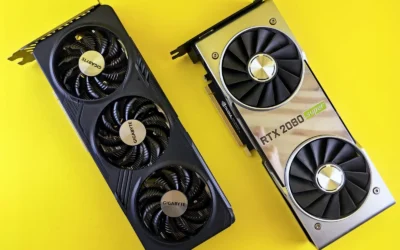
Length is only the first number to check. You also need thickness clearance, width for power connectors, and space below the card for intake fans to work. A case that supports graphics cards up to 412 mm in length, for example, gives you headroom for most modern triple fan cards, but you still need to check how close the card sits to the side panel, the power supply shroud, or a vertical mount. If the glass presses against the fans, the GPU will recycle its own hot air.
Thermal headroom is about volume and separation. Dual chamber designs move cables and drives behind the motherboard tray, which opens the main chamber for airflow and makes it easier to keep cables away from the GPU intake. That clean separation helps a hot card breathe, especially if you use bottom or side intake fans that blow directly across the GPU. When you evaluate any case, per the spec sheet, look for GPU length support, number of expansion slots, and whether the layout leaves a clear lane for air to reach the card. If you are pairing a high wattage card, you can cross reference our Graphics Cards section to see how card size and power relate to case choice.
Fan and Radiator Support
Count what comes in the box and what you can add. A case that includes four reverse blade fans and ventilated panels for out of the box airflow gives you a head start, because you do not need to buy extra fans just to get baseline cooling. Reverse blade designs are often used to keep the visible side clean while still moving air in the right direction, so check the manual for intended intake and exhaust orientation.
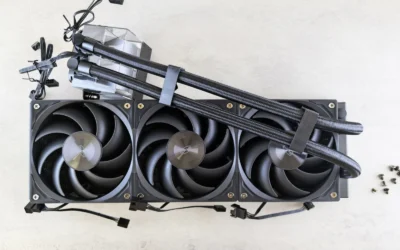
Then check radiator and fan mount flexibility. Support for top mounted radiators up to 360 mm tells you the top panel can handle a large cooler if you later add an AIO for your CPU, which helps keep CPU heat from warming the GPU chamber. Before you buy, check cooler height or radiator clearance against your case, and follow the manufacturer mounting instructions for fan direction and radiator placement. A 360 mm radiator needs both length and thickness clearance, plus room for the hoses and fans, so verify that the top mount does not conflict with tall memory or the motherboard heatsinks. If you are building around a power hungry GPU like those covered in our top RTX 5070 ti cards for 1440p gaming guide, that extra exhaust capacity can make a noticeable difference in sustained loads.
Build Practicality, Noise and Ease of Use
Airflow is not just about temperatures, it is also about noise and daily use. Ventilated panels cool better but can let more fan noise through, while solid panels are quieter but trap heat. Tool free access with easily removable panels including a glass side and front makes it simpler to clean filters, adjust fan curves and re route cables, which all affect long term cooling. You will maintain the system more often if it is easy to open.
Consider the dual chamber trade off. A panoramic glass design with a dual chamber layout looks clean and decluttered and hides cables, but it usually makes the case wider and deeper than a traditional mid tower. That is great for airflow and cable management, yet it needs more desk or floor space. Also think about your tolerance for RGB and glass. Panoramic glass shows off your build, but it also shows dust and fingerprints, and it adds weight. If you prefer a quiet, understated box that sits under a desk, a mesh front without a full glass wrap might be more practical.
A few options that show the range are listed below. Use them to compare how different designs handle GPU length, fan count and radiator space.
This article contains affiliate links. If you buy through one of our links, CustomPCGaming may earn a commission at no extra cost to you. Commissions never influence which products we recommend or how we rank them. Read our Affiliate Disclosure for details.
Quick Picks at a Glance

Fractal Design Pop 2 Vision Black RGB Panoramic
As an Amazon Associate we earn from qualifying purchases. Product prices and availability are accurate as of the date/time indicated.
Pros
- Excellent out of the box cooling with four reverse fans and ventilated panels
- Spacious interior supports large graphics cards and 360mm top radiators
- Striking panoramic glass aesthetic with smart dual-chamber cable management
- User friendly build experience with tool-free access and dust filtration
Cons
- Heavy at 24.9 pounds with a fairly large mid-tower footprint
- Glass side and front panels require careful handling and regular cleaning
- Spec sheet lists Mini ITX and Micro ATX only, conflicting with ATX and E-ATX claims in title
The Fractal Design Pop 2 Vision Black RGB is a panoramic mid-tower gaming case built to showcase high end hardware in a clean, gallery like presentation. It is ideal for gamers and PC enthusiasts who want a visually striking build with modern cable hiding features.
In real world use, the four pre-installed reverse blade fans provide impressive airflow right out of the box, while ventilated panels keep temperatures stable under load. Support for GPUs up to 412mm and top mounted 360mm radiators gives you plenty of headroom for powerful gaming components and future upgrades.
Build quality is a clear strength, with a sturdy dual-chamber layout that separates cables and drives from the main showcase area. The panoramic glass front and side panels offer an unobstructed view, while tool-free removal and integrated dust filters make assembly and upkeep simple.
There are a few tradeoffs to consider. At 24.9 pounds the case is heavier than many mid-towers, and the all glass design requires careful handling and frequent dusting to maintain its look. The specifications list only Mini ITX and Micro ATX support, which conflicts with the title claim of ATX and E-ATX compatibility and may cause confusion.
Overall, the Pop 2 Vision delivers a premium showcase experience with strong cooling, generous hardware support, and thoughtful RGB controls. If you want a clean, modern case that highlights your build while keeping thermals in check, it is an excellent choice for your next gaming PC.
Model: FD-C-POV2A-02 | Brand: Fractal Design | Color: Black RGB | Case Type: Midi Tower Dual-Chamber
Dimensions: 17.09 x 11.69 x 17.36 inches | Weight: 24.9 pounds | Motherboard Support: Mini ITX, Micro ATX (ATX, E-ATX noted in title)
GPU Clearance: Up to 412mm | Radiator Support: Up to 360mm top mounted | Cooling: Air cooling with four reverse blade fans included
Features: Panoramic glass side and front panels, ventilated panels, dust filter, tool-free panel removal, reverse connector motherboard ready, RGB lighting with dual control buttons
Matching a Part to Your Build
Scenario 1: Hot GPU for high refresh 1440p or 4K. You are targeting high frame rates and your graphics card will run near its power limit for long sessions. Prioritize direct GPU airflow and exhaust capacity. Look for a case with ventilated panels, multiple included fans, and top radiator support up to 360 mm so your CPU cooler does not add heat to the GPU zone. The Fractal Design Pop 2 Vision Black RGB Panoramic is a useful reference here, because it pairs four reverse blade fans with ventilated panels and room for a top mounted 360 mm radiator, plus support for graphics cards up to 412 mm long. That combination gives a hot, long card room to breathe while keeping an upgrade path for liquid cooling.
Scenario 2: Keeping your current GPU and improving thermals on a budget. You may not be buying a new card right now, but your current card runs warm and throttles in summer. Focus on out of the box airflow and easy maintenance rather than maximum radiator support. A dual chamber layout with a clean interior helps you keep cables out of the airflow path, and four included fans mean you do not need to spend extra to get decent intake and exhaust. Check that your existing card length fits comfortably, with extra space for the power cables to bend without pressing against the side panel. Our ryzen 5 7600 RX 7700 XT 1000 dollar gaming PC amazon build breakdown shows how a balanced parts list pairs case airflow with GPU choice, which is helpful if you are reusing a card in a new enclosure.
Scenario 3: Showcase build that still needs to stay cool. You want a panoramic glass view into a clean, decluttered interior but you do not want to sacrifice cooling for looks. In this scenario, evaluate how the glass is paired with ventilation. A case that combines a panoramic glass side and front with ventilated panels and reverse fans can look striking while still feeding the GPU. The Fractal Design Pop 2 Vision Black RGB Panoramic illustrates this approach, with tool free access via easily removable panels that make it simple to adjust fans and clean filters. If you go this route, plan your fan curve for a slightly higher idle speed to compensate for the glass, and make sure your desk has enough depth for the wider dual chamber footprint. For cost planning, the Budget Build Guides can help you balance aesthetics against cooling and component spend.
Common Mistakes
Mistake 1: Choking the GPU with the wrong panel or fan direction. It is easy to buy a beautiful glass front and then starve a hot GPU. If intake is blocked or fans are set to exhaust at the front, the card will pull in warm air from inside the case. Always confirm which fans are intake and which are exhaust, and make sure the GPU has a direct fresh air source from the front, side or bottom.
Mistake 2: Forgetting to check real clearance. A spec that says it supports graphics cards up to 412 mm long does not guarantee your thick card plus its power adapter will fit with the side panel on. Measure your card with cables attached, account for any front radiator thickness, and verify that a top mounted radiator up to 360 mm will not hit your memory or motherboard heatsinks. Also check cooler height or radiator clearance against your case before you order, and follow the manufacturer mounting instructions for safe installation.
Mistake 3: Ignoring the rest of the system. A hot GPU is only part of the thermal picture. A crowded main chamber with cables draped across the intake, a power supply shroud that blocks bottom airflow, or a single exhaust fan will raise GPU temperatures even in a good case. Plan cable routing through a dual chamber or behind the tray, keep the intake filters clean, and set a balanced fan curve so intake slightly leads exhaust. Remember that BIOS updates and overclocking are done at your own risk and may void warranty, and use anti static handling when you work inside the case.
Who Should Wait or Buy Differently
A panoramic dual chamber case with extensive glass is not ideal for you if you need the smallest possible footprint, the quietest possible operation in a bedroom, or maximum mesh airflow above all else. The wider body takes more desk space, glass can transmit more noise than a solid or heavily damped panel, and a full mesh front will often flow slightly more air at the same fan speed. If you move your PC often, prefer a compact mid tower, or want to hide the build entirely, you may be better served by a narrower mesh focused case or by waiting for a revision that matches your exact size and noise priorities. This type of design is also not a good fit if you do not plan to manage cables and filters, since its thermal advantage comes from keeping that clean, uncluttered interior clear.
Frequently Asked Questions
Is the Fractal North a good airflow case for a hot GPU compared to a panoramic glass case?
The Fractal North is generally evaluated as a wood front case with good intake, while a panoramic glass dual chamber case trades some front mesh area for a wide glass view and side ventilation. If your priority is maximum direct front airflow for a very hot GPU, a mesh front often has an edge. If you want a clean showcase with solid cooling, a design like the Fractal Design Pop 2 Vision Black RGB Panoramic with four reverse fans and ventilated panels can still keep a hot card comfortable when you set fans correctly.
How many fans do I really need for a hot GPU?
You want at least two strong intake fans feeding the GPU and one or two exhaust fans to remove heat, with a clear path between them. A case that includes four fans out of the box gives you that baseline without extra purchases, and you can tune the curve for noise. According to owners, adding a top exhaust or a 360 mm radiator up top can help if your CPU also runs warm, but you should verify clearance first.
Will a long graphics card fit and stay cool in a dual chamber panoramic case?
Many dual chamber panoramic cases support long cards, for example up to 412 mm, which covers most current triple fan models. Fit is one part, cooling is the other, so make sure the card has breathing room from the side glass and that power cables do not press against the panel. Keep cables routed behind the tray, maintain positive pressure with filtered intake, and clean the filters regularly to sustain airflow over time.


Write Your Review
No reviews yet. Be the first to share your experience!