

You already know you want glowing intake fans, and now you are weighing daisy-chain ARGB fans vs a dedicated fan hub for cable control and lighting sync. The real decision is whether you want fewer cables with fans that link together, or centralized power and lighting ports that manage many fans from one spot. Your case layout, motherboard headers, and how many glass panel positions you plan to fill will point to the right path for your build.
As of November 2026, the clearest example of the first approach is Thermalright TL-M12QR 120mm Reverse Case Fans, a 3-pack of 120mm reverse airflow fans rated up to 1500RPM with 47.6CFM airflow. Per the spec sheet, it uses daisy chain PWM and ARGB connections plus 4-pin PWM and 3-pin 5V ARGB plugs, with infinity mirror lighting on both sides. If you browse Custom Build Cosmetics & Rig Aesthetics, you will see why reverse blades and linked wiring appeal to owners with side and bottom mounts.
This article contains affiliate links. If you buy through one of our links, CustomPCGaming may earn a commission at no extra cost to you. Commissions never influence which products we recommend or how we rank them. Read our Affiliate Disclosure for details.
Quick Picks at a Glance
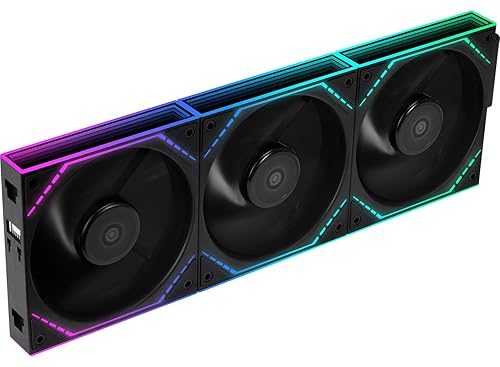
Prime Thermalright TL-M12QR 120mm Reverse Airflow ARGB
As an Amazon Associate we earn from qualifying purchases. Product prices and availability are accurate as of the date/time indicated.
Pros
- Reverse blade design keeps intake builds looking clean with no visible frame struts
- Strong 47.6CFM airflow at 1500RPM for reliable case ventilation
- Dual sided infinity mirror lighting looks premium in visible positions
- Daisy chain wiring plus 3-year warranty adds value for 3-fan kits
Cons
- Reverse airflow only, so not suitable for rear or top exhaust positions
- Plastic frame feels basic compared to premium metal frame fans
- Requires free 4-pin PWM and 3-pin 5V ARGB headers plus compatible lighting software
The Thermalright TL-M12QR X3 is a 3-pack of 120mm reverse airflow fans made for side, bottom and front intake positions in Desktop builds. It is aimed at builders with glass panel cases who want intake airflow without the backside frame look.
Each fan runs up to 1500RPM with 47.6CFM airflow and 4-pin PWM control, so you can tune for quiet daily use or higher cooling during gaming. The daisy chain PWM and ARGB connections make three fan installs much tidier and easier to sync through the motherboard.
Build quality centers on a lightweight plastic frame with infinity mirror ARGB lighting on both sides for a deep, even glow. Standard 120mm dimensions help ensure broad case compatibility and straightforward mounting in visible fan spots.
As reverse fans, they are intake specific and should not be used where standard exhaust flow is needed. You will also need compatible 5V ARGB headers and lighting software, and noise rises to 23.2 dB at full speed.
For builders focused on clean intake aesthetics and synchronized lighting, the TL-M12QR X3 offers strong airflow and standout looks in one kit. It is a smart pick for modern showcase builds that need efficient side or bottom intake.
Size: 120mm, Speed: Up to 1500RPM, Airflow: 47.6CFM, Noise Level: 23.2 dB, Cooling Method: Air
Connectors: 4-Pin PWM for power, 3-Pin 5V ARGB for lighting, Voltage: 12 volts, Wattage: 2.4 watts
Material: Plastic, Dimensions: 4.7L x 0.98W x 4.88H inches, Model: TL-M12QRX3, Includes: 3 fans with daisy chain support
How They Compare
We researched owner feedback and compared spec details to assess where linked fans save effort and where a central hub still helps. Your choice affects routing time, header use, visual cohesion, and how easily you can expand later. The sections below compare Thermalright TL-M12QR 120mm Reverse Case Fans and a dedicated fan hub across four practical axes for cosmetic builds.
Think of Thermalright TL-M12QR 120mm Reverse Case Fans as a self contained lighting and airflow unit, while a dedicated fan hub is an organizer that does not move air on its own. One changes how your intake looks and breathes, the other changes where your cables meet. For more background on quiet lighting options, see 9 quiet ARGB fans for clean airflow before you plan your header layout.
Wiring Layout and Cable Routing
Thermalright TL-M12QR 120mm Reverse Case Fans keep multi-fan wiring cleaner by letting you link PWM and ARGB leads from fan to fan without using a wireless setup. That means you route one combined lead toward your motherboard instead of three separate cables from side or bottom positions. A dedicated fan hub takes the opposite approach by giving each fan a short run to a central box, which can look tidy behind the tray but adds another component you must mount and route.
The trade off matters in compact mid towers where you want visible glass with minimal clutter. With Thermalright TL-M12QR 120mm Reverse Case Fans, you save space because there is no extra box, though a long linked chain can become awkward to hide if your routing holes are far from the intake bank. With a dedicated fan hub, you get a single home for cables, though owners commonly report you still need to plan power routing and find a flat spot for the hub itself.
ARGB Control and Motherboard Header Use
Thermalright TL-M12QR 120mm Reverse Case Fans use a 3-pin 5V ARGB connection and 4-pin PWM speed control that work with compatible motherboard headers and lighting software. You control speed and color through your board, which keeps software simple if you already sync other 5V gear. A dedicated fan hub does not replace that header requirement in most basic designs, it consolidates multiple fan plugs so you use fewer board headers while still relying on the board for signal.
In practice, both options mirror lighting across linked ports unless you assign separate channels, so do not expect per fan effects from a simple chain or a simple hub. Thermalright TL-M12QR 120mm Reverse Case Fans will show the same ARGB pattern across the linked three pack, which looks cohesive in a side wall. A dedicated fan hub offers similar cohesion with easier disconnects, but you should check your motherboard manual for header limits and avoid overloading a single header with too many linked loads.
Placement, Airflow Direction and Visual Impact
Thermalright TL-M12QR 120mm Reverse Case Fans are built for side, bottom, or intake positions where a standard fan would show its rear frame. The reverse blade layout pulls air inward while presenting a clean face, and infinity mirror ARGB lighting on both sides gives a fuller look in glass panel builds. A dedicated fan hub provides no airflow or lighting by itself, so it cannot fix a backward looking intake or add glow to a dark corner.
Per the spec sheet, Thermalright TL-M12QR 120mm Reverse Case Fans run up to 1500RPM with 47.6CFM airflow for steady case ventilation. That profile suits visible intake banks rather than dense radiators, so check your case radiator clearance and follow the manufacturer mounting instructions before you commit. If your priority is radiator performance, review top 120mm ARGB fans for radiators, while a dedicated fan hub remains useful only for organizing whatever fans you choose.
Expansion and Long Term Build Flexibility
Thermalright TL-M12QR 120mm Reverse Case Fans arrive as a matched 3-pack, which neatly covers a three fan side wall or bottom row with consistent color and speed. Adding a second set later is simple because the daisy chain design keeps wiring style consistent, though you will need free 4-pin PWM and 3-pin 5V ARGB capacity or a splitter strategy. A dedicated fan hub shines when your build grows beyond one bank and you want one service point for disconnects, reroutes, and seasonal cleaning.
Rated at 4.6 out of 5 from 264 reviews, Thermalright TL-M12QR 120mm Reverse Case Fans have earned steady owner approval for value focused cosmetic builds. That consistency is helpful if you care about matched lighting across all visible positions. A dedicated fan hub does not carry its own airflow rating, and its benefit grows with build size, so pair it with a cable plan like Cable Management & Under-Desk ideas adapted for inside the case to keep long runs out of sight.
Which One Should You Get
Choose Thermalright TL-M12QR 120mm Reverse Case Fans if your build centers on two or three visible intake spots, especially side or bottom mounts behind glass where you want the correct face showing. You get reverse airflow, infinity mirror lighting on both sides, up to 1500RPM with 47.6CFM airflow, and daisy chain PWM plus ARGB leads that reduce clutter without adding a box. This path fits you best when you have an available 4-pin PWM header and 3-pin 5V ARGB header and you prefer matched lighting with minimal extra hardware.
Choose a dedicated fan hub if your case already holds many fan positions, your motherboard headers are limited, or you plan to add more lighting zones over time. You will appreciate a central point for PWM and ARGB leads, simpler troubleshooting when you swap a single fan, and cleaner service loops behind the motherboard tray. This path fits you best when you accept finding mounting space for the hub and routing its leads carefully so the central box itself stays out of view.
Who Should Skip Both
If you run a closed panel workstation with no window, need non lighting high pressure radiator fans, or lack any 3-pin 5V ARGB header and do not want adapters or new control, this pairing is not ideal for your goals. You would be paying for infinity mirror glow and cable consolidation you will never see, and neither option will transform CPU thermals on its own. In that case, put your budget toward airflow layout, a larger cooler with verified case clearance, or a simple non RGB fan set that matches your platform.
Frequently Asked Questions
Do daisy-chain ARGB fans need a dedicated fan hub to work?
No, Thermalright TL-M12QR 120mm Reverse Case Fans connect directly to compatible 4-pin PWM and 3-pin 5V ARGB headers and sync through your motherboard software. A dedicated fan hub is optional and mainly helps when you are short on headers or want a central disconnect point. Always confirm header type in your board manual before you buy splitters or adapters.
Which looks better in side and bottom intake, daisy-chain ARGB fans vs a dedicated fan hub?
Thermalright TL-M12QR 120mm Reverse Case Fans look better in those spots because the reverse blade layout shows a clean face while moving air inward, with infinity mirror lighting visible from both sides. A dedicated fan hub is hidden behind the tray and adds no visual impact to the intake wall itself. Choose the fans for appearance, and add a hub only if cable consolidation becomes necessary.
Can I link all three fans to one motherboard header safely?
Per the spec sheet, the three pack is designed with daisy chain PWM and ARGB leads to reduce separate runs, and many owners run the linked set from board headers. Header limits vary by board, so check your manual for current limits, distribute load if you are unsure, and follow manufacturer mounting instructions. If you plan further expansion or feel uneasy about a single point of load, a dedicated fan hub with its own power routing is the more cautious route.







Write Your Review
No reviews yet. Be the first to share your experience!