

Video credit: TMTV. Original video: https://www.youtube.com/watch?v=OQNTp2QeOco. This is our own independent breakdown and is not affiliated with the video creator. As an Amazon Associate, CustomPCGaming earns from qualifying purchases. Product prices shown in the video may have changed.
Watch the build
Parts in this build
- UT Wire Cable Station
- ErGear Dual Monitor Arm
- Razer Iskur V2
- Lian Li Uni Fan SL Infinity
- Cordking Desk Pad
- BenQ ScreenBar Halo
- Lian Li O11D EVO Vertical GPU Kit
- FLEXISPOT E7 Standing Desk
- Brainwavz Hengja Desk Hook
Parts list is our summary of the video for reference. Confirm current specs and price on the retailer page before buying.
Watch: The Setup Tour
The tour video on this page is a helpful reference for proportions and layout in an industrial RGB battlestation. You will see how a dark frame, warm wood tones and focused RGB can feel grounded in an apartment space. Use it for layout ideas while you shop from our current breakdown below.
What This Setup Is Going For
You want raw materials with soft light. This industrial rgb pc and battlestation setup tour look pairs a matte black standing frame with wood grain, exposed metal and restrained RGB. You get contrast without clutter, so your monitors and tower become the focal points while the desk itself stays workmanlike and sturdy.
You will usually see a single standing desk with two monitors on one arm, a full tower with a glass side panel on one side, and a wide mat that ties your keyboard zone together. You keep your headset off the surface on a clamp hook and you let a light bar handle task light so you do not need a bulky lamp. RGB comes from fans and a strip behind the desk, not from a dozen small gadgets.
This layout suits a medium bedroom, a one bedroom apartment corner or a dedicated home office where you can pull the desk away from the wall. You need depth for the arm to swing back and room behind for cables and a power box. If you want more background on styling choices, browse the Custom Build Cosmetics and Rig Aesthetics archive for related looks.
You trade simplicity for presence. A standing desk with a dual arm costs more than a fixed desk with stock stands, and a glass tower with vertical GPU display needs more planning for airflow and cable routing. You also have to match finishes on purpose, because black metal, wood and RGB can clash if you buy random parts. Owners commonly report that finish matching takes more time than assembly.
This style does NOT suit you if you have a very small room, if you move often, if you rent with strict no drill rules, or if your budget is very tight. You need floor space for a full desk plus chair travel, and you need tolerance for cable trays and adhesive raceways. If you want a minimal portable setup, pick a smaller fixed desk instead.
The Gear Breakdown
This is the core of our breakdown. We researched current options that match this style and picked parts you can still buy. We refreshed these picks in November 2026 so you are not chasing old listings.
This article contains affiliate links. If you buy through one of our links, CustomPCGaming may earn a commission at no extra cost to you. Commissions never influence which products we recommend or how we rank them. Read our Affiliate Disclosure for details.
Quick Picks at a Glance

BenQ ScreenBar Pro LED Monitor Light Bar Black

Lian Li UNI Fan SL-Infinity 120mm Triple Pack

Prime BRAINWAVZ Hengja Desk Headphone Hanger Mount

ErGear Dual Monitor Arm for 13-32 Inch Screens
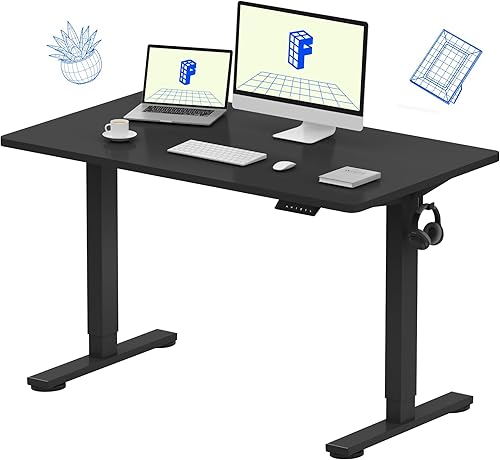
Prime FLEXISPOT EN1 Electric Standing Desk 48×24 Black

Prime Lian Li O11D Mini Vertical GPU Bracket Kit White

Prime UT Wire Cable Management Box Black

Razer Iskur V2 X 2XKO Edition Ergonomic
As an Amazon Associate we earn from qualifying purchases. Product prices and availability are accurate as of the date/time indicated.
Pros
- Exceptionally bright and even ultrawide coverage for large desks
- True no glare design helps reduce eye strain during long sessions
- Wide compatibility with flat, curved and thick monitor designs
- Automatic motion sensing for hands free convenience and energy savings
- Sturdy clamp mount frees up valuable desk space
Cons
- 19.68 inch width may overhang smaller monitors under 24 inches
- Controls are on the bar itself, with no remote for distance adjustment
- Motion sensor needs clear line of sight and may trigger in busy shared spaces
The BenQ ScreenBar Pro is a USB-C powered LED monitor light designed for remote workers, programmers, creators and gamers with flat or curved setups. It sits on top of your monitor to light the desk area while keeping your workspace clean and focused.
In real world use, the ultrawide beam delivers over 1000lx central brightness with even 500lx coverage across a 33 by 20 inch area. The asymmetrical optics direct light downward onto the desk, so there is no screen reflection, no direct glare and noticeably less eye fatigue during late sessions.
Standout conveniences include adjustable brightness and color temperature plus an ultrasonic motion sensor that turns the light on when you approach and off after five minutes away. It is a thoughtful touch for shared offices and energy saving without needing to touch a switch.
Build quality feels premium with a polished aluminum bar, sturdy patented clamp and integrated control buttons. It fits monitors from 0.17 to 2.56 inches thick and 1000 to 1800R curvature, and it avoids blocking the webcam on most designs.
It is not the most compact option for very small monitors and it lacks a remote control, but for eye comfort, brightness and clean design it sets the standard. If you want pro level desk lighting without a traditional lamp, the ScreenBar Pro is an excellent upgrade.
Model: BenQ ScreenBar Pro LED Monitor Light Bar, Black finish
Brightness: Over 1000lx central, 500lx across 33 x 20 inch area with adjustable brightness and color temperature
Compatibility: Fits monitors 0.17 to 2.56 inches thick, curvature 1000 to 1800R, patented clamp avoids webcam blocking
Sensor: Ultrasonic motion detection within 24 inch range, auto off after 5 minutes of absence
Design: 19.68 x 5.31 x 3.62 inches, 800g, polished aluminum, integrated buttons, USB-C powered
Pros
- Stunning infinity mirror RGB that looks great from all sides
- Strong airflow and static pressure for case and radiator use
- Interlocking design dramatically cuts cable clutter
- Quiet Fluid Dynamic Bearing operation rated at 29dB max
- Controller included for synchronized lighting and expansion
Cons
- Lighting control software has a learning curve for first time users
- Premium aluminum frame and LEDs add weight compared to basic fans
- Triple pack format may be more than compact single fan builds need
The Lian Li UNI Fan SL-Infinity 120mm triple pack is a premium ARGB cooling kit for desktop gamers, creators and enthusiasts who want standout lighting with serious airflow. It includes three interlocking 120mm fans plus a controller, making it ideal for new builds or visual upgrades.
Each fan delivers up to 61.3 CFM airflow and 2.66mmH2O static pressure with a wide 200 to 2100 RPM range. That makes it effective for case intake, exhaust and radiator mounting, while Fluid Dynamic Bearings help keep operation smooth and quiet at a max of 29dB.
Build quality feels premium with aluminum trim, infinity mirror framing and 40 LEDs per fan for a layered glow from any angle. The interlocking daisy chain system, removable keylock and reversible cable module reduce clutter and improve fit around radiator fittings.
There are some tradeoffs to consider. The lighting software takes time to learn, and planning fan groups matters for larger setups. The triple pack plus controller setup may also be more than users with small cases or single fan needs require.
Overall, the SL-Infinity triple pack is an excellent choice for builders who want performance and showpiece RGB in one kit. If you value bright customizable lighting, strong radiator ready cooling and expandable control for up to 16 fans, this set delivers a polished high end solution.
Model UF-SLIN120-3B, triple 120mm fan pack in black with included controller. Dimensions are 120 x 122.1 x 25mm per fan with 4-Pin power connection.
Performance is rated at 200 to 2100 RPM, up to 61.3 CFM airflow and up to 2.66mmH2O air pressure. Noise level is rated at 29dB maximum with Fluid Dynamic Bearing design.
Lighting features 40 LEDs per fan with infinity mirror frame and customizable blade and edge effects. Controller supports up to 16 fans in 4 groups plus 2 SM type devices.
Compatibility is listed for desktop cases and radiators with reversible cable module for improved fitting clearance. Material includes aluminum trim for a premium finish.
Pros
- Strong all metal build with durable scratch resistant finish
- Highly versatile with adjustable clamp and horizontal plus vertical mounting
- Curved rest is gentler on headbands than flat hooks
- Small footprint keeps desk clear and installation is simple
Cons
- Open end has no safety lip, so headphones can slip off if knocked
- Switching mount orientation needs a hex key adjustment
- No dedicated cable manager, cord routing needs extra planning
The BRAINWAVZ Hengja is a clamp on metal hanger designed to get headphones off your desk and within easy reach. It is made for PC gamers, office workers, students and anyone with limited desktop space who wants a tidy setup.
Its standout trick is rotatable mounting for both horizontal surfaces like desks and shelves, plus vertical surfaces like desk legs and bookcase sides. In real use, it holds light on ear models to heavy over ear gaming headsets securely, while the curved arm cradles the headband to reduce pressure points.
Build quality is a clear highlight, with thick all metal construction and a polished matte black finish that resists scratches. At just 4.72 inches long and 4.16 ounces, it feels sturdy without looking bulky, and it adds a clean, minimalist touch to home, work or studio spaces.
There are a few tradeoffs to note. The hanger tip has no raised lip, so headphones can slide if bumped hard, and rotating between horizontal and vertical modes requires a hex key adjustment. Cable storage is also basic, so you will need to plan where to route your headphone cord.
Overall, the Hengja is a smart, durable alternative to bulky floor stands. If you want a strong, space saving holder that clamps on without glue or mess, it is an excellent pick for gaming and everyday listening setups.
Model: BWAVZ-HENGJA-BLK, Color: Black, Material: Metal with polished finish
Dimensions: 4.72 x 2.36 x 2.36 inches, Weight: 4.16 ounces, Mounting: Tabletop clamp with bracket fastening
Compatibility: On ear and over ear headphones, all phone models, ideal for gaming and PC headsets, plus cables and small accessories
Pros
- Very sturdy alloy steel construction holds monitors steady without shaking
- Smooth independent adjustment for height, tilt, swivel and rotation stays in place
- Fast tool-free VESA setup with flexible C-clamp or grommet mounting options
- Smart cable management and space saving design creates a cleaner desk
- Durable long term performance backed by a 5-year warranty
Cons
- Only fits wooden desks within specific thickness ranges, not ideal for glass desks or desks with blocking crossbeams
- Initial assembly and tension adjustment can take time to balance perfectly
- Limited to 19.8 lbs per screen and 75x75mm or 100x100mm VESA, so not for extra heavy or nonstandard monitors
The ErGear Dual Monitor Arm is built for remote workers, gamers and multitaskers who use two 13 to 32 inch monitors side by side or stacked. It replaces bulky stock stands to reclaim desk space while placing each screen at eye level. If you want independent control over height and angle for both displays, this mount is made for you.
Each arm moves independently with generous height adjustment, extension, tilt, swivel and full rotation for portrait or landscape use. Users report smooth repositioning for sharing screens or finding an ergonomic viewing angle, and monitors stay firmly in place once tension is set. It handles daily adjustments well without sagging or drifting.
The construction uses alloy steel with an upgraded VESA head that fits tighter with a smaller gap for added stability. Both the C-clamp and grommet mounts feel solid on compatible wooden desks, and the base includes a cable routing cutout. Tool-free VESA plates and clip-on cable management make setup and daily use faster and cleaner.
It is not universal for all setups, as it only supports up to 19.8 lbs per monitor and 75x75mm or 100x100mm VESA patterns. Installation works best on wooden desks within the specified thickness range and can be blocked by crossbeams or cable trays. Initial assembly and tension tuning can also take some patience to get perfectly balanced.
Overall, this is a sturdy, versatile and user friendly dual monitor solution for most home and office workstations. It delivers smooth ergonomics, reliable hold and smart cable control in a durable package. For anyone upgrading to a cleaner dual screen setup, it is a strong value backed by a 5-year warranty.
Brand: ErGear, Model: EGDMA70B-DS-UK, Color: Black, Material: Alloy Steel, Mounting Type: Tabletop Mount
Monitor Compatibility: 13 to 32 inch flat or curved screens, Max Load 19.8 lbs per arm, VESA 75x75mm and 100x100mm
Adjustment Range: Height up to 17.5 inch, Extension up to 18.1 inch, Tilt +80 to -50 degrees, Swivel +/- 90 degrees, 360 degree rotation
Mounting Options: C-clamp for desks 0.39 to 2.56 inch thick, Grommet mount for desks 0.39 to 2.95 inch thick, Wooden desk recommended
Pros
- One-piece desktop with no center seam for extra comfort and clean look
- Strong 176 lb capacity and steel frame for excellent stability
- 4 memory presets make sit-stand transitions fast and convenient
- Compact 48x24 footprint fits bedrooms, dorms and home offices
- 5-year frame and motor warranty for long term peace of mind
Cons
- 0.63 inch desktop is thinner than premium models
- 24 inch depth can feel tight for large setups with multiple accessories
- Minimum height near 28.9 inches may be high for shorter users
The FLEXISPOT EN1 is a 48x24 inch electric standing desk designed for home offices, bedrooms and study spaces. It is built for remote workers, students, coders and gamers who need a compact sit-stand solution for laptops and dual monitors.
Its standout feature is the seamless one-piece desktop that removes the annoying center gap found on many budget desks. The electric motor moves smoothly from 28.9 to 46.5 inches, and four memory presets let you lock in ideal sit and stand heights.
Build quality centers on a heavy-duty alloy steel frame rated for up to 176 lbs. The powder coated finish, engineered wood top and stable legs keep the desk steady during typing, writing and gaming, while quiet operation avoids distractions.
There are a few tradeoffs to consider. The 0.63 inch top is on the thinner side, and the 24 inch depth can feel limited if you use large monitor arms or lots of gear. Cable management is basic with clips included, so larger setups may need extra accessories.
Overall, the EN1 delivers excellent core performance for a compact electric desk with stability, smooth adjustment and smart extras like a headphone hook. It is an ideal choice for anyone wanting affordable ergonomic flexibility without sacrificing desktop comfort.
Model: FLEXISPOT EN1 Electric Standing Desk, 48x24 inch, Black with seamless one-piece top
Height Range: 28.9 to 46.5 inches electric adjustment with 4 memory presets
Capacity and Build: 176 lb max load, alloy steel frame, engineered wood top
Dimensions and Weight: 48W x 24D inches, 0.63 inch top thickness, 45 lbs product weight
In the Box: Desktop, frame, controller, cable clips, headphone hook with 5-year frame and motor warranty
Pros
- Native PCIe 4.0 support for maximum GPU performance without bottlenecks
- Custom fit for O11D Mini ensures secure mounting and clean aesthetics
- Sturdy 1mm SPCC steel bracket with premium white painted finish
- Supports large 3-slot GPUs for high end gaming and creator builds
Cons
- Only compatible with the Lian Li O11D Mini, not universal for other cases
- Vertical mounting may limit airflow with thick cards close to side glass
- Compact installation requires careful cable routing and planning
The Lian Li O11DMINI-1W-4 is a dedicated vertical GPU bracket kit made exclusively for the popular O11D Mini case. It is built for PC enthusiasts who want to turn their graphics card into the visual centerpiece of a white themed showcase build.
The highlight is the included white 200mm PCIe Gen 4.0 riser cable, which delivers full bandwidth for modern NVIDIA and AMD cards. In real world use, that means no performance loss versus a direct motherboard slot, plus stable signaling for gaming and creative workloads.
Built from 1mm SPCC steel with a clean painted white finish, the bracket feels solid and matches the O11D Mini perfectly. It supports large 3-slot GPUs and holds the card securely in place while keeping the display clean and professional.
Compatibility is strictly limited to the O11D Mini, so it is not an option for other cases. Builders should also plan airflow carefully, as a vertically mounted card sits closer to the side glass which can raise temperatures with thick GPUs.
For O11D Mini owners, this kit is the cleanest way to show off a high end GPU without sacrificing PCIe 4.0 speed. If you value aesthetics, perfect fitment, and premium build quality, it is an easy recommendation.
Model O11DMINI-1W-4 in White, made from 1mm SPCC steel with a painted finish for durability. Designed as a vertical GPU mount accessory exclusively for the Lian Li O11D Mini chassis.
Supports graphics cards up to 3 slots thick, with bracket dimensions of D180mm x W191.5mm x H272.5mm. Mounting type is wall mount style inside the case for a secure showcase display.
Includes a 200mm white PCIe Gen 4.0 riser cable for full speed GPU connectivity. Backed by a 1 year manufacturer warranty from Lian Li.
Pros
- Large capacity holds big and tall plugs that smaller boxes cannot fit
- Creates a tidy, family friendly charging station for multiple devices at once
- Simple drop in setup with no tools, just place the strip inside and route cords
- Clean matte black finish looks neat in living rooms, bedrooms and offices
Cons
- Power strip and chargers are not included, box only
- Lid can feel loose and may need tidy cable placement to sit flat
- Lightweight plastic can sound hollow and rattle with phone vibration, and top grommets can pop out
The UT Wire UTW-BXSM-BK is a desktop cable management box designed to conceal a power strip, chargers and excess cord length. It is made for anyone tired of tangled cables on a desk, nightstand, kitchen counter or behind the TV.
In daily use, the extra long 16.4 inch interior easily swallows a standard 6 to 12 outlet strip plus bulky adapters. The top flip door with three slots lets you feed out just what you need for phones, tablets, headphones and watches, while the top groove holds a device upright as it charges.
The box is lightweight plastic in matte black, so it blends quietly under TVs and on mantels or desks. Side openings on the left, top and right make cable routing flexible, and setup takes seconds with no tools or mounting required.
Build quality is functional rather than premium, as the plastic feels a bit hollow and can rattle if your phone vibrates on top. The lid does not lock tightly and the soft top grommets can pop out when pulling thicker cables through, so a little cable arranging inside helps.
Overall, this is a practical and affordable fix for cord clutter, especially for shared family charging spots and home entertainment setups. If you want a larger, simple hideaway box with convenient top access, this UT Wire model is a smart pick.
Brand: UT Wire, Model: UTW-BXSM-BK, Color: Black, Style: Desktop charging box
Dimensions: 16.4L x 6.6W x 5.4H inches, Weight: 16 ounces, Material: Plastic
Capacity: Fits most standard 6 to 12 outlet power strips, power strip and chargers not included
Usage: Indoor only with top flip door plus left, top and right cable openings for flexible routing
Pros
- Integrated lumbar support with no extra pillow needed
- Wide, centered seat design for comfort and pressure relief
- Thick high density foam for lasting lower body support
- Breathable fabric keeps you cooler than leather alternatives
- Sturdy alloy steel frame supports up to 299 pounds
Cons
- 2D armrests offer less adjustability than premium 4D options
- Fabric upholstery may require more frequent cleaning than leather
- 50.3 pound build makes it less easy to move once assembled
The Razer Iskur V2 X 2XKO Edition is an officially licensed ergonomic gaming chair built for fighting game fans and long session grinders. It is aimed at adult gamers who want structured back support and a wider, more relaxed seat for ranked play and practice.
Built-in lumbar support encourages neutral posture without a separate pillow, which helps reduce lower back fatigue over hours. The widened seat with reduced edges guides you toward the center for even pressure distribution, while dense foam cushions add stability for the hips and thighs.
Upholstered in plush, breathable multilayered fabric, it feels cool and smooth during intense matches. The alloy steel frame, 152-degree recline and 2D armrests with height and rotation adjustment let you dial in a focused upright position or lean back between games.
It is not perfect, as the 2D armrests lack the full adjustability of 4D arms found on flagship chairs. The fabric finish can also collect dust and needs regular cleaning, and the solid back design offers less airflow than mesh alternatives.
Overall, the Iskur V2 X 2XKO Edition is a strong pick for players who prioritize posture support, wide seat comfort and themed style. If you want a cool, durable fabric chair for daily gaming with reliable ergonomics, this edition delivers focused comfort tuned for competition.
Model: Razer Iskur V2 X, Set Name: 2XKO Edition, Model Number: RZ38-05310900-R3UA
Upholstery: Multi-layered breathable fabric, Fill: High density foam, Frame: Alloy steel
Recline: Up to 152 degrees, Armrests: 2D adjustable in height and rotation, Seat: Widened base with reduced edges
Dimensions: 27.58 x 27.58 x 49.64 inches, Weight: 50.3 pounds, Max capacity: 299 pounds
Use: Indoor gaming for adults, Includes: Razer Iskur V2 X Gaming Chair, Color: 2XKO Edition
| Gear | Common in this style | Our 2026 pick | Why |
|---|---|---|---|
| Cable management | a cable management in this style | UT Wire Cable Station | a small hub that keeps charging cables from falling behind the desk |
| Monitor arm | a monitor arm in this style | ErGear Dual Monitor Arm | a gas-spring dual arm with cable channels for a clean look |
| Chair | a chair in this style | Razer Iskur V2 | a racing-style chair with real adjustable lumbar for long sessions |
| Case fans | a case fans in this style | Lian Li Uni Fan SL Infinity | daisy-chain ARGB fans with a mirror effect for a glass side panel |
| Desk mat | a desk mat in this style | Cordking Desk Pad | a cheap large mat to cover a full small desk |
| Bias light | a bias light in this style | BenQ ScreenBar Halo | a monitor light bar with a wireless dial and auto brightness for night work |
| Vertical GPU | a vertical gpu in this style | Lian Li O11D EVO Vertical GPU Kit | a vertical mount with a riser to show the card through the glass |
| Desk | a desk in this style | FLEXISPOT E7 Standing Desk | a stable dual-motor frame that handles a full tower and dual monitors |
| Headphone stand | a headphone stand in this style | Brainwavz Hengja Desk Hook | a clamp hook that keeps the headset under the desk edge |
Start with your foundation, the FLEXISPOT EN1 One-Piece Standing Desk. Per the spec sheet it offers a one piece top sized at 48 inch by 24 inch, support for up to 176 lbs, height range from 28.9 inch to 46.5 inch and 4 memory presets. You can store sit and stand heights for work and play, and you keep your tower, monitors and arm under that listed capacity while you follow the assembly instructions.
Light it in layers with the BenQ ScreenBar Pro LED Monitor Light Bar (Black) plus RGB from the Lian Li UNI Fan SL-Infinity 120mm SLIN120 Triple. The light bar lists over 1000lx central brightness with a 500lx range within 33 inch by 20 inch, fit for monitors 0.17 inch to 2.56 inch thick, curvature 1000 to 1800R, and a motion sensor that powers down after 5 mins without movement. The fan triple pack lists speeds from 200 to 2100RPM, up to 61.3CFM airflow, 2.66mmH2O pressure and 29dB noise, with 40 LEDs per fan and support for up to 16 fans through the included controller. For more fan ideas see 6 affordable 120mm ARGB fans for cool colorful builds.
Hide the mess with the UT Wire UTW-BXSM-BK Desktop Mobile Charging and the ErGear Dual Monitor Arm, Full Adjustable Monitor. The box measures 16.4 x 6.5 x 5.4 inch and fits most standard 6 to 12 outlet power strips, so you can park your strip and bricks inside with side openings for routing. The arm fits most 13 to 32 inch screens up to 19.8 lbs with VESA patterns of 75x75mm or 100x100mm, clamps to desks 0.39 inch to 2.56 inch thick, and offers height adjustment up to 17.5 inch with extension up to 18.1 inch. If you want theory on display mounting, read EZDIY-FAB shield ARGB vertical GPU mount vs traditional horizontal mount.
How To Adapt It To Your Room
Will this desk fit your wall without blocking a door, closet or radiator while still giving you room to stand and roll back? That is the question to answer before you buy anything. You want a wall or corner where your desk width leaves walk space on at least one side, plus a few inches behind for a cable box, a strip and an arm that needs to pull back. Measure twice and tape the footprint on the floor so you can see chair travel.
Adapt this to your space before buying. Measure the wall or corner of a room for the desk width, a compact layout needs more depth for a monitor arm to pull back. You use depth for screen distance, keyboard angle and arm articulation. If your room is narrow, you place the tower on the desk end or on a low stand beside the desk rather than under it, so your knees and cables stay clear.
Check your monitor for a VESA pattern before choosing an arm, and confirm the desk edge thickness for a clamp. The ErGear pick lists 75x75mm or 100x100mm VESA, support for screens 13 to 32 inch up to 19.8 lbs, and clamp fit for 0.39 inch to 2.56 inch with an optional grommet mount for 0.39 inch to 2.95 inch. You should confirm your screen size, hole pattern and weight with the manual, check for a curved back or protruding ports, and follow the mounting instructions step by step.
If you rent, use no-drill cable trays and adhesive raceways rather than screwing into the desk or wall, and find a stud before any wall mount. You can mount the BRAINWAVZ Hengja – The Desk Headphone Stand Hanger to a horizontal or vertical surface with its adjustable metal clamp, which keeps your headset under the desk edge without screws. For under desk power, a clamp tray plus a box like the UT Wire unit gives you a tidy run that you can remove without damage. See more routing ideas in Cable Management and Under-Desk.
Match the industrial look with the finish of the desk and mat first, then the lighting color, rather than buying every accessory in one brand. You pick a black frame with a medium wood top, then a dark stitched mat, then warm white task light with restrained RGB behind. That order keeps you from ending with mismatched blacks and blues. Owners commonly report that one warm white plus one RGB accent looks more settled than rainbow on every part.
A standing desk lists a weight capacity, keep the tower, monitors and arm under it. The FLEXISPOT pick lists support for up to 176 lbs, so you add your tower, both screens, the arm and desk items and stay under that limit. You should distribute weight evenly, route cables with slack for height changes, and follow the assembly instructions for frame bolts and control box wiring.
Plan power and GPU fit with care. Match the PCIe generation, seat the riser fully, do not force connectors. The Lian Li O11DMINI-1 Vertical GPU Bracket KIT/PCIE lists a PCIe 4.0 riser cable at 200mm length, bracket size at D180mm by W191.5mm by H272.5mm and 3 slot width, made for the O11D Mini family. You should confirm your case model, slot clearance and card thickness before you order. For lighting safety, do not overload a single outlet, keep power supplies ventilated, and keep strips away from fabric and heat.
What Actually Changes The Feel
You feel the biggest shift from task lighting, cable control and surface comfort. A monitor light bar gives you even desk light without glare on your screen, which helps during late work and long queues. A cable box plus arm channels removes visual noise behind your monitors, so your focus stays on the game or timeline.
You also feel a large mat more than you expect. It evens out mouse glide, quiets keyboard contact and visually joins your keyboard, mouse and controller into one zone. If your desk top is hard or cold, a full mat makes long sessions more relaxed without changing any hardware.
Lower priority for feel are the vertical GPU display and extra ARGB fans. They look striking through glass and they let you show your card, but they do not change how you sit, see or aim. Add them after your chair, arm and lighting are settled. For ambient theory, see Bias Lighting and Ambient RGB and 9 quiet ARGB fans for clean airflow.
No verified frame rate numbers are available for this build, so keep expectations qualitative. You are buying comfort, layout and lighting here, not extra frames. Your in game results will depend on your PC parts, settings and monitor, not on your desk gear.
Build It At Three Budgets
Budget Version
You build around a manual or single motor desk, a well reviewed chair such as a SIHOO M57, a single VIVO arm, one Govee light strip, a large cloth mat and a no-drill cable tray. You reuse your current monitors and tower and you focus on placement and routing. This suits you if you want a first industrial setup on a tight budget in a rental or dorm.
You still get the dark frame plus wood look and a floating screen effect, just with simpler motion and fewer presets. Keep your load light, use adhesive channels, and save your funds for a better chair later.
Balanced Version: Our Recommendation
You build around the FLEXISPOT EN1 One-Piece Standing Desk, the Razer Iskur V2 X Ergonomic Gaming Chair, the ErGear Dual Monitor Arm, Full Adjustable Monitor, the BenQ ScreenBar Pro LED Monitor Light Bar (Black) plus one strip, a stitched XL mat and a clamp tray with a sleeve. The chair lists built in lumbar support, a widened seat base, high density foam cushions, recline up to 152 degrees and 2D armrests. This suits most people who want it to last through work days and long play nights.
You get smooth height presets, stable dual screen positioning and layered light without going overboard. Add the Lian Li UNI Fan SL-Infinity 120mm SLIN120 Triple and the Lian Li O11DMINI-1 Vertical GPU Bracket KIT/PCIE when your case and budget allow.
Premium Version
You build around a Herman Miller or Steelcase chair, an Ergotron arm, a light bar plus wall panels, a felt or leather pad and a fully sleeved cable run. You keep the same industrial base but you upgrade touch points and motion quality. This suits you if you plan to keep the setup for years in a stable home office.
You gain finer arm articulation, longer warranty support on seating, and a more tailored wall glow behind your monitors. Plan your stud locations, sleeve every run, and label power bricks so future upgrades stay simple.
FAQ
Can I build an industrial RGB setup in a small rental without drilling?
Yes, you can if you pick no-drill mounting. You use a clamp monitor arm after checking VESA and edge thickness, a clamp headset hook, adhesive raceways and a freestanding cable box. You avoid wall mounts unless you can find a stud and get approval.
What should I check before buying a dual monitor arm?
You check your monitor size, weight and VESA pattern against the arm spec sheet. For the ErGear pick that means 13 to 32 inch screens up to 19.8 lbs with 75x75mm or 100x100mm holes and a desk edge 0.39 inch to 2.56 inch thick. You also confirm desk material and follow the mounting instructions.
Does a vertical GPU mount affect fitment in a compact case?
It can, so you verify before you buy. You match your case model, card thickness and PCIe generation, and you seat the riser fully without forcing connectors. The Lian Li bracket lists PCIe 4.0, 200mm cable length and 3 slot width for the O11D Mini family, so you should confirm your exact case and card clearances.
Final Verdict
You get the most from this style when you invest in desk stability, screen position and light control first, then add display pieces. That order keeps your room usable every day while still giving you the moody industrial glow you want. Owners commonly report that a tidy power run matters more than extra RGB.
Our pick: Balanced version with the FLEXISPOT standing desk, ErGear dual arm, BenQ light bar and Razer Iskur V2 X chair, for most renters and home offices who want comfort that lasts.







Write Your Review
No reviews yet. Be the first to share your experience!