

You chose the Lian Li O11 Vision for its wraparound glass on three sides, then you mounted your triple fan card horizontally and all you admire is a flat backplate and a drooping power cable. A vertical mount turns the fans, shroud and RGB toward the glass and makes the whole build feel intentional. This guide to the best vertical GPU mount kit for a Lian Li O11 Vision is for ATX owners with thick cards who also care about airflow focused case layouts.
We assessed eight popular brackets for riser generation, steel rigidity, forward shift and real Vision clearance in 2026. Our method focused on bottom fan space, side panel gap, HDMI cutout size and anti sag hardware, not generic fit claims. You will learn when PCIe 5.0 matters for RTX 50 series, when tilt improves cooling, and which no riser brackets to skip for this specific panoramic case.
This article contains affiliate links. If you buy through one of our links, CustomPCGaming may earn a commission at no extra cost to you. Commissions never influence which products we recommend or how we rank them. Read our Affiliate Disclosure for details.
Quick Picks at a Glance

Prime ARCTIC Accelero Vertical GPU Mount with PCIe 5.0

Prime XRIKUI Vertical GPU Mount Bracket with Adjustable
Lian Li VG4-5-V4X Vertical GPU Kit 4-Slot PCIe 5.0

Prime Lian Li O11D EVO XL Upright GPU Bracket Kit

Prime Cooler Master Vertical GPU Holder Kit V3 White

ConnBull PCIe 5.0 Vertical GPU Mount Bracket

Prime Cooler Master Vertical GPU Holder Kit V3 with PCIe

EZDIY-FAB Vertical GPU Mount Bracket with ARGB LED
As an Amazon Associate we earn from qualifying purchases. Product prices and availability are accurate as of the date/time indicated.
Pros
- PCIe 5.0 riser included for future proof bandwidth and reliable performance
- Wide compatibility with full length, 3-slot high end graphics cards
- Solid construction helps eliminate GPU sag for heavier cards
- Clean vertical showcase improves aesthetics and RGB visibility
Cons
- Requires at least 7 PCI expansion slots, limiting compatibility with smaller cases
- Vertical placement may affect airflow in cases with restricted front intake
- Black only finish offers no color option to match white themed builds
The ARCTIC Accelero Vertical GPU Mount is designed for gamers and PC builders who want to display their graphics card vertically instead of hiding it horizontally. It is ideal for ATX builds with tempered glass panels where cooler design and RGB lighting deserve full visibility.
The standout inclusion is the 160mm PCIe 5.0 x16 riser cable, which delivers full bandwidth with stable signal transmission. It is fully backward compatible with PCIe 4.0 and 3.0, so both current high end GPUs and older cards run without compromise.
Built for full length, 3-slot graphics cards, the mount uses a durable black steel bracket that holds the GPU firmly in place. The stable construction helps prevent sag and unwanted movement, which is especially valuable for heavier modern cards.
Compatibility is the main limitation, as you will need a case with at least 7 PCI expansion slots and an ATX layout. Vertical mounting can also affect airflow in some cases, so good front intake and spacing from the side panel are important.
Overall, this is a clean and practical upgrade for showcase gaming builds that need PCIe 5.0 performance and solid support. If your case meets the slot requirement, it offers a premium look with reliable functionality.
Brand: ARCTIC
Model: Accelero Vertical GPU Mount, Black
Riser Cable: 160mm PCIe 5.0 x16, backward compatible with 4.0 and 3.0
GPU Support: Full length cards, 3-slot installation
Compatibility: ATX motherboards, cases with 7 PCI slots
Dimensions: 10 x 6 x 8 inches
Weight: 675g
Recommended Use: Gaming PC showcase builds
Pros
- Strong yet lightweight CNC-machined aluminum alloy build
- Adjustable support arm keeps heavy GPUs stable and sag free
- Supports 120mm bottom fan for better vertical GPU cooling
- Universal compatibility with 2-slot and 3-slot graphics cards
- Includes 2 year manufacturer warranty for added confidence
Cons
- PCIe riser cable is not included and must be purchased separately
- Requires enough case clearance for vertical mounting and fan setup
- May need extra planning for cable routing in compact cases
The XRIKUI Vertical GPU Mount Bracket is designed for custom PC builders who want to display their graphics card vertically instead of in the traditional horizontal position. It is ideal for gaming rigs with tempered glass panels where aesthetics, airflow and GPU presentation matter.
Its universal design supports standard 2-slot and 3-slot GPUs from major brands, while the adjustable multi-angle support arm keeps heavy cards level and sag free. The modular base works with most PCIe riser cables and allows a 120mm fan underneath, which helps improve cooling in vertical layouts.
Built from CNC-machined aluminum alloy with a polished black finish, the bracket feels rigid yet lightweight and adds a premium look to any build. The expandable base with adjustable mounting holes makes it easier to fit different case layouts and riser cable positions.
The main limitation is that a PCIe riser cable is not included, so you will need a compatible cable for your GPU generation. You will also need to confirm your case has enough clearance for vertical mounting and bottom fan installation.
Overall, this is a solid and well engineered solution for showcasing a GPU while improving stability and airflow. For builders planning a clean, high performance custom PC, it offers strong value and versatile compatibility.
Brand: XRIKUI, Model: B0FWJ4CWFR, Material: CNC-Machined Aluminum Alloy, Color: Black with Polished Finish.
Compatibility: Standard 2-Slot and 3-Slot Graphics Cards, Most PCIe Riser Cables, 120mm Bottom Fan Support.
Mounting Type: Vertical Bracket with Expandable Base and Adjustable Support Arm, Weight: 0.4 kg, Warranty: 2 Year Manufacturer Warranty.
Before buying, confirm your case has space for vertical GPU installation and bottom fan clearance. Measure GPU length, thickness and available PCIe slot area to ensure proper fit.
Choose a quality PCIe riser cable that matches your motherboard and GPU generation for best performance. High speed GPUs benefit from shielded cables with stable signal transmission.
For heavy triple fan cards, adjust the multi-angle support arm to fully contact the GPU edge. Adding a 120mm intake fan below can further help temperatures in showcase builds.
Pros
- Sturdy metal construction eliminates GPU sag and feels premium
- PCIe 5.0 riser maintains stable high-bandwidth performance with no signal loss
- Tilt and height adjustments offer flexible display and noticeably better cooling
- Clean installation with improved cable clearance and integrated RGB support arm
Cons
- Requires ATX case with at least 6 PCIe slots, 7 slots needed for angled configurations
- Can interfere with bottom case fans or large CPU air coolers in compact mid-tower builds
- GPUs with overclocking buttons or three full-size DisplayPorts may contact the bracket when tilted
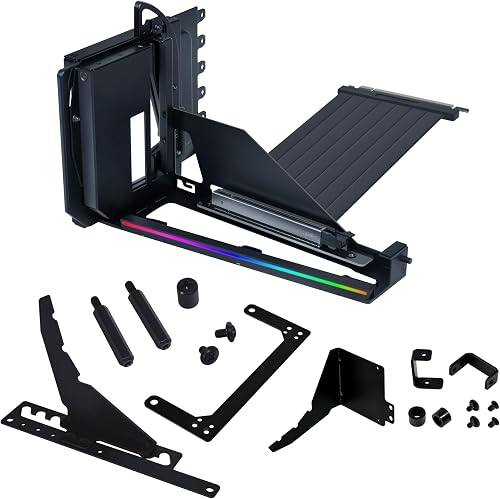
The Lian Li VG4-5-V4X is a vertical GPU mounting kit designed for ATX cases that lets you display your graphics card front and center. It is built for gamers and showcase builders with large 4-slot GPUs who want premium aesthetics without losing performance.
Its standout feature is the dual-angle tilt that lets you angle the card forward for better airflow or backward for display impact. Combined with three height settings and a PCIe 5.0 riser cable delivering up to 32 Gbps, it provides smooth performance and noticeably cooler operation in real builds.
Build quality is excellent, with a robust metal frame, smooth articulation, and an anti-sag arm that secures to a motherboard standoff. The updated #6-32 screws and enlarged I/O cutout make installation cleaner, while the integrated RGB lighting adds a refined finishing touch.
There are some fit limitations to consider. You need a case with 6 PCIe slots for vertical mounting and 7 for tilted modes, so compact cases are often incompatible. Large air coolers, bottom fans, or GPUs with extra buttons and ports can also create clearance issues.
Overall, this is one of the best vertical mounts for a high-end showcase build. If you have a compatible ATX case and want to highlight your GPU while improving stability and airflow, the VG4-5-V4X is a worthwhile upgrade.
Pros
- Perfect compatibility with O11D EVO XL case
- Improves airflow with chimney style configuration
- Sturdy support for oversized RTX 40 series cards
- Premium aluminum build with matching black finish
- Creates a striking vertical GPU showcase look
Cons
- Riser cable not included, requires separate purchase
- Only compatible with O11D EVO XL, not universal
- Limited to upright position with no angle adjustment
The Lian Li O11DEXL-1X is an upright GPU bracket kit made exclusively for the O11D EVO XL case. It is ideal for PC builders using large RTX 40 series cards who want a vertical showcase mount with improved airflow.
Its upright mounting angle opens up the case for an unrestricted chimney style configuration. This layout promotes natural heat rise and helps keep high power GPUs cooler while freeing space around the motherboard.
Built from aluminum with a matte black finish, the bracket matches the premium look and feel of Lian Li cases. It feels solid and secure, providing stable support for long, heavy graphics cards without flex.
The main drawback is that a PCIe riser cable is not included, so you will need to buy a compatible cable separately. It is also strictly limited to the O11D EVO XL, so owners of other cases cannot use it.
Overall, this is a must have accessory if you own the EVO XL and want maximum cooling and display impact. It delivers a clean, functional upgrade that is purpose built for large modern GPUs.
Compatibility: Lian Li O11D EVO XL case only. Supports large GPUs including RTX 40 series in upright orientation.
Material: Aluminum construction. Color: Black. Dimensions: 5.63 x 6.5 x 3.54 inches.
In the Box: 1x Upright GPU bracket kit. Please note, PCIe riser cable is not included and must be purchased separately.
Pros
- Wide compatibility with E-ATX, ATX and Micro-ATX cases plus modern triple slot GPUs
- Stable, high speed signal from included PCIe 4.0 riser for gaming and creative workloads
- Solid alloy steel frame with clean white ABS casing that matches white builds
- Quick, toolless positioning with flexible adjustment for better cooling clearance
Cons
- May block rear case fan in some Micro-ATX layouts
- Needs a full 7-slot ATX chassis, so not suited for compact Mini-ITX cases
- White color only, which limits matching options for black themed builds
The Cooler Master Vertical GPU Card Holder Kit V3 White is designed for PC builders who want to show off their graphics card vertically instead of the standard horizontal mount. It is ideal for gamers and creators using large triple slot GPUs in ATX or Micro-ATX cases with a side window.
The kit includes a 165mm PCIe 4.0 riser cable that works with both PCIe 4.0 and 5.0 motherboards and GPUs, including RTX 5090 and RX 9070 XT class cards. In real builds, it delivers stable, high speed performance for gaming and creative tasks while keeping installation simple and flexible.
Build quality feels solid thanks to the alloy steel frame and clean white ABS casing that blends well with white themed builds. The modular bracket adjusts up to 65mm forward and 30mm toward the side panel without tools, so you can dial in clearance and airflow.
Fitment is broad but not universal, as you need a standard 7-slot ATX case and the removable Micro-ATX bracket may block the rear fan in some compact layouts. The included cable is PCIe 4.0 rated, so users seeking a native PCIe 5.0 riser may want to plan accordingly.
Overall, this V3 holder is a practical upgrade for showcasing a high end GPU with a tidy, modern look. If you have a compatible case and want flexible, toolless vertical mounting, it is a strong and reliable choice.
Model MCA-U000R-WFVK03, Vertical GPU Card Holder Kit V3 White. Material is alloy steel frame with ABS casing in white finish.
Compatibility includes E-ATX, ATX and Micro-ATX tower cases, supports 3-slot GPUs, fits most 7-slot ATX and 4-slot Micro-ATX layouts. Riser is 165mm PCIe 4.0 cable, compatible with PCIe 4.0 and 5.0 motherboards and GPUs.
Adjustment offers up to 65mm horizontal and 30mm toward side panel with toolless design. Dimensions are 10.63 x 5.91 x 7.09 inches, weight 810g.
Best for standard mid tower and full tower ATX cases with 7 expansion slots and tempered glass side panels. Also fits many Micro-ATX cases after removing the M-ATX bracket, check rear fan clearance first.
Designed for large modern GPUs including triple slot RTX and RX models. Ensure your case has enough GPU length clearance and side panel space for vertical mounting.
For best performance, set your motherboard PCIe slot to the correct generation in BIOS if needed and secure the holder before installing the GPU. This flexible order makes cable routing and alignment much easier.
Pros
- Solid metal build feels stable and reliable even with larger graphics cards
- Magnetic base and included hardware make installation faster and more forgiving
- Universal compatibility is ideal for modders and cases without a native vertical mount option
- Vertical layout helps airflow and puts your GPU on display
- Kit includes a useful hex nut screwdriver noted by users
Cons
- PCIe riser cable is not included and must be sourced separately
- Some buyers reported inconsistent hardware packs and damaged packaging on arrival
- Fit can vary by case, so check clearance and mounting points before buying
The ConnBull PCIe 5.0 Vertical GPU Mount Bracket is a universal 3-slot stand designed for vertical graphics card installation in standard PC cases, eGPU docks and custom builds. It is made for DIY builders, modders and gamers who want to showcase their GPU or work around cases without a built-in vertical mount.
Standout features include the 3-slot width for thicker cards, a magnetic suction base for easy positioning, and a complete hardware kit with a handy hex driver. In real builds, users report a rock solid hold for PCIe devices, from full size GPUs to expansion cards mounted away from the main chassis.
The bracket uses black powder-coated metal that feels sturdy and supportive for heavy cards while keeping a clean, low profile look. At 7.6 x 5.3 x 2.2 inches and 220g, it stays compact enough for tight cases yet provides stable vertical support and better airflow visibility.
There are some tradeoffs to know. No PCIe riser cable is included, so you will need your own cable for connection. A few users also received mismatched screws or crushed boxes, which suggests checking all parts right after delivery.
Overall, this is a practical and affordable solution for anyone needing flexible vertical GPU placement. If you want stable support, easy installation and a clean showcase look for an eGPU or custom PC, this ConnBull mount is well worth considering.
Brand: ConnBull, Model: PCIE-5.0, Material: Metal with powder-coated black finish.
Dimensions: 7.6 x 5.3 x 2.2 inches, Weight: 220g, Color: Black, Slots: 3 for vertical GPU installation.
Includes: Mount bracket, screws, magnetic base components and installation hardware. PCIe riser cable not included.
Pros
- Very rigid SGCC steel construction prevents GPU sag even with large triple-slot cards
- Included PCIe 4.0 riser cable delivers reliable high-speed performance with no signal issues
- Adjustable positioning creates extra motherboard clearance and can reduce GPU fan noise in tight cases
- Ventilated bracket supports flow-through cooler designs for stable temperatures under load
Cons
- Requires a spacious case with at least 4 open PCI slots, not suitable for compact builds
- Installation with extra large GPUs can be fiddly and instruction steps could be clearer
- Limited to cards up to 3 slots wide and 3.5kg, so some flagship models may exceed support limits
The Cooler Master Vertical GPU Holder Kit V3 is a modular vertical mount for E-ATX, ATX and Micro-ATX cases with at least four PCI slots. It is built for gamers, creators and showcase builders who want to display a large GPU while stopping sag and PCB strain.
In real world use, the included 165mm PCIe 4.0 x16 riser cable provides fast and stable connectivity with backward compatibility. The ventilated bracket keeps airflow open for flow-through coolers, and users report stable temperatures with no throttling in extended stability tests.
Build quality is a clear strength thanks to thick powder-coated SGCC steel that feels rigid and resists deformation. The modular design allows tool-free shifts toward the front panel and side panel, which helps with RAM clearance and motherboard layout in roomy cases.
There are tradeoffs to consider, as you will need a fairly large case and Micro-ATX builds are limited by CPU cooler height. Fitting very thick cards can take patience, and some users found it easier to connect the riser first before securing the brackets.
Overall, this V3 kit is a solid upgrade for anyone prioritizing looks, strength and cooling flexibility. If you have the space and a compatible case, it delivers reliable vertical support with clean aesthetics and dependable PCIe 4.0 performance.
Model Number MCA-U000R-KFVK03. Mount Type: Vertical GPU holder for PC case with 4 or more PCI slots. Compatibility: E-ATX, ATX, Micro-ATX with up to 70mm CPU cooler height for Micro-ATX.
GPU Support: Cards of any length up to 3 slots wide and up to 3.5kg in weight. Adjustment: Up to 65mm toward front panel and 30mm toward side panel with tool-free modular design.
Riser Cable: PCIe 4.0 x16, 165mm male to female with 90 degree angle, backward compatible. Materials and Finish: Thick SGCC alloy steel with powder coated black finish. Dimensions: 9.45 x 27.17 x 0.98 inches, weight 1.79 pounds.
Before buying, confirm your case offers at least four available PCI slots and enough depth for vertical clearance. Large tempered glass ATX and E-ATX cases provide the best fit and airflow for this bracket.
This mount is ideal for long triple-slot cards with flow-through coolers and for builds where horizontal sag or motherboard stress is a concern. It is less suited to small form factor cases or Micro-ATX builds with tall air coolers.
For easiest installation, plug the riser cable into the motherboard first, then secure the main bracket and inner frame before seating the GPU. Adjust the front and side position to balance GPU clearance, cable routing and side panel space.
Pros
- Creates a striking showcase look that highlights GPU design
- Flexible mounting allows creative layouts and keeps other PCIe slots accessible
- Riser maintains reliable PCIe 3.0 performance when fully and securely installed
- ARGB lighting integrates easily with major motherboard sync software
Cons
- Limited to PCIe 3.0, so PCIe 4.0 cards must be manually set to Gen3 in BIOS
- Universal fit can be fiddly with unclear instructions and may not suit every ATX case
- Vertical position moves fans closer to side panel which can restrict airflow and cause minor sag
The EZDIY-FAB Vertical Graphics Card Holder is designed for PC builders who want to show off their GPU cooler and design instead of hiding it horizontally. It is ideal for ATX cases with at least 7 PCIe slots and users who enjoy ARGB showcase builds.
Standout features include synchronizable ARGB lighting through a 5V 3-pin motherboard header and an included 20cm PCIe 3.0 riser cable. In real world use, performance stays solid at Gen3 speeds when the riser is fully seated, with many users reporting temps on par with horizontal mounting.
The black painted bracket has a movable design that gives flexible placement options inside the case. The sectional TPE riser cable promotes ventilation while the mount creates extra space for creative layouts and cleaner cable routing.
There are some tradeoffs to consider, including PCIe 3.0 only support which requires setting Gen4 cards to Gen3 mode in BIOS. Fitment can be fiddly in some cases, instructions are hard to follow, and placing fans closer to the side panel may restrict airflow or cause slight sag.
Overall, this is a practical and stylish upgrade for showcase builders comfortable with a little tweaking. If you want vertical GPU display with ARGB flair and flexible mounting, it delivers strong value and visual impact.
This bracket is designed for most ATX cases with at least 7 PCIe expansion slots. Check your case depth and interior clearance before purchase to ensure enough space for vertical clearance and side panel airflow.
It works with most major brand graphics cards and connects via an included PCIe 3.0 x16 riser. For PCIe 4.0 GPUs, you must set the motherboard PCIe slot to Gen3 mode in BIOS for stable operation.
ARGB lighting requires a 5V 3-pin addressable header supporting Aura Sync, Mystic Light or RGB Fusion. Do not connect to a 12V 4-pin RGB header, as higher voltage can permanently damage the LEDs.
Buying Guide for O11 Vision Vertical GPU Mounts
The Vision looks open but it punishes poor GPU placement. Put the card too close to glass and heat builds up, put it too close to the motherboard and you fight cables and M.2 heatsinks. The ideal kit gives you generous forward adjustment, secure 7 slot anchoring and a riser that holds full x16 speed without manual retraining or signal drops.
Riser Generation and Signal Reliability
Start with the riser because it decides stability with modern cards. The ARCTIC Accelero Vertical GPU Mount (Black) ships with a 160 mm PCIe 5.0 x16 cable that is backward compatible with PCIe 4.0 and 3.0, so you keep full bandwidth today and headroom for future GPUs. The Lian Li ATX PC Case 4 Slots Vertical GPU Kit includes a 200 mm PCIe 5.0 cable designed for up to 32 Gbps throughput, which is ideal if you run an RTX 5090 or RX 9070 XT in 2026.
PCIe 4.0 options still make sense for most builders. Both the Cooler Master Vertical GPU Card Holder Kit V3 in white and the Cooler Master Vertical GPU Holder Kit V3 in black include a 165 mm PCIe 4.0 riser that works smoothly with PCIe 5.0 motherboards at 4.0 speeds. The EZDIY-FAB Vertical Graphics Card Holder Bracket uses a 20 cm PCIe 3.0 cable, so you must set your BIOS slot to Gen3 mode and ensure the gold fingers are fully seated to avoid falling back to x8 or x4.
Fitment, Thickness and Forward Clearance
The O11 Vision rewards brackets that move. Most vertical kits here want at least 7 PCI slots, with 6 slots as the minimum for tilted setups, and you should plan for 3 slot to 4 slot thick coolers. The Lian Li ATX PC Case 4 Slots Vertical GPU Kit supports up to 4 slot cards with three height positions and a dual angle tilt that angles forward for cooler clearance or backward for display. Cooler Master Vertical GPU Holder Kit V3 counters with tool free adjustment up to 65 mm toward the front and 30 mm toward the side panel, plus a removable panel for compact mATX layouts.
Universal brackets add flexibility but need more planning. The Vertical GPU Mount Bracket from XRIKUI fits standard 2 slot and 3 slot cards with an adjustable support arm and an expandable base that leaves room for bottom 120 mm fans. The PCIE 5.0 Vertical GPU Mount Bracket 3 Slots uses a magnetic suction base and sturdy black metal, but no riser cable is included. Note that the Lian Li Upright GPU Bracket Kit for RTX 40-O11D is made for O11D EVO XL chimney style builds and ships without a riser, so it is not the direct pick for a Vision vertical showcase.
Stability, Anti Sag and Airflow Around Glass
Heavy triple fan cards will sag without proper support, especially when standing vertically. The Lian Li ATX PC Case 4 Slots Vertical GPU Kit includes a support arm that ties to a motherboard standoff to lock the card in place, while the black Cooler Master Vertical GPU Holder Kit V3 uses thick SGCC steel that is rated to resist deformation for cards up to 3.5 kg. ARCTIC Accelero Vertical GPU Mount (Black) and the CNC machined aluminum Vertical GPU Mount Bracket both use rigid brackets and multi angle arms to stop sway during transport or desk bumps.
Airflow needs equal attention because glass reflects heat back toward the fans. Tilting forward lets cool air enter from below and warm air exit more cleanly, and a ventilated bracket helps flow through coolers breathe instead of choking. Pair your mount with quiet ARGB fans on the bottom and high static pressure fans for radiators on the side to keep pressure balanced. An open frame base like the XRIKUI design further helps by leaving the intake path unobstructed.
Looks, Lighting and Cable Routing in a Panoramic Case
Your mount is part of the decor in this case, so match color and light to the rest of your rig. Choose the white Cooler Master Vertical GPU Card Holder Kit V3 for a white Vision build with a matching LCD screen AIO for a white build, or pick black steel to disappear behind the card. The EZDIY-FAB Vertical Graphics Card Holder Bracket adds 5V 3 pin ARGB that syncs with Aura, Mystic Light and Fusion, while the Lian Li support arm adds subtle RGB that complements careful ambient RGB tuning without overwhelming the glass.
Cable cutouts decide how clean the rear looks. The newest Lian Li V4 bracket uses a larger GPU I/O cutout to reduce HDMI and DisplayPort interference, which matters when you angle the card. Cooler Master lets you mount the holder first and then drop in the GPU, so you can dial position before tightening. Keep riser bends gentle, leave room for the side latch release tab, and route display cables with the same care you use in a dual monitor cable routing guide to avoid strain on the ports.
Final Thoughts
If you want tailored tilt, 4 slot support and PCIe 5.0 readiness, choose Lian Li ATX PC Case 4 Slots Vertical GPU Kit for your Vision, while value focused builders who still want modern signal stability will love ARCTIC Accelero Vertical GPU Mount (Black) for a clean showcase in 2026.
Frequently Asked Questions
Will any vertical GPU mount fit the Lian Li O11 Vision?
Not every bracket is a good match, even if it claims universal ATX support. Look for 7 slot mounting, support for your card thickness, and at least 30 mm of side clearance so fans do not sit against glass. The Vision specific tilt kits and adjustable Cooler Master frames tend to fit with less compromise than fixed upright accessories made for other O11 models.
Do I need a PCIe 5.0 riser for new GPUs in 2026?
You do not strictly need PCIe 5.0 for gaming today, since most RTX 40 and 50 series cards run beautifully at PCIe 4.0 x16 with no perceptible loss. A PCIe 5.0 riser like those with ARCTIC and Lian Li simply gives you maximum headroom and fewer BIOS tweaks on newer boards. If you choose PCIe 4.0 or 3.0, set the matching Gen mode in BIOS before installing to prevent boot loops or lane downgrades.
Does vertical mounting hurt GPU temperatures in the O11 Vision?
It can raise temperatures by a few degrees if the fans are pressed against the side glass with no intake gap. You can offset this by shifting the bracket forward, tilting for better exhaust flow, and keeping bottom intake fans unobstructed. In 2026 many builders pair a tilted mount with strong bottom intake and a ventilated bracket to keep flow through coolers breathing evenly.
Why is my GPU stuck at PCIe 3.0 x8 with a riser cable?
This usually means the riser pins are not fully seated or the motherboard is trying to train at a higher generation than the cable supports. Power down, reseat both ends so the gold fingers are completely inserted, then manually set the slot to Gen3 if you use the EZDIY-FAB Vertical Graphics Card Holder Bracket. When removing the card, always hold the PCIe release tab down while lifting, because forcing it can damage the latch or the slot.
Browse more picks in our Custom Build Cosmetics & Rig Aesthetics category, or see our related guide on 9 Quiet ARGB Fans for Clean Airflow in 2026.
This roundup is not a good fit for every build; consider your target resolution, platform, and budget before buying.






Write Your Review
No reviews yet. Be the first to share your experience!