

If you are weighing CableMod vs Lian Li Strimer for RGB cables, you are really choosing between two visions for your build. CableMod custom sleeved cables focus on color matched fabric, sharp routing, and a calm premium glow that supports your theme without stealing attention. The Lian Li Strimer Wireless 24-Pin RGB Motherboard puts a bold addressable light bar right on your 24-pin motherboard run for a panoramic glow that is hard to miss as of November 2026.
This is not about resolution or frame rates, it is about ecosystem, control, and how much visual weight you want from one cable. We researched spec sheets, compared feature lists, and assessed what owners commonly report about install and daily use. If you want subtle coordination, your path is different than if you want your motherboard cable to be the centerpiece of a glass panel show build explored in our Custom Build Cosmetics & Rig Aesthetics guides.
This article contains affiliate links. If you buy through one of our links, CustomPCGaming may earn a commission at no extra cost to you. Commissions never influence which products we recommend or how we rank them. Read our Affiliate Disclosure for details.
Quick Picks at a Glance

Prime Lian Li Strimer Wireless 24-Pin RGB Motherboard
As an Amazon Associate we earn from qualifying purchases. Product prices and availability are accurate as of the date/time indicated.
Pros
- Stunning, vibrant diffused RGB that instantly upgrades tempered glass builds
- Fast, reliable wireless detection and setup through L-Connect 3
- Includes controller so no separate hub purchase is required
- Flexible, high quality light guides with improved side coverage
- Clean power from PSU keeps motherboard area tidy
Cons
- Lighting control limited to L-Connect 3, not compatible with SignalRGB or motherboard RGB software
- Requires USB header for controller, which can be an issue on boards with limited ports
- Premium pricing compared to standard non RGB extension cables
The Lian Li Strimer Wireless 24-Pin PW24-1W-T is an RGB ATX motherboard power extension designed for gaming PCs and showcase builds. It is best for builders already using Lian Li wireless fans or Hydroshift II who want unified lighting control.
Real world performance centers on its stable 2.4GHz wireless link and L-Connect 3 software. Users report instant detection, vibrant diffused effects, and smooth customization that transforms a standard build into a premium display piece through tempered glass.
Build quality feels premium with flexible silicone and TPE construction and 12 extended light guides. The 260mm strip now wraps light to the sides for fuller coverage, while power drawn from the PSU keeps visible wiring minimal.
There are tradeoffs to consider before buying. Control is limited to Lian Li software with no SignalRGB support, and you will need a free USB header for the included controller which can require a splitter on crowded boards.
Overall, this is one of the most striking RGB upgrades for a modern PC. If you value clean aesthetics, bright customizable lighting, and Lian Li ecosystem integration, it is an excellent and highly recommended pick.
Model: PW24-1W-T, Connector Type: 24-Pin ATX motherboard power extension for ATX, mATX and ITX boards.
Lighting: Addressable RGB with 12 light guides, 260mm lighting length, improved side illumination.
Control: Included L-Wireless Controller with 2.4GHz wireless signal, managed via L-Connect 3 software.
Materials and Size: Silicone and TPE construction, dimensions 13.43 x 3.39 x 1.46 inches, includes cable comb for alignment.
How They Compare
Lighting Style and Visual Impact
CableMod custom cables are known for clean fabric sleeving, precise color combos, and tidy combs that make your routing look intentional. Their RGB options tend to be more restrained, designed to add a soft accent while the sleeving color and pattern carry the theme. If you love white and silver builds, pastel builds, or two tone builds where every cable matches your fans and cooler shroud, that approach keeps the whole system coherent and calm in person and on camera.
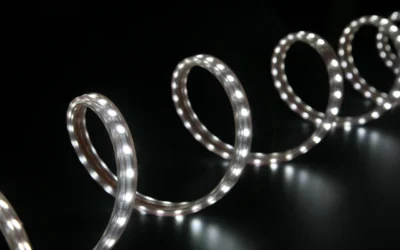
Lian Li Strimer Wireless 24-Pin RGB Motherboard takes the opposite route with an addressable rgb cable for PC lighting effects and an improved light guide that now extends coverage to the sides. Per the spec sheet, that side coverage creates a more immersive and visually striking effect than a flat front only diffuser. Owners commonly report a vivid, saturated wash that photographs well through tempered glass, though it will dominate a build rather than blend in, which is a real con if you prefer minimal glow.
Control Software and Ecosystem
Control is where the gap gets wide for CableMod vs Lian Li Strimer for RGB cables. CableMod lighting, where present, generally follows your motherboard 5V ARGB header or a simple controller, so you manage it alongside your other ARGB gear with limited extra software. That simplicity is a plus if you already run a unified fan setup and you do not want another app, another USB header occupied, or another background process just for one cable run.
Lian Li Strimer Wireless 24-Pin RGB Motherboard includes the L-Wireless Controller required for Strimer Wireless lighting, and that controller also allows you to control Lian Li wireless fans, Hydroshift II, and other Lian Li devices. It uses next-gen 2.4 GHz technology for RGB and fan control, and setup runs through L-Connect 3 software with per cluster fan speed tuning plus hardware monitor dashboards for CPU and GPU load and fan speed. That integration is excellent if you are already in the Lian Li wireless family, but it is added complexity and a con if you want plug and glow simplicity.
Compatibility, Fitment and Installation
CableMod asks you to think like a builder, because direct replacement kits must match your exact power supply model and pinout while universal extensions must be routed with care to avoid strain. The upside is a tailored length and color layout that can look factory clean behind a shroud and through cable channels. The downside is more homework, because you must confirm PSU compatibility, plan comb placement, and allow room for smooth bends without pulling on the motherboard or GPU headers.
Lian Li Strimer Wireless 24-Pin RGB Motherboard is positioned as a 24-pin motherboard power extension compatible with standard 24-pin headers across ATX, mATX, and ITX boards. Per the spec sheet, if the connector latch does not align properly, you adjust the rgb cable comb by removing and reinstalling it slightly backward to ensure correct alignment. That tip helps, but the light bar adds bulk, so you should check side panel clearance and vertical room around your 24-pin area, especially in compact cases, and follow the manufacturer mounting instructions closely.
Build Theme, Routing and Daily Ownership
In daily use, CableMod rewards careful routing with a tidy, photo ready interior that stays consistent under different lighting. Fabric sleeving hides minor routing sins, resists the plasticky shine of bare extensions, and pairs well with coordinated fans like the options in our guide to 9 quiet ARGB fans for clean airflow. On the other hand, owners commonly report that light colored sleeving shows dust and handling marks more easily, and re-routing a fully combed kit for a cooler swap takes patience.
Lian Li wireless routing changes the equation by cutting a control wire thanks to 2.4 GHz wireless signal operation, which helps around the busy 24-pin zone. You still need to plan the thick diffuser path so it does not press against glass or block airflow from front intake, a point that matters if you pair it with high pressure radiators covered in our top 120mm ARGB fans for radiators roundup. Owners commonly report strong satisfaction with brightness uniformity, rated 4.8 out of 5 from 491 reviews per the listing, though some note that fingerprints on the diffuser and the need to keep L-Connect 3 updated are ongoing chores.
Which One Should You Get
Choose CableMod if you are building a color coordinated system where cables should match, not lead. You will like this path for a whiteout build with a display cooler, for a two tone black and red or black and blue theme, or for a workstation where you want premium fabric texture under soft ambient light rather than a moving rainbow. It also suits you if you already manage lighting through your motherboard and you want fewer controllers, fewer apps, and routing you can set once and forget, especially when paired with a statement cooler like the best AIO LCD screen cooler for white build.
Choose Lian Li Strimer Wireless 24-Pin RGB Motherboard if your goal is a showpiece panoramic build where the 24-pin run is meant to glow. You will get more value if you already use Lian Li wireless fans or plan to add them, since the included L-Wireless Controller centralizes lighting and fan clusters in L-Connect 3 with live CPU and GPU monitoring. Pick this route for a dark interior with smoked glass, for a high contrast white case with vivid rainbow waves, or for a streaming setup where the motherboard cable needs to read clearly on camera from across the room.
Who Should Skip Both
Both of these upgrades are not ideal for a stealth office PC, a small form factor system with tight side clearance, or a budget build where funds should go to GPU, CPU cooling, or airflow first. If you dislike extra software, hate dusting diffusers and light sleeving, or need every millimeter around your 24-pin header for a thick air cooler or side radiator, you are not a good fit for either option and should keep clean stock cables with smart routing instead.
Frequently Asked Questions
Do I need Lian Li software to use the Strimer Wireless 24-Pin cable?
Yes, you need the included L-Wireless Controller and L-Connect 3 software for full lighting and fan integration. Per the spec sheet, the controller is essential for operating the wireless Strimer and linked wireless devices. Without it, you will not get the intended wireless lighting behavior.
Is CableMod or Lian Li Strimer better for a clean white build?
CableMod is usually better if you want an exact white or silver fabric match with minimal glow. Lian Li Strimer Wireless 24-Pin RGB Motherboard is better if you want a bright addressable accent that contrasts against white panels. Your choice depends on whether the cable should blend in or stand out.
Will the Lian Li Strimer Wireless fit my ATX, mATX, or ITX motherboard?
Per the spec sheet, it is designed as a 24-pin motherboard power extension for standard 24-pin headers on ATX, mATX, and ITX boards. Fit can still vary by case clearance and header position. Check diffuser room against your side panel and follow the comb adjustment guidance if the latch alignment feels off.







Write Your Review
No reviews yet. Be the first to share your experience!