

You know the feeling when your aim feels just a fraction behind the action, even though your reflexes are on point. In fast shooters and battle royales, a 60Hz or 144Hz panel can hold you back, with motion blur and tearing that makes tracking targets harder than it should be.
This guide focuses on the best 1080p 240Hz gaming monitor options in 2026 for players who want competitive speed without overkill resolution. We assessed real world gaming performance, panel quality, and everyday usability to help you decide, and if you pair your display with a powerful graphics card you will actually be able to hit those high frame rates consistently.
This article contains affiliate links. If you buy through one of our links, CustomPCGaming may earn a commission at no extra cost to you. Commissions never influence which products we recommend or how we rank them. Read our Affiliate Disclosure for details.
Quick Picks at a Glance
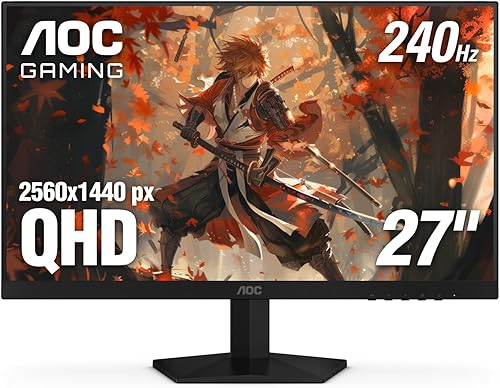
Prime AOC Q27G41ZE 27 Inch QHD Gaming Monitor 240Hz
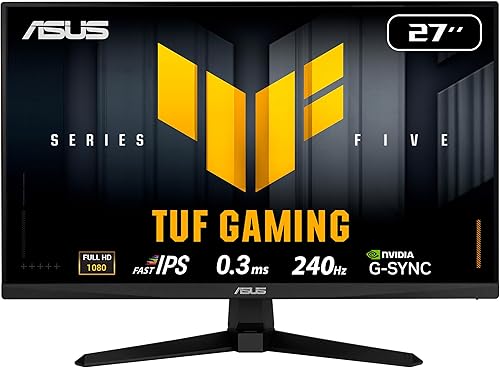
ASUS TUF VG279QM5A 27-inch 1080p 240Hz Fast IPS
As an Amazon Associate we earn from qualifying purchases. Product prices and availability are accurate as of the date/time indicated.
Pros
- Sharp 2560x1440 resolution offers a great balance of detail and performance
- Ultra-fast 240Hz (260Hz OC) and 0.3ms response ideal for esports and fast-paced games
- Wide GPU compatibility with Adaptive-Sync, G-Sync Compatible and FreeSync
- IPS panel delivers accurate colors and wide viewing angles
- Comes with 3-year manufacturer warranty and lightweight frameless build
Cons
- Ergonomics limited to tilt only, no height, swivel or pivot adjustment
- 300 nits brightness and 1000:1 contrast offer modest HDR performance
- Glossy screen finish can cause reflections in bright rooms and HDMI 2.0 limits max refresh rate
The AOC GAMING Q27G41ZE is a 27-inch QHD monitor built for players who want sharp visuals without sacrificing speed. With its 2560x1440 IPS panel and high refresh rate, it is aimed at competitive gamers and immersive players who need both clarity and responsiveness.
In real world use, the 240Hz refresh rate overclockable to 260Hz via DisplayPort and 0.3ms MPRT deliver noticeably smoother motion and reduced blur in shooters and racing titles. Adaptive-Sync with G-Sync Compatible and FreeSync support keeps gameplay tear free across NVIDIA and AMD GPUs, while Shadow Control and Game Modes help you spot details faster.
Design wise, the monitor keeps things clean and gamer focused with a three-sided frameless display and textured black and red finish. The IPS panel offers wide viewing angles and solid color accuracy, and the lightweight 6.15kg chassis with tilt from -3 to +21 degrees fits easily on most desks or mounts.
There are some tradeoffs to note. Ergonomics are limited to tilt only with no height, swivel or pivot, and the glossy screen finish can reflect light in bright rooms. Brightness tops out at 300 nits with 1000:1 contrast, so HDR impact is modest, and you need DisplayPort to reach the full refresh rate since HDMI is limited to 2.0.
Overall, the Q27G41ZE offers an impressive mix of resolution, speed and gaming features for its class. If you want a fast, sharp 27-inch display for esports and everyday gaming with reliable Adaptive-Sync performance, it is a strong and versatile pick.
Display: 27-inch IPS, 2560 x 1440 QHD, 16:9 aspect ratio, 300 nits brightness, 1000:1 contrast ratio, glossy finish
Performance: 240Hz via DisplayPort (260Hz overclocked), 0.3ms MPRT response time, Adaptive-Sync, G-Sync Compatible and FreeSync
Connectivity: 1x DisplayPort 1.4, 2x HDMI 2.0, Audio Out
Design and Warranty: Three-sided frameless design, tilt -3 to +21 degrees, 24.17 x 7.46 x 17.7 inches, 6.15kg, 3-year manufacturer warranty
Pros
- Exceptionally fast 240Hz refresh rate and 0.3ms response for competitive edge
- Excellent adaptive sync support with both FreeSync Premium and G-SYNC Compatible
- Vibrant Fast IPS panel with 99% sRGB and wide 178-degree viewing angles
- Useful gaming enhancements including ELMB SYNC, GamePlus and Shadow Boost
- Backed by a 3-year warranty with DisplayPort cable included
Cons
- 1080p resolution on a 27-inch panel may lack sharpness compared to 1440p alternatives
- Only one HDMI port limits connectivity for multiple consoles
- 300 nits brightness is solid for SDR but modest for HDR content
The ASUS TUF VG279QM5A is a 27-inch Full HD Fast IPS gaming monitor engineered for competitive play. It is built for FPS and esports gamers who value speed, responsiveness and smoothness over higher resolution.
In real world performance, the 240Hz refresh rate and 0.3ms response time deliver fluid, blur-free visuals during fast action. FreeSync Premium and G-SYNC compatibility plus ELMB SYNC work together to eliminate tearing and ghosting for sharp, seamless gameplay.
The design features a matte anti-glare finish, slim bezels and a flat panel with wide 178-degree viewing angles. Build quality is solid at 9.9 pounds, and it offers DisplayPort 1.4, HDMI, an earphone jack and 2W built-in speakers with easy mouse control via DisplayWidget Center.
Drawbacks include the 1080p resolution which can look less crisp on a 27-inch screen than 1440p options. Brightness at 300 nits is fine for most rooms but not impactful for HDR, and the stock stand may feel basic for users who prefer full ergonomic adjustment.
Overall, the VG279QM5A delivers outstanding speed, accurate 99 percent sRGB color and gamer-focused features in a reliable package. It is a compelling choice for competitive gamers seeking responsive, tear-free performance with trusted ASUS TUF durability.
Display: 27-inch Fast IPS, 1920 x 1080 FHD, 240Hz, 0.3ms, 1000:1 contrast, 300 nits brightness, 178-degree viewing angles, matte finish.
Color and Sync: 99% sRGB gamut, FreeSync Premium, G-SYNC Compatible, VESA AdaptiveSync 240Hz, ELMB SYNC, Flicker-Free and Low Blue Light.
Connectivity and Features: DisplayPort 1.4, HDMI, earphone jack, 2W x 2 speakers, GameVisual, GamePlus, Shadow Boost, DisplayWidget Center support.
Dimensions and Warranty: 24.21 x 17.83 x 7.6 inches, 9.9 pounds, black flat design, includes DisplayPort cable and power cord, 3-year warranty with ARR.
Buying Guide: How to Choose a 1080p 240Hz Gaming Monitor in 2026
Choosing a high refresh monitor is about more than just the number on the box. You want a display that keeps up with your GPU, feels responsive in your favorite titles, and remains comfortable during long sessions. Here is what we prioritize when we evaluate options for you.
1. Refresh Rate and True Response Time
A genuine 240Hz refresh rate delivers noticeably smoother motion than 144Hz, especially when you are flicking between targets or tracking fast movement. Both of our picks offer 240Hz and a 0.3ms MPRT response, which helps reduce blur and ghosting so enemies stay sharp even during rapid pans.
Do not overlook how you connect. The AOC 27″ Gaming Monitor QHD 260Hz Overclocked IPS reaches its full 240Hz via DisplayPort, while HDMI ports may be limited on some models. If you want to sustain 240 frames per second, make sure your system and cable support it, and explore our peripherals and monitors collection for setup tips that complement high refresh gaming.
2. Resolution, Panel Type, and Image Quality
Although this category is centered on 1080p, one of our featured displays takes a different approach. The ASUS TUF VG279QM5A 27 Inch 1080p 240Hz Fast IPS uses a native 1920×1080 Fast IPS panel that is ideal for maximizing frame rates on mid range GPUs, while the AOC model offers a 2560×1440 QHD IPS panel that gives you extra sharpness if your rig can drive it.
IPS technology matters for color and viewing angles. You get vibrant, accurate colors and wide angles that keep the image consistent whether you sit centered or slightly off axis. Look for solid brightness and contrast too, like the 300 nits and 1000:1 contrast on the AOC, which helps details pop in both bright arenas and darker scenes with Shadow Control enabled.
3. Adaptive Sync and Motion Blur Reduction
Screen tearing can ruin an otherwise smooth experience, so adaptive sync is essential. Both monitors support Adaptive Sync, with the ASUS offering FreeSync Premium and G-SYNC compatibility and the AOC supporting Adaptive Sync across AMD and NVIDIA GPUs. This keeps frames and refresh rates in sync for fluid, interruption free gameplay.
For competitive clarity, check for advanced blur reduction. The ASUS includes Extreme Low Motion Blur Sync, which lets you use ELMB together with variable refresh rate to cut ghosting without introducing tearing. Combined with Game Mode presets and a clean OSD, you can tune the picture quickly between competitive and immersive titles as of September 2026.
4. Ergonomics, Connectivity, and Daily Comfort
Speed means little if your setup is uncomfortable. The AOC provides tilt adjustment from -3 degrees to +21 degrees and a three sided frameless design that works well for multi monitor setups, while the ASUS focuses on easy control through DisplayWidget Center so you can adjust settings with your mouse instead of fumbling with buttons.
Connectivity and build considerations also affect your experience. Both offer DisplayPort 1.4 and HDMI 2.0, plus audio out on the AOC, so you can connect your PC, console, and headset without swapping cables. And if your system runs hot while pushing high frames, pairing your monitor with a airflow case for a hot GPU or a quiet gaming PC case that stays cool helps maintain stable performance during long sessions.
Final Thoughts
If you want maximum sharpness with competitive speed, choose the AOC 27″ Gaming Monitor QHD 260Hz Overclocked IPS for its QHD detail and versatile sync support, or pick the ASUS TUF VG279QM5A 27 Inch 1080p 240Hz Fast IPS if you prefer native 1080p for the highest frame rates and ELMB SYNC clarity.
Frequently Asked Questions
Is a 1080p 240Hz monitor worth it in 2026 if I mostly play competitive shooters?
Yes, for competitive shooters it remains the sweet spot. You get ultra smooth motion and low input lag without needing the GPU power required for higher resolutions. If you can consistently deliver 200 plus frames per second, you will feel the advantage in tracking and reaction time.
Do I need a very powerful PC to benefit from 240Hz at 1080p?
You need a capable CPU and GPU, but 1080p is far less demanding than 1440p or 4K. Many mid range builds, like the Ryzen 5 7600 and RX 7700 XT gaming PC build, can push high frame rates in esports titles with adjusted settings. Check our budget build guides if you are planning an upgrade around your new display.
What is the difference between QHD and Full HD for 240Hz gaming?
Full HD at 1920×1080 is easier to drive at 240Hz and keeps frame rates high, which is why the ASUS TUF VG279QM5A focuses there. QHD at 2560×1440, like on the AOC 27″ Gaming Monitor QHD 260Hz Overclocked IPS, looks sharper and more detailed but requires more graphics power to maintain the same refresh rate.
Does G-SYNC or FreeSync matter on a 240Hz monitor?
Absolutely. Adaptive sync prevents tearing and stutter when your frame rate fluctuates below 240. Both monitors support variable refresh rate, and the ASUS adds ELMB SYNC so you can reduce motion blur and keep sync active at the same time for cleaner visuals.
These picks are not ideal for casual or first-time players on a tight budget; they are aimed at people who want higher refresh rates, better panels, or competitive-grade input.



Write Your Review
No reviews yet. Be the first to share your experience!