

Figuring out what PSU wattage do you need for a RTX 5090 can feel confusing when you see a powerful new GPU paired with everything from a compact mid tower to a full workstation. You are not just picking a number, you are balancing your graphics card, your CPU, your case and cooling, and whether you plan to upgrade again in the next year or two. Get it right and your system runs quiet and stable, get it wrong and you risk shutdowns under load or paying for capacity you will never use.
In November 2026, the key variables have not changed, but the standards have. Modern high end cards use a 16-pin connector that can deliver much more power over a single cable, and power supplies are now rated to handle sharp, brief spikes in draw. This guide gives you a simple decision framework so you can match wattage, efficiency, and features to your actual build, with a few example options to show how the specs translate to real choices. For a broader look at the category, you can browse all current options in our Power Supplies archive.
What Actually Matters
Total System Power and Real Headroom
Start with your whole system, not just the GPU. Your RTX 5090 is the biggest single draw, but your CPU, motherboard, RAM, storage, fans, and any overclocking add to the total. The safest approach is to add up the combined peak draw of your CPU and GPU, then add 30 to 40 percent headroom for transient spikes, capacitor aging, and future upgrades. Following the GPU maker recommended wattage for your specific card is the baseline, then adjust upward if you run a high core count CPU or plan to push power limits.
You should also think about how you use your PC. A gaming build that mostly sees short bursts at high load has different needs than a workstation that renders for hours at sustained full load. If you expect long, heavy sessions, extra headroom keeps fan noise lower and keeps the unit operating in its most efficient range. Owners commonly report that running a supply at 50 to 70 percent of its rated capacity is quieter and cooler than running a smaller unit near its limit.
ATX 3.1 and PCIe 5.1 Support and the 16-Pin Cable
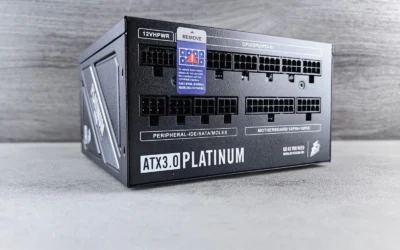
For an RTX 5090, the connector standard matters as much as the wattage number on the box. ATX 3.1 and PCIe 5.1 supplies are designed to handle the brief power excursions that modern GPUs can create, and they include a native 16-pin cable that can deliver up to 600W over one connector per the spec sheet. Using a native cable avoids adapters, reduces clutter, and ensures the connector, sense pins, and power delivery are built to the current specification.
When you compare supplies, check whether the 16-pin cable is included in the box and what it is rated for, rather than assuming any supply with enough watts will work. A fully modular design also helps here, since you only install the cables you need and you can route the 16-pin cable with a clean bend radius. If you are also thinking about thermals and airflow for a hot GPU, our guide on how to choose an airflow case for a hot GPU explains how case choice and cable routing affect temperatures.
Efficiency, Component Quality, and Protections
Efficiency ratings like 80+ Gold tell you how much power is lost as heat. Per the spec sheet, Gold units deliver over 90 percent efficiency under typical loads, which means less wasted energy, lower heat output, and often less fan noise. That does not replace wattage planning, but it does affect your power bill and how hard the supply works over time. Look for clear efficiency information and independent certification rather than marketing claims alone.
Inside the unit, build quality determines long term stability. Features like 100 percent Japanese capacitors, Active PFC, Full Bridge architecture, and DC-to-DC conversion are associated with tighter voltage regulation and lower ripple, which helps keep your system stable under continuous load. Equally important is a full protection suite including OVP, OPP, SCP, UVP, and OTP. These protections shut the system down safely if voltage, power, or temperature go outside safe limits, and you should never choose a supply that lacks them or claims it will never shut down.
Modularity, Size, Noise, and Case Compatibility
Even if the wattage is right, a supply has to fit and stay quiet in your case. Fully modular cables make building easier and improve airflow because you can leave out unused cables and use flat, flexible runs. Check your case spec for maximum PSU length, especially in compact cases, and confirm that you have room to route the thick 16-pin cable without sharp bends near the GPU. You should also verify CPU power connectors, as many boards need an 8-pin or 4+4 pin EPS cable.
Noise is the other practical factor. A large 135mm Fluid Dynamic Bearing fan with smart thermal control can stay quiet at low to mid loads and only ramp up when needed. If a quiet build is a priority, pair your power planning with a case designed for low noise, as covered in our roundup of quiet gaming PC cases that stay cool without the noise. Remember to follow the manufacturer mounting instructions and handle components with anti-static precautions during installation.
To see how these criteria look in practice, here are a few options that show the range:
This article contains affiliate links. If you buy through one of our links, CustomPCGaming may earn a commission at no extra cost to you. Commissions never influence which products we recommend or how we rank them. Read our Affiliate Disclosure for details.
Quick Picks at a Glance
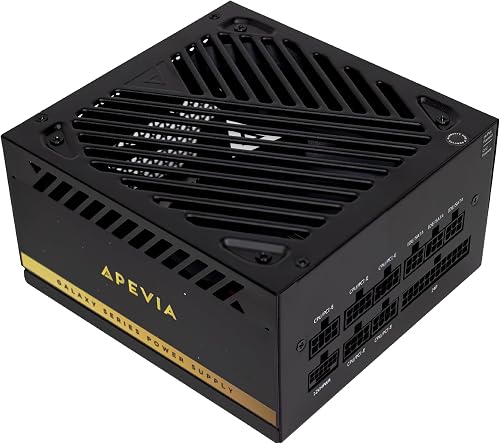
Prime Apevia Galaxy 1000W ATX 3.1 Gold Fully Modular PSU
As an Amazon Associate we earn from qualifying purchases. Product prices and availability are accurate as of the date/time indicated.
Pros
- High 1000W output easily handles flagship GPUs and dual GPU workstations with headroom to spare
- Fully modular design simplifies cable management and improves case airflow
- Quiet and efficient operation thanks to Gold certification and large FDB fan
- Broad compatibility with modern and legacy connectors including 4+4 CPU, 6+2 PCIe and 20+4 motherboard
Cons
- Mixed user feedback on build quality with some reports of cheap feel and port failures
- Lower brand recognition compared to top tier PSU makers may concern enthusiast builders
- Quality control appears less consistent than premium competitors based on user experiences
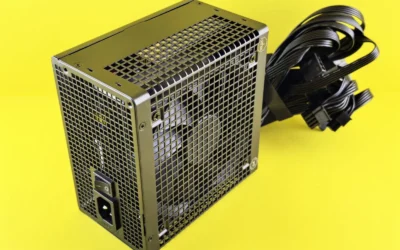
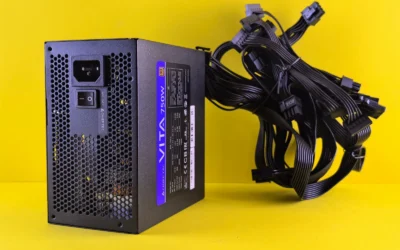
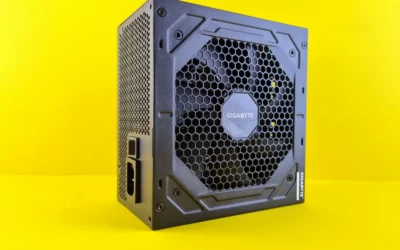
The Apevia Galaxy 1000W is a high wattage ATX 3.1 and PCIe 5.1 fully modular power supply designed for next generation gaming and workstation builds. It is aimed at gamers and creators running RTX 40 or 50 series cards, including the RTX 5090, or planning dual GPU setups who need serious headroom without premium pricing.
In real world use, the 600W 16-pin 12VHPWR cable delivers clean power to flagship GPUs while 80 Plus Gold efficiency keeps heat and energy waste low. Users report stable performance driving cards like the RX 9070 XT and RTX 4090, with quiet operation under load thanks to smart thermal control.
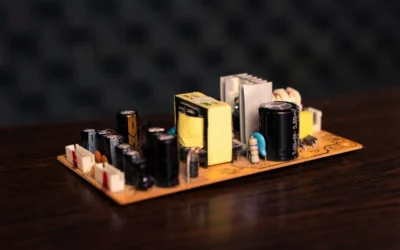
Build wise, the unit uses 100 percent Japanese capacitors, Active PFC, and DC to DC conversion for stable voltages and low ripple. The compact ATX form factor fits most cases, and fully modular flat black cables make routing easier while improving airflow for a cleaner professional look.
There are some caveats to consider before buying. A few owners note a plasticky feel and inconsistent quality control, with isolated reports of PCIe and CPU ports failing after hardware swaps. As a value focused brand, it does not carry the same long term reputation as more established enthusiast PSU makers.
Overall, the Galaxy 1000W offers impressive next gen specs, modular convenience, and quiet Gold rated efficiency for its class. It is a compelling budget friendly choice for high performance builders who want future proof power, provided they value features and wattage over proven premium pedigree.
Output: 1000W, 80 Plus Gold Certified, ATX 3.1 and PCIe 5.1 compliant with 600W 12VHPWR 16-pin connector
Design: Fully Modular, ATX Form Factor, 135mm Fluid Dynamic Bearing Fan with thermal control, Flat Black Cables
Internals: 100 percent Japanese Capacitors, Active PFC, Full Bridge and DC to DC architecture, Double Forward Converter
Protections: OVP, OPP, SCP, UVP, OTP plus Short Circuit and Over Power safeguards
Compatibility: Supports ATX 12V 2.3, SLI, CrossFire, Haswell, Dual and Quad Core CPUs, 4+4 CPU, 6+2 PCIe, 20+4 Motherboard connectors
Dimensions: 6.2 x 5.9 x 3.4 inches, 5 pounds, Model GALAXY1000W
Matching a Part to Your Build
Your ideal wattage depends on the rest of your parts and how long you want the supply to last through upgrades. Use the scenarios below to match the framework to your situation, and compare the example products by their rated wattage, connector support, and feature set rather than by brand alone.
Scenario 1: High end 4K gaming with a single RTX 5090 and a modern high performance CPU. You want a supply that meets the GPU maker recommended wattage with comfortable headroom and includes a native 16-pin cable rated for up to 600W. The Apevia Galaxy 1000W 80+ Gold ATX 3.1 Fully Modular is an example of this class, it is rated at 1000W, is 80+ Gold certified, and is ATX 3.1 and PCIe 5.1 ready with the 16-pin connector for RTX 40 and 50 series cards including the RTX 5090. For this build, 1000W gives you room for transient spikes and keeps the unit from running near its limit during long gaming sessions, while the fully modular flat cables help with airflow in a typical mid tower.
Scenario 2: Compact or airflow constrained build where noise and heat matter. If your case is smaller or you prioritize low noise, focus on efficiency and fan design in addition to wattage. A Gold rated unit with Japanese capacitors and a 135mm FDB fan with thermal control will run cooler and quieter at the same load than a lower efficiency design. Make sure to check PSU length and cable flexibility before you buy, and review your case airflow strategy alongside your power choice. Our comparison of lian li lancool 216 vs CORSAIR 4000D RS ARGB shows how case layout changes cable routing and cooling headroom for hot GPUs.
Scenario 3: Workstation or dual GPU capable build that runs sustained loads. If you do long renders, AI work, or you want support for dual GPU setups, you should plan for the highest sustained draw you will see, not just gaming peaks. In this situation you want the same ATX 3.1 compliance and protection suite, plus DC-to-DC conversion and heavy duty protections for stability under continuous full load. The Apevia Galaxy example lists support for dual GPU builds and includes OVP, OPP, SCP, UVP, and OTP protections, which aligns with what you need for a system that stays under load for hours. If you are on the fence between wattage tiers, moving up one step is often the more premium choice but can be justified for workstation use.
Common Mistakes
Mistake 1: Buying exactly the minimum wattage you calculated. Many builders add up CPU and GPU draw and stop there, with no buffer for spikes or future upgrades. That leaves no margin when a game or application creates a brief surge, which can cause shutdowns even if the average draw looks safe. Always add headroom over your combined peak and follow the GPU maker recommended wattage as a floor, not a target.
Mistake 2: Ignoring the cable standard and using adapters. A supply might have enough watts on paper but lack a native 16-pin PCIe 5.1 cable rated for up to 600W, forcing you to use multiple adapters. Adapters add clutter, can restrict airflow, and may not handle excursions as cleanly as a native ATX 3.1 design. Check the included cables list for the 16-pin connector, confirm it is rated for your card, and prefer a fully modular unit that lets you route it properly.
Mistake 3: Overlooking efficiency, protections, and case fit. Chasing the lowest cost per watt can leave you with a noisy fan, missing protections, or a unit that does not physically fit your case. Review the protection list, fan type and size, capacitor quality, and the actual PSU length against your case spec. For more context on balancing cost and quality across a full system, you can also look at our Budget Build Guides to see where spending more on power delivery pays off.
Who Should Wait or Buy Differently
A 1000W ATX 3.1 Gold unit is not ideal for every RTX 5090 shopper. If you are building a small form factor system with strict length limits, a compact ITX case, or you already own a high quality ATX 3.1 supply with enough headroom and the correct 16-pin cable, you may not need to buy again right now. This class of supply is also not a good fit if you need silent operation at very low loads and would benefit from a different fan curve or a higher efficiency tier, or if you want a unit with a longer track record of owner reviews, the example shown has a 3.9 out of 5 rating from a small number of owners, so you may prefer to wait for more feedback or compare additional options. If you are still deciding on your GPU tier, it can make sense to finalize your graphics card and CPU first, then choose wattage once your total system power is known.
Frequently Asked Questions
Is 1000W enough for an RTX 5090?
For many single GPU builds with a modern CPU, a 1000W ATX 3.1 supply with a native 16-pin cable rated for up to 600W is a commonly chosen level that provides headroom over the combined draw. You should still check the GPU maker recommended wattage for your exact card and add buffer for your CPU and overclocking. If your CPU is very high power or you run sustained workstation loads, you may want to evaluate the next tier up.
Do I need ATX 3.1 and PCIe 5.1 for an RTX 5090?
You do not strictly need it to power on, but it is strongly recommended. ATX 3.1 and PCIe 5.1 supplies are built to handle transient spikes and include the native 16-pin connector that can deliver up to 600W without adapters. That design improves stability, simplifies cable management, and aligns with what card makers expect for next generation GPUs.
What else should I check besides wattage?
Look at efficiency, protections, and physical compatibility. Confirm 80+ Gold certification, a full protection suite including OVP, OPP, SCP, UVP, and OTP, quality capacitors, and a quiet 135mm fan with thermal control if noise matters to you. Also verify PSU length against your case, that the unit is fully modular if you want clean routing, and that it includes the correct CPU and 16-pin GPU cables for your motherboard and card.


Write Your Review
No reviews yet. Be the first to share your experience!