

Choosing the right power supply wattage is one of the most important decisions in any PC build, and it directly affects stability, noise, and your upgrade path. If you are trying to figure out how to choose a PSU wattage for your GPU and CPU, you need to balance your resolution and refresh target, your platform and socket, your case size and clearance, your overall power budget, and whether you are building for what you need today or what you plan to add next year.
In November 2026, GPUs and CPUs have become more efficient in some ways and more demanding in others, especially during short transient spikes. This guide gives you a practical framework to evaluate what matters, avoid common pitfalls, and map your parts to the right capacity. You will also see a few options that show the range so you can compare features without getting lost in marketing.
What Actually Matters
Start With Combined Draw and the GPU Maker Recommendation
Your wattage choice starts with the two hungriest parts, your GPU and CPU, plus everything else that draws power. Instead of guessing, look up the graphics card manufacturer recommended PSU wattage for the exact model you plan to buy, then consider your CPU and the rest of your system. That recommendation already accounts for a typical system with storage, fans, and memory, so it is a reliable baseline.
You should then add comfortable headroom above that baseline. Owners commonly report that running a PSU near its limit leads to louder fan noise, higher heat, and less room for future upgrades. A good rule is to keep your typical gaming load well below the unit rated capacity, which also keeps you in the more efficient part of the power curve. For more context on how your graphics choice drives power needs, browse the Graphics Cards category to compare different tiers.
Transients, ATX 3.1 and PCIe 5.1 Readiness
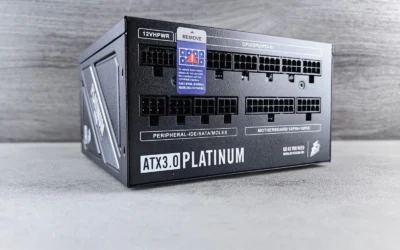
Modern GPUs can create brief transient power excursions that are much higher than their average draw. This is why the ATX 3.1 and PCIe 5.1 standards exist. A unit that is compliant with these standards is designed to handle those short spikes more gracefully and includes the newer 12V-2×6 connector that replaces the older 12VHPWR design for next generation cards.
When you evaluate a unit, check the spec sheet for ATX 3.1 and PCIe 5.1 compliance and whether it includes a native 12V-2×6 cable. That native cable reduces the need for adapters and helps with clean routing. If you plan to keep your PSU through a GPU upgrade in the next year or two, this compliance is worth prioritizing over a small saving on an older design.
Efficiency, Noise, and Build Quality
Efficiency ratings tell you how much power is wasted as heat. A unit rated at Cybenetics Gold efficiency, for example, will waste less energy and generally run cooler than a lower rated alternative. Cooler operation often means the fan can spin slower, which matters if you value a quiet build.
Look at the fan size and type, the fan curve behavior, and the internal components. A 120mm rifle bearing fan with a tuned curve can keep noise down even under load, and 105°C-rated capacitors are a sign of durable electrical performance. Also check reviews from owners for notes on coil whine and fan noise at idle and under load, since those details rarely appear on the spec sheet. If quiet operation is a priority, pair your PSU choice with insights from how to choose an airflow case for a hot GPU.
Modularity, Cables, and Physical Fit
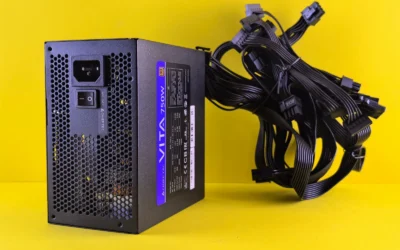
Fully modular cabling lets you connect only the cables your build needs, which improves airflow and makes building far easier, especially in compact cases. Before you buy, confirm the PSU length and your case PSU clearance, the number of PCIe and CPU power connectors you need, and whether the included cables are long enough for your case layout.
Also consider Modern Standby compatibility if you use sleep states often, as it enables faster wake times and better low load efficiency. For a full view of what is available right now, you can explore the Power Supplies archive and filter by wattage, efficiency, and modularity. Checking cable count and case clearance early prevents the frustration of a unit that is excellent on paper but awkward to install.
To illustrate how these criteria come together in a real product, here are a few options that show the range:
This article contains affiliate links. If you buy through one of our links, CustomPCGaming may earn a commission at no extra cost to you. Commissions never influence which products we recommend or how we rank them. Read our Affiliate Disclosure for details.
Quick Picks at a Glance
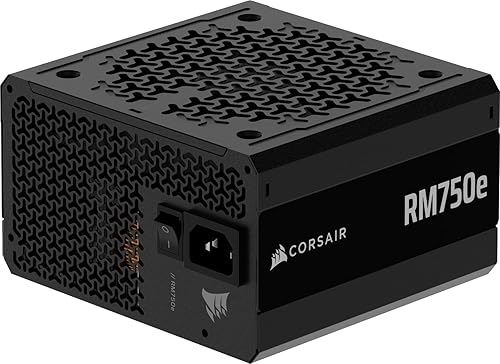
CORSAIR RM750e 750W ATX 3.1 Fully Modular PSU
As an Amazon Associate we earn from qualifying purchases. Product prices and availability are accurate as of the date/time indicated.
Pros
- Fully modular design makes installation and cable management much easier
- Very quiet operation praised by users even during gaming
- Handles GPU transient spikes reliably thanks to ATX 3.1 compliance
- Gold efficiency and high quality capacitors with 7 year warranty
- Includes both native 12V-2x6 and PCIe 8 pin cables for wide compatibility
Cons
- Audible click on power on is normal for this model but can alarm first time builders
- Only one dedicated PCIe 8 pin cable included, additional GPUs may need the included dual adapter
- Rifle bearing fan is reliable but not as durable as fluid dynamic bearing fans found on higher end units
The CORSAIR RM750e is a 750W fully modular power supply designed for modern gaming and creator PCs. Built to the latest ATX 3.1 and PCIe 5.1 standards, it is aimed at builders running mid-range to high-end GPUs who need reliable power and future ready connectivity.
In real world use it delivers quiet, stable performance with Cybenetics Gold efficiency and strong transient response for GPU power spikes. Users report silent operation, easy cable routing and dependable power for cards like the RTX 3060 and RTX 2070 Super, even under heavy load.
Build quality is a clear strength with industrial grade 105°C rated capacitors, a compact 140mm casing and a full set of modular cables. The included native 12V-2x6 cable, EPS and SATA cables are flexible and well made, and the 120mm rifle bearing fan keeps noise low.
Drawbacks are minor but worth noting. The unit produces a brief click at startup which is normal but can be confusing at first. Cable selection is generous but power users with multiple older PCIe devices may need to use the dual adapter.
Overall the RM750e offers excellent value for builders who want quiet, efficient and dependable power with modern standards. It is a smart pick for clean, future proof builds backed by a 7 year warranty.
Model: CORSAIR RM750e CP-9020295-NA/AM, Form Factor: ATX, Wattage: 750W, Efficiency: Cybenetics Gold
Compliance: Intel ATX 3.1, PCIe 5.1 with native 12V-2x6 600W connector, Modern Standby compatible
Design: Fully modular, 120mm rifle bearing fan, 105°C rated capacitors, 140mm compact depth
Connectors: 1x 24 pin ATX, 2x 8 pin EPS 4+4 pin, 1x PCIe 8 pin 6+2 pin, 1x 12V-2x6, 1x 12V-2x6 to dual 8 pin adapter, 6x SATA, 2x PATA
Dimensions: 5.91 x 5.51 x 3.35 inches, Weight: 3.3 pounds, Warranty: 7 Year Manufacturer
Matching a Part to Your Build
If you are building a balanced 1440p gaming PC with a mid range GPU and a current generation CPU, your focus should be on meeting the GPU maker recommendation with healthy headroom and securing ATX 3.1 and PCIe 5.1 support. The CORSAIR RM750e ATX 3.1 PCIe 5.1 Ready 750W Power is a useful example of this middle ground. Its 750W capacity covers many mainstream to upper mid range combinations, its fully modular design simplifies cable management, and its native 12V-2×6 connection plus ATX 3.1 compliance helps with transient spikes. According to owners, it is also rated 4.6 out of 5 from hundreds of reviews and keeps noise low thanks to its 120mm rifle bearing fan.
For a compact build where case size and clearance are tight, prioritize a fully modular unit with the right cable set and a length that fits your case without pressing against drive cages or shrouds. You still want the same headroom principle, so choose capacity based on your GPU recommendation first, then verify that the PSU you pick has enough PCIe connectors for your card and enough CPU power connectors for your motherboard. A smaller case also benefits from a quiet fan curve, so look for owner feedback on noise at low and medium loads before you decide.
If you are planning for a future GPU upgrade, think about buying a little more headroom now rather than replacing the PSU later. This does not mean you should buy far more wattage than you need, but it does mean you should not size your PSU exactly to your current parts with no margin. A unit with modern standby support, 105°C-rated capacitors, and Cybenetics Gold efficiency will serve you well across multiple builds, and you can offset the cost by choosing wisely in other areas. See the Budget Build Guides for ideas on balancing power, cooling, and case costs.
Common Mistakes
Mistake one is sizing the PSU to your average power draw with no headroom. Your system needs extra capacity above the combined GPU and CPU draw for transients, fan ramps, storage and USB devices, and future upgrades. Always follow the GPU maker recommended wattage as your floor, then add comfortable margin so your typical gaming load stays well below the unit rating.
Mistake two is ignoring connectors and standards. Buying a unit without a native 12V-2×6 cable or without ATX 3.1 and PCIe 5.1 compliance can leave you relying on adapters for newer GPUs, which complicates routing and may not handle spikes as cleanly. Check the spec sheet for the exact cable count and connector type, and confirm that the cables are long enough for your case and that the PSU length fits your PSU chamber.
Mistake three is focusing only on wattage and forgetting noise, efficiency, and fit. A high wattage unit with a loud fan or poor low load efficiency may be less pleasant to live with than a well tuned Gold rated design with a quiet 120mm fan. Also remember to check cooler height and radiator clearance against your case if you are pairing a new PSU with a CPU cooler upgrade, and follow manufacturer mounting instructions while using anti-static handling.
Who Should Wait or Buy Differently
A 750W ATX 3.1 unit is not ideal for every builder. If you are planning a flagship GPU with a very high recommended wattage, a small form factor build that needs an SFX or SFX-L unit, or a workstation with multiple GPUs or many drives, you should size up or choose a different form factor entirely. It is also not a good fit if your case has strict PSU length limits or if you need more PCIe connectors than a standard mid capacity unit provides. In those situations, wait for the right capacity and form factor or choose a higher wattage model that still offers modern features like fully modular cables and native 12V-2×6 support.
Frequently Asked Questions
How much headroom should I leave above my GPU and CPU draw?
Use the GPU manufacturer recommended PSU wattage as your minimum, then make sure your typical gaming load sits comfortably below the PSU rated capacity. This headroom helps with transient spikes, keeps fan noise lower, and leaves room for storage, fans, and minor upgrades without pushing the unit to its limit.
Do I need ATX 3.1 and PCIe 5.1 if my current GPU uses older connectors?
You do not strictly need it for older cards, but it is a smart future proofing choice if you plan to keep the PSU for several years. ATX 3.1 units are designed to handle 2x transient excursions and usually include a native 12V-2×6 cable, which simplifies builds with newer GPUs and reduces adapter clutter.
Is a fully modular PSU worth it for a first time builder?
For most builders, yes. Fully modular cabling means you only connect the cables your system requires, which improves airflow and makes routing easier, especially in compact cases. Just confirm the included cable count matches your motherboard and GPU, and verify PSU length against your case spec sheet before you buy.


Write Your Review
No reviews yet. Be the first to share your experience!