

If you are asking is the Corsair RM750e a good PSU for an RTX 5070 gaming build, you are really asking how to balance wattage, modern connector support, efficiency, and noise for your specific system. The answer depends on your resolution and refresh target, your CPU and platform, your case size and cable clearance, your total power budget, and whether you plan to keep this PSU through your next GPU upgrade.
This guide gives you a practical way to choose. You will learn what to prioritize in November 2026 for a single-GPU RTX 5070 build, how to avoid common sizing mistakes, and how to map your build scenario to the right feature set. You will also see how a current ATX 3.1 example fits into that framework so you can decide with confidence.
What Actually Matters
Wattage Headroom and Manufacturer Guidance
Start with headroom, not just the minimum that will boot. Add up the draw of your GPU and CPU, then add extra for fans, storage, and transient spikes. Follow the GPU maker recommended wattage for the RTX 5070 as your baseline, and give yourself comfortable headroom above that combined draw so the PSU runs efficiently and quietly under gaming loads.
A 750W unit is a common sweet spot for many RTX 5070 builds with a modern mainstream CPU, because it leaves room for spikes without overspending on capacity you will not use. If you run a power-hungry flagship CPU, many drives, or plan a future move to a higher-tier GPU, you should step up a tier. For most single-GPU gaming systems, staying near the GPU maker guidance plus headroom is the safest approach. You can explore more options in the Power Supplies category to compare wattage classes.
ATX 3.1 and PCIe 5.1 Readiness With Native 12V-2×6
Modern GPUs can create brief power excursions that are much higher than their average draw. The ATX 3.1 standard and PCIe 5.1 compliance are designed to handle those 2x transient excursions more gracefully, which helps with stability when your RTX 5070 ramps up quickly in games. A native 12V-2×6 connector also simplifies cabling and reduces the need for adapters.
When you evaluate a PSU, check that it lists ATX 3.1 compliance and includes a native 12V-2×6 cable in the box. That tells you the platform was designed for current GPUs rather than adapted with dongles. If you pair a new GPU with an older ATX 2.x unit, you can still make it work with adapters, but you lose the excursion tolerance and clean cabling that ATX 3.1 is meant to provide.
Efficiency, Component Quality, and Noise
Efficiency ratings like Cybenetics Gold indicate how much power is wasted as heat at typical loads. Higher efficiency usually means less heat, lower fan speeds, and lower operating costs over time. Also look at capacitor temperature ratings and protection features, since 105 degree C rated capacitors and a well tuned protection suite help the unit deliver steady power during long gaming sessions.
Noise matters if your PC sits on your desk. A 120mm rifle bearing fan with a carefully tuned fan curve can keep noise down even at higher loads, and many modern designs stay quiet at low to mid loads. If you value a quiet build, also consider your Cases & Airflow choices and overall fan layout, since case airflow directly affects how hard the PSU fan needs to work. Owners commonly report that well ventilated cases help PSUs stay quieter longer.
Modularity, Cable Management, and Case Fit
Fully modular cabling lets you connect only the cables your build needs, which improves airflow and makes building easier, especially in compact mid-towers. Before you buy, confirm the PSU length and cable flexibility against your case specs, and think about where the 12V-2×6 cable will route to avoid sharp bends near the GPU connector.
Also consider Modern Standby compatibility if you use sleep and fast wake features, and check that the unit offers enough PCIe and CPU connectors for your motherboard and GPU without splitting cables. A tidy cable run not only looks better, it helps you maintain steady airflow to your GPU. For ideas on pairing airflow and PSU choice, see how to choose an airflow case for a hot GPU.
To see how these criteria look in practice, here are a few options that show the range:
This article contains affiliate links. If you buy through one of our links, CustomPCGaming may earn a commission at no extra cost to you. Commissions never influence which products we recommend or how we rank them. Read our Affiliate Disclosure for details.
Quick Picks at a Glance
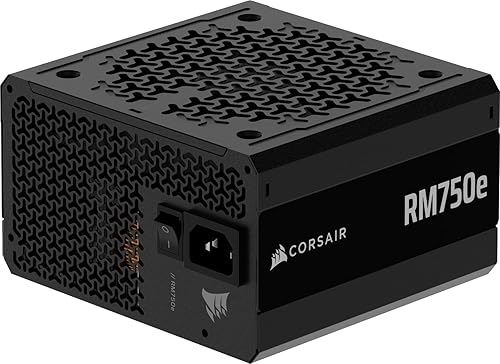
CORSAIR RM750e 750W ATX 3.1 Fully Modular PSU
As an Amazon Associate we earn from qualifying purchases. Product prices and availability are accurate as of the date/time indicated.
Pros
- Fully modular design makes installation and cable management much easier
- Very quiet operation praised by users even during gaming
- Handles GPU transient spikes reliably thanks to ATX 3.1 compliance
- Gold efficiency and high quality capacitors with 7 year warranty
- Includes both native 12V-2x6 and PCIe 8 pin cables for wide compatibility
Cons
- Audible click on power on is normal for this model but can alarm first time builders
- Only one dedicated PCIe 8 pin cable included, additional GPUs may need the included dual adapter
- Rifle bearing fan is reliable but not as durable as fluid dynamic bearing fans found on higher end units
The CORSAIR RM750e is a 750W fully modular power supply designed for modern gaming and creator PCs. Built to the latest ATX 3.1 and PCIe 5.1 standards, it is aimed at builders running mid-range to high-end GPUs who need reliable power and future ready connectivity.
In real world use it delivers quiet, stable performance with Cybenetics Gold efficiency and strong transient response for GPU power spikes. Users report silent operation, easy cable routing and dependable power for cards like the RTX 3060 and RTX 2070 Super, even under heavy load.
Build quality is a clear strength with industrial grade 105°C rated capacitors, a compact 140mm casing and a full set of modular cables. The included native 12V-2x6 cable, EPS and SATA cables are flexible and well made, and the 120mm rifle bearing fan keeps noise low.
Drawbacks are minor but worth noting. The unit produces a brief click at startup which is normal but can be confusing at first. Cable selection is generous but power users with multiple older PCIe devices may need to use the dual adapter.
Overall the RM750e offers excellent value for builders who want quiet, efficient and dependable power with modern standards. It is a smart pick for clean, future proof builds backed by a 7 year warranty.
Model: CORSAIR RM750e CP-9020295-NA/AM, Form Factor: ATX, Wattage: 750W, Efficiency: Cybenetics Gold
Compliance: Intel ATX 3.1, PCIe 5.1 with native 12V-2x6 600W connector, Modern Standby compatible
Design: Fully modular, 120mm rifle bearing fan, 105°C rated capacitors, 140mm compact depth
Connectors: 1x 24 pin ATX, 2x 8 pin EPS 4+4 pin, 1x PCIe 8 pin 6+2 pin, 1x 12V-2x6, 1x 12V-2x6 to dual 8 pin adapter, 6x SATA, 2x PATA
Dimensions: 5.91 x 5.51 x 3.35 inches, Weight: 3.3 pounds, Warranty: 7 Year Manufacturer
Matching a Part to Your Build
Scenario 1: 1440p high-refresh single-GPU build. You have an RTX 5070, a current mid-range CPU, 32GB of RAM, and one or two NVMe drives in a mid-tower with good airflow. Your priority is stable gaming power with low noise. In this case, a 750W ATX 3.1 unit with PCIe 5.1 support and a native 12V-2×6 connector, like the CORSAIR RM750e ATX 3.1 PCIe 5.1 Ready 750W Power, aligns well with the GPU maker guidance plus headroom. Its fully modular design, Cybenetics Gold efficiency, and 120mm rifle bearing fan with a tuned curve help keep the system quiet during long sessions, and 105 degree C rated capacitors support steady delivery.
Scenario 2: Compact or cable-sensitive build. You are working in a smaller case or you care a lot about clean routing behind the motherboard tray. Here modularity and cable flexibility matter as much as wattage. A fully modular 750W ATX 3.1 PSU lets you use only the 24-pin, CPU, and 12V-2×6 cables you need, which opens up airflow around the GPU. Check your case PSU length limit and the GPU clearance for the 12V-2×6 bend, and route that cable with a gentle curve per the manufacturer instructions. If your case is very tight, also review your Graphics Cards dimensions and cooler thickness before locking in the PSU.
Scenario 3: Builder who upgrades often or runs a high-end CPU. If you plan to keep the PSU for several years or you pair the RTX 5070 with a flagship CPU that you push hard, consider whether 750W still gives you the headroom you want for transients and future upgrades. For many users the CORSAIR RM750e ATX 3.1 PCIe 5.1 Ready 750W Power will be a balanced fit, but if your upgrade path points toward a much higher power GPU or heavy overclocking, you may want a higher wattage class so you are not running near the limit. Always follow the GPU maker wattage guidance for your target card and keep headroom in mind.
Common Mistakes
Mistake 1: Sizing to the average, not the spike. It is easy to add up average power and think you are safe. RTX 5070 class cards can produce brief excursions that are higher than the average, and an older PSU without ATX 3.1 excursion tolerance may shut down or run loud. Choose a unit that is rated to withstand those 2x transients and that provides a native 12V-2×6 connection.
Mistake 2: Ignoring case fit and cable routing. Even if wattage is correct, a PSU that is too long or has stiff cables can block airflow or force a tight bend at the GPU connector. Measure your case PSU chamber, account for modular connectors, and plan a smooth path for the 12V-2×6 cable. Good cable management helps the PSU and GPU stay cooler and quieter.
Mistake 3: Chasing wattage while overlooking quality and efficiency. Two units with the same wattage can behave very differently. Look beyond the number on the box to efficiency, capacitor rating, fan design, and protections. A well built 750W Gold-efficient unit with 105 degree C capacitors and a quiet 120mm fan will often provide a better ownership experience than a higher wattage unit with lower efficiency and louder cooling.
Who Should Wait or Buy Differently
A 750W ATX 3.1 PSU is not ideal for you if you are planning a near-term move to a very high power flagship GPU, you run an extreme workstation CPU with many additional components, or your case needs a different form factor such as SFX. It is also not the right choice if you need significantly more headroom for sustained overclocking at the reader own risk, or you already own a high quality higher-wattage ATX 3.1 unit that still meets the GPU maker guidance. In those situations, waiting or stepping up to a larger capacity, or choosing a different size standard, will serve you better than buying a side-grade.
Frequently Asked Questions
Is 750W enough for an RTX 5070 gaming build?
For many single-GPU RTX 5070 builds with a mainstream CPU, 750W lines up with typical GPU maker guidance plus headroom and is a popular choice, according to owners and per the spec sheet. If you use a flagship CPU, many drives, or plan a larger GPU later, consider a higher wattage class to keep comfortable headroom.
Do I need ATX 3.1 and a native 12V-2×6 cable for RTX 5070?
You do not strictly need it to boot, but ATX 3.1 with PCIe 5.1 support is recommended for current GPUs because it is designed to handle transient excursions and includes the native 12V-2×6 connector. It simplifies cabling, reduces adapter clutter, and helps with stability when the GPU ramps quickly.
Will a PSU like the CORSAIR RM750e be quiet in a gaming build?
Noise depends on load, case airflow, and fan tuning. A design with a 120mm rifle bearing fan and a tuned curve, along with Gold efficiency and good ventilation, is intended to keep noise down even under load. Ensure your case has clear intake and exhaust paths and follow the manufacturer mounting instructions for best results.


Write Your Review
No reviews yet. Be the first to share your experience!