

If you are choosing between Lian Li Lancool 216 vs Corsair 4000D Airflow for airflow and build quality, you are deciding between two distinct takes on the modern high airflow mid tower. Both aim to keep hot components cool while staying easy to build in, but they get there with very different layouts, panel designs and modular features.
This comparison is for builders who already know they want an ATX airflow case and now need to pick the right fit for their GPU length, cooler height and desk setup. We evaluated both cases for cooling philosophy, materials and modularity, fan flexibility and the actual building experience, so you can see which one matches your parts and priorities in 2026. For more context on case trends, browse our Cases & Airflow archive.
This article contains affiliate links. If you buy through one of our links, CustomPCGaming may earn a commission at no extra cost to you. Commissions never influence which products we recommend or how we rank them. Read our Affiliate Disclosure for details.
Quick Picks at a Glance

CORSAIR 4000D RS ARGB Mid-Tower ATX PC Case
As an Amazon Associate we earn from qualifying purchases. Product prices and availability are accurate as of the date/time indicated.
Pros
- Excellent airflow keeps components cool under heavy gaming and intensive workloads
- Highly modular and spacious layout simplifies building and future upgrades
- Three quiet ARGB fans included with customizable lighting and Zero RPM mode
- Smart cable management with covers, straps and hidden SSD and HDD mounts
- Compatible with modern reverse-connection motherboards from ASUS BTF, MSI Zero and Gigabyte Stealth
Cons
- Very large power supplies can make rear cable management tight
- Fans become noticeably loud at full speed without a tuned fan curve
- Frame feels lightweight and less rigid until fully assembled
The CORSAIR FRAME 4000D RS ARGB is a modular mid-tower ATX case designed for gamers, enthusiasts and first-time builders who want flexibility without complexity. It supports ATX, mATX and ITX motherboards, including reverse-connection models from ASUS, MSI and Gigabyte, making it ideal for clean, modern builds.
Real world performance is a highlight, thanks to the 3D Y-Pattern front panel and InfiniRail mounting system that supports dual 360mm radiators and versatile fan layouts. The three included RS ARGB PWM fans deliver strong, targeted airflow with daisy-chain wiring and Zero RPM mode for near silent operation at low loads.
Design and build quality focus on usability and clean aesthetics, with an alloy steel and aluminum frame and fully removable panels for easy access. Thoughtful details like the integrated GPU anti-sag arm, cable covers, straps and hidden drive trays help every build look tidy and professional.
There are a few drawbacks to note. The chassis can feel a bit lightweight before all panels are secured, and extra large power supplies leave limited space for cable routing in the rear. The stock fans are quiet at low speeds but get loud at maximum RPM, so adjusting your fan curve is recommended.
Overall, the 4000D RS ARGB offers outstanding cooling, customization and builder-friendly features in a sleek package. If you want a future-proof mid-tower that stays cool, looks clean and adapts to future upgrades, it is an excellent choice.
Model: CORSAIR 4000D RS ARGB FRAME Modular Mid-Tower, CC-9011296-WW, Black
Compatibility: ATX, mATX, ITX motherboards, including ASUS BTF, MSI Zero, Gigabyte Stealth reverse-connection boards
Cooling Support: Up to dual 360mm radiators, InfiniRail system for front and roof fans up to 200mm, 140mm in roof
Included Fans: 3x CORSAIR RS ARGB PWM 120mm fans with 8 LEDs per fan and +5V ARGB motherboard control
Materials and Dimensions: Alloy Steel and Aluminum, 19.17 x 9.41 x 19.13 inches, 22.7 pounds, 7 expansion slots
Storage and I/O: 3 internal bays with 2 trays for SSD or HDD, 3x USB 3.0 ports, RGB lighting, rear PSU mount
How They Compare
Airflow Design and Front Panel Approach
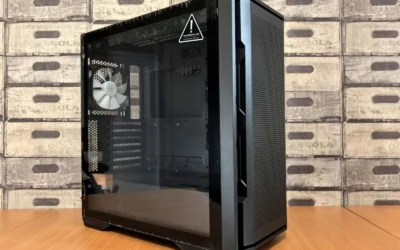
The CORSAIR 4000D RS ARGB Frame Modular Mid-Tower ATX relies on a steel front panel with a 3D Y-Pattern perforation that is shaped to reduce restriction and create a direct path for intake air. According to the spec sheet, this low obstruction design is paired with an open interior layout that encourages front to back airflow, which helps keep GPU and CPU temperatures balanced without needing extreme fan speeds.
The Lian Li Lancool 216 takes a different route that owners commonly report as more focused on sheer intake volume. It uses a wide mesh front with a large open area and a dual mode front that can be configured for air cooling or water cooling focus. In practice, you will feel more immediate front intake with the Lancool 216, while the CORSAIR 4000D RS ARGB Frame Modular Mid-Tower ATX is tuned for smoother, more directed flow with less turbulence and a cleaner front aesthetic.
Build Quality, Materials and Modularity
Build quality is where these two diverge most. The CORSAIR 4000D RS ARGB Frame Modular Mid-Tower ATX is built around the FRAME Modular Case System, which lets you swap elements like the motherboard tray and front I/O panel as your needs change. The chassis uses steel for the main structure and front panel, and per the spec sheet it supports modern back connect motherboards including ASUS BTF, MSI Zero and Gigabyte Stealth, which is a clear advantage if you want hidden connectors.
The Lian Li Lancool 216 is widely regarded for its solid panel fit and premium feeling exterior, with owners commonly reporting tight tolerances and sturdy side panels. It does not offer the same swapable modular ecosystem as the CORSAIR 4000D RS ARGB Frame Modular Mid-Tower ATX, instead focusing on a refined out of the box structure with well placed cutouts and grommets. If you value long term reconfiguration, the Corsair approach offers more flexibility, while the Lancool 216 appeals if you prefer a fixed, high quality shell with fewer moving parts.
Cooling Support and Fan Flexibility
For cooling hardware, the CORSAIR 4000D RS ARGB Frame Modular Mid-Tower ATX comes with 3x CORSAIR RS ARGB PWM Fans pre installed in the front, each with eight LEDs controllable via your motherboard +5V ARGB connector and support for daisy chainable 4 pin PWM plus Zero RPM mode for quiet operation at low loads. Its InfiniRail Fan Mounting System is a steel multi point rail that lets you slide fans to the exact position you need, supporting fans up to 200mm in the front and up to 140mm in the roof, which gives you precise control over targeted airflow.
The Lian Li Lancool 216 counters with a very generous stock fan setup that owners commonly report includes large front fans and wide radiator support in both front and top. While it lacks a sliding rail system like InfiniRail, it offers a roomy interior that makes it simple to mount thick radiators or tall air coolers. As with any case in this class, check your specific cooler height and radiator clearance against the case spec sheet before you buy, and follow the manufacturer mounting instructions carefully. If you plan a build around a large card like those in our top RTX 5070 ti cards for 1440p gaming guide, that clearance check is especially important.
Building Experience and Cable Management
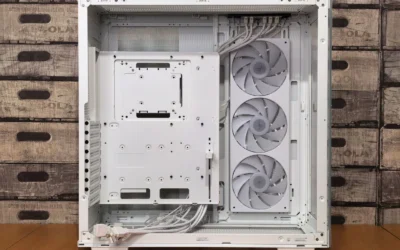
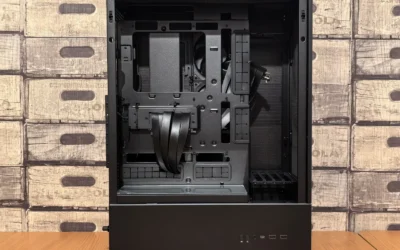
Inside, the CORSAIR 4000D RS ARGB Frame Modular Mid-Tower ATX gives you a choice for the internal side panel near the motherboard tray. You can keep it as a cable cover for a clean look that hides wiring, or remove it and mount side fans for extra cooling. That duality is useful if you start with a clean showcase build and later decide you need more airflow for a hotter GPU. The case also benefits from thoughtful routing channels that keep cables behind the tray and out of the airflow path.
The Lian Li Lancool 216 is often praised for its spacious rear chamber and well placed Velcro straps and tie points that make cable routing straightforward even with a fully loaded PSU and multiple drives. Owners commonly report that its PSU shroud and removable panels simplify the build process, especially for first time builders. Compared to the Corsair, you get less modular reconfiguration but a slightly more traditional and intuitive build flow. Pair either case with a balanced parts list such as the one in our ryzen 5 7600 RX 7700 XT 1000 dollar gaming PC amazon build and you will have plenty of room to manage cables without crowding your Graphics Cards and airflow.
Which One Should You Get
Choose Lian Li Lancool 216 if you want maximum out of the box airflow with a wide, open front and a roomy interior that accommodates large air coolers and thick radiators without much adjustment. It is a strong match if you prioritize immediate cooling volume, a straightforward build with generous space behind the motherboard tray, and a solid feeling chassis that does not need extra accessories to feel complete. You will appreciate it most in a high heat build where you want big front intake and simple, effective cable management from the start.
Choose CORSAIR 4000D RS ARGB Frame Modular Mid-Tower ATX if you value modularity, precise fan placement and a cleaner, more customizable platform. The FRAME Modular Case System, InfiniRail mounting for fans up to 200mm in front and 140mm in the roof, included 3x RS ARGB PWM fans with eight LEDs each and Zero RPM mode, and support for back connect motherboards make it the more adaptable choice. It is ideal if you like to tune airflow direction, plan to change your front I/O or motherboard tray later, or want the option to switch the side panel from cable cover to side fan mount as your cooling needs evolve in September and beyond.
Who Should Skip Both
Both of these cases are mid tower ATX designs focused on airflow, so they are not ideal for builders who need a compact footprint or a small form factor system for a tight desk or living room. If you are planning a mini ITX build, need a case that fits in a media console, or want silent focused enclosure with solid panels and heavy sound damping instead of mesh, neither is the right choice and you should look at compact or silence oriented options instead.
Frequently Asked Questions
Which has better airflow, Lian Li Lancool 216 or Corsair 4000D Airflow?
Both are high airflow cases but they achieve it differently. The CORSAIR 4000D RS ARGB Frame Modular Mid-Tower ATX uses a 3D Y-Pattern steel front and InfiniRail to direct air efficiently, while the Lian Li Lancool 216 relies on a very open mesh front that owners commonly report moves a larger volume of air at lower fan speeds. Your fan curve and component layout will influence the result more than the panel alone.
Which case has better build quality and modularity?
The Lian Li Lancool 216 is often noted for its sturdy panels and refined fit and finish out of the box. The CORSAIR 4000D RS ARGB Frame Modular Mid-Tower ATX stands out for modularity thanks to the FRAME system that lets you swap the motherboard tray and front I/O, plus support for ASUS BTF, MSI Zero and Gigabyte Stealth boards. If you want future reconfiguration, the Corsair has the edge.
Is the Corsair 4000D RS ARGB or Lian Li Lancool 216 easier for first time builders?
Both are considered builder friendly ATX mid towers with good cable routing. The Lian Li Lancool 216 offers a spacious, intuitive layout that many first timers find simple to work in. The CORSAIR 4000D RS ARGB Frame Modular Mid-Tower ATX adds helpful touches like a removable cable cover side panel and pre installed 3x RS ARGB fans with daisy chainable PWM, which can save time on wiring and fan setup.


Write Your Review
No reviews yet. Be the first to share your experience!