

If you are planning around RX 9070 length and clearance for a mid tower and SFF case, your main decision is not just whether the card fits on paper, but whether it fits with room to breathe, to cable, and to service. You need to weigh your case size and clearance, your power budget and cable routing, your platform and socket layout, and whether you are building for current 1440p or 4K targets or planning a next upgrade that will keep the same chassis.
In this guide for November 2026, you will learn how to read spec sheets correctly, how to compare a triple fan RX 9070 XT against your case limits, and when a vertical mount or a different case makes more sense. You will see a few example products that illustrate the size and cooling tradeoffs, so you can apply the same checks to any model you are considering. For broader context on chassis choice, browse our Cases & Airflow archive.
What Actually Matters
Published Length vs Usable Clearance
Case makers list a maximum GPU length, but your usable clearance is often less. You should compare the graphics card length on its spec sheet to the case spec, then subtract space taken by front fans, front radiators, and front panel cable channels. In many mid towers, a front mounted 240mm or 360mm radiator can reduce GPU clearance by 30mm or more, so you need to check cooler height or radiator clearance against your case before you commit.
For SFF cases, the tolerance is even tighter. You should look for the exact card length, then confirm whether that number includes the shroud and any protruding power connector recess. If the spec sheet does not list length, treat that as a gap and look for the manufacturer drawing or manual. Owners commonly report that cards that match the case limit to the millimeter can still interfere with front I/O cables or require you to remove a front fan to close the panel.
Thickness, Slot Count, and Airflow Path
Length is only one dimension. RX 9070 XT cards with triple fan coolers are typically wide and occupy more than two slots, which affects both side panel clearance and airflow. You should check the card thickness and how many slots it needs, then compare that to your case GPU support and the distance to the side panel or to a vertical mount bracket. A card that is too thick can choke its own fans against tempered glass or a PSU shroud.
You also want to evaluate how air moves through your build. In a mid tower with mesh front and bottom intake, a thick triple fan card can still stay cool if you give it unobstructed intake and an exhaust path. In a compact SFF case with limited intake, that same cooler may recirculate hot air unless you plan fan placement carefully. Follow the manufacturer mounting instructions for fan orientation and filter maintenance, and leave enough room so the fans are not pressed against cables or the side panel.
Case Layout, Front Radiators, and Vertical Mount Options
Your case layout determines whether length or width is the limiter. Traditional ATX mid towers with seven expansion slots usually handle long cards, but SFF and some micro ATX cases trade length for width or height. You should note whether your case has a removable drive cage, a recessed front fan mount, or a PSU basement that intrudes into GPU space. If you plan a front AIO, measure from the radiator plus fans to the PCIe bracket, not just to the bare front panel.
Vertical mounting can help with sag and aesthetics, but it changes clearance in a different way. A kit like the Cooler Master Vertical GPU Card Holder Kit V3 is designed to handle modern 3 slot GPUs while fitting into most traditional 7 slot ATX cases, and it can be adjusted up to 65mm horizontally and 30mm toward the side panel. It also includes a PCIe 4.0 riser cable that works with PCIe 4.0 and 5.0 motherboards and GPUs, with a 165mm length. That adjustability is useful if you need to move the card away from the motherboard or closer to the side panel for cable routing, but you should verify that the bracket does not block your rear fan and that your case has the extra depth for the riser bend.
Power Cabling and Serviceability
Even when a card fits, you need space for power connectors and for your hands during installation. Many RX 9070 XT boards place power connectors on the side or top edge, and the bend radius of the cables can add 15 to 30mm of needed clearance that does not show up in a simple length number. You should check whether your case has a cable cutout or shroud notch that lines up with the connector location, and whether you can route cables without pressing them hard against the side panel.
Serviceability matters for SFF builds where you may need to remove the GPU to access M.2 slots or front panel headers. Look at how the card is secured, whether you can reach the PCIe latch, and whether the vertical holder allows the GPU to be installed after the holder is secured in your preferred position. If you are comparing chassis options, our Graphics Cards section can help you match card dimensions to case reviews, and our Budget Build Guides show how builders balance case cost against clearance and cooling.
To illustrate the range, here are a few options that show the range:
This article contains affiliate links. If you buy through one of our links, CustomPCGaming may earn a commission at no extra cost to you. Commissions never influence which products we recommend or how we rank them. Read our Affiliate Disclosure for details.
Quick Picks at a Glance
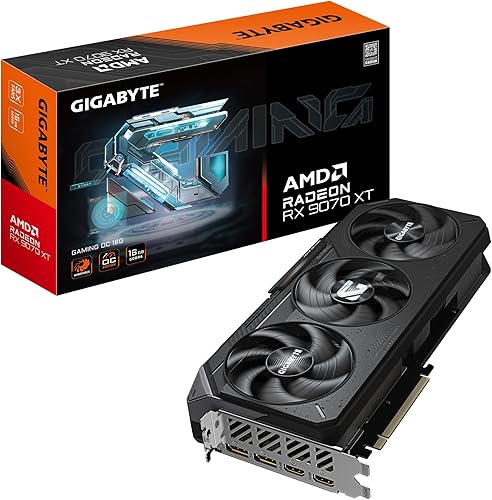
GIGABYTE Radeon RX 9070 XT Gaming OC 16GB GDDR6

Prime XFX Swift AMD Radeon RX 9070 XT Triple Fan

Prime Cooler Master Vertical GPU Holder Kit V3 with PCIe
As an Amazon Associate we earn from qualifying purchases. Product prices and availability are accurate as of the date/time indicated.
Pros
- Excellent 4K and high refresh 1440p gaming performance with 16GB VRAM
- WINDFORCE cooling with Hawk Fans keeps noise and temperatures low
- High 3060MHz boost clock offers strong overclocked performance
- PCIe 5.0 support ensures compatibility with next gen motherboards
- Highly rated build quality and reliability
Cons
- Large triple fan design requires a spacious case with good airflow
- High power draw needs a robust power supply
- Premium Gaming OC pricing is higher than reference models
The GIGABYTE Radeon RX 9070 XT Gaming OC 16G is a high end graphics card built for enthusiasts, competitive gamers and creators who demand top tier performance. With 16GB of GDDR6 memory and PCIe 5.0 support, it is designed to handle demanding 4K gaming, streaming and content creation with ease.
In real world use, the factory overclock to 3060MHz delivers noticeably higher frame rates and smoother gameplay in demanding titles. The 16GB VRAM provides ample headroom for high resolution textures and future games, while PCIe 5.0 ensures maximum bandwidth for next generation systems.
Build quality is a clear highlight thanks to GIGABYTEs WINDFORCE cooling system with Hawk Fans. The server grade thermal conductive gel and optimized heatsink keep the card cool and quiet even during extended gaming sessions, and the subtle RGB lighting adds style without being excessive.
The main drawback is its size, as the large triple fan cooler requires a spacious case with good airflow. It also demands a robust power supply, so users upgrading from mid range cards should verify compatibility before buying.
Overall, this is an excellent choice for gamers who want flagship AMD performance with reliable cooling and factory overclocked speed. If you are building a high end 4K gaming rig and want a card that will stay relevant for years, the RX 9070 XT Gaming OC is a compelling and well balanced option.
Graphics Processor: AMD Radeon RX 9070 XT
Memory: 16GB GDDR6
Boost Clock: Up to 3060 MHz Gaming OC Edition
Interface: PCIe 5.0
Cooling: WINDFORCE System with Hawk Fans and Server-grade Thermal Conductive Gel
Outputs: DisplayPort and HDMI
Lighting: RGB Fusion customizable lighting
Pros
- Large 16GB GDDR6 VRAM is excellent for 4K gaming and content creation
- High 2970 MHz boost clock and 20 GHz memory clock for strong performance
- Efficient SWFT triple fan cooling for stable thermals and quieter operation
- Modern RDNA 4 architecture with full 4K support
- Top 20 best seller ranking reflects strong market popularity
Cons
- Large 12.99 inch length and 1.5 kg weight may not fit compact or small form factor cases
- Desktop only compatibility requires PCIe x16 slot and adequate power and airflow
- Triple fan cooler needs good case ventilation to perform at its best
The XFX Swift AMD Radeon RX 9070 XT Triple Fan Gaming Edition is a high performance RDNA 4 graphics card built for serious desktop gamers. With 16GB of GDDR6 memory, it is designed for players who want smooth 4K gaming, content creation, and future proof performance.
Its standout feature is the impressive clock speed, reaching up to 2970 MHz boost and 20 GHz memory speed for fast, responsive gameplay. In real world use, this translates to high frame rates at 3840x2160, with enough VRAM to handle demanding textures and modern titles without compromise.
XFX equips this model with its SWFT Triple Fan Cooling Solution, which keeps thermals under control while maintaining lower noise levels. The card measures 12.99 inches long with a solid build quality, triple fan shroud, and clean gaming aesthetic that fits well in most mid to full tower cases.
The size and power requirements are worth noting, as this is a large, 1.5 kg card that needs a spacious case and adequate airflow. It is also strictly for desktop PCs with a PCIe x16 slot, so compact builds and laptop users will need to look elsewhere.
Overall, the RX 9070 XT Swift delivers excellent 4K ready performance, generous memory, and reliable cooling in a well built package. It is a strong choice for gamers upgrading to RDNA 4 who want top tier visuals and long term value backed by a 3 year warranty.
Model: XFX Swift RX 9070 XT Triple Fan Gaming Edition RX-97TSWF3B9
Architecture: AMD RDNA 4, RX 9070 XT chipset
Memory: 16GB GDDR6, 20 GHz memory clock
Clock Speeds: 1660 MHz base, 2400 MHz gaming, up to 2970 MHz boost
Cooling: XFX SWFT Triple Fan Cooling Solution with 3 fans
Outputs: 3x DisplayPort, 1x HDMI, max resolution 3840x2160 4K
Interface: PCI-Express x16, compatible with desktop PCs
Dimensions: 12.99 x 6.3 inches, weight 1.5 kg
Warranty: 3 Year Manufacturer Warranty
Pros
- Very sturdy, sag-free alloy steel bracket holds large heavy GPUs securely
- Premium PCIe 4.0 riser cable praised for strong shielding and easy flexible routing
- Tool-free adjustability makes alignment and airflow tuning simple
- Beginner friendly installation with clear modular design
- Clean professional look that enhances case aesthetics
Cons
- Removable Micro ATX bracket may block rear fan in some compact cases
- Requires compatible 7-slot ATX or 4-slot Micro ATX case, not universal for all chassis
- Vertical placement can limit clearance for large air coolers in smaller towers
The Cooler Master Vertical GPU Holder Kit V3 is a vertical mounting kit that lets you display your graphics card prominently while keeping your build clean and modern. It is ideal for gamers and PC enthusiasts with ATX or Micro ATX cases who want to showcase large triple slot GPUs.
Its standout feature is the included PCIe 4.0 riser cable, which is fully compatible with PCIe 5.0 motherboards and GPUs for fast, stable performance in gaming and creative work. Users report reliable signal integrity, smooth routing and no performance loss, even with high end cards.
Build quality is a strong point, with an alloy steel bracket and ABS casing that feels solid and prevents sag or flex under heavy cards. The black finish blends seamlessly into most cases, and the modular design feels premium and well engineered.
Installation is tool free and flexible, with up to 65mm of horizontal adjustment and 30mm toward the side panel to dial in perfect spacing and airflow. However, the Micro ATX bracket can block the rear fan in some compact cases, and you should verify case compatibility before buying.
Overall, the V3 is one of the most refined and user friendly vertical mounts available, combining secure support, excellent riser quality and easy adjustability. If you want a stable, great looking way to vertically mount a modern GPU, it is an excellent choice.
Model: Cooler Master Vertical GPU Holder Kit V3, MCA-U000R-KFVK03
Compatibility: ATX and Micro ATX motherboards, most 7-slot ATX and 4-slot Micro ATX tower cases, supports 3-slot GPUs
Riser Cable: PCIe 4.0, backward and forward compatible with PCIe 5.0, 165mm length, shielded design
Adjustment: Tool free, up to 65mm horizontal and 30mm toward side panel
Materials: Alloy steel bracket with ABS casing, Color Black, Weight 1.15 kg
Warranty: 1 Year Manufacturer Warranty
Matching a Part to Your Build
Scenario 1: Mid tower with front AIO and triple fan RX 9070 XT. If you have a standard ATX mid tower and want a large cooler like the GIGABYTE Radeon RX 9070 XT Gaming OC 16G Graphics with its WINDFORCE Cooling System and Hawk Fan design, you should prioritize length plus front radiator offset. Check the case GPU clearance with a front radiator installed, not the bare chassis number. If your case lists separate clearance with and without a radiator, use the smaller figure. Also confirm that the server grade thermal conductive gel and RGB lighting assembly do not add extra shroud length beyond the PCB, and that you have at least a finger width of space between the card end and the radiator fans for vibration and cable pass through.
Scenario 2: Compact SFF where every millimeter counts. If you are fitting an XFX Swift AMD Radeon RX 9070 XT Triple Fan with 16GB GDDR6 and a boost clock up to 2970 MHz into a small form factor case, you should treat thickness and power connector depth as equal to length. The XFX SWFT Triple Fan Cooling Solution is built for airflow, but it needs intake volume to work. Measure from the rear bracket to the front panel obstruction, then verify side panel clearance with the card installed. In many SFF cases you will need to choose between a slightly shorter card or removing a front fan, and you should decide based on which compromise keeps fan noise and temperatures in a range you accept.
Scenario 3: Showing off the card or fixing sag in an ATX case. If your mid tower has seven expansion slots and you want a cleaner look or better support for a heavy 3 slot card, the Cooler Master Vertical GPU Card Holder Kit V3 is a useful reference. It fits standard ATX cases and, with its removable micro ATX bracket, can also fit most traditional 4 slot micro ATX cases, though it may block the rear fan in some layouts. Its toolless adjustment lets you shift the card up to 65mm horizontally and 30mm toward the side panel, which helps you tune the gap between the fans and the glass. Before you buy, confirm your case has vertical slot openings and enough depth for the riser bend, and follow the manufacturer mounting instructions for the PCIe riser to avoid stress on the cable.
Common Mistakes
Mistake 1: Trusting the headline length without checking what it includes. You see a case rated for 340mm GPUs and a card listed as 335mm, so you assume it fits. In practice, front panel cables, radiator thickness, and the power connector bend can consume that last 5mm. Always compare the detailed card drawing to the case manual measurement points, and if either number is missing, pause and find it before ordering.
Mistake 2: Ignoring thickness and slot count. You focus on length and forget that a 3 slot triple fan card needs both vertical space and side clearance. A card that fits lengthwise can still press its fans against the side panel or PSU shroud, which hurts cooling and can add noise. Check how many slots the card occupies, how far it extends from the motherboard, and whether your case or vertical mount keeps at least a few millimeters of breathing room for intake.
Mistake 3: Forgetting cable bend and future service. You route power cables with a hard 90 degree bend to close the panel, or you block access to the PCIe latch and M.2 screws. Over time, tight bends can strain connectors and make maintenance harder. Plan your cable path with gentle bends, use the case cutouts as intended, and review whether you can remove the card without disassembling half the build. If you are reusing a case from a previous build, re-evaluate it as if it were new, since newer GPUs are often longer and thicker than older ones.
Who Should Wait or Buy Differently
This approach is not ideal for you if your current case is already at its clearance limit and you are not willing to change cases, remove a front radiator, or switch to a different GPU size. If you have a very compact SFF chassis with no adjustable GPU mount and limited intake, a large triple fan RX 9070 XT is not a good fit, and you will be better served by a shorter dual fan variant, a case with more GPU depth, or waiting for a chassis revision that gives you the extra 10 to 20mm you need. Also, if you need maximum serviceability for frequent drive or motherboard swaps, a tight SFF build that barely fits the card will cost you time on every upgrade, so consider a mid tower with more working room instead.
Frequently Asked Questions
How do I correctly measure RX 9070 length and clearance for my case?
Start with the official card length from the spec sheet and the case maximum GPU length from the manual. Then subtract space used by front fans or radiators, front panel cables, and the power cable bend at the card edge. If you use a vertical mount, include the holder offset and riser bend in your check, and verify rear fan and side panel clearance.
Will a triple fan RX 9070 XT fit in most mid towers but not in SFF?
Many mid towers with seven expansion slots and no front radiator interference will fit a triple fan RX 9070 XT, but many SFF cases will not without compromises. In SFF you need to check not only length but also thickness, slot count, and side panel gap. If your SFF case is close to the limit, look for a shorter card or a case that explicitly lists support for 3 slot GPUs with your chosen cooler.
Do I need a vertical GPU mount for an RX 9070 XT?
You do not need one for fit in most ATX mid towers, but a vertical kit can help with sag, aesthetics, and cable routing. If you choose one, confirm it supports your card thickness, that it includes a PCIe 4.0 or 5.0 riser rated for your platform, and that it allows adjustment toward the side panel without choking airflow. Always follow the manufacturer mounting instructions and check that the bracket does not block needed exhaust fans.

Write Your Review
No reviews yet. Be the first to share your experience!