

Finding the right RX 9060 XT 16GB length and clearance for a mid tower and SFF case is less about raw performance and more about whether the card will actually fit and breathe in your chassis. You are balancing length against your front fans or radiator, thickness against side panels and cables, and power connector placement against case width.
In November 2026, most RX 9060 XT 16GB models share the same core specs, 16GB of GDDR6 on a 128-bit bus and PCIe 5.0 support, but they differ a lot in physical size and cooler design. This buying guide gives you a simple framework to check your case, power supply, and airflow before you pick a specific model.
What Actually Matters
Length, Height, and How Cases Measure Clearance
Length is the first filter, especially for SFF cases. A card that is 249 mm long will fit in many compact cases that list 280 to 320 mm of GPU clearance, while a card that is 290 mm long can be tight if you also have front-mounted fans or a 240mm radiator. Always compare the card length on the spec sheet to your case manual number, then subtract about 10 to 15 mm if you have thick front fans or a radiator in the way.
Height and thickness matter just as much. A 132 mm tall card versus a 123 mm tall card changes how close the power cable sits to your side panel, and a 2-slot versus 2.5-slot design changes how much breathing room you have above the PSU shroud or below other components. Check both the length and the height numbers, not just length alone, and verify them against the exact case model you own.
For SFF cases, also look at where the GPU sits relative to the side panel. Some sandwich-layout cases need extra attention to thickness, while traditional SFF towers care more about length. If you are building in a mid tower, you usually have more length headroom, but you should still confirm clearance if you plan to mount a front AIO. For more context on how GPU choice fits into a full parts list, see this ryzen 5 7600 RX 7700 XT 1000 dollar gaming PC amazon build which walks through case and component spacing.
Power Connector and PSU Headroom
Every RX 9060 XT 16GB model in this generation that lists a spec sheet here uses a single 8-pin power connector and a recommended 550W power supply. That keeps wiring simple, but you still need to check two things, the physical space for the cable bend and the wattage headroom for your whole system.
For cable clearance, measure from the top edge of the PCIe slot to your side panel. If your case is narrow, a tall card can force a sharp bend in the 8-pin cable. In that situation a slightly shorter height card or a case with a recessed side panel helps. For power, follow the GPU maker recommended wattage and add headroom for your CPU and other parts rather than sizing exactly to the minimum. A quality 550W unit is the baseline listed for these cards, and a higher capacity unit makes sense if you run a high power CPU or plan to add more drives and fans.
Also consider your PSU cables and routing. In compact cases, stiff cables can push against the GPU shroud or side panel. Flexible cables or a right-angle adapter that is approved by your PSU maker can help, but always follow the manufacturer mounting instructions and avoid forcing a bend that stresses the connector.
Cooler Design, Noise, and Airflow
Dual-fan and triple-fan coolers both cool the same 16GB GDDR6 GPU, but they behave differently in tight spaces. A dual-fan card is often shorter in length, which helps SFF builds, while a triple-fan card can spread heat over a larger heatsink and may run quieter at a given fan speed. Per the spec sheets, several models include 0dB Silent technology that stops the fans at low loads, which you will appreciate in a mid tower on your desk.
In a mid tower with good front-to-back airflow, either design works well as long as you have at least a few millimeters of clearance below the card and an exhaust path for hot air. In an SFF case with limited intake, a card that exhausts heat efficiently and has a solid backplate and heatpipe layout will be more comfortable. Look for features like dual BIOS switches for Quiet versus Performance modes if you want to prioritize acoustics without changing fan curves manually.
Owners commonly report that dual-ball bearing fans last longer than sleeve bearing designs, and that alternate spinning fan layouts can reduce turbulence. Those details are worth weighing if you keep your system for several years. You can compare cooler philosophies further in our top RTX 5070 ti cards for 1440p gaming guide, which also discusses how cooler size affects case compatibility.
Slot Thickness and Motherboard Spacing
Slot thickness is listed as 2-slot or 2.5-slot and it directly affects what else you can install. A 2-slot card at 41 mm thick leaves more room for bottom intake fans or a capture card, while a 2.5-slot card fills more of the space above the PSU shroud and may sit closer to the side panel in narrow cases. If you use a microATX board in a compact mid tower, check that a 2.5-slot cooler does not block your second PCIe slot or SATA ports.
Also think about PCIe slot position. Most cases align the GPU with the top PCIe x16 slot, but some SFF riser cables shift the card slightly. Verify that your riser, if you use one, is rated for PCIe 5.0 x16 and that it does not add extra length behind the card. When in doubt, search your exact case plus GPU model to see owner photos of the fit before you order.
Browsing more examples in our gaming PC builds category archive can help you see how different builders handle thick cards in compact layouts and what tradeoffs they accept for cooling.
To show how these variables play out in real products, here are a few options that show the range:
This article contains affiliate links. If you buy through one of our links, CustomPCGaming may earn a commission at no extra cost to you. Commissions never influence which products we recommend or how we rank them. Read our Affiliate Disclosure for details.
Quick Picks at a Glance

ASRock Radeon RX 9060 XT Challenger 16GB OC

ASUS Prime Radeon RX 9060 XT OC Edition 16GB GDDR6

GIGABYTE Radeon RX 9060 XT Gaming OC ICE 16GB
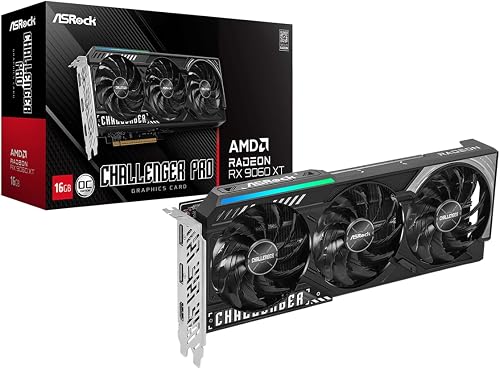
Prime ASRock Radeon RX 9060 XT Challenger Pro 16GB OC
As an Amazon Associate we earn from qualifying purchases. Product prices and availability are accurate as of the date/time indicated.
Pros
- Strong 1440p performance that users report as a clear uplift from RTX 3060 and 3060 Ti
- Large 16GB VRAM buffers modern AAA games and texture heavy mods
- Excellent thermal and acoustic performance, typically mid 60s under load and very quiet
- Power efficient and easy to install with single 8 pin connector
- Compact footprint fits where larger triple fan cards will not
Cons
- No RGB lighting and simpler cooler design compared to premium triple fan models
- 128 bit bus width limits memory bandwidth versus wider bus competitors
- Challenger series prioritizes value over luxury materials and extreme overclocking headroom
The ASRock Radeon RX 9060 XT Challenger 16GB OC is a next generation RDNA 4 graphics card designed for gamers who want smooth 1440p performance without a huge power or size penalty. It is ideal for users upgrading from older 8GB cards like the RTX 3060 or RX 6600 XT who need more VRAM and modern features for demanding titles.
With a boost clock up to 3290MHz, a game clock of 2700MHz, and 16GB of GDDR6 at 20 Gbps, it delivers high framerates and handles heavy textures with ease. Third Gen Ray Tracing and Second Gen AI Accelerators add future ready visuals and FSR support, and users report noticeably better performance and lower temperatures compared to previous generation cards.
The Challenger design keeps things compact and practical at 249mm long in a 2 slot form factor with a single 8 pin connector. Its dual fan cooler with 0dB Silent technology stays whisper quiet at idle and keeps temps in the mid 60s under load, while DisplayPort 2.1a and HDMI 2.1b offer full support for high refresh and 8K displays.
As a value focused Challenger model, it trades flashy RGB and a triple fan cooler for efficiency and affordability. The 128 bit bus is narrower than some enthusiast cards, and overclocking headroom is more limited than premium flagships, but for most 1440p gamers the trade off is well worth it.
Overall, the RX 9060 XT Challenger 16GB OC stands out as a cool, quiet, and highly efficient upgrade that balances size, power, and performance. If you want a compact card that nails 1440p gaming, stays quiet, and offers plenty of VRAM for years to come, this is one of the best value picks in its class.
Pros
- Excellent 1440p performance with stable, consistent clock speeds
- Quiet and efficient triple-fan cooling even under demanding workloads
- 16GB GDDR6 VRAM provides future proofing for modern games
- Compact yet premium ASUS build quality with 3-year warranty
- Dual BIOS and easy software tuning for enthusiasts and beginners
Cons
- 2.5-slot width may still be tight for ultra compact small form factor cases
- Ray tracing performance may trail competing NVIDIA options in the same class
- Requires a desktop with adequate power and PCIe space, not suitable for laptops
The ASUS Prime Radeon RX 9060 XT 16GB GDDR6 OC Edition is a performance focused graphics card built for gamers who want high refresh 1440p gaming with headroom for 4K. It is ideal for builders who need strong modern performance without moving to an oversized flagship card.
In real world testing, the card shows excellent stability with boost clocks up to 3330MHz in OC mode and consistent frame rates in demanding DirectX 12 workloads. The 16GB of GDDR6 memory helps handle high texture settings and future titles, while 0dB technology keeps things silent during lighter loads.
ASUS keeps the design compact with a 2.5-slot footprint that fits a wider range of cases while still packing three fans for supreme cooling. Dual-ball fan bearings, Auto-Extreme manufacturing and a Dual BIOS switch add durability and flexibility for both quiet and performance focused setups.
While the compact design helps compatibility, the card is still not ideal for the smallest small form factor builds. Like most AMD cards in this class, it delivers great rasterization performance but may not lead in ray tracing compared to similarly priced NVIDIA alternatives.
Overall, the Prime RX 9060 XT OC Edition balances power, cooling and build quality in a very appealing package. For gamers building a reliable 1440p rig that can stretch into 4K, it is a smart and future ready choice.
GPU: AMD Radeon RX 9060 XT, OC Mode up to 3330MHz Boost Clock and 2760MHz Game Clock, Default Mode up to 3310MHz Boost Clock
Memory: 16GB GDDR6
Interface and Outputs: PCI Express, DisplayPort, Maximum Resolution 3840 x 2160
Cooling: Triple fan design, dual-ball fan bearings, 0dB technology, Dual BIOS switch for Quiet and Performance modes
Design: 2.5-slot form factor, dimensions 12 x 5 inches, weight 1.9 pounds
Model and Warranty: PRIME-RX9060XT-O16G, includes GPU Tweak III software, 3-year warranty
Pros
- Excellent 1440p performance on high and ultra settings with 16GB VRAM headroom
- Outstanding thermal performance, stays cool and quiet under load thanks to triple Hawk fans
- Very low power consumption and simple single 8-pin installation
- Reinforced structure and clean white ICE design with customizable RGB lighting
- Seamless pairing with Ryzen 9000 and AM5 via Smart Access Memory and PCIe 5.0
Cons
- Large 11-inch triple-fan length may not fit compact or small form factor cases
- White ICE color scheme does not match all builds and may stand out in dark cases
- No USB-C video output and limited overclocking headroom with single 8-pin power
The GIGABYTE Radeon RX 9060 XT Gaming OC ICE 16G is a mid-range RDNA 4 graphics card built for gamers and creators who want strong 1440p performance with modern features. It is a smart upgrade for users coming from older GTX or RX cards and for builders pairing it with a Ryzen 9000 AM5 system.
In real-world use it handles most games at 1440p high or ultra settings above 60 fps while drawing impressively low power. The 16GB of GDDR6, 20 Gbps memory speed and PCIe 5.0 support provide headroom for future titles, and AMD features like Smart Access Memory and AI enhancements help boost older or poorly optimized games.
Design and build quality are standout strengths. The white ICE finish with silver accents looks premium, while the WINDFORCE cooler with three Hawk fans, composite copper heat pipes and copper plate keeps temperatures in the 30s at idle and low under load. The reinforced metal backplate and Dual BIOS add durability and flexibility.
There are a few drawbacks to consider. At 11.06 inches long the card can be tight in smaller cases despite its 2-slot width, and the bright white aesthetic will not blend with every build theme. Like many factory overclocked cards, extreme overclocking is limited by the single 8-pin power design.
Overall the RX 9060 XT Gaming OC ICE delivers excellent value, cool and quiet operation, and future-ready connectivity in a stylish package. For gamers wanting a reliable, efficient and visually striking 16GB card for 1440p gaming, it is an easy recommendation.
GPU: AMD Radeon RX 9060 XT, RDNA 4 Architecture, 2780 MHz GPU clock, 20000 MHz memory clock
Memory: 16GB GDDR6, 128-bit interface, ideal for high texture settings and creative workloads
Interface and Outputs: PCIe 5.0 x16, DisplayPort 2.1a, HDMI 2.1b, max resolution 3840x2160 and up to 7680x4320 support
Cooling and Design: WINDFORCE with 3x Hawk fans, server-grade thermal gel, copper plate and heat pipes, Dual BIOS Performance and Silent modes
Dimensions and Power: 11.06 x 4.65 inches, 2-slot, 1.9 pounds, single 8-pin connector, reinforced metal backplate with RGB lighting
Pros
- Strong 1440p performance with RDNA 4 and high 3290MHz factory overclock
- Large 16GB GDDR6 VRAM great for modern games and content creation
- Efficient triple fan cooler with true 0dB silent operation for quiet builds
- PCIe 5.0 support and DisplayPort 2.1a plus HDMI 2.1b for 8K multi monitor setups
- Power efficient design needs only a single 8 pin connector and 550W PSU
Cons
- Large 2.5 slot, 290mm length requires careful case clearance check
- 128 bit memory bus is narrower than some competing 16GB cards
- Only three display outputs and simple LED instead of full RGB lighting
The ASRock Radeon RX 9060 XT Challenger Pro 16GB OC is a factory overclocked RDNA 4 graphics card designed for gamers and creators focused on high refresh 1440p gaming. With 32 Compute Units, 3rd Gen Ray Tracing and 2nd Gen AI Accelerators, it is built for modern titles, streaming and content creation workloads.
In real world use, the 3290MHz boost clock and 2700MHz game clock deliver smooth, high frame rate performance out of the box without manual tuning. The 16GB of GDDR6 at 20 Gbps provides ample headroom for high resolution textures, multitasking and future games, while PCIe 5.0 ensures maximum bandwidth on next gen platforms.
Cooling and build quality are clear strengths, with a triple striped axial fan design, nickel plated copper base and ultra fit heatpipes for efficient heat dissipation. The 0dB Silent mode stops the fans completely under light loads for quiet operation, and the metal backplate plus Super Alloy components add rigidity and long term durability.
There are a few tradeoffs to consider, as the 2.5 slot, 290mm long cooler needs good case clearance and the 128 bit bus is narrower than some competing 16GB designs. Connectivity is limited to two DisplayPort 2.1a and one HDMI 2.1b, which is enough for most setups but offers less flexibility than four port cards.
Overall, the Challenger Pro 16GB OC is an excellent future proof upgrade for 1440p gamers who want quiet cooling, generous VRAM and modern connectivity in a power efficient package. If you want plug and play performance with headroom for 8K displays and next gen features, this card is a compelling choice.
GPU: AMD Radeon RX 9060 XT, RDNA 4 Architecture, 32 Compute Units, 3rd Gen Ray Tracing, 2nd Gen AI Accelerators
Clocks and Memory: Boost up to 3290MHz, Game Clock 2700MHz, 16GB GDDR6 128 bit at 20 Gbps
Interface and Power: PCIe 5.0 x16, single 8 pin connector, 550W PSU recommended, 2.5 slot design
Cooling and Dimensions: Triple striped axial fans, 0dB Silent Cooling, nickel plated copper base, 290 x 123 x 41mm
Connectivity and Features: 2x DisplayPort 2.1a, 1x HDMI 2.1b, up to 3 displays at 8K, LED switch, metal backplate, 3 year warranty
Matching a Part to Your Build
If you have a compact mid tower that lists about 300 mm of GPU clearance with front fans installed, the shorter dual-fan design is often the easiest fit. The ASRock Radeon RX 9060 XT Challenger 16GB OC measures 249 mm x 132 mm x 41 mm and uses a 2-slot design, so it leaves breathing room for a front radiator and keeps the single 8-pin cable away from the side panel. This is a practical pick when you want to keep a clean front intake and still have space for cable management.
If you are building in an SFF case that can handle longer cards but is sensitive to noise and heat, a triple-fan model can make sense. The ASRock Radeon RX 9060 XT Challenger Pro 16GB OC measures 290 mm x 123 mm x 41 mm and is a 2.5-slot card with a triple-fan cooler and 0dB Silent support. The extra length needs to be checked against your case limit, but the slightly lower height compared to the dual-fan Challenger can help with side panel cable clearance. It is a good match for SFF towers that have 310 mm or more of clearance and a vented side panel.
If you have a standard ATX mid tower with plenty of length and you want flexibility for acoustics, consider the models that add a Dual BIOS switch. The ASUS Prime Radeon RX 9060 XT 16GB GDDR6 OC Edition uses a 2.5-slot, triple-fan design with a Quiet and Performance BIOS and dual-ball fan bearings, while the GIGABYTE Radeon RX 9060 XT Gaming OC ICE 16G uses a 2-slot WINDFORCE system with Hawk fans, server-grade thermal gel, and a reinforced backplate. Both are aimed at builders who have the clearance and want to tune for lower noise or sustained cooling without worrying about a tight length limit. Per the spec sheets, all of these cards share the same core RDNA 4 foundation with 32 Compute Units, up to 3290 MHz boost on the ASRock models and up to 3330 MHz boost in OC mode on the ASUS Prime, plus 16GB GDDR6 at 20 Gbps on a 128-bit bus.
Common Mistakes
Mistake 1: Trusting the case marketing number without measuring your configuration. Case makers often list maximum GPU length with no front fans or radiator. Once you add a 25 mm thick fan or a 27 to 30 mm radiator, you can lose 25 to 55 mm of usable length. Always subtract your front cooling thickness from the listed maximum and compare that to the card length on the spec sheet, such as 249 mm or 290 mm in the examples above.
Mistake 2: Ignoring height, thickness, and cable bend. Builders focus on length and forget that a tall card plus a stiff 8-pin cable can press against a tempered glass side panel. In narrow mid towers and many SFF cases, check the card height, the 41 mm thickness, and the connector location. Route the 8-pin with a gentle bend, verify the side panel closes without pressure, and follow anti-static handling and the manufacturer mounting instructions when you install the card.
Mistake 3: Undersizing the PSU or forgetting total system draw. The spec sheets for these RX 9060 XT 16GB cards recommend a 550W power supply for a typical system, but your CPU, fans, storage, and overclocking headroom all add up. Size your PSU with headroom over the combined GPU and CPU draw, use a quality unit with a proper single 8-pin cable, and do not assume a smaller PSU will be fine because the card only needs one connector. If you plan a CPU upgrade soon, factor that into your PSU choice now.
Who Should Wait or Buy Differently
This class of card is not ideal for builders who need a true single-slot or low-profile solution for a slim SFF case, or for anyone whose case cannot provide at least the 249 mm length and 41 mm thickness clearance plus cable bend room. It is also not the right choice if you are chasing the smallest possible power supply for an ultra-compact build and cannot meet the 550W recommended baseline with headroom. If your case is extremely tight, if you need to keep a front 280mm or 360mm radiator and still have only 280 mm of GPU space, or if you are planning a platform change that would benefit from a different GPU tier, you should wait, choose a smaller card, or pick a case with more clearance. For builders who have the space and want 16GB of VRAM for 1440p textures and future titles, these designs are a good fit once clearance is confirmed.
Frequently Asked Questions
How do I know if a 290 mm RX 9060 XT 16GB will fit my SFF case?
Check your case manual for maximum GPU length, then subtract the thickness of any front fans or radiators you have installed. Compare the result to the 290 mm length listed for the ASRock Radeon RX 9060 XT Challenger Pro 16GB OC on its spec sheet. If the remaining space is less than the card length plus a few millimeters for insertion, choose the shorter 249 mm model or adjust your cooling layout.
Is a 2.5-slot card a problem in a mid tower?
In most ATX mid towers a 2.5-slot card fits without issue and can offer quieter operation due to a larger heatsink. It becomes a concern only if you need the slot below for another card, if your case has a very narrow PSU shroud area, or if side panel clearance is tight. Verify thickness at 41 mm and check motherboard spacing before you buy.
Do I need more than a 550W PSU for an RX 9060 XT 16GB?
The spec sheets for these cards list a single 8-pin connector and a recommended 550W power supply, which is sufficient for many balanced builds. You should move to a higher capacity PSU if you use a high power CPU, run many fans and drives, or want extra headroom for upgrades and quieter operation. Always follow the GPU and PSU maker guidance and use proper cables.
Browse more picks in our Cases & Airflow category.

Write Your Review
No reviews yet. Be the first to share your experience!