

When you are deciding RTX 5080 vs RTX 5070 Ti for 1440p gaming, you are really choosing between extra headroom for high refresh and ray tracing and a more balanced value for 1440p. Both cards in this comparison are built on NVIDIA Blackwell architecture with DLSS 4, both offer 16GB of GDDR7, and both target smooth 1440p, but they fit very different builds and budgets.
In this head to head we compare the ASUS TUF Gaming GeForce RTX™ 5080 16GB GDDR7 OC and the GIGABYTE GeForce RTX 5070 Ti Gaming OC 16G on the axes that matter at 1440p: performance tier and features, memory setup, power and PSU planning, and physical size and cooling. If you already know you want a Blackwell 16GB card, this guide helps you pick the right tier for your monitor, case, and power supply in 2026.
This article contains affiliate links. If you buy through one of our links, CustomPCGaming may earn a commission at no extra cost to you. Commissions never influence which products we recommend or how we rank them. Read our Affiliate Disclosure for details.
Quick Picks at a Glance
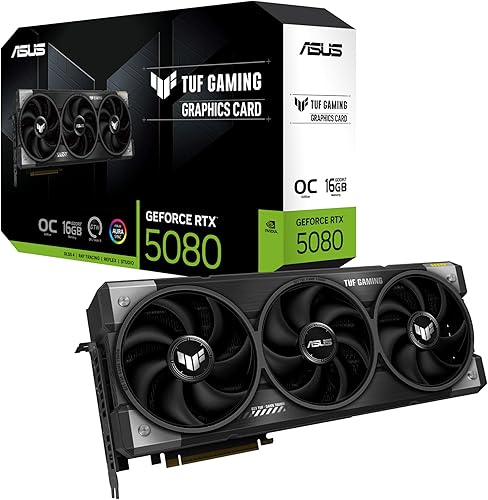
ASUS TUF Gaming GeForce RTX 5080 OC Edition 16GB

GIGABYTE GeForce RTX 5070 Ti Gaming OC 16GB GDDR7
As an Amazon Associate we earn from qualifying purchases. Product prices and availability are accurate as of the date/time indicated.
Pros
- Exceptionally cool and quiet operation, even during demanding AAA gaming and sustained AI generation
- Excellent build quality with rugged TUF construction and included GPU support bracket to prevent sag
- Strong 4K gaming and local AI performance thanks to 16GB GDDR7 and DLSS 4
- Premium connectivity with DisplayPort 2.1a and HDMI 2.1b for high-refresh 4K and 8K displays
- Intuitive tuning and monitoring via GPU Tweak III software
Cons
- Massive 3.6-slot, 13.7-inch footprint requires a large case and may block adjacent PCIe slots
- Requires 850W PSU with 16-pin 12V-2x6 connector, so many upgraders will need a new power supply
- Minimal RGB lighting will disappoint builders seeking a flashy, highly customizable light show
The ASUS TUF Gaming GeForce RTX 5080 OC Edition is a flagship Blackwell graphics card built for serious gamers, creators and AI enthusiasts who demand uncompromising 4K performance. With 16GB of ultra-fast GDDR7 memory and DLSS 4, it is designed to handle the most demanding AAA titles and local AI workloads with ease.
In real-world use, owners report impressively low temperatures and near-silent operation, often staying under 60 degrees Celsius during extended Cyberpunk 2077 sessions and idling around 25 degrees. The factory overclock to 2730 MHz plus DLSS 4 delivers smooth, high-frame-rate 4K gaming, while 16GB GDDR7 proves excellent for ComfyUI video generation and other creative tasks.
Build quality is a true highlight, with a rugged TUF design featuring military-grade components, protective PCB coating and Auto-Extreme manufacturing for long-term reliability. The massive 3.6-slot fin array with three Axial-tech fans and a phase-change thermal pad ensures lasting cooling, and the included GPU holder helps prevent sag despite its 4.3-pound weight.
Its size is the main trade-off, as the 13.7-inch length and 3.6-slot width demand a large case with excellent clearance and slot spacing. You will also need an 850W power supply with a 16-pin 12V-2x6 connector, so many users upgrading from older 30-series cards should plan for a PSU upgrade as well.
Overall, the TUF RTX 5080 OC Edition delivers on its promise of durability, cool quiet power and next-gen features in a tank-like package. If you have the case space and power to support it, it is an outstanding choice for a high-end, future-proof gaming and creation rig that will stay reliable for years.
GPU: NVIDIA GeForce RTX 5080 Blackwell architecture, 16GB GDDR7, Boost Clock up to 2730 MHz in OC Mode and 2700 MHz in Default Mode, PCI-Express x16 interface.
Cooling and Power: Triple Axial-tech fans, 3.6-slot design with massive fin array, phase-change thermal pad, requires 850W PSU with 16-pin 12V-2x6 connector.
Connectivity and Build: 3x Native DisplayPort 2.1a, 2x Native HDMI 2.1b, max resolution 7680 x 4320, dimensions 13.7 x 5.7 inches, weight 5 pounds. Includes TUF graphics card holder, TUF magnet, Velcro hook and loop, and user manual. 3-year warranty.
Pros
- Excellent native 1440p and 4K performance, even with ray tracing enabled
- Quiet and cool operation thanks to the WINDFORCE triple fan cooler
- High power efficiency compared to previous generation cards
- DLSS 4 Frame Generation delivers a large perceived fps boost with minimal visual artifacts
- 16GB GDDR7 provides plenty of headroom for future games and creative applications
Cons
- Extra large triple fan design requires a spacious case with modern clearances
- RGB lighting on the fans turns off when fans stop in 0 RPM idle mode
- Gaming OC factory overclocked model costs more than base reference designs
The GIGABYTE GeForce RTX 5070 Ti Gaming OC 16G is a high performance graphics card built on NVIDIA Blackwell architecture for gamers and creators who demand smooth 1440p and 4K experiences. It is designed for users upgrading from RTX 20 or 30 series cards who want a major leap in ray tracing, AI and creative workloads.
In real world testing, users report roughly double the performance of an RTX 2080 with similar power draw and much lower noise. With 16GB of GDDR7 memory, enhanced RT and Tensor Cores and DLSS 4 with Frame Generation, it handles maxed out settings and ray tracing at 60 to 100 fps native, and well above 120 fps with DLSS quality mode.
Build quality is premium and gamer focused, featuring GIGABYTEs WINDFORCE triple fan cooling system for efficient thermal control and quiet operation. The card supports PCIe 5.0, offers DisplayPort and HDMI outputs, and delivers up to 8K resolution support in a sturdy, factory overclocked design clocked at 2600 MHz.
The main trade off is physical size, as the triple fan cooler makes this a large card that barely fits in some mid tower cases. Some users also note that RGB lighting on the fans turns off when the fans stop at idle, which may disappoint those who want constant illumination.
Overall, the RTX 5070 Ti Gaming OC strikes an excellent balance between performance and efficiency in the RTX 50 series lineup. If you want flagship level visuals and AI acceleration without the highest tier cost or power demands, this is one of the most compelling choices available.
Graphics Processor: NVIDIA GeForce RTX 5070 Ti, Blackwell architecture, NVIDIA RTX 50 Series
Memory: 16GB GDDR7, 256-bit interface, 2600 MHz memory clock
Clock Speed: 2600 MHz boost clock, factory overclocked Gaming OC edition
Interface: PCI-Express x16, PCIe 5.0 support
Cooling: WINDFORCE cooling system with 3 fans and 0 RPM fan stop
Outputs: DisplayPort and HDMI, maximum resolution 7680 x 4320
Dimensions and Weight: 13.46 x 5.59 inches, 3.9 pounds, triple slot design
Model: GV-N507TGAMING OC-16GD, 3 year manufacturer warranty
Choose this card if you game at 1440p or 4K, use ray tracing, or create content that benefits from large VRAM and AI acceleration. It is a strong upgrade from RTX 2080, 3070 and 3080 class cards and pairs well with modern Ryzen 7, Ryzen 9 or Intel Core i7 and i9 systems.
Make sure your case has enough clearance for a large triple fan card and that your power supply meets the recommended wattage with proper PCIe power connectors. Good airflow will help you get the quietest operation and best boost clocks.
For the best experience, enable DLSS 4 in supported games to boost frame rates while keeping image quality high. Keep drivers updated through NVIDIA GeForce Experience and use GIGABYTE Control Center to customize fan curves and RGB if desired.
How They Compare
| Specification | ASUS TUF Gaming GeForce RTX 5080 16GB GDDR7 OC | GIGABYTE GeForce RTX 5070 Ti Gaming OC 16G |
|---|---|---|
| Architecture | NVIDIA Blackwell, DLSS 4 | NVIDIA Blackwell, DLSS 4 |
| VRAM | 16GB GDDR7 | 16GB GDDR7 256-bit |
| Boost Clock (spec sheet) | OC mode: 2730 MHz / Default: 2700 MHz | Not listed in provided spec sheet |
| Recommended PSU | Minimum 850W with 16-pin 12V-2×6 connector | Not listed in provided spec sheet, follow maker guidance |
| Dimensions / Cooler | 348mm length, 3.6 slots, 4.3 lbs, Axial-tech fans | WINDFORCE cooling, PCIe 5.0, dimensions not listed |
Architecture, Features and Performance Tier
Both cards are powered by NVIDIA Blackwell architecture and support DLSS 4, so you get the same modern feature set for upscaling, frame generation, and AI acceleration in games and creative apps. That shared foundation means your decision is less about feature support and more about which performance tier you need for your 1440p monitor and target refresh rate.
The ASUS TUF Gaming GeForce RTX 5080 16GB GDDR7 OC sits a tier above the GIGABYTE GeForce RTX 5070 Ti Gaming OC 16G in the product stack, and owners commonly report that it holds higher average frame rates at 1440p with ray tracing and DLSS enabled. Per the spec sheet, the ASUS card lists an OC mode boost clock of 2730 MHz and a default mode of 2700 MHz, which points to a higher factory tuned clock, while the GIGABYTE card does not list a boost clock in the provided data so you should evaluate it on its Gaming OC positioning and cooler rather than a direct clock comparison.
For 1440p gaming, that tier difference matters most if you play at 165Hz, 240Hz, or with heavy ray tracing where extra headroom keeps you above your refresh target. If you mostly play competitive shooters at 1440p or you use DLSS 4 to stretch performance, the GIGABYTE GeForce RTX 5070 Ti Gaming OC 16G is still a strong 1440p card, but it will have less overhead for future titles than the ASUS TUF Gaming GeForce RTX 5080 16GB GDDR7 OC. You can see how this tier fits among other options in our Graphics Cards archive.
VRAM and Memory Configuration
Memory is one area where these two cards are closely matched on paper. Both are integrated with 16GB of GDDR7, which is plenty for 1440p with high textures, and both should handle current 1440p ultra settings without forcing texture compromises. The GIGABYTE spec sheet explicitly calls out a 256-bit memory interface, while the ASUS sheet lists 16GB GDDR7 without detailing bus width in the provided data.
Because both offer 16GB, you should not choose between them based on capacity alone. Instead, think about how you use VRAM at 1440p. If you mod games, run creative workloads, or keep cards for several years, 16GB gives you comfortable breathing room on either card. For a deeper look at how 16GB cards scale at this resolution, our top RTX 5070 ti cards for 1440p gaming breakdown shows what to expect from this class of GPU.
A practical difference is that neither card offers a VRAM advantage over the other, so your choice should hinge on GPU tier and cooling rather than memory size. If you were hoping one would offer 20GB or 24GB for heavy 4K texture packs, neither is the right choice for that use case, you would need to look at a different class of card entirely.
Power Requirements and PSU Planning
Power planning is where the ASUS TUF Gaming GeForce RTX 5080 16GB GDDR7 OC asks for more careful preparation. Its spec sheet calls for a minimum 850W PSU with a 16-pin 12V-2×6 (12VHPWR) connector and notes you should verify before purchasing. That is a clear signal to budget for a quality ATX 3.x unit with the correct native cable and to leave headroom above the combined draw of your GPU and CPU.
The GIGABYTE GeForce RTX 5070 Ti Gaming OC 16G spec sheet does not list a recommended wattage in the provided data, but it is also a Blackwell card with PCIe 5.0 and 16GB GDDR7, so you should still follow the maker recommended wattage on the product page and use a PSU with appropriate headroom. In general, we recommend you size your PSU so you have comfortable headroom over your system peak, follow the GPU maker guidance, and avoid claims that any single wattage handles every build.
Whichever card you pick, plan your cables and power delivery before you buy. Confirm your PSU has a native 16-pin 12V-2×6 lead or a reliable adapter approved by the manufacturer, route the cable with a gentle bend, and follow the manufacturer mounting instructions with anti-static handling. If your current PSU is older, lower wattage, or lacks the required connector, factor a PSU upgrade into your total build cost, especially with the higher-end pick in September 2026.
Size, Cooling and Case Fit
Physical fit is a concrete differentiator you can verify today. The ASUS TUF Gaming GeForce RTX 5080 16GB GDDR7 OC measures 348mm (13.7 inches) long, occupies 3.6 slots, and weighs 4.3 lbs, and it includes a GPU bracket. Its 3.6-slot design uses a massive fin array with three Axial-tech fans, a protective PCB coating, military-grade components, and a phase-change GPU thermal pad designed to last longer than traditional paste under heavy loads.
The GIGABYTE GeForce RTX 5070 Ti Gaming OC 16G uses the WINDFORCE cooling system and lists PCIe 5.0 support, but the provided data does not include length, slot thickness, or weight. That means you must check the maker page for exact clearance before you order, and you should still measure your case GPU clearance, slot spacing, and front radiator or fan interference. If you are building in a compact mid-tower, the ASUS card length and 3.6-slot thickness will be the harder fit.
Cooling approach also hints at noise and thermal behavior. The ASUS TUF design is explicitly tuned for airflow with its large fin stack and three fans, plus Auto-Extreme manufacturing and GPU Tweak III for thermal controls and monitoring. The GIGABYTE WINDFORCE system is also built for sustained cooling, but without dimensions in the data we cannot compare slot impact directly, so treat case compatibility as a must-check item for both. For help balancing GPU size with the rest of your parts, see our ryzen 5 7600 RX 7700 XT 1000 dollar gaming PC amazon build for case and clearance planning ideas, and browse Budget Build Guides if you need to keep total system size and cost in check.
Which One Should You Get
Choose the ASUS TUF Gaming GeForce RTX 5080 16GB GDDR7 OC if you want maximum headroom for 1440p high refresh gaming and you have the case and power to support it. It is the better fit when you target 165Hz to 240Hz at 1440p with ray tracing, you want the higher factory boost clocks of 2730 MHz in OC mode and 2700 MHz default, and you can accommodate a 348mm, 3.6-slot, 4.3 lb card with an 850W PSU and 16-pin 12V-2×6 connector. You will also appreciate its rugged TUF reinforcements, protective PCB coating, phase-change thermal pad, and GPU Tweak III controls if you keep cards for years and value durability and monitoring.
Choose the GIGABYTE GeForce RTX 5070 Ti Gaming OC 16G if you want strong 1440p performance with a more practical footprint and lower total build cost. It is the smarter pick when you game at 1440p 144Hz to 165Hz, you want Blackwell and DLSS 4 with 16GB GDDR7 on a 256-bit interface and PCIe 5.0, and you prefer the WINDFORCE cooler without committing to the larger, heavier, and more power demanding premium tier. It also makes sense if you are pairing the GPU with a mid-range CPU and want to allocate more budget to a high quality monitor, storage, or a PSU with proper headroom rather than the top tier GPU alone.
Who Should Skip Both
Both of these cards are not ideal for small form factor builds, low wattage power supplies, or 1080p 60Hz gaming where you would pay for headroom you will not use. If your case cannot clear a long triple-fan card, if your PSU lacks the required 16-pin connector and wattage headroom, or if you need a compact dual-fan model for a tight chassis, this pair is not a good fit and you should consider a smaller, lower power GPU class.
They are also not the right choice if you are building primarily for 4K ultra with heavy ray tracing or for professional workloads that benefit from more than 16GB of VRAM. In those scenarios you are better served by a higher tier card or a workstation oriented option. For most 1440p gamers though, either of these 16GB Blackwell cards is well matched, the question is simply how much headroom and physical size you want to take on.
Frequently Asked Questions
Is the RTX 5080 worth it over the 5070 Ti for 1440p 144Hz gaming?
For 1440p 144Hz, the GIGABYTE GeForce RTX 5070 Ti Gaming OC 16G is usually enough when paired with DLSS 4, and owners commonly report smooth high refresh results at this resolution. The ASUS TUF Gaming GeForce RTX 5080 16GB GDDR7 OC is worth it if you want extra overhead for ray tracing, future titles, or 165Hz plus monitors, but you will need the larger case and 850W PSU it requires.
Do both cards have 16GB VRAM and is that enough for 1440p in 2026?
Yes, both cards are listed with 16GB of GDDR7, with the GIGABYTE model specifying a 256-bit interface. That capacity is comfortable for 1440p ultra textures in 2026 and gives you headroom for mods and creative apps without needing to compromise texture quality.
What power supply and case clearance do I need for these cards?
The ASUS TUF Gaming GeForce RTX 5080 16GB GDDR7 OC spec sheet calls for a minimum 850W PSU with a 16-pin 12V-2×6 connector, plus 348mm length clearance, 3.6 slots of width, and support for a 4.3 lb card with its included bracket. The GIGABYTE GeForce RTX 5070 Ti Gaming OC 16G does not list PSU or size numbers in the provided data, so check the maker page and your case manual, and ensure your PSU has headroom and the correct connector before you buy.


Write Your Review
No reviews yet. Be the first to share your experience!