

Figuring out how to choose a RTX 5060 Ti 16GB model, which brand and cooler is right for you, comes down to matching the card to your actual build, not just picking the highest clock on the spec sheet. All of the RTX 5060 Ti 16GB cards share the same NVIDIA Blackwell architecture, DLSS 4 support and 16GB of GDDR7, so your decision is really about size, cooling style, noise behavior and power fit.
Before you compare brands, lock in your own constraints for November 2026: what resolution and refresh rate you target, how much clearance your case offers for length and slot thickness, what power supply you already own, and whether this is a final build or a stepping stone to a larger GPU later. If you browse the wider Graphics Cards category you will see the same tradeoffs appear again and again, and this framework helps you weigh them for the 5060 Ti specifically.
What Actually Matters
Cooler Size, Slot Thickness and Case Clearance
Slot thickness is the first filter. A 2-slot design like the compact dual-fan cards leaves more room for adjacent PCIe devices and fits tighter microATX or small form factor cases, while a 2.5-slot triple-fan design needs an extra half slot of breathing room but can spread heat over a larger heatsink. Both approaches in this generation are marketed as SFF-Ready, which helps with compatibility, but you still need to check your case GPU clearance for length, thickness and airflow direction.
Fan count also changes how the card behaves in your case. Two 90mm fans with composite heatpipes and a pass-thru airflow design can exhaust heat efficiently in a compact chassis, while three Axial-tech fans with a barrier ring and smaller hub can move more air at lower fan speeds. If your case has limited front intake or a vertically mounted GPU, a pass-thru or flow-through design may matter more than raw fan count, so compare your case manual against the card dimensions.
Clock Speeds, BIOS Options and Noise Behavior
On paper the boost clocks look close, and they are. You will see Default mode around 2572MHz, OC mode at 2602MHz on several models, and a factory OC up to 2647MHz on the higher-end pick. In practice those differences are small for gaming, and per the spec sheet they depend on power and thermal headroom. Do not choose solely on the highest number, evaluate whether you value a quiet profile or a performance profile more.
Noise controls are where brands differ in a way you will feel daily. Look for 0dB technology or FREEZE Fan Stop that keeps fans off during light tasks, Dual BIOS switches that let you toggle between Quiet and Performance without software, and bearing type. Dual-ball fan bearings are rated to last up to twice as long as standard sleeve bearings according to the manufacturer, which matters if you keep cards for several years. Owners commonly report that Quiet BIOS lowers fan speed and noise at the cost of a few degrees higher temperature, so decide which tradeoff you prefer.
Power, Connectors and System Headroom
All of the example cards use a single 8-pin PCIe power connector and PCIe 5.0 interface, which keeps the upgrade path simple. The manufacturer recommendation you should follow is a 550W PSU for the factory OC model, and you should apply that guidance to the whole family. Add headroom over your combined CPU and GPU draw, especially if your CPU is power hungry or you plan to overclock, and never assume any PSU can handle any card.
Check your PSU age, cable availability and case airflow before you buy. A single 8-pin is convenient, but you still need a quality unit with the right protections and enough amperage on the 12V rail. If you are reusing an older PSU, verify it meets the GPU maker recommended wattage and that you have a dedicated cable rather than a daisy-chained splitter for stable delivery.
VRAM, Memory Specs and Display Outputs
Every RTX 5060 Ti 16GB model here carries 16GB of GDDR7 at 28 Gbps on a 128-bit interface, which is the key reason to consider this tier over 8GB variants. That capacity gives you extra headroom for high texture settings at 1440p, large open world assets, heavy multitasking and creator workflows like video editing and 3D rendering that benefit from more VRAM. The GPU itself still determines raw performance, so think of 16GB as future headroom rather than a guarantee of higher frame rates alone.
Display connectivity is consistent and modern: 1x HDMI 2.1b and 3x DisplayPort 2.1b, with support for up to 4 displays and up to 8K resolution. If you run a multi-monitor setup, an ultrawide plus a secondary display, or plan to keep the card through a monitor upgrade, that output layout gives you flexibility without adapters. Also note features like a metal backplate for rigidity and, on some models, an included GPU holder to reduce sag in larger cases.
The list below shows a few options that show the range, from compact dual-fan to triple-fan OC designs, so you can see how the same GPU is packaged differently:
This article contains affiliate links. If you buy through one of our links, CustomPCGaming may earn a commission at no extra cost to you. Commissions never influence which products we recommend or how we rank them. Read our Affiliate Disclosure for details.
Quick Picks at a Glance

ASUS Prime RTX 5060 Ti 16GB GDDR7 Graphics Card
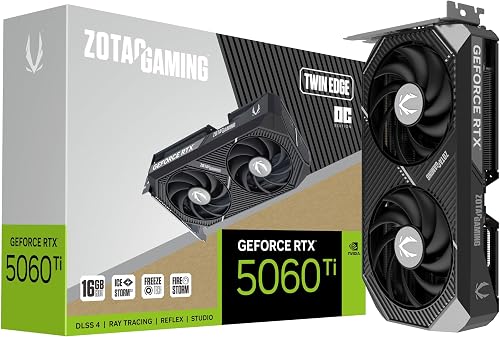
ZOTAC GeForce RTX 5060 Ti 16GB Twin Edge OC

ASUS Prime GeForce RTX 5060 Ti OC 16GB GDDR7
As an Amazon Associate we earn from qualifying purchases. Product prices and availability are accurate as of the date/time indicated.
Pros
- Excellent future proofing with 16GB GDDR7 and Blackwell efficiency
- Very quiet and cool under load thanks to triple fans and 0dB technology
- Strong AI and creative performance for rendering and LLMs
- SFF-Ready 2.5-slot design improves case compatibility
- Durable build with reinforced metal backplate and Dual BIOS flexibility
Cons
- Triple-fan length is still large for some ultra compact mini ITX cases
- Requires a desktop with PCIe x16 slot and adequate power supply
- Not as powerful as flagship RTX 5080 or 5090 for extreme 4K gaming
The ASUS Prime GeForce RTX 5060 Ti 16GB GDDR7 is a Blackwell powered enthusiast graphics card built for gamers, creators and AI users who want modern features without flagship cost. It is an ideal upgrade for anyone on GTX 10 series or older RTX cards seeking DLSS 4, ray tracing and generous VRAM.
In real world use it delivers smooth 1440p gaming and capable 4K with DLSS 4 boosting both performance and image quality. Users report quiet operation around 64C during AI rendering, fast SDXL image generation and flawless performance in titles like Fortnite and other demanding games.
Design and build quality are standout strengths, with a 2.5 slot SFF-Ready form factor that balances compatibility and cooling. The triple Axial-tech fans with barrier ring, dual-ball bearings and 0dB technology keep noise low, while the metal backplate adds rigidity and protection.
There are a few drawbacks to consider. Despite the SFF-Ready label, the triple fan cooler makes the card fairly long for very compact cases. It also requires a desktop with PCIe x16 and sufficient power, and it cannot match the raw 4K power of higher tier RTX 50 series cards.
Overall, the Prime RTX 5060 Ti offers an excellent blend of performance, efficiency and quiet cooling. If you want future ready 16GB GDDR7, strong AI acceleration and reliable ASUS build quality for gaming and creation, it is a highly recommended pick.
GPU: NVIDIA GeForce RTX 5060 Ti, Blackwell architecture, Boost Clock up to 2602MHz OC mode, 2572MHz default
Memory: 16GB GDDR7, 758 AI TOPS, supports DLSS 4 and ray tracing
Cooling: Triple Axial-tech fans, dual-ball bearings, 0dB technology, Dual BIOS Quiet and Performance modes
Interface: PCI-Express x16, DisplayPort and HDMI outputs, max resolution 7680 x 4320
Build: 2.5-slot SFF-Ready design, reinforced metal backplate, Auto-Extreme manufacturing, 12 x 4.7 inches, 800g
Pros
- Generous 16GB GDDR7 VRAM is excellent for future games versus 8GB models
- Compact SFF-ready footprint fits small builds where larger cards cannot
- Efficient and quiet IceStorm 2.0 cooling with intelligent fan stop
- DLSS 4, PCIe 5.0 and 8K support keeps the card ready for next generation titles
Cons
- 128-bit memory bus is narrower than higher tier enthusiast cards
- Dual fan cooler has less thermal headroom than larger triple fan designs under sustained load
- Compact heatsink design benefits from good case airflow to maintain best temperatures
The ZOTAC Gaming GeForce RTX 5060 Ti 16GB Twin Edge OC is a Blackwell based graphics card designed for gamers who want high VRAM in a compact footprint. It is ideal for SFF builders, 1440p gamers and creators who need extra memory without moving to a bulky flagship model.
Performance is driven by 16GB of ultra fast GDDR7 memory, a 2602 MHz boost clock and DLSS 4 for AI accelerated frame rates. In real world use it handles modern titles smoothly, supports VR and 8K output, and benefits from PCIe 5.0 bandwidth for next generation systems.
The Twin Edge OC keeps things minimal and functional with a 2 slot, 220.5mm design that fits most compact cases. IceStorm 2.0 cooling pairs a large heatsink and composite heatpipes with dual 90mm BladeLink fans and pass thru airflow, while the metal backplate adds rigidity and FREEZE Fan Stop enables silent idle operation.
There are a few trade offs to consider. The 128 bit memory interface is efficient but narrower than higher tier cards, and the dual fan cooler, while quiet, has less thermal headroom than larger triple fan solutions. Users should also ensure their power supply has an available 8 pin connector and adequate case ventilation.
Overall, this card delivers strong value for gamers who prioritize compact size, quiet cooling and generous 16GB VRAM. If you want a future ready, SFF friendly GPU that stays current with Blackwell and DLSS 4, the Twin Edge OC is a smart and reliable choice.
GPU: NVIDIA GeForce RTX 5060 Ti, Blackwell architecture, Boost Clock 2602 MHz
Memory: 16GB GDDR7, 128 bit, 28 Gbps, PCIe 5.0 x16 interface
Cooling: IceStorm 2.0, dual 90mm BladeLink fans, composite heatpipes, pass thru airflow, FREEZE Fan Stop
Connectivity: 3x DisplayPort 2.1b, 1x HDMI 2.1b, 8K Ready, 4 display support, HDCP 2.3, VR Ready
Design: 2 slot, 220.5mm length, metal backplate, single 8 pin power connector, SFF Ready
Pros
- 16GB GDDR7 VRAM offers excellent future-proofing for AAA games and content creation
- Quiet and efficient triple-fan cooling with 0dB fan stop technology
- SFF-ready compact design improves compatibility with smaller cases
- Modern connectivity with PCIe 5.0 and four outputs for multi-monitor and 8K setups
- Simple upgrade path with single 8-pin connector and factory overclock
Cons
- 2.5-slot width may still be tight for ultra-compact mini-ITX cases
- Requires a 550W PSU, so some older systems will need a power supply upgrade
- No USB-C video output for users who need it for certain displays or workflows
The ASUS Prime GeForce RTX 5060 Ti OC 16GB is a Blackwell architecture card designed for gamers and creators who want strong 1080p and 1440p performance without stepping up to flagship pricing. It is ideal for esports players, streamers, and compact PC builders who need modern features like DLSS 4, Reflex 2, and ray tracing in a practical package.
With 16GB of GDDR7 memory running at 28 Gbps, this card handles high texture settings, large open world games, and demanding creator apps with headroom to spare. The factory overclocked boost up to 2647 MHz, combined with DLSS 4 upscaling, delivers smooth high refresh gameplay and more responsive input for competitive titles.
ASUS equips the Prime with three Axial-tech fans in a 2.5-slot, SFF-ready form factor that balances cooling and case compatibility. The 0dB fan stop keeps the card silent during browsing or light work, while the included GPU holder prevents sag and gives the build a cleaner, more secure finish.
Connectivity is modern and flexible with PCIe 5.0, one HDMI 2.1b, and three DisplayPort 2.1b outputs supporting up to four displays and 8K resolution. The single 8-pin power connector and 550W PSU recommendation make it a straightforward upgrade, though very small cases and older power supplies should be checked for fit and capacity.
Overall, the ASUS Prime RTX 5060 Ti OC 16GB stands out for its generous VRAM, quiet triple-fan cooler, and compact yet powerful design. If you want a future-ready card for high detail gaming and light content creation in a small or mid-tower build, this is a compelling and well balanced choice.
Graphics Processor: NVIDIA GeForce RTX 5060 Ti, Blackwell architecture
Memory: 16GB GDDR7, 28 Gbps memory speed
Boost Clock: Up to 2647 MHz in OC Mode, 2617 MHz default
Interface: PCIe 5.0, 1x 8-pin power connector, 550W PSU recommended
Outputs: 1x HDMI 2.1b, 3x DisplayPort 2.1b, supports up to 4 displays and up to 8K
Cooling: Triple Axial-tech fans, 0dB fan stop, 2.5-slot SFF-Ready design
Extras: Includes GPU holder to reduce sag and improve build aesthetics
Matching a Part to Your Build
Scenario 1: Compact or airflow-constrained case. If you are building in a small form factor case or a tight mid-tower where every millimeter counts, prioritize the 2-slot thickness and shorter board. The ZOTAC Gaming GeForce RTX 5060 Ti 16GB Twin Edge OC is the clear illustration here with its 2-slot, SFF-ready layout, dual 90mm BladeLink fans, IceStorm 2.0 cooling and pass-thru airflow design. You still get the 2602 MHz boost clock and 16GB GDDR7 at 28 Gbps, but in a package that is easier to fit and leaves more clearance for case fans and cables.
Scenario 2: Quiet daily driver that still games hard. If your PC sits on your desk and you want silence for browsing and light work with strong cooling for long sessions, look for triple-fan cards with 0dB fan stop and a Dual BIOS switch. The ASUS Prime GeForce RTX 5060 Ti 16GB GDDR7 shows this approach with three Axial-tech fans, 0dB technology for light gaming, dual-ball bearings for longevity and a Quiet vs Performance BIOS toggle. It runs a 2.5-slot design, so confirm your case can handle the extra thickness, but you gain flexibility to tune noise without software.
Scenario 3: You want the highest factory clock and extra build support. If you prefer to install and go without manual tuning and you have room for a larger cooler, the factory OC model is the example to assess. The ASUS Prime GeForce RTX 5060 Ti OC 16GB GDDR7 pushes OC mode up to 2647 MHz boost clock, keeps the same 16GB GDDR7 and PCIe 5.0 platform, and adds a GPU holder in the bundle to help with sag. It is the more premium choice of the three examples and also 2.5-slot and SFF-ready, so it suits mid-tower builds where you want maximum out-of-box clock and a cleaner install. For context on how this tier scales to higher resolutions, you can compare it with our top RTX 5070 ti cards for 1440p gaming guide.
Common Mistakes
Mistake 1: Underestimating PSU and cable needs. A single 8-pin connector looks simple, but you still need to meet the 550W recommended PSU guidance and leave headroom for transient spikes, your CPU and future drives or fans. Reusing a low wattage or aging PSU because the connector fits can lead to shutdowns under load. Check the PSU label, use a dedicated 8-pin cable, and follow the GPU maker recommendation rather than assuming headroom you do not have.
Mistake 2: Buying a cooler that does not clear your case or RAM. A 2.5-slot triple-fan card cools well, but it can interfere with side panels, front radiators or tall RAM if your case is compact. Always compare the card slot thickness and length against your case GPU clearance and your motherboard layout. If you are planning a compact build on a budget, review our Budget Build Guides to see how case choice and cooler size interact before you commit.
Mistake 3: Paying for VRAM or clocks you cannot use. 16GB GDDR7 is valuable for high textures and creator apps, but it does not turn a 5060 Ti into a higher tier GPU. Likewise, chasing the highest boost clock from 2572MHz to 2647MHz yields only modest differences if your monitor is 1080p 60Hz or your CPU limits the system. Match the card to your monitor and workload first, then pick the cooler and brand that fits your noise and size priorities.
Who Should Wait or Buy Differently
This specific buying path is not ideal for everyone. If you game at 4K high refresh, need significantly more raw GPU power for heavy ray tracing or professional rendering, or you have a very small PSU that cannot meet the 550W recommendation with headroom, this 16GB 5060 Ti class is not the right choice and you should consider a higher tier GPU or a PSU upgrade first. It is also not a good fit if your case cannot accommodate a 2.5-slot triple-fan cooler and you are unwilling to switch to a compact 2-slot model, in that case wait for a card that matches your chassis or choose a different case.
Frequently Asked Questions
Do all RTX 5060 Ti 16GB cards perform the same regardless of brand?
Core performance is very similar because they share the Blackwell architecture, 16GB GDDR7 at 28 Gbps and DLSS 4 support. Differences come from cooler design, noise behavior, BIOS options and factory boost clocks like 2602MHz versus 2647MHz. Choose based on fit, noise and features rather than expecting a large performance gap.
Is a triple-fan card always better than a dual-fan card?
Not always. Triple Axial-tech fans can run quieter at a given temperature and sustain boost longer, but they need a 2.5-slot footprint and adequate case airflow. A well designed dual-fan with IceStorm 2.0 cooling, composite heatpipes and pass-thru airflow can be the better fit for compact builds where slot thickness and length are limited.
What should I check before installing any RTX 5060 Ti 16GB?
Verify your case GPU clearance for slot thickness and length, confirm your PSU meets the 550W recommendation with headroom and has a dedicated 8-pin cable, and ensure your monitor cables match the 3x DisplayPort 2.1b and 1x HDMI 2.1b outputs. Handle the card with anti-static precautions and follow the manufacturer mounting instructions, and note that BIOS updates are done at your own risk and may affect warranty.





Write Your Review
No reviews yet. Be the first to share your experience!