

You are building for 1440p and you want to know is the Intel Arc B580 good for 1440p in 2026 without overspending on power you will not use. The decision comes down to more than raw performance, you need to match your resolution and refresh target, your platform, your case size and clearance, your power budget, and whether you are buying for today or planning a monitor upgrade next year.
This buying guide walks you through how to evaluate any 1440p card using the Arc B580 family as a practical example. You will learn what specs actually affect 1440p smoothness, how to read cooling and power requirements, and how to avoid common fit and compatibility issues. For broader context on current options, browse the full Graphics Cards archive before you decide.
What Actually Matters
VRAM Capacity and Memory Bandwidth for 1440p
At 1440p, texture size, shadow detail, and future game requirements put more pressure on memory than at 1080p. A 12GB GDDR6 card on a 192-bit bus with a 19 Gbps memory clock gives you headroom for high texture settings and for running a second monitor with browser tabs or creative apps in the background.
When you compare cards, look at both capacity and bus width together. A large VRAM number alone does not help if the bus is narrow, and a wide bus does not help if capacity is too small for modern titles. For 1440p in 2026, 12GB is a comfortable baseline that lets you prioritize visual quality without constantly managing texture settings.
Architecture, Clock Speed, and Upscaling Support
Clock speed tells you how fast the GPU core can run, but architecture determines how efficiently it uses that speed. The Arc B580 is built on Intel Xe2-HPG architecture and includes 160 XMX engines for AI acceleration, which directly enables Xe Super Sampling 2 (XeSS 2). Per the spec sheet, partner cards list boost clocks around 2670MHz to 2760MHz, so differences between models are modest and cooling often matters more than the last few megahertz.
Upscaling is a key part of the 1440p decision. XeSS 2 can boost frame rates in supported games by rendering at a lower internal resolution and reconstructing to 1440p. If you play a lot of newer titles that support XeSS, FSR, or DLSS, factor that into your choice. You can see how higher tier cards handle the same resolution in our top RTX 5070 ti cards for 1440p gaming guide, which helps you set expectations for what extra cost buys at 1440p.
Cooling Design, Noise, and Case Airflow
Cooling design affects both temperatures and noise, especially during long 1440p sessions. Dual axial fan designs, like TORN Cooling 2.0 or Striped Axial Fan layouts, aim to move more air at lower fan speeds. Features like 0dB Silent Operation stop the fans at low temperatures, which keeps the system quiet when you are browsing or watching video.
Think about your case airflow as part of the cooler. A well ventilated case with intake and exhaust fans will let any dual fan card run quieter, while a compact case with restricted airflow will make fan quality and heatsink size more important. Also consider extras that affect daily use, such as a metal backplate for rigidity and a sag bracket to prevent GPU droop over time.
Power Requirements, Size, and Connectivity
Power and physical size are where many 1440p builds run into trouble. The Arc B580 models in this class use one 8-pin power connector and list a 190W board power with a 650W power supply recommendation. That recommendation assumes a typical mid range CPU and headroom for transient spikes, so you should follow it rather than sizing exactly to your calculated draw.
Check length, slot width, and display outputs before you buy. A 2-slot card that is 249mm long fits many mid towers, but you still need to verify clearance against front fans or radiators. For monitors, look for a mix of DisplayPort 2.1 and HDMI 2.1a if you plan to run a high refresh 1440p display and possibly a secondary 4K screen.
A few options that show the range:
This article contains affiliate links. If you buy through one of our links, CustomPCGaming may earn a commission at no extra cost to you. Commissions never influence which products we recommend or how we rank them. Read our Affiliate Disclosure for details.
Quick Picks at a Glance

SPARKLE Intel Arc B580 Titan OC 12GB GDDR6
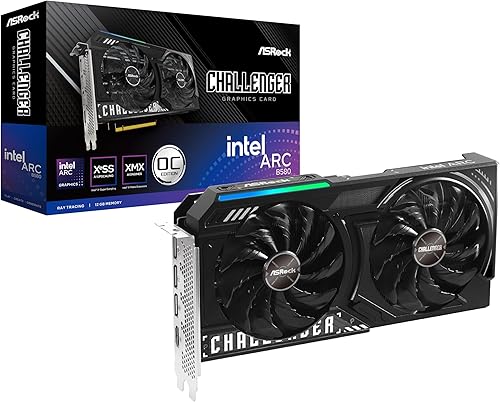
ASRock Intel Arc B580 Challenger 12GB OC Graphics

Prime WEELIAO GUNNIR Intel Arc B580 Index 12GB GDDR6

Prime ASRock Intel Arc B580 Challenger 12GB OC GPU
As an Amazon Associate we earn from qualifying purchases. Product prices and availability are accurate as of the date/time indicated.
Pros
- Strong 1080p Ultra and solid 1440p performance with 12GB VRAM
- Stays cool and quiet even during extended gaming sessions
- Excellent for video transcoding and content creation tasks
- High quality, thinner build with metal backplate and sag bracket included
- Benefits from frequent Intel driver and firmware updates
Cons
- Drivers still maturing, occasional performance dips in demanding titles
- Does not support VR gaming
- Can run warm in compact cases with limited airflow
The SPARKLE Intel Arc B580 Titan OC is a factory overclocked graphics card built on Intel's Arc B580 platform with 12GB of GDDR6 memory. It is designed for gamers targeting high refresh 1080p Ultra and smooth 1440p gaming, as well as creators needing strong video transcoding on a mid range budget.
In real world use, the 2760MHz boost clock and 19 Gbps memory deliver excellent performance for modern titles and media workloads. Users report cool and quiet operation under load, with strong value compared to older mainstream cards, and Intel's frequent driver updates continue to refine gaming stability.
Build quality is a clear highlight, with SPARKLE's TORN Cooling 2.0 and three axial fans providing efficient airflow in a slimmer profile than many competitors. The card includes a sturdy metal backplate, a blue breathing light accent, and a sag bracket for added support and a cleaner look inside your case.
There are a few caveats to consider before buying. Intel's Arc drivers are still maturing, so performance under heavy or niche workloads can vary, and VR gaming is currently not supported. The card can also run warm in compact builds, so good case airflow is recommended.
Overall, the B580 Titan OC is a compelling choice for budget conscious gamers and creators who want 12GB VRAM, modern DisplayPort 2.1 and HDMI 2.1 connectivity, and quiet cooling. If you do not need VR and can benefit from ongoing driver improvements, it offers outstanding versatility and long term value.
GPU: Intel Arc B580, OC Edition Boost Clock up to 2760MHz
Memory: 12GB GDDR6, 19 Gbps Memory Clock
Cooling: TORN Cooling 2.0 with Triple Axial Fans
Outputs: 1x HDMI 2.1, 3x DisplayPort 2.1, Max Resolution 3840x2160
Interface: PCI Express x8, Dimensions 12.4 x 4.61 inches, Weight 954g
Extras: Metal Backplate, Blue Breathing Light, Sag Bracket Included, 3 Year Limited Warranty
Pros
- Excellent 1440p performance with generous 12GB VRAM for modern games
- Very quiet and cool operation with 0dB fan stop technology
- Strong value compared to high priced flagship GPUs
- XeSS 2 upscaling and AV1 encode support for gaming and content creation
- Solid build quality with metal backplate and compact 2-slot design
Cons
- Intel Arc drivers still maturing, occasional game compatibility or shading quirks reported
- Requires 650W power supply and 249mm case clearance, check fit before purchase
- HDMI 2.1 support limited on Linux and no CEC support
The ASRock Intel Arc B580 Challenger 12GB OC is a mid-range graphics card built on Intel's Xe2-HPG architecture, designed for gamers targeting smooth 1080p and 1440p performance. It is ideal for budget conscious builders, casual creators, and anyone wanting modern features without paying flagship prices.
In real world use, the factory overclock to 2740 MHz and 19 Gbps memory delivers consistently high frame rates in demanding titles, with users reporting stable, stutter free gameplay at 1440p ultra settings. Support for Xe Super Sampling 2 and 160 XMX AI engines boosts performance further, while 12GB of GDDR6 on a 192-bit bus handles high resolution textures and AV1 encoding with ease.
ASRock's dual fan design with striped axial fans and 0dB Silent technology keeps the card cool and virtually silent under light loads, and the metal backplate with thermal pads adds rigidity and heat dissipation. At 249mm long with a 2-slot footprint and single 8-pin power connector, it fits most mid-tower cases and installs easily.
There are a few caveats to consider. Intel's Arc drivers have improved greatly but can still show occasional shading quirks or compatibility issues with less common games, and Linux users may find HDMI 2.1 support incomplete. You will also need a 650W power supply and to verify case clearance before buying.
Overall, the B580 Challenger offers outstanding value, combining strong 1440p performance, generous VRAM, and creator friendly features in a quiet, well built package. If you want reliable high refresh gaming and future ready connectivity at a sensible price, this is one of the smartest mid-range choices available.
GPU: Intel Arc B580, Xe2-HPG Architecture, 160 XMX Engines, 2740 MHz Boost Clock
Memory: 12GB GDDR6, 192-Bit Bus, 19 Gbps Memory Speed
Interface: PCI Express 4.0 x8, 1x 8-pin Power Connector, 650W PSU Recommended
Cooling: Dual Fan with Striped Axial Design, 0dB Silent Operation, Metal Backplate with Thermal Pad
Connectivity: 3x DisplayPort 2.1, 1x HDMI 2.1a, Supports 4 Displays up to 7680 x 4320
Dimensions: 2-Slot Design, 249mm Length, 999g Weight
Features: XeSS 2 Support, AV1 Encode, LED Indicator, Super Alloy Construction
Pros
- Generous 12GB GDDR6 memory for future proof gaming and creative work
- Competitive performance in its class with ongoing Intel driver improvements
- Efficient and quiet dual fan thermal design
- Excellent connectivity for up to four high resolution displays
- Modern feature set with improved power efficiency
Cons
- Requires Resizable BAR compatible CPU and motherboard for optimal performance
- Intel driver ecosystem is still maturing compared to established competitors
- Limited to a 1-year warranty and less established brand support
The WEELIAO GUNNIR Intel Arc B580 Index is a mid-range desktop graphics card built on Intel's latest Arc architecture. Designed for gamers and content creators, it targets smooth 1440p gaming with headroom for 4K displays and creative workloads.
With 12GB of GDDR6 memory clocked at 2670MHz, it delivers performance that trades blows with the RTX 4060 in modern titles. Intel's ongoing driver updates continue to improve frame rates and stability, making it more competitive over time.
The dual fan cooler maintains steady temperatures under load without excessive noise, while the compact dual slot design fits most mid tower cases. Build quality feels solid for the segment, with three DisplayPort outputs and one HDMI port offering flexible 4K multi monitor setups.
Compatibility is important, as the card performs best with systems that support Resizable BAR, so checking CPU and motherboard support is recommended. As a newer player from Intel and GUNNIR, driver maturity and brand support are still catching up to more established competitors.
Overall, the Arc B580 Index is a compelling choice for value conscious builders who want generous VRAM and modern features without stepping into high end territory. If your system is compatible and you are open to Intel's growing ecosystem, it offers excellent versatility for gaming and creation.
GPU: Intel Arc B580, 2675MHz GPU clock, 2670MHz memory clock
Memory: 12GB GDDR6, 192-bit interface
Interface: PCI-Express 4.0 x8, 1x 8-pin power connector, 190W TBP
Cooling: Dual fan cooling solution, dual slot design
Outputs: 3x DisplayPort, 1x HDMI, max resolution 3840 x 2160
Compatibility: Desktop systems, Resizable BAR recommended, GUNNIR B580 Index model
Pros
- Excellent 1440p performance with large 12GB GDDR6 VRAM buffer
- Advanced XeSS 2 upscaling and XMX AI features for extra performance
- Gold rated, ATX 3.1 ready PSU delivers efficient and stable power
- Quiet dual fan cooling with silent mode and durable metal backplate
Cons
- PSU is non-modular, so cable management requires extra case space
- Intel Arc platform can have more variable game optimization than established competitors
- Bundle is less useful if you already own a reliable power supply
This bundle combines the ASRock Intel Arc B580 Challenger 12GB OC graphics card with the PRO-650G 650W 80 PLUS Gold PSU to give new builders a balanced foundation for 1440p gaming. It is designed for value conscious gamers and creators who want modern features without buying components separately.
The B580 runs on Intel Xe2-HPG architecture with a 2740 MHz boost clock and 12GB of GDDR6 on a 192-bit bus, handling high resolution textures and multitasking with ease. With XeSS 2 and XMX AI acceleration, you get smoother frame rates and cleaner image quality in supported titles.
ASRock equips the card with dual Striped Axial Fans, 0dB Silent Cooling at idle, and a sleek metal backplate for durability and quiet operation. The PRO-650G delivers stable, efficient power with ATX 3.1 readiness and Gold rated efficiency to keep energy costs and system noise low.
The main compromise is the non-modular PSU design, which means extra cables need to be managed inside your case and requires a chassis with good storage space. As a newer Intel Arc platform, game optimization can also vary compared to more established GPU ecosystems.
Overall, this is a smart, efficient pairing that covers both performance and power in one purchase. If you are building from scratch and want capable 1440p gaming, AI upscaling, and reliable power delivery without overspending, this bundle is an excellent starting point.
GPU Model: ASRock Intel Arc B580 Challenger 12GB OC, Xe2-HPG Architecture, 2740 MHz Boost Clock
Memory: 12GB GDDR6, 192-bit Bus
Technology: Intel XeSS 2 Super Sampling, Xe Matrix Extensions (XMX) AI Acceleration
Cooling: Dual Striped Axial Fan Design, 0dB Silent Cooling, Metal Backplate
PSU: ASRock PRO-650G, 650W, 80 PLUS Gold Certified, ATX 3.1 Ready, Non-Modular
Bundle Use Case: Optimized for efficient 1440p gaming, content creation and AI workloads
Matching a Part to Your Build
If you are building a compact 1440p system in a micro ATX case with a 650W Gold rated PSU, focus on a card that is short, uses a single 8-pin, and has quiet low load behavior. The ryzen 5 7600 RX 7700 XT 1000 dollar gaming PC amazon build shows how CPU, GPU, and PSU balance matters, and the same logic applies here. The ASRock Intel Arc B580 Challenger 12GB OC Graphics with its 249mm length, 2-slot design, and 0dB Silent cooling is a straightforward fit for this type of build, and owners commonly report it runs quietly at idle.
If you want a bit more thermal headroom and a stiffer build for a larger case with good airflow, look at a model with a larger cooler and reinforced design. The Sparkle Intel Arc B580 Titan OC, 12GB GDDR6 lists a 2760MHz boost clock, TORN Cooling 2.0, a metal backplate, and includes a sag bracket. That combination is useful if your case has vertical GPU support or you keep your PC for several years and want extra structural support.
If you are starting from scratch and need both a GPU and a reliable power supply in one purchase, a bundle can simplify compatibility. The ASRock Intel Arc B580 Challenger 12GB OC bundle pairs the same 2740 MHz Challenger card with a PRO-650G 650W 80 PLUS Gold ATX 3.1 PSU, which aligns with the GPU maker recommended wattage and gives you efficient, stable power with the correct 8-pin connector. The WEELIAO GUNNIR Intel Arc B580 Index 12GB GDDR6 is another example of the baseline spec at 2670MHz with dual fan cooling and a 190W board power, showing that core 1440p capability does not require an oversized cooler if your case airflow is solid.
Common Mistakes
Undersizing the power supply is the most common error. Even though the card uses one 8-pin and is rated at 190W, the official recommendation is a 650W unit. Choosing a smaller or older non ATX 3.1 unit to save money can lead to shutdowns under load. Always follow the GPU maker recommendation and leave headroom for your CPU and future drives, and handle installation with anti-static precautions.
Ignoring physical clearance is another pitfall. A dual fan card may be listed as 2-slot and 249mm, but your case may lose space to front mounted radiators, thick cables, or drive cages. Measure from the rear bracket to the front obstruction and check cooler height against your RAM and case side panel, and follow the manufacturer mounting instructions for the bracket and support.
Paying for more VRAM than your GPU core can effectively use, or mismatching memory speed to your platform, also wastes budget. At 1440p, 12GB on a 192-bit bus is well matched to this class of GPU, as seen across these Arc B580 examples. If you are on a tight budget, review Budget Build Guides to see where that money is better spent, such as a better CPU cooler, faster system memory that matches your motherboard QVL, or a higher refresh monitor that you will actually notice.
Who Should Wait or Buy Differently
This class of card is not ideal for you if your primary goal is high refresh 4K gaming, heavy ray tracing at maximum settings without upscaling, or professional workloads that require specific ISV certified drivers and larger frame buffers. If you already own a faster 1440p card from the last generation, or if you plan to upgrade to a 4K 144Hz display within a few months, you are not a good fit for a side grade now and should wait or step up to a higher tier GPU that is designed for that heavier load.
Frequently Asked Questions
Is 12GB enough VRAM for 1440p in 2026?
For most current games at 1440p, 12GB on a 192-bit bus is enough for high textures and some future headroom. Per the spec sheet, these Arc B580 cards pair 12GB with a 19 Gbps memory clock, which helps with bandwidth heavy scenes. If you heavily mod games with ultra high resolution texture packs, you may need more, but for standard AAA titles it is a balanced amount.
Do I really need a 650W power supply for the Arc B580?
Yes, you should follow the GPU maker recommendation of a 650W power supply even though the card itself is rated around 190W and uses one 8-pin connector. The recommendation accounts for total system draw, efficiency, and transient peaks. Choosing a quality 80 PLUS Gold ATX 3.1 unit gives you stable power and the correct connectors without running near its limit.
What is the difference between the Challenger, Titan OC, and Index models?
All three share the same core GPU, 12GB GDDR6, and 192-bit interface, with small differences in boost clock and cooler design. The ASRock Challenger emphasizes a compact 249mm dual fan with 0dB Silent operation, the Sparkle Titan OC adds TORN Cooling 2.0, a metal backplate, and a sag bracket with a slightly higher 2760MHz boost, and the GUNNIR Index is a baseline dual fan design at 2670MHz. Your choice should come down to case fit, noise preference, and bundle needs rather than clock speed alone.





Write Your Review
No reviews yet. Be the first to share your experience!