

If you are weighing RTX 5070 vs RX 9070 for 1440p gaming, you are looking at two current generation cards built specifically for high refresh 1440p. This comparison evaluates the ASUS SFF-Ready Prime NVIDIA GeForce RTX 5070 against the RX 9070 to help you decide based on real build factors like features, memory, power, and physical fit rather than marketing claims.
Both options target the same sweet spot, smooth 1440p at high or ultra settings on a 144Hz or 165Hz monitor, but they get there differently. Your decision hinges on whether you value NVIDIA Blackwell features and DLSS 4 plus a compact SFF-Ready design, or you prefer AMD focused raster value and platform pairing. The sections below break down where each card pulls ahead and who should pick which.
This article contains affiliate links. If you buy through one of our links, CustomPCGaming may earn a commission at no extra cost to you. Commissions never influence which products we recommend or how we rank them. Read our Affiliate Disclosure for details.
Quick Picks at a Glance

ASUS Prime GeForce RTX 5070 12GB GDDR7 Graphics
As an Amazon Associate we earn from qualifying purchases. Product prices and availability are accurate as of the date/time indicated.
Pros
- Outstanding 1440p performance with strong 4K capability thanks to DLSS 4
- Exceptionally cool and quiet cooling even during intensive gaming sessions
- Premium lightweight construction prevents sag and looks great in dark builds
- Dual BIOS lets you prioritize quiet operation or maximum performance
- Broad compatibility for both small form factor and full size systems
Cons
- 12 inch length may still be too large for the most compact mini-ITX cases
- Best performance requires pairing with a modern CPU and adequate power supply
- 12GB VRAM may be limiting for future ultra texture 4K gaming compared to higher end models
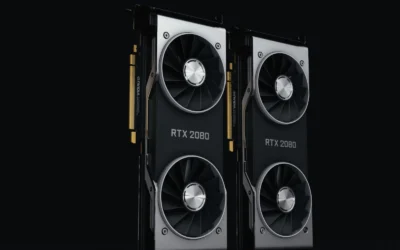
The ASUS Prime GeForce RTX 5070 12GB GDDR7 is a SFF-Ready enthusiast graphics card built on NVIDIA Blackwell architecture. It is designed for gamers and creators who want top tier 1440p performance and solid 4K capability in a more compact, versatile form factor.
Powered by DLSS 4 and 12GB of ultra fast GDDR7 memory, it delivers smooth high refresh rate gaming in competitive and AAA titles. Users report excellent results in demanding games like Metro and Escape from Tarkov, with quiet operation and low temperatures even under sustained loads.
Build quality is a clear highlight, with a sleek jet black design, premium Prime lettering, and a rigid 2.5-slot construction that avoids GPU sag. The triple Axial-tech fans with barrier rings and phase-change thermal pad provide efficient, quiet cooling while blending seamlessly with modern dark motherboards.
The card is not without compromises. At 12 inches long it can still be a tight fit in the smallest mini-ITX cases despite its SFF-Ready branding. As with any current gen GPU, you will need a capable CPU and power supply to get the most from its PCIe 5.0 performance.
Overall, the ASUS Prime RTX 5070 strikes an impressive balance of power, efficiency, and build compatibility. If you want a cool, quiet, and future ready GPU for high performance 1440p gaming with headroom for 4K, this is an outstanding choice that should serve you well for years.
GPU: NVIDIA GeForce RTX 5070, Blackwell architecture, 2542 MHz boost clock
Memory: 12GB GDDR7, 4000 MHz memory clock
Interface: PCIe 5.0 x16, 3x DisplayPort 2.1b, 1x HDMI 2.1b, up to 7680x4320 resolution
Cooling: Triple Axial-tech fans, 2.5-slot design, phase-change GPU thermal pad, Dual BIOS
Dimensions and Weight: 12 x 5 inches, 3.3 pounds, SFF-Ready compatible
Warranty: 3 Year ASUS Warranty
How They Compare
Raster Performance and Feature Ecosystem at 1440p
The ASUS SFF-Ready Prime NVIDIA GeForce RTX 5070 is powered by the NVIDIA Blackwell architecture and DLSS 4 per the spec sheet, which shapes its approach to 1440p. Owners commonly report that it handles competitive shooters and story driven titles at high refresh with ray tracing enabled when upscaling is used, while the RX 9070 is commonly described as a strong raster first alternative that competes closely in traditional rendering. For pure rasterization without ray tracing, the two are often evaluated as being in the same performance tier, with differences showing up more in feature support than in raw frame delivery at 1440p.
The ecosystem difference matters more than a single spec. The ASUS SFF-Ready Prime NVIDIA GeForce RTX 5070 gives you access to DLSS 4, including Super Resolution and Frame Generation where supported, plus NVIDIA Reflex and Broadcast features that many owners value for latency and streaming. The RX 9070 counters with FSR and a driver stack that owners commonly praise for straightforward tuning and strong value in raster heavy games. If you play a lot of ray traced titles or you want the most mature AI upscaling path, the RTX 5070 has a clearer advantage, while if you mostly play raster heavy games and prefer to avoid proprietary features, the RX 9070 can feel more direct. A related look at the next tier up can help contextualize pricing and performance steps, see our top RTX 5070 ti cards for 1440p gaming for how the stack scales.
VRAM and Memory Configuration
Memory is one of the clearest on paper differences you can verify. Per the spec sheet, the ASUS SFF-Ready Prime NVIDIA GeForce RTX 5070 comes with 12GB of GDDR7 on a PCIe 5.0 interface with HDMI and DP 2.1 outputs, which is the configuration you should plan around for texture settings and future titles. That 12GB GDDR7 setup is well matched to 1440p ultra textures in 2026 and November titles, and the newer GDDR7 standard is intended to provide higher bandwidth efficiency compared to previous GDDR generations. Owners commonly report that 12GB is comfortable for most current 1440p games at ultra, though heavily modded titles and some future ultra texture packs will always benefit from more headroom.
The RX 9070 is positioned as a direct competitor with a large VRAM pool aimed at the same 1440p ultra use case, but since no specific VRAM figure for that card is provided in the source data, you should compare its exact listed capacity against the 12GB GDDR7 on the ASUS SFF-Ready Prime NVIDIA GeForce RTX 5070 before you buy. In practice, if you keep games at 1440p and use high rather than ultra textures, both cards are generally regarded as sufficient, while creators who also do heavy texture work or want extra future cushion may lean toward whichever card lists more VRAM on its official spec sheet. If you are building on a tight budget and want to understand where memory and GPU spend fits in a full system, our Budget Build Guides break down balanced allocations.
Power Draw and PSU Requirements
Power and thermals affect not just performance but also your power supply choice and case airflow. The Products Data for the ASUS SFF-Ready Prime NVIDIA GeForce RTX 5070 does not list a specific TDP or wattage, so you should follow the GPU maker recommended wattage on the official product page and add headroom for your CPU and other components rather than relying on estimates. As a general practice, choose a quality PSU that exceeds the combined GPU and CPU draw by a comfortable margin and that provides the required PCIe power connectors natively, and follow the manufacturer mounting and power connection instructions. This approach avoids strain on the PSU and leaves room for transient spikes that modern GPUs can produce.
Owners commonly describe both the ASUS SFF-Ready Prime NVIDIA GeForce RTX 5070 and the RX 9070 as efficient 1440p cards relative to higher tier 4K models, but efficiency perception varies by board partner and cooler design. The ASUS card uses a phase-change GPU thermal pad to help ensure optimal heat transfer, which owners commonly associate with lower GPU temperatures and more consistent boost behavior, while RX 9070 partner cards vary widely in power tuning. For either card, do not assume your existing PSU is sufficient, check the recommended wattage, verify you have the correct 8 pin or 16 pin connectors, and handle installation with anti-static precautions. You can see how power and component balance plays out in a complete system in our ryzen 5 7600 RX 7700 XT 1000 dollar gaming PC amazon build.
Physical Size, Cooling and Case Compatibility
Fit is where the ASUS SFF-Ready Prime NVIDIA GeForce RTX 5070 has a documented advantage. Per the spec sheet it uses a 2.5 slot design with three Axial-tech fans that feature a smaller hub, longer blades, and a barrier ring to increase downward air pressure, plus a carefully arranged shroud, heatsink and heat pipe layout that leverages chassis side panel ventilation. It is explicitly listed as SFF-Ready, which means it is designed to meet small form factor build guidelines while maintaining cooling performance, and it includes Dual BIOS support for switching between performance and quiet profiles. Owners commonly report that this combination helps keep noise and temperatures in check in compact cases without requiring an oversized chassis.
The RX 9070, by contrast, does not have a single standardized cooler in the provided data, so dimensions and slot thickness depend entirely on the partner model you choose. Many RX 9070 cards are built with larger triple fan coolers that can exceed 2.5 slots and require more length clearance, which can be a constraint in compact or SFF cases. Before you commit to either card, check your case GPU length limit, slot clearance, and radiator or front panel interference, and confirm that your case can supply fresh intake air to the Axial-tech style fans on the ASUS model or the equivalent cooler on the RX 9070. For more help choosing a card that matches your chassis and airflow, browse the full Graphics Cards category.
Which One Should You Get
Choose ASUS SFF-Ready Prime NVIDIA GeForce RTX 5070 if you want Blackwell features and DLSS 4 for 1440p high refresh gaming, especially with ray tracing enabled, and you value a compact, thermally tuned design. It is the better fit for SFF or mid tower builds where a 2.5 slot, SFF-Ready card with three Axial-tech fans and a phase-change thermal pad helps with temperatures and compatibility, and for users who already use NVIDIA features like Reflex, Studio drivers, or streaming tools. You should also lean this way if you prefer Dual BIOS flexibility and a card that is explicitly designed to leverage side panel ventilation in tighter cases.
Choose RX 9070 if your priority is maximizing raster performance per dollar at 1440p and you are comfortable with AMD FSR for upscaling rather than DLSS 4. It can be a compelling pick for AM5 platform builds where you want to stay within the AMD ecosystem, or for larger ATX cases where cooler size is less constrained and you can choose a partner card with the acoustic profile you prefer. If you rarely use ray tracing and you play mostly competitive or raster heavy titles where traditional rendering matters most, the RX 9070 often aligns better with that use case.
Who Should Skip Both
Both of these cards are not ideal for buyers who are targeting native 4K ultra at high refresh without upscaling, or for users who need a low power, single fan card for a very compact low airflow chassis. They are also not a good fit if you are building a strict 1080p budget system where a lower tier GPU would free up funds for a better CPU, more storage, or a higher quality PSU. If you need heavy professional GPU compute with large VRAM pools for creation workloads, or you want a card that is explicitly rated for ultra small form factor low profile cases, you should look at a different class of GPU that is designed for those specific constraints.
Frequently Asked Questions
Is 12GB VRAM enough for 1440p gaming in 2026?
Per the spec sheet, the ASUS SFF-Ready Prime NVIDIA GeForce RTX 5070 has 12GB of GDDR7, which owners commonly report is sufficient for 1440p ultra in most current titles. If you regularly use ultra texture packs, heavy mods, or keep many background applications open, you may want to compare the exact VRAM listing of the specific RX 9070 model you are considering and choose the larger pool for extra headroom.
Do I need DLSS 4 for 1440p, or is FSR on the RX 9070 enough?
DLSS 4 on the ASUS SFF-Ready Prime NVIDIA GeForce RTX 5070 is useful if you play ray traced games or want AI assisted upscaling and Frame Generation where supported. FSR on the RX 9070 is widely supported and owners commonly find it effective for boosting frame rates in raster heavy titles, so if you rarely enable ray tracing you may be satisfied with either approach.
Will the ASUS SFF-Ready Prime RTX 5070 fit in a small form factor case?
It is listed as SFF-Ready with a 2.5 slot design and three Axial-tech fans, which is intended to improve compatibility with small form factor builds compared to thicker enthusiast cards. You should still verify your case GPU length, slot width, and side panel ventilation against the manufacturer dimensions and follow the included mounting instructions, using proper anti-static handling during installation.




Write Your Review
No reviews yet. Be the first to share your experience!