

Choosing an RTX 5060 Ti 16GB length and clearance for a mid tower and SFF case is less about raw performance and more about physical fit. You are balancing your resolution and refresh target, your platform and socket, your case size and clearance, your power budget, and whether this card is for your current build or your next upgrade.
In November 2026, most RTX 5060 Ti 16GB cards share the same core specs like 16GB GDDR7 and PCIe 5.0, but they differ in cooler size, slot thickness and power layout. That is why two cards with the same GPU can fit very differently. This guide gives you a simple framework to compare any model against your case, so you can shop with confidence and avoid returns. For a broader view of enclosure types, browse the Cases & Airflow archive.
What Actually Matters
SFF-Ready and Slot Thickness Are Your First Filter
NVIDIA defines SFF-Ready Enthusiast GeForce Card as a size guideline that helps small cases guarantee fit. If a card carries that label, it has been evaluated to meet maximum length, width and height limits for SFF builds. In our data set, several RTX 5060 Ti 16GB models carry this designation, which is a helpful shortcut when you shop compact.
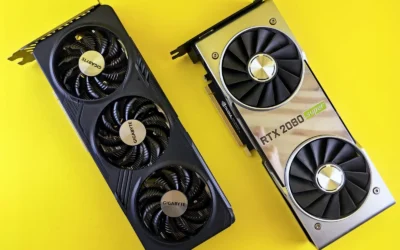
Slot thickness is the next detail to check. A 2-slot card like the compact dual-fan designs will clear most sandwich-layout and narrow SFF cases, while a 2.5-slot design needs extra width to the side panel. Always compare the card slot width on the spec sheet to your case GPU thickness limit. If your case lists support for 2.5-slot or 3-slot GPUs, a 2.5-slot card is usually fine. If it only lists 2-slot, you should stay with a true 2-slot model.
Also check how slot thickness affects neighboring slots and airflow. A thicker heatsink can block the slot below it and press against a side panel or riser cable in vertical mount setups. Owners commonly report higher noise or temperatures when a thick card has less than 5 to 10 mm of breathing room to the panel, so give yourself margin where you can.
Length, Height and Power Connector Bend Clearance
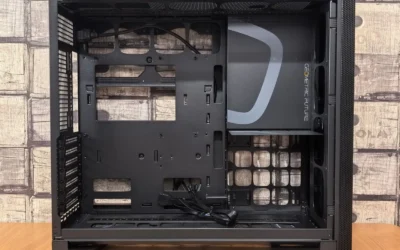
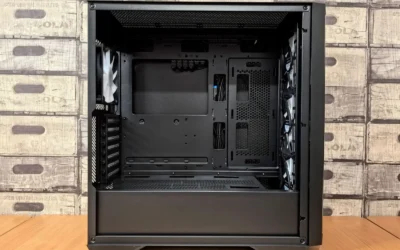
Case makers list a maximum GPU length, but that number assumes an empty front. Once you add front fans, an AIO radiator or a front-mounted reservoir, you lose 25 to 55 mm of usable length. Measure from the rear PCIe bracket to the nearest obstruction, not just the case spec. If you plan a front radiator, subtract its thickness plus fan thickness from the listed GPU clearance.
Height and power connector clearance matter just as much. Most RTX 5060 Ti 16GB cards in this group use a single 8-pin PCIe power connector, but the connector sits on top of the card. You need room for the plug plus the cable bend. In many SFF cases the side panel or top bar sits close to the card edge, so a stiff cable can prevent the panel from closing. Look for a recessed connector, a right-angle cable, or extra vertical clearance in your case manual.
Do not forget the GPU holder or support bracket if your case is a mid tower. Longer triple-fan cards can sag over time, and some models include a holder in the box. Check your case for vertical GPU mount options and whether that mount changes length and thickness limits. The Graphics Cards section has more guidance on how card dimensions interact with case layouts.
Cooler Design, Fan Count and Airflow Path
Cooler design determines noise and case airflow, not just GPU temperature. Triple Axial-tech fan designs with a 2.5-slot heatsink move more air at lower fan speeds and often include 0dB fan stop for quiet idle, plus a Dual BIOS switch for Quiet versus Performance profiles. Dual-fan 2-slot designs are shorter and narrower, which helps in tight SFF cases but they rely on higher fan speeds under load.
Look at airflow path as well. Cards with a pass-through airflow design and composite heatpipes vent some hot air directly through the backplate and out of the case, which helps in compact enclosures with limited exhaust. Traditional solid backplates rely more on case fans to remove heat. If your case has mesh side panels and strong exhaust, either approach can work. If your case is more closed, prioritize pass-through and make sure your case fans can keep up.
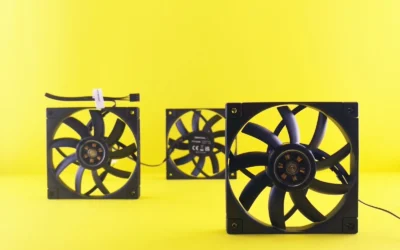
Fan bearing type and features like FREEZE Fan Stop or 0dB technology affect long-term noise and durability. Dual-ball bearings are rated to last longer than sleeve bearings according to makers, which is worth weighing if you keep cards for several years. For help balancing noise and thermals, review airflow basics in our Budget Build Guides before you finalize fans and layout.
Power Budget and Physical PSU Clearance
Even though RTX 5060 Ti 16GB cards are efficient, you still need proper power headroom. One model in this group lists a recommended 550W PSU with a single 8-pin connector, while a related prebuilt uses a 650W 80 PLUS Gold unit to cover the whole system. Follow the GPU maker recommended wattage and add headroom over your combined CPU and GPU draw. Never assume a small SFX or compact ATX PSU can handle any card, check its wattage, connector count and cable length.
In SFF cases, the PSU itself can block GPU length or cable routing. SFX and SFX-L units free up length in front of the GPU, while a full ATX PSU in a compact mid tower can crowd the bottom chamber. Verify PSU length limits, the position of the PSU shroud, and whether your 8-pin cable can route without a sharp bend. Also check cooler height or radiator clearance against your case if you use an AIO, and follow the manufacturer mounting instructions while using anti-static handling.
Finally, think about display and system connectivity. Cards here offer combinations of HDMI 2.1b and DisplayPort 2.1b with support for up to four displays and up to 8K output. If you run multiple monitors or an ultrawide, confirm your case rear clearance for thick display cables and that your PSU has the right PCIe cable routing to keep cables away from fans.
A few options that show the range help illustrate these tradeoffs. Compare slot width, fan count and power layout side by side before you measure your case:
This article contains affiliate links. If you buy through one of our links, CustomPCGaming may earn a commission at no extra cost to you. Commissions never influence which products we recommend or how we rank them. Read our Affiliate Disclosure for details.
Quick Picks at a Glance

KOTIN Prebuilt Gaming PC Ryzen 7 7800X3D RTX 5060

ASUS Prime RTX 5060 Ti 16GB GDDR7 Graphics Card
ZOTAC GeForce RTX 5060 Ti 16GB Twin Edge OC

ASUS Prime GeForce RTX 5060 Ti OC 16GB GDDR7
Prime ASUS Dual GeForce RTX 5060 Ti 16GB GDDR7 OC

Thermaltake View i1460-170 Gaming Desktop
As an Amazon Associate we earn from qualifying purchases. Product prices and availability are accurate as of the date/time indicated.
Pros
- Top tier gaming CPU with 3D V-Cache delivers excellent responsiveness and frame rate stability
- RTX 5060 Ti 8GB supports DLSS 4 Multi Frame Generation, ray tracing and Reflex low latency
- Ready to use out of the box with no building or Windows installation required
- Unique dual displays for easy system monitoring and a striking aesthetic
- Modern specs with fast DDR5, PCIe 4.0 SSD and WiFi 7 connectivity
Cons
- Large tower dimensions require ample desk or floor space
- Some users report software setup challenges with the smart display app
- 16GB RAM and 8GB VRAM may require future upgrades for heavy multitasking or 4K ultra settings
The KOTIN KTG50WA778X16506T8G is a white tower prebuilt gaming PC built around AMDs gaming focused Ryzen 7 7800X3D and NVIDIA RTX 5060 Ti 8GB. It is designed for gamers who want high refresh 1080p and smooth 1440p performance without the hassle of a DIY build.
In real world use, the 3D V-Cache CPU helps deliver stable frame rates in competitive esports and demanding AAA titles, while the RTX 5060 Ti adds DLSS 4, ray tracing and Reflex support. Paired with 16GB DDR5 6000MHz and a fast 1TB PCIe 4.0 SSD, it handles gaming, streaming and light video editing with quick load times.
Design is a clear highlight thanks to the 9.16 inch smart display that shows CPU and GPU usage, temperatures and storage stats with multiple themes. The 240mm ARGB liquid cooler has its own digital temperature readout, and the glass side panel with five synced ARGB fans gives it a clean, premium showpiece look.
There are tradeoffs to consider. The case is notably large and needs extra desk space, and some users report a learning curve with the display software and initial setup. The 16GB memory and 8GB VRAM are great for today, but power users may want to plan a future upgrade for heavier multitasking or 4K gaming.
Overall, this KOTIN desktop offers strong out of the box value for mid to high level gamers who prioritize convenience and standout aesthetics. If you want a stylish, liquid cooled system that is ready to game minutes after unboxing, it is a compelling choice.
Processor: AMD Ryzen 7 7800X3D, 8 cores, 4.2GHz base up to 5GHz with 3D V-Cache, Socket AM5
Graphics: NVIDIA GeForce RTX 5060 Ti 8GB GDDR7, PCI Express, HDMI and DP output
Memory and Storage: 16GB DDR5 6000MHz, 1TB PCIe 4.0 NVMe SSD
Cooling and Power: 240mm ARGB liquid cooler with digital display, 5 ARGB fans, 650W 80 Plus Gold PSU
Connectivity: WiFi 7, Bluetooth, HDMI, 3.5mm audio, Type B power plug
OS and Dimensions: Windows 11 Home, 17.32 x 8.66 x 14.17 inches, White Tower
Connect your monitor to the horizontal graphics card ports on the lower back of the PC, not the vertical motherboard ports, or you will get no display. Use HDMI or DisplayPort, and use an adapter for VGA or DVI monitors.
Remove the internal protective foam before first power on and install the included WiFi antennas for best wireless performance. Allow Windows and NVIDIA drivers to fully update after initial boot for optimal stability.
Explore the smart display themes to monitor CPU and GPU temps and usage in real time. Keep the system on a hard, ventilated surface to maximize airflow for the liquid cooler and ARGB fans.
Pros
- Excellent future proofing with 16GB GDDR7 and Blackwell efficiency
- Very quiet and cool under load thanks to triple fans and 0dB technology
- Strong AI and creative performance for rendering and LLMs
- SFF-Ready 2.5-slot design improves case compatibility
- Durable build with reinforced metal backplate and Dual BIOS flexibility
Cons
- Triple-fan length is still large for some ultra compact mini ITX cases
- Requires a desktop with PCIe x16 slot and adequate power supply
- Not as powerful as flagship RTX 5080 or 5090 for extreme 4K gaming
The ASUS Prime GeForce RTX 5060 Ti 16GB GDDR7 is a Blackwell powered enthusiast graphics card built for gamers, creators and AI users who want modern features without flagship cost. It is an ideal upgrade for anyone on GTX 10 series or older RTX cards seeking DLSS 4, ray tracing and generous VRAM.
In real world use it delivers smooth 1440p gaming and capable 4K with DLSS 4 boosting both performance and image quality. Users report quiet operation around 64C during AI rendering, fast SDXL image generation and flawless performance in titles like Fortnite and other demanding games.
Design and build quality are standout strengths, with a 2.5 slot SFF-Ready form factor that balances compatibility and cooling. The triple Axial-tech fans with barrier ring, dual-ball bearings and 0dB technology keep noise low, while the metal backplate adds rigidity and protection.
There are a few drawbacks to consider. Despite the SFF-Ready label, the triple fan cooler makes the card fairly long for very compact cases. It also requires a desktop with PCIe x16 and sufficient power, and it cannot match the raw 4K power of higher tier RTX 50 series cards.
Overall, the Prime RTX 5060 Ti offers an excellent blend of performance, efficiency and quiet cooling. If you want future ready 16GB GDDR7, strong AI acceleration and reliable ASUS build quality for gaming and creation, it is a highly recommended pick.
GPU: NVIDIA GeForce RTX 5060 Ti, Blackwell architecture, Boost Clock up to 2602MHz OC mode, 2572MHz default
Memory: 16GB GDDR7, 758 AI TOPS, supports DLSS 4 and ray tracing
Cooling: Triple Axial-tech fans, dual-ball bearings, 0dB technology, Dual BIOS Quiet and Performance modes
Interface: PCI-Express x16, DisplayPort and HDMI outputs, max resolution 7680 x 4320
Build: 2.5-slot SFF-Ready design, reinforced metal backplate, Auto-Extreme manufacturing, 12 x 4.7 inches, 800g
Pros
- Generous 16GB GDDR7 VRAM is excellent for future games versus 8GB models
- Compact SFF-ready footprint fits small builds where larger cards cannot
- Efficient and quiet IceStorm 2.0 cooling with intelligent fan stop
- DLSS 4, PCIe 5.0 and 8K support keeps the card ready for next generation titles
Cons
- 128-bit memory bus is narrower than higher tier enthusiast cards
- Dual fan cooler has less thermal headroom than larger triple fan designs under sustained load
- Compact heatsink design benefits from good case airflow to maintain best temperatures
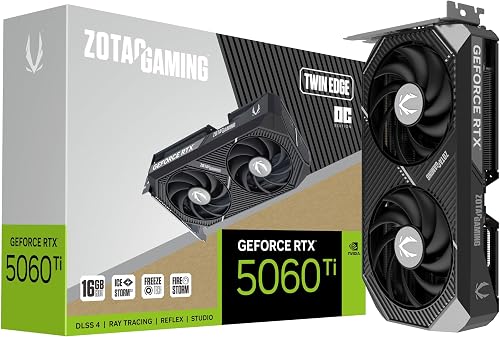
The ZOTAC Gaming GeForce RTX 5060 Ti 16GB Twin Edge OC is a Blackwell based graphics card designed for gamers who want high VRAM in a compact footprint. It is ideal for SFF builders, 1440p gamers and creators who need extra memory without moving to a bulky flagship model.
Performance is driven by 16GB of ultra fast GDDR7 memory, a 2602 MHz boost clock and DLSS 4 for AI accelerated frame rates. In real world use it handles modern titles smoothly, supports VR and 8K output, and benefits from PCIe 5.0 bandwidth for next generation systems.
The Twin Edge OC keeps things minimal and functional with a 2 slot, 220.5mm design that fits most compact cases. IceStorm 2.0 cooling pairs a large heatsink and composite heatpipes with dual 90mm BladeLink fans and pass thru airflow, while the metal backplate adds rigidity and FREEZE Fan Stop enables silent idle operation.
There are a few trade offs to consider. The 128 bit memory interface is efficient but narrower than higher tier cards, and the dual fan cooler, while quiet, has less thermal headroom than larger triple fan solutions. Users should also ensure their power supply has an available 8 pin connector and adequate case ventilation.
Overall, this card delivers strong value for gamers who prioritize compact size, quiet cooling and generous 16GB VRAM. If you want a future ready, SFF friendly GPU that stays current with Blackwell and DLSS 4, the Twin Edge OC is a smart and reliable choice.
GPU: NVIDIA GeForce RTX 5060 Ti, Blackwell architecture, Boost Clock 2602 MHz
Memory: 16GB GDDR7, 128 bit, 28 Gbps, PCIe 5.0 x16 interface
Cooling: IceStorm 2.0, dual 90mm BladeLink fans, composite heatpipes, pass thru airflow, FREEZE Fan Stop
Connectivity: 3x DisplayPort 2.1b, 1x HDMI 2.1b, 8K Ready, 4 display support, HDCP 2.3, VR Ready
Design: 2 slot, 220.5mm length, metal backplate, single 8 pin power connector, SFF Ready
Pros
- 16GB GDDR7 VRAM offers excellent future-proofing for AAA games and content creation
- Quiet and efficient triple-fan cooling with 0dB fan stop technology
- SFF-ready compact design improves compatibility with smaller cases
- Modern connectivity with PCIe 5.0 and four outputs for multi-monitor and 8K setups
- Simple upgrade path with single 8-pin connector and factory overclock
Cons
- 2.5-slot width may still be tight for ultra-compact mini-ITX cases
- Requires a 550W PSU, so some older systems will need a power supply upgrade
- No USB-C video output for users who need it for certain displays or workflows
The ASUS Prime GeForce RTX 5060 Ti OC 16GB is a Blackwell architecture card designed for gamers and creators who want strong 1080p and 1440p performance without stepping up to flagship pricing. It is ideal for esports players, streamers, and compact PC builders who need modern features like DLSS 4, Reflex 2, and ray tracing in a practical package.
With 16GB of GDDR7 memory running at 28 Gbps, this card handles high texture settings, large open world games, and demanding creator apps with headroom to spare. The factory overclocked boost up to 2647 MHz, combined with DLSS 4 upscaling, delivers smooth high refresh gameplay and more responsive input for competitive titles.
ASUS equips the Prime with three Axial-tech fans in a 2.5-slot, SFF-ready form factor that balances cooling and case compatibility. The 0dB fan stop keeps the card silent during browsing or light work, while the included GPU holder prevents sag and gives the build a cleaner, more secure finish.
Connectivity is modern and flexible with PCIe 5.0, one HDMI 2.1b, and three DisplayPort 2.1b outputs supporting up to four displays and 8K resolution. The single 8-pin power connector and 550W PSU recommendation make it a straightforward upgrade, though very small cases and older power supplies should be checked for fit and capacity.
Overall, the ASUS Prime RTX 5060 Ti OC 16GB stands out for its generous VRAM, quiet triple-fan cooler, and compact yet powerful design. If you want a future-ready card for high detail gaming and light content creation in a small or mid-tower build, this is a compelling and well balanced choice.
Graphics Processor: NVIDIA GeForce RTX 5060 Ti, Blackwell architecture
Memory: 16GB GDDR7, 28 Gbps memory speed
Boost Clock: Up to 2647 MHz in OC Mode, 2617 MHz default
Interface: PCIe 5.0, 1x 8-pin power connector, 550W PSU recommended
Outputs: 1x HDMI 2.1b, 3x DisplayPort 2.1b, supports up to 4 displays and up to 8K
Cooling: Triple Axial-tech fans, 0dB fan stop, 2.5-slot SFF-Ready design
Extras: Includes GPU holder to reduce sag and improve build aesthetics
Pros
- 16GB GDDR7 VRAM provides excellent future proofing for games and AI workloads
- Strong AI performance with 767 AI TOPS and DLSS 4 support
- Compact dual-fan SFF Ready design fits smaller cases while staying cool
- Factory OC and reliable ASUS build quality offer great out of the box performance
Cons
- New 50 series power requirements may require checking PSU and case airflow
- Dual-fan cooler can be louder than larger triple-fan models under sustained load
- Compact dual-fan design offers less thermal headroom for heavy manual overclocking
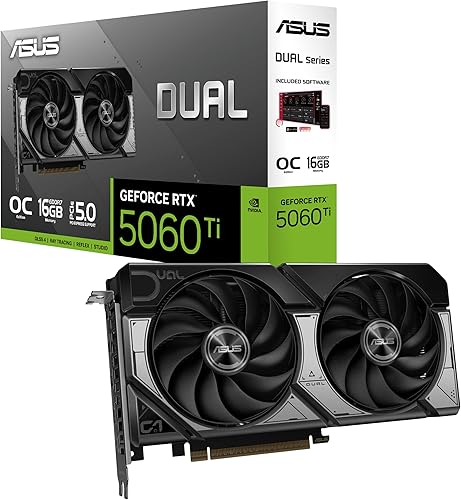
The ASUS Dual GeForce RTX 5060 Ti 16GB GDDR7 OC Edition is a next generation gaming graphics card built on NVIDIA Blackwell architecture. It is designed for gamers, creators and SFF enthusiasts who want high end 1440p and 4K performance in a compact footprint.
With 16GB of GDDR7 memory and 767 AI TOPS, it delivers excellent performance for modern games, ray tracing and AI accelerated workflows. DLSS 4 boosts frame rates and image quality, while the factory overclock to 2632 MHz ensures strong out of the box gaming performance.
The compact 9.02 inch dual fan design is SFF Ready and fits easily into smaller cases. ASUS Axial-tech fans use longer blades and a barrier ring to increase downward air pressure, keeping the card cool and quiet even under load.
As a newly launched RTX 50 series card, availability may be limited and it will demand a capable power supply and good airflow. The dual fan cooler is efficient but may be slightly louder than larger triple fan designs during extended heavy sessions.
Overall, the ASUS Dual RTX 5060 Ti 16GB OC is a powerful and future ready choice for compact builds. If you want next gen features, generous VRAM and strong 1440p performance without a massive card, it is an excellent pick.
GPU: NVIDIA GeForce RTX 5060 Ti, Blackwell architecture, OC mode up to 2632 MHz and default 2602 MHz, 16GB GDDR7, 767 AI TOPS, DLSS 4 support. Interface: PCI Express, outputs include DisplayPort and HDMI with up to 7680 x 4320 resolution.
Design: Dual Axial-tech fan cooler with 2 fans and barrier ring, SFF Ready compact size 9.02 x 4.72 inches, 0.66 kg weight. Model 90YV0MH0-M0NA00, ideal for desktop gaming and professional workloads.
Pros
- Excellent performance for modern games at 1080p and 1440p
- Very quiet operation with efficient ARGB tower air cooling
- Fast DDR5 memory and NVMe SSD for quick responsiveness
- Attractive tempered glass design with customizable RGB lighting
- Compact case that is easy to open and expand
Cons
- 16GB RAM is adequate but demanding games and heavy multitasking may benefit from 32GB
- Only two USB 3.0 ports on the front panel limits front connectivity
- Isolated user reports of power supply issues suggest considering extended warranty
The Thermaltake LCGS View i1460-170 is a balanced prebuilt gaming tower built for gamers, students and everyday users who want strong performance without building a PC. Combining an Intel Core i5-14400F with an NVIDIA RTX 5060, it targets smooth high setting gaming, streaming and productivity in one stylish package.
In real world use, the RTX 5060 8GB GDDR7 handles modern titles well at 1080p and 1440p, while the 16GB of DDR5 6000MT/s memory keeps multitasking fluid. The 1TB NVMe SSD delivers near instant boot times and fast game loads, and reviewers note the system runs quietly even under load with only a minor RAM upgrade needed for the most demanding titles.
Design is a major highlight, with an edge to edge tempered glass chassis that showcases the internal ARGB lighting and tower cooler. The case is more compact than many traditional towers, offers filtered ventilation and a PSU cover, and remains easy to open for adding a 2.5 inch or 3.5 inch drive.
Drawbacks are modest but worth noting. The front I/O is limited to two USB 3.0 ports plus audio jacks, and 16GB of RAM may feel limiting for future proofing. A small number of reviews mention power supply failure, so proper ventilation and warranty coverage are recommended.
Overall, the View i1460-170 delivers excellent value for gamers seeking a quiet, good looking and capable prebuilt. It is an ideal plug and play choice for those who prioritize 1080p and 1440p performance, clean aesthetics and easy expandability over extreme enthusiast specs.
Processor: Intel Core i5-14400F, LGA 1700, 2.5GHz base
Graphics: NVIDIA GeForce RTX 5060 8GB GDDR7, PCI Express, DisplayPort and HDMI outputs
Memory and Storage: 16GB DDR5 6000MT/s ToughRam RGB, 1TB NVMe M.2 SSD
Motherboard and Cooling: Intel B760 Chipset, ARGB Tower Air Cooler, filtered ventilated PSU cover
Connectivity and OS: WiFi, 2x USB 3.0, Headphone and Mic jacks, Windows 11 Home
Design: View Series Tempered Glass Tower, Black, 9.87 kg, Type B power plug
Matching a Part to Your Build
If you are building in a compact SFF case under about 20 liters, prioritize a true 2-slot, SFF-Ready card. The ZOTAC Gaming GeForce RTX 5060 Ti 16GB Twin Edge OC is a good illustration with its 2-slot width, dual 90mm BladeLink fans, IceStorm 2.0 cooling and single 8-pin connector. The ASUS Dual GeForce RTX 5060 Ti 16GB GDDR7 OC follows a similar dual-fan, SFF-Ready approach and lists an OC mode up to 2632 MHz with a default of 2602 MHz, which shows you can get factory overclock headroom without moving to a thicker cooler.
For a mid tower with mesh front, good exhaust and no front radiator, you have more freedom to choose a larger cooler for lower noise. The ASUS Prime GeForce RTX 5060 Ti 16GB GDDR7 and the ASUS Prime GeForce RTX 5060 Ti OC 16GB GDDR7 both use a 2.5-slot triple Axial-tech fan design, SFF-Ready labeling, and 0dB technology with a Dual BIOS option on some variants. The OC variant lists up to 2647 MHz in OC mode and includes a GPU holder, which is useful in taller cases where sag is a concern. These are strong fits when your case supports 2.5-slot thickness and you have room for the extra cooler length and power cable bend.
If you are evaluating a prebuilt or planning a GPU swap, use the complete system as a measuring guide. The Thermaltake LCGS View i1460-170 Gaming Desktop shows a mid tower with tempered glass, an ARGB tower air cooler and a B760 platform, which typically leaves generous GPU length but requires you to check tower cooler height and PSU shroud clearance. The KOTIN Prebuilt Gaming PC Ryzen 7 7800X3D 16GB DDR5 pairs a Ryzen 7 7800X3D with DDR5 6000MHz and a 650W 80 PLUS Gold PSU, a useful reference for power headroom and cable routing in a compact chassis with a liquid cooler display. Before you swap cards, measure your current GPU length, note your front fan or radiator thickness, and confirm your PSU has a free 8-pin cable with a gentle bend path. You can also compare enclosure strategies in our top RTX 5070 ti cards for 1440p gaming roundup for additional context on cooler size versus case airflow.
Common Mistakes
Mistake 1 is ignoring slot thickness and assuming any SFF-Ready card fits any SFF case. SFF-Ready is a helpful ceiling, but your specific case may still limit you to 2-slot cards or restrict width due to a riser cable or side panel. Always match the card 2-slot or 2.5-slot spec to your case GPU thickness support and leave a few millimeters for airflow and panel closure.
Mistake 2 is forgetting that front fans and radiators shorten usable GPU length. A case that lists 360 mm of GPU clearance may only offer 300 mm once a 27 mm radiator plus 25 mm fans are installed. If you plan to front-mount an AIO, measure with the radiator installed or choose a shorter dual-fan RTX 5060 Ti 16GB and top-mount the radiator instead.
Mistake 3 is underestimating power and cable bend space. Builders often check wattage but forget physical cable clearance above the card. An 8-pin plug needs room to bend without pressing against the side panel or PSU shroud. Use the recommended 550W guidance as a minimum, confirm your PSU has the correct 8-pin lead length for your case, and route cables before you fully seat the card so you are not forcing a tight bend.
Who Should Wait or Buy Differently
This category is not ideal for you if your case is an ultra-compact sandwich or console-style SFF that only supports true 2-slot cards under a strict length limit and you already own a larger 2.5-slot triple-fan model. It is also not the right choice if your PSU is well below the maker recommended wattage, if you lack an 8-pin PCIe cable with room for a gentle bend, or if you need maximum VRAM headroom that would be better served by a higher tier card with a larger cooler that your case cannot accommodate. In those situations, wait, choose a slimmer dual-fan RTX 5060 Ti 16GB, or move to a slightly larger case with better radiator and cable clearance. BIOS updates and any overclocking are done at your own risk and may void warranty, so follow manufacturer instructions and handle parts with anti-static precautions.
Frequently Asked Questions
Will a 2.5-slot RTX 5060 Ti 16GB fit in an SFF case?
Sometimes. Many SFF cases that are SFF-Ready compatible do support 2.5-slot cards, but some compact layouts only support 2-slot. Check your case spec for GPU thickness and length, then compare it to the card 2.5-slot or 2-slot rating. If your case lists only 2-slot support, choose a 2-slot model like the dual-fan options.
Do I need to worry about power connector clearance?
Yes, especially in SFF. Most cards here use a single 8-pin connector on top, and you need extra vertical space for the plug and bend. Measure from the top edge of the card to the side panel or PSU shroud and plan a gentle cable route. A right-angle 8-pin cable can help when clearance is tight.
Is a triple-fan card always better for a mid tower?
Not always. Triple Axial-tech designs can run quieter at a given load thanks to larger heatsinks and 0dB modes, but they are longer and thicker. In a mid tower with good airflow they are a great fit, while in a compact case a shorter dual-fan card with pass-through airflow may give you better overall system thermals and easier cable management.

Write Your Review
No reviews yet. Be the first to share your experience!