

If you are deciding between a classic metal under-desk cable tray and the 2 Pack No-Screw Cable Management Under Desk, you are really deciding between drilled-in strength and peel-and-stick simplicity. A metal tray appeals when you want a rigid, ventilated basket that stays put under a heavy battlestation, while this plastic tray from Aserelix appeals when you want a clean install with no tools and no holes in your desk. For a gaming setup with a PC, dual monitors, and chargers, that difference shapes your daily cable routine.
Your real decision comes down to desk material, load, and whether you can drill. If you own a solid wood desk and run a full tower, large power strip, and brick adapters, rigid metal often feels more secure. If you rent, use a glass top or particle board, or you want to tidy a home office quickly in November of 2026, the adhesive plastic route keeps things simple and reversible. This comparison breaks down material, install, capacity, and daily use so you can match the tray to your build, as covered in our Cable Management and Under-Desk guides.
This article contains affiliate links. If you buy through one of our links, CustomPCGaming may earn a commission at no extra cost to you. Commissions never influence which products we recommend or how we rank them. Read our Affiliate Disclosure for details.
Quick Picks at a Glance
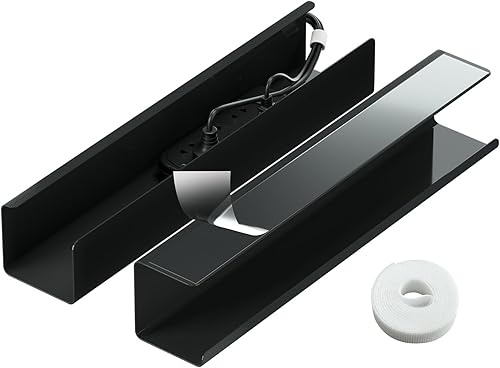
Prime Aserelix 2 Pack Under Desk Cable Management Tray
As an Amazon Associate we earn from qualifying purchases. Product prices and availability are accurate as of the date/time indicated.
Pros
- Tool-free installation is fast, simple and renter friendly
- Large capacity easily hides full-size power strips
- Minimalist black tray blends well with modern desks
- Sturdy PVC construction feels pressure resistant and safe
- Two trays plus Velcro straps add excellent organization value
Cons
- Adhesive bonds best to smooth surfaces only and may loosen over time
- Large profile can look visible under smaller or shallow desks
- Requires 24-hour cure time before loading and is hard to reposition
The Aserelix 2 Pack Under Desk Cable Management Tray is a self-adhesive organizer designed to lift power strips and cords off the floor. It is made for home office workers, gamers and students who want a tidy desk without drilling holes.
In real use, the large 15.55 inch tray easily swallows a full power strip plus chargers and adapters. Users report sturdy hold and cleaner desks, with the included Velcro strap making it simple to bundle excess length and keep everything in place.
The one-piece, no-hole design gives a sleek, minimalist look that blends with modern decor. Made from insulated, flame-retardant PVC, it resists pressure and wear and holds its shape during long term daily use.
The main limitation is the adhesive system, which works best only on smooth surfaces and needs a full 24 hours to cure. The size runs large, so it can be visible under compact desks, and repositioning after install is difficult.
Overall, this is a practical, renter friendly fix for cable chaos when you cannot or do not want to drill. If you have a smooth-bottom desk and need to hide bulky strips cleanly, this 2-pack is an easy recommendation.
Brand: Aserelix, Color: Black, Style: Modern, Material: Plastic PVC with flame-retardant insulation.
Size: 15.55 x 4.13 x 3.66 inches, Installation: Self-adhesive peel and stick, Indoor use only.
In the box: 2 under-desk cable trays plus reusable Velcro straps for bundling and organizing cords.
How They Compare
Material Strength and Heat Safety
The metal under-desk cable tray uses rigid steel mesh or solid steel that resists sag when you load it with a long surge protector and chunky adapters. The 2 Pack No-Screw Cable Management Under Desk uses high-quality PVC plastic with insulation and flame-retardant properties, plus a one-piece, no-hole design that feels smooth and resists pressure and wear. Per the spec sheet, the plastic tray will not deform even after long-term use, which matters if your cables press against the walls.
For heat, both approaches work for normal gaming loads when you give bricks room to breathe, but they behave differently. Metal dissipates warmth and allows airflow through open grids, which owners commonly report helps with warm power bricks tucked under a desk. The 2 Pack No-Screw Cable Management Under Desk relies on an enclosed plastic channel that looks cleaner and adds electrical insulation, though you should avoid packing it tight and keep high-heat adapters spaced for airflow.
Installation and Desk Compatibility
Installation is where the two diverge most for your desk. A metal under-desk cable tray typically needs screws, a drill, and careful measuring, which gives a very secure hold on solid wood but is not friendly to glass, thin tops, or rentals. The 2 Pack No-Screw Cable Management Under Desk needs no tools, since you peel and stick the pre-applied double-sided adhesive to any smooth surface, with no drilling and no mess.
You need to match the mount to your top material and patience. The 2 Pack No-Screw Cable Management Under Desk adheres best to smooth surfaces only, and the maker notes you should wait at least 24 hours after installation before loading cables or power strips for optimal hold. A metal under-desk cable tray takes more effort up front, yet owners commonly report it stays solid on uneven or textured wood where adhesive can struggle, provided you follow the manufacturer mounting instructions and check screw length against your desk thickness.
Capacity and Cable Layout
Capacity shapes whether your battlestation stays tidy with one tray or needs two. The 2 Pack No-Screw Cable Management Under Desk ships as a two-pack in black, and each tray measures 15.55×4.13×3.66 inches, which gives you room for a standard power strip plus routed monitor, USB, and Ethernet leads. A metal under-desk cable tray is often longer and more open, so you can drop in large bricks from above without threading, though the exact fit depends on the model you pick.
Layout habits matter as much as size. The 2 Pack No-Screw Cable Management Under Desk includes a free reusable Velcro strap to bundle runs before you lay them in the channel, and its one-piece design hides clutter for a minimalist look that pairs well with lighting. A metal under-desk cable tray usually offers open sides for quick reroutes when you swap a dock or console, while the plastic channel rewards planned routing where you set cables once and leave them.
Looks and Everyday Access
Under a gaming desk, looks count when your setup faces the room or streams on camera. The 2 Pack No-Screw Cable Management Under Desk blends with modern decor thanks to its sleek and seamless one-piece shape with no bulky clips, so you see a smooth black channel instead of hanging loops. A metal under-desk cable tray looks more utilitarian with visible mesh or bars, which some builders prefer for an industrial battlestation but others find busier from the side.
Daily access is the trade-off you will feel after install. With the metal under-desk cable tray you can reach up and unplug a brick in seconds, which helps if you rotate headsets, chargers, and external drives often. With the 2 Pack No-Screw Cable Management Under Desk you get a tidier hideaway that keeps dust and feet away, and you can learn more about pairing it with glow in our minimalist RGB desk setup breakdown and ideas to run LED strips around a desk without damage for a cleaner backdrop.
Which One Should You Get
Choose the metal under-desk cable tray if you run a heavy, permanent battlestation on solid wood and want maximum rigidity for long power strips and multiple bricks. You are a good match if you own your desk, you are comfortable drilling pilot holes, and you swap hardware often and need open-top access for quick changes. This path suits full tower gaming PCs, dual monitor arms, and sim rigs where cables stay thick and you want ventilation around warm adapters while you keep the floor clear and your power within easy reach.
Choose the 2 Pack No-Screw Cable Management Under Desk if you rent, use a smooth top desk, or want a fast tidy without tools in 2026. You get two black trays with adhesive backing and a reusable Velcro strap, so you can split power on one side and USB and network on the other for a balanced look that also works with 2 Pack No-Screw Cable Management Under Desk. Pair it with ideas from our RGB LED strips for a corner desk guide if you want soft rear glow without visible wires, and remember to press firmly, then wait 24 hours before loading.
Who Should Skip Both
If you run a standing desk with full motion, a glass desk with beveled edges, or a setup with floor-based UPS units and very thick bundles, these trays are not ideal for you. Adhesive plastic can lose grip on textured or coated glass and on frames that flex all day, while a basic screw-mounted metal basket can still sway or snag when the desk moves through its full range. You are not a good fit for either option if you need locking covers for small children or pets, or enclosed raceways for wall-to-desk runs, so consider J-channels, spine wraps, or floor covers instead.
Frequently Asked Questions
Is metal or plastic better for a heavy power strip under a gaming desk?
For maximum rigidity with a long surge protector and multiple bricks, a metal under-desk cable tray often feels more secure because steel resists flex. The 2 Pack No-Screw Cable Management Under Desk still handles a standard strip and routed leads when mounted on a smooth surface and loaded after 24 hours. If your load is very heavy or your top is textured, owners commonly report screw mounting holds up better over time.
Will adhesive plastic trays stick to glass, laminate, or rental desks?
The 2 Pack No-Screw Cable Management Under Desk is made for smooth surfaces with peel-and-stick adhesive, so it works well on flat laminate, sealed wood, and many metal frames without drilling. It is not recommended for rough, porous, or heavily textured tops where grip can fail. Clean the area, press firmly, and wait at least 24 hours before adding weight to get the most secure hold.
Which option looks cleaner for streaming and RGB lighting?
The 2 Pack No-Screw Cable Management Under Desk looks cleaner from the front and sides thanks to its sleek one-piece, no-hole design that hides loops, and it is rated 4.4 out of 5 from 38 reviews according to owners. A metal under-desk cable tray shows more texture but gives faster access for cable swaps. In 2026, many builders pair the plastic channel with rear glow for a tidy on-camera backdrop that keeps power and USB out of sight.








Write Your Review
No reviews yet. Be the first to share your experience!