

If you are choosing between the VIVO Black 63 x 55 in Corner Standing Desk and a standard rectangular gaming desk, you are really choosing between wrap-around corner space and a straight run along one wall. That single choice shapes where your PC sits, how your displays angle toward you, and how much room you keep open for your chair, storage and movement.
We reviewed the spec sheet, evaluated owner feedback and compared the layouts side by side for 2026 gaming rooms. In this guide you will see how footprint, display layout, sit to stand comfort and stability differ, so you can match the shape to your room and your play habits. If you are still planning the wider room, browse the gaming desks and chairs hub for related seating and layout ideas.
This article contains affiliate links. If you buy through one of our links, CustomPCGaming may earn a commission at no extra cost to you. Commissions never influence which products we recommend or how we rank them. Read our Affiliate Disclosure for details.
Quick Picks at a Glance
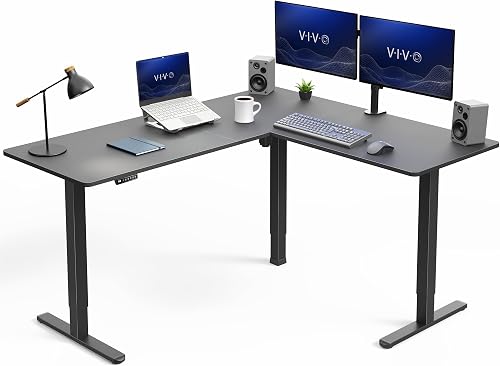
VIVO DESK-E3CTB L-Shaped Electric Corner Standing
As an Amazon Associate we earn from qualifying purchases. Product prices and availability are accurate as of the date/time indicated.
Pros
- Large L-shaped surface easily accommodates dual or triple monitor setups plus accessories
- Smooth single-motor electric lift with memory presets for effortless sit-stand transitions
- Sturdy all-steel frame and wide legs provide excellent stability at sitting and standing heights
- Smart corner-fitting design frees up floor space while offering generous work area
Cons
- Large 63 x 55 inch footprint needs a dedicated corner and may overwhelm small rooms
- Particle board tops with laminate finish are durable but less premium than solid wood
- Single motor design lifts smoothly but may operate slower than dual-motor standing desks
The VIVO DESK-E3CTB is an L-shaped electric corner standing desk designed for home office workers, gamers, and multitaskers who need room for multiple screens. With an outside footprint of 63 by 55.2 inches, it turns an unused corner into a highly functional workstation.
Standout performance comes from its powerful single motor with telescopic adjustment from 28.5 to 46.8 inches. The push-button controller with memory presets lets you switch between sitting and standing quickly, promoting better posture and energy during long workdays.
Build quality centers on an all-steel frame with strong 2.4 inch wide T-shape legs and 0.72 inch laminated tops. The three-part top feels solid, supports up to 225 lbs, and the modern black finish looks clean in most office settings.
There are a few tradeoffs to consider before buying. The large L-shape requires ample corner space and assembly takes time due to the three top panels, plus the particle board surface can show wear faster than solid wood under heavy daily use.
Overall, this VIVO corner standing desk delivers excellent value for anyone wanting spacious, stable, and ergonomic sit-stand performance. If you need a corner-friendly workstation with electric adjustment and memory presets, it is a smart and practical choice.
Model: VIVO DESK-E3CTB, L-shape corner standing desk in Black Top with Black Frame.
Dimensions: 63 inches wide by 55.2 inches deep, height adjusts from 28.5 to 46.8 inches with electric telescopic lift.
Capacity and Build: Supports up to 225 lbs with all-steel T-shape legs, 0.72 inch laminated particle board tops, and freestanding floor mount design.
Controls: Programmable push-button memory controller with presets for customized sitting and standing heights.
How They Compare
Footprint and Room Placement
The VIVO Black 63 x 55 in Corner Standing Desk uses an L-shape with 3-part top that includes a spacious main desk and return desk, and when fully assembled the outside surface measures 63” x 55.2”. That footprint is made to sit into a corner or to act as an office space divider, which gives you usable surface on two sides instead of one long edge. A standard rectangular gaming desk takes the opposite approach with a single straight top that sits flat against a wall or under a window and leaves the corners of the room open.
For your room, that difference matters more than it first appears. If you have an empty corner and you want your setup to feel enclosed and focused, the L-shape fills that dead space and keeps your keyboard, controller chargers and work materials within arm reach on two wings. If your room is narrow, if the door swing clips a corner, or if you share a bedroom and need to keep one side open for a bed or dresser, a rectangular top is often easier to place, easier to move, and simpler to pair with shelves above it.
Display and Gear Layout for Gaming
The VIVO Black 63 x 55 in Corner Standing Desk is described as accommodating a variety of monitor and laptop setups along with important work materials, supplies and decor, with comfortable viewing angles from the corner position. In practice that means you can center your main display on one wing, angle a second display or laptop on the return, and still keep room for your PC tower, headset stand, console or streaming mic without stacking everything in one line. A rectangular gaming desk puts all of that gear in a single row, which can feel clean for one ultrawide display but gets crowded once you add side displays, a laptop dock and speakers.
Think about how you actually play and create. If you run a main game display plus chat, guides, OBS preview or school work on a second screen, the return wing gives each screen its own zone and helps reduce neck turn because the corner brings the side screen closer to your natural line of sight. If you mainly play on one display with a controller or a compact keyboard and mouse layout, a rectangular top keeps your focus forward and your cable runs shorter. Owners commonly report that corner wings also help streamers separate game space on one side and mic, camera and lighting controls on the other.
Sit to Stand Movement and Daily Comfort
The VIVO Black 63 x 55 in Corner Standing Desk offers Create Instant Active Standing to go from sitting to standing in one smooth motion with customized user heights, using a powerful single motor and strong 2.4” wide legs with precise telescopic height adjustment. The height range is 28.5” to 46.8” and the easy-to-use push button controller features memory presets to save your preferred height settings, which is helpful when you share the desk or switch between sitting for long sessions and standing for short breaks. Most basic rectangular gaming desks are fixed height, so what you get out of the box is what you live with unless you add a riser or swap the frame.
That adjustability changes daily comfort if you alternate posture or if people of different heights use the same setup. You can set one preset low for focused aiming with your chair at full support and one preset higher for standing between matches, stretching or taking calls, then return to your exact sitting height without guessing. Pair that movement with supportive seating, and our big and tall gaming chair guide is useful if you need extra seat height, depth and back support to match a taller desk position. A fixed rectangular desk can still work well if your chair already fits you perfectly and you prefer a set-and-forget height.
Frame Strength, Stability and Cable Control
The VIVO Black 63 x 55 in Corner Standing Desk uses an all-steel frame and sturdy particle board table tops, and it supports up to 225 lbs with maximum stability while keeping a modern appearance that blends with a variety of home and office environments. With a rating of 4.6/5 from 1172 reviews, according to owners it is generally regarded as solid for a loaded corner build with multiple displays, a desktop PC and accessories spread across both wings. A typical rectangular gaming desk often uses a lighter straight frame that can feel nimble and easy to reposition, but it may show more wobble once you load one end with a heavy tower and a clamp mount.
Cable control also plays out differently by shape. On the L-shape you have longer runs from the return wing back to the PC and power strip, so planning helps a lot and a dedicated tray keeps sagging cables off your feet when the desk moves up and down. See the under-desk cable tray roundup and this guide to routing cables for a clean desk setup before you mount a power strip, because standing desks need slack for movement. A rectangular top has shorter, simpler runs along one back edge, which is easier to hide with a single raceway but leaves less room to separate game, audio and charging cables.
Which One Should You Get
Choose VIVO Black 63 x 55 in Corner Standing Desk if you have a free corner and want separate zones for play, work and streaming gear. It is a strong match for a multi-display PC build where you want your main monitor centered, a second screen or laptop angled on the return, and your tower, mic arm and chargers spread out instead of crowded in one line. You will also appreciate it if you want sit to stand flexibility with memory presets, if you share the setup with someone taller or shorter, or if you like a cockpit feel where supplies and decor stay close on both sides. For a closer look at the exact layout, see VIVO Black 63 x 55 in Corner Standing Desk and measure your corner carefully, including chair clearance and wall outlets, so both wings open fully without blocking a door or closet.
Choose a standard rectangular gaming desk if your room favors a straight wall setup, if you move often, or if you run a focused single-display build with a console or compact PC. It fits better under windows, in narrow bedrooms and in shared spaces where you need to keep floor space open and keep the visual profile low. You will also prefer it if you already have a chair height that feels perfect, if you want the simplest cable run along one back edge, or if you plan to flank the desk with a bookshelf, drawer unit or floor lamp that would collide with a return wing. Pick the widest straight top your wall allows, keep the PC off the floor for airflow, and leave enough side space for your mouse arm at low sensitivity.
Who Should Skip Both
If you need a very small portable station for a dorm loft, a lap-style living room build, or a full sim racing cockpit with a wheel deck and pedal plate, this comparison is not ideal for you and neither shape is the right choice on its own. You would be better served by a compact folding table, a dedicated rig frame, or a wall-mounted solution that is sized around that specific use. Both options here assume a standard chair, a desk-height monitor setup and room for a normal keyboard and mouse layout, so skip them if your build breaks any of those assumptions.
Frequently Asked Questions
Is an L-shaped desk better than a rectangular desk for multi-monitor gaming?
An L-shape is often easier for multi-display play because the return wing gives your side screen its own surface and brings it into a more comfortable viewing angle. A rectangular desk can still hold more than one display, but you will need to manage width carefully and you may feel crowded once mounts, speakers and a PC share one straight edge.
Does the VIVO Black 63 x 55 in Corner Standing Desk fit in a small bedroom?
It can fit if you have a true open corner, since the outside surface measures 63” x 55.2” and is designed to use corner space that often goes unused. Measure both walls, check door and drawer clearance, and make sure your chair can roll back freely, because the return wing needs open floor space to stay useful.
Do I need sit-stand height if I already have a comfortable gaming chair?
You do not need it, but many players enjoy switching posture during long days, and the VIVO height range of 28.5” to 46.8” with memory presets makes those changes repeatable. If your chair fit is already dialed and you rarely stand, a fixed rectangular desk with good ergonomics and clean cable routing may serve you just as well.







Write Your Review
No reviews yet. Be the first to share your experience!