

If you are trying to figure out how to build an ergonomic setup on a budget, your real decision is where comfort per dollar helps you most. You need to weigh screen height and viewing angle for neck comfort, laptop or desktop platform, desk size and clearance for mounts and risers, wrist support for long sessions, and what to fix now versus what to save for your next upgrade.
You do not need a full furniture swap to feel better. Small, focused add-ons that lift your screen, support your wrists, and free desk space often change posture more than a pricey chair alone. This guide shows you how to prioritize those pieces, what specs to compare, and which tradeoffs make sense when funds are tight. You can also browse the full Gaming Desks and Chairs collection for context as you plan.
What Actually Matters
Screen Height and Neck Position
Your screen top should sit near eye level so you are not craning down for hours. When you use a laptop flat on a desk, your neck bends and your shoulders round, which owners commonly report leads to stiffness after long play or work sessions. Look for a riser or arm that lets you adjust height and angle until your gaze feels neutral and your back can stay supported.
Tilt, swivel, and rotation matter more than they sound. Tilt helps you cut glare and keep text readable, swivel lets you shift position without twisting your spine, and rotation helps if you read long pages or code. Per the spec sheet, designs that offer +/-45 degree tilt and swivel with 360 degree rotation give you flexible control without forcing you into one fixed pose.
Desk Fit, Stability, and Weight Support
Before you pick any mount or riser, check how it connects to your desk. Clamp mounts need a compatible edge thickness and a sturdy top, while freestanding risers need enough depth so they do not wobble when you type. Always compare the stated weight capacity to your device and follow the manufacturer mounting instructions so the setup stays secure.
VESA compatibility is central if you plan to use a monitor now or later. Common patterns such as 75x75mm and 100x100mm cover many displays in the 15 inch to 32 inch range, but you should confirm your exact model on the spec sheet. For laptop trays, check both tray dimensions and supported laptop size, such as a 13.8 inch by 11.8 inch tray that fits laptops up to 17 inch, so your machine sits fully supported.
Wrist Angle and Typing Comfort
Wrist discomfort often comes from extension, where your hands bend up to reach a flat keyboard, and from pressure on hard desk edges. A supportive rest that keeps your wrists in a more neutral line can help you type and game longer with less fatigue. Look for soft but supportive foam with a breathable cover that keeps you cool, plus a base that grips instead of sliding.
Angle choice changes feel in a big way. A low angle around 3 degrees suits quick tasks and low profile keyboards, while a higher angle around 12.5 degrees gives more lift and cushion for extended sessions. One piece designs that combine the keyboard platform and the rest can prevent gaps that catch your wrists, and high density silicone bases help the whole unit stay put during intense input.
Airflow, Space, and Everyday Usability
Heat and clutter quietly hurt comfort. A laptop that sits flat traps warmth, and owners commonly report louder fan noise when airflow is blocked. Open designs with ventilation holes, such as a tray with 240 holes for airflow, let air move under the chassis and may help maintain performance during long sessions without adding extra gear.
Free space under your screen area also improves posture because you can pull your keyboard and mouse closer to your body. Arms and risers that lift the device create room for those inputs and for routing wires with clips. If cable mess stresses you out, pair your choice with under-desk cable trays that keep cords off your feet and out of sight.
To see how these ideas show up in real gear, here are a few options that show the range from simple portable lift to full desk mounted support. Use them to compare adjustability, footprint, and comfort features for your own space as of November 2026.
This article contains affiliate links. If you buy through one of our links, CustomPCGaming may earn a commission at no extra cost to you. Commissions never influence which products we recommend or how we rank them. Read our Affiliate Disclosure for details.
Quick Picks at a Glance
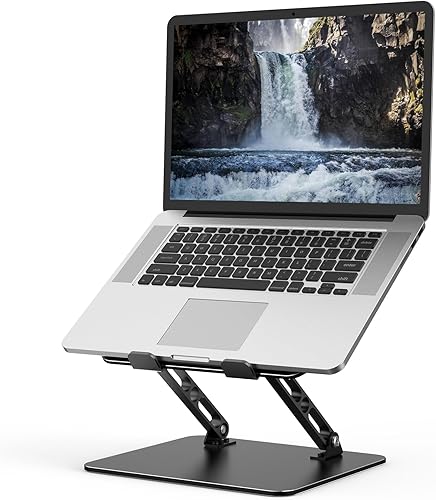
Prime Gogoonike Adjustable Laptop Stand for Desk

Prime Vaydeer 2-in-1 Ergonomic Keyboard Stand

Prime HUANUO 2-in-1 Laptop Desk Mount for 17 inch
As an Amazon Associate we earn from qualifying purchases. Product prices and availability are accurate as of the date/time indicated.
Pros
- Strong and stable metal build holds 15.6-inch laptops without wobble
- Highly adjustable for comfortable posture and reduced neck strain
- Ventilated top improves airflow and cooling performance
- Foldable with no assembly required, easy to carry and store
- Non-slip pads protect device from scratches and sliding
Cons
- Front support hooks are shallow and laptop may shift when opening lid or using touchpad area
- At 780g it feels slightly heavy for ultra-light travelers
- Not ideal for 17-inch or heavier gaming laptops
The Gogoonike ZB-1688 is an adjustable metal laptop stand designed for 10 to 15.6 inch laptops, tablets and books. It is built for remote workers, students and frequent travelers who want better posture at home, in the office or outdoors.
Adjustable height and angle let you raise the screen to eye level to reduce neck fatigue, back pain and eye strain. Users report cooler operation thanks to the open ventilated top, plus stable support for daily typing and viewing.
Construction is sturdy metal rated up to 8kg with smooth, hand friendly edges. Anti skid silicone pads on top and bottom plus rubber mats on the hooks keep devices secure and help prevent scratches and sliding.
The front hooks are a bit shallow, so the laptop can shift when opening the lid or pressing near the touchpad. At 780g it is portable but slightly heavier than ultra light plastic stands, and it is not suited for 17 inch laptops.
For anyone seeking a simple, sturdy and foldable riser for everyday laptops, this is a practical and ergonomic choice. It sets up in seconds with no assembly and folds flat for a backpack.
Brand: Gogoonike, Model: ZB-1688, Color: Classic Black, Style: Portable foldable riser
Compatibility: Laptops, tablets and books from 10 to 15.6 inches including MacBook Air and Pro, Dell XPS, HP, ASUS, Lenovo ThinkPad and Surface
Material: Metal with aluminum, silicone anti skid pads and rubber hook mats, supports up to 8kg
Features: Adjustable height and angle, foldable portable design, ventilated cooling top, tabletop mounting
Dimensions: 2.36 x 1.57 x 1.57 inches, Weight: 780g, Includes: 1 laptop stand with 1 year warranty
Pros
- Integrated one-piece design prevents separation and sliding
- Two ergonomic tilt angles for customized comfort
- Stable silicone non-slip base stays put during fast typing
- Soft memory foam with breathable lycra for all-day comfort
- Helps reduce wrist strain, fatigue and soreness
Cons
- Bulky large footprint may not fit compact desks or mini keyboards
- Limited to two fixed angles with no fine height tuning
- Extra soft foam may lack firmness for users who prefer rigid support
The Vaydeer Wrist Rest with Keyboard Stand is a 2-in-1 ergonomic solution designed for remote workers, students and gamers who type for hours. It combines a raised keyboard platform with an attached memory foam pad to keep wrists supported and aligned.
Its standout feature is dual angle adjustability, offering 12.5 degrees for maximum support during long work sessions and 3 degrees for relaxed, casual use. In real world use, this helps distribute pressure evenly and keeps typing motion smooth without gaps or interruptions.
Build quality centers on comfort and stability, with super soft memory foam topped by breathable, moisture wicking lycra fabric. The high-density silicone bottom grips the desk firmly, so the unit stays in place even during intense gaming or fast typing.
The main tradeoff is size and flexibility, as the large one-piece footprint is less ideal for small desks or compact keyboards. Some users may also want more than two height options or a firmer cushion feel.
Overall, this Vaydeer stand is a smart pick if you are tired of separate wrist rests that slide around. It delivers stable, cloud-like comfort and thoughtful ergonomics for easier, more comfortable work and play.
Size: Large platform measuring 16.92 inches long by 9.65 inches wide, designed to hold a full size keyboard with integrated wrist support.
Materials: Soft memory foam cushion with breathable lycra fabric top and high-density silicone anti-slip base for stability.
Color and Design: Black finish with one-piece 2-in-1 construction offering 12.5 degree and 3 degree ergonomic tilt positions.
Pros
- Versatile 2-in-1 use for both laptop and monitor setups
- Excellent airflow and ergonomic adjustability for daily comfort
- Solid steel construction with reliable 22 lb capacity
- Built in cable management helps keep desks tidy
Cons
- Single arm design does not support dual monitor setups
- Height adjustment is manual on the pole, not gas spring assisted
- Clamp only fits specific desk thicknesses and works best on wood desks
The HUANUO HNCM16 is a 2-in-1 desk mount designed for users who switch between a laptop and a monitor setup. It is ideal for remote workers, students and anyone with a compact desk who wants a cleaner, more ergonomic workspace.
Standout performance comes from its convertible tray that fits laptops up to 17 inches and converts to a VESA mount for 15 to 32 inch monitors. With plus or minus 45 degree tilt and swivel, 360 degree rotation and height adjustment on a 15 inch pole, you can easily find a comfortable viewing angle that reduces neck and eye strain.
Build quality feels solid thanks to alloy steel construction with a 22 pound capacity and support for VESA 75x75mm and 100x100mm patterns. The ventilated tray uses 240 holes to improve airflow, while integrated cable clips keep cords routed neatly along the arm and pole.
The main tradeoff is manual height adjustment on the pole rather than a gas spring arm, so repositioning takes a bit more effort. It also clamps only to specific desk thicknesses and offers a single screen setup, which may not suit dual monitor users.
Overall, this is a practical and flexible solution for freeing desk space and improving posture on a budget. If you want one sturdy mount that handles both laptop and monitor use, the HUANUO 2-in-1 is easy to recommend.
Compatibility: Laptop tray fits up to 17 inches, monitor mount fits 15 to 32 inches with VESA 75x75mm and 100x100mm. Maximum load capacity is 22 pounds.
Adjustability: Plus or minus 45 degree tilt and swivel, 360 degree rotation, height adjustable 15 inch pole for ergonomic positioning.
Installation: C-clamp fits desks 0.39 to 3.07 inches thick, grommet mount fits 0.39 to 2.36 inches thick. Alloy steel construction in black, model HNCM16.
Matching a Part to Your Build
If you play and work on a laptop from 10 to 15.6 inches on a small desk, dorm, or shared table, start with Adjustable Laptop Stand for Desk. It adjusts for height and angle to ease neck fatigue, back pain, and eye strain, supports up to 17.6 lbs, and uses rubber mats plus anti skid silicone pads to protect against scratches and sliding. Ventilation holes add airflow and the foldable frame slips into a backpack for travel. You should NOT buy this style if you need a permanent monitor mount or you type for hours without an external keyboard, since raising the laptop also raises its keys.
If your wrists get sore from long typing or gaming sessions on a desktop keyboard, consider Vaydeer Wrist Rest with Keyboard Stand Computer. We compared one piece units and this 2-in-1 design fuses the stand and memory foam rest so there is no gap, with a choice of 12.5 degrees for extended support or 3 degrees for casual use, plus a high density silicone base that resists sliding. The lycra fabric feels soft and breathable while distributing pressure more evenly. It is not ideal for very compact desks where a combined platform crowds your mouse space, and it will not fix posture if your monitor still sits far below eye level.
If you want to free desk space and switch between laptop and monitor, look at HUANUO Laptop Desk Mount – 17′ to 32′ Monitor Arm. You get a ventilated tray sized 13.8 inch by 11.8 inch for laptops up to 17 inch, which can be removed to hold monitors from 15 inch to 32 inch with 75x75mm and 100x100mm VESA patterns and a 22-lb capacity. You get +/-45 degrees tilt and swivel, 360 degree rotation, and a 15 inch pole for flexible placement, plus cable clips to route wires. Check that your desk supports C-clamp mounting on tops from 0.39 inch to 3.07 inch thick or grommet mounting from 0.39 inch to 2.36 inch thick, and follow the manufacturer mounting instructions. Pair it with ideas from our guide to cable management for a dual monitor setup to keep the arm area tidy.
Common Mistakes
• Lifting your laptop and still typing on it. A riser improves neck angle but puts your hands in a strained reach. When you raise the screen, add an external keyboard and mouse at a comfortable height, or your shoulders and wrists will take the strain you just saved from your neck.
• Ignoring clamp fit and weight limits. A mount rated for a 22-lb load still fails if your desk edge is glass, too thin, too thick, or hollow. Measure thickness, confirm solid wood or other solid material, and assess the tray and VESA specs against your exact devices before you order.
• Choosing a wrist rest that slides or traps heat. A cushion that drifts creates gaps that press on tendons, while non breathable covers leave you sweaty and restless. Look for anti slip silicone bases and moisture wicking fabric, and if chair height is part of the problem, read our big and tall gaming chair guide before blaming the keyboard alone.
Who Should Wait or Buy Differently
If your main pain comes from a sagging chair, a desk at the wrong height, or ongoing wrist issues that need care, small add-ons alone are not the right choice for you yet. This type of budget lift is not recommended for anyone who needs medical advice, a full sit stand change, or a larger display upgrade in the next few months. In those cases, save your funds, address seating and desk height first, and revisit these affordable lifts once your base is solid.
Frequently Asked Questions
Do I need an external keyboard if I use a laptop stand?
Yes, in most cases you do. Raising the screen to a neutral eye level also raises the built-in keyboard to an awkward height for your hands. Pair any riser or arm with a separate keyboard and mouse so your neck and wrists can both stay relaxed.
Will a desk mount fit my desk and monitor?
It depends on three specs you should check before buying. Confirm VESA pattern, weight capacity, and desk thickness range for C-clamp or grommet mounting, then follow the manufacturer mounting instructions. If your desk has a thick edge, glass top, or cable lip, a freestanding riser is often a safer fit.
Can a wrist rest fix soreness on its own?
It can help reduce pressure and support a more neutral angle, but it is not a cure by itself. You still need proper screen height, chair support, and breaks from long sessions. If soreness persists, pause use and seek qualified advice rather than pushing through.







Write Your Review
No reviews yet. Be the first to share your experience!