

If you are researching how to choose a gaming desk that fits a full ATX tower, your real decision is where that large, heavy case will live without crowding your keyboard, monitors, and legs. A full tower needs more surface width, more floor clearance, and more room for cables and airflow than a smaller case, so you want to plan placement first and style second.
Updated for November 2026, think in terms of your whole build. Your resolution and refresh target decides whether you need room for one ultrawide or two monitors, your platform and socket matter less here than your case size and clearance, your power budget decides how many outlets and USB ports you want built into the desk, and you should buy for your current setup plus your next upgrade, such as a wider panoramic case or an added console. You can browse more ideas in our Gaming Desks & Chairs section as you compare shapes.
What Actually Matters
Tower Placement and Clearance for a Full Size Case
You have three basic choices: put the tower on the desktop, on a dedicated side stand or integrated shelf, or on the floor beside the desk. On the desktop keeps front ports within reach and shows off tempered glass, but it consumes a large part of your usable surface. A side stand or lower rack preserves mouse space and keeps the case off carpet and dust, but you must check width and height carefully.
Measure your actual case before you shop, including height with feet, width with side panel clearance, and depth with front and rear cables plugged in. Leave open space behind the case for power and display cables, leave space above for warm air to exit, and leave enough side room so a hinged glass door can open. Owners commonly report that tight cubbies cause heat buildup and scratched panels, so an open shelf or open desktop spot is often easier to live with than a closed cabinet.
Desktop Width, Depth, and Monitor Layout
Width decides whether you can fit a tower plus monitors plus speakers without stacking everything. If you want the PC on the desk with you, look for a wide top with a separate monitor shelf or hutch so screens sit up high while the case sits to the side. If you plan to keep the tower on the floor or on a lower rack, you can prioritize width for monitors and elbow room instead.
Depth matters just as much for comfort. An extra deep top gives you proper viewing distance, room for a full size keyboard and extended mousepad, and space to angle dual monitors without hanging over the edge. Shallow tops force you to sit too close and push the tower closer to your monitor arms. For dual screens, also review ideas in our guide on how to choose cable management for dual monitor setup so your arms and cables do not fight for the same space.
Frame Strength, Stability, and Height Needs
A full tower build is heavy once you add glass, a large GPU, cooling, and power supply, so frame design matters more than looks. Look for a thick top panel paired with a steel frame, wide feet or a T style leg layout, and adjustable foot pads that keep the desk level on uneven floors. Reversible L shapes can add surface area, but check that the corner joint feels rigid when you lean or type hard.
Decide if you need fixed height or sit to stand adjustment. Fixed desks are simple and often feel very solid, while electric standing desks let you change posture during long sessions and often include memory presets for preferred heights. If you choose adjustable, confirm the lift system is rated for your combined load of tower, monitors, and accessories when the tower rides on the desk, and always follow the manufacturer assembly instructions for fasteners and motor cables.
Power Access, Cable Control, and Daily Ergonomics
Count your plugs before you buy. A desk with built in AC outlets and USB ports can centralize charging for your PC, monitors, headset, and phone, which reduces extension cords across the floor. Under desk trays, magnetic slots, and side hooks keep thick power bricks and display cables off your feet and make cleaning easier.
Ergonomics come from monitor height and legroom. A raised monitor stand can lift screens to eye level and free space underneath for a keyboard or small accessories, while an open under desk area gives tall users more knee room. Pair your desk choice with a solid routing plan from our how to choose Under-Desk cable routing for a clean setup and 10 top Under-Desk cable trays for gaming desks guides so cables move cleanly with you.
To see how these tradeoffs look in real furniture, here are a few options that show the range from fixed showcase desks to L shapes and height adjustable models:
This article contains affiliate links. If you buy through one of our links, CustomPCGaming may earn a commission at no extra cost to you. Commissions never influence which products we recommend or how we rank them. Read our Affiliate Disclosure for details.
Quick Picks at a Glance

Prime AODK 63 Inch Gaming Desk with Elevated PC Stand
Prime AODK 63 Inch L Shaped Gaming Desk with Display
ErGear 48×24 Electric Standing Desk

Prime YOUDENOVA 51 Inch Gaming Desk with LED Lights

FLYCITY 55 Inch Electric Gaming Standing Desk
As an Amazon Associate we earn from qualifying purchases. Product prices and availability are accurate as of the date/time indicated.
Pros
- Purpose built for Lian Li O11, Hyte Y60 and other panoramic tempered glass cases
- Large 63 inch surface with monitor shelf improves ergonomics and viewing height
- Built in RGB lighting adds immersive gaming atmosphere
- Triple drawers plus side shelf offer excellent storage and display options
- Sturdy steel frame and thick top designed for heavy full tower PCs
Cons
- 19.7 inch depth may feel narrow for extra deep setups or large PC plus triple monitors
- Assembly required and 41.9 pound frame will need two people for easiest setup
- Black only color option may not suit all room decor
The AODK 63 Inch Gaming Desk is built specifically for gamers with panoramic fish tank PCs, including popular cases like the Lian Li O11 and Hyte Y60. It is ideal for streamers, RGB enthusiasts and anyone who wants their PC as the centerpiece rather than hidden on the floor.
The standout is the elevated desktop stand that lifts your chassis to eye level for full visibility of internal components and lighting. Under the monitor shelf, the integrated RGB LED strip extends that glow across your desk, creating a cohesive and immersive setup for gaming or streaming.
With a 63 inch wide surface, three box drawers and a side shelf for figures or speakers, it balances display space with clutter control. The reversible layout lets you adapt the configuration to your room, while the monitor shelf helps improve posture during long sessions.
Build quality centers on a heavy duty alloy steel frame with a thick rubber wood top designed to support heavy glass panel builds without wobbling. At 19.7 inches deep, very wide multi monitor plus large PC layouts can feel tight, and assembly will be easier with two people due to the size and weight.
Overall, this is a smart pick for showcase style battle stations that need both style and storage. If you own a panoramic case and want a clean, stable and streamer ready desk, the AODK 63 inch model delivers excellent functionality for the concept.
Brand: AODK, Model: B01OK151001009, Size: 63 Inches, Color: Black, Style: Contemporary Rectangular.
Dimensions: 63 inches wide by 19.7 inches deep by 45.1 inches high with 1 inch thick top.
Materials: Rubber wood top with engineered wood body and alloy steel frame and base for heavy duty support.
Storage: 3 box drawers plus 1 side display shelf with overhead board for collectibles or speakers.
Features: Elevated PC display stand, monitor stand, integrated LED lights, reversible layout for gaming setups.
Pros
- Extra deep desktop ideal for dual monitors and comfortable viewing distance
- Unique display cabinet and pegboard keep collectibles visible and accessories organized
- Built in outlets, USB ports and LED lights reduce clutter and add ambience
- Sturdy alloy steel frame with thick legs for long term stability
- Reversible layout with generous under desk storage and legroom for tall users
Cons
- Tall 62.2 inch hutch design requires ample vertical space and may not suit low rooms
- On desk tower shelf takes up desktop space and fits mid tower cases best, so check dimensions
- Large L shaped footprint needs a dedicated corner and assembly will take time and space
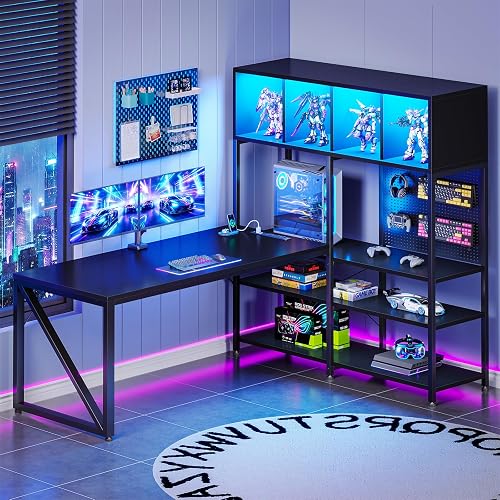
The AODK 63 Inch L Shaped Gaming Desk is a corner workstation built for gamers, streamers and home office users who want display space plus work space. With its tall display hutch, pegboard and reversible L shape, it is designed to turn a corner into a clean, show worthy battle station.
Standout features include the 4 compartment display cabinet for figures and collectibles, pegboard storage for headsets and controllers, and a dedicated on desk shelf for a mid tower PC. The built in power outlet with 3 AC outlets and 2 USB ports plus LED edge lighting keeps charging simple and adds immersive ambience for gaming or streaming.
The main desktop measures 51.18 inches wide by 21.65 inches deep, giving extra room for dual monitors, large mouse pads and comfortable viewing distance. Thick metal legs, engineered wood top with laminated finish and a reinforced alloy steel frame provide solid stability for intense sessions and heavy daily use.
The tall hutch and large L footprint need a dedicated corner with good vertical clearance, so it is not ideal for small rooms. The on desk tower space is sized for many mid towers, so measure your case first, and the desktop tower placement does reduce usable surface area compared to floor placement.
Overall, this desk is a strong pick if you want organization, display and power in one gaming ready package. It blends storage, lighting and sturdy construction to support both long gaming sessions and productive workdays.
Shape: L Shape, reversible layout for left or right corner placement.
Overall Size: 62.99 inches W x 43.31 inches D x 62.2 inches H with 63 inch diagonal work surface.
Materials: Engineered wood top with laminated black finish, alloy steel frame and metal legs.
Storage: 4 enclosed display compartments, 3 open shelves, under desk rack, pegboard and PC tower shelf sized 10.24 inches W x 23.46 inches H.
Included: Built in outlet with 3 AC and 2 USB, LED lights, headphone hook and display hutch.
Pros
- Stable carbon steel frame stays steady even at maximum height
- Quiet motor with 4 convenient memory presets for shared or multi position use
- Large 48 inch surface works well for computer work, studying and gaming
- Easy assembly with low VOC materials for a cleaner indoor workspace
Cons
- 24 inch depth may feel tight for large dual monitor setups with extra gear
- Engineered wood top is practical but lacks premium solid wood feel
- Black laminated finish can show dust and fingerprints and needs regular wiping
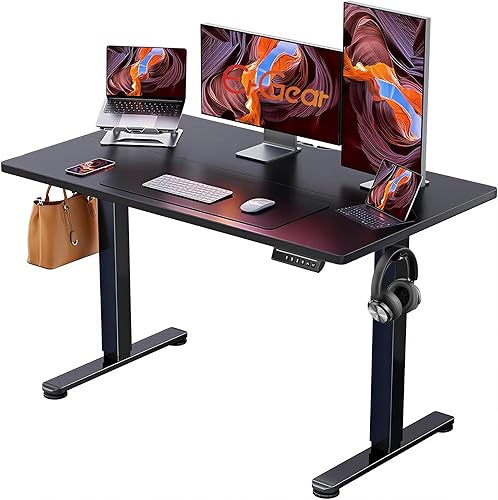
The ErGear 48 x 24 Inch Electric Standing Desk is a compact sit stand solution built for home offices, bedrooms, classrooms and gaming setups. Its 47.2 by 23.6 inch footprint makes it ideal for smaller rooms, apartments and dedicated work corners.
Height adjusts smoothly from 28.35 to 46.46 inches at the touch of a button, so you can switch postures without breaking focus. The quiet motor plus four memory presets lets you save sitting and standing heights for work, gaming or shared use.
Design is clean and modern with a black laminated top and carbon steel base that fits most decor. The heavy duty alloy steel frame with aerospace grade columns stays steady even at max height, and the engineered wood top wipes clean easily.
The 24 inch depth is practical but can feel tight if you run dual large monitors with speakers and accessories. The engineered wood top is sturdy for daily use but does not have the premium feel of solid wood.
Overall, this ErGear standing desk delivers reliable electric adjustment, strong stability and user friendly presets in a space saving size. It is a smart choice for remote workers, students and gamers who want comfort, durability and easy setup.
Dimensions: 47.2W x 23.6D inches, adjustable height 28.35 to 46.46 inches, rectangular shape.
Materials and Finish: Carbon steel base with engineered wood top, black laminated finish, modern style.
Operation: Electric lift motor with push button controller and 4 memory height presets.
Use and Care: Suitable for bedroom, office, study room, classroom and living room. Wipe clean with damp cloth.
Pros
- Complete all in one setup with lights, power, monitor riser and storage included
- Extra wide 51 inch surface with vertical storage ideal for dorms and small bedrooms
- Carbon fiber texture and black finish give a modern gaming look that suits home offices
- Reversible layout and adjustable foot pads adapt to different rooms and uneven floors
Cons
- Narrow 18.9 inch depth may feel tight for dual large monitors and full gaming gear
- Fabric drawers are best for light items and lack the strength of solid wood drawers
- Assembly is required and the 38.8 pound frame is easier to set up with two people
The YOUDENOVA 51 Inch Gaming Desk is a multifunctional workstation designed for gamers, students and home office users who want storage, lighting and power in one footprint. With a 51 inch wide carbon fiber black top, it fits well in bedrooms, dorms, living rooms and creative studios.
Standout features include multicolor RGB LED strips with adjustable modes and brightness, plus a built-in charging station with USB ports and power outlets. In daily use, this keeps your phone, headset and accessories charged right at the desk while creating an immersive setup for gaming or streaming.
The design focuses on smart storage with four fabric drawers, an open side rack for a full size PC tower, a raised monitor stand and a side headset hook. The sturdy metal frame, wood top with scratch resistant carbon fiber texture and adjustable foot pads provide stable support for daily work and play.
The 18.9 inch depth is efficient for small spaces but can feel tight for large dual monitor setups with a full size keyboard. The fabric drawers are great for light accessories and supplies, yet they will not match the rigidity of solid wood drawers for heavier gear.
Overall, this is a strong pick for anyone who wants an organized, tech ready desk without buying separate lights, power strips and storage. If you need a compact, modern gaming and work station with ergonomic benefits, the YOUDENOVA 51 inch desk delivers excellent versatility.
Dimensions: 51.18 inches wide by 18.9 inches deep with height up to 44.88 inches including monitor stand. Weight: 38.8 pounds with rectangular carbon fiber black top and black metal base.
Storage and Power: 4 fabric utility drawers, 1 open shelf, dedicated PC tower compartment, side headset hook, built-in USB outlet, power outlets and RGB LED lights. Includes monitor stand, reversible layout and adjustable leveling feet.
Use and Style: Modern freestanding computer desk for gaming, studying, working and writing. Suitable for bedroom, dormitory, office, study room and living room. Model NBDE030, residential grade with scratch resistant wood finish.
Pros
- Quiet and smooth electric height adjustment praised for sit to stand versatility
- Sleek carbon fiber finish with customizable LED lighting enhances gaming room vibe
- Sturdy steel frame and thick top feel solid with minimal wobble during use
- Thoughtful cable tray and moving PC shelf help keep setup organized
Cons
- Enclosed host shelf can be too narrow for large custom PC towers
- Assembly is best with two people due to desktop size and frame weight
- 24 inch depth may feel compact for users with multiple large monitors and accessories
The FLYCITY 55 x 24 inch electric gaming standing desk is designed for gamers, streamers and remote workers who want both comfort and atmosphere. It combines a full size workstation with height adjustment, RGB lighting and dedicated PC storage.
Height moves smoothly from 28.3 to 47.2 inches at up to 25mm per second with noise under 50DB, so transitions feel quick and quiet. The LED system offers 7 RGB colors with dynamic and music reactive modes via remote or app, which adds real immersion during play.
Build quality centers on a CARB certified top with scratch resistant carbon fiber texture and a T shaped high carbon steel frame. The result is a stable platform rated for active use, with curved front edges that keep arms comfortable during long sessions.
The main limitation is the enclosed host shelf, which some users find too small for large custom towers and end up using for consoles instead. Assembly is also easier with two people, and the 24 inch depth can feel tight if you run triple monitors plus desktop speakers.
Overall, this is a strong value pick for anyone upgrading to a height adjustable gaming station with lighting and cable control built in. If your PC is extra large, plan to measure first, but for most setups it delivers comfort, stability and style.
Size: 55 x 24 inch rectangular top with 1 inch thick carbon fiber surface in Black 3D Carbon Fiber finish. Height range: 28.3 to 47.2 inches minimum to maximum with electric motor control.
Construction: High carbon steel T frame with alloy steel and wood components. Load capacity up to 176 lbs dynamic and up to 330 lbs static, tested for long term lift stability.
Included: Underdesk cable management tray, magnetic cable channel and enclosed host shelf that moves with the desk. Controls include upgraded hand controller plus LED remote and app control for lighting modes.
Matching a Part to Your Build
Showcase panoramic build on the desk: If you own a wide glass case and want it at eye level, study the Gaming Desk with PC Display Stand. Per the spec sheet it uses a 63 inch top with an elevated desktop stand intended for panoramic cases, plus an RGB LED strip under the monitor shelf, 3 built in drawers, and a side display shelf for figures or speakers. Look for that type of layout when your priority is visibility and dust protection, but measure your case footprint first because a desktop stand still consumes surface width.
Corner dual monitor setup with tower off the floor: If you need wall coverage and storage, consider the AODK 63″ L Shaped Gaming Desk with Display Hutch. It pairs a main desktop described as 51.18″W x 21.65″D with a 4 compartment display cabinet, pegboard for headphones and controllers, under desk storage, and a built in outlet module with 3 AC outlets and 2 USB ports. Note its on desk CPU space is listed as 10.24″W x 23.46″H and is described for many mid tower cases, so full tower owners should plan to use the lower rack or floor spot and reserve the desk top for screens.
Standing, small room, or budget first builds: For posture changes, compare the ErGear 48 X 24 Inch Height Adjustable Electric and the 55″ x 24″ Electric Gaming Standing Desk with LED. The ErGear model lists adjustment from 28.35″ to 46.46″ with up to 4 memory presets and an alloy steel frame, which suits users who want simple sit to stand function in a compact footprint. The FLYCITY model lists adjustment from 28.3” to 47.2”, lift speed up to 25mm/sec at working noise at or under 50DB, dynamic load up to 176LBS and static load up to 330LBS, plus 7 RGB colors with remote and app control. If you prefer fixed height with tower storage included, the 51 Inch Gaming Desk with Drawers & PC Tower Stand offers 4 fabric drawers, a raised monitor stand, and an open rack described to fit even a full size tower, which is a practical pick for dorms and bedrooms.
Common Mistakes
Mistake 1: Assuming any tower shelf fits a full tower. Many integrated shelves are sized for mid towers, and a full ATX case can be taller and wider than the opening. Always compare your measured case height and width to the listed shelf opening and choose an open rack or floor placement when in doubt.
Mistake 2: Buying a top that is wide but too shallow. A narrow depth forces monitors close to your face, leaves no room for wrist rest, and pushes cables against the wall. Prioritize extra depth if you use dual monitors, a large mousepad, or a monitor arm with a heavy base.
Mistake 3: Forgetting power and cable movement. Builders often load a height adjustable desk with a tower, two monitors, and chargers, then find cords tug when the desk rises. Map your outlet needs in advance, add a tray or raceway, and leave service slack so the lift can move without pulling plugs.
Who Should Wait or Buy Differently
If you own an extra tall or extra wide full tower with front radiators and thick cables, a compact desk with a small enclosed cubby is not ideal for you, and it is not a good fit if you need dual 32 inch class monitors plus desktop speakers. In that situation you should wait and shop for a wider L shape with an open tower rack or keep the tower beside the desk, and tall users who need maximum legroom should also compare chair clearance in our best big and tall gaming chair for a 6 foot 5 person guide before locking in a narrow frame.
Frequently Asked Questions
Can I keep a full ATX tower on the desktop?
Yes, if the top is wide enough and the stand or side zone supports the weight with room for airflow. Use an elevated stand or side section so the case does not block monitors, and keep rear and side clearance for cables and glass doors.
How much clearance should I leave around the tower?
Leave open space behind for power and display cables, space above for exhaust, and enough side room to remove panels for cleaning. Owners commonly report better dust control and easier upgrades when the case sits on a hard stand or desk surface rather than directly on carpet.
Is a standing desk strong enough for a tower plus monitors?
Many are, but you must compare your total load to the rated dynamic and static capacity in the spec sheet. If your tower will ride on the desk, include its weight plus monitors and arms, and route cables with slack so raising the desk does not strain connections.








Write Your Review
No reviews yet. Be the first to share your experience!