

Deciding if is the Ryzen 7 9800X3D worth it for 1440p gaming in 2026 comes down to more than raw gaming reputation. At 1440p your graphics card still carries most of the load, but your CPU determines how consistently you hit high refresh targets, how smooth your 1% lows feel, and how long your platform stays relevant. As of November 2026, the choice is really about balancing resolution and refresh goals, platform and socket costs, case size and cooler clearance, power budget, and whether you are building new or upgrading.
This buying guide gives you a decision framework you can reuse for any gaming CPU. You will learn what actually matters at 1440p, how to avoid common pairing mistakes, and how to match a part to your specific build. You will also see a few options that show the range, so you can compare a standalone processor against a full platform combo without getting lost in marketing.
What Actually Matters
1. How Much Your GPU Still Determines 1440p Performance
At 1440p you are more GPU bound than at 1080p, which changes how you should value a CPU. If you pair a strong CPU with a mid range graphics card, you will often be limited by the card at ultra settings, and the CPU headroom will sit unused. If you target high refresh rates like 165Hz or 240Hz, or you play competitive titles at lower settings, the CPU matters more because you are asking it to feed frames faster.
Think about your monitor and your graphics card together. For a closer look at what cards make sense at this resolution, browse our Graphics Cards section and our guide to Top RTX 5070 Ti Cards for 1440p Gaming in 2026. If your card is already the limiting factor, a more modest CPU can be the smarter allocation of budget. If your card is very capable and you want to keep frame times steady, a faster gaming CPU earns its keep.
2. Platform Cost, Memory Speed, and Socket Longevity
A CPU is never just the chip. With Socket AM5 you are committing to DDR5 memory and a compatible motherboard, and those platform costs shape value as much as the processor itself. Per the spec sheet, the Ryzen 7000, 8000, and 9000 series share the AM5 socket, and boards like B850 support dual channel DDR5 up to 256GB with PCIe 5.0 and modern connectivity such as Wi-Fi 7 and Bluetooth 5.4. That gives you a clear upgrade path, but only if you plan to stay on the platform for several years.
Memory speed matters here too. Many AM5 builds are commonly paired with DDR5 6000MHz kits that support AMD Expo or XMP 3.0, such as a 32GB (2x16GB) CL30 kit at 1.35V. You should check the motherboard QVL and the memory kit rating, and enable the correct profile in BIOS. Remember that BIOS updates and memory overclocking are done at your own risk and may void warranty, so follow the manufacturer instructions and handle components with anti-static precautions.
3. Cache, Clocks, and What 3D V-Cache Actually Does for You
For gaming, cache and clock behavior often matter more than core count alone. The processor in focus here offers 8 cores and 16 threads built on AMD Zen 5 with Next Gen 3D V-Cache, with 96MB of L3 cache and a combined 104MB of L2 plus L3 cache per the spec sheet. It also lists up to 5.2GHz max boost and an approximate 16 percent IPC uplift over the prior generation, plus an unlocked multiplier for overclocking.
What does that mean in practice for you? Extra cache helps in games that are sensitive to memory latency, which can smooth out stutters and lift performance when you are CPU limited. Higher boost clocks help with single threaded responsiveness. If you mostly play at 1440p ultra with a card that is already saturated, you will see less benefit than someone chasing very high frame rates at competitive settings. Evaluate whether your favorite titles are the type that owners commonly report as cache sensitive before you pay for that specialization.
4. Power, Thermals, and Cooler Clearance
Thermal and power planning is part of choosing a CPU. The spec sheet lists a default TDP of 120W for this 8 core part and notes that a cooler is not included. That means you need to budget for an air cooler or liquid cooler that fits your case and your RAM. Always check cooler height or radiator clearance against your case specifications, and confirm RAM clearance if you choose a large air cooler.
Also consider your power supply headroom. Add the CPU draw to your graphics card requirement and follow the GPU maker recommended wattage, with extra headroom for transients and future upgrades. Follow the cooler and motherboard manufacturer mounting instructions, use appropriate thermal paste application, and avoid absolute claims about temperatures. No cooler guarantees low temperatures in every case, airflow and ambient conditions always matter.
To see how these options compare in the real market, here are a few options that show the range:
This article contains affiliate links. If you buy through one of our links, CustomPCGaming may earn a commission at no extra cost to you. Commissions never influence which products we recommend or how we rank them. Read our Affiliate Disclosure for details.
Quick Picks at a Glance
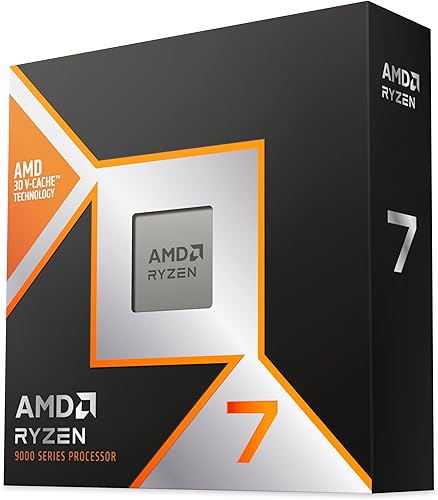
AMD Ryzen 7 9800X3D 8-Core 16-Thread

Prime AMD Ryzen 7 9800X3D 3-in-1 Gaming Bundle with MSI
As an Amazon Associate we earn from qualifying purchases. Product prices and availability are accurate as of the date/time indicated.
Pros
- Exceptional gaming performance with extremely consistent frame times
- Excellent power efficiency and manageable thermals with a good aftermarket cooler
- Easy installation on AM5 platform with broad motherboard compatibility after BIOS update
- Strong all around performance for gaming, streaming and everyday creation tasks
Cons
- Cooler not included, requires separate high quality cooling solution
- Requires AM5 motherboard and DDR5 memory, not compatible with AM4 systems
- 8-core design is less optimal for heavy workstation rendering versus higher core count CPUs
The AMD Ryzen 7 9800X3D is a high performance desktop processor designed for gamers, streamers and creators who demand top tier speed. Built on the Zen 5 architecture with next generation 3D V-Cache, it is purpose built to eliminate CPU bottlenecks in modern titles.
In real world gaming, the massive 96MB L3 cache and boost clocks up to 5.2GHz deliver outstanding frame rates and remarkably consistent frame times. Users report smooth performance in demanding and CPU heavy games, with excellent 1% lows that reduce stutter during competitive play and streaming.
The chip uses the proven Socket AM5 platform and offers drop in compatibility with existing AM5 motherboards after a BIOS update. Build quality reflects AMDs premium design, with improved thermal performance over the previous generation and efficient operation even during long sessions with a quality aftermarket cooler.
As a gaming focused CPU, it is not the best choice for heavy workstation or rendering workloads where higher core count processors excel. It also ships without a cooler, requires an AM5 board and DDR5 memory, and needs capable cooling to maintain its boost performance.
Overall, the Ryzen 7 9800X3D stands out as the go to processor for gamers who want the fastest and most stable gaming experience available. If your priority is maximum FPS, low latency and future ready AM5 support, this CPU is an excellent investment.
Model: AMD Ryzen 7 9800X3D, 8-Core, 16-Thread, Zen 5 Architecture
Cache: 96MB L3 Cache, 104MB Total Cache, 8MB L2 Cache
Clock Speed: 4.7GHz Base, Up to 5.2GHz Boost
Socket & Platform: Socket AM5, Supports DDR5 and PCIe 5.0, Windows 11 Ready
Power & Cooling: 140W, External Cooler Required, Cooler Not Included
AMD Ryzen 7 9800X3D 3-in-1 Gaming Bundle with MSI
Pros
- Top tier gaming performance from 8 core, 16 thread Ryzen 7 9800X3D with unlocked overclocking
- Optimal DDR5 6000 CL30 at 1.35V delivers ideal performance for AM5 platform
- Future ready motherboard supports up to 256GB DDR5, PCIe 5.0 GPU and fast M.2 storage
- Pre matched bundle saves time and ensures full component compatibility out of the box
Cons
- Fixed bundle limits choice if you prefer a different motherboard or RAM brand and color
- ATX motherboard and RGB memory require a mid or full tower case, not ideal for compact builds
- 8 core X3D design is optimized for gaming, less ideal for heavy productivity or workstation tasks
This 3-in-1 combo from Micro Center bundles the AMD Ryzen 7 9800X3D, MSI B850 Gaming Plus WiFi motherboard, and KLEVV CRAS V RGB 32GB DDR5 6000MHz kit. It is designed for gamers and PC builders who want a complete, high performance AM5 foundation without compatibility research.
The Ryzen 7 9800X3D is the standout, offering 8 cores, 16 threads, up to 5.2 GHz boost and 104MB of L2 plus L3 cache with next gen 3D V-Cache. Paired with 6000MHz CL30 RAM, the sweet spot for Ryzen, it delivers exceptional frame rates in AAA titles and smooth multitasking. The B850 board adds PCIe 5.0 support and Wi-Fi 7 for fast, future proof connectivity.
Build quality is strong across the bundle. The MSI B850 Gaming Plus WiFi uses an ATX layout with robust power delivery, three M.2 slots and ample USB and networking options. The KLEVV memory features a refined aluminum heatsink, low profile clearance for large air coolers, and vibrant RGB lighting that syncs with mainstream software.
There are a few tradeoffs to consider. The ATX form factor needs a larger case, and the fixed parts mean less flexibility for custom aesthetics or brand preferences. The 9800X3D also prioritizes gaming over productivity, so creators needing more cores may want a different CPU.
Overall, this is an excellent value bundle for anyone building a premium gaming PC on AM5. It removes guesswork, guarantees performance synergy, and provides a modern, upgrade ready platform. If you want the best current gaming CPU with a balanced, ready to run motherboard and RAM kit, this combo is hard to beat.
Processor: AMD Ryzen 7 9800X3D, 8 Core 16 Thread, up to 5.2 GHz, 104MB L2+L3 Cache, Socket AM5, 120W TDP, Zen 5 with 3D V-Cache
Motherboard: MSI B850 Gaming Plus WiFi, ATX, AM5, AMD B850 Chipset, DDR5 up to 256GB, PCIe 5.0, 3x M.2 (1x PCIe 5.0 x4, 2x PCIe 4.0 x4), 4x SATA 6Gb/s, Wi-Fi 7, Bluetooth 5.4
Memory: KLEVV CRAS V RGB 32GB (2x16GB) DDR5 6000MHz, CL30, 1.35V, SK Hynix A-Die, XMP 3.0 and AMD EXPO Ready, Aluminum Heatsink
Compatibility: Supports AMD Ryzen 9000, 8000 and 7000 Series, Windows 11 64-bit, Dual Channel DDR5
Matching a Part to Your Build
Scenario 1: You are building a high refresh 1440p rig around a strong GPU. If you already own or plan to buy a card in the RTX 5070 Ti class and you play on a 165Hz or higher monitor, a 3D V-Cache CPU makes the most sense. You will be pushing enough frames that the CPU needs to keep up, and the extra cache can help maintain consistency. In this context the Top RTX 5070 Ti Cards for 1440p Gaming in 2026 pairing is where the Gaming CPUs choice leans toward the higher-end pick. The AMD RYZEN 7 9800X3D 8-Core fits that role as a standalone processor when you already have a board and DDR5 kit.
Scenario 2: You are starting a new AM5 build from scratch. If you need a CPU, motherboard, and memory together, a bundle can simplify compatibility and save research time. The Micro Center 3-in-1 Combo combines the same 8 core, 16 thread processor with an MSI B850 Gaming Plus WiFi motherboard and a KLEVV CRAS V RGB DDR5 32GB (2x16GB) 6000MHz CL30 kit. Per the spec sheet the board brings PCIe 5.0, three M.2 NVMe slots with one PCIe 5.0 x4 and two PCIe 4.0 x4, four SATA ports, Wi-Fi 7, and support for AMD Ryzen 9000, 8000, and 7000 series processors. This is useful if you want a drop-in ready AM5 foundation with Expo ready memory and modern I/O without hunting for each part separately.
Scenario 3: You are focused on value at 1440p 60 to 144Hz. If you play mostly story driven titles at ultra settings or you are pairing with a mid range card, you may be GPU limited most of the time. In that case the premium for 3D V-Cache is harder to justify, and you might allocate budget toward a stronger graphics card or a larger SSD. Our breakdown of the Ryzen 5 7600 RX 7700 XT 1000 Dollar Gaming PC Amazon Build shows how a balanced budget build approaches 1440p, and you can use that logic to decide whether to step up or stay modest on the CPU.
Common Mistakes
Mistake 1: Undersizing the power supply and cooling. A 120W TDP part with boost up to 5.2GHz needs a capable cooler and a power supply with real headroom. Do not rely on a cooler that was adequate for a lower power chip, and do not assume any power supply will handle any card. Check the GPU maker recommended wattage, add CPU and system draw, and leave margin. Also verify that your chosen cooler clears your RAM heatsinks and your case side panel.
Mistake 2: Mismatched memory for the platform. AM5 is DDR5 only, so DDR4 will not work, and slow or single channel memory can hold back performance. If you buy a board that supports up to 256GB, that does not mean you should fill it for gaming, 32GB (2x16GB) is the sweet spot for most 1440p builds. Choose a kit that is listed as XMP 3.0 or AMD Expo Ready, confirm it is on the board QVL, and enable the profile in BIOS at your own risk.
Mistake 3: Paying for cache you will not use. 3D V-Cache shines when you are CPU limited, but at 1440p ultra many games are GPU limited. If your graphics card is the bottleneck, extra L3 cache will not raise your average frame rate much. Review your monitor refresh target and your graphics settings first. If you cannot feed more frames because the GPU is maxed, put the budget toward the graphics card, or save it for your next upgrade.
Who Should Wait or Buy Differently
This type of premium gaming CPU is not ideal for everyone. It is not a good fit if you play at 1440p 60Hz on a mid range GPU, if you are on a tight budget where platform costs for AM5, DDR5, and a new cooler would force you to downgrade your graphics card, or if you already own a recent AM5 chip that keeps you above your monitor refresh target. It is also not the right choice if you need strong multi core throughput for heavy creation work on a budget, where a different core count or platform might serve you better. If any of those describe you, consider a more balanced CPU and put the savings toward your GPU, or wait for your next full platform refresh. For more context on value oriented builds, see our Budget Build Guides.
Frequently Asked Questions
Is the Ryzen 7 9800X3D overkill for 1440p 60Hz gaming?
For many 60Hz setups it can be more than you need, because your graphics card will usually be the limiting factor at ultra settings. You will still get smooth performance, but a less expensive CPU often delivers a similar experience at 60Hz. Save the difference for a better GPU or keep it for a future upgrade if your monitor and settings do not demand very high frame rates.
Do I need DDR5 6000MHz and Expo for this CPU?
You need DDR5 for any AM5 processor, and owners commonly report that DDR5 6000MHz CL30 kits with AMD Expo offer a good balance for this platform. Check your motherboard QVL for validated kits, such as a 32GB (2x16GB) option, and enable the Expo or XMP profile in BIOS. As always, memory overclocking is done at your own risk, so follow the board and memory maker guidance.
Can I drop this CPU into any AM5 motherboard?
It is drop-in ready for Socket AM5 infrastructure per the spec sheet, and boards like B850 list support for Ryzen 9000, 8000, and 7000 series. You may still need a BIOS update for newer CPUs on older boards, which should be performed carefully following the manufacturer instructions. Also confirm that your case has clearance for your cooler and that your power supply meets the combined system requirements.
Write Your Review
No reviews yet. Be the first to share your experience!