

If you are asking is the RX 9070 good for 1440p in 2026, you are really asking how to match a graphics card to your monitor, your case, and your power budget without overspending. At 1440p you sit between the lighter load of 1080p and the much heavier demands of 4K, so your choice comes down to how much VRAM you want, how much cooling your case can support, and whether you plan to keep this card for a long upgrade cycle or replace it sooner.
Before you compare individual models, define your own targets. What resolution and refresh rate does your monitor run, and what refresh rate do you actually want to sustain? What platform and socket are you building on, how much clearance does your case offer for length and slot thickness, what is your power budget and PSU capacity, and are you buying for your current monitor or for the next one you plan to own? Answering those questions first makes the specs below much easier to weigh. For a broader view of current options, browse the full Graphics Cards archive.
What Actually Matters
VRAM Capacity and Memory Interface for 1440p
At 1440p, VRAM matters more than it did at 1080p because higher resolution textures, shadow maps, and frame buffers need more memory. A 12GB card with a 192-bit interface can handle most current 1440p games at high settings, while a 16GB card with a 256-bit interface gives you more headroom for ultra texture packs, mods, and upcoming titles that use larger assets. You should weigh how long you keep cards and whether you often raise texture quality to the maximum.
Do not assume more VRAM automatically means higher performance in every game. The GPU architecture still determines how fast it can use that memory. If you play mostly competitive shooters with lower texture settings and you upgrade every two years, 12GB is often sufficient. If you keep a card for three to five years, run simulation or open world games with heavy textures, or you want to capture gameplay while you play, the extra capacity and wider bus of a 16GB model is easier to justify.
Cooler Design, Size, and Noise
Cooling design affects noise, temperatures, and whether the card physically fits. Look at slot thickness, length, and fan design. A 2.5-slot design is more compact and fits a wider range of cases, while larger triple fan coolers with features like Hawk fans, axial-tech fans, barrier rings, and alternate spinning layouts aim to move more air at lower noise. Features like a large copper plate, composite copper heat pipes, server-grade thermal conductive gel, or a phase-change GPU thermal pad help transfer heat from the GPU to the heatsink.
You should check your case specs for maximum GPU length and slot clearance, plus clearance to front fans or radiators. If your case has limited airflow, a cooler with a more efficient heatsink and lower noise profile will matter more than factory overclocking. Dual BIOS switches that let you choose between Performance and Quiet or Silent modes are useful if you want to prioritize acoustics at times. Zero decibel or 0dB modes that stop fans at low load can keep your system quiet when you are browsing or playing lighter titles. If you are weighing AMD against Nvidia cooling options, our top RTX 5070 ti cards for 1440p gaming comparison shows how cooler size and noise tradeoffs play out across brands.
Power, PCIe, and Connectivity
All of the newest RX 9070 family cards in this range use PCI Express 5.0, which is backward compatible with PCIe 4.0 motherboards. You do not need a PCIe 5.0 board to run them, but you should confirm your motherboard and power supply have the right connectors and headroom. Follow the GPU maker recommended wattage for your specific model and leave headroom over your combined CPU and GPU draw. A power supply that is comfortably above that recommendation runs quieter and more efficiently than one that is maxed out.
Connectivity also matters for your monitor setup. Check how many HDMI and DisplayPort outputs a card offers and what version they support. Cards with HDMI and DisplayPort 2.1 give you more flexibility for high refresh 1440p or future 4K displays. If you run multiple monitors or a high refresh primary display plus a secondary screen, having two of each output, as some models provide, simplifies cabling. Also consider dual ball fan bearings and build features like GPU Guard or Auto-Extreme manufacturing if you value long term reliability.
Features, Software, and Aesthetics
Beyond raw hardware, look at software and design touches that affect daily use. AMD RDNA 4 brings updated features for efficiency and display output, and vendor tools like GPU Tweak III let you adjust fan curves, monitor temperatures, and fine tune performance. RGB lighting, backplates, and shroud design do not affect frame rates, but they affect how the card looks in a windowed case. Decide whether you want lighting you can sync or a more understated look.
You should also think about your platform as a whole. If you are building around a value oriented CPU, pairing it with a very high end GPU may not give you the balance you expect at 1440p. Our Ryzen 5 7600 and RX 7700 XT build breakdown is a useful reference for how CPU, GPU, and memory choices interact in a balanced 1440p system. For tighter budgets, the Budget Build Guides section can help you prioritize where to spend.
To see how these tradeoffs look in real cards, here are a few options that show the range:
This article contains affiliate links. If you buy through one of our links, CustomPCGaming may earn a commission at no extra cost to you. Commissions never influence which products we recommend or how we rank them. Read our Affiliate Disclosure for details.
Quick Picks at a Glance

Prime GIGABYTE Radeon RX 9070 GRE Gaming OC 12GB GDDR6
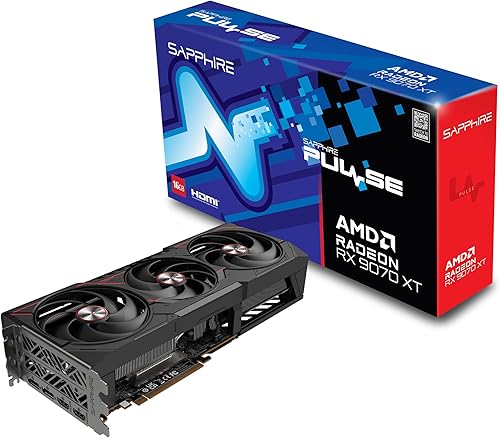
Sapphire Pulse AMD Radeon RX 9070 XT 16GB GDDR6

ASUS Prime Radeon RX 9070 XT OC Edition 16GB GDDR6
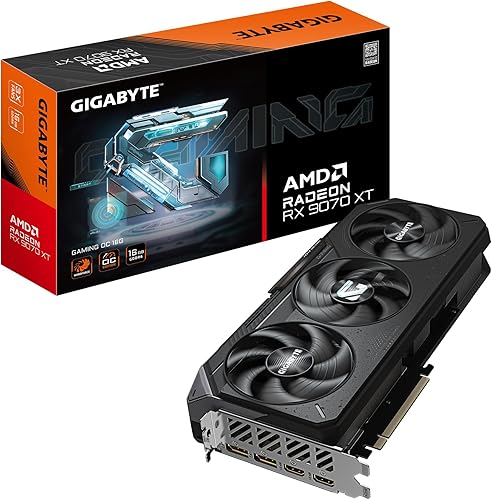
GIGABYTE Radeon RX 9070 XT Gaming OC 16GB GDDR6
As an Amazon Associate we earn from qualifying purchases. Product prices and availability are accurate as of the date/time indicated.
Pros
- Excellent thermal performance from WINDFORCE system with Hawk fans and copper cooling
- 12GB GDDR6 provides plenty of VRAM for modern games and content creation
- Dual BIOS offers flexibility for performance or quiet operation
- Factory overclocked for out of the box performance boost
- Supports ultra high resolutions up to 8K via DisplayPort and HDMI
Cons
- Large 11.34 inch triple fan design requires a spacious ATX case
- Needs strong case airflow and adequate power supply to reach full potential
- Official spec lists Windows 11 only, limiting OS flexibility
The GIGABYTE Gaming Radeon RX 9070 GRE OC 12GD is a factory overclocked PCIe 5.0 graphics card built for enthusiast gamers and creators. With 12GB GDDR6 on a 192-bit bus and a 2340 MHz GPU clock, it is designed for high refresh 1440p and immersive 4K gaming.
In real world performance, the RX 9070 GRE offers strong rasterization power and high memory bandwidth for texture heavy AAA titles. The 18000 MHz memory clock helps maintain stable frame rates at ultra settings, while 12GB VRAM provides headroom for future games and creative applications.
Design and build quality stand out with the WINDFORCE cooling system. It combines three Hawk fans with alternate spinning, 3D Active Fan, a large copper plate, composite copper heat pipes, and server-grade thermal conductive gel for efficient, quiet cooling. RGB lighting and a solid shroud add premium style to any build.
Drawbacks are mainly related to size and compatibility. At 11.34 inches long and 5.2 inches wide with a triple fan cooler, it needs a roomy ATX case with good airflow. The listed OS support is limited to Windows 11, which may not suit all users.
Overall, the GIGABYTE RX 9070 GRE Gaming OC is a compelling choice for gamers who want cool, quiet, and reliable performance with modern features. If you need a future ready 12GB card with excellent cooling and Dual BIOS versatility, this model delivers great value and headroom.
Graphics Processor: AMD Radeon RX 9070 GRE, 2340 MHz boost clock
Memory: 12GB GDDR6, 192-bit interface, 18000 MHz memory clock
Interface: PCI Express 5.0 x16, DisplayPort and HDMI outputs, 7680 x 4320 max resolution
Cooling: WINDFORCE with 3x Hawk fans, alternate spinning, 3D Active Fan, screen cooling, composite copper heat pipes, large copper plate, server-grade thermal gel
Features: RGB Lighting, Dual BIOS (Performance / Silent), Dedicated graphics, ATX form factor
Dimensions & Weight: 11.34 x 5.2 inches, 2.2 pounds
Model: GV-R907GREGAMING OC-12GD, 3 Year Manufacturer Warranty
Pros
- Excellent 4K and 1440p performance that rivals more expensive competitors
- Very quiet and cool operation even under heavy gaming loads
- Strong ray tracing and FSR 4 support for next gen games
- Premium Sapphire build quality backed by a 2 year manufacturer warranty
Cons
- Large triple fan design is bigger than expected and may not fit compact Micro ATX cases
- Anti aliasing performance in VRChat can be weaker than Nvidia equivalents
- A few users reported occasional HDMI signal detection issues requiring a restart
The Sapphire Pulse AMD Radeon RX 9070 XT is a high end RDNA 4 graphics card built for serious 1440p and 4K gamers who want flagship performance without flagship cost. With 16GB of GDDR6 memory and a 2970MHz boost clock, it is aimed at enthusiasts upgrading to high refresh rate or ultrawide displays.
In real world gaming it delivers excellent results, with users reporting 100 to 150 fps in Diablo IV at 4K with FSR 4 and stable 60 plus fps in demanding AAA titles at ultra settings. Ray tracing performance is strong for an AMD card, and many reviewers note it matches the RTX 5070 Ti while running cooler and quieter.
Sapphire's Pulse design uses a robust triple fan cooler that keeps core temps under 50C during gaming and memory temps well controlled, all while remaining nearly silent. The card feels premium and solid, with dual HDMI and dual DisplayPort outputs and support for up to 8K resolution on a standard PCIe x16 interface.
The main drawback is its physical size, as the large triple fan shroud can be a tight fit in Micro ATX and smaller cases so measure before you buy. A few users also noted slightly weaker anti aliasing in VRChat compared to Nvidia and occasional display signal issues that were resolved with a restart or BIOS update.
Overall the Pulse RX 9070 XT is one of the best value high end GPUs of this generation, offering cool, quiet and authentic Sapphire build quality. If you want smooth 4K gaming, future proof 16GB VRAM and great efficiency, this is an outstanding choice over more expensive alternatives.
Model: Sapphire Pulse 11348-03-20G, AMD Radeon RX 9070 XT, RDNA 4
Memory: 16GB GDDR6, 256-bit interface, 20 GHz memory clock
Clock Speed: 2970MHz boost, up to 3100MHz stable overclock reported
Interface: PCI-Express x16, 2x HDMI, 2x DisplayPort, max resolution 7680x4320
Cooling and Size: Triple fan design, 4 pounds, desktop compatible, 2 year manufacturer warranty
Pros
- Excellent cost to performance for 1440p and 4K gaming
- Very cool and quiet operation even under load
- Premium ASUS build quality with easy installation
- Future proof features including PCIe 5.0 and DisplayPort 2.1a
- Dual BIOS and 0dB tech offer flexible noise and performance control
Cons
- Large 12.3 inch length may not fit compact or small form factor cases
- Shroud feels more plasticky compared to higher end ROG and TUF models
- Ray tracing and upscaling performance still trails competing Nvidia DLSS solutions
The ASUS Prime Radeon RX 9070 XT OC Edition is a high performance 16GB GDDR6 graphics card designed for gamers, creators and PC builders who want strong 1440p and solid 4K performance without stepping up to ultra flagship pricing.
In real world testing it handles demanding AAA titles at high and ultra settings with high frame rates, thanks to boost clocks up to 3030 MHz and fast GDDR6 memory. Users report smooth gameplay, low temperatures around 55 to 59C under load, and surprisingly quiet fans even at 75 percent speed.
Design and build focus on practical cooling and reliability, with a 2.5 slot layout for wider case compatibility, triple Axial-tech fans with dual ball bearings, and a phase change thermal pad for efficient heat transfer. Auto-Extreme manufacturing and ASUS GPU Guard add durability and a clean, professional look without RGB.
There are some trade offs to consider. The card is quite long at 12.3 inches, so compact cases should be measured carefully, and the shroud feels more plasticky than premium ROG models. Ray tracing and AI upscaling also remain a step behind Nvidia alternatives for users who prioritize those features.
Overall, this Prime OC Edition is a compelling value pick that balances power, thermals and acoustics exceptionally well. For gamers seeking reliable high refresh performance, quiet operation and modern connectivity, it is one of the smartest upgrades in its class.
Model: ASUS PRIME-RX9070XT-O16G, AMD Radeon RX 9070 XT OC Edition
Memory: 16GB GDDR6, OC Mode Boost Clock up to 3030 MHz, Game Clock up to 2480 MHz
Interface: PCIe 5.0 x16, 3x Native DisplayPort 2.1a, 1x Native HDMI 2.1b, Max Resolution 7680 x 4320
Cooling: Triple Axial-tech fans, dual ball bearings, 0dB technology, phase-change GPU thermal pad, dual BIOS
Design: 2.5-slot, 12.3 x 5.1 inches, 1500g, ASUS GPU Guard, Auto-Extreme manufacturing
Compatibility: Desktop, includes GPU Tweak III software, 3 year warranty
Pros
- Excellent 4K and high refresh 1440p gaming performance with 16GB VRAM
- WINDFORCE cooling with Hawk Fans keeps noise and temperatures low
- High 3060MHz boost clock offers strong overclocked performance
- PCIe 5.0 support ensures compatibility with next gen motherboards
- Highly rated build quality and reliability
Cons
- Large triple fan design requires a spacious case with good airflow
- High power draw needs a robust power supply
- Premium Gaming OC pricing is higher than reference models
The GIGABYTE Radeon RX 9070 XT Gaming OC 16G is a high end graphics card built for enthusiasts, competitive gamers and creators who demand top tier performance. With 16GB of GDDR6 memory and PCIe 5.0 support, it is designed to handle demanding 4K gaming, streaming and content creation with ease.
In real world use, the factory overclock to 3060MHz delivers noticeably higher frame rates and smoother gameplay in demanding titles. The 16GB VRAM provides ample headroom for high resolution textures and future games, while PCIe 5.0 ensures maximum bandwidth for next generation systems.
Build quality is a clear highlight thanks to GIGABYTEs WINDFORCE cooling system with Hawk Fans. The server grade thermal conductive gel and optimized heatsink keep the card cool and quiet even during extended gaming sessions, and the subtle RGB lighting adds style without being excessive.
The main drawback is its size, as the large triple fan cooler requires a spacious case with good airflow. It also demands a robust power supply, so users upgrading from mid range cards should verify compatibility before buying.
Overall, this is an excellent choice for gamers who want flagship AMD performance with reliable cooling and factory overclocked speed. If you are building a high end 4K gaming rig and want a card that will stay relevant for years, the RX 9070 XT Gaming OC is a compelling and well balanced option.
Graphics Processor: AMD Radeon RX 9070 XT
Memory: 16GB GDDR6
Boost Clock: Up to 3060 MHz Gaming OC Edition
Interface: PCIe 5.0
Cooling: WINDFORCE System with Hawk Fans and Server-grade Thermal Conductive Gel
Outputs: DisplayPort and HDMI
Lighting: RGB Fusion customizable lighting
Matching a Part to Your Build
If you are building a mid-tower with good airflow and you want strong 1440p performance with headroom for ultra textures, focus on 16GB models with a 256-bit memory interface and a robust cooler. The top RTX 5070 ti cards for 1440p gaming style of triple fan card is a good mental model. In this RX 9070 family, the Sapphire 11348-03-20G Pulse AMD Radeon™ RX 9070 XT and the GIGABYTE Radeon RX 9070 XT Gaming OC 16G Graphics both offer 16GB of GDDR6 on a 256-bit bus with WINDFORCE or Pulse cooling, dual BIOS, and multiple HDMI and DisplayPort outputs. They are suited to you if you keep cards for several years and you prefer to turn texture and detail settings up.
If your case is compact or you prioritize quiet operation, pay close attention to slot thickness and fan technology. The ASUS Prime Radeon RX 9070 XT 16GB GDDR6 OC Edition uses a 2.5-slot design with axial-tech fans, dual ball fan bearings, a phase-change GPU thermal pad, and a dual BIOS switch with a Quiet profile plus 0dB technology for light loads. That combination is helpful when you need greater build compatibility while maintaining cooling performance, or when you want the option to trade a small amount of performance for lower noise. Check your case manual for GPU length and thickness limits before you commit.
If you are aiming for solid 1440p gaming on a tighter overall budget and you upgrade more often, a 12GB option can make sense. The GIGABYTE Gaming Radeon RX 9070 GRE 12GB GDDR6 PCI pairs 12GB of GDDR6 on a 192-bit interface with a WINDFORCE cooling system, Hawk fans, server-grade thermal conductive gel, RGB lighting, and dual BIOS. It gives you the newest architecture and PCIe 5.0 support with lower memory capacity, which fits you if you play at high rather than ultra textures, you do not heavily mod games, and you would rather allocate budget to a better CPU, faster storage, or a higher refresh monitor.
Common Mistakes
Mistake 1: Undersizing your power supply. It is common to focus on the GPU and forget total system draw. Add your CPU, GPU, and other components together, then choose a quality PSU that exceeds the GPU maker recommended wattage with comfortable headroom. Running a PSU near its limit can increase noise, heat, and instability. Follow the manufacturer guidance for power connectors and do not rely on adapters that are not rated for the load.
Mistake 2: Ignoring physical clearance. Length, slot thickness, and fan shroud design determine whether a card fits and whether it can breathe. A 2.5-slot card may fit where a thicker triple slot cooler will not, and a long card may interfere with front radiators or drive cages. Always compare the card dimensions against your case GPU clearance and check that your PCIe slot and case brackets align without forcing cables against the side panel.
Mistake 3: Chasing VRAM or factory overclocks without context. More VRAM helps when you actually use high resolution textures, but it does not automatically raise frame rates if the GPU core is the limiting factor. Similarly, a small factory overclock is less important than a cooler that keeps temperatures and noise under control in your case. Read owner feedback per the spec sheet, compare the memory interface and cooler features, and choose the balance that matches your games and how long you plan to keep the card.
Who Should Wait or Buy Differently
This class of card is not ideal for you if your primary display is 1080p at 60Hz, if your case and PSU cannot support a large, power hungry GPU without major upgrades, or if you are hoping to drive 4K at high refresh with ultra settings without compromise. It is also not the right choice if you need Nvidia specific features for your workflow or if you would benefit more from putting the budget toward a CPU, memory, or monitor upgrade first. In those situations, consider a lower tier GPU or waiting until you can address the platform bottleneck, then revisit the RX 9070 family when your system can make full use of it.
Frequently Asked Questions
Is the RX 9070 good for 1440p in 2026 for high refresh gaming?
For most players, yes, the RX 9070 family is well suited to 1440p in 2026 when paired with a capable CPU and sufficient power. Models with 16GB and a 256-bit interface give you more headroom for ultra settings and future titles, while 12GB models still handle high settings well if you are comfortable adjusting texture quality.
Do I need 16GB of VRAM for 1440p, or is 12GB enough?
It depends on your settings and upgrade cycle. If you keep cards for many years, use ultra textures, or play heavily modded open world games, 16GB on a 256-bit bus is the safer long term pick. If you upgrade more often and you are happy with high settings, a 12GB card on a 192-bit bus can be a balanced way to stay at 1440p without overspending.
What should I check before buying an RX 9070 XT model?
Check your case for GPU length and slot thickness, confirm your PSU meets the maker recommended wattage with headroom, and verify your monitor inputs match the card outputs. Also look at cooler features like dual BIOS, 0dB modes, and fan bearing design if noise matters to you, and review owner feedback and the spec sheet to compare WINDFORCE, Pulse, and Prime cooling approaches.


Write Your Review
No reviews yet. Be the first to share your experience!