

If you are asking is the RTX 5060 Ti 16GB good for 1440p in 2026, you are really asking how to balance resolution, refresh rate, and future headroom without overspending on a card your system cannot fully use. For 1440p, your decision comes down to a few variables you control: your target resolution and refresh rate, your case size and clearance, your power budget and PSU capacity, and whether you are buying for today or for the next two to three years of games.
This guide gives you a simple framework to choose wisely. You will learn what specs actually affect 1440p results, how to compare cooler and size options, and which trade offs matter most for your build. You can browse more options in our Graphics Cards archive as you plan.
What Actually Matters
VRAM Capacity and Memory Specs
At 1440p, texture size, ray tracing, and background apps all push VRAM use higher than at 1080p. A 16GB GDDR7 card gives you more headroom for ultra textures and creator workloads than an 8GB version on the same GPU, which is why many buyers evaluate the 16GB models for longer term use. Per the spec sheet, the RTX 5060 Ti cards in this generation use a 128-bit interface with 28 Gbps memory speed, so bandwidth is shared across that bus.
How to weigh it: If you play newer AAA titles with high texture packs, stream while you game, or keep many browser tabs and apps open, the extra VRAM helps you avoid stutter when you raise settings. If you mainly play competitive or lighter titles at more modest settings, 8GB can still be workable, but you will need to manage texture quality more carefully. Check owner feedback on VRAM use at your favorite settings before you decide.
Cooling Design, Size, and Case Fit
Cooling and physical size affect noise, temperatures, and whether the card even fits. You will see both compact 2-slot dual fan designs and larger 2.5-slot triple fan designs in the RTX 5060 Ti family, and many are labeled SFF-Ready for smaller builds. Features like Axial-tech or BladeLink fans, composite heatpipes, pass through airflow, and 0dB fan stop at low temps all aim to keep noise down during light tasks and ramp up for long sessions.
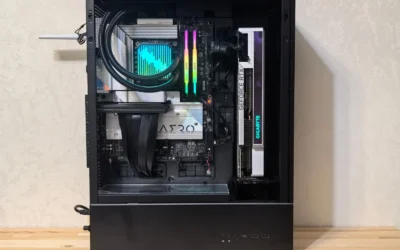
How to weigh it: Measure your case GPU clearance for length, thickness in slots, and airflow path. A 2-slot card is easier to fit in tight cases and leaves more room for airflow, while a 2.5-slot triple fan cooler can run quieter under sustained load if your case has the space. Also confirm your case can support the card length and that the fans have a clear intake and exhaust path.
Clock Speeds, Power, and Connectors
Boost clocks and power design tell you how the card is tuned. For example, per the spec sheet you will see boost clocks around 2602 MHz on default mode, with OC modes reaching up to 2632 MHz or 2647 MHz on factory overclocked models. Most of these cards use a single 8-pin PCIe power connector and list a recommended 550W PSU, and they run on PCIe 5.0 with DisplayPort 2.1b and HDMI 2.1b outputs that support up to 4 displays and up to 8K resolution.
How to weigh it: A higher factory OC can give you a small out of the box uplift without manual tuning, but the difference is often modest compared to cooling and power headroom. More important is your PSU: follow the GPU maker recommended wattage and leave headroom over your combined CPU and GPU draw, and make sure you have the required 8-pin connector and cable routing space. If you plan to overclock or update your BIOS, do so at your own risk and note it may void your warranty, and use anti-static handling when you install the card.
Features That Help at 1440p: DLSS 4, Ray Tracing, and AI
The Blackwell architecture cards in this class support DLSS 4 and ray tracing, plus Reflex 2 for lower latency in responsive titles. Per the spec sheet, one model lists up to 767 AI TOPS, which relates to AI accelerated tasks in games and creator apps. At 1440p, upscaling and frame generation can help you hit higher refresh rates without dropping to low settings, especially in demanding titles.
How to weigh it: If you target high refresh 1440p or you use ray tracing, prioritize a card with solid cooling and 16GB VRAM so you can keep textures high while using DLSS 4. If you prefer native rendering without upscaling, focus on raw cooling and power stability instead. For a sense of how a step up behaves at this resolution, see our top RTX 5070 ti cards for 1440p gaming to compare what changes when you move to a higher tier.
To see how these ideas look in real products, here are a few options that show the range:
This article contains affiliate links. If you buy through one of our links, CustomPCGaming may earn a commission at no extra cost to you. Commissions never influence which products we recommend or how we rank them. Read our Affiliate Disclosure for details.
Quick Picks at a Glance
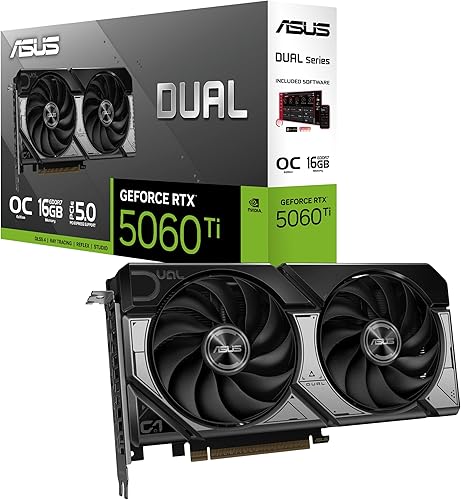
Prime ASUS Dual GeForce RTX 5060 Ti 16GB GDDR7 OC

GIGABYTE GeForce RTX 5060 Ti Gaming OC 8GB GDDR7
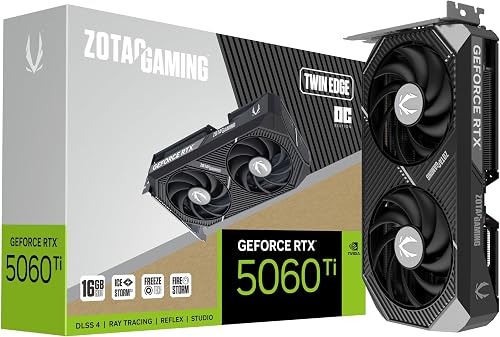
ZOTAC GeForce RTX 5060 Ti 16GB Twin Edge OC

ASUS Prime GeForce RTX 5060 Ti OC 16GB GDDR7
As an Amazon Associate we earn from qualifying purchases. Product prices and availability are accurate as of the date/time indicated.
Pros
- 16GB GDDR7 VRAM provides excellent future proofing for games and AI workloads
- Strong AI performance with 767 AI TOPS and DLSS 4 support
- Compact dual-fan SFF Ready design fits smaller cases while staying cool
- Factory OC and reliable ASUS build quality offer great out of the box performance
Cons
- New 50 series power requirements may require checking PSU and case airflow
- Dual-fan cooler can be louder than larger triple-fan models under sustained load
- Compact dual-fan design offers less thermal headroom for heavy manual overclocking
The ASUS Dual GeForce RTX 5060 Ti 16GB GDDR7 OC Edition is a next generation gaming graphics card built on NVIDIA Blackwell architecture. It is designed for gamers, creators and SFF enthusiasts who want high end 1440p and 4K performance in a compact footprint.
With 16GB of GDDR7 memory and 767 AI TOPS, it delivers excellent performance for modern games, ray tracing and AI accelerated workflows. DLSS 4 boosts frame rates and image quality, while the factory overclock to 2632 MHz ensures strong out of the box gaming performance.
The compact 9.02 inch dual fan design is SFF Ready and fits easily into smaller cases. ASUS Axial-tech fans use longer blades and a barrier ring to increase downward air pressure, keeping the card cool and quiet even under load.
As a newly launched RTX 50 series card, availability may be limited and it will demand a capable power supply and good airflow. The dual fan cooler is efficient but may be slightly louder than larger triple fan designs during extended heavy sessions.
Overall, the ASUS Dual RTX 5060 Ti 16GB OC is a powerful and future ready choice for compact builds. If you want next gen features, generous VRAM and strong 1440p performance without a massive card, it is an excellent pick.
GPU: NVIDIA GeForce RTX 5060 Ti, Blackwell architecture, OC mode up to 2632 MHz and default 2602 MHz, 16GB GDDR7, 767 AI TOPS, DLSS 4 support. Interface: PCI Express, outputs include DisplayPort and HDMI with up to 7680 x 4320 resolution.
Design: Dual Axial-tech fan cooler with 2 fans and barrier ring, SFF Ready compact size 9.02 x 4.72 inches, 0.66 kg weight. Model 90YV0MH0-M0NA00, ideal for desktop gaming and professional workloads.
Pros
- Noticeable performance uplift over RTX 3070 at max settings according to owners
- Very quiet and efficient cooling even during demanding ray traced games
- DLSS 4 and improved RT cores provide smoother, more detailed visuals
- Future-ready with GDDR7 memory and PCIe 5.0 support
- Backed by a 3-year manufacturer warranty and solid build quality
Cons
- 8GB VRAM with 128-bit bus may limit ultra texture performance in future 4K titles
- Large 11.06-inch triple-fan design requires a spacious case with good clearance
- 8GB version is less future proof than the 16GB variant for heavy creators
The GIGABYTE GeForce RTX 5060 Ti Gaming OC 8G is a mid to high end GPU built on NVIDIA Blackwell architecture. It is designed for 1080p and 1440p gamers, streamers and creators who want modern features like DLSS 4 and ray tracing without flagship cost.
In real world use, owners upgrading from RTX 3070 report an instant jump in frame rates at max settings. Ray tracing and DLSS 4 feel much smoother, while the factory overclock to 2647 MHz and 28 Gbps GDDR7 memory keep demanding AAA games stable and responsive.
Design and build quality stand out thanks to the WINDFORCE triple-fan cooling system. It controls thermals effectively while staying very quiet, and the card supports up to 8K resolution through DisplayPort and HDMI with a PCIe 5.0 interface for latest desktops.
The main drawback is the 8GB VRAM on a 128-bit interface, which is great today but could feel constrained for future 4K ultra textures or heavy creative workloads. Its 11.06-inch length also means you should verify case compatibility before buying.
Overall, this Gaming OC model is an excellent sweet spot in the RTX 50 series for quiet, efficient 1440p gaming with next-gen tech. If you need maximum longevity for 4K creation, consider the 16GB version, otherwise this card offers strong value and performance.
Graphics Coprocessor: NVIDIA GeForce RTX 5060 Ti, Blackwell Architecture
Memory: 8GB GDDR7, 128-bit, 28000 MHz Memory Clock
GPU Clock: 2647 MHz OC, PCIe 5.0 x16 Interface
Cooling: WINDFORCE Triple Fan System
Outputs: DisplayPort, HDMI, Max Resolution 7680x4320
Dimensions: 11.06 x 4.69 inches, Weight 1.12 kg, Model GV-N506TGAMING OC-8GD
Pros
- Generous 16GB GDDR7 VRAM is excellent for future games versus 8GB models
- Compact SFF-ready footprint fits small builds where larger cards cannot
- Efficient and quiet IceStorm 2.0 cooling with intelligent fan stop
- DLSS 4, PCIe 5.0 and 8K support keeps the card ready for next generation titles
Cons
- 128-bit memory bus is narrower than higher tier enthusiast cards
- Dual fan cooler has less thermal headroom than larger triple fan designs under sustained load
- Compact heatsink design benefits from good case airflow to maintain best temperatures
The ZOTAC Gaming GeForce RTX 5060 Ti 16GB Twin Edge OC is a Blackwell based graphics card designed for gamers who want high VRAM in a compact footprint. It is ideal for SFF builders, 1440p gamers and creators who need extra memory without moving to a bulky flagship model.
Performance is driven by 16GB of ultra fast GDDR7 memory, a 2602 MHz boost clock and DLSS 4 for AI accelerated frame rates. In real world use it handles modern titles smoothly, supports VR and 8K output, and benefits from PCIe 5.0 bandwidth for next generation systems.
The Twin Edge OC keeps things minimal and functional with a 2 slot, 220.5mm design that fits most compact cases. IceStorm 2.0 cooling pairs a large heatsink and composite heatpipes with dual 90mm BladeLink fans and pass thru airflow, while the metal backplate adds rigidity and FREEZE Fan Stop enables silent idle operation.
There are a few trade offs to consider. The 128 bit memory interface is efficient but narrower than higher tier cards, and the dual fan cooler, while quiet, has less thermal headroom than larger triple fan solutions. Users should also ensure their power supply has an available 8 pin connector and adequate case ventilation.
Overall, this card delivers strong value for gamers who prioritize compact size, quiet cooling and generous 16GB VRAM. If you want a future ready, SFF friendly GPU that stays current with Blackwell and DLSS 4, the Twin Edge OC is a smart and reliable choice.
GPU: NVIDIA GeForce RTX 5060 Ti, Blackwell architecture, Boost Clock 2602 MHz
Memory: 16GB GDDR7, 128 bit, 28 Gbps, PCIe 5.0 x16 interface
Cooling: IceStorm 2.0, dual 90mm BladeLink fans, composite heatpipes, pass thru airflow, FREEZE Fan Stop
Connectivity: 3x DisplayPort 2.1b, 1x HDMI 2.1b, 8K Ready, 4 display support, HDCP 2.3, VR Ready
Design: 2 slot, 220.5mm length, metal backplate, single 8 pin power connector, SFF Ready
Pros
- 16GB GDDR7 VRAM offers excellent future-proofing for AAA games and content creation
- Quiet and efficient triple-fan cooling with 0dB fan stop technology
- SFF-ready compact design improves compatibility with smaller cases
- Modern connectivity with PCIe 5.0 and four outputs for multi-monitor and 8K setups
- Simple upgrade path with single 8-pin connector and factory overclock
Cons
- 2.5-slot width may still be tight for ultra-compact mini-ITX cases
- Requires a 550W PSU, so some older systems will need a power supply upgrade
- No USB-C video output for users who need it for certain displays or workflows
The ASUS Prime GeForce RTX 5060 Ti OC 16GB is a Blackwell architecture card designed for gamers and creators who want strong 1080p and 1440p performance without stepping up to flagship pricing. It is ideal for esports players, streamers, and compact PC builders who need modern features like DLSS 4, Reflex 2, and ray tracing in a practical package.
With 16GB of GDDR7 memory running at 28 Gbps, this card handles high texture settings, large open world games, and demanding creator apps with headroom to spare. The factory overclocked boost up to 2647 MHz, combined with DLSS 4 upscaling, delivers smooth high refresh gameplay and more responsive input for competitive titles.
ASUS equips the Prime with three Axial-tech fans in a 2.5-slot, SFF-ready form factor that balances cooling and case compatibility. The 0dB fan stop keeps the card silent during browsing or light work, while the included GPU holder prevents sag and gives the build a cleaner, more secure finish.
Connectivity is modern and flexible with PCIe 5.0, one HDMI 2.1b, and three DisplayPort 2.1b outputs supporting up to four displays and 8K resolution. The single 8-pin power connector and 550W PSU recommendation make it a straightforward upgrade, though very small cases and older power supplies should be checked for fit and capacity.
Overall, the ASUS Prime RTX 5060 Ti OC 16GB stands out for its generous VRAM, quiet triple-fan cooler, and compact yet powerful design. If you want a future-ready card for high detail gaming and light content creation in a small or mid-tower build, this is a compelling and well balanced choice.
Graphics Processor: NVIDIA GeForce RTX 5060 Ti, Blackwell architecture
Memory: 16GB GDDR7, 28 Gbps memory speed
Boost Clock: Up to 2647 MHz in OC Mode, 2617 MHz default
Interface: PCIe 5.0, 1x 8-pin power connector, 550W PSU recommended
Outputs: 1x HDMI 2.1b, 3x DisplayPort 2.1b, supports up to 4 displays and up to 8K
Cooling: Triple Axial-tech fans, 0dB fan stop, 2.5-slot SFF-Ready design
Extras: Includes GPU holder to reduce sag and improve build aesthetics
Matching a Part to Your Build
Scenario 1: Compact 1440p high refresh build in a small case. You want smooth 1440p in esports and AAA titles but you have limited length and slot clearance. Look for an SFF-Ready 2-slot model like the ZOTAC Gaming GeForce RTX 5060 Ti 16GB Twin Edge OC with its 2-slot thickness, dual 90mm BladeLink fans, and IceStorm 2.0 cooling with FREEZE Fan Stop. Per the spec sheet it offers 16GB GDDR7 at 28 Gbps, a 2602 MHz boost clock, and a single 8-pin connector, which keeps power cabling simple in tight builds. Pair it with a PSU that meets the recommended wattage and verify your case supports its length and 2-slot width.
Scenario 2: Quiet 1440p build for long AAA sessions and light creation. You value low noise and extra thermal headroom for extended play, plus VRAM for video editing or large texture packs. The ASUS Prime GeForce RTX 5060 Ti OC 16GB GDDR7 is the more premium choice here, with a 2.5-slot triple Axial-tech fan design, 0dB mode at low temps, and an OC mode up to 2647 MHz per the spec sheet. It also includes a GPU holder to help reduce sag in larger towers. This pick makes sense if your mid tower has good airflow and you can accommodate the wider cooler, and you want the 16GB GDDR7 buffer for heavier multitasking.
Scenario 3: Value focused 1440p build where you manage settings. You play a mix of competitive and single player games and you are willing to tune texture settings to save cost. The GIGABYTE GeForce RTX 5060 Ti Gaming OC 8G Graphics shows the 8GB GDDR7 side of the lineup on the same Blackwell platform with DLSS 4 and PCIe 5.0. It can still be a fit for 1440p if you keep textures at high instead of ultra and lean on upscaling, but you will have less headroom for future titles that use larger assets. If you keep your PC for several years or you run creator apps that benefit from more VRAM, the 16GB models like the ASUS Dual GeForce RTX 5060 Ti 16GB GDDR7 OC with its 2632 MHz OC mode and 767 AI TOPS rating are the safer long term choice.
Common Mistakes
Mistake 1: Undersizing your PSU or ignoring connector needs. Many buyers focus only on the GPU and forget total system draw. Follow the maker recommended 550W guidance seen on these cards, add headroom over your CPU plus GPU peak, and confirm you have a free 8-pin PCIe cable with clean routing. An undersized or aging PSU can cause shutdowns under load, even if the card fits physically.
Mistake 2: Buying a cooler that does not clear your case or RAM. A 2.5-slot triple fan card cools well, but it can crowd front fans, RAM, or bottom mounted radiators. Always check GPU length, slot thickness, and fan clearance against your case spec sheet, and follow the manufacturer mounting instructions. For SFF builds, a 2-slot SFF-Ready card often saves you from last minute case swaps.
Mistake 3: Paying for VRAM you cannot fully use, or not enough when you need it. At 1440p, 16GB helps with ultra textures and future games, but the 128-bit bus means bandwidth is still limited compared to higher tier GPUs, so extra VRAM alone does not make a mid tier card act like a high end one. On the other hand, if you plan to keep ultra textures and ray tracing on for years, an 8GB card will force compromises sooner. Match VRAM to your settings target and how long you plan to keep the card. Our ryzen 5 7600 RX 7700 XT 1000 dollar gaming PC amazon build shows how balancing CPU, GPU, and memory matters more than maxing one spec.
Who Should Wait or Buy Differently
The RTX 5060 Ti 16GB is not ideal for you if you target 4K ultra settings at high refresh, or if you need the extra bandwidth and compute of a higher tier GPU for heavy ray tracing and creation. It is also not the right choice if your case, PSU, or budget cannot support the larger coolers and recommended power headroom, or if you are on a strict budget and are comfortable lowering texture settings, where a different GPU or an 8GB option could be a better fit for now. If you are close to a platform upgrade, consider waiting and putting funds toward a CPU or PSU that will let your next GPU stretch its legs at 1440p.
Frequently Asked Questions
Is the RTX 5060 Ti 16GB good for 1440p in 2026 for AAA games?
For many players it is a solid 1440p option when you pair it with DLSS 4 and sensible settings. Per the spec sheet, models with 16GB GDDR7 at 28 Gbps and boost clocks around 2602 MHz to 2647 MHz are designed for smooth 1080p and 1440p high refresh play, and owners commonly report good results at high settings with upscaling enabled in demanding titles.
Should I get 16GB or 8GB for 1440p?
Choose 16GB if you want more headroom for ultra textures, ray tracing, and multitasking over the next few years, or if you do light video editing and 3D work that benefits from more VRAM. Choose 8GB only if you are comfortable managing texture quality and you want to keep cost lower, knowing you may need to lower settings sooner as games grow larger.
What should I check before I buy for my current PC?
Check three things: case clearance for length and slot thickness (2-slot versus 2.5-slot), PSU capacity and that you have a free 8-pin connector with the maker recommended wattage and headroom, and your monitor outputs (these cards offer HDMI 2.1b and DisplayPort 2.1b for up to 4 displays). Also confirm PCIe 5.0 support is not required for basic compatibility, and handle the install with anti-static care.


Write Your Review
No reviews yet. Be the first to share your experience!