

If you are asking is the Cooler Master NR200P a good airflow case for a hot GPU, you are really trying to solve a small form factor cooling puzzle. You want a compact desk footprint, but you also need consistent airflow for a high power graphics card that will run long sessions at high resolution and high refresh rates. As of November 2026, the right choice depends on more than looks or volume.
Before you compare any specific model, map your build variables. What resolution and refresh target are you chasing, and will your GPU need thermal headroom for a next generation upgrade. Check your platform and socket, because Mini-ITX limits you to that board size, then confirm case size and clearance for your graphics card length and your cooler, and your power budget including PSU form factor. Thinking through current versus next upgrade now helps you avoid a costly rebuild. For background on enclosure design, browse the Cases & Airflow category.
What Actually Matters
Panel Choice and Airflow Path
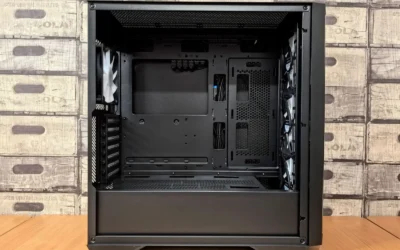
In a compact case, the side panel and the direction of airflow matter more than raw fan count. A ventilated steel panel lets heat exhaust directly from the GPU chamber, while a tempered glass panel looks great but restricts that side exhaust and raises internal temperatures. If you plan to run a hot GPU at sustained load, you should prioritize a vented panel and a clear bottom to top or bottom to side airflow path.
Look for dedicated bottom intake slots that feed cool air straight to the graphics card fans. A design with two bottom fan slots and a 120mm bottom fan mount gives you targeted cooling where a hot GPU needs it most. You should also consider dust filtering and how easily you can remove panels for cleaning, because restricted intake quickly erases any airflow advantage in a small volume.
GPU Clearance and Mounting Orientation
Hot GPUs are often long, tall, and thick, so clearance is not just about length. Check the maximum supported GPU length, the number of slots the cooler occupies, and whether the case mounts the card vertically with a riser. Vertical mounting can improve presentation and align the card fans with bottom intake, but it also puts the card closer to the side panel, so panel ventilation becomes critical.
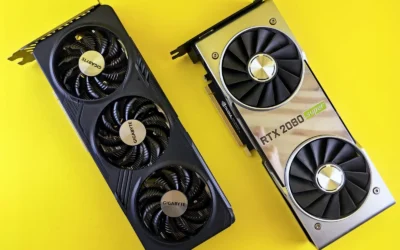
A case that supports GPUs up to 357mm gives you room for large high end cards, including models in the RTX 5080 and RX 9070 XT class, but you still need to verify thickness and power connector clearance. A bundled PCIe 4.0 riser cable helps maintain signal integrity for vertical installs, and a removable GPU back panel or tool free access makes installation far less frustrating. If you want to understand how card size affects case choice, see our Graphics Cards section for sizing guidance.
Cooling Support and Radiator Clearance
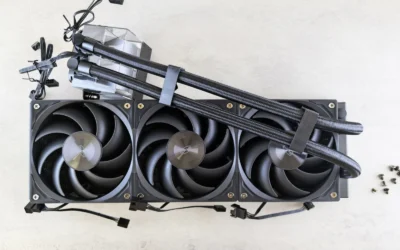
For a hot GPU, your case cooling strategy should cool both the CPU and the graphics card without recirculating hot air. Top mounted radiator support for 240mm or 280mm AIOs lets you exhaust CPU heat upward while bottom fans supply fresh air to the GPU. That separation is valuable in Mini-ITX where components sit close together. Always check the spec sheet for radiator thickness and fan clearance, not just radiator length.
You should also check cooler height or radiator clearance against your case before you buy, and follow the manufacturer mounting instructions closely. In compact layouts, tubing length and routing matter, and a recommendation for 525mm tubing for clean front routing is a good example of why you should plan the loop path in advance. Confirm whether the case supports your preferred AIO orientation and whether bottom fans will conflict with a thick GPU or its power cables.
Form Factor Limits: Motherboard and Power Supply
Compact volume comes with strict compatibility limits. An 18.25L footprint that exclusively accommodates Mini-ITX motherboards will not fit Micro-ATX or ATX boards, so your motherboard choice is locked to that socket and size. That affects your RAM slot count, M.2 placement, and rear I/O, which are all harder to change later without replacing the board.
Power supply form factor is equally important. A chassis engineered for SFX only power supplies will not accept a standard ATX PSU, even if the wattage is sufficient. You need to budget for an SFX unit that meets the GPU maker recommended wattage with headroom over your combined CPU and GPU draw. Also check front I/O, such as an integrated USB Type-C port, so your case matches your motherboard header support.
To see how these criteria translate to real hardware, here are a few options that show the range in this compact class. Use them to compare panel options, clearance, and cooling support side by side.
This article contains affiliate links. If you buy through one of our links, CustomPCGaming may earn a commission at no extra cost to you. Commissions never influence which products we recommend or how we rank them. Read our Affiliate Disclosure for details.
Quick Picks at a Glance

Prime Cooler Master NR200P V2 Mini-ITX Case
As an Amazon Associate we earn from qualifying purchases. Product prices and availability are accurate as of the date/time indicated.
Pros
- Outstanding thermal performance with support for 280mm radiators and vertical airflow design
- Accommodates oversized next-gen GPUs up to 357mm despite compact Mini-ITX size
- Flexible panel options and tool-free access make building and maintenance easier
- Includes PCIe 4.0 riser cable for reliable vertical GPU mounting
- Highly ventilated construction keeps high-end components cool under load
Cons
- SFX power supplies only, no support for standard ATX PSUs
- Limited 67mm CPU air cooler clearance and tight fit for some bulky AIO pump heads
- Some units show minor quality inconsistencies like loose side panels and thin dust filters
The Cooler Master NR200P V2 is a compact 18.25L Mini-ITX case designed for enthusiasts who want flagship performance in a small footprint. It is built exclusively for Mini-ITX motherboards and SFX power supplies, and is ideal for gamers and creators planning high-end builds with next-gen GPUs.
Real world builds show it comfortably houses large triple-slot cards up to 357mm, including RTX 5080 class GPUs, plus 240mm or 280mm top-mounted AIOs. The vertical GPU layout and bottom fan support create strong directed airflow, keeping both CPU and GPU cool even under heavy gaming loads.
Build quality is thoughtful, with quick-release pins, a removable GPU back panel, and a choice of tempered glass or vented steel side panels. Ventilation is extensive and panels are easily removable, which makes assembly and cable routing more manageable for a small form factor case.
There are tradeoffs to the compact design. CPU air cooler height is limited to 67mm, only SFX PSUs fit, and some AIO pumps with bulky heads can be a tight squeeze. A few users also noted minor panel fit issues and flimsy dust filters, so careful part selection and patience during the build are important.
Overall, the NR200P V2 delivers exceptional flexibility and cooling for its size, proving that small does not mean compromised. If you want a desk-friendly Mini-ITX case that can still handle a powerhouse GPU and liquid cooling, it is one of the most capable and well balanced options available.
Model: Cooler Master NR200P V2 (NR200PV2-KCNN-S00)
Case Type: Mini-Tower, 18.25L, Dimensions 14.65 x 7.28 x 11.5 inches, Weight 10.9 lbs
Motherboard Support: Mini-ITX 170 x 180mm only
GPU Support: Up to 357mm length, up to 3.5 slots, vertical mount only, PCIe 4.0 riser cable included
Cooling Support: Top mount 240mm / 280mm AIO (525mm tubing recommended), CPU cooler up to 67mm, bottom 120mm fan support
PSU Support: SFX only, up to 130mm length, top mount
Panels: Tempered glass and vented steel side panels included
I/O Ports: USB Type-C (USB 3.2 Gen 2x2) plus USB 3.0 and USB 2.0
Matching a Part to Your Build
If your priority is maximum GPU airflow for 1440p or 4K gaming with a hot card, prioritize the vented steel panel over tempered glass. The top RTX 5070 ti cards for 1440p gaming roundup shows how large modern cards can be, and the Cooler Master NR200P V2 Mini-ITX PC Case Ready addresses that with support for GPUs up to 357mm in a vertical mount and two bottom fan slots to feed the card directly. You get the small 18.25L footprint without giving up the length needed for high end GPUs, but you should run the vented panel for sustained loads.
If you plan to cool your CPU with an AIO while keeping GPU temperatures in check, look closely at radiator support. The Cooler Master NR200P V2 Mini-ITX PC Case Ready is ready for top mounted 240mm or 280mm radiators, which lets you exhaust CPU heat out the top while a 120mm bottom fan delivers targeted cooling to the GPU chamber. This layout works well when you want a quieter system under load, but you must verify that your AIO tubing, especially if you use the recommended 525mm length for clean front routing, does not interfere with the vertically mounted GPU or its riser cable.
If you are building a compact living room or desk side system and already own or plan to buy an SFX power supply, the SFX only design is a feature, not a drawback, because it frees interior volume for airflow. The Cooler Master NR200P V2 Mini-ITX PC Case Ready is engineered strictly for SFX fit, perfectly matched with SFX Gold units, and includes easy tool free access with quick release pins and a removable GPU back panel to simplify building in tight quarters. For a balanced parts list that respects small case limits, compare your plan to the ryzen 5 7600 RX 7700 XT 1000 dollar gaming PC amazon build to see how motherboard, PSU, and GPU choices interact.
Common Mistakes
Choosing a PSU that is too small or the wrong form factor. Many builders pick wattage based on average draw and forget transient spikes from a hot GPU, or they try to reuse an ATX PSU in an SFX only case. Always follow the GPU maker recommended wattage, add headroom over your combined CPU and GPU draw, and confirm SFX fit before you order. An undersized or incompatible PSU forces a return and delays your build.
Ignoring radiator and cooler clearance. A 280mm radiator may fit on paper but conflict with tall RAM, motherboard heatsinks, or the GPU riser once installed. Check cooler height or radiator clearance against the case spec sheet, measure your specific AIO thickness with fans, and follow the manufacturer mounting instructions. Also handle components with anti-static precautions and avoid forcing panels or brackets.
Picking tempered glass for a hot GPU without a ventilation plan. Glass looks excellent for showing off your build, but it traps heat next to a vertically mounted card that already sits close to the panel. If you run demanding games for hours, use the vented steel panel, populate the bottom fan slots, and keep a clear exhaust path at the top. For more ways to stretch value while staying cool, explore our Budget Build Guides.
Who Should Wait or Buy Differently
This compact vertical GPU layout is not ideal for you if you need Micro-ATX or ATX motherboard support, require an ATX power supply, or want a traditional horizontal GPU mount with multiple PCIe cards. It is also not the right choice if you insist on tempered glass with a very hot, thick GPU and no bottom intake, because you will limit the very airflow that keeps that card stable. In those cases, consider a larger airflow focused mid tower that supports ATX boards, ATX PSUs, and broader cooler clearance, or wait until you can move to an SFX power supply and Mini-ITX platform together.
Frequently Asked Questions
Is the Cooler Master NR200P good for a hot GPU if I want tempered glass?
You can use tempered glass for display, but for a hot GPU you will get better sustained airflow with the vented steel panel. The case includes both, so you can switch to the vented panel for heavy gaming and use glass when you want to showcase the build. Bottom intake fans help either way, but they are most effective with the vented side.
What cooling setup works best for a hot GPU in this size class?
Feed the GPU with cool bottom intake and exhaust CPU heat out the top. A top mounted 240mm or 280mm AIO handles the CPU while two bottom fans and a 120mm bottom fan mount supply fresh air to the graphics card. Check radiator and fan thickness against GPU clearance and follow the manufacturer guidance for tubing routing.
What compatibility checks should I do before buying a Mini-ITX airflow case?
Confirm your motherboard is Mini-ITX, your PSU is SFX, and your GPU length is within the 357mm vertical mount limit. Verify that your chosen AIO fits the top radiator support and that your power cables and riser cable have room. Owners commonly report that careful measurement before ordering prevents most fit issues.

Write Your Review
No reviews yet. Be the first to share your experience!