

Choosing the right case for an Intel Arc B580 length and clearance for a mid tower and SFF case build comes down to millimeters, not marketing. The B580 is a popular 12GB option for 1080p and 1440p gaming, but different board partner models vary in length, thickness, and cooling design, and your case determines whether that card fits comfortably or crowds cables, fans, and radiators.
Before you pick a case or a specific B580 model, weigh five variables together: your resolution and refresh target, your platform and motherboard form factor, the case size and its real GPU clearance, your power budget and PSU form factor, and whether you are building for what you need now or for a larger GPU next time. A compact living room build and a roomy ATX tower can both work, but they ask for different tradeoffs. For more context on how cases shape thermals and noise, browse the Cases & Airflow archive to see how clearance and fan layout interact.
What Actually Matters
1. Card Length Versus Usable GPU Clearance
The number that matters most is the card length compared to the case maximum GPU length, measured from the rear bracket to the front obstruction. That obstruction is often a front fan, radiator, or PSU shroud, not just the case wall. Always compare the spec sheet length of the exact B580 model you plan to buy against the case spec for GPU clearance, and leave 10 to 15mm of extra space for power cables and front panel wiring if you want a clean bend.
In this class, many B580 models are relatively compact. For example, one dual-fan model is listed at 249mm long and occupies two slots, which gives you more flexibility in smaller chassis. Other partner cards with larger coolers and backplates can be longer, so you should verify the listed length per the spec sheet rather than assuming all B580 cards are the same size. If a case lists 338mm, 358mm, or 360mm of GPU clearance, a 249mm card will fit with room to spare, while a longer triple-fan design needs closer checking.
2. Thickness, Slot Count, and Front Obstructions
Length is only one axis. Thickness determines whether the card interferes with bottom fans, PSU shrouds, or vertical mount brackets. A 2-slot card is easier to accommodate in SFF and micro ATX layouts because it leaves breathing room for intake fans below it. Thicker coolers may still fit the length spec but can choke airflow or block access to headers along the bottom edge of the motherboard.
Also consider what sits in front of the GPU. Some cases gain their maximum GPU length only with a power cover removed or without a front radiator installed. If you plan a front-mounted 280mm or 360mm radiator, that can subtract 30 to 60mm from usable GPU length depending on fan thickness. Check whether the case clearance figure assumes no radiator, and decide which matters more to you: extra cooling capacity or maximum GPU room. You can see how different builders balance these choices in our Graphics Cards coverage.
3. Airflow Path and Cooler Design
Dual-fan B580 cards with axial fans and features like 0dB silent operation rely on case airflow to stay quiet. In a mesh-front mid tower, fresh air from front intakes flows directly across the GPU heatsink and exhausts out the top and rear. In a compact SFF case with full mesh panels, the GPU often sits close to a vented side panel, which can help temperatures but also makes fan noise more audible.
Look at how many fans the case supports and where they mount. A chassis that supports up to six fans or up to 8x120mm fans, or alternatively 5x140mm fans, gives you more ways to create a front-to-back or bottom-to-top path. Preinstalled fans help, for instance a case that includes 2x120mm CT fans on top for exhaust, but you should still plan intake. If you add slim fans on the bottom or side, verify they do not conflict with a longer GPU or with thick power cables. Owners commonly report lower noise when the GPU has at least 20 to 30mm of clearance below it for intake.
4. Power Connector, PSU Size, and Cable Room
Power and cabling affect clearance as much as the card itself. Some B580 models require one 8-pin power connector and list a 650W power supply recommendation. That recommendation is about total system headroom, not just the card, and you should follow the GPU maker guidance plus add headroom for your CPU and other parts. Never assume a smaller PSU will be fine because the card has a single connector.
In SFF and micro ATX cases, PSU form factor changes usable space. A case that supports ATX PSUs up to 180mm long gives you more choice, while another that is optimized for SFX with an SFX bracket preinstalled can free up bottom chamber airflow when you use the smaller unit. A third type supports an ATX PSU up to 140mm when you also want a 360mm AIO, which is a useful detail if you plan liquid cooling. Always check both PSU length and GPU length together, and route the 8-pin cable with a gentle bend so it does not press against a side panel or front fan.
To see how a few current cases and B580 cards compare on these exact specs, here are a few options that show the range:
This article contains affiliate links. If you buy through one of our links, CustomPCGaming may earn a commission at no extra cost to you. Commissions never influence which products we recommend or how we rank them. Read our Affiliate Disclosure for details.
Quick Picks at a Glance
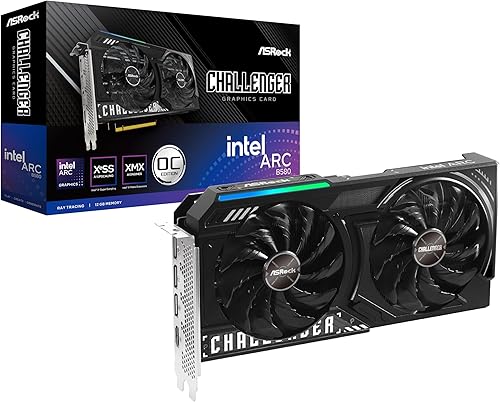
ASRock Intel Arc B580 Challenger 12GB OC Graphics

Thermaltake Tower 250 mITX Mini Tower Case Butter

SPARKLE Intel Arc B580 Titan OC 12GB GDDR6

Thermaltake Versa H21 ATX Mid Tower Case

Prime ASUS Prime AP201 MicroATX Mini Tower Case

Lian Li B4 mATX Compact Mesh PC Case 21.3L
As an Amazon Associate we earn from qualifying purchases. Product prices and availability are accurate as of the date/time indicated.
Pros
- Excellent 1440p performance with generous 12GB VRAM for modern games
- Very quiet and cool operation with 0dB fan stop technology
- Strong value compared to high priced flagship GPUs
- XeSS 2 upscaling and AV1 encode support for gaming and content creation
- Solid build quality with metal backplate and compact 2-slot design
Cons
- Intel Arc drivers still maturing, occasional game compatibility or shading quirks reported
- Requires 650W power supply and 249mm case clearance, check fit before purchase
- HDMI 2.1 support limited on Linux and no CEC support
The ASRock Intel Arc B580 Challenger 12GB OC is a mid-range graphics card built on Intel's Xe2-HPG architecture, designed for gamers targeting smooth 1080p and 1440p performance. It is ideal for budget conscious builders, casual creators, and anyone wanting modern features without paying flagship prices.
In real world use, the factory overclock to 2740 MHz and 19 Gbps memory delivers consistently high frame rates in demanding titles, with users reporting stable, stutter free gameplay at 1440p ultra settings. Support for Xe Super Sampling 2 and 160 XMX AI engines boosts performance further, while 12GB of GDDR6 on a 192-bit bus handles high resolution textures and AV1 encoding with ease.
ASRock's dual fan design with striped axial fans and 0dB Silent technology keeps the card cool and virtually silent under light loads, and the metal backplate with thermal pads adds rigidity and heat dissipation. At 249mm long with a 2-slot footprint and single 8-pin power connector, it fits most mid-tower cases and installs easily.
There are a few caveats to consider. Intel's Arc drivers have improved greatly but can still show occasional shading quirks or compatibility issues with less common games, and Linux users may find HDMI 2.1 support incomplete. You will also need a 650W power supply and to verify case clearance before buying.
Overall, the B580 Challenger offers outstanding value, combining strong 1440p performance, generous VRAM, and creator friendly features in a quiet, well built package. If you want reliable high refresh gaming and future ready connectivity at a sensible price, this is one of the smartest mid-range choices available.
GPU: Intel Arc B580, Xe2-HPG Architecture, 160 XMX Engines, 2740 MHz Boost Clock
Memory: 12GB GDDR6, 192-Bit Bus, 19 Gbps Memory Speed
Interface: PCI Express 4.0 x8, 1x 8-pin Power Connector, 650W PSU Recommended
Cooling: Dual Fan with Striped Axial Design, 0dB Silent Operation, Metal Backplate with Thermal Pad
Connectivity: 3x DisplayPort 2.1, 1x HDMI 2.1a, Supports 4 Displays up to 7680 x 4320
Dimensions: 2-Slot Design, 249mm Length, 999g Weight
Features: XeSS 2 Support, AV1 Encode, LED Indicator, Super Alloy Construction
Pros
- Supports full size 360mm GPUs and radiators despite compact mITX size
- Excellent thermal performance with vertical chimney airflow and extensive fan mounting
- Tool free magnetic panels and smart cable management make building easier
- Compatible with both SFX and ATX power supplies for more flexibility
- Premium metal construction with unique octagonal design
Cons
- Rear I/O access is awkward, requires removing top hatch and fan shroud to reach ports
- Heavier than expected and tall vertical design needs more desk height clearance
- Vertical dual chamber layout can be challenging for first time SFF builders
The Thermaltake Tower 250 is a compact mITX mini tower that shrinks the iconic Tower series octagonal design into a small footprint. It is built for enthusiasts who want a space saving SFF case without giving up support for large GPUs, big coolers, and serious water cooling.
Real world performance is a highlight, with support for GPUs up to 360mm and radiators up to 360mm plus room for up to eight 120mm fans. The vertical chimney layout with two included 120mm CT exhaust fans promotes natural heat rise, and reviewers note excellent airflow, low noise with quality fans, and easy fitting of large air coolers.
Design and build quality feel premium, with a sturdy metal chassis, dual chamber interior, and eye catching Butter Caramel finish. The magnetic and push clip panels allow tool free teardown, removable dust filters simplify cleaning, and the separate chambers keep cables tidy and airflow unobstructed.
There are some drawbacks to consider. Accessing the rear motherboard I/O is cumbersome since you must remove the top hatch and unscrew the fan shroud. The case is also heavier than it looks and its 19.9 inch height demands vertical clearance, which may not suit every desk setup.
Overall, the Tower 250 is an excellent choice for experienced builders and SFF fans who want big hardware support in a compact, stylish case. If you want a compact showpiece that can handle future GPU upgrades and advanced cooling, it delivers strong value and standout looks.
Model: Thermaltake The Tower 250 Butter Caramel CA-1Z9-00SMWN-00
Motherboard Support: Mini ITX
Dimensions: 19.92 inch H x 11.81 inch W x 11.06 inch D, Dual Chamber Mini Tower
GPU Clearance: Up to 360mm with power cover removed
Cooling Support: Up to 360mm radiator, up to 8x120mm or 5x140mm fans, 2x120mm CT fans included
PSU Support: SFX and ATX form factors, bottom mount, SFX bracket preinstalled
Material & Features: Metal enclosure, built in RGB, removable dust filters, tool free magnetic panels
Pros
- Strong 1080p Ultra and solid 1440p performance with 12GB VRAM
- Stays cool and quiet even during extended gaming sessions
- Excellent for video transcoding and content creation tasks
- High quality, thinner build with metal backplate and sag bracket included
- Benefits from frequent Intel driver and firmware updates
Cons
- Drivers still maturing, occasional performance dips in demanding titles
- Does not support VR gaming
- Can run warm in compact cases with limited airflow
The SPARKLE Intel Arc B580 Titan OC is a factory overclocked graphics card built on Intel's Arc B580 platform with 12GB of GDDR6 memory. It is designed for gamers targeting high refresh 1080p Ultra and smooth 1440p gaming, as well as creators needing strong video transcoding on a mid range budget.
In real world use, the 2760MHz boost clock and 19 Gbps memory deliver excellent performance for modern titles and media workloads. Users report cool and quiet operation under load, with strong value compared to older mainstream cards, and Intel's frequent driver updates continue to refine gaming stability.
Build quality is a clear highlight, with SPARKLE's TORN Cooling 2.0 and three axial fans providing efficient airflow in a slimmer profile than many competitors. The card includes a sturdy metal backplate, a blue breathing light accent, and a sag bracket for added support and a cleaner look inside your case.
There are a few caveats to consider before buying. Intel's Arc drivers are still maturing, so performance under heavy or niche workloads can vary, and VR gaming is currently not supported. The card can also run warm in compact builds, so good case airflow is recommended.
Overall, the B580 Titan OC is a compelling choice for budget conscious gamers and creators who want 12GB VRAM, modern DisplayPort 2.1 and HDMI 2.1 connectivity, and quiet cooling. If you do not need VR and can benefit from ongoing driver improvements, it offers outstanding versatility and long term value.
GPU: Intel Arc B580, OC Edition Boost Clock up to 2760MHz
Memory: 12GB GDDR6, 19 Gbps Memory Clock
Cooling: TORN Cooling 2.0 with Triple Axial Fans
Outputs: 1x HDMI 2.1, 3x DisplayPort 2.1, Max Resolution 3840x2160
Interface: PCI Express x8, Dimensions 12.4 x 4.61 inches, Weight 954g
Extras: Metal Backplate, Blue Breathing Light, Sag Bracket Included, 3 Year Limited Warranty
Pros
- Excellent front-to-back ventilation with mesh panels and washable dust filter
- Lightweight, compact mid tower that still fits full-size GPUs and multiple drives
- Beginner-friendly build experience with tool-free bays and cable management cutouts
- Clean gamer look with solid ATX, Micro ATX and Mini ITX support
Cons
- Thinner steel construction with some sharp interior edges compared to premium cases
- Only one rear 120mm fan pre-installed, front fans must be purchased separately
- Minimal accessory bundle and only one reusable expansion slot cover included
The Thermaltake Versa H21 is an ATX mid tower chassis designed for budget-conscious gamers and home builders who need a straightforward, spacious case without extra cost. It supports Mini ITX, Micro ATX and ATX motherboards, making it a versatile foundation for entry to mid-range gaming or productivity builds.
In real-world use, its standout strength is airflow. The perforated metal mesh front and top panels, combined with elevated feet and support for up to three 120mm fans, deliver direct front-to-back cooling that keeps components stable. The included rear 120mm fan, washable air filter and 120mm radiator support also give you a solid starting point for air or basic liquid cooling.
Design is functional and gamer-inspired, with a black SPCC steel frame, clean mesh bezel and top-mounted power controls for easy access. At just 9.3 pounds and under 19 inches deep, it offers a manageable footprint while still fitting long 315mm graphics cards, tall CPU coolers and multiple drives with smart cable management cutouts.
Build quality reflects its budget positioning. The steel is thinner than premium cases and some interior edges can be sharp, and the accessory bundle is minimal with limited screws and a single reusable slot cover. You will also want to add at least one or two front intake fans, as only the rear exhaust fan is pre-installed.
Overall, the Versa H21 delivers exceptional value for first-time builders, secondary PCs or sleeper builds where function matters more than tempered glass and RGB. If you want reliable cooling, broad compatibility and easy assembly at an affordable entry point, it is a smart and proven choice.
Model: Thermaltake Versa H21 CA-1B2-00M1NN-00, Black ATX Mid Tower
Materials & Dimensions: SPCC / SECC Steel, 16.89 x 8.23 x 18.9 inches (H x W x D), 9.3 lb
Motherboard Support: Mini ITX, Micro ATX, ATX with 7 expansion slots
Drive Bays: 3 x 5.25 inch, 3 x 3.5 inch or 2.5 inch, 3 x 2.5 inch (6 internal bays total)
Cooling Support: Front 2 x 120mm, Rear 1 x 120mm (1 x 120mm black fan included), Rear 120mm radiator support
Clearance: Max CPU cooler height 155mm, Max GPU length 315mm
Front I/O: 1 x USB 3.0, 1 x USB 2.0, 1 x HD Audio / Mic
Warranty: 3 Years
Pros
- Outstanding thermal flexibility for a compact case
- Supports large GPUs and standard ATX power supplies
- Tool-free panels and smart cable management simplify building
- Modern front I/O with high speed USB Type-C
- Clean, minimalist design with tempered glass display
Cons
- Only supports MicroATX and Mini-ITX motherboards, no standard ATX
- Front mounted PSU layout can make cable routing more challenging for beginners
- Compact interior requires careful planning for elaborate custom cooling
The ASUS Prime AP201 is a compact 33L mini tower designed for builders who want small form factor efficiency without giving up full size power. It supports MicroATX and Mini-ITX motherboards and is ideal for gamers, creators and professionals who need high performance in a space saving chassis.
Where the AP201 truly shines is cooling. It supports up to six 120mm fans and both 280mm and 360mm radiators, giving it thermal headroom usually reserved for much larger cases. Combined with support for 338mm graphics cards and ATX PSUs up to 180mm, it handles high end gaming and workstation hardware with ease.
Build quality is clean and practical. The tool-free tempered glass side panel uses a secure clip mechanism that makes access simple while staying firmly in place. An extended motherboard tray with a 32mm gap behind it plus strategically placed cutouts keeps cables tidy and airflow unobstructed.
There are a few tradeoffs to consider. The case does not support full ATX motherboards, so you will need to plan around MicroATX or Mini-ITX. Its front mounted PSU layout and compact interior also mean cable management and custom loop installation require a bit more patience than a mid tower.
Overall, the AP201 delivers outstanding spatial efficiency, cooling flexibility and modern features like USB 3.2 Gen 2 Type-C in a refined compact package. If you want a minimalist, airflow focused case that fits powerful components without dominating your desk, it is one of the best MicroATX options available.
Model: ASUS Prime AP201 Black (AP201/BLK/TG)
Case Type: Mini-Tower, 33L Compact Footprint
Motherboard Support: Micro-ATX, Mini-ITX
GPU Clearance: Up to 338mm
PSU Support: ATX up to 180mm, Front Mount
Cooling Support: Up to 6 x 120mm fans, 280mm and 360mm radiator compatible
Front I/O: USB 3.2 Gen 2 Type-C up to 10Gbps
Materials: Alloy Steel, Plastic, Tempered Glass
Cooling Method: Air and Water Cooling Ready
Pros
- Extremely compact for an mATX case while supporting full size GPUs
- Excellent ventilation with full mesh panels and flexible cooling options
- Versatile horizontal and vertical placement
- Comes with two slim fans and GPU support bracket included
- Lightweight yet solid steel and mesh construction
Cons
- Cable management is tight, especially with ATX PSUs, SFX is strongly recommended
- Instructions are limited and some plastic trim feels less premium
- Very little extra space for oversized components when using an ATX power supply
The Lian Li B4 is a 21.3 liter compact case designed for builders who want mATX power in a small form factor footprint. It is perfect for gamers, compact PC enthusiasts and anyone looking to downsize without giving up GPU or cooling performance.
In real world builds it punches above its size, accommodating GPUs up to 358mm and a 360mm AIO when paired with an SFX PSU. The full mesh panels deliver outstanding airflow, while the two included slim 120mm fans provide solid cooling right out of the box.
Build quality is strong for its class with a steel frame and mesh exterior that keeps weight low at just 11 pounds. The clever rotatable AC inlet and ability to run horizontally or vertically make it adaptable to almost any setup, plus the included GPU anti sag bracket adds welcome stability.
It is not without compromises. Cable management is tight and reviewers note that an ATX PSU makes routing difficult, so an SFX unit is highly recommended. The manual is a bit sparse and some plastic trim pieces feel less premium than the rest of the chassis.
Overall the Lian Li B4 is an excellent choice if you want a truly compact mATX case that still handles high end hardware. For builders willing to plan their parts carefully and opt for an SFX PSU, it offers fantastic flexibility, cooling and value in a minimal footprint.
Motherboard Support: Micro-ATX, Mini-ITX
Case Type: Mid Tower, 21.3L Compact, 16.02 x 7.52 x 11.34 inches
GPU Clearance: Up to 358mm
Radiator Support: Up to 360mm AIO with SFX PSU
PSU Support: ATX up to 140mm and SFX, SFX recommended for best space
Cooling: Full Mesh Panels, 2x 120mm Slim Fans Included, GPU Anti Sag Bracket
Material: Mesh and Steel, Color: Black, Weight: 11 pounds
Matching a Part to Your Build
Scenario 1: Compact micro ATX or small form factor with easy GPU fit. If you want a small footprint without sacrificing GPU room, look at cases in the 21 to 33L range that still advertise generous GPU clearance. The ryzen 5 7600 RX 7700 XT 1000 dollar gaming PC amazon build breakdown shows how builders balance compact size with real clearance, and the same logic applies here. The Lian Li B4-mATX 21.3L PC Case, 358mm GPU, 360 AIO is rated for GPUs up to 358mm and supports a 360mm AIO with an SFX PSU, while the ASUS Prime AP201 Black Micro ATX PC Case offers up to 338mm of GPU length in a 33L footprint and supports ATX PSUs up to 180mm. Pair either with the ASRock Intel Arc B580 Challenger 12GB OC Graphics at 249mm and you keep ample front space for fans or a radiator, plus room for cable bends. This is a good path if you value a smaller desk footprint and straightforward assembly.
Scenario 2: Vertical or showcase mini tower where height helps clearance. If you prefer a vertical layout or a display-style chassis, the Thermaltake Tower 250 mITX Mini Tower is rated for GPUs up to 360mm with the power cover removed and supports radiators up to 360mm. That extra length headroom means even a longer B580 variant like the Sparkle Intel Arc B580 Titan OC, 12GB GDDR6 with its TORN Cooling 2.0 and metal backplate can fit without crowding the front, provided you plan fan placement. This case comes with 2x120mm CT fans on top and can accommodate up to 8x120mm fans, so you can build a bottom-to-top airflow path that feeds the GPU directly. Choose this direction if you want maximum visual showcase and flexible cooling, and you are comfortable managing an mITX motherboard and SFX or ATX PSU tradeoffs.
Scenario 3: Budget ATX mid tower for maximum flexibility. If you already own an ATX board or want the widest future upgrade path, a traditional mid tower such as the Thermaltake Versa H21 SPCC ATX Mid Tower Computer offers the most forgiving install. It supports motherboards up to standard ATX and is described as supporting long graphics cards, with perforated mesh on the front and top to aid intake and exhaust. You will have fewer worries about GPU length, and you can prioritize airflow and cable management over shaving liters. This suits builders who want to reuse parts, add more storage, or keep the option open for a longer GPU later without rethinking the whole case. For ideas on how GPU choice scales with resolution, see our top RTX 5070 ti cards for 1440p gaming guide for comparison on how case airflow affects larger cards as well.
Common Mistakes
Mistake 1: Ignoring the radiator tax on GPU length. Many builders check the case GPU clearance number but forget that a front-mounted 280mm or 360mm radiator and its fans sit in that same space. A case that lists 338mm or 360mm of clearance without a radiator may lose a significant chunk once you add one. Decide early whether you need a front AIO, and if you do, favor a shorter B580 model like the 249mm dual-fan design or a case that explicitly retains long GPU support with a radiator installed.
Mistake 2: Undersizing the PSU or blocking cable bends. A B580 that asks for one 8-pin connector and a 650W recommendation still needs proper headroom for your CPU, fans, and drives. Picking a PSU that just meets the minimum, or stuffing a long ATX PSU into a compact case rated for 140mm ATX with an AIO, can leave no room for clean cable routing. In SFF builds, consider an SFX unit where the case provides a bracket, and always review the 8-pin bend before final mounting so the side panel closes without pressure on the connector.
Mistake 3: Forgetting thickness and bottom clearance. Even when length checks out, a thick cooler or a sag bracket can interfere with bottom intake fans or a PSU shroud. A 2-slot card is more forgiving, but you should still verify that bottom fans, especially slim 120mm models, do not touch the GPU shroud or backplate. Also confirm CPU cooler height and radiator thickness against the case spec, and follow the manufacturer mounting instructions with anti-static handling. Good clearance is about all three dimensions, not just length.
Who Should Wait or Buy Differently
This approach is not ideal for you if you already know your next GPU will be much longer than current B580 models, or if you need a truly ultra-compact case under 20L where every millimeter counts and you plan a thick front radiator. In those situations, waiting for a case with a confirmed longer GPU spec, or choosing a different GPU length class altogether, will save you from a tight rebuild. If you are set on a small chassis but also want a large AIO and an ATX PSU, that combination is often not a good fit in one enclosure, so prioritize either cooling or PSU size and pick the case that matches that priority. For broader planning on budget versus performance, the Budget Build Guides section can help you decide whether to allocate funds to a roomier case now or to other components.
Frequently Asked Questions
Will any Intel Arc B580 fit in any mid tower?
Not automatically, but most mid towers have more than enough room. A compact B580 at 249mm will fit easily in cases rated for 338mm, 358mm, or 360mm, while longer partner cards need a direct spec comparison. Always check the exact card length and whether the case measurement assumes no front radiator.
What clearance do I need for an SFF case with a B580?
Look for an SFF or micro ATX case that lists at least 20 to 30mm more than your card length to allow for cables and fans. For example, a 249mm card in a 338mm or 358mm rated case leaves comfortable room, and a 360mm rating with the power cover removed gives even more flexibility. Also verify PSU length limits and whether using an SFX PSU improves bottom airflow.
Do I need a bigger PSU for a B580 in a small case?
Follow the GPU maker recommendation, which for one model is a 650W power supply with one 8-pin connector, and add headroom for your CPU and cooling. Small cases do not reduce power needs, and a cramped PSU area can make cable management harder. Choose a PSU form factor and length that the case explicitly supports, and avoid overloading a small unit.

Write Your Review
No reviews yet. Be the first to share your experience!