

Video credit: The Chandler. Original video: https://www.youtube.com/watch?v=_9khXL4xMj8. This is our own independent breakdown and is not affiliated with the video creator. As an Amazon Associate, CustomPCGaming earns from qualifying purchases. Product prices shown in the video may have changed.
Watch the build
Parts in this build
- Govee Glide Wall Light
- JOTO Under Desk Cable Tray
- Grovemade Wool Felt Desk Pad
- Yecaye Under Desk Cable Tray
- Sweetcrispy Computer Desk
- Corsair TC100 Relaxed
- UT Wire Cable Station
- Logitech G502 X
- Ergotron LX
Parts list is our summary of the video for reference. Confirm current specs and price on the retailer page before buying.
Watch: The Setup Tour
This style is about visual quiet. You get a compact wood desk, one monitor floating on an arm, soft wall light and nothing hanging underneath. If you work and play in a bedroom, dorm or shared apartment and you want your setup to fade into the room when you step away, this guide shows how to hide cables in a minimalist small desk setup without rebuilding the space.
What This Setup Is Going For
You are aiming for warm minimalism, not a stark office. Think light brown wood top, soft felt pad, black metal legs and one warm glow on the wall behind the monitor. Your eye should land on the screen first, then the desk surface, then nothing else. That restraint is why this look feels calm during long work days and focused during evening play.
Most builds in this lane use one screen centered on a single arm. Per the spec sheet, the featured arm supports flat, curved and ultrawide monitors up to 34 inches, so you can center a wide display and pull it back when you need writing space. You keep the tower on the floor, the chair tucked in, and the desktop reserved for keyboard, mouse and one small charging box.
This layout suits a small bedroom, a dorm or one wall of a shared living space. A narrow desk like the one we recommend fits where a deep corner desk cannot, and the open leg layout gives your feet and legs more room even when the top is compact. Browse more ideas in our Cable Management and Under-Desk guides if your room has limited wall space.
Tradeoffs are real and you should weigh them before you buy. You give up drawer storage and wide speaker placement to keep the footprint small. A quality gas spring arm and a felt style pad cost more than a basic stand and a thin cloth mat, and routing every cable under a shallow desk takes planning. This style also does NOT suit you if you need lots of gear within reach, if you move every few months, or if you share a very narrow room where a chair cannot roll back fully.
Matching matters more than brand loyalty here. Start with the finish of the desk and mat first, then choose a lighting color that complements that wood tone. If you buy every accessory from one brand, you often end up with mismatched whites and grays. For tray shapes that suit a compact top, see our roundup of the 10 top Under-Desk cable trays for gaming desks.
The Gear Breakdown
Below is the core of this breakdown. We researched owner feedback, compared spec sheets and rated each pick for a small footprint, renter friendliness and visual fit. The table gives you the common approach in this style and our current pick, then we explain the pieces that define the look most.
This article contains affiliate links. If you buy through one of our links, CustomPCGaming may earn a commission at no extra cost to you. Commissions never influence which products we recommend or how we rank them. Read our Affiliate Disclosure for details.
Quick Picks at a Glance

Prime Cinati Under Desk Cable Management Tray No Drill

Logitech G502 HERO Wired Gaming Mouse

Sweetcrispy 47 Inch Computer Desk in Rustic Brown

Ergotron LX Single Monitor Arm for Up to 34 Inch

Govee Glide Wall Lights H610A

Prime Yecaye Metal Under Desk Cable Management Tray

Prime UT Wire Cable Management Box Black

Corsair TC100 Relaxed Gaming Chair, Leatherette
As an Amazon Associate we earn from qualifying purchases. Product prices and availability are accurate as of the date/time indicated.
Pros
- Tool free clamp setup with no damage to desk
- Strong metal construction holds power strips securely
- Anti-scratch pads and reversible mounting add versatility
- Includes clips and ties for complete cord control
- Keeps floor clear and workspace tidy and safe
Cons
- Single tray may be small for very large multi monitor setups
- Clamp fit limited to desks between 0.4 and 2.4 inches thick
- Open tray design does not fully enclose cords from dust
The Cinati Under Desk Cable Management Tray is a clamp on metal organizer designed to clear cord clutter without drilling into your desk. It is made for remote workers, gamers and anyone with a home office who wants a cleaner setup with cables off the floor.
Its standout feature is the no drill clamp that grips wood, glass and metal desks and can be repositioned in seconds. In daily use, the 13.4 inch tray easily holds a power strip, chargers and data cables, while the reversible opening lets you face it inward for hiding cords or outward for quick access.
Build quality is a clear strength thanks to fully welded steel with a smooth powder coated finish that resists rust and dust. The included anti scratch mats protect the desktop surface, and the solid clamp feels stable with no wobble once tightened.
The main limitation is size and fit, since one tray holds up to 10 lbs and only fits desktops between 0.4 and 2.4 inches thick. Very thick executive desks or large battlestation setups with multiple power bricks may need a second tray for full coverage.
Overall, this is a practical, durable and renter friendly solution for under desk wire management. If you want fast installation with no damage and a tidier, safer workspace, the Cinati tray is an excellent pick.
Brand: Cinati, Model: Under Desk Cable Management Tray in Black, Material: Fully welded metal with powder coating.
Dimensions: 13.4L x 4.6W x 3.1H inches, Capacity: Up to 10 lbs, Desk Compatibility: 0.4 to 2.4 inches thick.
In the Box: 1 cable tray, 4 cable clips and 6 cable ties with anti scratch mats for clamp protection.
Pros
- Exceptional HERO sensor accuracy up to 25,600 DPI with adjustable sensitivity from 200 DPI
- Deep customization with 11 programmable buttons, onboard profiles and adjustable weights
- Durable mechanical switch tensioning for clean, consistent click feedback
- Comfortable ergonomic shape with textured grips for extended gaming sessions
Cons
- Wired only design with USB cable, no wireless option for clutter free setups
- Right handed shape only, not suitable for left handed users
- Larger and heavier body may feel bulky for small hands or fingertip grip players
The Logitech G502 HERO is a wired gaming mouse built for PC gamers who want precision, control, and deep customization. With its right handed ergonomic shape and 11 programmable buttons, it suits FPS, MOBA, MMO, and productivity users who rely on macros and quick commands.
At its core is the HERO optical sensor with up to 25,600 DPI, tunable from 200 DPI for ultra precise tracking. In real world play, it delivers consistent, responsive movement with zero smoothing, filtering, or acceleration, plus a dual mode hyper fast scroll wheel for fast scrolling or click to click control.
Build quality feels premium with textured grips, metal pivot hinges, and spring tensioned left and right clicks for a crisp response. The tunable weight system lets you add up to five 3.6g weights to adjust balance, while LIGHTSYNC RGB adds personalized lighting that syncs with other Logitech G gear.
It is not perfect for everyone. The larger, heavier body can feel bulky for small hands or strict claw and fingertip grip players, and the right hand only shape excludes left handed users. Full RGB and profile customization also requires Logitech Gaming Software on Windows 7 or newer.
Overall, the G502 HERO remains a top pick for gamers who want proven accuracy, durable switches, and unmatched customization in a wired mouse. If you want a comfortable, highly tunable mouse for competitive and casual play, it is hard to beat.
Connectivity: Wired USB with 1.0 meter cable, corded electric power, plug and play for PC.
Sensor and Performance: Optical HERO sensor, 200 to 25,600 DPI, sub micron tracking, 11 buttons and dual mode scroll wheel.
Design: Right handed ergonomic build in black with LED LIGHTSYNC RGB, metal accents, and five adjustable 3.6g weights.
Compatibility and Extras: Works with Windows 7 and newer, includes mouse and quickstart guide, 1 year hardware limited warranty.
Pros
- Sturdy and stable construction with reinforced metal frame and X-brace support
- Space-saving design ideal for tight rooms, apartments and dorms
- Easy solo assembly with clear instructions and included hardware
- Attractive rustic brown finish that is easy to clean and matches many decors
Cons
- Desktop depth around 19.69 inches may feel narrow for dual monitors or large setups
- Particle board top can scratch with heavy craft use or sharp objects without a protective mat
- No built-in storage, drawers or cable management for accessories
The Sweetcrispy 47-Inch Computer Desk is a compact workstation made for bedrooms, dorms and small home offices. It suits students, part time remote workers and anyone who wants a clean, minimalist setup in a tight space.
In daily use, it comfortably holds a laptop, keyboard, monitor and a few accessories while staying stable. Reviewers note it feels solid with no wobble, assembles easily solo and works well for study, office work and light gaming.
The design pairs a rustic brown wood look top with a black reinforced steel frame for a modern, neutral style. The scratch resistant particle board wipes clean easily, while the X shaped rear bar and open leg layout add stability and legroom.
The main tradeoff is size, as the narrow depth can feel tight for dual monitors or sprawling projects. The particle board top can also mark if used for crafts or with sharp items, so a mat is smart for heavy use.
Overall, this is a practical, sturdy and attractive small space desk that is easy to build and easy to live with. If you need a minimalist desk for focused work or study, it is a smart pick.
Shape: Rectangular computer desk in Rustic Brown with polished finish and metal frame. Top material is wood look particle board with sturdy steel legs.
Dimensions: 32 inches wide by 19.69 inches deep by 29.7 inches high, with a 39.5 inch diagonal work surface. Item weight is 22.3 pounds with a maximum load capacity of 176 lb.
Setup: Freestanding design for bedroom, office, study room, living room or classroom use. Includes prelabeled parts for assembly in under 30 minutes, model GDZ-47IN-RUST.
Pros
- Securely holds large ultrawide monitors up to 34 inches and 25 lbs without sagging
- Smooth articulation with generous lift, tilt and rotation for all-day comfort
- Includes both desk clamp and grommet mount to fit different desk types
- Durable metal build with cable management and 10-year warranty for long-term use
Cons
- Supports only one monitor, so dual screen setups require a second arm
- Solid 9.8 pound frame can be bulky to handle during solo installation
- Limited to specific VESA patterns and desk thicknesses, so check fit before buying
The Ergotron LX is a single monitor desk mount designed for flat and curved computer monitors up to 34 inches and 25 pounds. It is ideal for remote workers, creators and gamers who want to free up desk space and improve posture.
With 13 inches of smooth lift, up to 17.3 inches above the worksurface, plus 75 degrees of tilt and 360 degrees of rotation, finding a comfortable viewing angle is easy. Portrait to landscape changes, shared screen viewing and standing desk use all feel stable and controlled.
The matte black metal build looks clean and professional, while built-in cable management routes cords neatly out of sight. Both a two-piece desk clamp and grommet mount are included, and the modular design works with additional Ergotron accessories.
Installation takes some effort due to the solid 9.8 pound frame, and it only supports one display with 75x75mm or 100x100mm VESA patterns. Users with extra large screens or desks outside the supported thickness range should measure carefully first.
Overall, the Ergotron LX stands out for smooth adjustability, rock solid stability and long-term durability. If you want a premium single monitor arm that keeps your setup ergonomic and clutter free, it is a smart choice.
Compatibility: Single flat or curved monitor up to 34 inches, 7 to 25 lbs
VESA Patterns: 75x75mm and 100x100mm
Adjustment: 13 inches lift, 75 degrees tilt, 360 degrees rotation
Mounting: Tabletop desk clamp for 0.4 to 2.4 inch desks and grommet mount for desks up to 2.25 inches
Build: Metal construction in Matte Black, Model 45-241-224 with 10-year warranty
Pros
- Vibrant, segmented multicolor lighting with smooth flowing effects
- Extensive smart control with app, voice, WiFi and Bluetooth
- Excellent for gaming setups, bedrooms and party ambiance with music sync
- Simple installation on smooth walls with no wiring or tools required
Cons
- Rigid bars are not flexible, so layouts are limited to straight line designs
- Requires a smooth surface and proper velcro curing time for secure mounting
- Indoor use only with no water resistance, and all segments must be connected before powering on
The Govee Glide H610A is a six piece smart wall light system designed for gamers, streamers and anyone wanting dynamic bedroom decor. Each set creates two linear light bars that mount to the wall for modern ambient lighting.
Standout performance comes from patented RGBIC tech that displays multiple colors on each bar at once, plus 64+ scenes and 11 music modes. In real use, effects are bright, fluid and highly responsive, while the AI Lighting Bot makes custom designs easy from a prompt or photo.
Build quality is solid with rigid brushed white housings that look clean on the wall day or night. The 14.8 inch segments feel sturdy, and app control over WiFi and Bluetooth plus Alexa and Google Assistant support is reliable and intuitive.
The rigid design means you cannot bend or curve the bars, so creativity is limited to angular layouts. Installation also requires a clean smooth surface and patience for the adhesive to set, and the set is indoor only.
Overall, the Glide delivers premium looking smart lighting with deep customization for gaming rooms and creative spaces. If you want vibrant, music reactive wall decor with strong app features, this is a top value pick.
Model: Govee H610A Glide Wall Lights, 6 segments for 2 panels
Lighting: RGBIC LED, 16 million colors, DIY mode, 64+ scenes, 11 music modes
Control: Govee Home App via WiFi and Bluetooth, Alexa, Google Assistant, SmartThings
Power: 36W corded electric, 24V with adapter and control box included
Design: Rigid white wall mount bars, indoor use only, not water resistant
Pros
- Tool-free clamp installation with no drilling or permanent damage
- Sturdy metal construction holds everyday power strips and adapters securely
- Padded clamps protect high-value desks, great for renters and offices
- Dual bars and included ties make wrapping and organizing cords fast
Cons
- Fixed drop height sits low with no adjustment option
- Metal is on the softer side and not intended for heavy equipment
- 14.17-inch length may feel compact for large multi-device setups
The Yecaye Metal Under Desk Cable Management Tray is a clamp-on shelf designed to hide power strips, chargers and loose cords without drilling into your desk. It is built for office workers, gamers and renters using standard desks or height-adjustable standing desks who want a cleaner setup fast.
In daily use, it holds a power strip plus adapters neatly out of sight while dual side bars let you wrap extra cord length to stop tangles. Reviewers note it installs in minutes with the clamp design and instantly tidies dangling cables under the desk.
The frame uses coated iron with a modern black finish that resists rust and abrasion better than plastic alternatives. Padded clamps grip wood, metal and lacquered tops firmly while helping prevent scratches and wobble during cable adjustments.
It is not perfect, as the tray hangs at a fixed low height with no adjustment and the metal can flex if overloaded. The compact 14.17 inch length is great for minimal setups but may feel tight if you run multiple large power bricks.
Overall, this is a practical, renter-friendly upgrade for anyone wanting hidden wiring without permanent installation. If you need simple, sturdy under-desk storage for everyday electronics, it delivers solid value and a tidier workspace.
Brand: Yecaye, Material: Coated iron, Color: Black, Dimensions: 14.17L x 4.53W inches, Weight: 2.2 pounds.
Installation: Clamp-on, no-drill mounting with included hardware and anti-scratch padding. Compatibility: Standard office desks, standing desks, gaming desks and home workstations.
Capacity: Holds power strips, USB hubs, chargers and adapters with dual wrap bars and cuttable ties included for cord organization.
Pros
- Large capacity holds big and tall plugs that smaller boxes cannot fit
- Creates a tidy, family friendly charging station for multiple devices at once
- Simple drop in setup with no tools, just place the strip inside and route cords
- Clean matte black finish looks neat in living rooms, bedrooms and offices
Cons
- Power strip and chargers are not included, box only
- Lid can feel loose and may need tidy cable placement to sit flat
- Lightweight plastic can sound hollow and rattle with phone vibration, and top grommets can pop out
The UT Wire UTW-BXSM-BK is a desktop cable management box designed to conceal a power strip, chargers and excess cord length. It is made for anyone tired of tangled cables on a desk, nightstand, kitchen counter or behind the TV.
In daily use, the extra long 16.4 inch interior easily swallows a standard 6 to 12 outlet strip plus bulky adapters. The top flip door with three slots lets you feed out just what you need for phones, tablets, headphones and watches, while the top groove holds a device upright as it charges.
The box is lightweight plastic in matte black, so it blends quietly under TVs and on mantels or desks. Side openings on the left, top and right make cable routing flexible, and setup takes seconds with no tools or mounting required.
Build quality is functional rather than premium, as the plastic feels a bit hollow and can rattle if your phone vibrates on top. The lid does not lock tightly and the soft top grommets can pop out when pulling thicker cables through, so a little cable arranging inside helps.
Overall, this is a practical and affordable fix for cord clutter, especially for shared family charging spots and home entertainment setups. If you want a larger, simple hideaway box with convenient top access, this UT Wire model is a smart pick.
Brand: UT Wire, Model: UTW-BXSM-BK, Color: Black, Style: Desktop charging box
Dimensions: 16.4L x 6.6W x 5.4H inches, Weight: 16 ounces, Material: Plastic
Capacity: Fits most standard 6 to 12 outlet power strips, power strip and chargers not included
Usage: Indoor only with top flip door plus left, top and right cable openings for flexible routing
Pros
- Wider relaxed bolstering is more comfortable than tight racing seats
- Comes with both lumbar pillow and memory foam neck pillow included
- Sturdy steel Class 4 gas lift for smooth, reliable height adjustment
- Plush leatherette exterior is stylish and easy to clean
Cons
- Faux leather upholstery can feel warm during long sessions and may show wear over time
- One size design with basic adjustability compared to premium gaming chairs
- 375mm seat may still feel snug for some larger users
The Corsair TC100 Relaxed is a racing-inspired gaming chair designed for players who want extra room without giving up support. With its wider seat and relaxed bolstering, it suits gamers, streamers and home office users who sit for hours.
Standout comfort comes from the roomy 375mm seat paired with an adjustable lumbar pillow and detachable memory foam neck pillow. In real use, the combo promotes better posture and reduces neck strain, while the 100mm height adjustment and movable armrests help you match your desk setup.
Build quality centers on a steel Class 4 gas lift, sturdy nylon construction and plush leatherette upholstery in classic black. The materials look clean on camera, feel soft to the touch and wipe down easily after long sessions.
It is not perfect, as faux leather can trap heat and the one size fit will not suit everyone. Some users may also want deeper recline, more advanced armrests or thicker padding found on higher end models.
Overall, the TC100 Relaxed is a solid pick for comfort focused gamers who want Corsair styling with a roomier feel. If you value included neck and lumbar support plus easy adjustability, it delivers dependable everyday comfort.
Brand: Corsair, Model: TC100 Relaxed, Color: Black
Material: Faux leather, nylon and polyurethane with plush leatherette exterior
Seat Width: 375mm with relaxed racing-inspired bolstering for roomy support
Adjustability: 100mm seat height range with Class 4 steel gas lift plus adjustable armrests
Extras: Included adjustable lumbar pillow and detachable memory foam neck pillow
Dimensions: 19.69 D x 14.96 W x 33.07 H inches, Size: One Size
| Gear | Common in this style | Our 2026 pick | Why |
|---|---|---|---|
| Bias light | a bias light in this style | Govee Glide Wall Light | a lower-cost take on modular wall lighting |
| Cable management | a cable management in this style | JOTO Under Desk Cable Tray | a no-drill tray for a standard-depth desk |
| Desk mat | a desk mat in this style | Grovemade Wool Felt Desk Pad | a warm felt pad for a wood or Scandinavian look |
| Cable management | a cable management in this style | Yecaye Under Desk Cable Tray | a long clamp-on tray that hides a power strip and the bulk of the cables |
| Desk | a desk in this style | Sweetcrispy Computer Desk | a narrow desk for a small apartment or dorm room |
| Chair | a chair in this style | Corsair TC100 Relaxed | a well-reviewed budget racing chair that lasts |
| Cable management | a cable management in this style | UT Wire Cable Station | a small hub that keeps charging cables from falling behind the desk |
| Mouse | a mouse in this style | Logitech G502 X | a familiar shape with enough buttons for most games |
| Monitor arm | a monitor arm in this style | Ergotron LX | the arm to buy once for a heavy or ultrawide monitor |
The desk sets the proportions. The Sweetcrispy 47-Inch Computer Desk for Bedroom is compact and designed for tight spaces, with a reinforced steel frame and an X shaped support bar to reduce wobble. Per the spec sheet it supports up to 176 lb, but you should still keep your tower off the top and keep monitors and arm well under that listed capacity while following the assembly instructions.
Lighting does most of the mood work. The Govee Glide Wall Lights, Smart Gaming Light Bar uses RGBIC tech for multiple colors at once, with 64 plus scene modes and 11 music modes controlled in the app. You can mount the rigid segments in a simple line above or beside the monitor for a soft gallery glow, and you should keep power supplies ventilated and avoid overloading a single outlet.
Cable control is what makes a small desk feel larger. The Yecaye Metal Under Desk Cable Management Tray clamps on with no drilling and holds a power strip plus adapters, while the Under Desk Cable Management Tray Black hangs from the frame and holds up to 10 lbs at 13.4L x 4.6W x 3.1H per the spec sheet. Pair one long tray with the UT Wire UTW-BXSM-BK Desktop Mobile Charging box on top to stop phone cables from slipping behind the desk.
How To Adapt It To Your Room
How do you hide everything when your desk is narrow and you cannot drill. That is the question most people recreating this look want answered, and the answer starts with measuring before you order anything.
Adapt this to your space before buying. Measure the wall or shared room for the desk width, a small desk layout needs more depth for a monitor arm to pull back. A compact top leaves little room behind the screen, so you need depth for the arm to fold and for cables to loop without pressing against the wall. If your wall is short or a door swings near the desk, shift to a smaller display or push the tower to the floor to free width.
Check your monitor for a VESA pattern before choosing an arm, and confirm the desk edge thickness for a clamp. Per the spec sheet, the Ergotron LX fits VESA 75x75mm or 100x100mm, supports 7 to 25 pounds, and its desk clamp attaches to desks 0.4 to 2.4 inches thick with a grommet option through surfaces up to 2.25 inches thick. Weigh your screen with any adapter attached, follow the mounting instructions, and find a wall stud before any wall mount. Never assume one arm fits every screen.
If you rent, use no-drill cable trays and adhesive raceways rather than screwing into the desk or wall, and find a stud before any wall mount. Clamp on trays can be repositioned without marks, and soft padding helps protect wood or lacquered tops. For routing up a wall without screws, compare options in our guide to adhesive clips vs delamu cord hider raceway.
Match the minimalist look with the finish of the desk and mat first, then the lighting color, rather than buying every accessory in one brand. Choose a warm wood or neutral top, then pick a felt or stitched mat that complements it. Set your wall light to a warm white for work and save saturated color for evening sessions, so the room still feels calm in daylight.
A standing desk lists a weight capacity, keep the tower, monitors and arm under it. Even on a fixed desk, group weight low and centered. Place the power strip in the tray, not on the floor, leave slack for the monitor arm to move through its 13 inches of lift and 75 degrees of tilt, and sleeve the drop to the outlet. If you plan baseboard glow as well, see our LED strip lights for gaming room baseboards and keep those drivers ventilated.
Finally, plan your daily reach. Put the charging box on the side of your dominant hand, keep the mouse cable or receiver path short, and leave one open slot in the tray for a future charger. When every cable has a home under the desk, your small top stays usable and dusting takes minutes.
What Actually Changes The Feel
No verified frame rate numbers are available for this build, so we keep performance qualitative. What changes the feel most in this style is space, light and silence from cables, not raw component swaps.
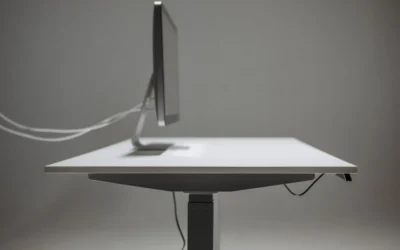
A monitor arm is the biggest spatial upgrade. Lifting the screen off its factory foot frees the area underneath for a full width mat and lets you pull the display to a comfortable viewing distance. Owners commonly report better posture and a tidier sightline once the stand is gone, provided the VESA pattern and weight are confirmed first.
Under desk trays come next. One long clamp on tray that hides the power strip plus one smaller tray or box for daily chargers removes the visual noise you notice in photos. Sleeves and ties help, but the tray does the heavy lifting by getting weight off the floor and keeping feet clear.
Wall lighting and a large mat are finishing moves. A soft bar behind the monitor reduces contrast strain in a dark room, while a felt style pad warms up a wood top and quiets keyboard sound. A new mouse or chair matters for comfort, but those do less to change how small your desk looks.
Build It At Three Budgets
Use these three paths to match your room and your plans. The picks above are current for November 2026, and each path below names the key gear approach plus who it suits.
Budget Build
Choose a manual or single motor desk, a well reviewed sub-150 chair such as a SIHOO M57, a single VIVO arm, one Govee light strip, a large cloth mat and a no-drill cable tray like the Cinati style tray. This suits you for a first minimalist setup on a tight budget, especially in a dorm where you may move within a year.
Balanced Build, Our Recommended Path
Choose a dual motor standing desk, a mid ergonomic or racing chair like the Corsair TC100 Relaxed, a gas spring arm like the Ergotron LX, a monitor light bar plus one strip such as the Govee Glide Wall Lights, a stitched XL mat and a clamp on cable tray with a sleeve like the Yecaye Metal Under Desk Cable Management Tray. This suits most people who want it to last through apartment moves and daily work plus play.
Premium Build
Choose a Herman Miller or Steelcase chair, an Ergotron arm, a light bar plus wall panels, a felt or leather pad and a fully sleeved cable routing with a box like the UT Wire UTW-BXSM-BK Desktop Mobile Charging unit. This suits you for a setup you plan to keep for years in a dedicated room where you can fine tune lighting and seating once.
FAQ
How to hide cables in a minimalist small desk setup without drilling
Use a clamp on under desk tray for the power strip, add adhesive raceways for the vertical drop, and finish with a small desktop box for phone chargers. Keep slack looped in the tray so the monitor arm can move, and avoid screws if you rent.
What monitor arm fits a small desk for an ultrawide
Confirm your screen weight and VESA 75x75mm or 100x100mm pattern first, then check desk edge thickness for the clamp. Per the spec sheet, the Ergotron LX supports screens up to 34 inches and 7 to 25 pounds with up to 17.3 inches of height adjustment, which suits many single ultrawide layouts.
Is the Logitech G502 Hero good for small desk gaming spaces
Owners commonly report it suits players who want extra buttons without a large mouse. Per the spec sheet it offers 11 programmable buttons, tracking up to 25600 DPI and five 3.6 g weights for balance tuning. Its familiar shape works well when your pad space is limited.
Final Verdict
For most small rooms, the balanced path gives you lasting comfort without visual bulk. You get a supportive chair, a stable arm, layered light and hidden power in one thoughtful footprint.
Our pick: Build the balanced version with the Sweetcrispy Computer Desk, Ergotron LX arm, Yecaye tray plus UT Wire box, and Govee Glide lighting if you want a calm small setup that stays usable every day.







Write Your Review
No reviews yet. Be the first to share your experience!