

Figuring out how to choose a B650 motherboard for gaming, VRM, IO, price can feel confusing when every board looks similar on the surface. You are balancing socket compatibility, power delivery, connectivity, and budget, and the right choice depends on your CPU, your case, and how long you plan to keep the platform.
In this buying guide you will learn how to weigh the variables that actually affect gaming. Think about your target resolution and refresh rate, your AM5 processor choice from the Ryzen 7000, 8000, or 9000 series, your case size and clearance, your power budget, and whether this is a build to keep as is or a foundation for a future GPU or storage upgrade. For a broader view of how motherboards fit into the whole system, browse the Motherboards & Compatibility archive.
What Actually Matters
VRM Design and Thermal Headroom for Your CPU Choice
Your VRM, or voltage regulator module, determines how cleanly and consistently your board can feed power to the CPU. For gaming you want stable power under sustained loads, not just a high phase count on the box. Look at the phase design, the quality of the components, and especially the heatsinks that keep the VRM cool when you are playing for hours.
Per the spec sheet, some B650 boards use a 12+2+2 phases digital VRM solution with an advanced thermal design to help maintain stability. When you evaluate any board, check whether it has large VRM heatsinks, whether the thermal design covers the power stages fully, and whether owners commonly report steady performance with higher core count AM5 chips. If you plan to run a Ryzen 9 or to enable power limits for longer boosts, prioritize stronger cooling over flashy styling.
IO, Storage, and Connectivity That Matches How You Play
IO is where you will feel your motherboard every day, so match it to your peripherals and storage plans. Count your M.2 slots, check their PCIe generation, and think about whether you need PCIe 5.0 for a future drive or if PCIe 4.0 is enough for your current library. Also look at rear USB options, including USB 3.2 Gen 2×2 Type-C if you use fast external drives or a modern case front panel.
A typical well rounded B650 layout offers triple M.2 slots with one PCIe 5.0 and two PCIe 4.0 slots, plus M.2 Thermal Guard or similar heatsinks to help sustain drive performance. For networking, decide if you need WiFi 6E and Bluetooth built in, or if you will rely on wired GbE LAN. If you stream, play online competitively, or move large files, built in WiFi 6E can save you an add in card, while a strong USB layout keeps your headset, controller, and capture devices connected without hubs. See how storage and GPU choices interact in this ryzen 5 7600 RX 7700 XT 1000 dollar gaming PC amazon build example.
Memory Support, BIOS Features, and Platform Longevity
All B650 boards use DDR5 and the AM5 socket, but memory topology and BIOS polish still matter. You want four SMD DIMMs with support for AMD EXPO and Intel XMP profiles so you can run your kit at its intended speed with a single setting. Check the board memory QVL for your exact kit if you are buying a high speed set, and confirm that the BIOS allows easy profile selection.
Helpful firmware features make ownership easier over time. Q-Flash or a similar BIOS flashback lets you update the BIOS without a CPU installed, which is valuable if you buy a board that needs a newer version for Ryzen 8000 or 9000 support. Smart Fan 6 or comparable fan control helps you tune noise and airflow, and you should handle any BIOS update at your own risk, following the manufacturer instructions carefully and using anti-static precautions. A board that supports Ryzen 7000, 8000, and 9000 series gives you a clear upgrade path on AM5 without changing platforms.
Price Tiers and What You Actually Get for More Money
Price on B650 does not always track gaming FPS directly. More premium choices often add better VRM heatsinks, extra M.2 slots, faster USB, integrated WiFi, and nicer audio, rather than raw speed. For most gamers, the sweet spot is a board that covers your must have IO and power needs without paying for extras you will never use.
Before you decide, list your non negotiables, such as ATX size for your case, the number of M.2 drives you plan to install, whether you need WiFi 6E, and how many USB ports you use daily. If you are building on a tighter budget, you can learn to prioritize value by browsing Budget Build Guides and comparing where spending more actually helps. Remember that a higher end pick is only worth it if its added IO or thermal headroom solves a real problem in your build.
To see how these tradeoffs look in practice, here are a few options that show the range:
This article contains affiliate links. If you buy through one of our links, CustomPCGaming may earn a commission at no extra cost to you. Commissions never influence which products we recommend or how we rank them. Read our Affiliate Disclosure for details.
Quick Picks at a Glance

GIGABYTE B650 Eagle AX AM5 ATX Motherboard
As an Amazon Associate we earn from qualifying purchases. Product prices and availability are accurate as of the date/time indicated.
Pros
- Excellent value with premium features like PCIe 5.0 M.2, DDR5 and WiFi 6E
- Stable power delivery and thermal guards keep performance consistent under gaming and heavy loads
- Generous expansion with triple M.2, four DDR5 slots up to 128GB and four PCIe slots
- User-friendly UEFI BIOS and Q-Flash Plus praised by first-time builders for easy setup
- Strong wired and wireless connectivity plus versatile rear I/O for peripherals
Cons
- Only one M.2 slot is PCIe 5.0, the other two are PCIe 4.0
- Limited to GbE LAN instead of faster 2.5GbE found on some competing B650 boards
- Full ATX size requires a mid or full tower case, not suited for compact builds
The GIGABYTE B650 Eagle AX is an ATX motherboard built for AMD AM5, supporting Ryzen 7000, 8000 and 9000 series processors with DDR5 memory. It is ideal for gamers, creators and first-time builders who want modern features and a clear upgrade path without moving to a premium chipset.
In real world use it delivers smooth gaming and multitasking thanks to its 12+2+2 phase digital VRM and DDR5 support with EXPO and XMP profiles. The triple M.2 layout with one PCIe 5.0 slot is a standout for video editing and large game libraries, while WiFi 6E and USB 3.2 Gen2x2 Type-C keep wireless and wired transfers fast.
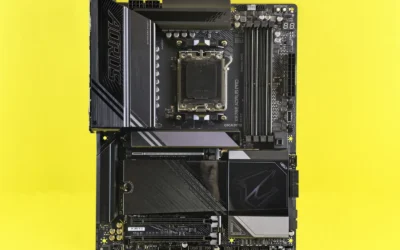
Design and build quality are strong with a stealthy black Eagle aesthetic and reinforced thermal guards for the VRM and M.2 drives. The layout offers four DDR5 DIMM slots up to 128GB, four PCIe slots and generous rear I/O including HDMI, DisplayPort and multiple USB ports, all controlled through an intuitive UEFI and Smart Fan 6.
There are a few tradeoffs to note. Only one M.2 slot runs at PCIe 5.0 speed while the others are PCIe 4.0, and networking is limited to GbE LAN rather than 2.5GbE. Its ATX form factor also needs a mid or full tower case, so it is not suited for small form factor builds.
Overall the B650 Eagle AX hits a sweet spot of features, stability and value in the B650 range. If you want a reliable, future-ready foundation for a Ryzen DDR5 system with strong storage options and modern wireless, it is one of the most versatile choices in its class.
Socket & Chipset: AM5, AMD B650, ATX form factor
CPU Support: AMD Ryzen 7000, 8000 and 9000 Series Processors
Memory: 4x DDR5 DIMM slots, up to 128GB, AMD EXPO and Intel XMP support
Storage: 3x M.2 slots (1x PCIe 5.0, 2x PCIe 4.0) plus 4x SATA 3 ports, M.2 Thermal Guard
Expansion: PCIe slots for GPU and add-in cards, 1x HDMI, 1x DisplayPort
Connectivity: WiFi 6E, Realtek GbE LAN, USB 3.2 Gen2x2 Type-C, total 18 USB ports
Special Features: 12+2+2 Phase Digital VRM, Smart Fan 6, Q-Flash Plus, 24-pin power
Matching a Part to Your Build
Scenario 1: Balanced 1440p gaming build with a modern Ryzen CPU. If you are pairing a Ryzen 7000 or 8000 series chip with a mid range to upper mid range GPU for 1440p high refresh gaming, focus on stable power and flexible storage. The top RTX 5070 ti cards for 1440p gaming roundup shows how much GPU matters at this resolution, so your motherboard should not bottleneck that investment.
The GIGABYTE B650 Eagle AX AM5 LGA 1718 ATX fits this scenario well because its 12+2+2 phases digital VRM solution and advanced thermal design help keep power stable during long sessions, while triple M.2 slots with one PCIe 5.0 and two PCIe 4.0 give you room for a fast boot drive plus extra game storage. Its USB 3.2 Gen 2×2 Type-C, GbE LAN, and AMD WiFi 6E cover both wired and wireless networking without extra cards, and four DIMM slots with AMD EXPO and Intel XMP support make DDR5 tuning straightforward.
Scenario 2: Compact budget AM5 entry that leaves room to grow. If you are building an affordable AM5 system now with a Ryzen 5 and plan to upgrade the CPU or add a second M.2 drive later, prioritize ATX compatibility with your case, Q-Flash for easy BIOS updates, and enough M.2 Thermal Guard coverage to keep drives cool. You should check your case manual for ATX support and verify cooler and RAM clearance before you buy, and you should compare memory and GPU options in Graphics Cards to avoid overspending on a board when the budget is better used on the GPU.
Scenario 3: Gaming plus light creation with lots of storage. If you edit clips, stream, or keep a large game library installed, prioritize IO over aesthetics. Look for three M.2 slots so you can separate OS, games, and scratch or recording drives, and make sure the board has the USB mix you need for audio interfaces, external drives, and capture hardware. The GIGABYTE B650 Eagle AX AM5 LGA 1718 ATX again illustrates this approach, since its triple M.2 layout and Smart Fan 6 controls let you keep drives cool and fans quiet while you juggle gaming and background tasks.
Common Mistakes
Mistake 1: Ignoring form factor, clearance, and power headroom. Buying an ATX board for a micro ATX case, or forgetting to check CPU cooler height and RAM clearance, leads to returns. Measure your case, confirm ATX mounting, and ensure your cooler and tall DDR5 modules fit together. Also size your power supply with headroom over your combined CPU and GPU draw and follow the GPU maker recommended wattage, rather than assuming any board or PSU will handle any card.
Mistake 2: Paying for PCIe 5.0 everywhere when you will not use it yet. A single PCIe 5.0 M.2 slot is useful for future proofing, but filling every slot with the fastest drive adds cost without a noticeable gaming benefit for many players. If your library lives on PCIe 4.0 drives, two PCIe 4.0 M.2 slots plus one PCIe 5.0 slot is often the practical balance, and you can allocate the savings to a better GPU or more storage capacity.
Mistake 3: Forgetting BIOS compatibility and memory profiles. AM5 supports multiple Ryzen generations, but early stock may need a BIOS update for newer CPUs. Choose a board with Q-Flash or BIOS flashback so you can update safely, and plan to enable the correct EXPO or XMP profile for your DDR5 kit. Skipping this step can leave memory running at base speeds and make the system feel slower than it should, and BIOS updates are done at your own risk and may affect warranty, so follow the vendor guide closely.
Who Should Wait or Buy Differently
A B650 board is not ideal for everyone. If you need the extra PCIe 5.0 lanes for multiple next generation drives and GPUs, want extensive overclocking features, or require premium audio and IO that only higher tier chipsets offer, you are not a good fit for a value focused B650 and should consider X670 or X670E instead. Likewise, if you are on AM4 and happy with your current performance, or you are waiting for a specific next generation platform launch, holding off and keeping your current system may be the smarter move than switching sockets right now.
Frequently Asked Questions
Do I need PCIe 5.0 M.2 for gaming on B650?
No, you do not need PCIe 5.0 for gaming today. Most games load similarly on PCIe 4.0 and PCIe 5.0 drives, and a board with one PCIe 5.0 slot plus two PCIe 4.0 slots gives you future flexibility without forcing you to buy the most expensive drive now. Prioritize having enough M.2 slots and good thermal guards over chasing the fastest generation for every slot.
How important is VRM quality if I only play games?
It matters for stability and noise, even if you do not overclock. A board with a solid digital VRM and capable heatsinks helps maintain consistent clocks during long gaming sessions and keeps fan speeds lower. Per the spec sheet, a 12+2+2 phases design with an advanced thermal layout is an example of what to look for if you plan to run higher core count Ryzen 7000, 8000, or 9000 CPUs.
Will a B650 board support DDR5 EXPO and XMP and future Ryzen CPUs?
Yes, B650 boards support DDR5 with both AMD EXPO and Intel XMP profiles via four DIMM slots, so you can run your kit at its rated profile. Many B650 models also support Ryzen 7000, 8000, and 9000 series on the AM5 socket, and features like Q-Flash make it easier to update the BIOS for newer processors when needed.



Write Your Review
No reviews yet. Be the first to share your experience!