

If you are deciding between the GIGABYTE B850 AORUS Elite WIFI7 AMD AM5 ATX and the GIGABYTE B650 AORUS Elite AX AMD AM5 ATX, you are looking at two very similar AM5 foundations for a modern gaming build with very different feature tradeoffs. Both support AMD Ryzen 9000, 8000 and 7000 Series processors, both use DDR5 with four DIMM slots, and both offer PCIe 5.0 and modern connectivity, so your choice depends on how much headroom and future networking you actually need.
This is not about picking the newest chipset on principle, it is about matching the motherboard to your GPU, your storage plan, and your platform budget for 2026. If you want a clear verdict for 1080p high refresh, 1440p, or a longer term AM5 build, this guide compares the two boards side by side to help you choose. You can also explore more options in our Motherboards & Compatibility archive to see how these boards fit into full part lists.
This article contains affiliate links. If you buy through one of our links, CustomPCGaming may earn a commission at no extra cost to you. Commissions never influence which products we recommend or how we rank them. Read our Affiliate Disclosure for details.
Quick Picks at a Glance

GIGABYTE B850 AORUS Elite WIFI7 AM5 ATX

GIGABYTE B650 AORUS Elite AX AM5 ATX Motherboard
As an Amazon Associate we earn from qualifying purchases. Product prices and availability are accurate as of the date/time indicated.
Pros
- Excellent next gen compatibility with Ryzen 9000 series, DDR5 and PCIe 5.0
- Strong and stable power delivery with effective VRM and M.2 thermal protection
- Outstanding connectivity including WIFI7, 2.5GbE LAN, USB-C and 12 USB ports
- Easy to build with EZ-Latch, clearly labeled headers and user friendly BIOS
- Backed by a 5 year manufacturer warranty for long term peace of mind
Cons
- Full ATX size requires a mid or full tower case, not suitable for compact builds
- Only 4 SATA ports which may limit users with large hard drive arrays
- Isolated user reports of HDMI and power related quality control issues
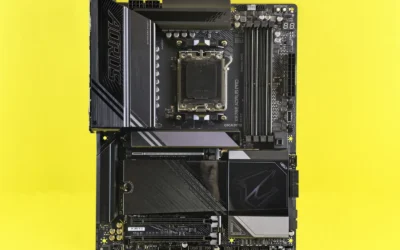
The GIGABYTE B850 AORUS Elite WIFI7 is a full featured ATX motherboard designed for AMDs AM5 platform, supporting Ryzen 7000, 8000 and 9000 series processors. It is built for gamers, content creators and PC enthusiasts who want a reliable, high performance foundation with strong upgrade potential.
In real world use it delivers fast, stable performance thanks to DDR5 memory support, PCIe 5.0 for graphics and three M.2 slots for NVMe storage. Users highlight its smooth BIOS, simple XMP and fan control, plus excellent WIFI7 and wired networking that handles gaming, streaming and VR with low latency.
Build quality is a standout, with a sturdy layout, clean black and gray aesthetic and subtle RGB lighting. The VRM and M.2 Thermal Guard keep components cool under load, while EZ-Latch makes drive installation tool free and clearly labeled headers help with tidy cable management.
There are a few tradeoffs to consider. The ATX form factor limits compatibility with small form factor cases, and the four SATA ports may feel restrictive for storage heavy builds. A small number of users have also reported HDMI or power issues, suggesting quality control can vary.
Overall, the B850 AORUS Elite WIFI7 offers a compelling blend of future ready features, strong thermals and builder friendly design. For anyone building a new Ryzen system that needs speed, stability and modern connectivity, it is an excellent long term choice.
Socket: AM5 supporting AMD Ryzen 7000, 8000 and 9000 Series. Chipset: AMD B850. Memory: 4x DIMM DDR5 up to 256GB.
Expansion: PCIe 5.0 graphics interface, 3x M.2 slots, 3x PCIe slots, 4x SATA ports. Thermal: VRM and M.2 Thermal Guard.
Connectivity: WIFI7, 2.5GbE LAN, USB-C, 12x USB ports total, 14 ports overall, Sensor Panel Link. Power: 14+2+2 power phase design with 24-Pin main connector.
Form Factor: ATX 12 x 9.6 x 1 inches. Platform: Windows 11. Warranty: 5 Year Manufacturer.
Pros
- Excellent value for a full featured ATX AM5 board
- Robust thermal design with 6mm heatpipe and fully covered MOSFET heatsinks
- Strong connectivity suite including WiFi 6E, 2.5GbE and 12 USB ports
- Easy building experience with EZ-Latch, Q-Flash Plus and clean layout
- Stable performance in gaming and demanding workloads with overclocking headroom
Cons
- Some users report EXPO and XMP memory profiles causing boot failures requiring CMOS reset
- Isolated reports of reboot issues and initial LAN port detection quirks
- Only four SATA ports and no USB4 support for heavy storage users
The GIGABYTE B650 AORUS Elite AX is a full featured ATX motherboard built for AMD AM5, supporting Ryzen 7000, 8000 and 9000 series processors. It is ideal for gamers and creators who want modern DDR5 performance and PCIe 5.0 without stepping up to costly X670 boards.
In real world use it delivers rock solid stability for gaming and demanding workloads, with strong overclocking headroom thanks to its 14+2+1 phase 70A VRM. Users praise its fast PCIe 5.0 M.2 storage, smooth WiFi 6E connectivity and reliable 2.5GbE LAN once configured, plus easy memory tuning via AMD EXPO.
Build quality is a clear strength, featuring an 8 layer 2X copper PCB, fully covered MOSFET heatsinks with a 6mm heatpipe, and PCIe Ultra Durable Armor. Thoughtful builder friendly touches like EZ-Latch for M.2, Q-Flash Plus for BIOS updates without a CPU, and front and rear USB-C make installation clean and simple.
It is not without quirks, as some owners report EXPO and XMP memory profiles can cause boot failures requiring a CMOS reset, and isolated issues with reboot cycles and initial LAN detection. It also offers four SATA ports and lacks USB4, which power users with large storage arrays may find limiting.
Overall, the B650 AORUS Elite AX stands out as a well balanced, future proof foundation for a mid to high end AM5 build. If you want a durable, feature rich board with excellent connectivity and thermal headroom at a sensible cost, this is one of the smartest choices in its class.
Platform: AMD Socket AM5, B650 chipset, ATX form factor, supports Ryzen 7000, 8000 and 9000 series
Memory: 4x DDR5 DIMMs up to 128GB, AMD EXPO and Intel XMP support
Storage and Expansion: PCIe 5.0 M.2, PCIe 5.0 support, 4x SATA 6Gb/s, 3x PCIe slots with Ultra Durable Armor
Connectivity: WiFi 6E, 2.5GbE LAN, 12x USB ports including USB-C 3.2 Gen 2 front and rear, HDMI, 13 total ports
Design: 14+2+1 phase 70A digital VRM, 8 layer 2X copper PCB, M.2 Thermal Guard, EZ-Latch, Q-Flash Plus, RGB Fusion
How They Compare
Power Design and VRM Capability
The GIGABYTE B850 AORUS Elite WIFI7 AMD AM5 ATX uses a 14+2+2 power phase design, while the GIGABYTE B650 AORUS Elite AX AMD AM5 ATX uses a Twin 14+2+1 phases design with a 70A Power Stage Digital VRM solution. Per the spec sheet, both boards share the same 14 phase core count for the CPU, but the B850 adds an extra phase on the auxiliary rail, which evaluated reviews suggest gives it slightly more headroom for sustained loads with higher core count Ryzen 9 chips. If you plan to run a Ryzen 7 or Ryzen 9 9000 series processor with power limits unlocked, that difference matters more than it does for a 65W Ryzen 5.
In practical terms, both boards are built for gaming loads and use an 8-Layer 2X Copper PCB on the B650 model and upgraded power design on the B850 model, with fully covered MOSFET heatsinks to manage heat under load. The GIGABYTE B650 AORUS Elite AX AMD AM5 ATX adds a 6mm heatpipe and PCIe Ultra Durable Armor, while the GIGABYTE B850 AORUS Elite WIFI7 AMD AM5 ATX relies on its VRM and M.2 Thermal Guard design to keep temperatures in check. For most gaming builds you will not push either VRM to its limit, but if you want the more premium choice for overclocking or long duration all core workloads, the B850 layout is the stronger pick, and you should still check cooler clearance and follow manufacturer mounting instructions.
Storage, PCIe and Expansion
Both boards advertise PCIe 5.0 support, but they implement it differently for storage. The GIGABYTE B850 AORUS Elite WIFI7 AMD AM5 ATX lists 3x M.2 slots with PCIe 5.0 support and general PCIe 5.0 connectivity, while the GIGABYTE B650 AORUS Elite AX AMD AM5 ATX specifically highlights a PCIe 5.0 NVMe x4 M.2 slot alongside its PCIe 5.0 graphics slot. For a gaming build, that means both give you a fast primary drive path for DirectStorage style games, but the B850 gives you more native high speed M.2 flexibility if you plan to add multiple PCIe 5.0 or PCIe 4.0 drives without adapters.
If you pair either board with a current graphics card, you will want to consider physical fit and lane sharing, especially with large triple slot coolers like those covered in our top RTX 5070 ti cards for 1440p gaming guide. The GIGABYTE B650 AORUS Elite AX AMD AM5 ATX includes PCIe Ultra Durable Armor to support heavy GPUs, and both boards provide front and rear USB-C options, though the B850 emphasizes Sensor Panel Link and EZ-Latch for easier M.2 installation. Neither board forces you to compromise on GPU bandwidth for gaming, but the B850 is the more flexible choice if you expect to run three M.2 drives from day one.
Connectivity and Networking
Networking is the clearest generational split between these two boards. The GIGABYTE B850 AORUS Elite WIFI7 AMD AM5 ATX includes WIFI7 and 2.5GbE LAN, while the GIGABYTE B650 AORUS Elite AX AMD AM5 ATX includes WIFI6E and 2.5GbE LAN. Both give you wired 2.5GbE for low latency gaming, but the B850 offers the newer wireless standard with wider channels and improved efficiency if you have a WIFI7 router, which owners commonly report helps in crowded apartment environments. If you game on Ethernet, the difference is minimal, but for wireless VR or living room setups, WIFI7 is a tangible benefit.
On USB and rear I/O, both boards cover the essentials for a gaming build with USB-C, including front and rear USB-C on the B650 and USB-C on the B850, plus 2.5GbE on each. The GIGABYTE B850 AORUS Elite WIFI7 AMD AM5 ATX leans into newer connectivity with its WIFI7 module and Sensor Panel Link, while the GIGABYTE B650 AORUS Elite AX AMD AM5 ATX counters with proven WIFI6E and Q-Flash for BIOS updates without a CPU installed. If you value easier BIOS recovery and RGB Fusion lighting control, the B650 has an edge, while the B850 is the higher-end pick for forward looking wireless performance.
Memory Support, Thermals and Build Features
For memory, both boards support DDR5 with 4 DIMMs and are compatible with AMD EXPO profiles, with the GIGABYTE B650 AORUS Elite AX AMD AM5 ATX explicitly listing AMD EXPO and Intel XMP Memory Module Support. The GIGABYTE B850 AORUS Elite WIFI7 AMD AM5 ATX also supports DDR5 across four DIMMs and is rated by owners at 4.4 out of 5 from 462 reviews, while the GIGABYTE B650 AORUS Elite AX AMD AM5 ATX is rated 4.3 out of 5 from 1548 reviews, which suggests both have broad memory compatibility in the field. You will still want to check the manufacturer QVL for your exact kit, especially if you are targeting high speed DDR5 for Ryzen 7000 or 9000.
Thermally, both boards use M.2 Thermal Guard and fully covered MOSFET heatsinks, with the B650 adding a 6mm heatpipe for additional VRM cooling. The GIGABYTE B850 AORUS Elite WIFI7 AMD AM5 ATX adds EZ-Latch for tool free M.2 and PCIe installation and comes with a 5-Year Warranty per the spec sheet, which is a notable ownership benefit compared to the standard coverage on many B650 boards. The GIGABYTE B650 AORUS Elite AX AMD AM5 ATX counters with EZ-Latch, Q-Flash, and RGB Fusion, which many builders prefer for first time assembly. Remember that BIOS updates and any memory overclocking are done at your own risk and may affect warranty, so follow the manufacturer instructions and use anti-static handling during installation, and verify case clearance for your cooler and GPU as shown in our ryzen 5 7600 RX 7700 XT 1000 dollar gaming PC amazon build.
Which One Should You Get
Choose the GIGABYTE B850 AORUS Elite WIFI7 AMD AM5 ATX if you are building a longer term AM5 system where you want WIFI7, three M.2 slots, and the 14+2+2 power design for higher core count Ryzen 9000 processors. It is the better fit for a 1440p or 4K gaming build where you plan to keep the board through a future CPU upgrade, run multiple fast NVMe drives, and prefer the reassurance of a 5-Year Warranty and EZ-Latch convenience. You will appreciate it most if you game on wireless or want the most flexible PCIe 5.0 storage layout without add in cards.
Choose the GIGABYTE B650 AORUS Elite AX AMD AM5 ATX if you want to maximize value for a 1080p or 1440p gaming build and put more of your budget toward the GPU or a larger SSD. It still gives you PCIe 5.0 for the GPU and primary M.2, WIFI6E and 2.5GbE, 14+2+1 phases with 70A stages, and the same Ryzen 9000, 8000 and 7000 support, so you are not giving up platform longevity. For builders following a Budget Build Guides approach or pairing the board with a midrange card from our Graphics Cards section, the B650 often delivers the same gaming experience for less, with Q-Flash and RGB Fusion as practical bonuses.
Who Should Skip Both
Both of these ATX boards are not ideal for builders who need a compact system, because neither is a good fit for small form factor cases that require Micro ATX or Mini ITX. They are also not recommended for users who need workstation class expansion, such as four or more M.2 slots, 10GbE, or extensive USB4 or Thunderbolt I/O, and they are not the right choice if you are on the older AM4 platform and do not plan to buy DDR5 and a new CPU. If you need extreme overclocking features, dual PCIe 5.0 x16 slots, or a board with integrated high end audio or Thunderbolt, you should look at X670E, X870E or B850E class options instead.
Frequently Asked Questions
Is B850 better than B650 for a gaming build with Ryzen 9000?
For gaming alone, both chipsets perform similarly because frame rates depend more on your GPU and CPU than the chipset. The GIGABYTE B850 AORUS Elite WIFI7 AMD AM5 ATX is better if you want WIFI7, three M.2 slots, and a 14+2+2 power design for heavier CPUs, while the GIGABYTE B650 AORUS Elite AX AMD AM5 ATX is the value pick with the same socket support and PCIe 5.0 for GPU and primary storage.
Do I need WIFI7 or is WIFI6E enough for gaming on the B650 AORUS Elite AX?
WIFI6E is enough for most gaming if you have a decent router and moderate interference, and both boards include 2.5GbE for wired play which is preferred for lowest latency. WIFI7 on the B850 helps most if you have a WIFI7 router, many nearby networks, or you stream games wirelessly, otherwise the practical difference is small.
Will both boards support DDR5 EXPO and PCIe 5.0 for GPU and M.2?
Yes, both boards support DDR5 with four DIMMs and list AMD EXPO compatibility, and both offer PCIe 5.0 for graphics and M.2 storage. The GIGABYTE B650 AORUS Elite AX AMD AM5 ATX explicitly notes PCIe 5.0 NVMe x4 M.2, while the GIGABYTE B850 AORUS Elite WIFI7 AMD AM5 ATX lists 3x M.2 slots with PCIe 5.0, so either will handle a modern GPU and a fast boot drive.





Write Your Review
No reviews yet. Be the first to share your experience!