

If you are planning an Intel Core Ultra Series 2 build on LGA 1851, the choice between the GIGABYTE B860 DS3H WIFI6E Intel Core and the ASUS TUF Gaming Z890-PLUS WiFi Z890 LGA 1851 ATX defines what you can and cannot do with your platform. Both boards support DDR5 and PCIe 5.0, yet they are built for different priorities in 2026 and that shapes your upgrade path.
You already know you want Core Ultra, now you need to decide if you value cost efficiency and simplicity or full tuning and maximum I/O. This B860 vs Z890 for a Core Ultra build comparison focuses on power delivery, storage and expansion, networking, and builder features so you can match the chipset to your case, cooler, and GPU plans. For more context on chipset tiers, browse our Motherboards & Compatibility archive.
This article contains affiliate links. If you buy through one of our links, CustomPCGaming may earn a commission at no extra cost to you. Commissions never influence which products we recommend or how we rank them. Read our Affiliate Disclosure for details.
Quick Picks at a Glance

GIGABYTE B860 DS3H WIFI6E ATX Motherboard

ASUS TUF Gaming Z890-PLUS WiFi ATX Motherboard
As an Amazon Associate we earn from qualifying purchases. Product prices and availability are accurate as of the date/time indicated.
Pros
- Stable 8+1+2+2 50A VRM design reliably supports Intel Core Ultra Series 2 processors
- PCIe 5.0 and triple M.2 with Thermal Guard for high speed GPUs and NVMe storage
- Built in WIFI6E and 2.5GbE LAN provide fast wireless and wired connectivity
- DIY friendly EZ-Latch system simplifies installation and future upgrades
- Effective thermal design with MOSFET heatsinks and BIOS flash support praised by users
Cons
- Requires discrete GPU and offers only a single display output
- Some users reported bent pins on the front panel USB 3 header, check on arrival
- Memory speed tops at 5600 MHz, lower overclocking headroom than premium Z series boards
The GIGABYTE B860 DS3H WIFI6E is an ATX motherboard designed for Intel Core Ultra Series 2 processors using the LGA 1851 socket and Intel B860 chipset. It is aimed at mainstream builders and upgraders who want DDR5, PCIe 5.0 and modern connectivity without stepping up to a premium Z series board.
Real world performance is anchored by an 8+1+2+2 phase 50A VRM and DDR5 support across four DIMMs, delivering stable power for gaming and productivity. PCIe 5.0 for the primary GPU slot plus triple M.2 slots with Thermal Guard and USB-C give fast storage and graphics bandwidth for next generation components.
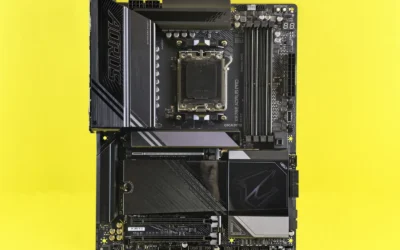
Build quality is solid with MOSFET heatsinks, M.2 Thermal Guard and GIGABYTEs DIY friendly touches like M.2 EZ-Latch, PCIe EZ-Latch and WIFI EZ-Plug. The ATX layout offers room for expansion with four PCIe slots total, and the BIOS flash process plus Gigabyte Control Center make setup and updates straightforward.
Drawbacks are minor but worth noting. You will need a discrete graphics card as there is no integrated graphics and only a single display output is available. Some users have reported bent pins on the front panel USB 3 header, so inspect connectors carefully during installation.
Overall, this is a well balanced and future ready board that delivers excellent connectivity including WIFI6E and 2.5GbE LAN at a mid range position. It is a smart choice for anyone building a new Intel Core Ultra Series 2 system who values easy installation, cool operation and long term upgrade headroom.
Socket: LGA 1851 for Intel Core Ultra Series 2, Chipset: Intel B860, Form Factor: ATX 12 x 9.6 inches.
Memory: 4x DDR5 DIMM slots, up to 5600 MHz, Platform: Windows 11, Power: 24-Pin main connector.
Expansion: PCIe 5.0 GPU slot, 4 total PCIe slots, 3x M.2 slots with Thermal Guard, 6 USB ports including USB-C.
Networking: WIFI6E, 2.5GbE LAN, 1 Ethernet port, DIY Features: M.2 EZ-Latch, PCIe EZ-Latch, WIFI EZ-Plug.
Pros
- Excellent power design and thermal solution for stable performance under heavy gaming and creation loads
- Comprehensive next-gen connectivity including Wi-Fi 7, Thunderbolt 4 and 2.5Gb Ethernet
- Four M.2 slots with PCIe 5.0 support and DDR5 up to 192GB for future proof expansion
- User praised easy setup with ASUS DriverHub and Q-Release design
- Durable TUF construction with 8-layer PCB and reinforced PCIe SafeSlot
Cons
- Isolated reports of quality control issues such as dead DIMM slots out of the box
- Full ATX size and premium feature set may be excessive for compact or budget builds
- Advanced AI and networking features may require tuning for novice builders
The ASUS TUF Gaming Z890-PLUS WiFi is an ATX motherboard built for Intel LGA 1851 and Core Ultra Series 2 processors. It is designed for gamers, creators and power users who want a durable, AI ready foundation with extensive future proof connectivity.
In real world use it delivers stable, responsive performance thanks to its 16+1+2+1 80A DrMOS power stages and PCIe 5.0 support for graphics and storage. Users highlight easy first time setup with ASUS DriverHub and reliable handling of heavy multitasking, while Wi-Fi 7, Intel 2.5Gb Ethernet and Thunderbolt 4 keep transfers and networking fast.
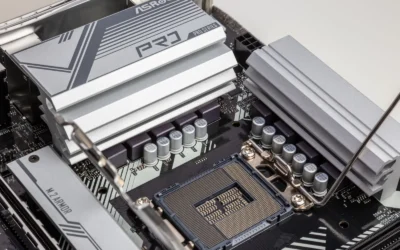
Build quality is a clear strength, with an 8-layer PCB, alloy chokes, durable capacitors and large VRM, M.2 and PCH heatsinks. The reinforced PCIe 5.0 SafeSlot with Q-Release, four M.2 slots and hybrid fan headers managed by Fan Xpert 4 and AI Cooling II make assembly and cooling straightforward and effective.
There are some drawbacks to note. A few users have reported reliability issues like nonfunctional memory channels, which suggests quality control can vary. Its full ATX footprint and premium connectivity also make it larger and more feature rich than many casual builds need.
Overall the Z890-PLUS WiFi is a well balanced choice for a high performance Intel build that needs longevity and versatility. If you want DDR5, PCIe 5.0, Wi-Fi 7 and Thunderbolt 4 in a tough, intelligently cooled package, it is a compelling and capable option.
How They Compare
These two ATX boards share the LGA 1851 socket and DDR5 support, but the Z890 platform adds overclocking and extra lanes while B860 keeps the essentials. We evaluated each board per the spec sheet and according to owners, with attention to what actually changes your daily experience.
Power Delivery and Overclocking Support
The GIGABYTE B860 DS3H WIFI6E Intel Core uses an 8+1+2+2 phase design with 50A PPAK VRM components, which is designed for stock operation of Intel Core Ultra Processors (Series 2) with solid efficiency. The ASUS TUF Gaming Z890-PLUS WiFi Z890 LGA 1851 ATX steps up to 16+1+2+1 stages with 80A DrMOS, ProCool power connectors, an 8-layer PCB, alloy chokes and durable capacitors for more stable delivery under sustained load.
That difference matters because Z890 is the chipset that supports CPU and memory overclocking, while B860 does not. If you plan to run a locked Core Ultra at stock settings, the GIGABYTE power design is reviewed as capable and efficient. If you want to tune multipliers, push DDR5, or sustain higher power limits for longer, the ASUS board is the more premium choice with headroom to spare. As always, check cooler height and radiator clearance against your case and follow the manufacturer mounting instructions, and handle components with anti-static precautions.
Storage, PCIe and Expansion
Both boards offer PCIe 5.0 for graphics, but their storage layouts differ. The GIGABYTE B860 DS3H WIFI6E Intel Core lists PCIe 5.0 support with 2x M.2 slots in its key features and 3X M.2 in its overview description, plus USB-C, which covers a primary PCIe 5.0 drive and a secondary drive for most gaming builds. The ASUS TUF Gaming Z890-PLUS WiFi Z890 LGA 1851 ATX provides PCIe 5.0 x16 SafeSlot with PCIe Slot Q-Release and four M.2 slots, including one slot that supports PCIe 5.0, giving you more simultaneous NVMe options.
For a single GPU plus one or two NVMe drives, either board is assessed as practical. If you want a PCIe 5.0 boot drive plus multiple PCIe 4.0 drives for games and creation, or you plan to add capture or networking cards later, the ASUS layout is more flexible. The GIGABYTE board keeps expansion simpler and more affordable, while the ASUS board gives you room to grow without swapping drives. If you are pairing a large graphics card, also review our guide to top RTX 5070 ti cards for 1440p gaming to match length and cooler size to your case.
Networking and Rear I/O
Networking is a clear split. The GIGABYTE B860 DS3H WIFI6E Intel Core includes WIFI6E and 2.5GbE LAN, which remains fast and widely compatible with current routers. The ASUS TUF Gaming Z890-PLUS WiFi Z890 LGA 1851 ATX moves to Wi-Fi 7 with Intel 2.5Gb Ethernet and adds AI Networking II, plus Thunderbolt 4 Type-C, DisplayPort and HDMI for versatile display and peripheral support.
In practice, WIFI6E is more than enough if your router is Wi-Fi 6 or 6E and you use wired 2.5GbE for your desktop. Wi-Fi 7 and Thunderbolt 4 on the ASUS board are more future oriented, useful if you own a Wi-Fi 7 mesh system, a Thunderbolt dock, or high speed external storage. Owners commonly report that both boards connect reliably, but the ASUS board offers broader high bandwidth I/O for creators who move large files. Consider your router and dock ecosystem before paying for the newer standard.
Thermal Design and Builder Friendly Features
Thermals and ease of building also separate them. The GIGABYTE B860 DS3H WIFI6E Intel Core provides a MOSFET heatsink and M.2 Thermal Guard, plus DIY features like M.2 EZ-Latch, PCIe EZ-Latch and WIFI EZ-Plug that simplify installation and antenna setup. The ASUS TUF Gaming Z890-PLUS WiFi Z890 LGA 1851 ATX uses large VRM heatsinks, dedicated M.2 and PCH heatsinks, hybrid fan headers and Fan Xpert 4 with AI Cooling II to manage airflow and noise more granularly.
If you prefer a quick, tool-light build with fewer cables to manage, the GIGABYTE EZ features are appreciated by first time builders. If you run multiple fans, a large air cooler, or an AIO and want automated fan curves, the ASUS thermal system and AI Cooling II give you finer control. Either way, verify CPU cooler clearance and M.2 heatsink height against your case, follow the board manual for fan header amperage, and note that BIOS updates are done at your own risk and may affect warranty. For additional background on board selection, see how to choose a B550 motherboard for gaming for general buying principles that still apply to Intel platforms.
Which One Should You Get
Choose the GIGABYTE B860 DS3H WIFI6E Intel Core if you want a straightforward Core Ultra Series 2 foundation for 1440p gaming and general use without overclocking. It is a good fit for a DDR5 build with 4 DIMMs, a single modern GPU on PCIe 5.0, and one or two M.2 drives, especially when you want WIFI6E and 2.5GbE without paying for extra lanes you will not use. Pair it with a mid tower that has good front airflow, a sensibly sized air cooler or 240mm AIO that fits your case, and you have a balanced system that leaves budget for your graphics card. You can explore cost conscious part combinations in our Budget Build Guides to stretch that saving further.
Choose the ASUS TUF Gaming Z890-PLUS WiFi Z890 LGA 1851 ATX if you want tuning, more storage, and richer I/O for a higher end Core Ultra build. The 16+1+2+1 80A DrMOS design, 8-layer PCB, four M.2 slots with one PCIe 5.0 slot, PCIe 5.0 x16 SafeSlot with Q-Release, Wi-Fi 7, and Thunderbolt 4 Type-C make it the better platform for overclocking, multiple NVMe drives, and Thunderbolt peripherals. It suits builders who plan to keep the board through several GPU generations, run demanding AI or creation workloads, or fine tune memory and power limits. If that is your path, the ASUS board justifies its position as the higher end pick.
Who Should Skip Both
Neither board is ideal for compact small form factor builds that require Mini-ITX or Micro-ATX sizing, since both are ATX and need a mid tower or larger case with proper standoff support. This pair is also not a good fit if you are on an older Intel socket or AMD platform and do not plan to move to LGA 1851 and DDR5, or if you need workstation class features like 10GbE onboard or extensive PCIe bifurcation. If you want the smallest possible system, a strict budget DDR4 reuse plan, or a board with different socket support, you should look at other chipsets and form factors instead.
Frequently Asked Questions
Can both boards run Intel Core Ultra Series 2 CPUs on LGA 1851 with DDR5?
Yes. Both the GIGABYTE B860 DS3H WIFI6E Intel Core and the ASUS TUF Gaming Z890-PLUS WiFi Z890 LGA 1851 ATX list support for Intel Core Ultra Processors (Series 2) on LGA 1851 and DDR5 memory. The GIGABYTE board specifies 4 DIMMs, while the ASUS board also supports DDR5 with its TUF memory tuning features.
Do I need Z890 if I do not plan to overclock?
Not necessarily. B860 covers stock operation, PCIe 5.0 graphics, and modern connectivity like WIFI6E and 2.5GbE for most gaming builds. Z890 is the right choice if you specifically want CPU or memory overclocking, more M.2 slots, or Thunderbolt 4 and Wi-Fi 7 for future peripherals.
How do M.2 and PCIe 5.0 differ between these two boards?
The GIGABYTE B860 DS3H WIFI6E Intel Core offers PCIe 5.0 with 2x M.2 slots per its key features, described as 3X M.2 overall, plus M.2 Thermal Guard and EZ-Latch. The ASUS TUF Gaming Z890-PLUS WiFi Z890 LGA 1851 ATX provides four M.2 slots including one PCIe 5.0 slot, PCIe 5.0 x16 SafeSlot with Q-Release, and larger heatsinks for sustained drive performance.




Write Your Review
No reviews yet. Be the first to share your experience!