

If you are figuring out how to cable manage a wall-mounted TV and console, your real decision is not which plastic plate looks nicest. It is how power and signal will travel from the wall to your screen without visible clutter, while staying safe and easy to service. You need to weigh resolution and refresh target for your games and movies, platform and socket needs for your console and streaming gear, case size and clearance behind the TV and inside your media furniture, power budget for everything you plug in, and your current setup versus your next upgrade.
A clean wall mount with a floating console looks simple, but it hides several choices about wall type, cable capacity, and code friendly power routing. Get those right and you can add a soundbar or second console later without reopening the wall. This guide walks you through that framework, and you can browse more Cable Management and Under-Desk ideas to plan the rest of your run from wall to desk or rack.
What Actually Matters
Wall Type, Cavity Depth, and Routing Style
Start with your wall, because it decides whether in wall routing is even possible for you. Most kits in this category are designed for hollow drywall or plaster and wood plank walls between studs, not for concrete, brick, or concrete backed drywall. You should confirm you have an open cavity, locate studs and fire blocks, and check wall thickness and depth before you cut.
You also need to choose between true in wall concealment and surface raceway. In wall pass throughs give you that floating look with no visible channel, but they require two cutouts and room to fish cables. If you rent, have masonry walls, or cannot cut, a surface channel or a furniture based spine is a better path than forcing an in wall kit where it does not belong.
Power Strategy Versus Low Voltage Pass Through
The biggest split is whether you need to relocate power or only hide signal cables. A simple pass through kit is just two brush plates with a hollow wall between them. You drop your HDMI, Ethernet, and optical cables behind the drywall, but your TV and console still need a nearby outlet for power. That approach is simple and affordable, yet it leaves you dependent on outlet location.
A recessed power kit solves the outlet problem without hard wiring. Per the spec sheet, these systems often use a long extension style cord rated for 125V and 15A with a 1875W max, so you plug the lower module into your existing wall outlet and get new AC outlets up behind the TV. Look for an ultra thin flat plug that sits close to the wall, because a bulky plug can block adjacent outlets or push furniture out from the wall.
Cable Capacity, Plug Size, and Brush Design
Count what you actually need to pass, then add one spare. A basic TV plus one console might mean two HDMI cables, one Ethernet cable, and one optical or USB cable for accessories. A full theater with soundbar, streaming box, and game console can double that quickly. Spacious recessed openings and wide brush plates make it easier to fish large heads through without damage, while slim pass throughs look neater but can be tight for bulky plugs.
Pay attention to plug clearance on both ends. Per the spec sheet, some kits highlight a 0.28 inch 45 degree flat plug and large plates around 6.3 inch by 7.9 inch with a smaller lower plate, which shows how much wall area and depth the system needs. Brush style openings are preferred over open holes because they block dust, reduce light leak from behind the wall, and keep cables centered so they do not rub on drywall edges.
Install Complexity, Tools Included, and Safety Details
You should assess what comes in the box and what your walls require. Many kits are marketed as a 30 minute DIY install with a cutting template, pre installed screws, and in some cases a drywall saw or hole saw drill attachment. A template and sharp saw matter more than you think, because clean cutouts seat the mounting wings firmly and prevent wobble. Owners commonly report that measuring twice and checking for studs saves the most time.
Safety details separate researched designs from generic plates. Look for flame retardant materials, bend resistant construction, built in safety shutters on outlets, strong mounting wings that lock into drywall, and a clear ETL in wall certification for the power portion. You should also follow the manufacturer mounting instructions closely and keep high voltage power and low voltage signal separated as directed. For related glow control after your cables are hidden, see how to choose LED desk lighting for eye comfort.
To illustrate these trade offs, here are a few options that show the range from simple pass through to full power relocation:
This article contains affiliate links. If you buy through one of our links, CustomPCGaming may earn a commission at no extra cost to you. Commissions never influence which products we recommend or how we rank them. Read our Affiliate Disclosure for details.
Quick Picks at a Glance

Prime Naerza In-Wall Cable Management Kit for Wall Mount

Prime Riozoo In-Wall TV Wire Hider Kit White
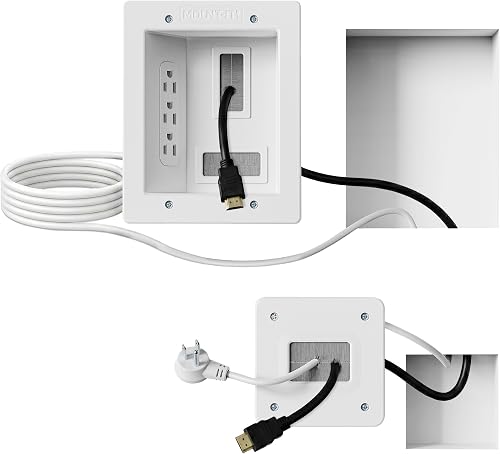
Prime Mount-It! In-Wall TV Cable Concealer Kit
As an Amazon Associate we earn from qualifying purchases. Product prices and availability are accurate as of the date/time indicated.
Pros
- Large capacity brush opening handles multiple thick HDMI, power and network cables at once
- Dual 15A outlets reliably power TV plus soundbar, console or projector
- Slim flush mount plates blend with decor for a near invisible finish
- Sturdy locking wings and safety shutters add stability and household safety
Cons
- Requires cutting two holes in drywall, so it is not ideal for renters
- Needs at least 3.74 inches of open wall cavity and does not work with concrete backed walls
- White only finish and two outlet limit may not suit larger theater setups or dark walls
The Naerza In-Wall Cable Management Kit is a recessed outlet solution built to hide power and AV cables behind a wall mounted TV. It is made for homeowners and anyone building a clean home theater, office or conference room setup.
The kit pairs a large brush pass through with dual AC outlets and a 9FT power cord, so thick HDMI, Ethernet and power plugs route easily inside the wall. The 45 degree ultra thin flat plug sits flush to free up space and let furniture sit close while delivering stable 125V/15A power for TV and soundbar.
Slim white plates sit nearly flush for a discreet look that blends with most decor and can hide behind soundbars or furniture. The housing uses flame retardant, bend resistant plastic with safety shutters and strong drywall wings for a stable, wobble free fit.
Installation is DIY friendly in about 30 minutes with the included template, but you must cut drywall and have at least 3.74 inches of cavity depth. It will not work on concrete backed walls and the two outlet limit means large setups may still need additional power.
Overall, this is a practical, safety focused upgrade for anyone tired of dangling TV cords. If you want a professional, kid and pet friendly finish without hiring an electrician, this Naerza kit is a smart pick.
Model: WallOutletBox-01 by Naerza, Color: White, Category: Wall Plates for wall mount TV setups.
Power: 2 AC outlets, 125V/15A, 1875W max with 9FT cord and 0.28 inch 45 degree flat plug.
Compatibility: TVs, soundbars, projectors, HDMI, Ethernet and audio cables, fits standard outlet boxes.
Installation: Requires 3.74 inch wall cavity, not for concrete backed drywall, includes brush plate, template and instructions.
Pros
- Complete all in one kit with pass throughs and hole saw for fast DIY setup
- Creates a truly hidden in wall look, cleaner than surface raceways
- Low profile white finish blends well with most walls and decor
- Works great for wall mounted TVs, gaming systems and streaming devices
Cons
- Only fits walls 12mm to 18mm thick, not for brick, concrete or thicker walls
- In wall design requires drilling holes, not ideal for renters
- Plastic construction feels lightweight compared to premium metal kits
The Riozoo In-Wall TV Wire Hider Kit is designed to hide power and low voltage cables behind the wall for a floating TV look. It is ideal for DIY users with wall mounted TVs, gaming consoles and soundbars who want to eliminate dangling cords.
In real world use, the kit routes multiple HDMI, Ethernet and power cables cleanly between two pass through openings. The included hole saw drill attachment makes cutting precise holes fast, even for first time installers, and the grommets snap in for a snug fit.
Design wise, the low profile white plastic grommets sit flush and blend easily with white walls and modern decor. The plastic feels sturdy enough for everyday use while staying lightweight, and the thicker ring design helps prevent slipping or gaps.
The main limitation is compatibility, since it only fits perforated walls 12mm to 18mm thick like drywall, plaster or wood plank. It also requires drilling, so renters or those with brick, concrete or insulated exterior walls will need a different solution.
Overall, this is a practical, beginner friendly upgrade for anyone wanting a tidy entertainment setup without surface raceways. If your wall type matches and you are comfortable with a drill, it delivers a clean, professional result with minimal effort.
Brand: Riozoo, Color: White, Material: Plastic, Style: Modern.
Installation Type: Wall Mount, Wall Compatibility: 12mm to 18mm drywall, plaster and wood plank walls.
In the Box: 2 pass through grommets plus hole saw drill attachment for installation.
Pros
- Easy DIY installation with included saw and template, ideal for renters and first-time installers
- Handles both power and low-voltage cables in one recessed system for a truly clean setup
- ETL certified for in-wall safety with durable build and lifetime warranty
- 9ft cord reaches your existing outlet for flexible TV placement
Cons
- Requires drywall cutting between studs with 2.4 inch cavity depth, so careful measuring is required
- White and gray plastic plates may not match all wall colors or decor styles
- Designed for indoor drywall walls only, not suitable for brick, concrete or outdoor use
The Mount-It! MI-7284 is an in-wall cable concealer kit that routes TV power and low-voltage cables behind drywall for a cord-free wall. It is designed for homeowners and renters who want a professional home theater look without hardwiring or hiring an electrician.
In real world use, the triple recessed outlet powers your TV and accessories while the wide opening easily passes multiple HDMI, Ethernet and AV cables. The included 9ft cord plugs into your existing outlet below, so you can mount TVs in living rooms, bedrooms or media rooms with full flexibility.
Build quality feels solid with durable plastic wall plates in white and gray and pre-installed screws for faster assembly. The ETL In-Wall Certification adds confidence that both power and low-voltage routing meet safety standards for indoor use.
Installation is DIY friendly but still requires cutting drywall between studs with at least 2.4 inches of cavity depth. It is not ideal for brick, concrete or shallow walls, and you will need to measure carefully using the included template before cutting.
Overall, this is a complete and well thought out kit for anyone who wants safe, clean cable management in under 30 minutes. If you want an affordable way to hide messy TV wires with a polished finish, this Mount-It! kit is an excellent choice.
Brand: Mount-It!, Model: MI-7284, Color: White and Gray, Material: Plastic and Rubber. Kit includes 2 wall plates, large 6.3 x 7.9 inches and small 4.5 inches, plus 9ft extension power cord.
Installation Type: In-wall, plug-in system for indoor drywall walls. Requires cutout between studs with minimum 2.4 inch cavity depth. ETL In-Wall Certified with lifetime warranty.
Matching a Part to Your Build
If your build is a living room drywall wall with one TV and one console plus a streaming stick, focus on wall thickness fit and easy fishing. The TV Wire Hider Kit for Wall Mount TV represents this simple pass through lane. It is designed for perforated walls around 12mm to 18mm thick such as plaster or wood plank, and it includes hole sawing accessories to get a snug grommet fit. You should not buy this style if you need a new outlet behind the TV, because you will still need to power everything from an existing outlet and you may end up with a visible power cord.
If your build is a dedicated theater wall with a soundbar, multiple HDMI and Ethernet runs, and a desire for zero visible cords, look for a recessed power kit with higher capacity. The Nearza in Wall Cable Management Kit with Recessed illustrates that approach with 2 AC outlets, a slim pass through that fits standard plugs, and an extra long 9ft power cord to reach your existing outlet. Per the spec sheet it calls for wall cavity depth of at least 3.74 inches and notes it is not compatible with concrete backed drywall. That depth requirement is a real con for shallow or insulated walls, so measure before you commit.
If your build is a family room or bedroom where safety certification and guided install matter most, prioritize ETL certification and a complete tool set. The Mount-It! in-Wall TV Cable Concealer Kit shows that premium lane with triple outlet capacity, a 9ft cord, included hand saw and template, and ETL in wall certification. Per the spec sheet it needs a drywall cutout between studs and a minimum cavity depth of 2.4 inches, which fits standard walls that are usually deeper. It is the higher-end pick of the three examples, so you should not buy it if you only need to hide a single HDMI cable. Pair your finished wall with a minimalist RGB desk setup if your console also feeds a nearby gaming desk.
Common Mistakes
• Cutting before checking structure. Many readers mark the template, cut, then hit a stud, fire block, or shallow cavity. You should use a stud finder, probe with a small pilot hole, and confirm depth and clearance for the large plate before making the full cutout. This is especially important when a kit lists a specific depth need or requires placement between studs.
• Buying pass through only when you need power. A cheap brush kit hides signal cables well, but it does not create an outlet behind the TV. If your existing outlet sits far from the mount or behind furniture, you will still see a power cord draped down the wall. Map your power budget and outlet location first, then decide if you need a recessed power kit with multiple AC outlets.
• Overstuffing one opening and ignoring service loops. Cramming stiff HDMI heads, Ethernet, and power through a slim brush can stress connectors and make future swaps painful. Leave a gentle service loop behind the console, label each run, and avoid sharp bends. For ambient light that will highlight any remaining clutter, plan your finish with bias lighting and ambient RGB ideas so cables and shadows stay out of sight.
Who Should Wait or Buy Differently
If you have concrete, brick, or tile over concrete, rent where cutting is prohibited, or only need to hide one cable along a short drop, an in wall kit is not ideal for you right now. You will get a cleaner result with a paintable surface raceway, a cord cover behind a media stand, or a furniture based tray that routes power and signal together. Wait until you own the wall or plan a full mount relocation, then revisit in wall power with correct depth and certification for your space in November 2026.
Frequently Asked Questions
Can I run my TV power cord directly behind drywall?
No, you should not fish a standard TV power cord or extension cord inside the wall as a permanent solution. Use a code oriented recessed kit where low voltage cables run in wall and power connects through a certified inlet and outlet system to your existing outlet. Always follow the manufacturer mounting instructions for separation and ratings.
How do I know if my wall can accept an in wall kit?
Check for hollow drywall or plaster between studs, then verify thickness and cavity depth against the spec sheet. Owners commonly report that standard interior walls work well, while exterior insulated walls, fire blocks, and concrete backing cause problems. When in doubt, cut a small inspection hole behind where the TV will sit before buying large plates.
What size brush opening do I need for console and soundbar cables?
Choose based on plug heads, not cable diameter, and leave room for one future cable. Slim pass throughs look tidy for one or two leads, while large recessed openings handle multiple HDMI, Ethernet, and audio cables at once. If you plan to add a soundbar or second console next season, size up now so you do not need to recut later.




Write Your Review
No reviews yet. Be the first to share your experience!